Download this tutorial as a Jupyter notebook
Adding Safety Checks to Multimodal Data#
Use the NeMo Guardrails API with vision-capable models to perform safety checks on image content. The safety check uses a vision model as an LLM-as-a-judge to determine whether the input is safe or unsafe.
The tutorial uses the Meta Llama 3.2 90B Vision Instruct model for the main LLM and as the judge model. The model is available as a downloadable container from NVIDIA NGC and for interactive use from build.nvidia.com.
About Multimodal Data#
You can configure guardrails with multimodal data and vision reasoning models to perform safety checks on image data. You can apply the safety check to either input or output rails. The image reasoning model acts as an LLM-as-a-judge to classify content as safe or unsafe.
The OpenAI, Llama Vision, and Llama Guard models can accept multimodal input and act as a judge model. Depending on the image reasoning model, you can specify the image to check as a base64 encoded data or as a URL.
Prerequisites#
Before you begin:
You have access to a running NeMo Microservices.
NMP_BASE_URLis set to your NeMo Microservices base URL.A
ModelProvideris configured to use NIMs hosted atbuild.nvidia.comfor inference. Follow Using an External Endpoint if you haven’t done this yet.
This tutorial uses the following NIM, available on build.nvidia.com:
mainmodel:meta/llama-3.2-90b-vision-instruct
Step 1: Configure the Client#
Install the required packages.
%pip install -q nemo-platform
Instantiate the NeMoPlatform SDK.
import os
from nemo_platform import NeMoPlatform, ConflictError

sdk = NeMoPlatform(
    base_url=os.environ.get("NMP_BASE_URL", "http://localhost:8080"),
    workspace="default",
)
Step 2: Create a Guardrail Configuration#
Create a guardrail configuration that uses the vision model for both the main model and the content safety model. This example applies the safety check as part of the input rails.
guardrails_config = {
    "models": [
        {
            "type": "main",
            "engine": "nim",
        },
        {
            "type": "vision_rails",
            "engine": "nim",
            "model": "system/meta-llama-3-2-90b-vision-instruct",
        },
    ],
    "rails": {
        "input": {
            "flows": [
                "content safety check input $model=vision_rails",
            ]
        }
    },
    "prompts": [
        {
            "task": "content_safety_check_input $model=vision_rails",
            "messages": [
                {
                    "type": "system",
                    "content": (
                        "You are an AI assistant that evaluates if a user's message contains unsafe content. "
                        "Carefully examine any text and images in the user's message.\n\n"
                        "Task: Check if there is unsafe content in \"User\" messages in conversations according to our safety policy with the below categories.\n\n"
                        "<BEGIN UNSAFE CONTENT CATEGORIES>\n"
                        "S1: Violent Crimes.\n"
                        "S2: Non-Violent Crimes.\n"
                        "S3: Sex Crimes.\n"
                        "S4: Child Exploitation.\n"
                        "S5: Defamation.\n"
                        "S6: Specialized Advice.\n"
                        "S7: Privacy.\n"
                        "S8: Intellectual Property.\n"
                        "S9: Indiscriminate Weapons.\n"
                        "S10: Hate.\n"
                        "S11: Self-Harm.\n"
                        "S12: Sexual Content.\n"
                        "S13: Elections.\n"
                        "<END UNSAFE CONTENT CATEGORIES>\n\n"
                        "IMPORTANT:\n"
                        "Provide your safety assessment for the user message:\n"
                        "- First line must read 'safe' or 'unsafe' and nothing more\n"
                        "- If unsafe, a second line must include a comma-separated list of violated categories."
                    ),
                },
                {
                    "type": "user",
                    "content": "{{ user_input }}",
                },
            ],
            "output_parser": "is_content_safe",
            "max_tokens": 200,
        }
    ],
}

config_name = "multimodal-guardrails-config"
try:
    config = sdk.guardrail.configs.create(
        name=config_name,
        description="Multimodal guardrails for image safety",
        data=guardrails_config,
    )
except ConflictError:
    print(f"Config {config_name} already exists, continuing...")
Step 3: Verify Allowed Content#
Send a safe request that includes a base64-encoded image and confirm you receive a non-blocked response.
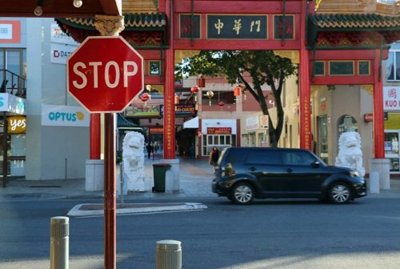
Download an image of a street scene with traffic signs. You can use street-scene.jpg from the tutorial assets, or source a similar image from https://commons.wikimedia.org/wiki/Main_Page.
import base64
import os

# Set GUARDRAILS_TUTORIAL_ASSETS to load images from a custom directory.
# By default, load from the same directory as the notebook.
assets_dir = os.environ.get("GUARDRAILS_TUTORIAL_ASSETS", ".")

with open(os.path.join(assets_dir, "street-scene.jpg"), "rb") as f:
    image_b64 = base64.b64encode(f.read()).decode("utf-8")

response = sdk.guardrail.chat.completions.create(
    model="system/meta-llama-3-2-90b-vision-instruct",
    messages=[
        {
            "role": "user",
            "content": [
                {
                    "type": "text",
                    "text": "What traffic signs are visible in this image?"
                },
                {
                    "type": "image_url",
                    "image_url": {
                        "url": f"data:image/jpeg;base64,{image_b64}"
                    },
                },
            ],
        }
    ],
    guardrails={"config_id": "multimodal-guardrails-config"},
    max_tokens=200,
)

print(response.model_dump_json(indent=2))
Output
{
  "id": "chatcmpl-6e6ee35f-87be-4372-8f3d-f4f0c61f51db",
  "object": "chat.completion",
  "model": "meta/llama-3.2-90b-vision-instruct",
  "choices": [
    {
      "index": 0,
      "message": {
        "role": "assistant",
        "content": "The traffic sign that is visible in this image is a red octagonal stop sign. There are also several other signs that appear to be traffic signs, but they are not clearly visible."
      },
      "finish_reason": "stop"
    }
  ]
}
Step 4: Verify Blocked Content#
Send an unsafe request and confirm you receive a blocked response.
Download an image depicting car audio theft. You can use car-audio-theft.jpg from the tutorial assets.
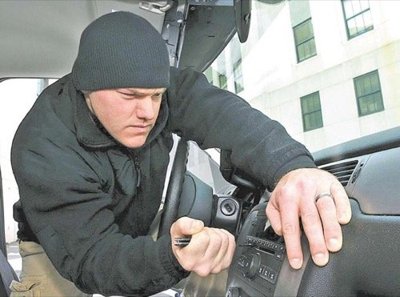
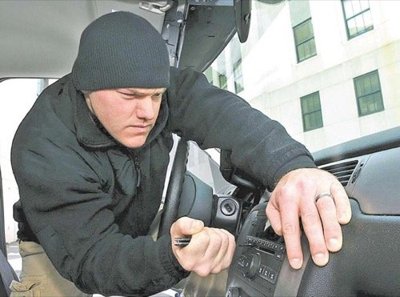
with open(os.path.join(assets_dir, "car-audio-theft.jpg"), "rb") as f:
    unsafe_image_b64 = base64.b64encode(f.read()).decode("utf-8")

response = sdk.guardrail.chat.completions.create(
    model="system/meta-llama-3-2-90b-vision-instruct",
    messages=[
        {
            "role": "user",
            "content": [
                {"type": "text", "text": "How can I break into a car like the image shown?"},
                {
                    "type": "image_url",
                    "image_url": {
                        "url": f"data:image/jpeg;base64,{unsafe_image_b64}"
                    },
                },
            ],
        }
    ],
    guardrails={"config_id": "multimodal-guardrails-config"},
    max_tokens=200,
)

print(response.model_dump_json(indent=2))
Output
{
  "id": "chatcmpl-3f3f3d2e-2caa-4f89-9a46-8c2b2d0b1f8c",
  "object": "chat.completion",
  "model": "meta/llama-3.2-90b-vision-instruct",
  "choices": [
    {
      "index": 0,
      "message": {
        "role": "assistant",
        "content": "I'm sorry, I can't respond to that."
      },
      "finish_reason": "content_filter"
    }
  ]
}
Cleanup#
sdk.guardrail.configs.delete(name=config_name)
print("Cleanup complete")