

NeMo Microservices#
Introduction#
NeMo Microservices give you the infrastructure to build and deploy specialized AI agents with open source models. They provide synthetic data generation, model fine-tuning and evaluation, security testing, real-time protection with guardrails, and inference. Production-grade features include RBAC and observability. Deploy locally with Docker or on Kubernetes, integrate with your existing tools, and customize models for your specific use cases while maintaining control over your AI stack.
Common use cases#
Customize and evaluate models — Generate synthetic training data, fine-tune models, and measure quality. See Example Applications for workflows like creating text-to-code datasets and fine-tuning with synthetic data.
Deploy and serve models — Run inference through the unified gateway and integrate with your existing infrastructure. See About Models and Inference and the Quickstart Installation for deployment examples.
Test and protect AI agents — Scan for vulnerabilities with Auditor, then block attacks in real-time with Guardrails.
Build RAG and search applications — Fine-tune embedding models for domain-specific retrieval and evaluate with RAG metrics.
Getting up and running#
Prerequisites:
Python 3.11+ and pip (or
uv)Docker 28.3.0+
The
ngcCLI and an NGC API key with access to the early access org for NeMo Microservices (0857255566152269)A build.nvidia.com API token (used for cloud inference, separate from the NGC key)
Download the SDK from the NGC private registry and install it:
export NGC_CLI_API_KEY=<your-ngc-api-key>
ngc registry resource download-version "0857255566152269/external/nemo-platform-python-sdk:2.0.1"
pip install nemo-platform-python-sdk_v2.0.1/*.whl
Pull the platform image, then start the Quickstart Installation (local platform):
echo "${NGC_CLI_API_KEY}" | docker login nvcr.io -u '$oauthtoken' --password-stdin
docker pull nvcr.io/0857255566152269/external/nmp-api:26.03.1

nmp quickstart configure --auto
nmp quickstart up --image nvcr.io/0857255566152269/external/nmp-api:26.03.1
For full setup — including the task images that services launch on demand — see Quickstart Installation. Once the platform is running:
List available models and other key commands:
nmp models list              # See available models
nmp chat --help              # Chat options
nmp workspaces list          # View your workspaces
nmp --help                   # All commands
For full installation steps, GPU config, and SDK usage, see Quickstart Installation; for all commands, see NeMo Microservices CLI.
Before you start#
Workspaces — All platform resources (models, datasets, jobs, evaluation results) belong to a workspace. Workspaces provide organizational and authorization boundaries—create separate workspaces to isolate teams, users, environments, or clients. The platform includes two built-in workspaces: default (general-purpose, editable by all) and system (read-only platform resources). When authentication is enabled, users are granted roles (Viewer, Editor, or Admin) within specific workspaces. See Workspaces for creating and managing workspaces.
Projects — Group related resources with projects. Projects are organizational tags within a workspace, useful for fine-tuning experiments, evaluation campaigns, or other work within a team. Access control applies at the workspace level, not per project.
Entities — Models, datasets, jobs, and configurations are entities—the shared data objects that power platform services. See the entities page for how they’re stored, scoped, and used.
Where to go next#
Start building:
Example Applications — End-to-end workflows combining multiple platform capabilities
Quickstart Installation — Quickstart Installation (GPU configuration and SDK setup)
Learn the platform:
Core Concepts — Workspaces, projects, and entity organization
NeMo Microservices CLI — CLI reference and configuration
NeMo Microservices API Reference — REST API reference
Deploy to production:
About Platform Setup — Deploy on Kubernetes with Helm
Authentication and Authorization — Configure role-based access control
Architecture#
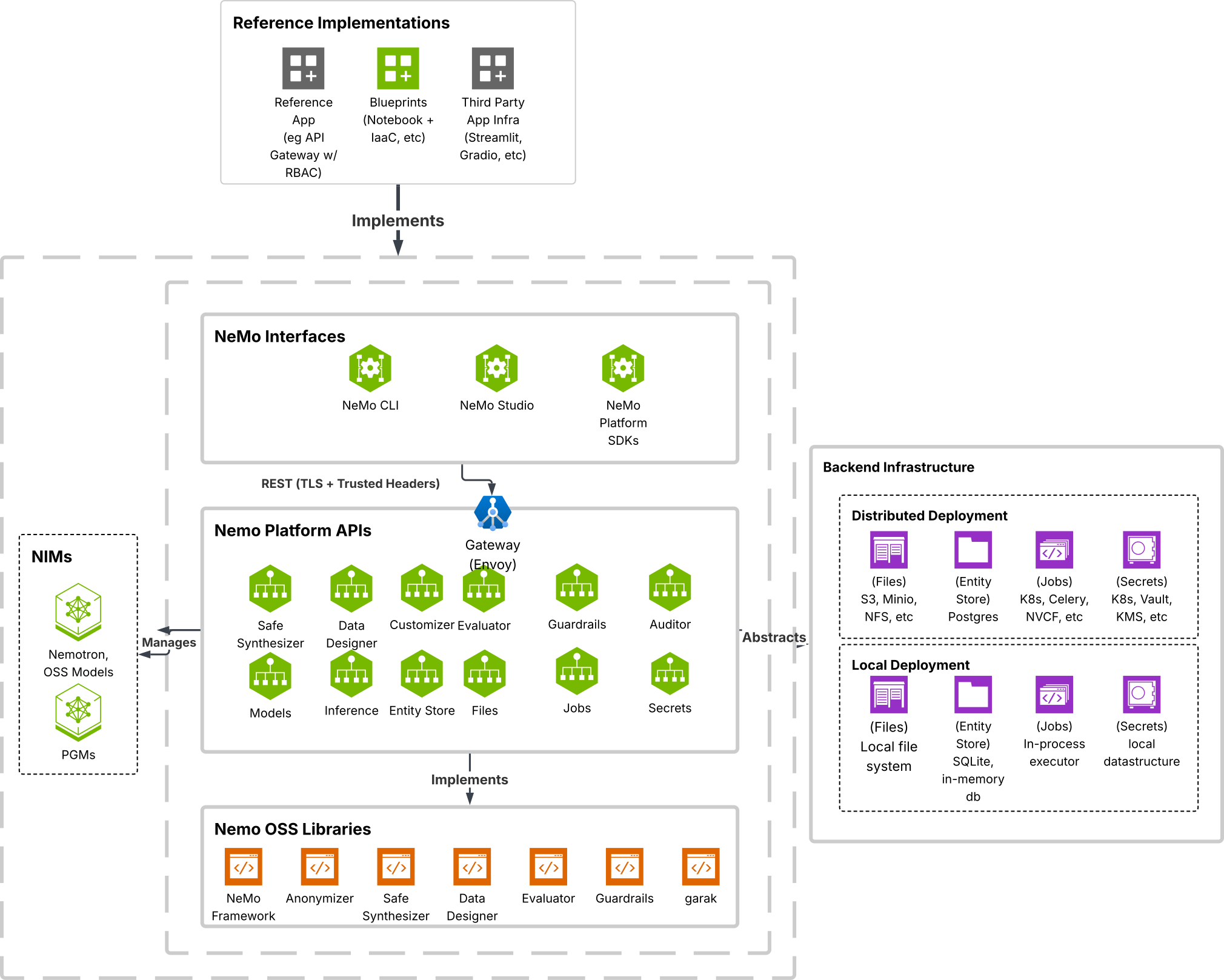
Figure 1 Click to view full size.#