


Nsight Graphics SDK User Guide#
Support for procedural delimiters and procedural invocation of Graphics Capture and GPU Trace is now available as a beta-level feature. We welcome your feedback on the API design as well as your experience testing it on real-world applications. The SDK is header-only and can be found in the directory SDKs/NsightGraphicsSDK/0.9.0.
The SDK is beta quality and is subject to change in future releases. Do not rely on it for mission-critical usage.
SDK Features#
The Nsight Graphics SDK supports a subset of the Nsight Graphics activities. The activities currently supported are:
Graphics Capture
GPU Trace
Within these activities, the SDK allows for programmatic injection, activity initialization, capture and trace triggering, and more. Some scenarios made possible by the SDK include:
Using Graphics Capture on a D3D12 or Vulkan workload that doesn’t call Present
Generating a Graphics Capture directly from an application without opening Nsight Graphics
Triggering a GPU Trace procedurally based on arbitrary runtime logic
Some functions of the SDK provide enhanced capabilities for applications running while attached to the Nsight Graphics GUI, using a traditional workflow where the app is launched from Nsight Graphics. Other functions of the SDK allow the Nsight Graphics GUI or command line to be bypassed entirely.
API Reference#
To see a full API reference, navigate to the “Nsight Graphics SDK” Developer Interfaces section here and reference the “NGFX API”.
Special Case: Frame Boundaries in Vulkan#
There is a use case addressed by this SDK which can also be addressed without using the SDK at all: marking frame boundaries in Vulkan when no Present method is called, either because the application is truly headless or because presentation is handled by a different graphics API such as OpenGL or D3D11. (Graphics Capture in particular has no awareness of those APIs.)
Vulkan defines an extension called VK_EXT_frame_boundary, which Nsight Graphics now supports. Using this extension is equivalent to using NGFX_FrameBoundary_Vulkan(), as described below. Either can be used for Vulkan, but the extension may be more convenient than incorporating the SDK if headless frame boundaries are the only use case. For D3D12, NGFX_FrameBoundary_D3D12() from the SDK must be used.
VK_EXT_frame_boundary is provided only by debugging tools. It will not appear in the enumerated extensions when running an application outside of a debugging tool that supports the extension. The workflow to use it is:
Enumerate the supported device extensions
If VK_EXT_frame_boundary is available, request it when calling
vkCreateDevice()If it was successfully requested, add VkFrameBoundaryEXT to pNext chain of the queue submission info.
VkFrameBoundaryEXT frameBoundaryExt {
.sType = VK_STRUCTURE_TYPE_FRAME_BOUNDARY_EXT,
.flags = VK_FRAME_BOUNDARY_FRAME_END_BIT_EXT,
};
if (frameBoundaryExtensionIsEnabled) {
    submitInfo.pNext = &frameBoundaryExt;
}
vkQueueSubmit2(queue, 1, &submitInfo, nullptr);
Nsight Graphics does not utilize any of the fields in the VkFrameBoundaryEXT struct, such as frameID.
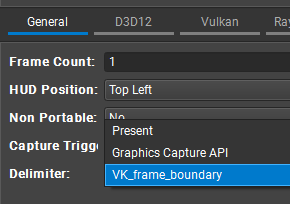
Then when starting a Graphics Capture, set the delimiter to “VK_frame_boundary”:
Sample Application#
Use of VK_EXT_frame_boundary can be seen in the NVIDIA Nvpro vk_mini_samples. To test this functionality in Nsight Graphics, follow the README instructions to build the mini samples, then invoke the rectangle sample as follows from Nsight Graphics to create a headless Graphics Capture:
rectangle --headless --frames 1000000
The code to support this is located in two places:
The rectangle app in rectangle.cpp requests the frame boundary extension when initializing Vulkan, and then sets
appInfo.useFrameBoundaryon thenvapp::ApplicationCreateInfoobject appropriately.The nvapp::application class in nvpro_core2 adds the VKFrameBoundaryEXT object to pNext in
nvapp::Application::endFrame()if both headless mode and useFrameBoundary are enabled.
Initialization and First Steps#
Header Files#
The SDK is header-only and resides in SDKs/NsightGraphicsSDK. To use the SDK, include the appropriate header files for your activity and API:
For Graphics Capture:
D3D12:
#include <NGFX_GraphicsCapture_D3D12.h>Vulkan:
#include <NGFX_GraphicsCapture_Vulkan.h>
For GPU Trace:
D3D12:
#include <NGFX_GPUTrace_D3D12.h>Vulkan:
#include <NGFX_GPUTrace_Vulkan.h>CUDA:
#include <NGFX_GPUTrace_CUDA.h>CUDART:
#include <NGFX_GPUTrace_CUDART.h>OpenGL:
#include <NGFX_GPUTrace_OpenGL.h>
For System Profiling:
D3D12:
#include <NGFX_SystemProfiling_D3D12.h>Vulkan:
#include <NGFX_SystemProfiling_Vulkan.h>
Each activity-specific header includes the necessary common headers and API-specific headers automatically.
Library Loading Callback#
While no dynamic libraries need to be included in your application when incorporating the SDK, use of any of the injection functions described below requires pointing the SDK to an installation of Nsight Graphics, from which the SDK will dynamically load any necessary libraries to implement the requested activity.
In order to provide full awareness of these library loads to the application incorporating the SDK, the SDK uses a customizable function pointer to allow the client to add any verification/security/logging logic of its choosing. REQUIRED: If any injection functions are being used, the client must specify the loading strategy by calling NGFX_SetLibraryLoadFn with a function pointer that matches the NGFX_LoadLibraryFnPtr signature.
// Required before any SDK usage
NGFX_SetLibraryLoadFn(your_load_function);
For Non-Production/Local Development:
For clients that do not need library verification, such as for local work, the SDK provides a built-in callback NGFX_LoadLib_NoVerification:
NGFX_SetLibraryLoadFn(NGFX_LoadLib_NoVerification);
Warning
NGFX_LoadLib_NoVerification is not recommended for production code as it performs no library verification or security checks.
For Production Code:
Clients should provide their own library loading function that performs appropriate verification. The function must match this signature:
typedef void* (*NGFX_LoadLibraryFnPtr)(const NGFX_PathChar* libName);
- Where:
On Windows,
NGFX_PathChariswchar_tOn Linux,
NGFX_PathCharischarThe function should return a library handle on success, or
NULLon failure
- Your custom loading function should:
Verify library signatures/certificates
Validate library paths
Check library versions if needed
Implement any security policies required by your application
Structure Version Initialization#
CRITICAL: All parameter structures passed to SDK functions must have their version member initialized to the appropriate {StructType}_VER constant before use. This ensures forward and backward compatibility.
NGFX_GraphicsCapture_RequestCapture_D3D12_Params params =
    { NGFX_GraphicsCapture_RequestCapture_D3D12_Params_VER };

// Then set other members...
params.delimiter = NGFX_GraphicsCapture_Delimiter_Present;
params.framesToCapture = 1;
Failure to initialize the version member will result in undefined behavior or API errors.
Activity Initialization#
All SDK functions require the InitializeActivity function for the relevant activity to have been successfully called before they can be used. The initialization must occur before creating the graphics context (e.g., before creating the D3D12 device or Vulkan instance). If injection is being used, injection should be called first, then initialization. Injection is described below in the Usage Scenarios section.
Another way to think about the InitializeActivity functions is that they answer the question “Am I running in an application attached to Nsight Graphics under the specified activity?” In the case where the application has performed its own injection, it should expect to be attached and for initialization to return success. If the application doesn’t know if it was launched from Nsight Graphics under the specified activity, calling the initialization function and checking for success is the indicator. The success or failure of this query should gate any built-in functionality to call SDK functions, for example frame boundaries or procedural triggers.
Graphics Capture Initialization:
For D3D12 applications:
NGFX_GraphicsCapture_InitializeActivity_D3D12_Params params =
{ NGFX_GraphicsCapture_InitializeActivity_D3D12_Params_VER };
NGFX_Result result = NGFX_GraphicsCapture_InitializeActivity_D3D12(¶ms);
if (result != NGFX_Result_Success) {
// Handle error
}
For Vulkan applications:
NGFX_GraphicsCapture_InitializeActivity_Vulkan_Params params =
{ NGFX_GraphicsCapture_InitializeActivity_Vulkan_Params_VER };
NGFX_Result result = NGFX_GraphicsCapture_InitializeActivity_Vulkan(¶ms);
if (result != NGFX_Result_Success) {
// Handle error
}
GPU Trace Initialization:
For D3D12 applications:
NGFX_GPUTrace_InitializeActivity_D3D12_Params params =
{ NGFX_GPUTrace_InitializeActivity_D3D12_Params_VER };
NGFX_Result result = NGFX_GPUTrace_InitializeActivity_D3D12(¶ms);
if (result != NGFX_Result_Success) {
// Handle error
}
For Vulkan applications:
NGFX_GPUTrace_InitializeActivity_Vulkan_Params params =
{ NGFX_GPUTrace_InitializeActivity_Vulkan_Params_VER };
NGFX_Result result = NGFX_GPUTrace_InitializeActivity_Vulkan(¶ms);
if (result != NGFX_Result_Success) {
// Handle error
}
For CUDA applications:
NGFX_GPUTrace_InitializeActivity_CUDA_Params params =
{ NGFX_GPUTrace_InitializeActivity_CUDA_Params_VER };
NGFX_Result result = NGFX_GPUTrace_InitializeActivity_CUDA(¶ms);
For CUDART applications:
NGFX_GPUTrace_InitializeActivity_CUDART_Params params =
{ NGFX_GPUTrace_InitializeActivity_CUDART_Params_VER };
NGFX_Result result = NGFX_GPUTrace_InitializeActivity_CUDART(¶ms);
For OpenGL applications:
NGFX_GPUTrace_InitializeActivity_OpenGL_Params params =
{ NGFX_GPUTrace_InitializeActivity_OpenGL_Params_VER };
NGFX_Result result = NGFX_GPUTrace_InitializeActivity_OpenGL(¶ms);
System Profiling Initialization:
For D3D12 applications:
NGFX_SystemProfiling_InitializeActivity_D3D12_Params params =
{ NGFX_SystemProfiling_InitializeActivity_D3D12_Params_VER };
NGFX_Result result = NGFX_SystemProfiling_InitializeActivity_D3D12(¶ms);
For Vulkan applications:
NGFX_SystemProfiling_InitializeActivity_Vulkan_Params params =
{ NGFX_SystemProfiling_InitializeActivity_Vulkan_Params_VER };
NGFX_Result result = NGFX_SystemProfiling_InitializeActivity_Vulkan(¶ms);
Important Notes:
Activity initialization should be called only once per process
It must be called before creating the graphics context
Always check the return value for errors (
NGFX_Result_Successindicates success)When using the GUI or ngfx-capture (non-injection scenarios), initialization is still required for procedural control over captures/traces
Only one activity type can be initialized per process
Debugging and Troubleshooting#
Because the Nsight Graphics SDK is implemented as a header-only library, all SDK source code is directly included in your application’s compilation. This provides a significant debugging advantage: you can step through the SDK’s internal implementation with your debugger when troubleshooting integration issues or unexpected behavior.
Debugging Tips:
Set breakpoints in SDK code: You can set breakpoints directly in any of the SDK header files (
NGFX_*.h) to inspect execution flowInspect SDK state: All SDK variables and data structures are visible in your debugger’s watch windows
Step through API calls: When you call an SDK function like
NGFX_GraphicsCapture_RequestCapture_D3D12(), you can step into the SDK-side implementation, up to the point where it calls into an Nsight Graphics library.Verify parameters: You can examine parameter structures before they’re processed by the SDK to ensure they’re correctly initialized
Understand error paths: When an SDK function returns an error code, you can step through the code to see exactly why the error occurred
Common Debugging Scenarios:
Injection failures: Step through
NGFX_GraphicsCapture_Inject_*()to see if library loading is failing or if settings are reported as invalidInitialization errors: Debug
NGFX_*_InitializeActivity_*()calls to verify the activity is being initialized at the correct timeCapture/trace not triggering: Set breakpoints in
RequestCaptureorStartTracefunctions to verify they’re being called with correct parametersVersion mismatch errors: Inspect the
versionmember of parameter structures during initialization to ensure it matches the expected value
Usage Scenarios#
The following sections describe various usage scenarios for the Nsight Graphics SDK and APIs. Click to expand:
Initiate a Graphics Capture Procedurally (w/ Nsight Graphics GUI Attached)
Rather than relying on the user to press F11, you can initiate a regular frame-based capture procedurally using the SDK. Examples where this would be useful include:
Having a native GUI button for triggering a capture
Triggering a capture based on procedural runtime criteria
Triggering a series of captures during an automated playthrough for QA purposes
Launch the application through Nsight Graphics as you normally would, or launch the app with ngfx-capture. In your code you can then call:
NGFX_GraphicsCapture_RequestCapture_D3D12(¶ms)
OR
NGFX_GraphicsCapture_RequestCapture_Vulkan(¶ms)
Where params is appropriately initialized, for example as follows:
NGFX_GraphicsCapture_RequestCapture_D3D12_Params params =
{ NGFX_GraphicsCapture_RequestCapture_D3D12_Params_VER };
params.delimiter = NGFX_GraphicsCapture_Delimiter_Present;
params.framesToCapture = 1; // or more
NGFX_GraphicsCapture_RequestCapture_D3D12(¶ms);
Note: Always initialize the “version” member of a struct to {struct_type}_VER.
Initiate a GPU Trace Procedurally (w/ Nsight Graphics GUI Attached)
For GPU Trace, the SDK does not currently have an equivalent of RequestCapture that queues a capture for the next frame, just as pressing F11 would. Instead, in your code call this at the beginning of your rendering loop, with params appropriately initialized:
NGFX_GPUTrace_StartTrace_Vulkan(¶ms)
OR
NGFX_GPUTrace_StartTrace_D3D12(¶ms)
As long as there is a max frame count / submit / elapsed time set, you do not need to call NGFX_GPUTrace_EndTrace().
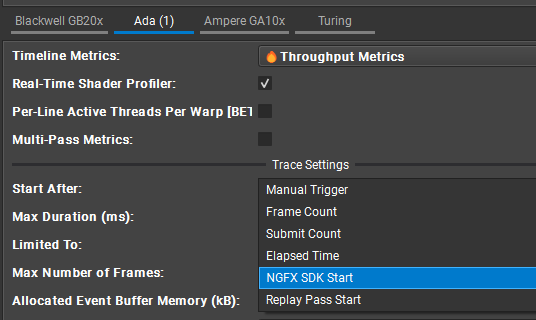
Then launch the application through Nsight Graphics as you normally would, with one additional requirement: set “Start After” to “NGFX SDK Start”:
See later usage scenarios for a description of using both StartTrace and EndTrace for targeted sub-sections or “one shot” captures.
Run Graphics Capture on a repeated, non-Present-based workload
If you’re rendering frames (or any repeated workload) without calling Present, for example because you have a hybrid application that is passing the rendered output to OpenGL or D3D11 for presentation, then you need to insert a procedural delimiter for Graphics Capture to know when to start and end the capture.
Remember that Graphics Capture generally knows nothing about OpenGL and D3D11. For hybrid Vulkan / OpenGL applications, using frame boundaries around the Vulkan workload is intended to allow the Vulkan portion to be captured with Graphics Capture. This is a work in progress, and the presence of OpenGL may still interfere with the capture process. This use case will get more focus in future releases.
Only a single delimiter is required, marking the end of one frame and the beginning of the next.
Check For The Presence of Nsight Graphics
You want to make sure that you are attached to Nsight Graphics before emitting frame delimiter calls. Use code such as this to check if you are in an active Graphics Capture or GPU Trace session:
bool emitFrameBoundaries = false;
if (NGFX_GraphicsCapture_InitializeActivity_D3D12(&gc_params) == NGFX_Result_Success ||
NGFX_GPUTrace_InitializeActivity_D3D12(>_params) == NGFX_Result_Success) {
emitFrameBoundaries = true;
}
Only call the boundary functions if emitFrameBoundaries is true. This is similar to how the Vulkan frame boundary extension must be queried for its existence, indicating that Nsight Graphics is present and active.
D3D12 Delimiters
Use this call:
NGFX_FrameBoundary_D3D12(¶ms)
Where params must be initialized appropriately as NGFX_FrameBoundary_D3D12_Params.
Vulkan Delimiters
With Vulkan you have two choices. One option is to call:
NGFX_FrameBoundary_Vulkan(¶ms)
Where params is initialized appropriately as NGFX_FrameBoundary_Vulkan_Params.
Or, you can use the VK_EXT_frame_boundary extension.
Running Graphics Capture w/ Delimiters
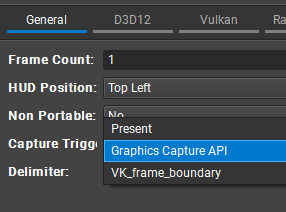
Set the Delimiter setting in the Graphics Capture launch settings to “Graphics Capture API”, or “VK_frame_boundary” if using the Vulkan extension:
Or when using ngfx-capture from the command line, use the flag “–delimiter-graphics-capture-api” or “–delimiter-vk-frame-boundary-ext”. Note that you will still need to trigger the capture with one of the usual methods, such as hitting F11. Alternatively, a capture using delimiters can be triggered procedurally with NGFX_GraphicsCapture_RequestCapture_D3D12/Vulkan (see following section).
Run GPU Trace on a repeated, non-Present-based workload
GPU Trace already supports non-frame-based criteria such as queue submits or elapsed time. However if frame delimiters are present they will be honored instead of Present for any frame-based trace settings.
Initiate a Graphics Capture Procedurally Without Launching Nsight Graphics
In this scenario the application never needs to connect to Nsight Graphics, or be launched from ngfx-capture.
It is recommended that you build up the SDK usage for your application gradually. Confirm that everything works when launching with Nsight Graphics before adding injection support.
Step 1: Injection
Prior to the graphics context being created in the application, call NGFX_GraphicsCapture_Inject_D3D12/Vulkan() with params appropriately initialized. You must point it to the installation of Nsight Graphics from which the runtime capture library will be used.
Initialize params->settings using NGFX_GraphicsCapture_InjectionSettings_SetDefaults(). You can make additional changes to the settings beyond the defaults.
Always check the return value for error codes.
Note
Running the app with injection will incur the same runtime overhead as attaching Nsight Graphics to an application. The overhead while not actively capturing is small in most cases, but not non-zero. Injection should only be performed when there is intent to run a capture.
Step 2: Initialization
Immediately after injection (still prior to creating the graphics context) call:
NGFX_GraphicsCapture_InitializeActivity_Vulkan/D3D12() with params appropriately initialized. This only needs to be called once.
Always check the return value for error codes.
Step 3: Running a Capture
Once the activity is initialized then you should be able to run a capture just as if Nsight Graphics were attached, or the app had been launched using ngfx-capture. You can either capture interactively (depending on the values in NGFX_GraphicsCapture_InjectionSettings) or run a procedural capture.
Before requesting a capture, call NGFX_GraphicsCapture_GetCaptureFileCount() and retain the returned count. That count is the zero-based index of the next successfully completed capture file. After requesting the capture, call NGFX_GraphicsCapture_WaitForCaptureFilePath() with that index. The wait returns only after the capture file has been finalized and is safe to open.
Artifact path APIs use caller-owned buffers. Call the wait function first with a NULL path and zero capacity to obtain requiredPathCapacity, allocate that many NGFX_PathChar elements, and call it again with the buffer. A negative timeout waits indefinitely; a zero timeout polls without blocking. NGFX_GraphicsCapture_GetCaptureFilePath() retrieves an already completed capture without waiting.
Step 4: Open The Capture In Nsight Graphics
Launch Nsight Graphics with the finalized path returned by NGFX_GraphicsCapture_WaitForCaptureFilePath(). The returned path is in the target application’s filesystem namespace and reflects any default naming or collision disambiguation applied while creating the capture.
Initiate a GPU Trace Procedurally Without Initially Launching Nsight Graphics
Note the use of “Initially” in this section title. GPU Trace is currently a bit different from Graphics Capture, as it requires an Nsight Graphics or ngfx.exe host process to be running and attached to the application in order to run a trace. This is due to the fact that some pre-processing of the metrics sets happens in the host. (This may change in a future release.)
However you can still use the GPU Trace injection APIs to prepare an application for attachment in Nsight Graphics, so that it doesn’t have to have been launched from Nsight Graphics. The same warning as with Graphics Capture applies about the non-zero overhead of GPU Trace injection: it should only be performed when there is intent to run a trace.
First, follow steps 1 & 2 from Initiate a Graphics Capture Procedurally Without Launching Nsight Graphics, but using the GPU Trace APIs. Use NGFX_GPUTrace_InjectionSettings_SetDefaults() to set the default injection settings values.
At this point it should be possible to use the “Attach” interface in the GUI, or with “ngfx.exe --attach”.
If you want to start the trace to start immediately with the first batch of queued work, you also need to call “ActivateTrace” before submitting any work: NGFX_GPUTrace_ActivateTrace_D3D12/Vulkan(params)
Finally, use the instructions from Initiate a GPU Trace Procedurally to run the trace.
Use NGFX_GPUTrace_GetTraceFileCount(), NGFX_GPUTrace_GetTraceFilePath(), and NGFX_GPUTrace_WaitForTraceFilePath() in the same way as the Graphics Capture artifact APIs. GPU Trace files are finalized by the attached host, so returned paths are in the host filesystem namespace and may not be directly accessible to a remote target.
Note
Only one of GPU Trace and Graphics Capture can be injected into a process.
Run a “One-Shot” Graphics Capture or GPU Trace
Fully frameless, aka “one-shot” captures and traces can be invoked with
NGFX_GraphicsCapture_StartCapture_D3D12()
NGFX_GraphicsCapture_StopCapture_D3D12()

or

NGFX_GraphicsCapture_StartCapture_Vulkan()
NGFX_GraphicsCapture_StopCapture_Vulkan()
For GPU Trace you use StartTrace/StopTrace:
NGFX_GPUTrace_StartTrace_D3D12()
NGFX_GPUTrace_StopTrace_D3D12()

or

NGFX_GPUTrace_StartTrace_Vulkan()
NGFX_GPUTrace_StopTrace_Vulkan()
These have the additional requirement that the start & stop conditions (either in the GUI or the injection settings) need to be set to the corresponding “NGFX Start” and “NGFX Stop” events.
Also remember to use ActivateTrace() if you want the trace to start from the very start of the GPU workload.
Expect practical limits to how much can be captured this way, as this is not capable of endless recording.
Licensing#
The Nsight Graphics SDK is licensed as follows:
SDK Headers: Apache License. See LICENSE.txt in the Nsight Graphics SDK directory.
No External Dependencies or Third-Party Code#
The Nsight Graphics SDK has no external dependencies for compilation other than the C standard library.
Contributions#
The Nsight Graphics SDK does not accept contributions, but bug reports are welcome. Please send feedback or bug reports to NsightGraphics@nvidia.com .
Old Injection API#
There is a previous API which had a much more focused use case and was not widely used. This API resides in the SDKs/NsightGraphicsSDK/0.8.0 directory. This API is provided for customers that have historically relied on it but it should not be used for new integrations.