

Kumo Engine Benchmarks
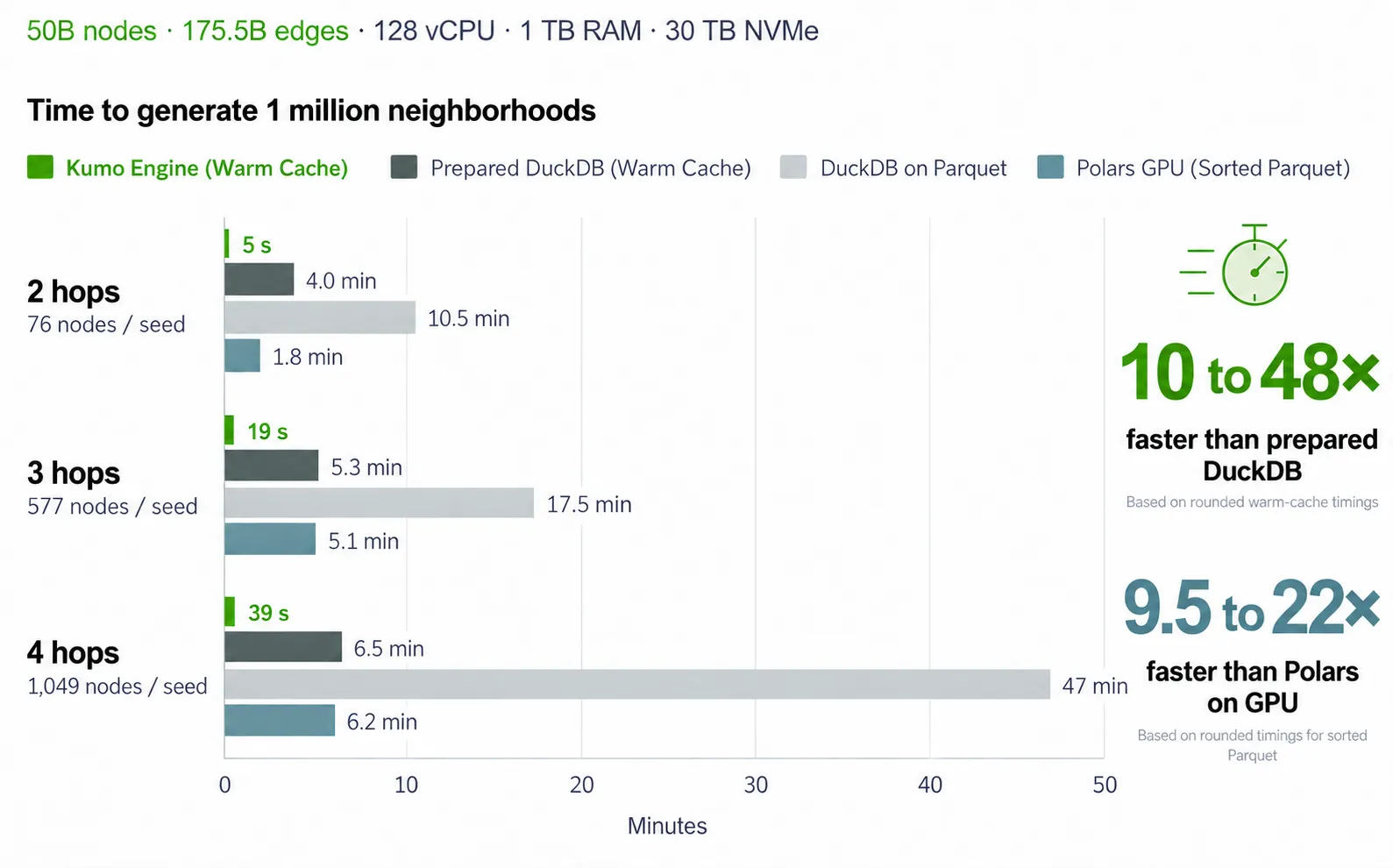
Kumo Engine generated three-hop neighborhoods for one million entities in 19 seconds with a warm cache on a graph containing 50 billion nodes and 175.5 billion edges.
The experiments below measure context generation, a commerce training and prediction workflow, and graph ML framework performance. Each comparison uses its own dataset, hardware, and measurement scope.
Context Neighborhood Generation
Context generation retrieves connected records and their raw features for each starting entity, or seed. These neighborhoods supply model inputs for graph models, transformers, and in-context learning workloads.
This experiment used a synthetic commerce graph with 50 billion nodes, 175.5 billion edges, seven tables, and nine foreign keys. The source contained 2.8 TB of uncompressed data, stored as 500 GiB of Parquet files. DiskGraph’s 2.6 TiB index exceeded the Kumo host’s 1 TiB RAM.
The methods used different data representations:
- Kumo Engine: Reads the DiskGraph index from local NVMe storage.
- Prepared DuckDB: Reads native on-disk tables and key-and-time-sorted lookup tables prepared from Parquet.
- DuckDB on Parquet: Reads source Parquet files directly.
- Polars GPU: Queries sorted Parquet files with GPU execution.
Neighborhood Retrieval Time
The following timings cover one million seeds and exclude preparation and model training. Kumo Engine and prepared DuckDB used warm caches by repeating the same seeds a second time. Durations are rounded.
Across these depths, Kumo Engine was approximately 10 to 48 times faster than prepared DuckDB and 9.5 to 22 times faster than Polars GPU, using the rounded timings. The Polars comparison used different hardware, as shown above.
DiskGraph and prepared DuckDB returned identical neighborhoods for every seed compared.
One-Time Graph Preparation
These retrieval timings exclude the initial preparation step:
DiskGraph took longer to prepare than the tested DuckDB and Polars representations, then retrieved neighborhoods faster. Repeated sampling can amortize that preparation cost.
Commerce Training and Prediction Workflow
This experiment measured Kumo Engine training and batch prediction on the 50-billion-node synthetic commerce graph, using one AWS g6e.48xlarge.
Training Pipeline
Kumo Engine trained a six-hop model in approximately 5.2 hours, including graph ingestion and training-table generation:
Training used 1,000 steps per epoch and a batch size of 1,024. The 61-minute ingestion measurement belongs to this training experiment; the 49.8-minute index build above belongs to the separate context-generation experiment.
Reuse Across Tasks
Kumo Engine built the graph index once and reused it across three tasks. Each task added its own training-table generation and model configuration without rebuilding the index.
Batch Prediction
The commerce graph included 1 billion unique customers among its 50 billion nodes. Batch prediction ran on a subset of 5 million customers using one g6e.48xlarge.
Graph ML Framework Comparison
These experiments used a citation graph with 111 million nodes, 1.616 billion citation edges (3.23 billion including reverse edges), and 128-dimensional node features. The prediction task had 172 classes and 1.55 million labeled nodes across the official training, validation, and test splits.
PyG on Matched Hardware
Kumo Engine and an in-memory PyG implementation used the same model modules and matched training settings. Both ran for 15 epochs on one g5.16xlarge with one A10G GPU, 256 GiB RAM, and local NVMe.
Kumo Engine completed training and validation in 41 minutes 14 seconds, compared with 64 minutes 13 seconds for PyG, a 36% reduction. Its observed training-container memory was also lower:
Kumo Engine’s full workflow included ingestion, training, evaluation, and model publication. Its test accuracy was 0.67 percentage points lower in this run, alongside the lower training time and observed memory use.
GraphStorm on Larger Hardware
GraphStorm is an AWS open-source framework for graph neural network training and deployment. The configurations below stored graph data in RAM and used the same 111-million-node citation graph.
Graph construction ran on a separate r5.24xlarge with 768 GiB RAM. Distributed training used four g5.48xlarge instances; the single-node training configuration used one g5.16xlarge.
Distributed GraphStorm completed training faster than Kumo Engine, using more training hardware. Its graph-construction stage took longer than Kumo Engine’s full 55-minute workflow. The single-node GraphStorm run failed while loading the graph and features into RAM.
Additional Storage Examples
Separate workload examples illustrate the storage configurations used for different datasets:
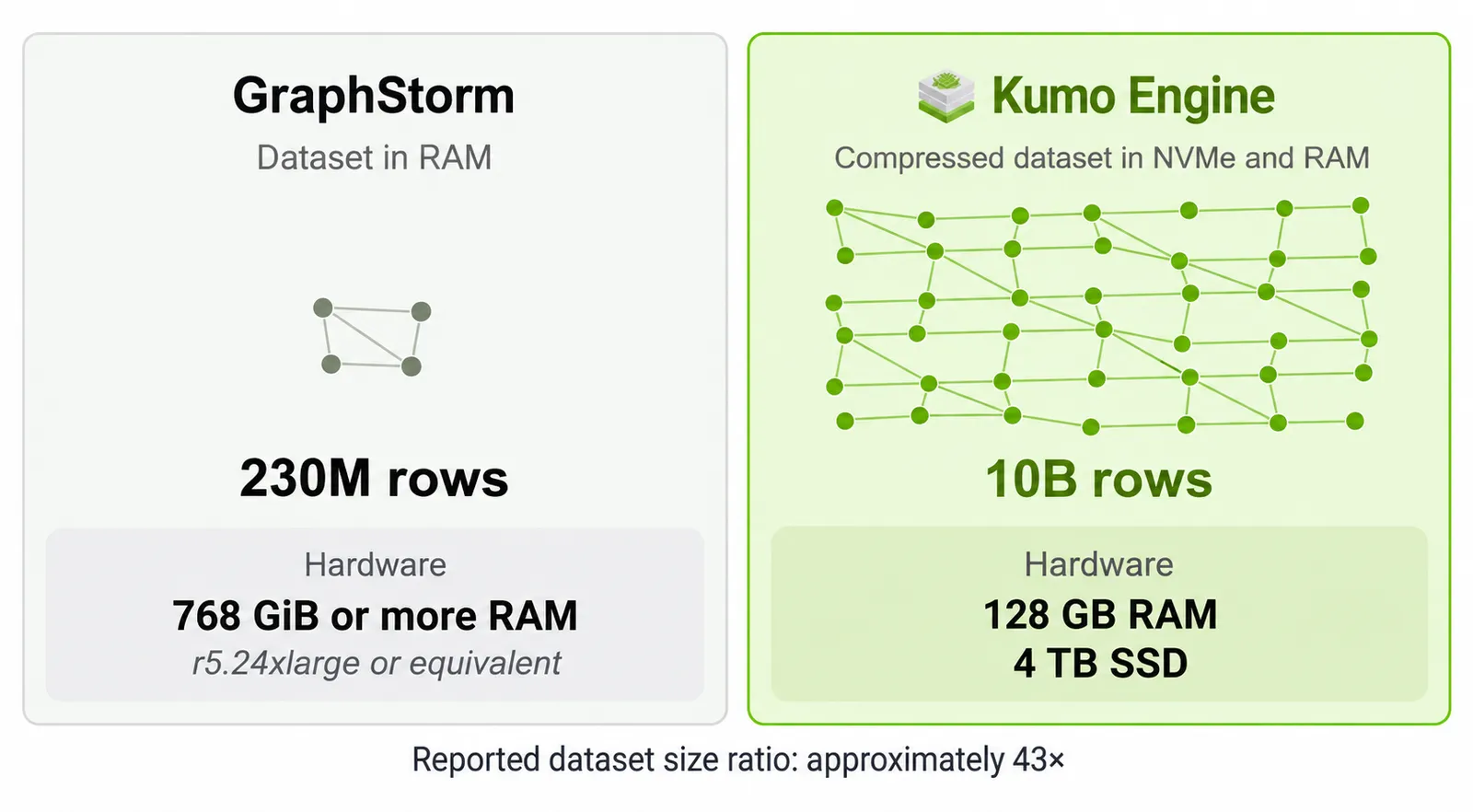
These examples use different datasets and do not establish a relative capacity limit. They are separate from the commerce and citation-graph experiments above.
Comparison with a DuckDB Feature-Engineering Pipeline
This experiment compares two complete modeling workflows: Kumo Engine learning from connected records, and a model trained on features engineered with DuckDB. Both pipelines ran from raw Parquet to a trained model on the same 50-billion-node synthetic commerce dataset, using one AWS g6e.48xlarge per pipeline.
The DuckDB pipeline constructed model inputs with hand-written aggregates and multi-table joins. Features included column means, standard deviations, modes, and multi-hop signals such as co-purchase, co-view, and similar-customer features. Kumo Engine retrieved connected records and raw features for its graph model.
The DuckDB approach required task-specific labels, temporal windows, candidate sets, and feature logic.
The code counts cover features, candidate generation, labels, and evaluation in these implementations.
Instance Compute Cost
Because both pipelines used the same instance type, their elapsed times imply approximately 1.9 times the instance compute cost for the DuckDB pipeline, at the same hourly rate. This comparison covers instance compute only.
Plan Your Evaluation
Use a representative task and dataset, then:
- Measure source ingestion and index preparation separately from repeated sampling, training, and prediction.
- Record hardware, software versions, sampling settings, model configuration, and the full training budget.
- Compare runtime and memory alongside held-out prediction quality, using the same evaluation population and metrics.
Use the Model Plan Guide to configure sampling and training. For the complete workflow, start with the Kumo Engine Overview.