Skip to navigation

Model Explainability

View as Markdown

Inspect explanation files after training a model to investigate input-column sensitivity and the sampled graph context used for selected examples. These files describe the selected model on a bounded set of test examples. They do not establish that a feature caused an outcome or explain every later prediction.

Use your prediction task to identify which explanation methods are eligible:

Prediction taskGradient scoresColumn cohortsSampled graph context
Binary, multiclass, or multilabel classificationEligibleEligibleEligible
RegressionEligibleEligibleEligible
Static or temporal link predictionEligibleNot supportedEligible
ForecastingEligibleNot supportedNot supported
Multilabel rankingNot supportedNot supportedNot supported

Eligibility does not guarantee that a file is generated. Availability also depends on model compatibility, whether explanations are enabled, and whether the explanation step completes. Check the fit logs if an eligible explanation is missing.

Find the Selected Experiment

For supported tasks, Trainer.fit() requests gradient scores, column analysis, and sampled subgraphs unless trainer.model_plan.training_job.disable_explain is enabled. The files remain in local scratch and are not part of the published model bundle.

Continue in the process that produced fit_result. Resolve the selected experiment instead of reading every experiment directory under scratch:

from pathlib import Path
import json
run_dir = Path(fit_result.bundle_dir).parent
automl_dirs = sorted({
path.parent
for path in run_dir.rglob("auto_train_progress.json")
if path.is_file()
})
if len(automl_dirs) != 1:
raise RuntimeError(
f"Expected one AutoML directory for this fit, found {len(automl_dirs)}."
)
automl_dir = automl_dirs[0]
selection = json.loads(
(automl_dir / "best_trainer.json").read_text(encoding="utf-8")
)
selected_trial_name = Path(selection["best_trainer"]).name
selected_trial_dir = automl_dir / selected_trial_name
if (
not selected_trial_name.startswith("version_")
or not selected_trial_dir.is_dir()
):
raise RuntimeError("The selected experiment directory is unavailable.")
refit_trial_dir = automl_dir / f"{selected_trial_name}_refit_trainval"
explanation_trial_dir = (
refit_trial_dir if refit_trial_dir.is_dir() else selected_trial_dir
)
paths = {
"gradient scores": explanation_trial_dir / "explain_test" / "scores.csv",
"column analysis": (
explanation_trial_dir
/ "column_analysis"
/ "test"
/ "column_analysis.json"
),
"sampled subgraphs": (
explanation_trial_dir
/ "subgraph_collector"
/ "test"
/ "subgraph_json"
),
}
print("Explanation experiment:", explanation_trial_dir)
for label, path in paths.items():
print(label, path, "available=" + str(path.exists()))

When training refits the selected experiment on the combined training and validation data, test explanations are written under the matching _refit_trainval directory. Otherwise, they remain under the selected version_N directory.

Explanation availability depends on the task and model. An explanation failure is logged without discarding a successfully trained model. If a file is absent, check disable_explain and the fit logs. A missing score does not mean that a column was excluded from training.

Inspect Gradient Scores

scores.csv contains one gradient attribution score for each reported input column. Its columns are table, column, and score.

Plot the highest scores to compare columns within this explanation. Run the examples below with pandas, numpy, and matplotlib installed in your notebook or Python environment. Continue from the paths dictionary above.
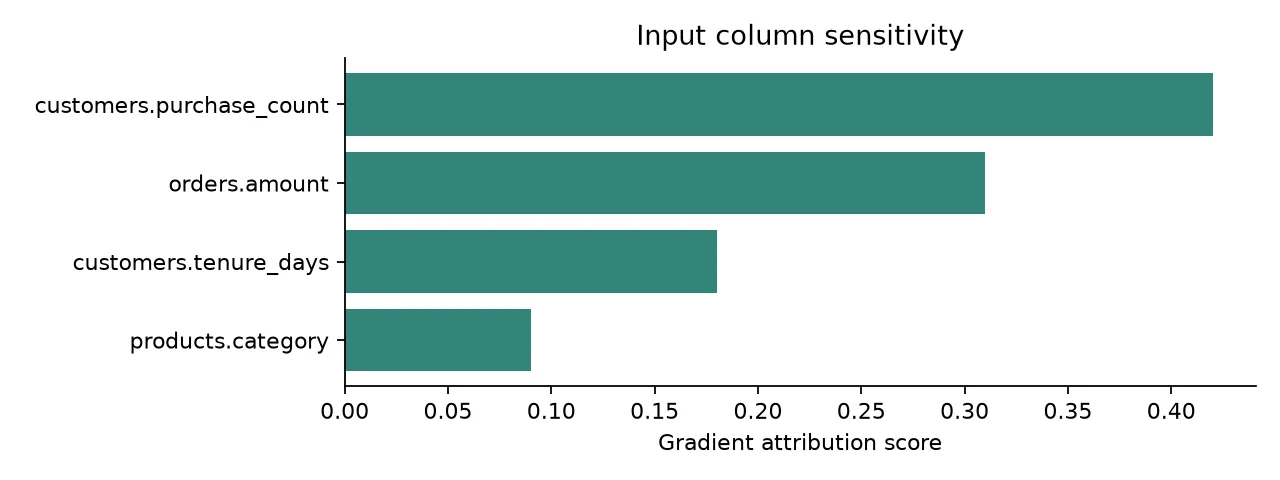
Illustrative gradient scores: customers purchase count and orders amount lead the ranking

Illustrative data, not results from a customer model. Scores are shown as reported, without converting them to percentages.

Plot the column ranking from scores.csv
import numpy as np
import pandas as pd
import matplotlib.pyplot as plt
scores_path = paths["gradient scores"]
if not scores_path.is_file():
raise FileNotFoundError("No gradient scores. Check explanation availability and fit logs.")
scores = pd.read_csv(scores_path)
required = {"table", "column", "score"}
if scores.empty or not required.issubset(scores.columns):
raise ValueError("Expected nonempty gradient scores with table, column, and score fields.")
scores["score"] = pd.to_numeric(scores["score"], errors="coerce")
if scores[["table", "column"]].isna().any().any() or not np.isfinite(scores["score"]).all():
raise ValueError("Gradient scores contain missing names or nonnumeric scores. Inspect scores.csv.")
ranking = scores.nlargest(12, "score").sort_values("score")
labels = ranking["table"].astype(str) + "." + ranking["column"].astype(str)
fig, ax = plt.subplots(figsize=(8, max(3, 0.4 * len(ranking))))
ax.barh(labels, ranking["score"], color="#348579")
ax.set(xlabel="Gradient attribution score", title="Input column sensitivity")
ax.spines[["top", "right"]].set_visible(False)
fig.tight_layout()
plt.show()

Use the table and column names to check whether the leading signals make sense for your task. A high score shows model sensitivity in the examples used for explanation, not a causal effect or a guarantee of predictive value on future data.

These scores concern input features. They are different from the AutoML setting analysis in Training Diagnostics.

Inspect Column Cohorts

Column analysis groups feature values into cohorts and reports their population share, average predictions, and average observed targets when available. Each record identifies a column by table_name, hop, and col_name. The same column can appear at more than one graph hop, so select all three fields together.
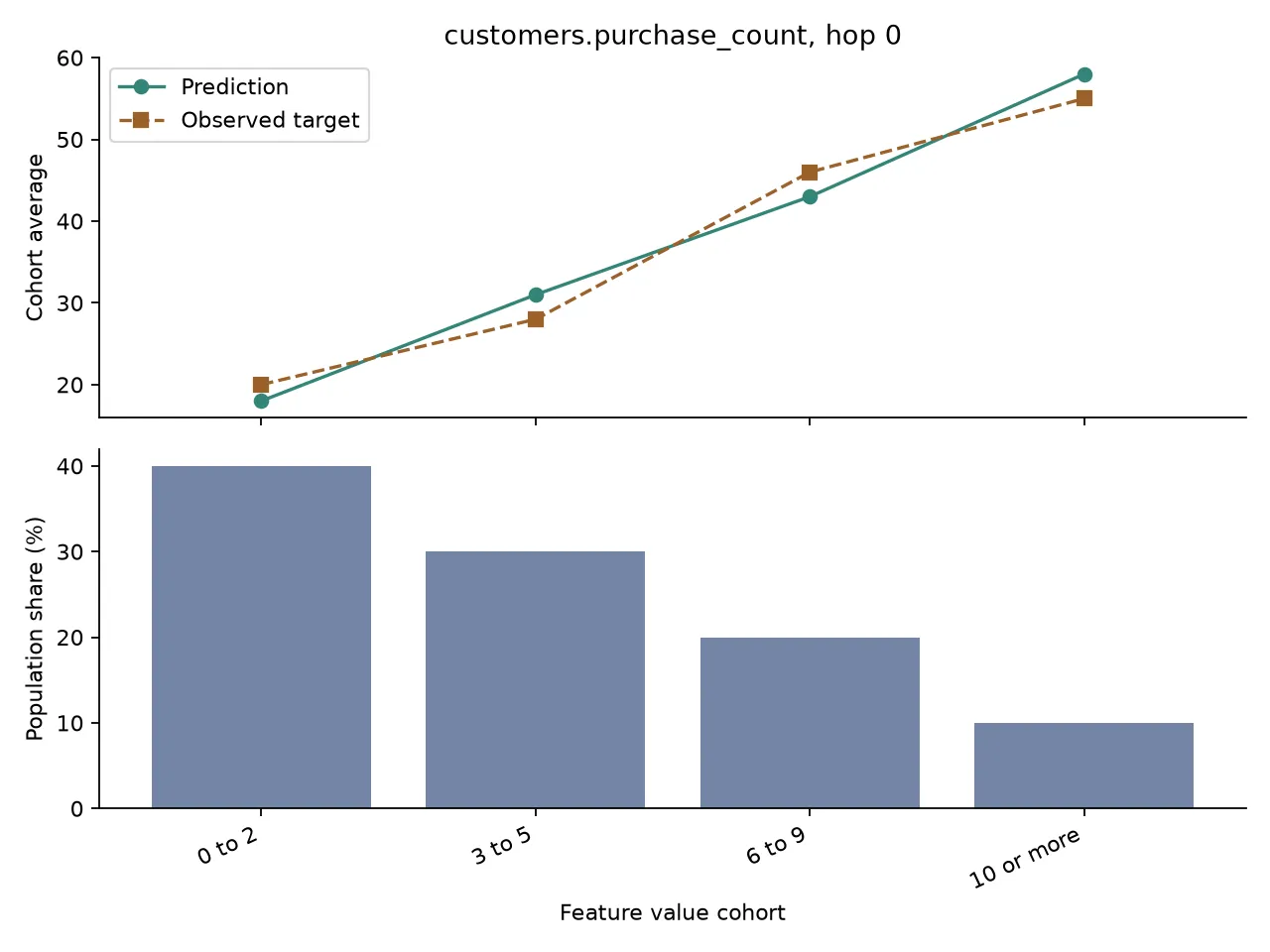
Illustrative cohort comparison with prediction and observed target averages above a separate population share chart

Illustrative regression data for customers.purchase_count at hop 0. These values do not describe a trained customer model.

The upper panel compares averages in the prediction target’s units. For a selected classification class, it compares predicted probabilities with observed class proportions. The lower panel shows each cohort’s relative population. Differences describe associations in the explanation sample, not the effect of changing a feature. A small population share warrants caution and does not provide an absolute sample count or uncertainty interval.

Select a Column and Class

List the available records first. Replace column_key with a (table_name, hop, col_name) tuple from this output. For class dictionaries, the example selects and prints the first available class; set class_name to another listed key to inspect that class. Regression uses a single list and needs no class selection.

import json
analysis_path = paths["column analysis"]
if not analysis_path.is_file():
raise FileNotFoundError("No column analysis. Check task eligibility and fit logs.")
analysis = json.loads(analysis_path.read_text(encoding="utf-8"))
records = analysis.get("cohorts") if isinstance(analysis, dict) else None
if not isinstance(records, list) or not records:
raise ValueError("No column cohorts. Inspect column_analysis.json and the fit logs.")
key_fields = ("table_name", "hop", "col_name")
if any(not isinstance(row, dict) or not all(k in row for k in key_fields) for row in records):
raise ValueError("A cohort record lacks table_name, hop, or col_name. Inspect the JSON.")
keys = [tuple(row[k] for k in key_fields) for row in records]
print("Available columns:", keys)
column_key = keys[0] # Replace with the table, hop, and column you want.
matches = [row for key, row in zip(keys, records) if key == column_key]
if len(matches) != 1:
raise ValueError("Select one unique column key from Available columns.")
record = matches[0]
predictions = record.get("predictions")
class_name = None
if isinstance(predictions, dict):
if not predictions:
raise ValueError("No prediction classes. Inspect this record's predictions field.")
print("Available classes:", list(predictions))
class_name = next(iter(predictions)) # Replace with the class key you want.
print("Selected column and class:", column_key, class_name)

Plot Predictions and Population Share

Run this after selecting the record above. The plot omits observed targets when targets is absent or null. It rejects missing classes, invalid numbers, and mismatched cohort lengths rather than plotting misaligned values.

Plot the selected cohort record
import numpy as np
import matplotlib.pyplot as plt
labels = record.get("cohorts")
if not isinstance(labels, list) or not labels or not all(isinstance(x, str) for x in labels):
raise ValueError("Expected nonempty cohort labels. Inspect the selected record's cohorts field.")
def cohort_values(field):
values = record.get(field)
if isinstance(values, dict):
if class_name not in values:
raise ValueError(f"Select a class present in {field}: {list(values)}")
values = values[class_name]
if not isinstance(values, list) or len(values) != len(labels):
raise ValueError(f"{field} must contain one value per cohort. Inspect the selected record.")
try:
values = np.asarray(values, dtype=float)
except (TypeError, ValueError) as error:
raise ValueError(f"{field} contains nonnumeric values. Inspect the selected record.") from error
if values.ndim != 1 or not np.isfinite(values).all():
raise ValueError(f"{field} must contain finite numbers. Inspect the selected record.")
return values
population = cohort_values("populations")
if (population < 0).any() or (population > 1).any() or population.sum() <= 0:
raise ValueError("Expected population shares between 0 and 1 with a positive total.")
predicted = cohort_values("predictions")
observed = cohort_values("targets") if record.get("targets") is not None else None
x = np.arange(len(labels))
fig, (ax, shares) = plt.subplots(2, 1, figsize=(8, 6), sharex=True)
ax.plot(x, predicted, "o-", label="Prediction", color="#348579")
if observed is not None:
ax.plot(x, observed, "s--", label="Observed target", color="#9b612a")
table, hop, column = column_key
class_label = f" (class {class_name})" if class_name is not None else ""
ax.set(title=f"{table}.{column}, hop {hop}{class_label}", ylabel="Cohort average")
ax.legend()
shares.bar(x, population * 100, color="#7485a5")
shares.set(ylabel="Population share (%)", xlabel="Feature value cohort")
shares.set_xticks(x, labels, rotation=25, ha="right")
for panel in (ax, shares):
panel.spines[["top", "right"]].set_visible(False)
fig.tight_layout()
plt.show()

Inspect Sampled Graph Context

The subgraph collector saves a bounded selection of test examples. Each file can contain a root entity, sampled nodes and relationships, and feature values. Inspect the structure before building a visualization or sharing the file:

subgraph_dir = paths["sampled subgraphs"]
subgraph_paths = sorted(subgraph_dir.glob("*.json"))
if not subgraph_paths:
print("No sampled subgraph file was generated for the selected model.")
else:
subgraph = json.loads(subgraph_paths[0].read_text(encoding="utf-8"))
structure = subgraph.get("subgraph_store") or {}
features = (subgraph.get("feature_store") or {}).get("features") or {}
root_id = structure.get("root_id")
nodes = structure.get("nodes") or {}
edges = structure.get("edges") or {}
sampled_links = sum(
len(target_ids)
for relations in edges.values()
for target_ids in relations.values()
)
print("Root node:", nodes.get(str(root_id), root_id))
print("Tables:", list((structure.get("tables") or {}).keys()))
print("Sampled links:", sampled_links)
print("Root feature names:", list(features.get(str(root_id), {}))[:10])

The subgraph is a sampled view of model context, not the complete source graph. It can contain entity identifiers and feature values. Review that data before exporting an image or sharing the JSON. The local Python API does not provide a graph visualization call for these files.

Preserve the Explanation Files

Retain the selected explanation files with the model version, predictive query, graph definition, snapshot identity, and Kumo package version used for training. Publishing a model does not copy these files.

On Linux, copy the complete AutoML directory to storage that survives the machine so the selected experiment and any refit explanations remain together. In a Snowflake notebook, use Preserve the Selected History to archive that directory to a restricted internal stage. Keep access limited when the files contain source derived values. In a Databricks notebook, use the same history guide to copy the selected AutoML directory to a restricted Unity Catalog volume before the cluster stops. The model bundle does not include explanation files.