


Decoder#
SimpleDecoder#
SimpleDecoder Class#
High-level decoder class providing random access to video frames with indexing, slicing, and batch operations.
Description#
The SimpleDecoder class provides a high-level, user-friendly interface for video decoding with random frame access capabilities. It abstracts the complexities of video demuxing, seeking, and decoding behind an intuitive Python API that supports indexing, slicing, and flexible frame retrieval patterns.
Unlike ThreadedDecoder which is optimized for sequential processing, and the low-level Decoder which requires manual packet management, SimpleDecoder provides file-like random access to video frames, making it ideal for non-linear access patterns and exploratory workflows.
Important Note:
SimpleDecoder requires seekable video sources (container formats with proper index). Elementary streams (raw H.264/HEVC bitstreams without container) are not supported. Use Decoder or ThreadedDecoder if you are dealing with elementary video streams.
Syntax#
import PyNvVideoCodec as nvc

decoder = nvc.SimpleDecoder(
    enc_file_path,
    gpu_id=0,
    cuda_context=0,
    cuda_stream=0,
    use_device_memory=True,
    max_width=0,
    max_height=0,
    need_scanned_stream_metadata=False,
    decoder_cache_size=4,
    output_color_type=nvc.OutputColorType.NATIVE,
    bWaitForSessionWarmUp=False,
    enableDecodeStats=False
)
Constructor Parameters#
Parameter |
Type |
Default |
Description |
|---|---|---|---|
enc_file_path |
str |
Required |
Path to encoded video file. Must be a seekable container format (MP4, MKV, AVI, MOV, etc.). Elementary streams are not supported |
gpu_id |
int |
0 |
GPU device ID to use for decoding. Useful for multi-GPU systems |
cuda_context |
size_t |
0 |
CUDA context handle. 0 uses the primary context for the specified GPU |
cuda_stream |
size_t |
0 |
CUDA stream handle. 0 creates a new stream internally |
use_device_memory |
bool |
True |
If True, decoded frames remain in GPU memory (CUdeviceptr via CUDA Array Interface). If False, frames are copied to host memory |
max_width |
int |
0 |
Maximum frame width for decoder allocation. Important for decoder reuse with multiple sources. 0 uses actual stream width |
max_height |
int |
0 |
Maximum frame height for decoder allocation. Important for decoder reuse. 0 uses actual stream height |
need_scanned_stream_metadata |
bool |
False |
If True, performs complete stream scan on background thread to collect accurate frame count and detailed metadata. Required for precise len() on certain formats |
decoder_cache_size |
int |
4 |
LRU cache size for decoder instances when using reconfigure_decoder(). Caches decoders for frequently accessed sources |
output_color_type |
OutputColorType |
NATIVE |
Output color format: NATIVE (NV12/YUV444/P016 depending on source), RGB (interleaved HWC), or RGBP (planar CHW) |
bWaitForSessionWarmUp |
bool |
False |
Wait for decoder session initialization to complete. Useful for synchronized multi-threaded scenarios |
enableDecodeStats |
bool |
False |
Enable decode statistics collection (motion vectors, QP values, CU types). Only available on supported hardware |
Methods#
getitem (Indexing and Slicing)
decoder[index: int] -> DecodedFrame
decoder[start:stop:step] -> List[DecodedFrame]
Provides Python-style indexing and slicing for random frame access.
See __getitem__ (Indexing and Slicing) for detailed documentation.
len
__len__() -> int
Returns total number of frames in the video.
See __len__ for detailed documentation.
get_batch_frames
get_batch_frames(batch_size: int) -> List[DecodedFrame]
Retrieves a sequential batch of frames from the current decoder position.
See get_batch_frames for detailed documentation.
get_batch_frames_by_index
get_batch_frames_by_index(indices: List[int]) -> List[DecodedFrame]
Retrieves specific frames by their indices in arbitrary order.
See get_batch_frames_by_index for detailed documentation.
get_stream_metadata
get_stream_metadata() -> StreamMetadata
Returns fast stream metadata extracted from container header.
See get_stream_metadata for detailed documentation.
get_scanned_stream_metadata
get_scanned_stream_metadata() -> ScannedStreamMetadata
Returns accurate stream metadata by scanning entire video.
See get_scanned_stream_metadata for detailed documentation.
seek_to_index
seek_to_index(index: int) -> None
Moves the internal decoder position to specified frame index.
See seek_to_index for detailed documentation.
get_index_from_time_in_seconds
get_index_from_time_in_seconds(time_in_seconds: float) -> int
Converts time position to frame index.
See get_index_from_time_in_seconds for detailed documentation.
reconfigure_decoder
reconfigure_decoder(new_source: str) -> None
Reconfigures decoder to process a different video source.
See reconfigure_decoder for detailed documentation.
getitem (Indexing and Slicing)#
Python-style indexing and slicing operator for random frame access in SimpleDecoder.
Description#
The __getitem__ method enables Python-style indexing and slicing for random frame access in the SimpleDecoder. This allows you to access frames using familiar Python syntax like decoder[10] for single frames or decoder[10:20:2] for frame ranges.
Syntax#
Single Frame Access:
frame = decoder[index]
Slice Access:
frames = decoder[start:stop:step]
Method Signatures#
decoder[index: int] -> DecodedFrame
decoder[start:stop:step] -> List[DecodedFrame]
Parameters#
- index (int)
Zero-based frame index for single frame access. Must be in range [0, num_frames-1]
- start:stop:step (slice)
Python slice notation for multiple frames. All standard Python slice semantics apply
Returns#
Single index: DecodedFrame object containing the decoded frame data
Slice: List of DecodedFrame objects for all frames in the slice range
Exceptions#
IndexError: Raised if index is out of range [0, num_frames-1]TypeError: Raised if key type is neither int nor sliceValueError: Raised if slice produces empty range
See Also#
len#
Returns the total number of frames in the video.
Description#
The __len__ method enables Python’s built-in len() function to work with SimpleDecoder objects, returning the total number of frames in the video.
Syntax#
total_frames = len(decoder)
Method Signature#
__len__() -> int
Returns#
Integer frame count. Internally it uses scanned metadata if need_scanned_stream_metadata=True was specified during decoder creation, otherwise uses container metadata (may be approximate or 0 for some formats).
See Also#
get_batch_frames#
Retrieves a sequential batch of frames from the current decoder position.
Description#
The get_batch_frames method retrieves a sequential batch of frames from the current decoder position. This is the most efficient way to process video frames sequentially.
Syntax#
frames = decoder.get_batch_frames(batch_size)
Method Signature#
get_batch_frames(batch_size: int) -> List[DecodedFrame]
Parameters#
- batch_size (int)
Number of sequential frames to retrieve
Returns#
List of DecodedFrame objects. May return fewer frames than requested if end of stream is reached. Returns empty list when no more frames are available.
See Also#
get_batch_frames_by_index#
Retrieves specific frames by their indices in arbitrary order.
Description#
The get_batch_frames_by_index method retrieves specific frames by their indices in arbitrary order, making it ideal for non-sequential frame access patterns.
Syntax#
frames = decoder.get_batch_frames_by_index(indices)
Method Signature#
get_batch_frames_by_index(indices: List[int]) -> List[DecodedFrame]
Parameters#
- indices (List[int])
List of frame indices to retrieve
Returns#
List of DecodedFrame objects in the same order as requested indices.
See Also#
get_stream_metadata#
Returns fast stream metadata extracted from container header.
Description#
The get_stream_metadata method provides fast access to video stream metadata extracted from the container header without scanning the entire file.
Syntax#
metadata = decoder.get_stream_metadata()
Method Signature#
get_stream_metadata() -> StreamMetadata
Returns#
StreamMetadata object containing:
codec: Video codec (cudaVideoCodec enum)width,height: Frame dimensions in pixelsnum_frames: Approximate frame count (may be 0 or inaccurate)avg_frame_rate: Average frame rateduration: Video duration in secondsbit_rate: Bitrate in bits per secondchroma_format: Chroma subsampling formatbit_depth: Bit depth per color channel
See Also#
get_scanned_stream_metadata#
Returns accurate stream metadata by scanning entire video.
Description#
The get_scanned_stream_metadata method returns accurate stream metadata by scanning the entire video file. This provides precise frame counts and keyframe locations.
Syntax#
scanned_metadata = decoder.get_scanned_stream_metadata()
Method Signature#
get_scanned_stream_metadata() -> ScannedStreamMetadata
Returns#
ScannedStreamMetadata object with accurate frame count and keyframe locations.
Exceptions#
Raises
Exceptionif decoder was created withneed_scanned_stream_metadata=False
See Also#
seek_to_index#
Moves the internal decoder position to specified frame index.
Description#
The seek_to_index method moves the internal decoder position to a specified frame index, affecting subsequent calls to get_batch_frames().
Syntax#
decoder.seek_to_index(index)
Method Signature#
seek_to_index(index: int) -> None
Parameters#
- index (int)
Target frame index (zero-based)
Exceptions#
IndexError: If index is out of valid range
See Also#
get_index_from_time_in_seconds#
Converts time position to frame index.
Description#
The get_index_from_time_in_seconds method converts a time position (in seconds) to the corresponding frame index, enabling time-based video navigation.
Syntax#
frame_index = decoder.get_index_from_time_in_seconds(time_in_seconds)
Method Signature#
get_index_from_time_in_seconds(time_in_seconds: float) -> int
Parameters#
- time_in_seconds (float)
Time position in seconds
Returns#
Integer frame index corresponding to the time position.
See Also#
reconfigure_decoder#
Reconfigures decoder to process a different video source.
Description#
The reconfigure_decoder method reconfigures the decoder to process a different video source, reusing the decoder instance and benefiting from internal decoder caching.
Syntax#
decoder.reconfigure_decoder(new_source)
Method Signature#
reconfigure_decoder(new_source: str) -> None
Parameters#
- new_source (str)
Path to new video file
See Also#
ThreadedDecoder#
ThreadedDecoder Class#
High-performance threaded decoder class for background video decoding with automatic frame prefetching suitable for inference pipelines and high throughput pipelines.
Description#
The ThreadedDecoder class provides hardware-accelerated video decoding on a background thread, enabling near-zero frame fetch latency for CPU-bound inference pipelines. This class is specifically designed for real-time and high-performance deep learning workloads where video decoding should not become a bottleneck.
Unlike the standard Decoder class which decodes frames synchronously, the ThreadedDecoder continuously decodes frames in the background and maintains a preloaded buffer of ready-to-use frames. This approach effectively hides decoding latency by overlapping decode operations with inference processing.
Syntax#
import PyNvVideoCodec as nvc

decoder = nvc.ThreadedDecoder(
    enc_file_path,
    buffer_size,
    gpu_id=0,
    cuda_context=0,
    cuda_stream=0,
    use_device_memory=True,
    max_width=0,
    max_height=0,
    need_scanned_stream_metadata=False,
    decoder_cache_size=4,
    output_color_type=nvc.OutputColorType.NATIVE,
    start_frame=0,
    enableDecodeStats=False
)
Constructor Parameters#
Parameter |
Type |
Default |
Description |
|---|---|---|---|
enc_file_path |
str |
Required |
Path to the encoded video file. Supports various container formats (MP4, MKV, AVI, etc.) |
buffer_size |
int |
Required |
Number of decoded frames to prefetch and keep in the buffer. Larger values increase memory usage but provide more buffering against pipeline stalls. Recommended: 8-16 for typical workloads |
gpu_id |
int |
0 |
GPU device ID to use for decoding |
cuda_context |
size_t |
0 |
CUDA context handle. 0 uses the primary context for the specified GPU |
cuda_stream |
size_t |
0 |
CUDA stream handle. 0 creates a new stream internally |
use_device_memory |
bool |
True |
If True, decoded frames remain in GPU memory (CUdeviceptr). If False, frames are copied to host memory |
max_width |
int |
0 |
Maximum frame width the decoder must support. 0 uses stream width |
max_height |
int |
0 |
Maximum frame height the decoder must support. 0 uses stream height |
need_scanned_stream_metadata |
bool |
False |
If True, performs complete stream scan on background thread to collect accurate frame count and metadata. This may take time for large files |
decoder_cache_size |
int |
4 |
LRU cache size for number of decoders to retain when using reconfigure_decoder(). Useful for switching between multiple video sources |
output_color_type |
OutputColorType |
NATIVE |
Output format: NATIVE (NV12/YUV444), RGB (interleaved HWC), or RGBP (planar CHW) |
start_frame |
int |
0 |
Frame index to start decoding from. Decoder seeks to nearest keyframe and skips frames until reaching this index. Useful for processing video segments |
enableDecodeStats |
bool |
False |
If True, enables decode statistics collection (motion vectors, QP values, etc.) for each frame |
Methods#
get_batch_frames
get_batch_frames(batch_size: int) -> List[DecodedFrame]
Retrieves a batch of prefetched decoded frames from the internal buffer.
See get_batch_frames for detailed documentation.
get_stream_metadata
get_stream_metadata() -> StreamMetadata
Returns fast stream metadata extracted from container header.
See get_stream_metadata for detailed documentation.
get_scanned_stream_metadata
get_scanned_stream_metadata() -> ScannedStreamMetadata
Returns accurate stream metadata by scanning the entire video stream.
See get_scanned_stream_metadata for detailed documentation.
reconfigure_decoder
reconfigure_decoder(new_source: str) -> None
Reconfigures the decoder to process a new video source.
See reconfigure_decoder for detailed documentation.
len
__len__() -> int
Returns the total number of frames in the video stream.
See __len__ for detailed documentation.
How It Works#
In a traditional synchronous decoding workflow, the inference pipeline must wait for each frame to be decoded before processing can begin:
The threaded decoder eliminates this inefficiency by decoding frames continuously in the background:
The decoder maintains a producer-consumer pattern using a lock-free SPSC (Single Producer Single Consumer) buffer:
Producer Thread: Continuously decodes frames and pushes to buffer
Consumer Thread: Application calls get_batch_frames() to pop frames
Synchronization: Automatic blocking when buffer is full/empty
Frame Locking: Frames remain valid until next get_batch_frames() call
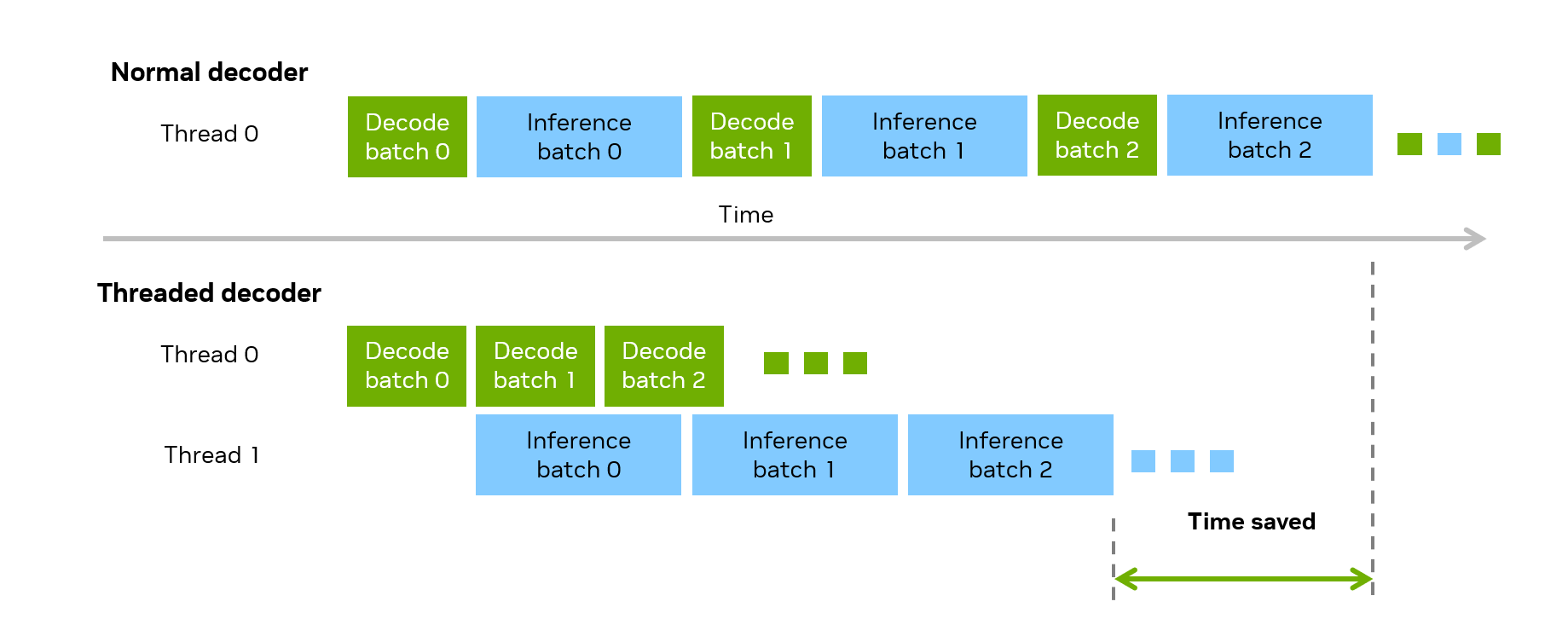
Figure 1 Normal decoder(e.g. Core Decoder) vs. Threaded Decoder Overlapping inference workload with decode#
get_batch_frames#
Retrieves a batch of prefetched decoded frames from the internal buffer.
Description#
The get_batch_frames method retrieves a batch of prefetched decoded frames from the internal buffer. The frames are decoded continuously in the background, providing near-zero latency access.
Syntax#
frames = decoder.get_batch_frames(batch_size)
Method Signature#
get_batch_frames(batch_size: int) -> List[DecodedFrame]
Parameters#
- batch_size (int)
Number of frames to retrieve. Must be <= buffer_size specified in constructor. Use 0 to drain all remaining frames
Returns#
List of DecodedFrame objects. Empty list indicates end of stream or decoder stopped.
Exceptions#
Raises
Exceptionif batch_size exceeds buffer_size
See Also#
get_stream_metadata#
Returns fast stream metadata extracted from container header.
Description#
The get_stream_metadata method provides fast access to video stream metadata extracted from the container header without scanning the entire file.
Syntax#
metadata = decoder.get_stream_metadata()
Method Signature#
get_stream_metadata() -> StreamMetadata
Returns#
StreamMetadata object containing:
codec: Video codec typewidth,height: Frame dimensionsnumFrames: Approximate frame count from container (may be 0 or inaccurate)frameRate: Frame rate as fraction (numerator/denominator)bitRate: Bitrate in bits per secondchromaFormat: Chroma subsampling formatbitDepth: Bit depth per channel
See Also#
get_scanned_stream_metadata#
Returns accurate stream metadata by scanning the entire video stream.
Description#
The get_scanned_stream_metadata method returns accurate stream metadata by scanning the entire video file, providing precise frame counts and additional metadata.
Syntax#
scanned_metadata = decoder.get_scanned_stream_metadata()
Method Signature#
get_scanned_stream_metadata() -> ScannedStreamMetadata
Returns#
ScannedStreamMetadata object with accurate frame count and additional metadata collected during stream scan.
Exceptions#
Raises
Exceptionif decoder was created withneed_scanned_stream_metadata=False
See Also#
reconfigure_decoder#
Reconfigures the decoder to process a new video source.
Description#
The reconfigure_decoder method reconfigures the decoder to process a new video source, efficiently reusing the decoder instance and benefiting from internal decoder caching.
Syntax#
decoder.reconfigure_decoder(new_source)
Method Signature#
reconfigure_decoder(new_source: str) -> None
Parameters#
- new_source (str)
Path to new encoded video file
See Also#
len#
Returns the total number of frames in the video stream.
Description#
The __len__ method enables Python’s built-in len() function to work with ThreadedDecoder objects, returning the total number of frames in the video.
Syntax#
total_frames = len(decoder)
Method Signature#
__len__() -> int
Returns#
Integer frame count. Uses scanned metadata if available (need_scanned_stream_metadata=True), otherwise uses container metadata (may be 0 or inaccurate).
See Also#
Core Decoder#
This section describes the core APIs for low-level demuxing and decoding of videos.
Demuxer#
CreateDemuxer Function#
Function for creating a file-based demuxer.
Syntax#
CreateDemuxer(filename: str) -> Demuxer
Description#
Creates a Demuxer instance for parsing video container files and extracting encoded packets.
Parameters#
- filename
Path to the video file to demux.
Returns#
Demuxer object for the specified file.
Demuxer Class#
Video demuxer for extracting encoded packets from container files.
Overview#
The Demuxer class parses video container formats (MP4, MKV, AVI) and extracts encoded video packets for decoding. Create a demuxer using the CreateDemuxer function.
Methods#
Method |
Description |
|---|---|
Returns the NVIDIA codec identifier for the video stream |
|
Returns the chroma subsampling format (e.g., YUV420) |
|
Returns the bit depth per color component (8, 10, or 12) |
|
Returns the frame rate in frames per second |
|
Width() |
Returns the video width in pixels |
Height() |
Returns the video height in pixels |
ColorSpace() |
Returns the color space (BT_601, BT_709, UNSPEC) |
ColorRange() |
Returns the color range (MPEG, JPEG, UDEF) |
Seek(timestamp) |
Seeks to the nearest keyframe before the specified timestamp |
Iterator Protocol#
The Demuxer implements the Python iterator protocol. Use a for loop to iterate over packets:
for packet in demuxer:
    # packet is a PacketData object
    for frame in decoder.Decode(packet):
        process_frame(frame)
See Demuxer Iterator for details.
GetNvCodecId#
Returns the NVIDIA codec identifier for the video stream.
Syntax#
demuxer.GetNvCodecId() -> cudaVideoCodec
Description#
Returns the codec identifier corresponding to the NVDEC hardware decoder. This value is used when creating a decoder with CreateDecoder().
Returns#
cudaVideoCodec - The NVIDIA codec identifier (e.g., H264, HEVC, VP9, AV1).
ChromaFormat#
Returns the chroma subsampling format of the video stream.
Syntax#
demuxer.ChromaFormat() -> cudaVideoChromaFormat
Description#
Returns the chroma subsampling format of the video stream. Common formats include YUV420 (4:2:0), YUV422 (4:2:2), and YUV444 (4:4:4).
This information can be used to query decoder capabilities with GetDecoderCaps().
Returns#
cudaVideoChromaFormat - The chroma format of the video stream.
Demuxer.BitDepth#
Returns the bit depth per color component of the video stream.
Syntax#
BitDepth() -> int
Description#
Returns the bit depth per color component. Common values are 8 (SDR content) and 10 (HDR content).
This information can be used to query decoder capabilities with GetDecoderCaps().
Returns#
int - Bit depth per color component (typically 8, 10, or 12).
FrameRate#
Returns the frame rate of the video stream.
Syntax#
demuxer.FrameRate() -> float
Description#
Returns the average frame rate of the video stream as a floating-point value. Common values include 23.976, 24.0, 25.0, 29.97, 30.0, 50.0, 59.94, and 60.0 fps.
Returns#
float - Frame rate in frames per second.
Iterator#
Iterate over the demuxer to retrieve video packets.
Syntax#
for packet in demuxer:
    # Process packet
Description#
The Demuxer object implements the Python iterator protocol (__iter__ and __next__). Each iteration extracts a single compressed video packet from the container and yields a PacketData object.
The iteration continues until all packets in the video stream have been extracted.
Yields#
PacketData - A packet containing compressed video data with the following properties:
pts- Presentation timestampdts- Decode timestampduration- Packet durationkey- True if this is a keyframe (I-frame)bsl_data- Bitstream data
Note#
The decoder may return zero, one, or multiple frames per packet due to B-frame reordering.
After iterating through all packets, call
decoder.Flush()to retrieve any buffered frames.
Decoder#
Decoder Class#
Low-level decoder class for advanced video decoding with full parameter control and hardware acceleration.
Description#
The Decoder class (implemented as PyNvDecoder) provides low-level access to NVIDIA hardware-accelerated video decoding using the NVDEC engine. It is created via the CreateDecoder function and provides maximum flexibility for advanced applications requiring fine-grained control over the decoding process.
This class supports multiple video codecs (H.264, HEVC, AV1, VP9, etc.), various output formats (NV12, P016, YUV444, RGB), and advanced features including SEI message extraction, decode statistics, and configurable latency modes.
Syntax#
decoder = CreateDecoder(
    gpuid=0,
    codec=cudaVideoCodec.H264,
    cudacontext=0,
    cudastream=0,
    usedevicememory=True,
    maxwidth=0,
    maxheight=0,
    outputColorType=OutputColorType.NATIVE,
    enableSEIMessage=False,
    bWaitForSessionWarmUp=False,
    latency=DisplayDecodeLatency.DISPLAYDECODELATENCY_NATIVE,
    enableDecodeStats=False
)
Methods#
Decode
Decode(packetData: PacketData) -> List[DecodedFrame]
Decodes bitstream data in the packet into uncompressed frames.
See Decode for detailed documentation.
GetNumDecodedFrame
GetNumDecodedFrame(packetData: PacketData) -> int
Decodes bitstream data and returns the count of decoded frames without retrieving frame data.
- Parameters
packetData(PacketData): Structure containing bitstream data, size, PTS, and decode flags
- Returns
Integer count of decoded frames available for retrieval
GetFrame
GetFrame() -> DecodedFrame
Retrieves a single decoded frame from the internal decoder buffer.
- Returns
DecodedFrame object containing the decoded frame data, timestamp, SEI message, CUDA event, and decode statistics
- Remarks
Call this method in a loop to fetch all available decoded frames after calling Decode().
GetLockedFrame
GetLockedFrame() -> CUdeviceptr
Returns a locked frame buffer that remains valid until explicitly unlocked.
- Returns
CUDA device pointer to the locked frame buffer
- Remarks
Locked frames are protected from being overwritten by subsequent decode calls. Use UnlockFrame() to release the frame buffer when processing is complete.
UnlockFrame
UnlockFrame(pFrame: CUdeviceptr) -> None
Unlocks a previously locked frame buffer, making it available for reuse.
- Parameters
pFrame(CUdeviceptr): Device pointer to the frame buffer to unlock
SetSeekPTS
SetSeekPTS(targetPTS: int64) -> None
Sets the presentation timestamp of the target frame for seeking operations.
- Parameters
targetPTS(int64): Target presentation timestamp for seeking
- Remarks
The decoder can skip decoding frames with PTS less than the seek target, improving seek performance.
setReconfigParams
setReconfigParams(width: int = 0, height: int = 0) -> None
Dynamically reconfigures decoder output resolution.
See setReconfigParams for detailed documentation.
GetWidth
GetWidth() -> int
Returns the width of the decoded frame output.
- Returns
Integer width in pixels (2-byte aligned for NV12/P016/NV16/P216 formats)
GetHeight
GetHeight() -> int
Returns the luma height of the decoded frame output.
- Returns
Integer height in pixels
GetFrameSize
GetFrameSize() -> int
Returns the total size of the decoded frame in bytes.
- Returns
Integer frame size in bytes, calculated based on the pixel format
GetPixelFormat
GetPixelFormat() -> str
Returns the pixel format of the decoded output.
- Returns
String representation of the pixel format (e.g., “NV12”, “P016”, “YUV444”)
SyncOnCUStream
SyncOnCUStream() -> None
Synchronizes the decoder stream, forcing all operations to complete.
- Remarks
Blocks until all decoder post-processing kernels and memory copies finish. Use for explicit synchronization when needed.
GetSessionInitTime
GetSessionInitTime() -> int64
Returns the decoder session initialization time in milliseconds.
- Returns
Integer initialization time in milliseconds
setDecoderSessionID
setDecoderSessionID(sessionID: int) -> None
Sets the decoder session identifier for performance tracking.
- Parameters
sessionID(int): Session identifier
Static Methods#
SetSessionCount
PyNvDecoder.SetSessionCount(numThreads: int) -> None
Sets the expected number of concurrent decoder sessions for performance optimization.
- Parameters
numThreads(int): Number of concurrent decoder sessions
getDecoderSessionOverHead
PyNvDecoder.getDecoderSessionOverHead(sessionID: int) -> int64
Returns the cumulative session overhead (initialization + deinitialization time).
- Parameters
sessionID(int): Session identifier
- Returns
Integer overhead time in milliseconds
DecodedFrame Properties#
The DecodedFrame class represents a decoded video frame with the following properties and methods:
Property/Method |
Type |
Description |
|---|---|---|
timestamp |
int64 |
Presentation timestamp (PTS) of the decoded frame |
format |
Pixel_Format |
Pixel format enumeration (NV12, P016, YUV444, RGB, etc.) |
decoder_stream_event |
CUevent |
CUDA event for synchronization with decoder operations |
decode_stats_ptr |
uint8_t* |
Pointer to decode statistics buffer (if enabled) |
decode_stats_size |
size_t |
Size of decode statistics buffer in bytes |
getPTS() |
int64 |
Returns the presentation timestamp |
getSEIMessage() |
SEI_MESSAGE |
Returns SEI message data (if enabled) |
getRawDecodeStats() |
List[uint8] |
Returns raw decode statistics buffer as byte array |
ParseDecodeStats() |
Dict |
Returns parsed decode statistics: qp_luma, cu_type, motion vectors |
framesize() |
int |
Returns total frame size in bytes |
cuda() |
List[CAIMemoryView] |
Returns CUDA Array Interface memory views |
GetPtrToPlane(planeIdx) |
CUdeviceptr |
Returns device pointer to specified plane index |
shape |
List[int] |
Shape of the frame buffer as array |
strides |
List[int] |
Strides of the frame buffer |
dtype |
str |
Data type of the buffer |
dlpack(stream) |
DLPackTensor |
Exports frame as DLPack tensor for zero-copy interoperability |
dlpack_device() |
Tuple[int, int] |
Returns device type and device ID for DLPack |
CreateDecoder Function#
Function for creating a low-level video decoder with full parameter control.
Syntax#
CreateDecoder(
    gpuid: int,
    codec: CudaVideoCodec,
    cudacontext: int = 0,
    cudastream: int = 0,
    usedevicememory: bool = True,
    outputcolortype: ColorFormat = ColorFormat.NV12,
    latency: DisplayDecodeLatencyType = DisplayDecodeLatencyType.NATIVE,
    maxwidth: int = 0,
    maxheight: int = 0,
    lowlatency: bool = False
) -> Decoder
Description#
Creates a Decoder instance for hardware-accelerated video decoding with full control over decoding parameters. This is the low-level API for advanced applications requiring fine-grained control.
Returns#
Decoder object configured with the specified parameters.
Decode#
Decodes bitstream data in a packet into uncompressed video frames.
Description#
The Decode method is the core low-level decoding operation that processes compressed bitstream data and returns decoded video frames. This method provides fine-grained control over the decoding pipeline and is suitable for custom video processing workflows.
Syntax#
frames = decoder.Decode(packet_data)
Method Signature#
Decode(packetData: PacketData) -> List[DecodedFrame]
Parameters#
- packetData (PacketData)
Structure containing:
bitstream: Compressed bitstream data (bytes)size: Size of bitstream in bytespts: Presentation timestampflags: Decode flags (e.g., end-of-stream)
Returns#
List of DecodedFrame objects containing decoded video frames with associated metadata. May return multiple frames from a single packet due to decoder buffering, or an empty list if frames are still buffered.
See Also#
Decoder.Flush#
Flushes remaining frames from the decoder’s internal buffer after all input packets have been processed.
Description#
The Flush method retrieves any frames that remain in the decoder’s internal buffer after all compressed bitstream packets have been submitted via Decode(). Because the decoder may hold multiple frames internally due to B-frame reordering, calling Flush after the main decode loop is required to ensure all frames are returned. It should be the final step in any Core Decoder pipeline.
Syntax#
frames = decoder.Flush()
Method Signature#
Flush() -> List[DecodedFrame]
Parameters#
None
Returns#
List of DecodedFrame objects containing the remaining buffered frames. Returns an empty list when the decoder buffer is fully drained.
See Also#
Decoder.setReconfigParams#
Dynamically reconfigures decoder output resolution without recreating the decoder instance.
Description#
The setReconfigParams method allows dynamic reconfiguration of the decoder’s output resolution. This is particularly useful for adaptive bitrate streaming (ABR) scenarios where resolution may change mid-stream without needing to destroy and recreate the decoder.
Syntax#
decoder.setReconfigParams(width=1920, height=1080)
Method Signature#
setReconfigParams(width: int = 0, height: int = 0) -> None
Parameters#
Parameter |
Type |
Description |
|---|---|---|
width |
int |
Updated width for decoded output. Default: 0 (no change) |
height |
int |
Updated height for decoded output. Default: 0 (no change) |
See Also#
Decode Statistics API#
Python API for extracting low-level decoding statistics including quantization parameters, coding unit types, and motion vectors.
Description#
The decode statistics API provides access to detailed per-frame and per-macroblock decoding information. This functionality is based on the cuvidGetDecodeStatus() API from the NVDEC Video Decoder API.
Statistics collection must be explicitly enabled when creating a decoder by setting enableDecodeStats=True. Once enabled, each DecodedFrame object provides access to statistics through the ParseDecodeStats() method.
Supported Codecs: H.264 (AVC) and H.265 (HEVC)
Supported Decoders:
SimpleDecoder- UseenableDecodeStats=TrueparameterCreateDecoder(Core Decoder) - UseenableDecodeStats=1parameter
Enabling Statistics Collection#
SimpleDecoder: Use enableDecodeStats=True parameter when creating the decoder.
Core Decoder (CreateDecoder): Use enableDecodeStats=1 parameter when creating the decoder.
DecodedFrame Statistics Properties#
When statistics collection is enabled, DecodedFrame objects expose the following properties:
Property |
Type |
Description |
|---|---|---|
decode_stats_ptr |
uint8_t* |
Pointer to raw decode statistics buffer |
decode_stats_size |
size_t |
Size of decode statistics buffer in bytes. Check if > 0 before parsing |
ParseDecodeStats Method#
Signature: ParseDecodeStats() -> Dict[str, List]
Description:
Parses the raw decode statistics buffer and returns a dictionary containing per-macroblock statistics. This method processes the NVDEC decode status data and extracts quantization parameters, coding unit types, and motion vectors.
Returns:
A dictionary with the following keys:
Key |
Type |
Description |
|---|---|---|
qp_luma |
List[int] |
Luma quantization parameter for each macroblock. Range: 0-51 for H.264/HEVC. Higher values = more compression, potentially lower quality |
cu_type |
List[int] |
Coding unit type for each macroblock. Values: 0=INTRA, 1=INTER, 2=SKIP, 3=PCM, 7=INVALID |
mv0_x |
List[int] |
X component of primary motion vector (L0 reference list) in quarter-pixel units |
mv0_y |
List[int] |
Y component of primary motion vector (L0 reference list) in quarter-pixel units |
mv1_x |
List[int] |
X component of secondary motion vector (L1 reference list, B-frames only) |
mv1_y |
List[int] |
Y component of secondary motion vector (L1 reference list, B-frames only) |
Exceptions:
Raises
Exceptionif statistics collection was not enabledRaises
Exceptionif parse operation fails
getRawDecodeStats Method#
Signature: getRawDecodeStats() -> List[uint8]
Description:
Returns the raw decode statistics buffer as a byte array. Use this for custom parsing or binary export of statistics data.
Returns:
List of unsigned 8-bit integers containing the raw statistics buffer.
Coding Unit Type Constants#
The cu_type field contains values indicating the prediction mode for each macroblock:
Value |
Name |
Description |
|---|---|---|
0 |
INTRA |
Spatial prediction from current frame only. High in I-frames and at scene changes |
1 |
INTER |
Temporal prediction using motion compensation. Most common in P/B frames |
2 |
SKIP |
Block copied from reference without residual. Efficient for static regions |
3 |
PCM |
Pulse Code Modulation - raw uncompressed values. Rare |
7 |
INVALID |
Invalid or undefined block type |