

Video Analytics API#
The Video Analytics API microservice is built using Node.js with Express.js as the web application framework. The service exposes multiple REST API endpoints.
These endpoints enable you to: - Retrieve events and alerts - Calculate metrics - Access tracked objects across camera feeds - Obtain behavior clusters - Check the timestamp of the most recent data transmission
Additionally, the API supports configuration management through endpoints for inserting and retrieving configuration data.
Overview#
The architecture of the API can be explained using the following block diagram.
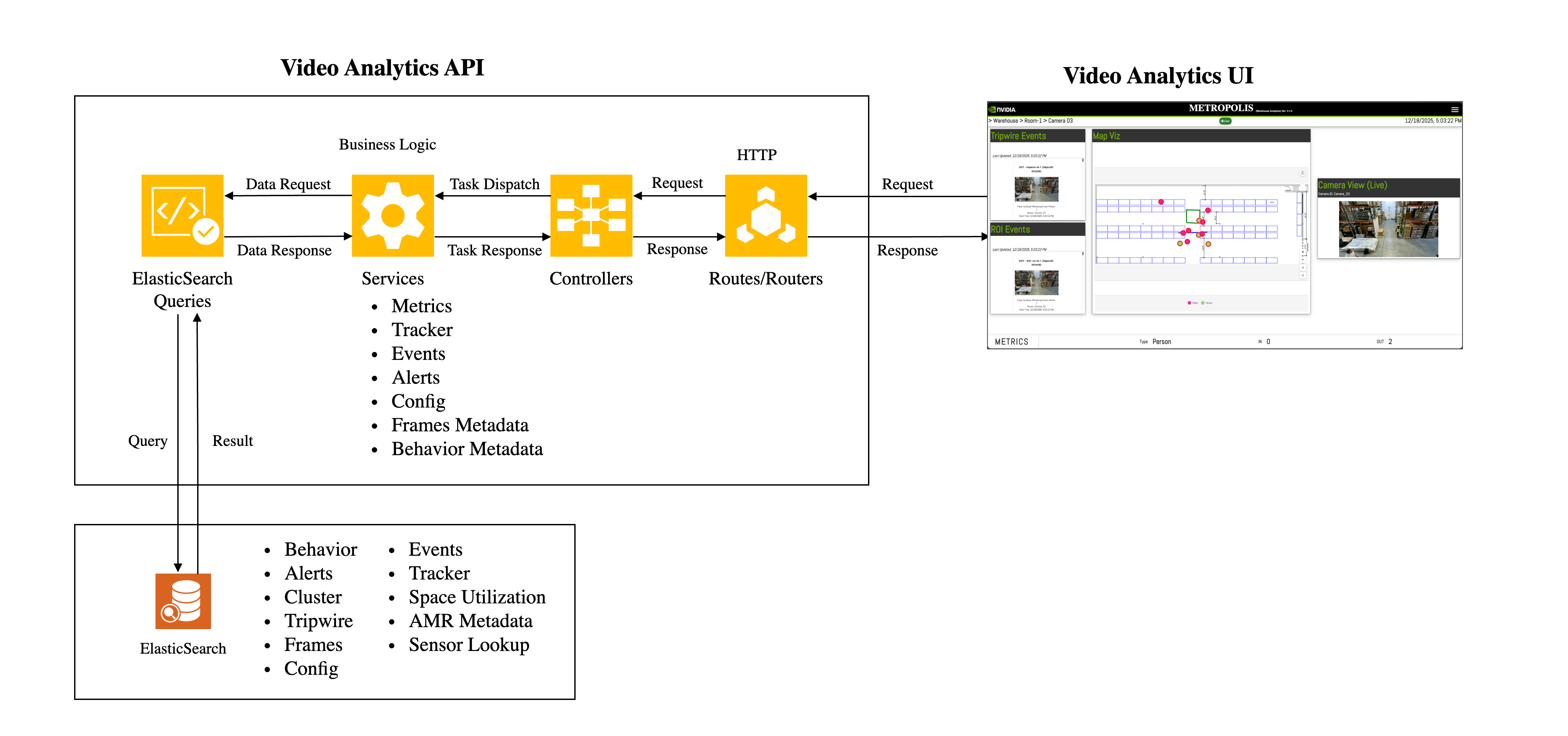
The data sent by sensor processing module is processed in streaming pipelines to create behavior, track objects across cameras and detect event/anomalies. The processed data is inserted into Elasticsearch. Video Analytics API comprises of REST API endpoints which queries Elasticsearch to obtain relevant data based on the input of client requests. To obtain real time data, certain endpoints use Kafka as their data source. Kafka is also used to handle notification related messages.
The response is aggregated (if required) and formatted appropriately before responding to clients.
Note
Kafka is optional. If Kafka is not configured (i.e., "brokers": null) and a request is made to an API endpoint which uses it, an appropriate error message will be returned as part of the response.
You can create a client with the programming language of your choice to connect with the HTTP endpoints. Python client examples are provided in Jupyter lab which is made available in docker-compose and K8s deployments.
Configurations#
API Bootstrap Config#
The Utils.Config class of the web-api-core library initializes the default bootstrap config. You can override this config by passing either the entire config or a minimal config. The API reads the config while starting the server. It remains constant as long as the server runs. If anything needs to be modified then the server must be restarted.
The bootstrap config’s attributes are as follows:
{
    "server":{
        "port": "<Server port (e.g., 8081)>",
        "configs":[
            {
                "name": "postBodySizeLimit",
                "value": "<Body size for post requests (e.g., 50mb)>"
            },
            {
                "name": "amrRetentionInSec",
                "value": "<Retention of AMR data in seconds (e.g., 3)>"
            },
            {
                "name": "inSimulationMode",
                "value": "<Boolean value to indicate if the server is running in simulation mode>"
            }
        ]
    },
    "elasticsearch":{
        "node": "<Elasticsearch URL (e.g., http://localhost:9200)>",
        "indexPrefix": "<Index prefix (e.g., mdx-)>",
        "rawIndex": "<Raw index pattern (e.g., mdx-raw-*)>"
    },
    "kafka":{
        "brokers": "<List of kafka brokers or (null or empty array) - if it is not applicable.>"
    }
}
Note
When using Redis as the message broker instead of Kafka, set "brokers": null.
Calibration Config#
Calibration file is generated either by the Calibration Toolkit or by Omniverse’s Calibration tool. See here for more details.
Library#
Overview#
The web-api-core library consists of four namespaces.
Metrics
Errors
Services
Utils
Each namespace consists of classes which helps to either compute metrics, get records from database or provide utilities with helper functions.
Metrics#
The Metrics namespace consists of following classes:
Behavior: Used to compute metrics related to behavior.TripwireEvent: Used to find the total number of events (eg: effective and actual tripwire crossing events) that have occurred. It is also used to compute Tripwire Histogram.LastProcessedTimestamp: Used to find the timestamp of last processed object.Occupancy: Used to find current occupancy of a place based on tripwire events. It also enables to reset occupancy. It helps in computing the average occupancy/histogram for objects in FOV and ROI.SpaceUtilization: Used to compute space utilization metrics like histogram.
Errors#
The Errors namespace consists of following classes:
BadRequestError: Error to be used when the request sent by client is a Bad Request.IndexNotFoundError: Error to be used when Elasticsearch index is not found.InternalServerError: Error to be used when there is a server side error.InvalidInputError: Error to be used when the input is not valid.ResourceNotFoundError: Error to be used when a resource is not found.ServiceUnavailableError: Error to be used when a service is not available.
Services#
The Services namespace consists of following classes:
Alerts: Used to fetch alerts and indicate if a place or a sensor has severe alerts. Also supports fetching VLM-verified alerts and severe alerts detection.Behavior: Used to fetch behavior, a behavior’s timestamp or to calculate a behavior’s start and end pts.Calibration: Used to upload/insert, update or delete sensors in calibration. It is also used to produce/consumer Kafka messages. It can also be used to upload/retrieve calibration related images.Clustering: Used to obtain behavior cluster. It is also used to add cluster labels.ConfigManager: Used to update the configs of other microservices. It is also used to obtain the current config of a microservice.Events: Used to fetch events data (eg: tripwire).Frames: Used to fetch clusters of objects which are in proximity of each other. Also used to fetch raw, enhanced and bev frames. It is also used to fetch frame based alerts. It is used to calculate pts and also fetch object with max confidence.Incidents: Used to fetch incidents and indicate if a place or a sensor has severe incidents. Also supports fetching VLM-verified incidents and severe incidents detection.MTMC: Used to obtain unique object and unique object counts. It can also be used for Query-by-Example (QBE) and to obtain locations of matched behaviors.NotificationManager: Used to produce and consume notification messages.Place: Used to build aggregation queries for places, including sensor ID aggregation for leaf places and place successor aggregation for non-leaf places.RoadNetwork: Used to upload and retrieve road network config.Sensor: Used to lookup which sensors are overlooking a coordinate of a place.UsdAssets: Used to upload and retrieve USD assets config.
Utils#
The Utils namespace consists of following classes:
Config: Provides the utility which initializes server config with default values. It also reads the bootstrap config provided by user which is used to override config values.Database: Wrapper class for various databases.Elasticsearch: Utilities related to Elasticsearch are provided in this class.FileUploadHandler: Provides helper functions related to file uploads.Histogram: Provides helper functions related to histogram.Kafka: Utilities related to Kafka are provided in this class.MessageBroker: Wrapper class for various message brokers.Utils: Provides helper functions used by Video Analytics API.Validator: Utilities which help to validate inputs are provided in this class.
API#
Documentation#
Open API Specification can be found here.
The following sections describe the various API endpoints along with their respective sequence diagrams.
Frame Based Alerts#
Library Usage#
The web-api-core package has function which helps to retrieve frame based alerts.
For example:
const mdx = require("@nvidia-mdx/web-api-core");
const elastic = new mdx.Utils.Elasticsearch({node: "elasticsearch-url"},databaseConfigMap);
let input = {sensorId:"abc",fromTimestamp: "2025-01-10T11:10:00.000Z", toTimestamp: "2025-01-10T11:12:00.000Z"}
let framesMetadata = new mdx.Services.Frames();
let alerts = await framesMetadata.getAlerts(elastic,input);
In the above example, getAlerts is an async function which returns confined area, restricted area and proximity alerts.
Note
The confined area alert occurs when one of the confined object types moves out of the ROI. Similarly, the restricted area alert occurs when one of the restricted object types enters the ROI. The proximity alert occurs when one object of type ‘x’ is closer to another object of type ‘y’ than the defined proximity threshold config.
REST API#
Sequence Diagram
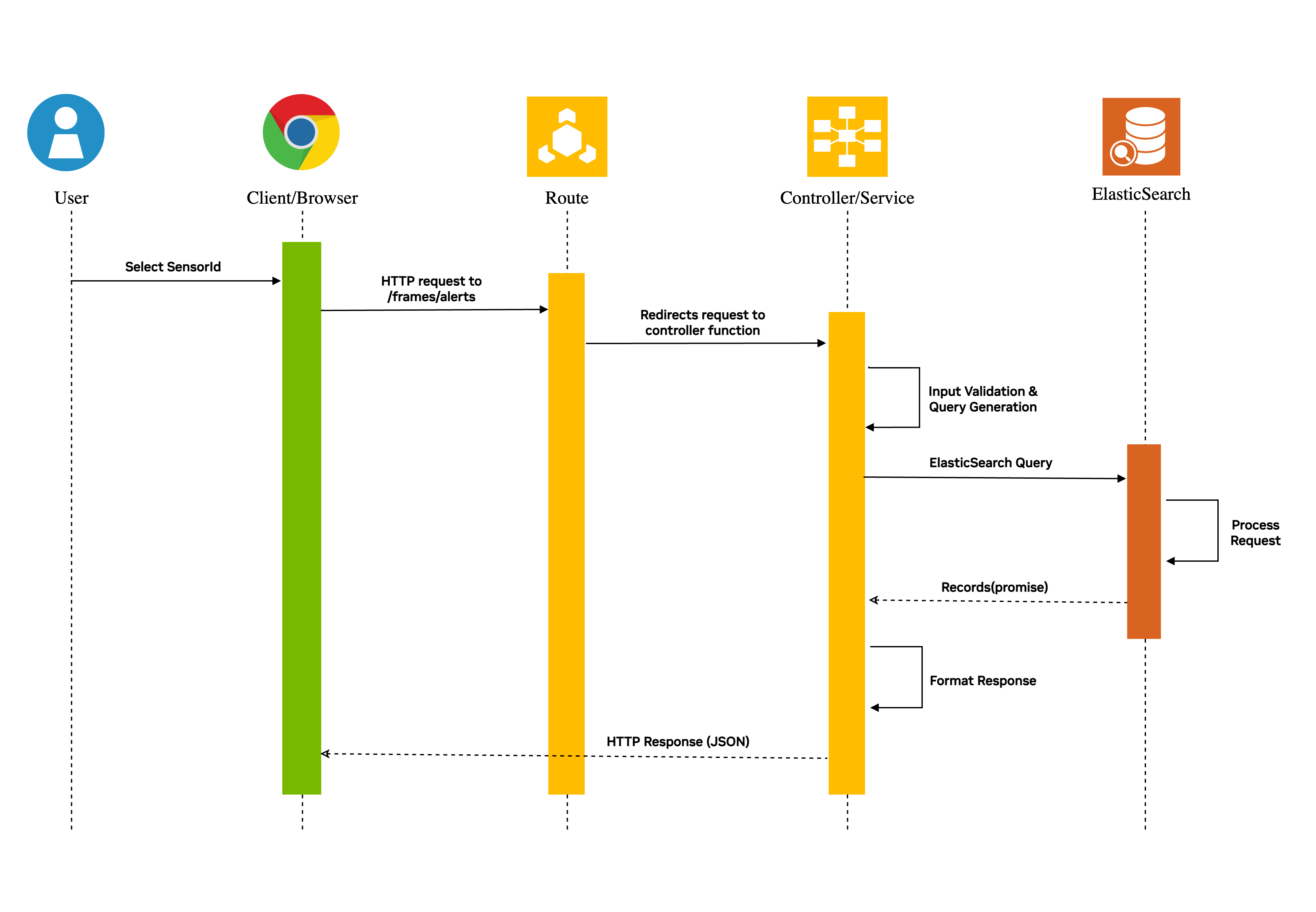
The http request sent to the /frames/alerts route is redirected to the controller function where the query input is validated and an Elasticsearch query object is generated. The Elasticsearch is queried as a promise (async call) which then responds with results. The results are formatted appropriately and sent back to the client.
Multi Camera Tracking: Unique Objects#
Library Usage#
The web-api-core package has function which helps to retrieve unique objects tracked across sensors.
For example:
const mdx = require("@nvidia-mdx/web-api-core");
const elastic = new mdx.Utils.Elasticsearch({node: "elasticsearch-url"},databaseConfigMap);
let input = {sensorIds:["abc","def"],fromTimestamp: "2025-01-10T11:10:05.000Z", toTimestamp: "2025-01-10T11:10:10.000Z"}
let mtmc = new mdx.Services.MTMC();
let uniqueObjects = await mtmc.getUniqueObjects(elastic, input);
In the above example, getUniqueObjects is an async function which returns unique objects which were identified by MTMC microservice.
REST API#
Sequence Diagram
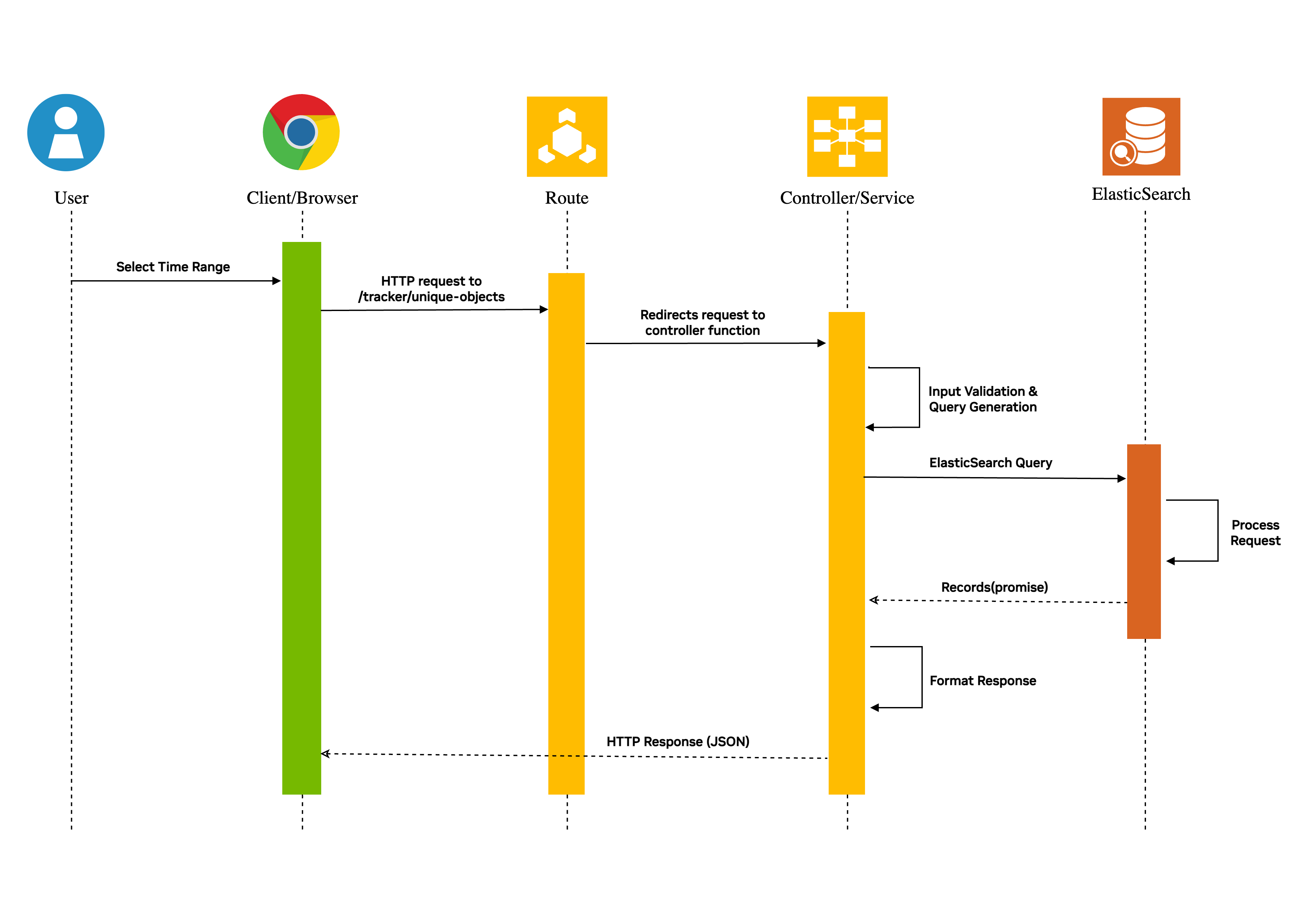
The http request sent to the /tracker/unique-objects route is redirected to the controller function where the query input is validated and an Elasticsearch query object is generated. The Elasticsearch is queried as a promise (async call) which then responds with results. The results are formatted appropriately and sent back to the client.
Note
The query parameter ‘place’ sent as part of request is a hierarchy of places. For example, a room of a building located in a particular city will be in the following format: city=abc/building=pqr/room=xyz.
Tripwire Events#
Library Usage#
The web-api-core package enables the user to retrieve tripwire events. For example:
const mdx = require("@nvidia-mdx/web-api-core");
const elastic = new mdx.Utils.Elasticsearch({node: "elasticsearch-url"},databaseConfigMap);
let input = {sensorId:"abc",fromTimestamp: "2025-01-10T11:10:05.000Z", toTimestamp: "2025-01-10T11:10:10.000Z"}
let tripwireMetadata = new mdx.Services.Events();
let tripwireEvents = await tripwireMetadata.getTripwireEvents(elastic,input);
In the above example getTripwireEvents is an async function which returns tripwire events.
REST API#
Sequence Diagram
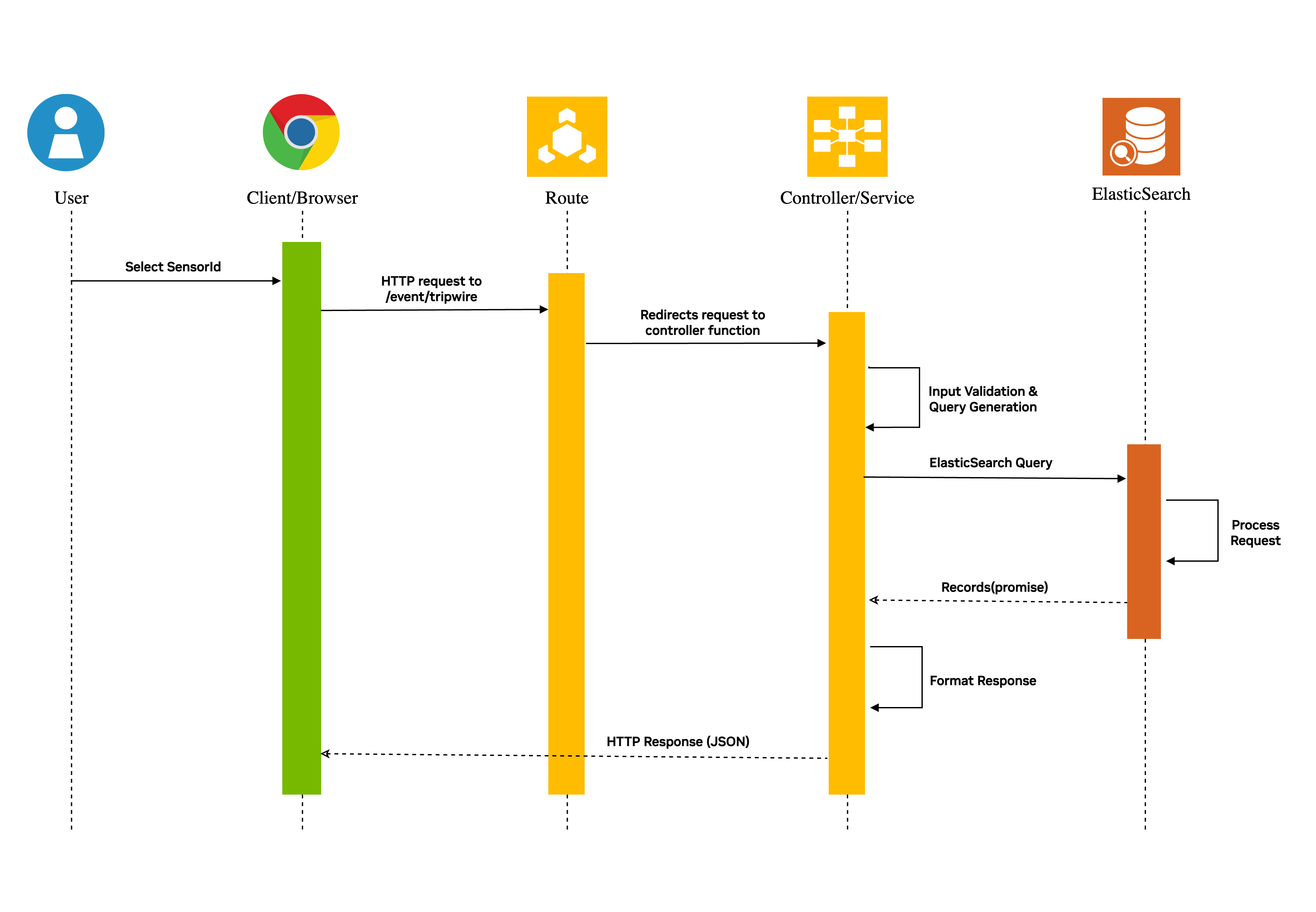
The http request sent to the /events/tripwire route is redirected to the controller function where the query input is validated and an Elasticsearch query object is generated. The Elasticsearch is queried as a promise (async call) which then responds with results. The results are formatted appropriately and sent back to the client.
Note
The query parameter ‘place’ sent as part of request is a hierarchy of places. For example, a room of a building located in a particular city will be in the following format: city=abc/building=pqr/room=xyz.
Metrics: Tripwire Counts#
Library Usage#
The web-api-core package has helpful functions which can be used to calculate Tripwire related metrics.
For example:
const mdx = require("@nvidia-mdx/web-api-core");
const elastic = new mdx.Utils.Elasticsearch({node: "elasticsearch-url"},databaseConfigMap);
let input = {sensorId:"abc",fromTimestamp: "2025-01-10T11:10:05.000Z", toTimestamp: "2025-01-10T11:10:10.000Z"}
let tripwireMetricObject = new mdx.Metrics.TripwireEvent();
let tripwireCounts = await tripwireMetricObject.getTripwireCounts(elastic,input);
In the above example, getTripwireCounts is being used to get tripwire counts for each tripwire of sensor abc. It is also used to get effective tripwire counts for each tripwire of sensor abc.
Effective counts are used to count only the effective event generated by an object. An effective tripwire event can be defined with the following example: Suppose an object generates tripwire events in the following sequence: IN --> OUT --> IN, then the effective count in this case considers only the final IN event. This is helpful to handle loitering behavior of an object.
REST API#
The http request sent to the /metrics/tripwire/counts route is redirected to the controller function where the query input is validated and an Elasticsearch query object is generated.
The Elasticsearch is queried as a promise (async call) to calculate detailed count and effective count for each tripwire of the sensor.
The API receives the result for both the queries which is formatted appropriately before sending the response to the client.
Example:
A client sends a request to obtain tripwire counts of sensorId abc which has 2 tripwires.
Let’s assume the query was sent for the time period t1 - t2 when tripwire-id-1 had IN, OUT and IN events produced by the same object and tripwire-id-2 had a single IN event.
Then the response in this scenario should look as follows:
{
    "tripwireMetrics":[
        {
            "id": "tripwire-id-1",
            "events":[
                {
                    "type": "IN",
                    "count": 1,
                    "actualCount":2,
                    "objectType": "Person"
                },
                {
                    "type": "OUT",
                    "count": 0,
                    "actualCount":1,
                    "objectType": "Person"
                }
            ]
        },
        {
            "id": "tripwire-id-2",
            "events":[
                {
                    "type": "IN",
                    "count": 1,
                    "actualCount": 1,
                    "objectType": "Person"
                },
                {
                    "type": "OUT",
                    "count": 0,
                    "actualCount": 0,
                    "objectType": "Person"
                }
            ]
        }
    ],
    "aggregatedMetrics":{
        "events": [
            {
                "type": "IN",
                "count": 2,
                "actualCount": 3,
                "objectType": "Person"
            },
            {
                "type": "OUT",
                "count": 0,
                "actualCount": 1,
                "objectType": "Person"
            }
        ]
    }
}
The count attribute in the above response is the effective count of events.
Note
The query parameter ‘place’ sent as part of request is a hierarchy of places. For example, a room of a building located in a particular city will be in the following format: city=abc/building=pqr/room=xyz.
Other API Endpoints#
The endpoints listed over here have very similar sequence diagrams as tripwire count and tripwire events endpoints.
Average Speed: This endpoint is used to calculate the average speed of behaviors in a given time range for a sensor or a place.
Flowrate: This endpoint is used to calculate the flowrate of objects in a given time range for a sensor or a place.
Average Speed with Flowrate: This endpoint is used to calculate the average speed and flowrate of objects in a given time range for a sensor or a place.
Average Speed with Travel Time: This endpoint is used to calculate the average speed and travel time of objects in a given time range for a corridor (place).
Last Processed Timestamp: This endpoint is used to find the latest timestamp of a place, successors of a place in a hierarchy or of a particular sensor.
Tripwire Histogram: This endpoint is used to create histogram for tripwire events. Each bucket of histogram will have effective counts and actual counts.
Tripwire Based Occupancy: This endpoint is used to compute occupancy of a place based on tripwire events.
Occupancy Reset: This endpoint is used to reset the occupancy of a place.
FOV Occupancy: This endpoint is used to calculate the occupancy of a sensor’s FOV by different objects during a given time period.
FOV Histogram: This endpoint is used to create histogram based on the occupancy of a sensor’s FOV by different objects.
ROI Occupancy: This endpoint is used to calculate the occupancy of sensor’s ROIs by different objects during a given time period.
ROI Histogram: This endpoint is used to create histogram based on the occupancy of sensor’s ROIs by different objects.
Occupancy based on Mutually Exclusive ROIs: This endpoint is used to calculate occupancy of a place based on mutually exclusive ROIs.
Occupancy based on RTLS Results: This endpoint returns occupancy of a place based on object count determined by RTLS and AMR data-points.
Histogram of Occupancy based on RTLS Results: This endpoint returns histogram of occupancy of a place based on object count determined by RTLS and AMR data-points.
Space Utilization Histogram: This endpoint returns histogram of various space utilization metrics of the rois present in the scene.
Road Network Segment Speed: This endpoint returns road segment speed of a place.
Behavior Clustering: This endpoint is used to retrieve sampled behaviors of each cluster belonging to a sensor for a given time range.
Add Cluster Labels: This endpoint is used to insert labels for a cluster.
Frames Metadata: This endpoint is used to retrieve raw frame data.
Enhanced Frames Metadata: This endpoint is used to retrieve enhanced frame data.
Bev Frames Metadata: This endpoint is used to retrieve bev frame data.
Frame Pts: This endpoint is used to get the current presentation time of a video source. This is mainly used for NVStreamer sources.
Proximity Detection: This endpoint is used to obtain clusters of objects that are in proximity with each other.
High Confidence Objects: This endpoint is used to obtain objects detected in a particular sensor with high confidence.
Behavior Metadata: This endpoint is used to retrieve behavior data.
Behavior Pts: This endpoint is used to get a behavior’s start and end presentation time based on the video source. This is mainly used for NVStreamer sources.
Alerts: This endpoint is used to retrieve behavior based alerts data.
Severe Alerts: This endpoint is used to indicate if a place or a sensor has severe alerts.
AMR Events: This endpoint is used to retrieve AMR events.
ROI Events: This endpoint is used to retrieve ROI events like ENTRY and EXIT.
Unique Object Count: This endpoint is used to get unique object count across sensors.
Unique Object Count With Locations: This endpoint is used to get unique object count of different object types along with their locations.
Behavior Locations: This endpoint is used to get locations of behaviors that get matched to a global object.
Last Record of Tracker: This endpoint is used to retrieve the last record of RTLS or AMR data source.
Upload Config Files: This endpoint is used to upload config files like calibration.json, roadNetwork.json, usdAssets.json.
Update Config: This endpoint is used to dynamically update existing configurations of microservices. If a configuration doesn’t exist in database then it is fetched from that microservice.
Get Calibration Config: This endpoint is used to get config like calibration from database.
Upsert Calibration Config: This endpoint is used to insert new sensors into calibration config. It can also be used to update an existing sensor in the calibration config.
Delete Sensor Calibration: This endpoint is used to delete sensors present in calibration config.
Get Road Network Config: This endpoint is used to retrieve road network config from database.
Get USD Assets Config: This endpoint is used to retrieve USD assets config from database.
Upload Calibration Images: This endpoint is used to upload calibration related images. The upload consists of images and imageMetadata JSON file.
Get Calibration Image: This endpoint is used to retrieve a calibration related image.
Get Metadata of Calibration Images: This endpoint is used to retrieve metadata of calibration related images.
Delete Calibration Images: This endpoint is used to delete calibration related images.
Incidents: This endpoint is used to retrieve incidents data.
Severe Incidents: This endpoint is used to indicate whether a place or a sensor has severe incidents.
Sensor Lookup: This endpoint is used to lookup which sensors are overlooking a coordinate of a place.
Health Check: This endpoint responds with
{ "isAlive": true }if the Video Analytics API server has started successfully.