

3. MLIR-TensorRT Tutorial#
Step 1: Introduction#
This tutorial demonstrates the basic workflow for compiling an example JAX function to a TensorRT engine for the NVIDIA Aerial Framework runtime. We will use NVIDIA’s MLIR-TensorRT and TensorRT compilers.
Procedure:
Define a JIT-able JAX function.
Export the function to StableHLO.
Compile the function using MLIR-TensorRT and TensorRT.
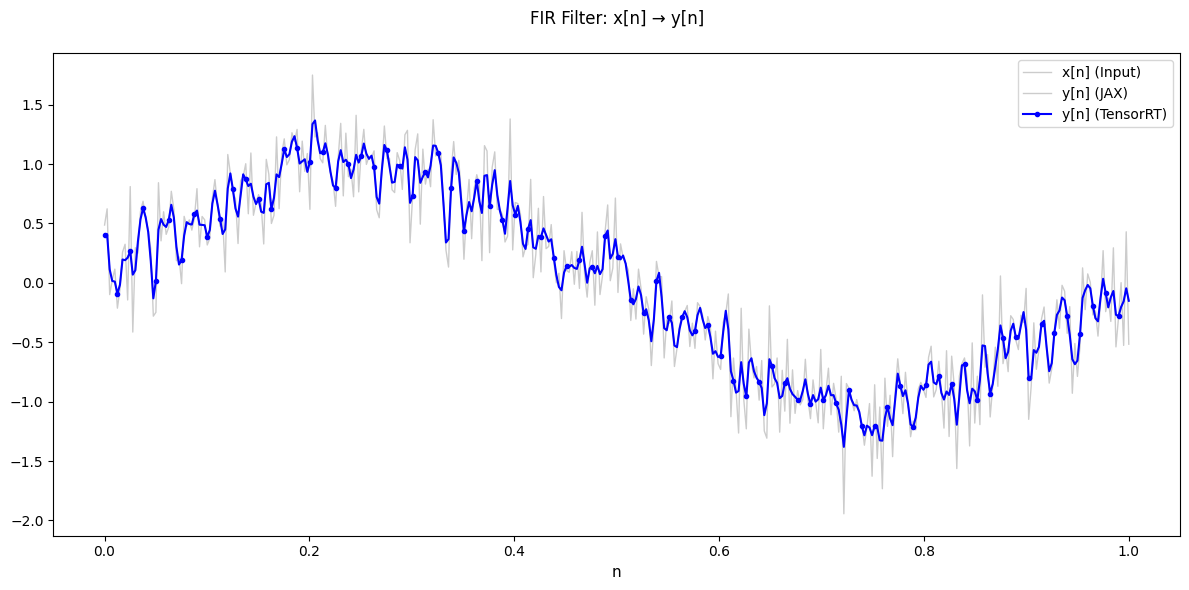
Visualize results showing JAX and TensorRT produce identical outputs
Time: ~30 minutes
Step 2: Prerequisites and Environment Setup#
This tutorial requires:
Running inside the Aerial Framework Docker container
Completion of the Getting Started tutorial
Step 3: Configure CMake and Build Required Targets#
Python Environment Setup: This tutorial requires the RAN Python virtual environment with MLIR-TensorRT support. First time setup may take several minutes to download and install the required Python packages.
[ ]:
import os
import sys

from tutorial_utils import (
    build_cmake_target,
    configure_cmake,
    get_project_root,
    is_running_in_docker,
    load_ran_env_file,
    require_mlir_trt,
)

# Ensure running inside Docker container
if not is_running_in_docker():
    msg = (
        "This notebook must be run inside the Docker container. "
        "Please refer to the Getting Started tutorial for instructions."
    )
    raise RuntimeError(msg)

PROJECT_ROOT = get_project_root()
RAN_PY_PATH = PROJECT_ROOT / "ran" / "py"
PRESET = "gcc-release"
RAN_BUILD_DIR = PROJECT_ROOT / "out" / "build" / PRESET

# Configure CMake if needed
configure_cmake(RAN_BUILD_DIR, PRESET)

# Build required targets (first time may take a few minutes)
try:
    build_cmake_target(RAN_BUILD_DIR, ["py_ran_setup", "sync_env_python"])
except RuntimeError as e:
    print(f"\n✗ Build failed: {e}\n")
    print("To view full build output and fix issues, enter the container:")
    print("  docker exec -it aerial-framework-base-$USER bash -l")
    print(f"  cmake --build out/build/{PRESET} --target py_ran_setup sync_env_python")
    sys.exit(1)

# Load environment variables from .env.python (includes MLIR_TRT_COMPILER_PATH)
load_ran_env_file()

# Check if MLIR-TensorRT is enabled
require_mlir_trt()

print(f"\nBuild directory: {RAN_BUILD_DIR}")
print("✅ Step 3 complete: CMake configured and targets built")
Building py_ran_setup, sync_env_python...
✓ py_ran_setup, sync_env_python ready

Build directory: /opt/nvidia/aerial-framework/out/build/gcc-release
✅ Step 3 complete: CMake configured and targets built
Step 4: Import Dependencies#
Import the required packages from the RAN Python environment. These were installed when the docs environment was set up via CMake.
[ ]:
# TensorRT enables lazy loading of CUDA modules (improves loading time)
os.environ["CUDA_MODULE_LOADING"] = "LAZY"

# Available JAX backends are: cpu, cuda, and mlir_tensorrt
os.environ["JAX_PLATFORMS"] = "cuda"

# Limit JAX GPU memory pre-allocation to prevent OOM issues in CI
os.environ["XLA_PYTHON_CLIENT_MEM_FRACTION"] = "0.05"

# Third-party imports
import tempfile
from pathlib import Path

import jax
import numpy as np
from jax import export, numpy as jnp
from matplotlib import pyplot as plt

# Aerial Framework imports
from ran import mlir_trt_wrapper as mtw

# Set up TensorRT engine directory in a temporary location
build_dir = Path(tempfile.mkdtemp(prefix="mlir_trt_tutorial_"))
os.environ["RAN_TRT_ENGINE_PATH"] = str(build_dir)
print(f"Temporary build directory: {build_dir}")

print("✅ Step 4 complete: All imports successful!")
Temporary build directory: /tmp/mlir_trt_tutorial_xrcvexwx
✅ Step 4 complete: All imports successful!
Step 5: JAX Function#
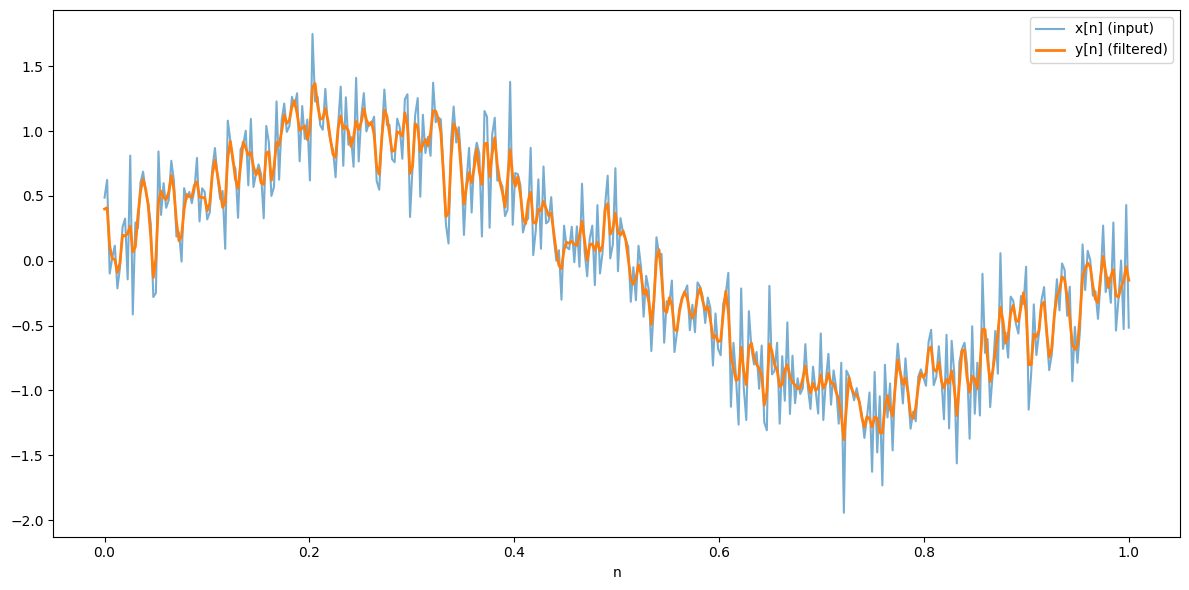
Here we define the JAX function that we want to compile using TensorRT. We will use a simple finite impulse response (FIR) filter as an example. The function needs to be JIT-able and exportable to StableHLO, see https://docs.jax.dev/en/latest/jit-compilation.html for more details.
[ ]:
# FIR filter coefficients
KERNEL_COEFFS = jnp.array([0.25, 0.5, 0.25])

# Flip the kernel coefficients for the convolution operation,
# and reshape to (K, 1, 1) for the convolution operation.
KERNEL = KERNEL_COEFFS[::-1][:, None, None]


def my_func(x: jnp.ndarray) -> jnp.ndarray:
    """Finite impulse response (FIR) filter."""
    y = jax.lax.conv_general_dilated(
        lhs=x[None, :, None],  # input, shape (1, T, 1)
        rhs=KERNEL,  # kernel, shape (K, 1, 1)
        window_strides=(1,),
        padding="SAME",
        lhs_dilation=None,
        rhs_dilation=None,
        dimension_numbers=("NWC", "WIO", "NWC"),
    )
    return y[0, :, 0]


# Test the FIR filter.
N = 400
n = jnp.linspace(0.0, 1.0, N)

key = jax.random.key(0)
x = jnp.sin(2 * jnp.pi * n) + 0.3 * jax.random.normal(key, (N,))
y = my_func(x)

plt.figure(figsize=(12, 6))
plt.plot(n, x, label="x[n] (input)", alpha=0.6)
plt.plot(n, y, label="y[n] (filtered)", linewidth=2)
plt.xlabel("n")
plt.legend()
plt.tight_layout()
plt.show()
print("✅ Step 5 complete: FIR filter defined and plotted.")
✅ Step 5 complete: FIR filter defined and plotted.
Step 6: Export to StableHLO#
Export the FIR filter to StableHLO IR. The following function is used to prettyprint the StableHLO IR.
[ ]:
from jax._src.interpreters import mlir as jax_mlir
from jax._src.lib.mlir import ir


def _get_stablehlo_asm(module_str):
    with jax_mlir.make_ir_context():
        stablehlo_module = ir.Module.parse(module_str, context=jax_mlir.make_ir_context())
        return stablehlo_module.operation.get_asm(large_elements_limit=20)
[ ]:
# JIT compile the function
jit_my_func = jax.jit(my_func)

# Export to StableHLO
exported = export.export(jit_my_func)(x)

# Get the StableHLO MLIR module
stablehlo_mlir = exported.mlir_module()

print("StableHLO MLIR Representation:")
print("=" * 80)
print(_get_stablehlo_asm(stablehlo_mlir))

# Save the StableHLO MLIR to a file for inspection
stablehlo_file = build_dir / "stablehlo_mlir.mlir"
with open(stablehlo_file, "w") as f:
    f.write(stablehlo_mlir)

print(f"✅ Step 6 complete: Exported StableHLO MLIR to {stablehlo_file}")
StableHLO MLIR Representation:
================================================================================
module @jit_my_func attributes {jax.uses_shape_polymorphism = false, mhlo.num_partitions = 1 : i32, mhlo.num_replicas = 1 : i32} {
  func.func public @main(%arg0: tensor<400xf32>) -> (tensor<400xf32> {jax.result_info = "result"}) {
    %cst = stablehlo.constant dense<[[[2.500000e-01]], [[5.000000e-01]], [[2.500000e-01]]]> : tensor<3x1x1xf32>
    %0 = stablehlo.broadcast_in_dim %arg0, dims = [1] : (tensor<400xf32>) -> tensor<1x400x1xf32>
    %1 = stablehlo.convolution(%0, %cst) dim_numbers = [b, 0, f]x[0, i, o]->[b, 0, f], window = {pad = [[1, 1]]} {batch_group_count = 1 : i64, feature_group_count = 1 : i64} : (tensor<1x400x1xf32>, tensor<3x1x1xf32>) -> tensor<1x400x1xf32>
    %2 = stablehlo.slice %1 [0:1, 0:400, 0:1] : (tensor<1x400x1xf32>) -> tensor<1x400x1xf32>
    %3 = stablehlo.reshape %2 : (tensor<1x400x1xf32>) -> tensor<400xf32>
    return %3 : tensor<400xf32>
  }
}

✅ Step 6 complete: Exported StableHLO MLIR to /tmp/mlir_trt_tutorial_xrcvexwx/stablehlo_mlir.mlir
Step 7: Compile to TensorRT and Execute#
Now we’ll use the MLIR-TensorRT and TensorRT compilers to lower the StableHLO MLIR to a TensorRT engine.
[ ]:
mlir_tensorrt_compilation_flags = [
    "tensorrt-builder-opt-level=0",
    "tensorrt-workspace-memory-pool-limit=50MiB",
    f"artifacts-dir={build_dir}",
]

exe = mtw.compile(
    stablehlo_mlir=stablehlo_mlir,
    name="my_func",
    export_path=build_dir,
    mlir_entry_point="main",
    mlir_tensorrt_compilation_flags=mlir_tensorrt_compilation_flags,
    trt_plugin_configs={},
)

print("✓ Compiled to TensorRT engine")

# Show build directory contents
print("\nBuild directory contents:")
for item in sorted(build_dir.iterdir()):
    if item.is_file():
        size_kb = item.stat().st_size / 1024
        print(f"  {item.name} ({size_kb:.1f} KB)")
    else:
        print(f"  {item.name}/ (directory)")
print("✅ Step 7 complete: Function compiled to TensorRT engine")
✓ Compiled to TensorRT engine

Build directory contents:
  my_func.bin (209.3 KB)
  my_func.opaque_plugin.stablehlo.mlir (3.4 KB)
  my_func.original.stablehlo.mlir (3.4 KB)
  my_func.stablehlo.mlir (1.0 KB)
  output.cpp (1.9 KB)
  stablehlo_mlir.mlir (3.4 KB)
  tensorrt_cluster_engine_data.trtengine (207.9 KB)
✅ Step 7 complete: Function compiled to TensorRT engine
Step 8: Execute the TensorRT Engine#
Execute the TensorRT engine using the MLIR-TensorRT runtime. This step is useful to verify that the TensorRT engine outputs match the JAX outputs (and, therefore, the engine is ready for integration into the Aerial Framework runtime).
[ ]:
# Execute the TensorRT engine
outputs = (np.zeros_like(y),)
mtw.execute(
    exe=exe,
    inputs=(np.array(x),),
    outputs=outputs,
    sync_stream=True,
    mlir_entry_point="main",
)

print(f"\nResults match: {np.allclose(outputs[0], y, rtol=1e-5, atol=1e-5)}")

# Plot all results in a single figure
plt.figure(figsize=(12, 6))
plt.plot(n, x, "gray", alpha=0.4, linewidth=1, label="x[n] (Input)")
plt.plot(n, y, "gray", alpha=0.4, linewidth=1, label="y[n] (JAX)")
plt.plot(
    n,
    outputs[0],
    "b-",
    linewidth=1.5,
    marker="o",
    markersize=3,
    markevery=5,
    label="y[n] (TensorRT)",
)

plt.xlabel("n", fontsize=11)
plt.title("FIR Filter: x[n] → y[n]\n", fontsize=12)
plt.legend(loc="best", fontsize=10)
plt.tight_layout()
plt.show()

print("✅ Step 8 complete: TensorRT engine executed and verified")
print("✅ Tutorial complete!")
Results match: True
✅ Step 8 complete: TensorRT engine executed and verified
✅ Tutorial complete!
Step 9: Summary and Next Steps#
What we accomplished:
✅ Defined a simple FIR filter in JAX
✅ Exported the FIR filter to StableHLO
✅ Compiled the FIR filter to a TensorRT engine
✅ Verified correctness of the TensorRT engine
Next steps:
Experiment with my_func.
Try different functions to see how the MLIR-TensorRT compiler handles them.
The MLIR-TensorRT compiler will try to lower the function to TensorRT operations and data types.
If successful, MLIR-TensorRT will handover to the TensorRT compiler backend to produce a single TensorRT engine.
If MLIR-TensorRT cannot lower the function to TensorRT operations and data types, it will fall back to TileIR (experimental) and MLIR-LLVM kernel generator backends.
Move onto the PUSCH Receiver.