

6. PUSCH Channel Filter Lowering#
Step 1: Introduction#

This tutorial demonstrates how you can design and evaluate your own PUSCH channel filter using the NVIDIA Aerial Framework. We will walk you through the complete workflow from designing your own novel channel filter in JAX to an optimized and compiled TensorRT engine ready for deployment with microsecond-class latency.
Time: ~45 minutes
Workflow:#
We start by optionally designing a channel estimation filter in this notebook (a working example is provided to get started).
We then create four different channel estimator functions, where each estimator implements one of the following channel filters (see figure above):
ai_tukey_filter (Please note that you need to train the AI Tukey filter model first, see AI Channel Filter Tutorial tutorial)
free_energy_filter
weighted_threshold_filter
identity_filter (a the placeholder for the custom filter defined in this notebook).
Note:
The custom filter will be fused within the larger channel estimator block that includes:
DMRS generation
DMRS extraction
Matched filtering
Channel filtering
Interference+noise covariance estimation
The equalizer block in the figure above is NOT included in this tutorial, we’ll just compile the TensorRT engine to have channel estimation.
We compile the four PUSCH channel estimators (one for each channel filter) into four separate optimized TensorRT engines.
We compare the performance of the four channel estimators using a CDL dataset from Sionna.
We benchmark GPU performance of the four channel estimators with NVIDIA Nsight Systems.
Theory:#
Here is a high-level overview of the channel estimation block (the implementation may differ slightly).
1. LS channel estimation: We use matched filtering to extract channel estimates from received DMRS symbols (approximate LS channel estimation). Given the received signal \(y\) and known transmitted DMRS reference \(x\), the matched filter estimate is:
where \(x^*\) denotes the complex conjugate of the transmitted DMRS, and \(E\) is the DMRS energy scaling factor (typically 1.0 or 2.0). This operation is applied element-wise across all DMRS ports, symbols, antennas, and subcarriers to produce per-port channel estimates.
2. Channel filtering: Here we give some toy example DFT-based channel filters that estimate true channel taps by exploiting typical wireless channel properties.
2.1. Weighted Threshold Filter: Transform to delay domain \(h_{\tau} = \mathrm{IFFT}(\hat{H})\) and compute power delay profile \(P[\tau] = |h_{\tau}[\tau]|^2\). Estimate noise power and variance (\(\mu\), \(\sigma\)). Compute delay-dependent threshold:
Apply thresholding to the delay domain channel estimate:
Transform back: \(\tilde{H} = \mathrm{FFT}(\tilde{h}_{\tau})\). Here \(k_{\sigma}\) controls threshold sensitivity and \(\lambda\) is the decay rate that suppresses late taps more aggressively (default: \(k_{\sigma}=3.0\), \(\lambda=0.01\)).
2.2 Free Energy Filter: Transform to delay domain using IFFT and compute cumulative energy of the channel:
When \(\tau\) exceeds the delay spread, the cumulative energy grows linearly in \(\tau\) with slope defined by the noise power \(\mu\). We guess this point by estimating the noise power \(\mu\) and minimizing the free energy objective:
Here \(\alpha\) is a tunable parameter that controls the aggressiveness of the filter.
2.3 AI Tukey Filter: see AI Channel Filter Tutorial
3. Interpolation: A simple linear interpolation is used to interpolate the channel estimates from the DMRS subcarriers to all subcarriers.
4. Interference+noise covariance estimation: Estimate the interference+noise covariance matrix per PRB using residuals from DMRS subcarriers. Reconstruct the desired signal component:
Compute residuals (interference + noise):
Estimate the covariance matrix per PRB:
where \(N\) is the number of samples (DMRS symbols * subcarriers per PRB) and \(\epsilon\) is a regularization term for numerical stability. RBLW (Rao-Blackwell Ledoit-Wolf) shrinkage is applied to improve covariance estimation with limited samples:
where \(\rho \in [0,1]\) is the shrinkage intensity computed from sample statistics.
Step 2: Prerequisites and Environment Setup#
This tutorial requires:
Running inside the Aerial Framework Docker container
Completion of the Getting Started Tutorial
Completion of the MLIR-TensorRT Tutorial
Completion of the PUSCH Receiver
Completion of the AI Channel Filter Tutorial
Step 3: Configure CMake and Build Required Targets#
RAN Python Environment Setup
This tutorial requires the RAN Python environment with MLIR-TensorRT support. The setup involves two key steps:
CMake Configuration - Configure the build system with MLIR-TensorRT enabled
Build Targets - Build Python deps (py_ran_setup) and benchmark (channel_estimation_bench)
What gets installed
MLIR-TensorRT compiler and runtime
JAX with CUDA support
RAN PHY libraries (channel estimation, DMRS, FFT plugins)
Benchmarking tools
Note - First time setup may take several minutes to download and install the required Python packages.
[ ]:
import os
import shutil
import subprocess
import sys
import time
from concurrent.futures import ThreadPoolExecutor, as_completed
from dataclasses import dataclass, replace
from pathlib import Path

from tutorial_utils import (
    build_cmake_target,
    check_nsys_profile,
    configure_cmake,
    get_project_root,
    is_running_in_docker,
    load_ran_env_file,
    parse_benchmark_output,
    require_mlir_trt,
)

# Ensure running inside Docker container
if not is_running_in_docker():
    msg = (
        "This notebook must be run inside the Docker container. "
        "Please refer to the Getting Started tutorial for instructions."
    )
    raise RuntimeError(msg)

PROJECT_ROOT = get_project_root()
RAN_PY_PATH = PROJECT_ROOT / "ran" / "py"
PRESET = "gcc-release"
RAN_BUILD_DIR = PROJECT_ROOT / "out" / "build" / PRESET

# Configure CMake if needed
configure_cmake(RAN_BUILD_DIR, PRESET)

# Build required targets (first time may take a few minutes)
try:
    build_cmake_target(
        RAN_BUILD_DIR, ["py_ran_setup", "channel_estimation_bench", "sync_env_python"]
    )
except RuntimeError as e:
    print(f"\n✗ Build failed: {e}\n")
    print("To view full build output and fix issues, enter the container:")
    print("  docker exec -it aerial-framework-base-$USER bash -l")
    print(
        f"  cmake --build out/build/{PRESET} "
        f"--target py_ran_setup sync_env_python channel_estimation_bench"
    )
    sys.exit(1)

# Load environment variables from .env.python (includes MLIR_TRT_COMPILER_PATH)
load_ran_env_file()

# Check if MLIR-TensorRT is enabled (required for this tutorial)
require_mlir_trt()

# Set up TensorRT engine directory
build_dir = RAN_BUILD_DIR / "ran" / "py" / "trt_engines"
build_dir.mkdir(parents=True, exist_ok=True)
os.environ["RAN_TRT_ENGINE_PATH"] = str(build_dir)

print(f"\nBuild directory: {RAN_BUILD_DIR}")
print(f"TensorRT engines: {build_dir}")
print("✅Step 3 complete: CMake configured and targets built")
Building py_ran_setup, channel_estimation_bench, sync_env_python...
✓ py_ran_setup, channel_estimation_bench, sync_env_python ready

Build directory: /opt/nvidia/aerial-framework/out/build/gcc-release
TensorRT engines: /opt/nvidia/aerial-framework/out/build/gcc-release/ran/py/trt_engines
✅Step 3 complete: CMake configured and targets built
Step 4: Import Dependencies#
Import the required packages from the RAN Python environment. These were installed when the docs environment was set up via CMake.
[ ]:
# TensorRT enables lazy loading of CUDA modules (improves loading time)
os.environ["CUDA_MODULE_LOADING"] = "LAZY"
# Available JAX backends are: cpu, cuda, and mlir_tensorrt
# We use cuda for this tutorial (and use a separate call to ahead-of-time compile
# channel estimator to TensorRT engines).
os.environ["JAX_PLATFORMS"] = "cuda"

# Limit JAX GPU memory pre-allocation to prevent OOM issues
os.environ["XLA_PYTHON_CLIENT_MEM_FRACTION"] = "0.05"

# Third-party imports
import jax
import numpy as np
from jax import Array, export, numpy as jnp
from matplotlib import pyplot as plt
from tqdm import tqdm

# Aerial Framework imports (we already imported some above for checking)
from ran import mlir_trt_wrapper as mtw
from ran.datasets import setup_datasets
from ran.phy.jax.pusch import ai_tukey_filter, awgn
from ran.phy.jax.pusch.channel_estimation import (
    ChannelEstimatorDynamicInputs,
    ChannelEstimatorOutputs,
    ChannelEstimatorStaticInputs,
    channel_estimator,
)
from ran.phy.jax.pusch.delay_compensation import delay_compensate
from ran.phy.jax.pusch.free_energy_filter import FreeEnergyFilterConfig
from ran.phy.jax.pusch.weighted_threshold_filter import WeightedThresholdFilterConfig
from ran.trt_plugins.dmrs import (
    apply_dmrs_to_channel,
    dmrs_3276,
    gen_transmitted_dmrs_with_occ,
)
from ran.trt_plugins.fft import fft_2048, ifft_2048

print("✅ All imports successful!")
print("✅ Step 4 complete: Python dependencies verified and imported")
✅ All imports successful!
✅ Step 4 complete: Python dependencies verified and imported
Step 5: Set parameters#
The following parameters can be changed for the test.
tensorrt-builder-opt-level: Defines how aggressively TensorRT fuses kernels:
0: Weak (debug, faster compilation)
5: Strong (release, slower compilation)
The number of test SNRs: Defines the range of SNRs for the CDL test dataset.
Channel filter methods: We will test three separate channel filters:
ai_tukey_filter: Aerial framework reference filter based on AI Tukey windowing.
free_energy_filter: Aerial framework reference filter based on Free Energy windowing.
weighted_threshold_filter: Aerial framework reference filter based on Weighted Thresholding.
identity_filter / my_filter: A custom filter that we will design in this tutorial. The “identity_filter” is a placeholder in the Aerial framework backend that we will “monkey patch” over here with your own custom filter “my_filter”.
[ ]:
# Random number generator seeds
rng_key = jax.random.PRNGKey(42)  # JAX
prng_seed = 42  # NumPy (used in dataset construction)

# MLIR-TensorRT compilation flags / options
mlir_tensorrt_compilation_flags = [
    "tensorrt-builder-opt-level=0",  # 0 (debug), 5 (release/performance)
    "tensorrt-workspace-memory-pool-limit=50MiB",  # Sufficient workspace for optimizations
]

# Sionna test CDL dataset parameters
test_snrs = np.arange(-20, 15, 1)  # Test SNRs in dB
validation_frac = 0.1  # Fraction of dataset to use for validation
# Default CDL parameters are ran/py/src/ran/datasets/generate_test_channels_app.yaml

# Define channel filter methods to test
channel_filter_methods = [
    # "ai_tukey_filter",
    "free_energy_filter",
    "weighted_threshold_filter",
    "identity_filter",  # This is the placeholder for your custom filter
]

# Import utilities for copying TRT engines and test data to C++ benchmark directories
from ran.trt_plugins.manager.trt_plugin_manager import (
    copy_test_data_for_cpp_tests,
    copy_trt_engine_for_cpp_tests,
)

print("✅ Step 5 complete: Parameters configured")
✅ Step 5 complete: Parameters configured
Step 6: Create the Sionna test CDL dataset#
We need to generate a CDL dataset to test the channel estimator. The code below generates a CDL dataset using the Sionna scripts in the ran.datasets module. You can find the CDL parameters here pusch_channel_estimation_lowering_tutorial_cdl_params.yaml.
[ ]:
# Generate the CDL test dataset using Sionna
data_gen_script_path = RAN_PY_PATH / "src/ran/datasets/generate_test_channels_app.py"
data_gen_config_path = (
    PROJECT_ROOT
    / "docs"
    / "tutorials"
    / "src"
    / "pusch_channel_estimation_lowering_tutorial_cdl_params.yaml"
)

# Use RAN development venv Python which has datasets extra (sionna) installed
ran_venv_python = PROJECT_ROOT / "ran" / "py" / ".venv" / "bin" / "python"

print(f"Generating test channels using: {data_gen_script_path}")
print(f"Config file: {data_gen_config_path}")
print(f"Python interpreter: {ran_venv_python}")
print()

result = subprocess.run(
    [str(ran_venv_python), str(data_gen_script_path), "--config", str(data_gen_config_path)],
    capture_output=True,
    text=True,
    env=os.environ,
)

if result.returncode == 0:
    print("✓ Dataset generation completed successfully")
    if result.stdout:
        print(result.stdout)
else:
    print(f"✗ Dataset generation failed with return code {result.returncode}")
    if result.stderr:
        print("Error output:")
        print(result.stderr)
    print("\n⚠️  If dataset generation fails, ensure the RAN venv has datasets extra:")
    print(f"   cd {PROJECT_ROOT}/ran/py")
    sys.exit(1)

# Pre-generated CDL dataset paths
dataset_dir = Path(
    os.environ.get("SIONNA_DATASET_DIR", str(PROJECT_ROOT / "out" / "sionna_dataset"))
)
train_path = dataset_dir / "train_data.safetensors"
test_path = dataset_dir / "test_data.safetensors"
print(f"Loading pre-generated CDL test datasets from {dataset_dir}")

# Setup test dataset (ignore train and val datasets since we are only
# testing here)
_, _, test_dataset = setup_datasets(
    train_glob=str(train_path),
    test_glob=str(test_path),
    num_sc=3276,  # 273 PRBs * 12 subcarriers
    validation_frac=validation_frac,
    prng_seed=prng_seed,
)

print(f"Loaded {len(test_dataset)} test channel samples")
print("✅ Step 6 complete: CDL dataset created and loaded")
Generating test channels using: /opt/nvidia/aerial-framework/ran/py/src/ran/datasets/generate_test_channels_app.py
Config file: /opt/nvidia/aerial-framework/docs/tutorials/src/pusch_channel_estimation_lowering_tutorial_cdl_params.yaml
Python interpreter: /opt/nvidia/aerial-framework/ran/py/.venv/bin/python

✓ Dataset generation completed successfully
Loading pre-generated CDL test datasets from /opt/nvidia/aerial-framework/out/sionna_dataset
Loaded 64 test channel samples
✅ Step 6 complete: CDL dataset created and loaded
Step 7: Design your own channel filter#
Here you can design your own custom channel filter that will be dropped into the larger channel (it will replace the free_energy_filter and ai_tukey_filter in the figure above). We have provided a working example filter below to get you started.
The input to your filter is a noisy channel estimate in the frequency domain. You don’t need to worry about DMRS extraction and matched filtering – they will be performed as part of the larger channel estimation block into which your filter is fused (see figure above). The output of your filter should be an estimated/denoised channel with the same shape as the input.
Input: Noisy frequency-domain channel estimates on DMRS resources
Name: h_noisy__ri_port_dsym_rxant_dsc
Type: jax.Array (float16)
Shape: (2, n_dmrs_port, n_dmrs_syms, n_rxant, n_dmrs_sc)
Axis 0: Real/imaginary components
Axis 1: DMRS port index
Axis 2: DMRS symbol index
Axis 3: Rx antenna index
Axis 4: DMRS subcarrier index
Output: Denoised channel estimates (same shape as input)
Configuration: Use MyFilterConfig dataclass for compile-time parameters (e.g., FFT size, filtering parameters)
You can pass configuration parameters using the MyFilterConfig dataclass defined below. These parameters are specified at compile time and cannot be dynamically changed at runtime.
[ ]:
@dataclass(frozen=True)
class MyFilterConfig:
    """Configuration for weighted threshold filter.

    Frozen dataclass that is hashable for use with JAX static_argnum.

    Attributes
    ----------
    fft_size : int
        FFT size for delay domain processing.
    delay_compensation_samples : float
        Delay compensation in samples.
    decay_rate : float
        Exponential decay rate for delay-dependent threshold weighting.
        Higher values suppress late taps more aggressively.
    k_sigma : float
        Statistical threshold multiplier (number of standard deviations above mean).
        Higher values result in less aggressive filtering.
    """

    fft_size: int = 2048
    delay_compensation_samples: float = 0.0
    decay_rate: float = 0.03
    k_sigma: float = 4.0
The next cell contains an example custom channel filter that you can modify to create your own filter. This basic filter works as follows:
We transform the noisy channel estimate from the frequency domain to the delay domain using a zero-padded 2048-point IFFT.
We estimate the noise power and noise variance from the tail samples of the delay domain channel estimate.
We threshold the channel taps using a heuristic based on
Noise power and noise variance
Tap position (later taps are have lower thresholds)
We transform the channel back to the frequency domain using an FFT.
Note: TensorRT does not support IFFT/FFT operations, so we use custom TensorRT plugins for these operations. Our custom plugins use the cuFFTDx device library under the hood, so the IFFT/FFT can be fused into the TensorRT engine (i.e., no GPU-CPU data transfer is needed).
[ ]:
def my_filter(
    h_noisy__ri_port_dsym_rxant_dsc: Array,
    n_dmrs_sc: int,
    config: MyFilterConfig | None = None,
) -> Array:
    """My channel filter.

    Describe your filter here.

    Parameters
    ----------
    h_noisy__ri_port_dsym_rxant_dsc : Array
        Noisy frequency-domain channel estimates with stacked real/imag,
        shape (2, n_dmrs_port, n_dmrs_syms, n_rxant, n_dmrs_sc).
    n_dmrs_sc : int
        Number of DMRS subcarriers (static, compile-time constant).
    config : FreeEnergyFilterConfig | None, optional
        Configuration for free energy filter. If None, uses default values.

    Returns
    -------
    Array
        Denoised channel estimates with shape
        (2, n_dmrs_port, n_dmrs_syms, n_rxant, n_dmrs_sc).
    """
    # Use default config if not provided
    if config is None:
        config = MyFilterConfig()

    # Reshape for batched FFT-based denoising
    # Extract other dimensions from shape (these are not used in slicing)
    n_dmrs_port = h_noisy__ri_port_dsym_rxant_dsc.shape[1]
    n_dmrs_syms = h_noisy__ri_port_dsym_rxant_dsc.shape[2]
    n_rxant = h_noisy__ri_port_dsym_rxant_dsc.shape[3]

    h_noisy__ri_batch_sc = h_noisy__ri_port_dsym_rxant_dsc.reshape(
        2, n_dmrs_port * n_dmrs_syms * n_rxant, n_dmrs_sc
    )

    n_f = n_dmrs_sc  # Use static parameter instead of extracting from shape

    # Apply delay compensation (forward)
    h_noisy__ri_batch_sc = delay_compensate(
        h_noisy__ri_batch_sc,
        delay_samples=config.delay_compensation_samples,
        forward=True,
    )

    # -----------------------------------------------------------------------
    # IFFT with zero padding
    # -----------------------------------------------------------------------

    if n_f > config.fft_size:
        error_msg = f"n_f={n_f} exceeds fft_size={config.fft_size}"
        raise ValueError(error_msg)

    pad_length = config.fft_size - n_f
    h_noisy__ri_batch_sc = jnp.pad(
        h_noisy__ri_batch_sc, ((0, 0), (0, 0), (0, pad_length)), mode="constant", constant_values=0
    )

    # Convert to delay domain using IFFT-2048
    h_delay_real__batch_sc, h_delay_imag__batch_sc = ifft_2048(
        h_noisy__ri_batch_sc[0].astype(np.float32), h_noisy__ri_batch_sc[1].astype(np.float32)
    )
    # Scale to maintain power
    h_delay_real__batch_sc = h_delay_real__batch_sc * config.fft_size
    h_delay_imag__batch_sc = h_delay_imag__batch_sc * config.fft_size

    # Repack into stacked format
    h_delay__ri_batch_sc = jnp.stack(
        [h_delay_real__batch_sc, h_delay_imag__batch_sc],
        axis=0,
    )

    # -----------------------------------------------------------------------
    # Zero out taps below threshold (defined by estimated noise power)
    # -----------------------------------------------------------------------

    # Compute power profile
    # Power = real^2 + imag^2
    h_power__batch_sc = h_delay__ri_batch_sc[0] ** 2 + h_delay__ri_batch_sc[1] ** 2

    # Estimate noise power from tail samples
    noise_start_static = int(2 * config.fft_size / 3)
    noise_samples_batch = h_power__batch_sc[:, noise_start_static : config.fft_size]

    # Compute noise statistics
    noise_mean__batch = jnp.mean(noise_samples_batch, axis=1, keepdims=True)
    noise_std__batch = jnp.std(noise_samples_batch, axis=1, keepdims=True)

    # Statistical threshold: mean + k*std
    threshold__batch = noise_mean__batch + config.k_sigma * noise_std__batch

    # Create delay-dependent scaling factor
    delay_indices = jnp.arange(config.fft_size)
    delay_penalty = jnp.exp(config.decay_rate * delay_indices)

    # Apply to threshold (broadcast across batch dimension)
    threshold__batch = threshold__batch * delay_penalty[None, :]

    # Zero out taps below threshold
    h_est_delay__ri_batch_sc = jnp.where(
        h_power__batch_sc < threshold__batch, 0.0, h_delay__ri_batch_sc
    )

    # -----------------------------------------------------------------------
    # FFT, convert to float16, and remove padding
    # -----------------------------------------------------------------------

    # Convert back to frequency domain using FFT-2048 (batched along axis 1)
    # Need to divide by 2048 to undo the IFFT scaling
    h_est__ri_batch_sc_real, h_est__ri_batch_sc_imag = fft_2048(
        h_est_delay__ri_batch_sc[0], h_est_delay__ri_batch_sc[1]
    )
    # Undo IFFT scaling
    h_est__ri_batch_sc_real = (h_est__ri_batch_sc_real / config.fft_size).astype(np.float16)
    h_est__ri_batch_sc_imag = (h_est__ri_batch_sc_imag / config.fft_size).astype(np.float16)

    h_est__ri_batch_sc = jnp.stack(
        [h_est__ri_batch_sc_real, h_est__ri_batch_sc_imag],
        axis=0,
    )

    # Extract the original signal portion (first n_f samples)
    h_est__ri_batch_sc = h_est__ri_batch_sc[:, :, :n_f]

    # Undo delay compensation (reverse)
    h_est__ri_batch_sc = delay_compensate(
        h_est__ri_batch_sc,
        delay_samples=config.delay_compensation_samples,
        forward=False,
    )

    # Reshape back to original shape and return
    return h_est__ri_batch_sc.reshape(2, n_dmrs_port, n_dmrs_syms, n_rxant, n_dmrs_sc)


print("✅Step 7 complete: Custom channel filter defined")
✅Step 7 complete: Custom channel filter defined
Step 8: Inject your custom filter into the RAN package#
We now monkey patch my_filter to replace the identity_filter placeholder in the RAN package (this enables us to connect your custom filter with the rest of the channel estimation block before compilation).
[ ]:
channel_estimator.__globals__["identity_filter"] = my_filter
channel_estimator.__globals__["IdentityFilterConfig"] = MyFilterConfig

print("Monkey patched channel_estimator to use my_filter")
print(f"-Verified: {channel_estimator.__globals__['identity_filter'].__name__} == 'my_filter'")
print("✅Step 8 complete: Custom filter injected into RAN package")
Monkey patched channel_estimator to use my_filter
-Verified: my_filter == 'my_filter'
✅Step 8 complete: Custom filter injected into RAN package
Step 9: Set PUSCH inner receiver parameters#
The following parameters are used to configure the PUSCH inner receiver.
[ ]:
# Basic DMRS and slot parameters
slot_number = 0
n_dmrs_id = 0

# PRB allocation
n_prb = 273  # Number of PRBs (273 = 100 MHz bandwidth)
start_prb = 0  # Starting PRB index
n_f = 3276  # Total subcarriers (273 PRBs x 12 = 3276)
n_t = 14  # OFDM symbols per slot

# Number of receive antennas
n_rxant = 4

# Layer and UE configuration
n_ue = 1  # Number of UEs
layer2ue = (0,)  # Layer to UE mapping (single layer -> UE 0)

# DMRS configuration
scids = (0,)  # Scrambling IDs (0 or 1)
dmrs_sym_idxs = (2,)  # DMRS symbol indices (symbol 2)
dmrs_port_nums = (0,)  # DMRS port numbers (port 0)

# Aliases for DMRS generation (same values, different variable names)
vec_scid = scids  # Same as scids
dmrs_idx = dmrs_sym_idxs  # Same as dmrs_sym_idxs
port_idx = dmrs_port_nums  # Same as dmrs_port_nums

# Channel estimation parameters
rww_regularizer_val = 1e-8  # Regularization for covariance matrix
apply_cov_shrinkage = True  # Apply RBLW shrinkage
energy = 2.0  # DMRS energy scaling

print("✅Step 9 complete: PUSCH receiver parameters configured")
✅Step 9 complete: PUSCH receiver parameters configured
Step 10: Compile each channel estimator filter#
We now compile the different channel estimators that are built from weighted_threshold_filter, free_energy_filter, my_filter, (optionally) ai_tukey_filter. Each channel estimator is compiled to a separate executable and TensorRT engine.
How does it work?
We use NVIDIA’s MLIR-TensorRT compiler to ahead-of-time compile the channel estimator for each channel filter. MLIR-TensorRT provides state-of-art inference acceleration of StableHLO programs (e.g., produced by JAX or PyTorch) by offloading to TensorRT and other NVIDIA technologies.
MLIR-TensorRT will try to segment the channel estimator code into large blocks that map to individual TensorRT engines – providing TensorRT maximal opportunity to optimize and fuse kernels. If your code contains data types or operations that TensorRT does not support, then MLIR-TensorRT will fall back to TileIR (experimental) and MLIR-LLVM kernel generator backends.
Important - At this time, the Aerial Framework runtime only supports integration of a single TensorRT engine; therefore, you may need to experiment with the MLIR-TensorRT compiler to produce one TensorRT engine for your filter. Here are some tips for lowering your code to a single, performant, TensorRT engine:
Only use data types and operations supported by TensorRT.
Use custom TensorRT plugins for unsupported operations (e.g., we provide examples for device FFT/IFFT, DMRS generation, and fused Cholesky inversion).
Avoid complex control flow.
Make use of JAX’s static typing to remove dynamic shapes.
Develop through trial and error:
Compile and inspect the generated artifacts (MLIR StableHLO, C++, PTX, and TensorRT engines) to see how the compiler reasoned.
Did JAX produce 1000’s of lines of StableHLO?
Did the compiler produce a single TensorRT engine? If not, what operation or data type triggered MLIR-TensorRT to split the engine?
When you have a working compiled engine, profile in NVIDIA Nsight Systems to find bottlenecks.
We provide a working example to get you started.
[ ]:
# Create a dummy input to trace the operations and build the StableHLO MLIR graph
rng = np.random.default_rng(42)
xtf__ri_sym_rxant_sc = rng.standard_normal((2, n_t, n_rxant, n_f), dtype=np.float32).astype(
    np.float16
)

# The following TensorRT plugin configurations are needed by the compiler
trt_plugin_configs = {
    "tensorrt_dmrs_plugin": dmrs_3276.get_config(),
    "tensorrt_fft_plugin_forward": fft_2048.get_config(),
    "tensorrt_fft_plugin_inverse": ifft_2048.get_config(),
}

# Dictionary to hold the compiled TensorRT executables
executables = {}

# Dictionary to hold the reference outputs for each method (these are
# actually the same in this notebook, but we compute them for each method to
# ensure they are correct).
outputs_ref_dict = {}

# Create dynamic inputs (same for all methods)
dynamic_inputs = ChannelEstimatorDynamicInputs(
    xtf__ri_sym_rxant_sc=xtf__ri_sym_rxant_sc,
)
dynamic_inputs_pos = dynamic_inputs.to_tuple()


# Helper function to compile a single channel filter method
def compile_method(method: str) -> tuple[str, object, object, float]:  # noqa: PLR0915
    """Compile channel estimator for a specific filter method.

    Args:
        method: Channel filter method name

    Returns
    -------
        Tuple of (method, exe, outputs_ref, compilation_time)
    """
    start_time = time.time()

    print(f"\n{'=' * 80}")
    print(f"Compiling channel estimator with {method} filter")
    print(f"{'=' * 80}")

    # Create method-specific build directory for artifacts
    method_build_dir = build_dir / "channel_estimation" / method
    if method_build_dir.exists():
        print(f"  Cleaning existing directory: {method_build_dir}")
        shutil.rmtree(method_build_dir)
    method_build_dir.mkdir(parents=True, exist_ok=True)

    # Save input data for C++ benchmark
    print("  Saving input data for C++ benchmark...")
    xtf_file = method_build_dir / "xtf_input.bin"
    xtf_meta_file = method_build_dir / "xtf_input_meta.txt"
    xtf__ri_sym_rxant_sc.tofile(xtf_file)
    with open(xtf_meta_file, "w") as f:
        f.write("# xtf input data metadata\n")
        f.write(f"shape: {xtf__ri_sym_rxant_sc.shape}\n")
        f.write(f"dtype: {xtf__ri_sym_rxant_sc.dtype}\n")
        f.write(f"size_bytes: {xtf__ri_sym_rxant_sc.nbytes}\n")

    # Get the config settings for the filter
    channel_filter_config = None

    if method == "ai_tukey_filter":
        # Use model trained from ai_tukey_filter_training_tutorial.py
        # The training tutorial saves to:
        # PROJECT_ROOT / "out" / "ai_tukey_filter_tutorial_training" / "checkpoints"
        model_path = PROJECT_ROOT / "out" / "ai_tukey_filter_tutorial_training" / "checkpoints"

        if not model_path.exists():
            error_msg = (
                f"AI Tukey filter model not found at: {model_path}\n\n"
                "Please run the AI Tukey filter training tutorial first:\n"
                "  docs/tutorials/src/ai_tukey_filter_training_tutorial.py\n\n"
                "This will train and save the model to the expected location."
            )
            raise FileNotFoundError(error_msg)

        # Explicitly load model configuration from saved checkpoint
        channel_filter_config = ai_tukey_filter.load_model_config_from_yaml(
            model_dir=model_path,
            fft_size=2048,
        )
        print(f"  Using trained AI Tukey filter model: {model_path.name}")
        print(f"  Model directory: {model_path}")
        print(
            f"  Loaded config: delay_compensation_samples="
            f"{channel_filter_config.delay_compensation_samples}"
        )

    elif method == "free_energy_filter":
        channel_filter_config = FreeEnergyFilterConfig(
            fft_size=2048,
            alpha=2.0,
            tau_min=0,
            tau_max_absolute=1024,
            delay_compensation_samples=0.0,
        )
        print(f"  Using Free Energy filter config: {channel_filter_config}")

    elif method == "weighted_threshold_filter":
        channel_filter_config = WeightedThresholdFilterConfig(
            fft_size=2048,
            delay_compensation_samples=50.0,
            decay_rate=0.01,
            k_sigma=3.0,
        )
        print(f"  Using Weighted Threshold filter config: {channel_filter_config}")

    elif method == "identity_filter":
        channel_filter_config = MyFilterConfig(
            fft_size=2048,
            delay_compensation_samples=50.0,
        )
        print(f"  Using my filter config: {channel_filter_config}")

    else:
        raise ValueError(f"Invalid channel filter method: {method}")

    # Create static inputs (the channel filter config can be different)
    static_inputs = ChannelEstimatorStaticInputs(
        slot_number=0,
        n_dmrs_id=0,
        rww_regularizer_val=1e-8,
        start_prb=0,
        scids=(np.int64(0),),
        apply_cov_shrinkage=True,
        channel_filter_method=method,
        dmrs_sym_idxs=(np.int64(2),),
        dmrs_port_nums=(np.int64(0),),
        layer2ue=(0,),
        n_prb=273,
        n_ue=1,
        n_f=3276,
        n_t=14,
        energy=2.0,
        channel_filter_config=channel_filter_config,
    )

    # Convert to tuples for positional function call
    static_inputs_pos = static_inputs.to_tuple()
    all_inputs = dynamic_inputs_pos + static_inputs_pos
    static_argnums = tuple(range(len(dynamic_inputs_pos), len(all_inputs)))

    # Get reference outputs using cpython runtime
    print("  Computing reference outputs...")
    outputs_ref_tuple = channel_estimator(*all_inputs)
    outputs_ref = ChannelEstimatorOutputs.from_tuple(outputs_ref_tuple)

    # JIT and export the whole channel estimator to StableHLO
    print("  Exporting to StableHLO MLIR...")

    jit_channel_estimator = jax.jit(channel_estimator, static_argnums=static_argnums)

    exported = jax.export.export(
        jit_channel_estimator,
        disabled_checks=[
            export.DisabledSafetyCheck.custom_call("tensorrt_dmrs_plugin"),
            export.DisabledSafetyCheck.custom_call("tensorrt_fft_plugin"),
        ],
    )(*all_inputs)

    stablehlo_mlir = exported.mlir_module()

    with open(method_build_dir / "stablehlo_mlir.mlir", "w") as f:
        f.write(stablehlo_mlir)

    # Compile the whole channel estimator StableHLO with MLIR-TensorRT
    print("  Compiling with MLIR-TensorRT...")

    method_compilation_flags = [
        *mlir_tensorrt_compilation_flags,
        f"artifacts-dir={method_build_dir}",
    ]

    exe = mtw.compile(
        stablehlo_mlir=stablehlo_mlir,
        name=f"channel_estimator_{method}",
        export_path=method_build_dir,
        mlir_entry_point="main",
        mlir_tensorrt_compilation_flags=method_compilation_flags,
        trt_plugin_configs=trt_plugin_configs,
    )

    # Copy TensorRT engine to location expected by C++ benchmark
    engine_dest = copy_trt_engine_for_cpp_tests(
        method_build_dir, f"channel_estimator_{method}.trtengine"
    )
    print(f"  Copied TensorRT engine to {engine_dest}")

    # Copy test input data files for C++ benchmark
    test_data_dest = copy_test_data_for_cpp_tests(
        method_build_dir, f"pusch_channel_estimation/{method}", ["*.bin", "*_meta.txt"]
    )
    print(f"  Copied test data files to {test_data_dest}")

    # Execute compile model on dummy data (this cannot be removed)
    outputs_tuple = tuple(np.zeros_like(o) for o in outputs_ref.to_tuple())
    mtw.execute(
        exe=exe,
        inputs=dynamic_inputs_pos,
        outputs=outputs_tuple,
        sync_stream=True,
        mlir_entry_point="main",
    )

    compilation_time = time.time() - start_time
    print(f"  Compiled {method} in {compilation_time:.2f}s")

    return method, exe, outputs_ref, compilation_time


# Parallel compilation of all channel filter methods
print(f"\n{'=' * 80}")
print(f"Compiling {len(channel_filter_methods)} methods in parallel...")
print(f"{'=' * 80}")
start_parallel_time = time.time()

futures = []
with ThreadPoolExecutor(max_workers=len(channel_filter_methods)) as executor:
    for method in channel_filter_methods:
        future = executor.submit(compile_method, method)
        futures.append(future)

    for future in as_completed(futures):
        method, exe, outputs_ref, compilation_time = future.result()
        executables[method] = exe
        outputs_ref_dict[method] = outputs_ref
        print(f"  ✓ {method} completed in {compilation_time:.2f}s")

end_parallel_time = time.time()
total_parallel_time = end_parallel_time - start_parallel_time
print(f"\nParallel compilation completed in {total_parallel_time:.2f}s")

print(f"\n{'=' * 80}")
print("MLIR-TensorRT compilation complete!")
print(f"\n{'=' * 80}")
print("✅Step 10 complete: Channel estimators compiled to TensorRT engines")
================================================================================
Compiling 3 methods in parallel...
================================================================================

================================================================================
Compiling channel estimator with free_energy_filter filter
================================================================================

================================================================================
Compiling channel estimator with weighted_threshold_filter filter
================================================================================

================================================================================
Compiling channel estimator with identity_filter filter
================================================================================
  Saving input data for C++ benchmark...
  Saving input data for C++ benchmark...
  Saving input data for C++ benchmark...
  Using Free Energy filter config: FreeEnergyFilterConfig(fft_size=2048, alpha=2.0, tau_min=0, tau_max_absolute=1024, delay_compensation_samples=0.0)
  Computing reference outputs...
  Using my filter config: MyFilterConfig(fft_size=2048, delay_compensation_samples=50.0, decay_rate=0.03, k_sigma=4.0)
  Computing reference outputs...
  Using Weighted Threshold filter config: WeightedThresholdFilterConfig(fft_size=2048, delay_compensation_samples=50.0, decay_rate=0.01, k_sigma=3.0)
  Computing reference outputs...
  Exporting to StableHLO MLIR...
  Exporting to StableHLO MLIR...
  Exporting to StableHLO MLIR...
  Compiling with MLIR-TensorRT...
  Compiling with MLIR-TensorRT...
  Compiling with MLIR-TensorRT...
  Copied TensorRT engine to /opt/nvidia/aerial-framework/out/build/gcc-release/ran/py/trt_engines/channel_estimator_identity_filter.trtengine
  Copied test data files to /opt/nvidia/aerial-framework/out/build/gcc-release/ran/py/trt_engines/test_vectors/pusch_channel_estimation/identity_filter
  Compiled identity_filter in 43.66s
  ✓ identity_filter completed in 43.66s
  Copied TensorRT engine to /opt/nvidia/aerial-framework/out/build/gcc-release/ran/py/trt_engines/channel_estimator_free_energy_filter.trtengine
  Copied TensorRT engine to /opt/nvidia/aerial-framework/out/build/gcc-release/ran/py/trt_engines/channel_estimator_weighted_threshold_filter.trtengine
  Copied test data files to /opt/nvidia/aerial-framework/out/build/gcc-release/ran/py/trt_engines/test_vectors/pusch_channel_estimation/free_energy_filter
  Copied test data files to /opt/nvidia/aerial-framework/out/build/gcc-release/ran/py/trt_engines/test_vectors/pusch_channel_estimation/weighted_threshold_filter
  Compiled free_energy_filter in 45.59s
  Compiled weighted_threshold_filter in 45.60s
  ✓ free_energy_filter completed in 45.59s
  ✓ weighted_threshold_filter completed in 45.60s

Parallel compilation completed in 45.60s

================================================================================
MLIR-TensorRT compilation complete!

================================================================================
✅Step 10 complete: Channel estimators compiled to TensorRT engines
Step 11: Evaluation on Sionna CDL dataset#
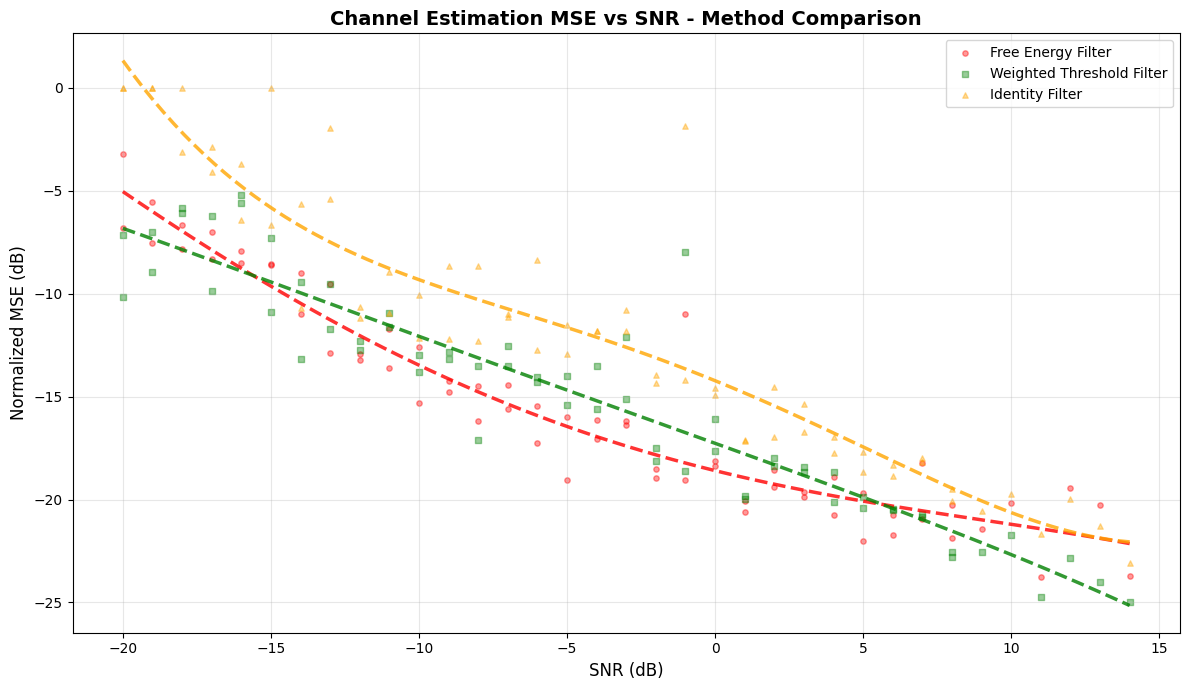
Here we evaluate the performance of the three channel estimators on the Sionna CDL dataset. We will compute the normalized MSE vs SNR across all subcarriers and compare the performance of the three channel estimators.
[ ]:
# Generate DMRS
r_dmrs__ri_sym_cdm_dsc, _ = dmrs_3276(slot_number=slot_number, n_dmrs_id=n_dmrs_id)

# Get the transmitted DMRS with frequency and time OCC applied
n_dmrs_sc = n_prb * 6  # Type 1 DMRS: 6 subcarriers per PRB
x_dmrs__ri_port_sym_sc = gen_transmitted_dmrs_with_occ(
    r_dmrs__ri_sym_cdm_dsc=r_dmrs__ri_sym_cdm_dsc,
    dmrs_port_nums=np.array(port_idx),
    scids=np.array(vec_scid),
    dmrs_sym_idxs=np.array(dmrs_idx),
    n_dmrs_sc=n_dmrs_sc,
)
x_dmrs_real__port_sym_sc = x_dmrs__ri_port_sym_sc[0]
x_dmrs_imag__port_sym_sc = x_dmrs__ri_port_sym_sc[1]
x_dmrs__port_sym_dsc = x_dmrs_real__port_sym_sc + 1j * x_dmrs_imag__port_sym_sc
x_dmrs__port_sym_dsc = np.ascontiguousarray(x_dmrs__port_sym_dsc, dtype=np.complex64)

# Determine the Type 1 DMRS grid configuration (even=0 or odd=1 subcarriers)
grid_cfg = port_idx[0] & 0b010
grid_cfg = grid_cfg >> 1  # 0 for even, 1 for odd

print("✅Step 11: DMRS generation complete")
✅Step 11: DMRS generation complete
Here we take each compiled channel estimator and compute its normalized MSE performance on the Sionna CDL dataset. For debugging we also plot the first few channel impulse responses (CIRs) in the delay domain.
We evaluate the following metrics:
Normalized MSE vs SNR across all subcarriers
Edge vs Center MSE comparison between edge and center subcarriers
[ ]:
# Storage for MSE results for each method
snr__sample: list[float] = []
mse_db_methods: dict[str, list[float]] = {method: [] for method in channel_filter_methods}

# Edge vs Center tracking
mse_db_methods_edge_left: dict[str, list[float]] = {method: [] for method in channel_filter_methods}
mse_db_methods_center: dict[str, list[float]] = {method: [] for method in channel_filter_methods}
mse_db_methods_edge_right: dict[str, list[float]] = {
    method: [] for method in channel_filter_methods
}

for test_idx in tqdm(range(len(test_dataset)), desc="Testing all methods", unit="samples"):
    # Test dataset loading and processing
    H__sc_sym_rxant = test_dataset[test_idx]

    # Extract the true channel at the DMRS positions
    H_true__sc_sym_rxant = np.ascontiguousarray(H__sc_sym_rxant, dtype=np.complex64)

    # Apply DMRS to the true channel (transmit: y = h * x)
    dmrs_base = 12 * start_prb
    dmrs_sc_idxs = dmrs_base + 2 * np.arange(n_dmrs_sc) + grid_cfg

    # Use shared function to apply DMRS to channel
    H_dmrs__sc_sym_rxant = np.array(
        apply_dmrs_to_channel(
            jnp.asarray(H__sc_sym_rxant),
            jnp.asarray(x_dmrs__port_sym_dsc),
            jnp.asarray(dmrs_sc_idxs),
            jnp.asarray(dmrs_idx),
            energy,
        )
    )

    # Add noise to the channel with DMRS (randomly pick an SNR from test_snrs)
    _snr: float = float(test_snrs[test_idx % len(test_snrs)])
    snr__sample.append(_snr)

    rng_key, subkey = jax.random.split(rng_key)
    H_dmrs_noisy__sc_sym_rxant = awgn(subkey, H_dmrs__sc_sym_rxant, _snr)

    # Prepare channel for MLIR-TensorRT runtime (convert to float16)
    H_dmrs_noisy__ri_sc_sym_rxant = np.stack(
        [H_dmrs_noisy__sc_sym_rxant.real, H_dmrs_noisy__sc_sym_rxant.imag], axis=0
    ).astype(np.float32)
    H_dmrs_noisy__ri_sym_rxant_sc = np.einsum("abcd->acdb", H_dmrs_noisy__ri_sc_sym_rxant)
    H_dmrs_noisy__ri_sym_rxant_sc = np.ascontiguousarray(
        H_dmrs_noisy__ri_sym_rxant_sc, dtype=np.float16
    )

    # Setup dynamic inputs for MLIR-TensorRT runtime
    dynamic_inputs_runtime = replace(
        dynamic_inputs,
        xtf__ri_sym_rxant_sc=H_dmrs_noisy__ri_sym_rxant_sc,
    )
    runtime_inputs = dynamic_inputs_runtime.to_tuple()

    # Execute all channel filter methods
    H_est_methods = {}
    for method in channel_filter_methods:
        # Get executable for this method
        exe = executables[method]
        outputs_ref = outputs_ref_dict[method]

        # Setup output arrays
        outputs_runtime_tuple = tuple(np.zeros_like(o) for o in outputs_ref.to_tuple())

        # Execute
        mtw.execute(
            exe=exe,
            inputs=runtime_inputs,
            outputs=outputs_runtime_tuple,
            sync_stream=True,
            mlir_entry_point="main",
        )

        # Extract channel estimates
        outputs_runtime = ChannelEstimatorOutputs.from_tuple(outputs_runtime_tuple)
        h_interp__ri_port_rxant_sc = outputs_runtime.h_interp__ri_port_rxant_sc
        H_est__port_rxant_sc = h_interp__ri_port_rxant_sc[0] + 1j * h_interp__ri_port_rxant_sc[1]
        H_est_full__sc_sym_rxant = np.transpose(H_est__port_rxant_sc, (2, 0, 1))
        H_est_methods[method] = H_est_full__sc_sym_rxant

    # --------------------------------
    # Plot channel estimates for debugging (first 10 samples only)
    # --------------------------------
    MAX_PLOT_SAMPLES = 5
    if test_idx < MAX_PLOT_SAMPLES:
        taps_to_plot = 125
        linewidth = 1.0

        plt.figure(figsize=(12, 6))

        # Plot noisy CIR
        h_dmrs_noisy__tau = jax.numpy.fft.ifft(H_dmrs_noisy__sc_sym_rxant[:, dmrs_idx[0], 0])
        plt.plot(
            10 * np.log10(np.maximum(np.abs(h_dmrs_noisy__tau), 1e-10))[:taps_to_plot],
            label="Noisy CIR",
            linewidth=linewidth,
            marker="o",
            markersize=0.5,
            markevery=50,
            alpha=0.6,
        )

        # Plot all channel filter methods
        markers = ["d", "s", "*", "v", "<", ">"]
        for i, method in enumerate(channel_filter_methods):
            h_est__tau = jax.numpy.fft.ifft(H_est_methods[method][:, 0, 0])
            plt.plot(
                10 * np.log10(np.abs(h_est__tau))[:taps_to_plot],
                label=method.replace("_", " ").title(),
                linewidth=linewidth,
                marker=markers[i % len(markers)],
                markersize=0.5,
                markevery=50,
                alpha=0.8,
            )

        # Plot true channel
        h_true__tau = jax.numpy.fft.ifft(H_true__sc_sym_rxant[:, dmrs_idx[0], 0])
        plt.plot(
            10 * np.log10(np.maximum(np.abs(h_true__tau), 1e-10))[:taps_to_plot],
            label="True CIR",
            linewidth=linewidth + 0.5,
            linestyle="--",
            alpha=0.9,
        )

        plt.xlabel("Delay Tap")
        plt.ylabel("Magnitude (dB)")
        plt.title(f"Channel Impulse Response Comparison (Sample {test_idx}, SNR={_snr:.1f} dB)")
        plt.legend(loc="best", fontsize=9)
        plt.grid(visible=True, alpha=0.3)
        plt.show()
        plt.close()

    # --------------------------------
    # Compute MSE for all methods
    # --------------------------------

    # Get true channel
    sc_idx = np.arange(0, n_f, 1)
    H_true = H_true__sc_sym_rxant[sc_idx, dmrs_idx[0], 0]

    # Compute overall MSE for all filter methods
    for method in channel_filter_methods:
        H_est = H_est_methods[method][sc_idx, 0, 0]
        mse = np.mean(np.abs(H_est - H_true) ** 2 / (np.mean(np.abs(H_true) ** 2)))
        mse_db_methods[method].append(10 * np.log10(mse))

    # --------------------------------
    # Edge vs Center Analysis (for Gibbs effect)
    # --------------------------------
    edge_size = 200
    edge_left_idx = np.arange(0, edge_size)
    edge_right_idx = np.arange(n_f - edge_size, n_f)
    center_idx = np.arange(edge_size, n_f - edge_size)

    def region_mse(
        h_est,
        h_true,
        region_idx,
    ):
        """Calculate normalized MSE for a specific frequency region.

        Parameters
        ----------
        h_est : np.ndarray
            Estimated channel response.
        h_true : np.ndarray
            True channel response.
        region_idx : np.ndarray
            Indices defining the frequency region.

        Returns
        -------
        float
            Normalized MSE for the specified region.
        """
        error = np.abs(h_est[region_idx] - h_true[region_idx]) ** 2
        signal_power = np.mean(np.abs(h_true) ** 2)
        return np.mean(error) / signal_power

    # All filter methods edge/center MSE
    for method in channel_filter_methods:
        H_est = H_est_methods[method][sc_idx, 0, 0]
        mse_edge_left = region_mse(H_est, H_true, edge_left_idx)
        mse_edge_right = region_mse(H_est, H_true, edge_right_idx)
        mse_center = region_mse(H_est, H_true, center_idx)
        mse_db_methods_edge_left[method].append(10 * np.log10(mse_edge_left))
        mse_db_methods_center[method].append(10 * np.log10(mse_center))
        mse_db_methods_edge_right[method].append(10 * np.log10(mse_edge_right))

print("✅Step 11 complete: Performance evaluation finished")
Testing all methods:   0%|          | 0/64 [00:00<?, ?samples/s]/tmp/ipykernel_47261/3924380974.py:110: RuntimeWarning: divide by zero encountered in log10
  10 * np.log10(np.abs(h_est__tau))[:taps_to_plot],
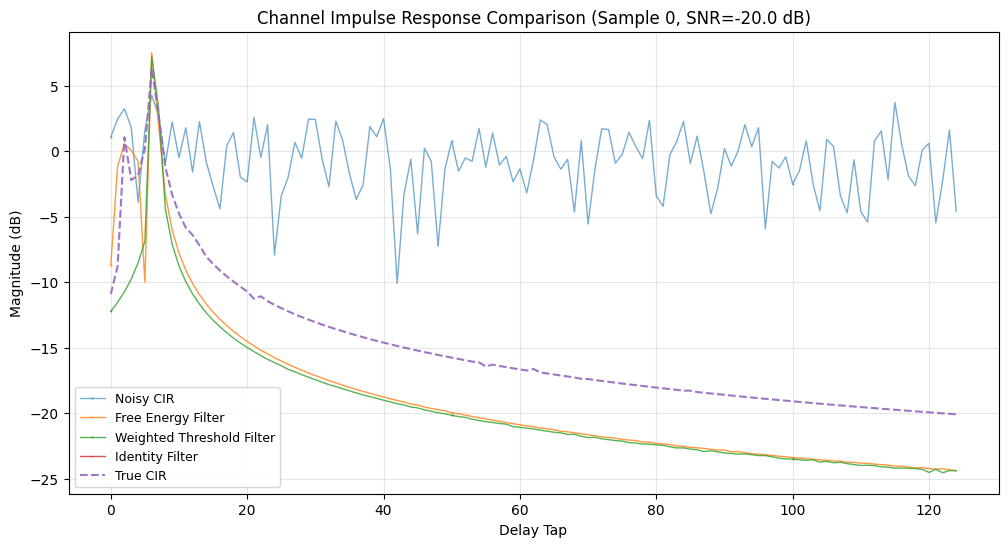
Testing all methods: 2%|▏ | 1/64 [00:02<02:24, 2.30s/samples]
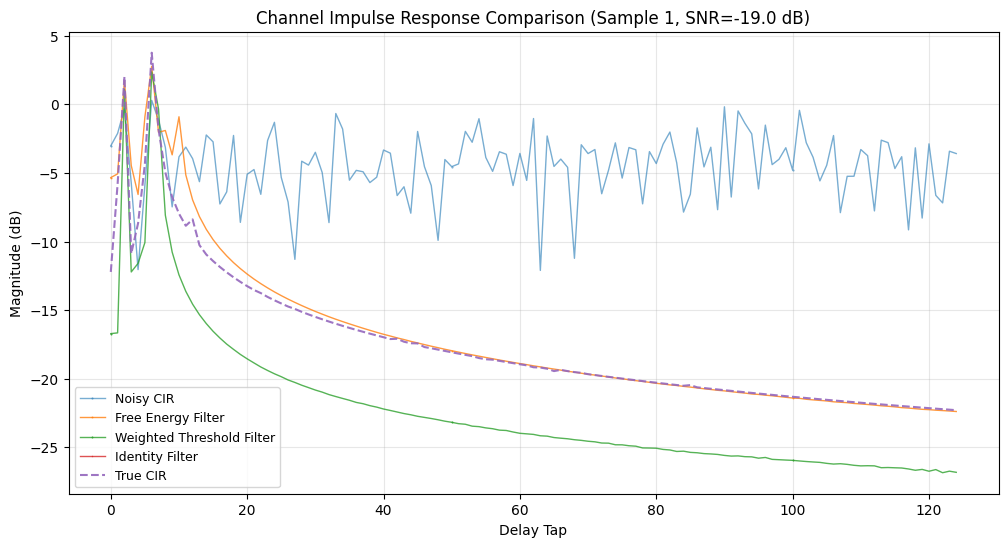
Testing all methods: 3%|▎ | 2/64 [00:02<01:06, 1.07s/samples]
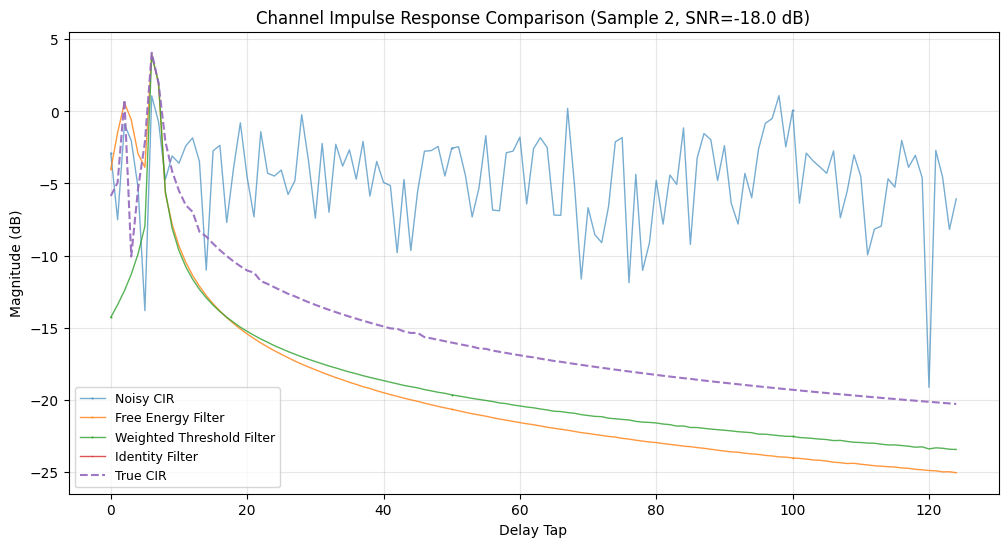
Testing all methods: 5%|▍ | 3/64 [00:02<00:41, 1.47samples/s]
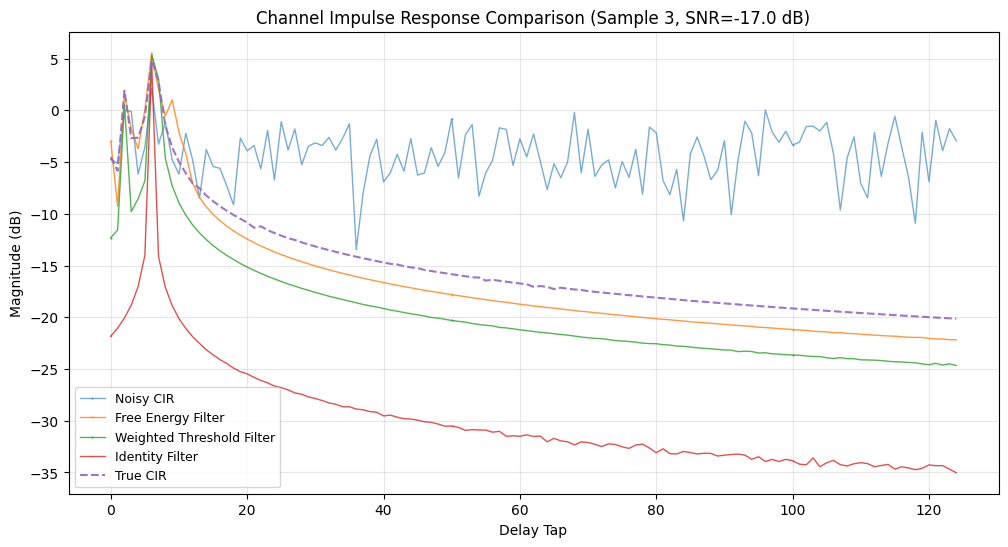
Testing all methods: 6%|▋ | 4/64 [00:02<00:29, 2.02samples/s]
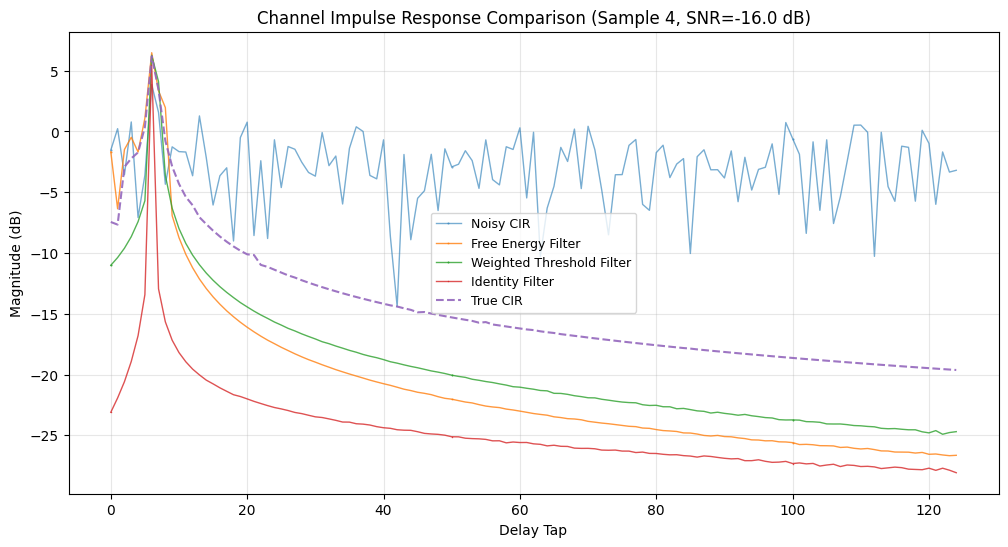
Testing all methods: 100%|██████████| 64/64 [00:09<00:00, 7.01samples/s]
✅Step 11 complete: Performance evaluation finished
Step 12: Post-processing: Plot MSE vs SNR for all methods#
Plot the normalized MSE vs SNR for all channel filter methods to see how they perform as a function of SNR.
[ ]:
# Convert to numpy arrays
snr_array = np.array(snr__sample)

# Plot MSE vs SNR comparison
plt.figure(figsize=(12, 7))

# Colors for different methods
colors = ["red", "green", "orange", "purple", "brown", "pink"]
markers_plot = ["o", "s", "^", "v", "d", "<"]

# Plot all filter methods
for i, method in enumerate(channel_filter_methods):
    mse_db_array = np.array(mse_db_methods[method])
    plt.scatter(
        snr_array,
        mse_db_array,
        label=method.replace("_", " ").title(),
        alpha=0.4,
        s=15,
        color=colors[i % len(colors)],
        marker=markers_plot[i % len(markers_plot)],
    )

# Add best-fit curves
snr_range = np.linspace(snr_array.min(), snr_array.max(), 100)

# Compute best-fit curves for all methods
for i, method in enumerate(channel_filter_methods):
    mse_db_array = np.array(mse_db_methods[method])
    coeffs = np.polyfit(snr_array, mse_db_array, deg=4)
    fit = np.polyval(coeffs, snr_range)
    plt.plot(
        snr_range, fit, color=colors[i % len(colors)], linewidth=2.5, linestyle="--", alpha=0.8
    )

plt.xlabel("SNR (dB)", fontsize=12)
plt.ylabel("Normalized MSE (dB)", fontsize=12)
plt.title("Channel Estimation MSE vs SNR - Method Comparison", fontsize=14, fontweight="bold")
plt.legend(loc="best", fontsize=10)
plt.grid(visible=True, alpha=0.3)
plt.tight_layout()
plt.show()
plt.close()

print("✅Step 12 complete: MSE vs SNR plots generated")
✅Step 12 complete: MSE vs SNR plots generated
Step 13: Plot the edge vs Center PRB MSE vs SNR performance for all methods#
Plot the edge vs Center PRB MSE vs SNR performance for all methods.
[ ]:
# Create figure with 3 subplots (one for each region)
fig, axes = plt.subplots(1, 3, figsize=(20, 6))
fig.suptitle("Edge vs Center PBRs MSE vs SNR - All Methods", fontsize=15, fontweight="bold")

region_names = ["Edge Left (PRBs 0-33)", "Center (PRBs 34-239)", "Edge Right (PRBs 240-273)"]

region_data_methods = [
    mse_db_methods_edge_left,
    mse_db_methods_center,
    mse_db_methods_edge_right,
]

for ax_idx, (ax, title) in enumerate(zip(axes, region_names, strict=True)):
    # Plot all filter methods
    for i, method in enumerate(channel_filter_methods):
        method_data = np.array(region_data_methods[ax_idx][method])
        ax.scatter(
            snr_array,
            method_data,
            alpha=0.4,
            s=12,
            color=colors[i % len(colors)],
            marker=markers_plot[i % len(markers_plot)],
            label=method.replace("_", " ").title(),
        )

        # Best fit line
        method_coeffs = np.polyfit(snr_array, method_data, deg=4)
        method_fit = np.polyval(method_coeffs, snr_range)
        ax.plot(
            snr_range,
            method_fit,
            color=colors[i % len(colors)],
            linewidth=2.5,
            linestyle="--",
            alpha=0.8,
        )

    ax.set_xlabel("SNR (dB)", fontsize=11)
    ax.set_ylabel("Normalized MSE (dB)", fontsize=11)
    ax.set_title(title, fontsize=12)
    ax.legend(fontsize=9, loc="best")
    ax.grid(visible=True, alpha=0.3)

plt.tight_layout()
plt.show()
plt.close()


# All filter methods
for method in channel_filter_methods:
    edge_left_avg = np.mean(mse_db_methods_edge_left[method])
    center_avg = np.mean(mse_db_methods_center[method])
    edge_right_avg = np.mean(mse_db_methods_edge_right[method])
    edge_penalty = ((edge_left_avg - center_avg) + (edge_right_avg - center_avg)) / 2

    print(
        f"{method.replace('_', ' ').title():<30} "
        f"{edge_left_avg:>12.2f} "
        f"{center_avg:>12.2f} "
        f"{edge_right_avg:>12.2f} "
        f"{edge_penalty:>12.2f}"
    )

print("✅ Step 13 complete: Edge vs center analysis plots generated")
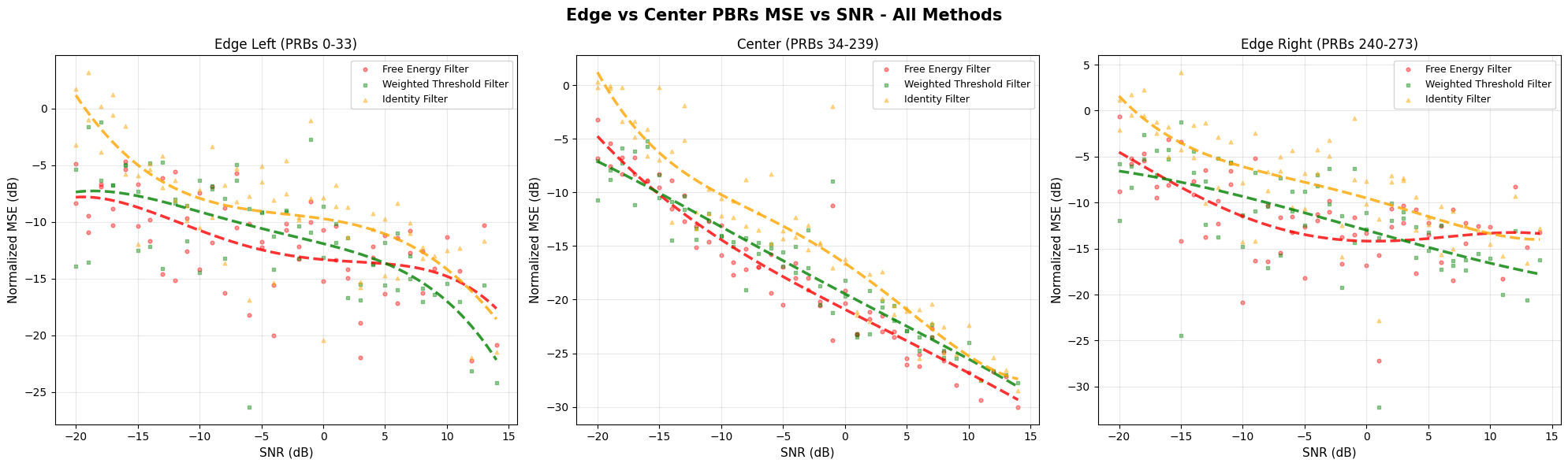
Free Energy Filter                   -11.87       -17.57       -11.73         5.77
Weighted Threshold Filter            -11.23       -16.71       -11.50         5.34
Identity Filter                       -8.57       -13.73        -7.63         5.63
✅ Step 13 complete: Edge vs center analysis plots generated
Step 14: Run the C++ channel estimation benchmark#
Here we run the benchmark tests, via CTest, for all filter methods.
[ ]:
# Environment variable already set in Step 3 for C++ benchmarks
print(f"Build directory: {RAN_BUILD_DIR}")
print(f"TensorRT engines directory: {build_dir}")
print(f"C++ benchmark engine path: {os.environ['RAN_TRT_ENGINE_PATH']}\n")

for method in channel_filter_methods:
    print(f"\n{'=' * 80}")
    print(f"Method: {method}")
    print(f"{'=' * 80}")

    # Map filter method names to ctest filter names (remove '_filter' suffix)
    filter_name = method.replace("_filter", "")

    # Run ctest for this specific filter
    ctest_cmd = [
        "ctest",
        "--preset",
        PRESET,
        "-R",
        f"ran.phy_bench.channel_estimation_bench.{filter_name}",
        "-V",
    ]

    print(f"Running: {' '.join(ctest_cmd)}\n")

    result = subprocess.run(ctest_cmd, cwd=PROJECT_ROOT, capture_output=True, text=True)

    if result.returncode == 0:
        print("✓ Benchmark complete!\n")

        # Parse and display benchmark results table
        benchmark_lines = parse_benchmark_output(result.stdout, "bm_channel_estimation")

        if benchmark_lines:
            print("\n".join(benchmark_lines))
        else:
            # Fallback: show last part of output if parsing failed
            print("Benchmark output:")
            print("\n".join(result.stdout.split("\n")[-20:]))
    else:
        print("✗ Benchmark failed")
        print(result.stdout[-500:])
        print(result.stderr[-500:])
        sys.exit(1)

print("\n" + "=" * 80)
print("Benchmark Results Summary")
print("=" * 80)
print("\nBenchmark JSON results saved to:")
for method in channel_filter_methods:
    filter_name = method.replace("_filter", "")
    json_file = (
        Path(RAN_BUILD_DIR)
        / f"benchmark_results/channel_estimation_bench_{filter_name}_results.json"
    )
    if json_file.exists():
        print(f"  {method}: {json_file}")

print("✅ Step 14 complete: C++ benchmarks executed")
Build directory: /opt/nvidia/aerial-framework/out/build/gcc-release
TensorRT engines directory: /opt/nvidia/aerial-framework/out/build/gcc-release/ran/py/trt_engines
C++ benchmark engine path: /opt/nvidia/aerial-framework/out/build/gcc-release/ran/py/trt_engines


================================================================================
Method: free_energy_filter
================================================================================
Running: ctest --preset gcc-release -R ran.phy_bench.channel_estimation_bench.free_energy -V

✓ Benchmark complete!

-------------------------------------------------------------------------------------------------------------------------
Benchmark                                                               Time             CPU   Iterations UserCounters...
-------------------------------------------------------------------------------------------------------------------------
bm_channel_estimation_free_energy_stream/min_warmup_time:2.000        200 us          201 us         3583 max_us=342 median_us=200 min_us=193 p95_us=201 stddev_us=3.09833
bm_channel_estimation_free_energy_graph/min_warmup_time:2.000         170 us          170 us         4083 max_us=177 median_us=169 min_us=168 p95_us=170 stddev_us=0.656672
4/4 Test #72: ran.phy_bench.channel_estimation_bench.free_energy ...   Passed    2.61 sec

================================================================================
Method: weighted_threshold_filter
================================================================================
Running: ctest --preset gcc-release -R ran.phy_bench.channel_estimation_bench.weighted_threshold -V

✓ Benchmark complete!

--------------------------------------------------------------------------------------------------------------------------------
Benchmark                                                                      Time             CPU   Iterations UserCounters...
--------------------------------------------------------------------------------------------------------------------------------
bm_channel_estimation_weighted_threshold_stream/min_warmup_time:2.000        153 us          153 us         4637 max_us=163 median_us=153 min_us=150 p95_us=154 stddev_us=0.783374
bm_channel_estimation_weighted_threshold_graph/min_warmup_time:2.000         132 us          132 us         5297 max_us=1.344k median_us=131 min_us=131 p95_us=132 stddev_us=16.6872
4/4 Test #74: ran.phy_bench.channel_estimation_bench.weighted_threshold ...   Passed    2.44 sec

================================================================================
Method: identity_filter
================================================================================
Running: ctest --preset gcc-release -R ran.phy_bench.channel_estimation_bench.identity -V

✓ Benchmark complete!

----------------------------------------------------------------------------------------------------------------------
Benchmark                                                            Time             CPU   Iterations UserCounters...
----------------------------------------------------------------------------------------------------------------------
bm_channel_estimation_identity_stream/min_warmup_time:2.000        152 us          152 us         4643 max_us=377 median_us=151 min_us=149 p95_us=152 stddev_us=3.53114
bm_channel_estimation_identity_graph/min_warmup_time:2.000         133 us          133 us         5291 max_us=2.426k median_us=132 min_us=131 p95_us=132 stddev_us=31.6027
4/4 Test #76: ran.phy_bench.channel_estimation_bench.identity ...   Passed    2.51 sec

================================================================================
Benchmark Results Summary
================================================================================

Benchmark JSON results saved to:
  free_energy_filter: /opt/nvidia/aerial-framework/out/build/gcc-release/benchmark_results/channel_estimation_bench_free_energy_results.json
  weighted_threshold_filter: /opt/nvidia/aerial-framework/out/build/gcc-release/benchmark_results/channel_estimation_bench_weighted_threshold_results.json
  identity_filter: /opt/nvidia/aerial-framework/out/build/gcc-release/benchmark_results/channel_estimation_bench_identity_results.json
✅ Step 14 complete: C++ benchmarks executed
Step 15: NVIDIA Nsight systems profiling#
We now run nsys profiling for all filter methods.
[ ]:
# Run nsys profiling via ctest for each filter method
# Note: Each ctest run profiles both stream and graph modes
for method in channel_filter_methods:
    print(f"\n{'=' * 80}")
    print(f"Method: {method}")
    print(f"{'=' * 80}")

    # Map filter method names to ctest filter names (remove '_filter' suffix)
    filter_name = method.replace("_filter", "")

    # Run nsys profiling via ctest
    nsys_cmd = [
        "ctest",
        "--preset",
        PRESET,
        "-R",
        f"ran.phy_nsys.channel_estimation_bench.{filter_name}",
        "-V",
    ]

    print(f"Running: {' '.join(nsys_cmd)}")
    print("This will profile both stream and graph modes...")
    print("This may take a few minutes...")

    result = subprocess.run(nsys_cmd, cwd=PROJECT_ROOT, capture_output=True, text=True)

    if result.returncode == 0:
        print("✓ Profiling complete!")

        # ctest writes to a single file based on filter name (not mode)
        check_nsys_profile(RAN_BUILD_DIR, f"channel_estimation_bench_{filter_name}")
    else:
        print("✗ Profiling failed")
        print(result.stdout[-1000:])
        print(result.stderr[-1000:])
        sys.exit(1)

print("✅ Step 15 complete: Nsight Systems profiling finished")
================================================================================
Method: free_energy_filter
================================================================================
Running: ctest --preset gcc-release -R ran.phy_nsys.channel_estimation_bench.free_energy -V
This will profile both stream and graph modes...
This may take a few minutes...
✓ Profiling complete!
  Profile: /opt/nvidia/aerial-framework/out/build/gcc-release/nsys_results/channel_estimation_bench_free_energy.nsys-rep
  Size: 6.92 MB
  View with: nsys-ui /opt/nvidia/aerial-framework/out/build/gcc-release/nsys_results/channel_estimation_bench_free_energy.nsys-rep

================================================================================
Method: weighted_threshold_filter
================================================================================
Running: ctest --preset gcc-release -R ran.phy_nsys.channel_estimation_bench.weighted_threshold -V
This will profile both stream and graph modes...
This may take a few minutes...
✓ Profiling complete!
  Profile: /opt/nvidia/aerial-framework/out/build/gcc-release/nsys_results/channel_estimation_bench_weighted_threshold.nsys-rep
  Size: 5.02 MB
  View with: nsys-ui /opt/nvidia/aerial-framework/out/build/gcc-release/nsys_results/channel_estimation_bench_weighted_threshold.nsys-rep

================================================================================
Method: identity_filter
================================================================================
Running: ctest --preset gcc-release -R ran.phy_nsys.channel_estimation_bench.identity -V
This will profile both stream and graph modes...
This may take a few minutes...
✓ Profiling complete!
  Profile: /opt/nvidia/aerial-framework/out/build/gcc-release/nsys_results/channel_estimation_bench_identity.nsys-rep
  Size: 5.03 MB
  View with: nsys-ui /opt/nvidia/aerial-framework/out/build/gcc-release/nsys_results/channel_estimation_bench_identity.nsys-rep
✅ Step 15 complete: Nsight Systems profiling finished
Step 16: Summary and Next Steps#
What we accomplished
✅ Designed and compiled four different channel estimators
✅ Evaluated performance of the four channel estimators
✅ Benchmarked GPU performance of the four channel estimators
✅ Profiled GPU performance of the four channel estimators
Next steps
Review Nsight Systems profiles to identify optimization opportunities
Explore the AI Tukey Filter Training tutorial to train a custom AI Tukey filter for channel estimation.
Move on tp pipeline tutorial to run the full PUSCH pipeline.
print(”✅ Step 16 complete: Summary and Next Steps”)