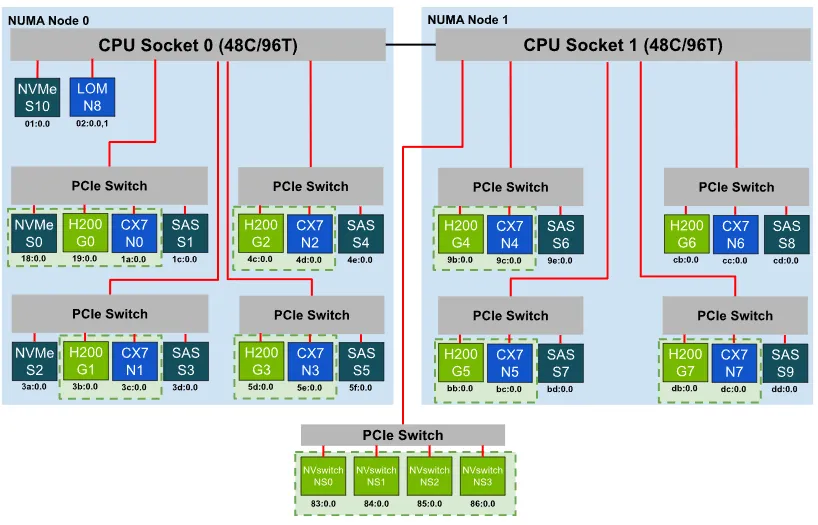
Machine (2015GB total)
Package L#0
NUMANode L#0 (P#0 1007GB)
L3 L#0 (105MB)
L2 L#0 (2048KB) + L1d L#0 (48KB) + L1i L#0 (32KB) + Core L#0 + PU L#0 (P#0)
L2 L#1 (2048KB) + L1d L#1 (48KB) + L1i L#1 (32KB) + Core L#1 + PU L#1 (P#2)
L2 L#2 (2048KB) + L1d L#2 (48KB) + L1i L#2 (32KB) + Core L#2 + PU L#2 (P#4)
L2 L#3 (2048KB) + L1d L#3 (48KB) + L1i L#3 (32KB) + Core L#3 + PU L#3 (P#6)
L2 L#4 (2048KB) + L1d L#4 (48KB) + L1i L#4 (32KB) + Core L#4 + PU L#4 (P#8)
L2 L#5 (2048KB) + L1d L#5 (48KB) + L1i L#5 (32KB) + Core L#5 + PU L#5 (P#10)
L2 L#6 (2048KB) + L1d L#6 (48KB) + L1i L#6 (32KB) + Core L#6 + PU L#6 (P#12)
L2 L#7 (2048KB) + L1d L#7 (48KB) + L1i L#7 (32KB) + Core L#7 + PU L#7 (P#14)
L2 L#8 (2048KB) + L1d L#8 (48KB) + L1i L#8 (32KB) + Core L#8 + PU L#8 (P#16)
L2 L#9 (2048KB) + L1d L#9 (48KB) + L1i L#9 (32KB) + Core L#9 + PU L#9 (P#18)
L2 L#10 (2048KB) + L1d L#10 (48KB) + L1i L#10 (32KB) + Core L#10 + PU L#10 (P#20)
L2 L#11 (2048KB) + L1d L#11 (48KB) + L1i L#11 (32KB) + Core L#11 + PU L#11 (P#22)
L2 L#12 (2048KB) + L1d L#12 (48KB) + L1i L#12 (32KB) + Core L#12 + PU L#12 (P#24)
L2 L#13 (2048KB) + L1d L#13 (48KB) + L1i L#13 (32KB) + Core L#13 + PU L#13 (P#26)
L2 L#14 (2048KB) + L1d L#14 (48KB) + L1i L#14 (32KB) + Core L#14 + PU L#14 (P#28)
L2 L#15 (2048KB) + L1d L#15 (48KB) + L1i L#15 (32KB) + Core L#15 + PU L#15 (P#30)
L2 L#16 (2048KB) + L1d L#16 (48KB) + L1i L#16 (32KB) + Core L#16 + PU L#16 (P#32)
L2 L#17 (2048KB) + L1d L#17 (48KB) + L1i L#17 (32KB) + Core L#17 + PU L#17 (P#34)
L2 L#18 (2048KB) + L1d L#18 (48KB) + L1i L#18 (32KB) + Core L#18 + PU L#18 (P#36)
L2 L#19 (2048KB) + L1d L#19 (48KB) + L1i L#19 (32KB) + Core L#19 + PU L#19 (P#38)
L2 L#20 (2048KB) + L1d L#20 (48KB) + L1i L#20 (32KB) + Core L#20 + PU L#20 (P#40)
L2 L#21 (2048KB) + L1d L#21 (48KB) + L1i L#21 (32KB) + Core L#21 + PU L#21 (P#42)
L2 L#22 (2048KB) + L1d L#22 (48KB) + L1i L#22 (32KB) + Core L#22 + PU L#22 (P#44)
L2 L#23 (2048KB) + L1d L#23 (48KB) + L1i L#23 (32KB) + Core L#23 + PU L#23 (P#46)
L2 L#24 (2048KB) + L1d L#24 (48KB) + L1i L#24 (32KB) + Core L#24 + PU L#24 (P#48)
L2 L#25 (2048KB) + L1d L#25 (48KB) + L1i L#25 (32KB) + Core L#25 + PU L#25 (P#50)
L2 L#26 (2048KB) + L1d L#26 (48KB) + L1i L#26 (32KB) + Core L#26 + PU L#26 (P#52)
L2 L#27 (2048KB) + L1d L#27 (48KB) + L1i L#27 (32KB) + Core L#27 + PU L#27 (P#54)
L2 L#28 (2048KB) + L1d L#28 (48KB) + L1i L#28 (32KB) + Core L#28 + PU L#28 (P#56)
L2 L#29 (2048KB) + L1d L#29 (48KB) + L1i L#29 (32KB) + Core L#29 + PU L#29 (P#58)
L2 L#30 (2048KB) + L1d L#30 (48KB) + L1i L#30 (32KB) + Core L#30 + PU L#30 (P#60)
L2 L#31 (2048KB) + L1d L#31 (48KB) + L1i L#31 (32KB) + Core L#31 + PU L#31 (P#62)
L2 L#32 (2048KB) + L1d L#32 (48KB) + L1i L#32 (32KB) + Core L#32 + PU L#32 (P#64)
L2 L#33 (2048KB) + L1d L#33 (48KB) + L1i L#33 (32KB) + Core L#33 + PU L#33 (P#66)
L2 L#34 (2048KB) + L1d L#34 (48KB) + L1i L#34 (32KB) + Core L#34 + PU L#34 (P#68)
L2 L#35 (2048KB) + L1d L#35 (48KB) + L1i L#35 (32KB) + Core L#35 + PU L#35 (P#70)
L2 L#36 (2048KB) + L1d L#36 (48KB) + L1i L#36 (32KB) + Core L#36 + PU L#36 (P#72)
L2 L#37 (2048KB) + L1d L#37 (48KB) + L1i L#37 (32KB) + Core L#37 + PU L#37 (P#74)
L2 L#38 (2048KB) + L1d L#38 (48KB) + L1i L#38 (32KB) + Core L#38 + PU L#38 (P#76)
L2 L#39 (2048KB) + L1d L#39 (48KB) + L1i L#39 (32KB) + Core L#39 + PU L#39 (P#78)
L2 L#40 (2048KB) + L1d L#40 (48KB) + L1i L#40 (32KB) + Core L#40 + PU L#40 (P#80)
L2 L#41 (2048KB) + L1d L#41 (48KB) + L1i L#41 (32KB) + Core L#41 + PU L#41 (P#82)
L2 L#42 (2048KB) + L1d L#42 (48KB) + L1i L#42 (32KB) + Core L#42 + PU L#42 (P#84)
L2 L#43 (2048KB) + L1d L#43 (48KB) + L1i L#43 (32KB) + Core L#43 + PU L#43 (P#86)
L2 L#44 (2048KB) + L1d L#44 (48KB) + L1i L#44 (32KB) + Core L#44 + PU L#44 (P#88)
L2 L#45 (2048KB) + L1d L#45 (48KB) + L1i L#45 (32KB) + Core L#45 + PU L#45 (P#90)
L2 L#46 (2048KB) + L1d L#46 (48KB) + L1i L#46 (32KB) + Core L#46 + PU L#46 (P#92)
L2 L#47 (2048KB) + L1d L#47 (48KB) + L1i L#47 (32KB) + Core L#47 + PU L#47 (P#94)
HostBridge
PCIBridge
PCI 01:00.0 (NVMExp)
Block(Disk) "nvme0c0n1"
PCIBridge
PCI 02:00.0 (Ethernet)
Net "eno8303"
PCI 02:00.1 (Ethernet)
Net "eno8403"
PCIBridge
PCIBridge
PCI 04:00.0 (VGA)
PCI 00:18.0 (SATA)
PCI 00:19.0 (SATA)
HostBridge
PCIBridge
PCIBridge
PCIBridge
PCI 18:00.0 (NVMExp)
Block(Disk) "nvme1n1"
PCIBridge
PCI 19:00.0 (3D)
PCIBridge
PCI 1a:00.0 (InfiniBand)
OpenFabrics "mlx5_0"
PCIBridge
PCI 1c:00.0 (SAS)
HostBridge
PCIBridge
PCIBridge
PCIBridge
PCI 3a:00.0 (NVMExp)
Block(Disk) "nvme2n1"
PCIBridge
PCI 3b:00.0 (3D)
PCIBridge
PCI 3c:00.0 (InfiniBand)
OpenFabrics "mlx5_1"
PCIBridge
PCI 3d:00.0 (SAS)
HostBridge
PCIBridge
PCIBridge
PCIBridge
PCI 4c:00.0 (3D)
PCIBridge
PCI 4d:00.0 (InfiniBand)
OpenFabrics "mlx5_2"
PCIBridge
PCI 4e:00.0 (SAS)
HostBridge
PCIBridge
PCIBridge
PCIBridge
PCI 5d:00.0 (3D)
PCIBridge
PCI 5e:00.0 (InfiniBand)
OpenFabrics "mlx5_3"
PCIBridge
PCI 5f:00.0 (SAS)
Package L#1
NUMANode L#1 (P#1 1008GB)
L3 L#1 (105MB)
L2 L#48 (2048KB) + L1d L#48 (48KB) + L1i L#48 (32KB) + Core L#48 + PU L#48 (P#1)
L2 L#49 (2048KB) + L1d L#49 (48KB) + L1i L#49 (32KB) + Core L#49 + PU L#49 (P#3)
L2 L#50 (2048KB) + L1d L#50 (48KB) + L1i L#50 (32KB) + Core L#50 + PU L#50 (P#5)
L2 L#51 (2048KB) + L1d L#51 (48KB) + L1i L#51 (32KB) + Core L#51 + PU L#51 (P#7)
L2 L#52 (2048KB) + L1d L#52 (48KB) + L1i L#52 (32KB) + Core L#52 + PU L#52 (P#9)
L2 L#53 (2048KB) + L1d L#53 (48KB) + L1i L#53 (32KB) + Core L#53 + PU L#53 (P#11)
L2 L#54 (2048KB) + L1d L#54 (48KB) + L1i L#54 (32KB) + Core L#54 + PU L#54 (P#13)
L2 L#55 (2048KB) + L1d L#55 (48KB) + L1i L#55 (32KB) + Core L#55 + PU L#55 (P#15)
L2 L#56 (2048KB) + L1d L#56 (48KB) + L1i L#56 (32KB) + Core L#56 + PU L#56 (P#17)
L2 L#57 (2048KB) + L1d L#57 (48KB) + L1i L#57 (32KB) + Core L#57 + PU L#57 (P#19)
L2 L#58 (2048KB) + L1d L#58 (48KB) + L1i L#58 (32KB) + Core L#58 + PU L#58 (P#21)
L2 L#59 (2048KB) + L1d L#59 (48KB) + L1i L#59 (32KB) + Core L#59 + PU L#59 (P#23)
L2 L#60 (2048KB) + L1d L#60 (48KB) + L1i L#60 (32KB) + Core L#60 + PU L#60 (P#25)
L2 L#61 (2048KB) + L1d L#61 (48KB) + L1i L#61 (32KB) + Core L#61 + PU L#61 (P#27)
L2 L#62 (2048KB) + L1d L#62 (48KB) + L1i L#62 (32KB) + Core L#62 + PU L#62 (P#29)
L2 L#63 (2048KB) + L1d L#63 (48KB) + L1i L#63 (32KB) + Core L#63 + PU L#63 (P#31)
L2 L#64 (2048KB) + L1d L#64 (48KB) + L1i L#64 (32KB) + Core L#64 + PU L#64 (P#33)
L2 L#65 (2048KB) + L1d L#65 (48KB) + L1i L#65 (32KB) + Core L#65 + PU L#65 (P#35)
L2 L#66 (2048KB) + L1d L#66 (48KB) + L1i L#66 (32KB) + Core L#66 + PU L#66 (P#37)
L2 L#67 (2048KB) + L1d L#67 (48KB) + L1i L#67 (32KB) + Core L#67 + PU L#67 (P#39)
L2 L#68 (2048KB) + L1d L#68 (48KB) + L1i L#68 (32KB) + Core L#68 + PU L#68 (P#41)
L2 L#69 (2048KB) + L1d L#69 (48KB) + L1i L#69 (32KB) + Core L#69 + PU L#69 (P#43)
L2 L#70 (2048KB) + L1d L#70 (48KB) + L1i L#70 (32KB) + Core L#70 + PU L#70 (P#45)
L2 L#71 (2048KB) + L1d L#71 (48KB) + L1i L#71 (32KB) + Core L#71 + PU L#71 (P#47)
L2 L#72 (2048KB) + L1d L#72 (48KB) + L1i L#72 (32KB) + Core L#72 + PU L#72 (P#49)
L2 L#73 (2048KB) + L1d L#73 (48KB) + L1i L#73 (32KB) + Core L#73 + PU L#73 (P#51)
L2 L#74 (2048KB) + L1d L#74 (48KB) + L1i L#74 (32KB) + Core L#74 + PU L#74 (P#53)
L2 L#75 (2048KB) + L1d L#75 (48KB) + L1i L#75 (32KB) + Core L#75 + PU L#75 (P#55)
L2 L#76 (2048KB) + L1d L#76 (48KB) + L1i L#76 (32KB) + Core L#76 + PU L#76 (P#57)
L2 L#77 (2048KB) + L1d L#77 (48KB) + L1i L#77 (32KB) + Core L#77 + PU L#77 (P#59)
L2 L#78 (2048KB) + L1d L#78 (48KB) + L1i L#78 (32KB) + Core L#78 + PU L#78 (P#61)
L2 L#79 (2048KB) + L1d L#79 (48KB) + L1i L#79 (32KB) + Core L#79 + PU L#79 (P#63)
L2 L#80 (2048KB) + L1d L#80 (48KB) + L1i L#80 (32KB) + Core L#80 + PU L#80 (P#65)
L2 L#81 (2048KB) + L1d L#81 (48KB) + L1i L#81 (32KB) + Core L#81 + PU L#81 (P#67)
L2 L#82 (2048KB) + L1d L#82 (48KB) + L1i L#82 (32KB) + Core L#82 + PU L#82 (P#69)
L2 L#83 (2048KB) + L1d L#83 (48KB) + L1i L#83 (32KB) + Core L#83 + PU L#83 (P#71)
L2 L#84 (2048KB) + L1d L#84 (48KB) + L1i L#84 (32KB) + Core L#84 + PU L#84 (P#73)
L2 L#85 (2048KB) + L1d L#85 (48KB) + L1i L#85 (32KB) + Core L#85 + PU L#85 (P#75)
L2 L#86 (2048KB) + L1d L#86 (48KB) + L1i L#86 (32KB) + Core L#86 + PU L#86 (P#77)
L2 L#87 (2048KB) + L1d L#87 (48KB) + L1i L#87 (32KB) + Core L#87 + PU L#87 (P#79)
L2 L#88 (2048KB) + L1d L#88 (48KB) + L1i L#88 (32KB) + Core L#88 + PU L#88 (P#81)
L2 L#89 (2048KB) + L1d L#89 (48KB) + L1i L#89 (32KB) + Core L#89 + PU L#89 (P#83)
L2 L#90 (2048KB) + L1d L#90 (48KB) + L1i L#90 (32KB) + Core L#90 + PU L#90 (P#85)
L2 L#91 (2048KB) + L1d L#91 (48KB) + L1i L#91 (32KB) + Core L#91 + PU L#91 (P#87)
L2 L#92 (2048KB) + L1d L#92 (48KB) + L1i L#92 (32KB) + Core L#92 + PU L#92 (P#89)
L2 L#93 (2048KB) + L1d L#93 (48KB) + L1i L#93 (32KB) + Core L#93 + PU L#93 (P#91)
L2 L#94 (2048KB) + L1d L#94 (48KB) + L1i L#94 (32KB) + Core L#94 + PU L#94 (P#93)
L2 L#95 (2048KB) + L1d L#95 (48KB) + L1i L#95 (32KB) + Core L#95 + PU L#95 (P#95)
HostBridge
PCIBridge
PCIBridge
PCIBridge
PCI 9b:00.0 (3D)
PCIBridge
PCI 9c:00.0 (InfiniBand)
OpenFabrics "mlx5_4"
PCIBridge
PCI 9e:00.0 (SAS)
HostBridge
PCIBridge
PCIBridge
PCIBridge
PCI bb:00.0 (3D)
PCIBridge
PCI bc:00.0 (InfiniBand)
OpenFabrics "mlx5_5"
PCIBridge
PCI bd:00.0 (SAS)
HostBridge
PCIBridge
PCIBridge
PCIBridge
PCI cb:00.0 (3D)
PCIBridge
PCI cc:00.0 (InfiniBand)
OpenFabrics "mlx5_6"
PCIBridge
PCI cd:00.0 (SAS)
HostBridge
PCIBridge
PCIBridge
PCIBridge
PCI db:00.0 (3D)
PCIBridge
PCI dc:00.0 (InfiniBand)
OpenFabrics "mlx5_7"
PCIBridge
PCI dd:00.0 (SAS)