


Scheduling Policies#
On time-sliced vGPUs, the scheduler decides how GPU time is shared among VMs. The policy sets how long a VM may run before preemption (the time slice), which trades raw throughput against scheduling latency.
Longer slices mean less context switching and suit compute-heavy CUDA® work. Shorter slices give other VMs turns sooner and suit latency-sensitive guests (including graphics).
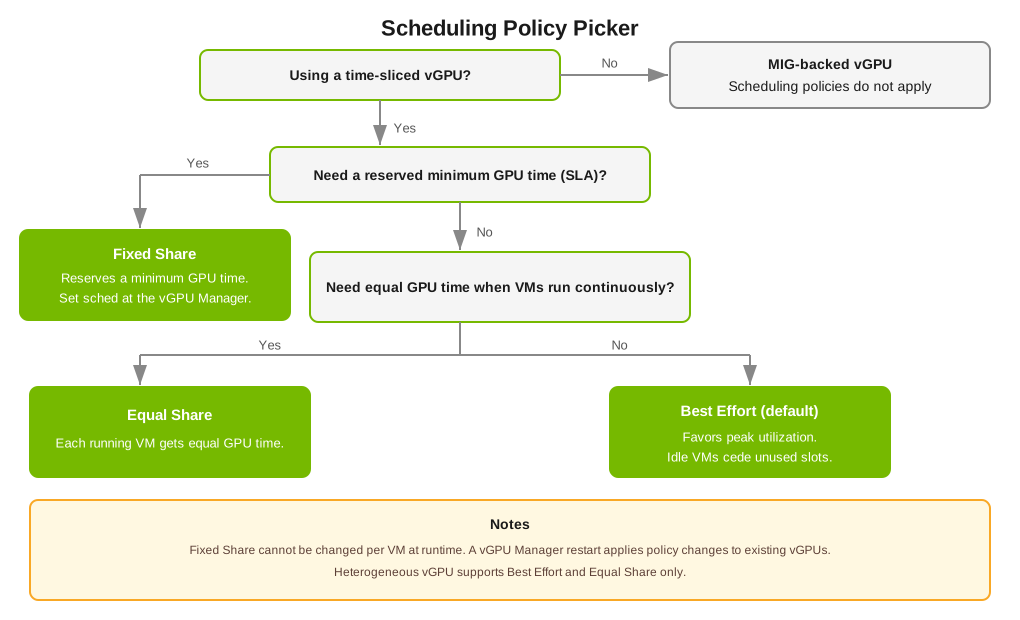
NVIDIA® vGPU™ for Compute exposes three scheduling policies that differ in how GPU time is allocated across VMs. Use the following decision tree to pick a policy. The comparison table that follows lists allocation models and typical use.
Mode |
Allocation model |
When to use |
|---|---|---|
Best Effort (default) |
Time slices distributed across VMs without reservation; idle VMs cede their slots to active ones. |
General-purpose mixed workloads where peak utilization matters more than predictability. |
Equal Share |
Each running VM receives an equal fraction of GPU time regardless of its load. |
Multi-tenant fairness; consistent per-VM throughput when several VMs run continuously. |
Fixed Share |
Each VM receives a fixed fraction of GPU time, even when other VMs are idle. |
Reservation-style guarantees; SLA workloads requiring predictable minimums. |
For full mode definitions, refer to the vGPU Schedulers documentation. For configuration commands and per-mode tuning, refer to Changing Scheduling Behavior for Time-Sliced vGPUs.
Scheduling Limitations#
Scheduling policies apply only to vGPUs that time-share a physical GPU or a GPU instance. A MIG-backed vGPU that occupies a whole GPU instance has dedicated hardware resources and does not time-slice, so no scheduling policy applies to it. Where several time-sliced, MIG-backed vGPUs share one GPU instance, the scheduling behavior is set for that GPU instance, applies to every vGPU on it, and is independent of the other GPU instances on the same GPU. Refer to Virtual GPU Types for Supported GPUs for the GPUs and profiles that place more than one vGPU in a GPU instance.
Scheduling policy is set on the host for a physical GPU or a GPU instance, not per VM, and it cannot be changed from inside a VM at runtime. Use
nvidia-smi vgpu set-scheduler-statefor a change that applies immediately but is lost when the driver is reloaded or the host is rebooted, or theRmPVMRLregistry key for a persistent change that requires a driver reload or host reboot before it takes effect.When you use
nvidia-smi vgpu set-scheduler-state, no vGPU can exist on the target physical GPU or GPU instance at the time you make the change; otherwise the change fails. The change affects only the vGPUs created after it. A persistent change made with theRmPVMRLregistry key takes effect after a driver reload or host reboot.On VMware vSphere ESXi, you cannot use
nvidia-smito change the scheduling behavior of time-sliced, MIG-backed vGPUs. Use theRmPVMRLregistry key, which sets the behavior for all GPU instances on the GPU rather than for selected GPU instances.The default scheduling policy (Best Effort) does not guarantee minimum GPU time for any VM. Use Equal Share or Fixed Share when predictable GPU allocation is required.