

Kubernetes Cluster API
The Kubernetes Cluster API (CAPI), as explained in the introduction to the online Cluster API Book at https://cluster-api.sigs.k8s.io/, “is a Kubernetes sub-project focused on providing declarative APIs and tooling to simplify provisioning, upgrading, and operating multiple Kubernetes clusters”. The Cluster API Book is the official Kubernetes project documentation for CAPI.
This chapter describes the installation and usage of the NVIDIA Base Command Manager CAPI extension called BCM Kubernetes CAPI Infrastructure Provider.
8.1 Kubernetes Cluster API Components
An overview of the CAPI components is shown in figure 8.1. Further details about the components are given in the sections of this chapter that follow.
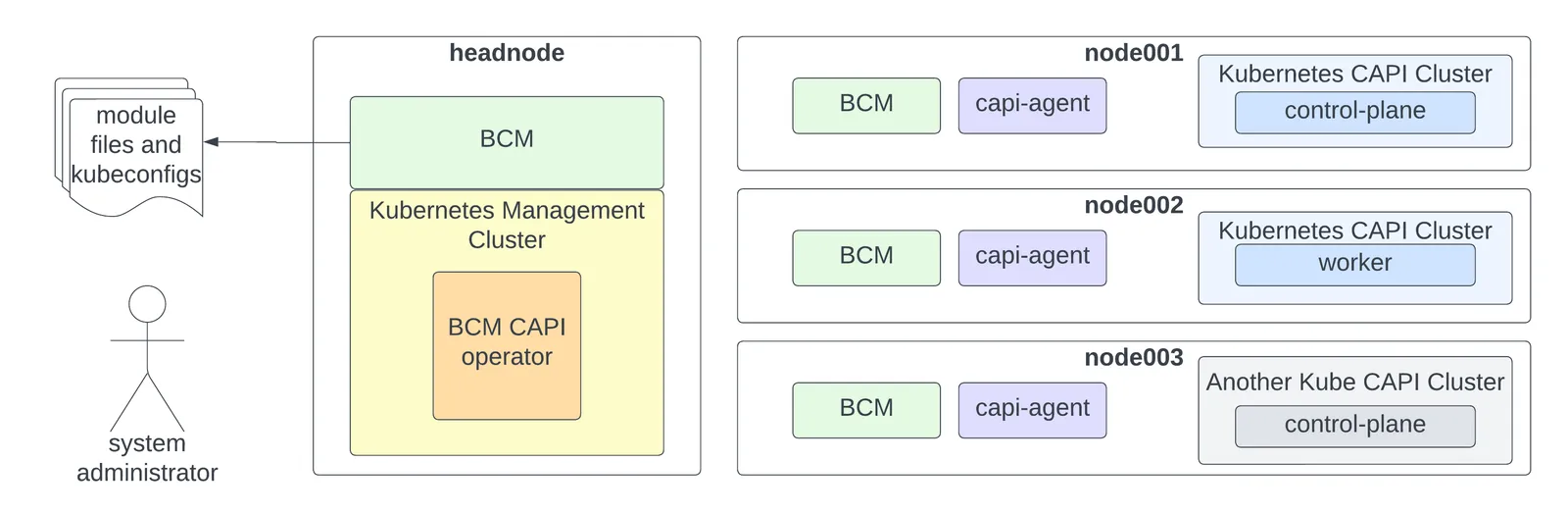
Figure 8.1: CAPI components
Figure 8.1 shows a standard Kubernetes cluster deployed on an active head node. The cluster has been modified to become a Kubernetes management cluster using the BCM CAPI Infrastructure Provider, and has successfully deployed two additional Kubernetes clusters through CAPI. These additional clusters may be running different versions of Kubernetes.
The system administrator receives module files and kubeconfig files for all three Kubernetes clusters.
8.1.1 Kubernetes Management Cluster
In BCM documentation, the term Kubernetes management cluster is used specifically and precisely to refer to a Kubernetes cluster that operates as the management cluster for CAPI.
The ability to modify an external Kubernetes cluster to operate as a Kubernetes management cluster is under preparation at the time of writing (June 2023) of this section. This includes scenarios such as using an existing Kubernetes cluster, hosted on a public cloud, to serve as the Kubernetes management cluster for a Kubernetes cluster deployed through BCM. At present, any Kubernetes cluster deployed through BCM (Chapter 4) can be modified into a CAPI management cluster.
8.1.2 Kubernetes CAPI Cluster
BCM documentation uses the term Kubernetes CAPI cluster to refer specifically to a Kubernetes cluster deployed via the Cluster API. Upstream Kubernetes documentation also sometimes refers to a Kubernetes cluster deployed via CAPI as a workload cluster.
8.1.3 BCM CAPI Infrastructure Provider
The BCM CAPI Infrastructure Provider is a derivative of the Bring Your Own Host (BYOH) CAPI provider. The BYOH CAPI provider can also be referred to as the BYOH CAPI Infrastructure Provider, and is available as a GitHub project at:
https://github.com/vmware-tanzu/cluster-api-provider-bringyourownhost
Similar to other CAPI providers, the BCM CAPI Infrastructure Provider is an extension of CAPI itself, and both the CAPI provider and CAPI are required on the Kubernetes management cluster.
8.1.3.1 The BCM CAPI Operator
The BCM CAPI operator is an operator deployed in the byoh-system namespace on the Kubernetes management cluster. The operator serves as the central point of connection for BCM CAPI host agents (section 8.1.3.2). It also monitors the state of clusters and machines for the Kubernetes CAPI clusters.
8.1.3.2 BCM CAPI Host Agents
BCM CAPI host agents are scheduled to run on selected hosts. These hosts are defined by the cluster administrator when the cm-kubernetes-capi-setup wizard (section 8.2.2) is run. The wizard ensures that a selected host gets the right packages in its software image, and that the host is assigned the right BCM roles.
For CAPI calls to function, the CapiRole is assigned. Assignment can be done either before or after creating a Kubernetes CAPI cluster via the Kubernetes management cluster. The role sets up a capi-agent service on the host for the associated Kubernetes management cluster.
When the role is:
-
assigned: BCM initiates and bootstraps the service
-
unassigned: BCM halts the service and makes it unavailable for use by CAPI on the associated Kubernetes management cluster
This differs from cloud-based CAPI providers, which do not require managing a limited number of pre-existing nodes, but instead start up new nodes on demand as needed.
If a Kubernetes CAPI cluster receives a cluster request and there are no hosts available, then machines remain in a Pending state until hosts become available. Once hosts become available, the status transitions to Provisioning, and then eventually to Running (section 8.3.1).
8.1.3.3 BCM CAPI Vs BYOH
Once the actual Kubernetes CAPI clusters are deployed on designated CAPI hosts, BCM uses its Python API to carry out the following operations:
-
The requested Kubernetes version for each node is stored in the BCM database.
-
The requested Kubernetes version is made available in the corresponding software image for the node.
-
The node is provisioned with the software image.
-
The installer is notified that the Kubernetes installation can proceed.
In contrast to the BYOH provider, BCM CAPI has the following extra features:
-
Linux distributions can be other than just Ubuntu 20.04.
-
Kubernetes versions can be other than only those for which parcels have been created, as the BCM Kubernetes integration does not rely on parcels.
8.2 The Kubernetes CAPI Wizard
The cm-kubernetes-capi-setup wizard installs the BCM CAPI Infrastructure Provider, and assigns the CAPI role to nodes.

Figure 8.2: CAPI setup wizard
8.2.1 The Install CAPI Option
The Install CAPI option of figure 8.2 leads to a screen that prompts the user to select the Kubernetes cluster instance on which to install the BCM CAPI Infrastructure Provider.

Figure 8.3: Selection of Kubernetes cluster for installation of the BCM CAPI Infrastructure Provider
If needed:
-
cert-managerand the Cluster API itself are installed -
the CAPI
clusterctltool is run in the back end to carry out initialization
8.2.1.1 The Install CAPI Option Actions
Execution of the Install CAPI operation:
-
prepares a Kubernetes cluster template for CAPI (section 8.8).
-
installs the BCM CAPI Infrastructure Provider on the Kubernetes Cluster with the command:
clusterctl init infrastructure byoh. -
waits for the BCM CAPI operator to be ready for operation.
-
patches the BCM CAPI operator to use the appropriate image. Patching is required until the BCM changes get into the upstream repository.
-
makes the
capimodule available for loading
8.2.1.2 The Install CAPI Option Changes To Kubernetes Management Cluster
After the Install CAPI option has run, the operators installed and running on the Kubernetes management cluster can be seen (some output truncated):
Example
8.2.1.3 The Install CAPI Changes To BCM
A new Kubernetes cluster template is generated in BCM on running Install CAPI. The template naming convention used follows the form:
capi- <mgmt_cluster_name>-template
In the present example, where the name of the Kubernetes management cluster is default, the resulting template would be called capi-default-template. The name default is set by default when creating a Kubernetes instance (figure 4.2).
This becomes the default template used for generating Kubernetes CAPI clusters associated with this specific Kubernetes management cluster. Users can modify this template, and can even create additional templates as needed. The YAML configuration for a CAPI cluster also lets users specify a template, via annotations within the YAML file (section 8.8).
8.2.2 The Assign CAPI Role Option
After the Install CAPI operation has completed its run, the Assign CAPI Role operation can be carried out from the setup screen of figure 8.2. The Assign CAPI Role operation carries out a CAPI role assignment to a group of nodes by creating a configuration overlay (section 4.5). The role can then be assigned either to a category, or to individual nodes.
The software images on the chosen nodes get the packages needed to run the CAPI agents.
When the Assign CAPI Role operation is carried out, the screens in figures 8.4-8.7 may be displayed:

Figure 8.4: Select a Kubernetes management cluster

Figure 8.5: Customize the configuration overlay

Figure 8.6: Choose nodes via categories

Figure 8.7: Choose nodes directly
Some of the screens may be skipped if they are not needed. For example, the screen for selecting individual nodes (figure 8.7) is not displayed if all the nodes have already been assigned during selection via categories.
8.2.2.1 The Assign CAPI Role Actions
During execution of the Assign CAPI Role operation, the wizard:
-
prepares the Kubeadm and Helm repositories in the software images for the nodes.
-
writes the IP Forwarding configuration to the software images for the nodes.
-
installs necessary packages in the software images for the nodes (for example:
cm-capi). -
provisions the nodes from their software images.
-
creates a configuration overlay in BCM.
-
assigns the selected categories and nodes to the overlay.
-
assigns the
capirole andcontainerdroles to the overlay.
8.2.2.2 The Assign CAPI Role Changes To BCM
The configuration overlay created during the execution of the Assign CAPI Role operation is now visible in the configurationoverlay mode (some output elided):
Example
The preceding overlay shows that the capi role has been assigned to nodes node001 and node002.
The capi role sets the capi-agent service for a node. If it is set, then BCM bootstraps the agent (section 8.4) and initiates the capi-agent systemd service that runs on the node.
The containerd role takes care of the containerd service, so that containerd is also started on the nodes.
The containerd service is needed after the agent initiates the provisioning of its node to integrate it into a Kubernetes CAPI cluster. This is because a kubelet service is eventually started, which relies on containerd.
CAPI uses kubeadm for node provisioning and management, which means that containerd must be running in advance. Therefore, as part of its pre-launch checks, kubeadm verifies that the containerd service is operational.
8.2.2.3 The Assign CAPI Role Changes To the Kubernetes management cluster
The BCM CAPI host agents should register with the Kubernetes management cluster, and can then be seen on running kubectl with the get byohost option:
Example
Registration does not necessarily make these hosts a part of any Kubernetes CAPI cluster. However, if there are clusters that have been created beforehand, and there are machines that are awaiting additional resources, then it might be that some or all of these hosts are immediately provisioned. A simple method to check this is by querying the machine resource.
If however there were machines that were pending, the output might look like:
When the machines are provisioned, the Kubernetes CAPI cluster output state might look like:
This is discussed further in section 8.3.
8.3 Deploying A Kubernetes Cluster Through CAPI
The BCM CAPI Infrastructure Provider configures the Kubernetes management cluster. A Kubernetes cluster can then be created through CAPI, and deployed on the available CAPI nodes.
If resources are not available, then the cluster cannot assign nodes to the newly-created cluster definition for provisioning. This results in a persistent Pending state for various resources.
The capi module makes the command line tool clusterctl available, which can be used to generate a cluster manifest. In the following example, the tool is used to define a cluster with Kubernetes version 1.26.0, comprising one control plane node and one worker node.
Example
The environment variable CONTROL_PLANE_ENDPOINT_IP must be set by the cluster administrator to a valid unused IP address. The IP address must be within the internal network of the nodes that have been assigned the CAPI role. Here the IP address of 10.141.168.1 is set.
The YAML file that is generated is typically several hundred lines long:
Example
The start of it looks like:
Example
The cluster can now be created with kubectl:
Example
The very first control plane node is assigned this IP address initially, and any other control planes nodes do not try to take it at that time. Only one of the control plane nodes use this IP address at a time.
Load balancing between all three nodes is however possible—it is just not currently configured out-of-the-box at the time of writing (July 2023).
When all prerequisites are met, the BCM CAPI Infrastructure Provider initiates node provisioning, and creates the cluster. BCM generates a module file and kubeconfig for the cluster automatically.
8.3.1 Machine Provisioning
Applying the YAML for the cluster creates the machine resources. These are initially in a Pending state:
Example
The operator in the byoh-system namespace then allocates resources. It first selects the machine for the control plane:
The capi-agent service on the node finds an installation script and invokes it, as indicated by the log entry:
Example
At this point the ByoHost resource should be linked to a ByoMachine resource, which is linked to a Machine resource. Until the installation script has completed, it is not easy to go the other way around from a Machine resource to find the related ByoHost resource. Once the installation script has completed, the Machine resource updates the ProviderID column with a value, but it can take some time to show up. It shows up later in this session as the value byoh://node001/f3j7mt in this example session.
The output for the installation script is only printed on completion, and the installation script is automatically removed. Figure 8.9 has more details on the installation process.
The machine transitions to the Provisioning state, and also the ByoHost resource is now tied to the given Machine:
Example
The journal for BCM displays output similar to the following (some output ellipsized):
Example
The registration of a node by the wizard is done automatically in the background, by using BCM’s Python API (PythonCM, Chapter 1 of the Developer Manual). The node is registered with the active head node, triggering a cascade of events using:
cm-kubernetes-capi-setup --register-node node001
Script logs can be found in the log file /var/log/cm-kubernetes-capi-setup.log. More on what the script does can be found in section 8.5.
If multiple nodes are being provisioned at the same time, then BCM invokes the script with more nodes as arguments so that the work is parallelized. On completion, the machine transitions to the Running state:
Example
Section 8.5.1 covers the process from a different perspective, which may clarify matters further.
8.3.2 Accessing The Cluster
Assuming a Kubernetes CAPI cluster named byoh-cluster has been deployed, with three control planes, one worker, with the following machines all running:
Example
The KubeCluster entity can then be seen in cmsh:
Example
There should also be a byoh-cluster module file available on the head node:
Example
By default, Kubernetes CAPI clusters do not come with a networking implementation configured. This can be created by the cluster administrator, to see if this improves the state of the cluster (section 4.2.2):
Example
The preceding session ends up with the nodes then ends up configured with Calico networking:
Example
8.3.3 Scaling Control Planes Or Workers
Control planes can be scaled at the level of the KubeadmControlPlane resource (some output ellipsized):
Example
Workers can be scaled at the level of the MachineDeployment resource:
Example
8.3.4 Upgrading Control Planes Or Workers
For this section, some background understanding of how Kubernetes upgrades work is recommended. A good introduction can be found at:
https://cluster-api.sigs.k8s.io/tasks/upgrading-clusters.html
Further hints and suggestions on upgrading can be found at:
-
https://github.com/kubernetes/sig-release/blob/master/release-engineering/versioning.md#kubernetes-release-versioning: discusses release versioning, and is a recommended first read
-
https://kubernetes.io/releases/version-skew-policy/: discusses version skew policy, but is also a document that provides more detailed information
One suggestion from these resources that should be followed, is first to upgrade to the latest patch version of the current minor version, and then to upgrade to the next minor version.
Typically all the control planes are upgraded first, and then the workers.
8.3.4.1 Rolling Upgrades
The default upgrade method is with rolling upgrades. More information on rolling upgrades can be found at:
The rolling upgrades method requires that at least one spare ByoHost is available, since machines are replaced one by one, and both the old and new machine need to run at the same time during a part of the procedure. If assigning an extra CAPI role is a problem, then the upgrade strategy based on OnDelete can be followed instead, which is also described at that URL.
Another option, depending on the cluster, could be to temporarily scale down the workers by one during the rolling upgrade, via the MachineDeployment resource.
8.3.4.2 Deprecated APIs
-
The deprecation guide at:
https://kubernetes.io/docs/reference/using-api/deprecation-guide/
should be read before carrying out upgrades. The cluster administrator should check the changelogs and upstream documentation for obsolete APIs in the target version.
-
The
plutoutility (https://github.com/FairwindsOps/pluto) can check for deprecated API usage. -
The
kubentutility (https://github.com/doitintl/kube-no-trouble) can also be used, but seems a few Kubernetes versions behind at the time of writing (June 2023).
8.3.4.3 Upgrading The Control Plane
The following example session upgrades the control plane from version v1.26.1 to v1.26.2:
Example
The resource immediately shows the new version. However, the upgrade is not performed immediately:
First a new control plane is provisioned with the new version. Only when it is fully up, is the old control plane deleted:
The deletion is not carried out immediately. There is a grace period in which both control planes run. The old control plane is deleted shortly afterwards.
If there is than one control plane, then a rolling upgrade takes place, one control plane at a time.
8.3.4.4 Upgrading The Workers
The following session shows the workers being upgraded from version v1.26.1 to v1.26.2.
Example
In this case there are three workers. The version is patched with:
Example
The resource immediately shows the new desired version. However, the upgrade is not performed immediately:
Example
First a new worker is provisioned with the new version. Only when it is fully up, is the old worker deleted:
The process repeats itself until all the workers are upgraded.
8.4 BCM Host Agent Registration
The registration process in figure 8.8 is sourced from the documentation at the upstream BYOH project:
https://github.com/vmware-tanzu/cluster-api-provider-bringyourownhost/blob/main/docs/
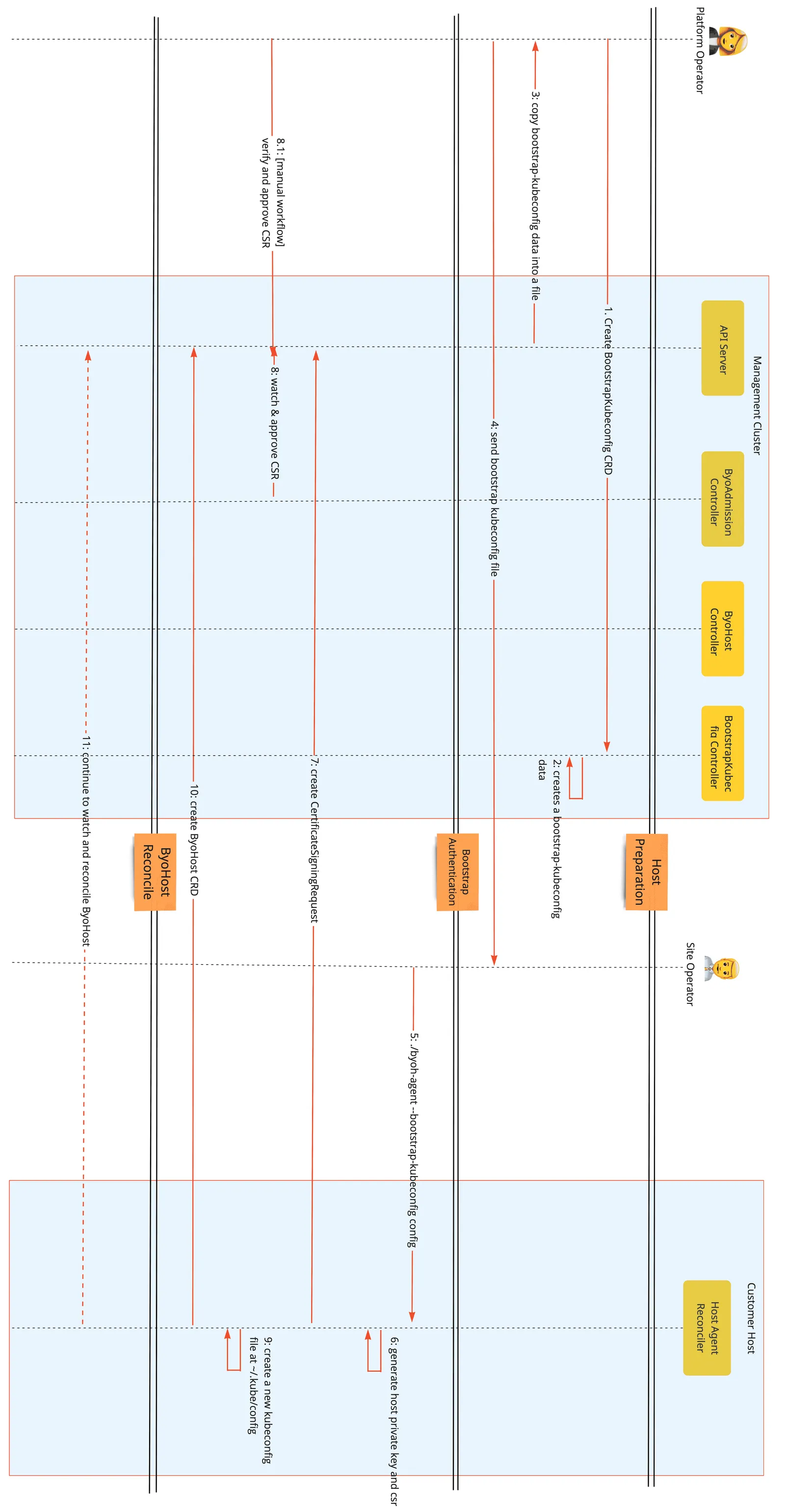
Figure 8.8: BYOH bootstrap flow
The roles of the platform operator and site operator in the illustration are automated by BCM.
The process initiated by BCM CAPI Infrastructure Provider starts with BCM.
When initiating, the capi-agent service verifies the existence of a configuration before launching. If a configuration does not exist, then the BCM API is used to request one.
BCM then automates all the steps necessary to generate this configuration, and prepares it for the capi-agent so it can start its process.
To clarify figure 8.8 further, before step 9 (create a new kubeconfig file at ~/.kube/config), only the bootstrap configuration exists on the node. However, after this step, two configuration files exist: the bootstrap and the definitive configuration files. The presence of these files enables BCM to determine the current phase of the bootstrap process that the capi-agent is in.
Manual generation of bootstrap configurations is also possible. Details on this are given in the documentation at https://github.com/vmware-tanzu/cluster-api-provider-bringyourownhost/blob/main/docs/getting_started.md#register-byoh-host-to-management-cluster
The host agent registration process described in the preceding is part of what is carried out for nodes when running the Assign Capi Role option in section 8.2.2.
8.5 Install Process BCM CAPI
The preceding section (section 8.4) focused on BCM CAPI host agent registration. The current section (section 8.5) discusses the deployment of Kubernetes clusters on these CAPI Hosts.
The deployment uses installation scripts transmitted to the designated nodes through “installation secrets”.
Node registration with BCM is also carried out as part of the deployment of Kubernetes on the CAPI hosts, and is distinct from the host agent registration of section 8.4. The deployment process flow is illustrated in figure 8.9:
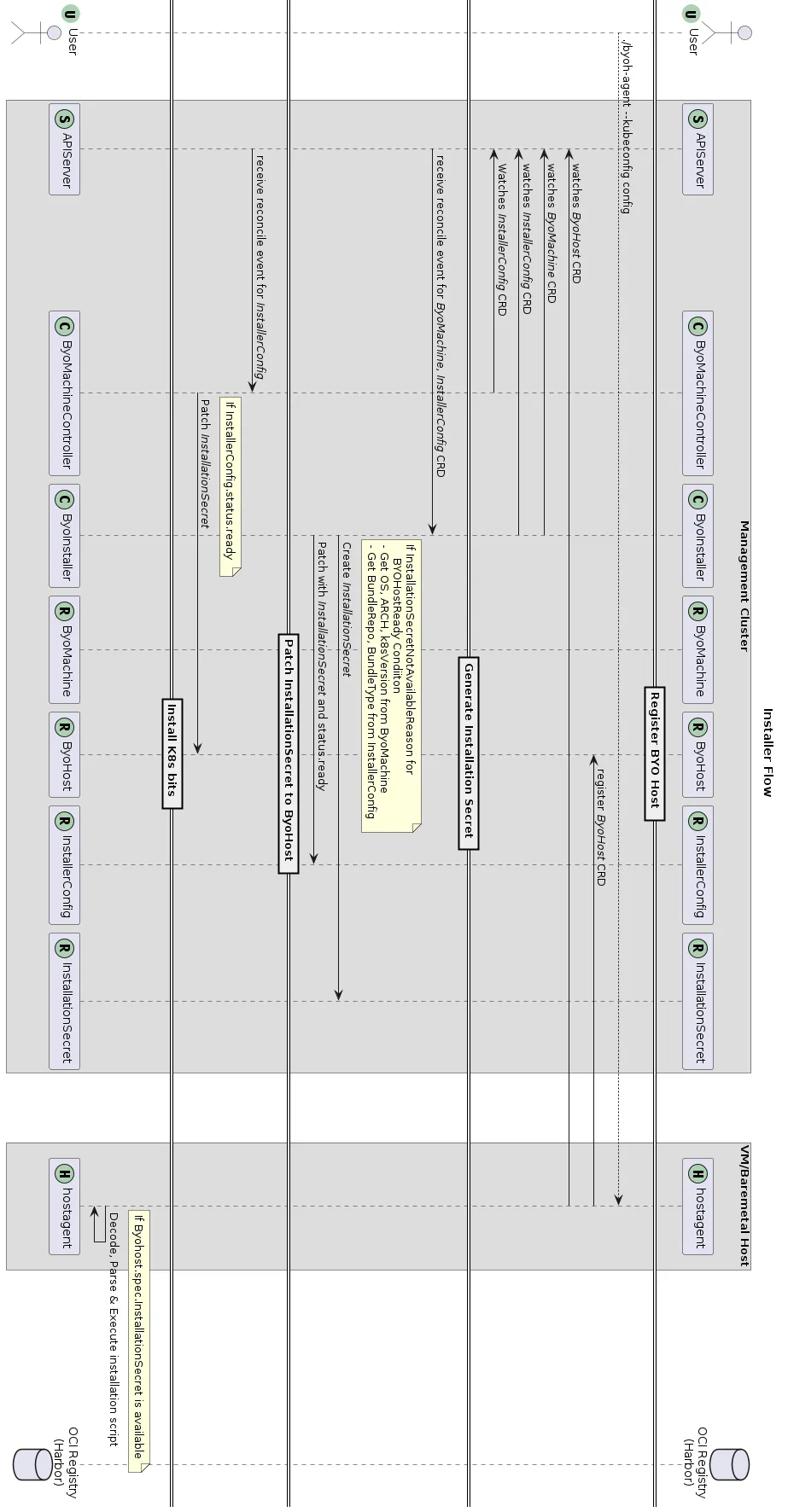
Figure 8.9: BYOH installer flow
8.5.1 Registration Process Of The Node With BCM
With BCM CAPI Infrastructure Provider, the installation script is a pythoncm script. It establishes communication with BCM on the active Head Node. This is referred to as “registering” the node with BCM.
The registration process involves essential bookkeeping tasks, such as tracking which nodes belong to specific Kubernetes CAPI clusters, and preparing software images with the appropriate Kubernetes versions.
The example that follows illustrates various components involved in creating a Kubernetes cluster using CAPI. In the example, a single head node operates as the Kubernetes management cluster, and multiple nodes are assigned the CAPI role. A cluster definition is generated for a control plane node and a worker node using the procedure described in section 8.3. An overview of the components involved when the cluster definition is applied is seen in figure 8.10:
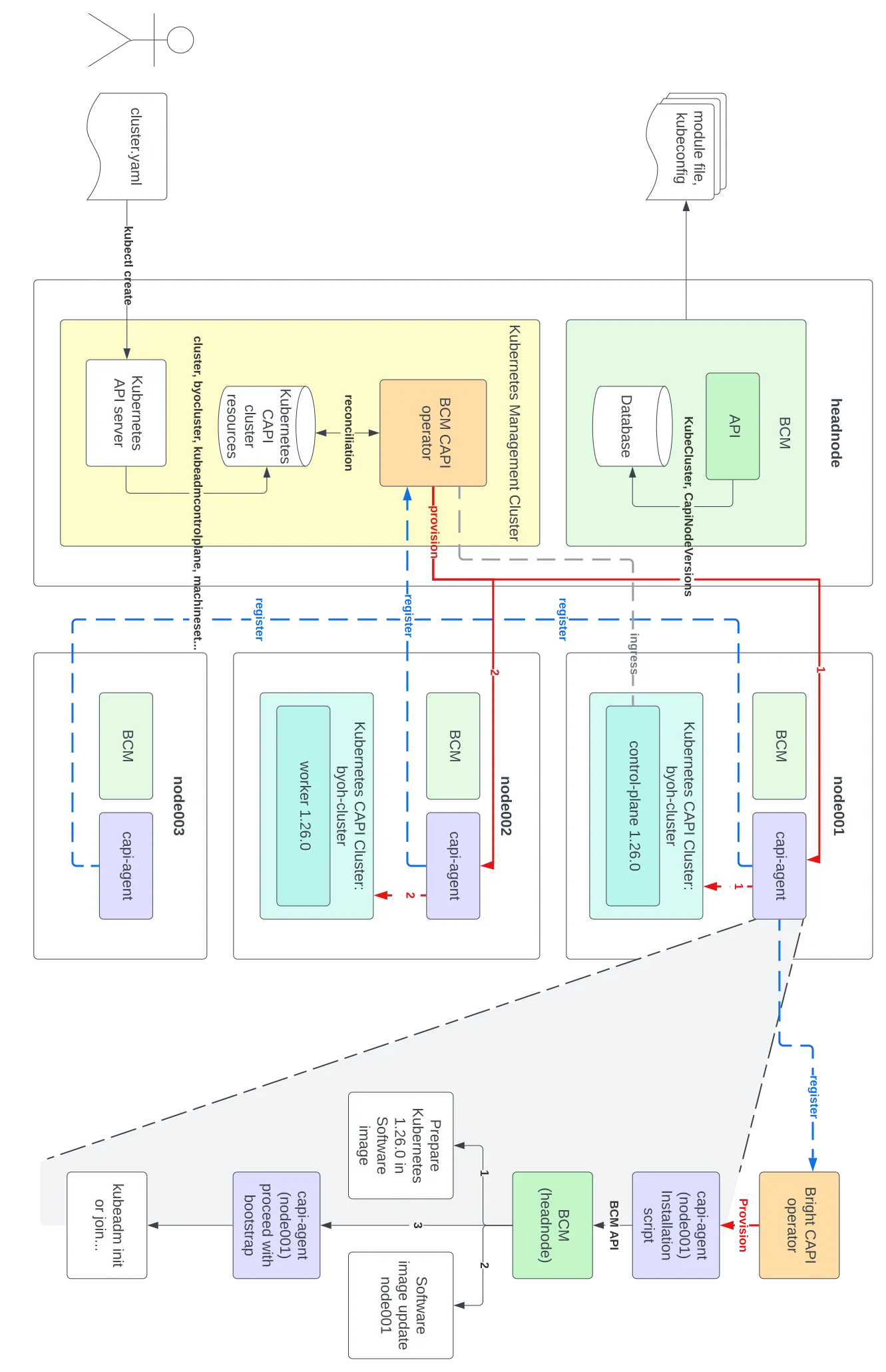
Figure 8.10: CAPI summary
In figure 8.10, the Kubernetes CAPI cluster has the control plane deployed on node001, followed by the deployment of the worker node software image on node002. The diagram of the is expanded from the node001 CAPI agent block illustrates the steps executed by the node001 capi-agent.
Upon registering with the BCM API, the more important actions that BCM carries out are:
-
Step 1: Preparation of Kubernetes version 1.26.0 within the software image for the registering node.
-
Step 2: Provisioning of the node through an image update, for example using the
imageupdatecommand ofcmsh(section 5.6.2 of the Administrator Manual), to ensure that it stays synchronized with its software image. -
Step 3: Handing control back to the
capi-agent, which proceeds with the subsequent step in the CAPI cluster creation process.
The steps also include processes beside the ones illustrated in figure 8.10. The more complete sequence is:
-
Step 1: The installation script is invoked with contextual information, such as the desired Kubernetes version (for example: 1.26.0) and the cluster name.
-
Step 2: The installation script, implemented as a PythonCM script, establishes communication with BCM. It registers itself with the active head node and remains in a waiting state until notified to terminate.
-
Step 3: BCM creates a mapping that specifies which node should be provisioned with the corresponding Kubernetes version.
-
Step 4: BCM ensures that the software image for the node contains the requested Kubernetes version.
-
Step 5: BCM ensures that the node is provisioned with its designated software image.
-
Step 6: BCM signals to the node that the installation script has completed.
From this point onward, the default logic for the BCM CAPI operator takes over, and kubeadm initializes the node accordingly.
8.5.2 Creating A Kubernetes Cluster Via CAPI
The steps in section 8.5.1, are about the node registration process and node provisioning during Kubernetes cluster creation with CAPI. The following steps zoom out further, and describe the complete process of creating a Kubernetes cluster through CAPI.
-
Step 1: The system administrator defines a cluster to be deployed by the BCM CAPI operator, and feeds it to the Kubernetes API server using
kubectl. -
Step 2: The definition results in a number of Kubernetes resources being created, such as a
Cluster,ByoCluster,MachineDeployment. -
Step 3: The BCM CAPI operator responds to these newly-created resources.
-
Step 4: CAPI starts assigning CAPI agents to reconcile specific
Machines, beginning with the first control plane. This is indicated by the red provisioning line, numbered with a1. -
Step 5: BCM prepares a module file and kubeconfig for the new Kubernetes CAPI cluster, and writes these to disk for the system administrator.
-
Step 6: BCM CAPI operator updates its records using the newly-created control plane and proceeds with provisioning the additional control planes or workers, such as the additional worker. This is indicated by the red line numbered with a
2.
8.6 Configuring CAPI Versions In Software Images
BCM takes care of configuring CAPI versions in software images automatically. This is part of its BCM CAPI node registration process, as mentioned earlier in section 8.5.
An alternative is to manually pre-install a specific version of Kubernetes in a software image. This can be done from within the softwareimage mode of cmsh:
Example
8.7 Removing Kubernetes CAPI clusters
The following steps remove the CAPI clusters:
-
Step 1: The removal of the CAPI clusters is started with the
kubectl deletecommand: -
Step 2: If all CAPI hosts are not part of any significant clusters, then the configuration overlay configuration overlays are removed:
The removal of the configuration overlays causes
containerdand the CAPI agents to stop on the hosts. -
Step 3: For additional cleanliness, the bootstrap configurations for each of the hosts should be removed:
-
Step 4: The infrastructure provider is then removed:
-
Step 5: The removal of all the ByoHost resources can be checked:
For clean-up the command
kubectl delete byohost ...can be used.
-
Step 6: Finally, the Kubernetes CAPI clusters is eliminated from BCM itself:
8.8 Kubernetes CAPI Templates
In BCM, each Kubernetes cluster is represented as a KubeCluster entity stored in the BCM database. These entities can be viewed in the kubernetes submode of cmsh:
Example
-
For every Kubernetes management cluster, a default KubeCluster CAPI template is generated once the CAPI role node is assigned using the wizard, as discussed in section 8.2.2. This template serves as a base for all subsequent Kubernetes clusters created via CAPI.
-
For example, if an administrator creates a cluster
my-capi-clustervia CAPI, for the Kubernetes management clustermgmt, then BCM clones thecapi-mgmt-templateKubeCluster entity to create a new KubeClustermy-capi-cluster. -
At the time of CAPI cluster creation, the KubeCluster template can also be customized using an annotation in the Cluster resource definition:
Example
The provided YAML illustrates a cluster
byoh-clusterdefinition, with the specified capi-template set tomy-capi-cluster-template. If present, then this is used instead of the default. -
The fallback sequence for the CAPI template is: The specified label (for example:
my-capi-cluster-template) is used if it exists; otherwise the defaultcapi-mgmt-templateis used. If neither is available, thencapi-templateis used.