


Low Latency Streaming (LLS/WebRTC) Functions#
Cloud Functions supports the ability to stream video, audio, and other data using WebRTC.
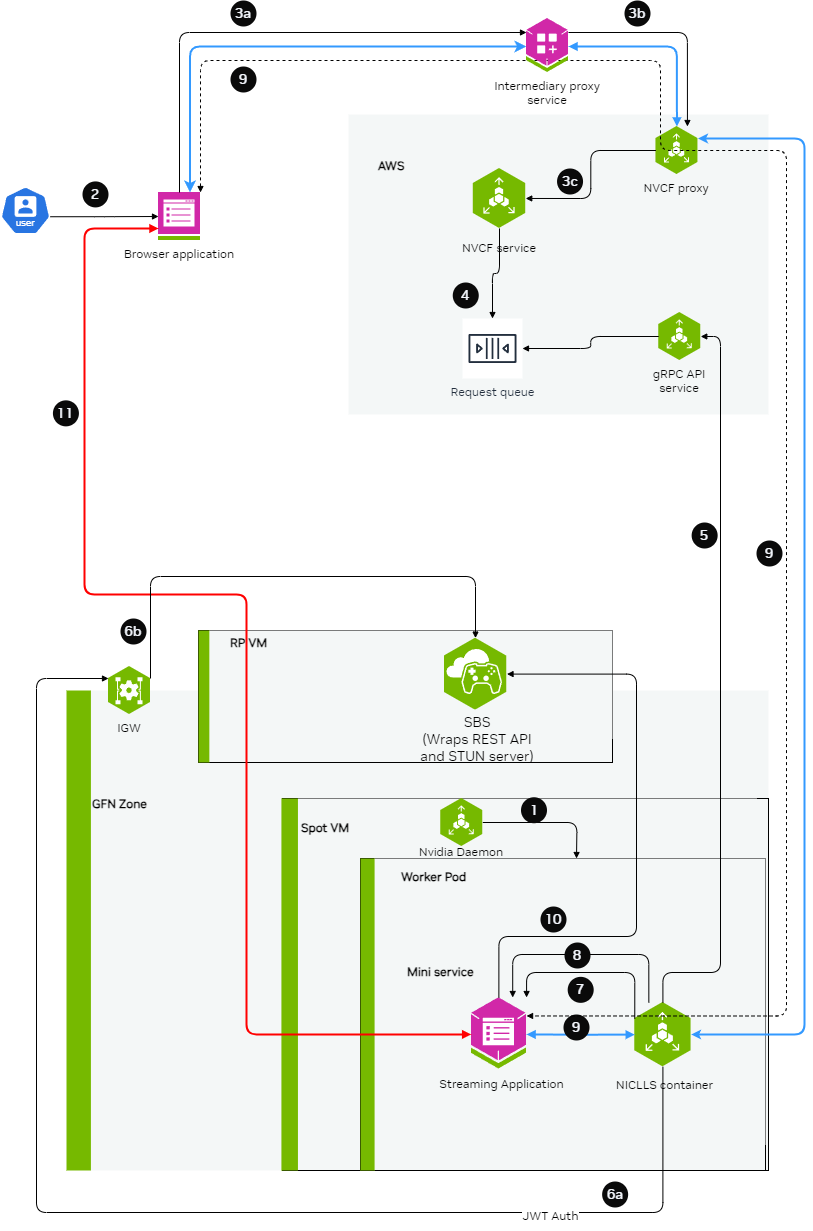
For complete examples of LLS streaming functions, contact your NVIDIA representative for access to sample function containers.
Building the Streaming Server Application#
The streaming application needs to be packaged inside a container and should be leveraging the StreamSDK. The streaming application needs to follow the below guidelines:
Expose an HTTP server at port
CONTROL_SERVER_PORTwith following 2 endpoints:Health endpoint: This endpoint should return 200 HTTP status code only when the streaming application container is ready to start streaming a session. If the streaming application container doesn’t want to serve any more streaming sessions of current container deployment this endpoint should return HTTP status code 500.
 Request:
    Endpoint:
        GET /v1/streaming/ready

 Responses:
    Status code:
        200 OK 500 Internal Server Error
STUN creds endpoint: This endpoint should accept the access details and credentials for STUN server and keep it cached in the memory of the streaming application. When the streaming requests comes, the streaming application can use these access details and credentials to communicate with STUN server and request for opening of ports for streaming.
  Request:
      Endpoint:
          POST /v1/streaming/creds
      Headers:
          Content-Type: application/json
      Request Body:
          {
              "stunIp": "<string>",
              "stunPort": <int>,
              "username": "<string>",
              "password": "<string>"

          }
  Responses:
      Status code:
          200 OK
Expose a server at port
STREAMING_SERVER_PORTto accepting WebSocket connectionAn endpoint
STREAMING_START_ENDPOINTshould be exposed by this server
Post websocket connection establishment guidelines:
When the browser client requests for opening port for specific protocols (e.g. WebRTC), the streaming application needs to request STUN server to open port. This port should be in the range of 47998 and 48020 which would be referred as
STREAMING_PORT_BINDING_RANGEin this doc.
Containerization guidelines:
The container should make sure that the
CONTROL_SERVER_PORT,STREAMING_SERVER_PORTandSTREAMING_PORT_BINDING_RANGEare exposed by the container and accessible from outside the container.If multiple sessions one after another needs to be supported with a fresh start of container, then exit the container after a streaming session ends.
Creating the LLS Streaming Function#
When creating the function, ensure functionType is set to STREAMING:
 1curl -s -X POST "http://${GATEWAY_ADDR}/v2/nvcf/functions" \
 2    -H "Host: api.${GATEWAY_ADDR}" \
 3    -H "Authorization: Bearer $NVCF_TOKEN" \
 4    -H 'accept: application/json' \
 5    -H 'Content-Type: application/json' \
 6    -d '{
 7        "name": "'$STREAMING_FUNCTION_NAME'",
 8        "inferenceUrl": "/sign_in",
 9        "inferencePort": '$STREAMING_SERVER_PORT',
10        "health": {
11            "protocol": "HTTP",
12            "uri": "/v1/streaming/ready",
13            "port": '$CONTROL_SERVER_PORT',
14            "timeout": "PT10S",
15            "expectedStatusCode": 200
16        },
17        "containerImage": "'$STREAMING_CONTAINER_IMAGE'",
18        "apiBodyFormat": "CUSTOM",
19        "description": "'$STREAMING_FUNCTION_NAME'",
20        "functionType": "STREAMING"
21        }
22    }'
Connecting to a streaming function with a client#
Intermediary Proxy#
An intermediary proxy service needs to be deployed in order to facilitate the connection to the streaming function.
The intermediate proxy serves to handle authentication and the headers that are required for NVCF, and also to align the connection behavior with NVCF that the browser can’t handle on its own, or the browser behavior is unpredictable.
Proxy Responsibilities
The intermediary proxy performs the following functionalities:
Authenticate the user token coming from the browser to the intermediary proxy
Authorize the user to have access to specific streaming function
Once the user is authenticated and authorized, modify the websocket connection coming in to append the required NVCF headers (
NVCF_API_KEYandSTREAMING_FUNCTION_ID)Forward the websocket connection request to NVCF
Technical Implementation Guidance
nvcf-function-id Header
NVCF requires this header to be present to identify the function that needs to be reached. Browser does not have the mechanism to set any kind of headers in case of WebSocket connections other than Sec-Websocket-Protocol, so the intermediate proxy can serve to either add the nvcf-function-id header on its own, or to parse Sec-Websocket-Protocol if the browser added it there and get the function id from there.
See http-request add-header documentation in HAProxy.
Authentication
The role of intermediate proxy is to add the required server authentication (e.g. http-request set-header Authorization "Bearer NVCF_BEARER_TOKEN").
Connection Keepalive
NVCF controls the session lifetime based on the TCP connection lifetime to the function and the type of disconnection that happens. The intermediate proxy helps to keep the connection with the browser alive.
Resume Support
NVCF returns the cookie with nvcf-request-id, but given the browser may reject the cookie since it is not from the same domain, the intermediate proxy helps to align this.
CORS Headers
For browsers to allow traffic with NVCF, the intermediate proxy needs to add the relevant CORS headers to responses from NVCF:
access-control-expose-headers: *access-control-allow-headers: *access-control-allow-origin: *
For guidance on implementing this in HAProxy, see http-response set-header documentation.
Example HAProxy Dockerfile
Below is an all-in-one Dockerfile sample for setting up an HAProxy intermediary proxy with optional TLS/SSL support:
Note
This example focuses on NVCF integration. In production, you should also implement user authentication and authorization to control access to your streaming function.
For certain applications, TLS/SSL support is required. The proxy can be configured to use self-signed certificates for development and testing purposes by setting PROXY_SSL_INSECURE=true.
Update NVCF_SERVER to point to your gateway address. See Gateway Routing and DNS for details.
  1FROM haproxy:3.2
  2
  3# Switch to root user for package installation
  4USER root
  5
  6# Install necessary tools
  7RUN apt-get update && apt-get install -y \
  8    bash \
  9    gettext-base \
 10    lua5.3 \
 11    openssl \
 12    && rm -rf /var/lib/apt/lists/*
 13
 14# Create directory for configuration and certificates
 15RUN mkdir -p /usr/local/etc/haproxy/lua \
 16    && mkdir -p /usr/local/etc/haproxy/certs \
 17    && chown -R haproxy:haproxy /usr/local/etc/haproxy
 18
 19# Create certificate generation script
 20COPY <<EOF /usr/local/bin/generate-cert.sh
 21#!/bin/bash
 22cd /usr/local/etc/haproxy/certs
 23openssl req -x509 -newkey rsa:2048 -keyout server.key -out server.crt -days 365 -nodes -subj "/CN=localhost" -quiet
 24# Combine certificate and key into a single file for HAProxy
 25cat server.crt server.key > server.pem
 26chown haproxy:haproxy server.key server.crt server.pem
 27chmod 600 server.key server.pem
 28chmod 644 server.crt
 29EOF
 30
 31RUN chmod +x /usr/local/bin/generate-cert.sh
 32
 33# Create the HAProxy configuration template file
 34COPY --chown=haproxy:haproxy <<EOF /usr/local/etc/haproxy/haproxy.cfg.template
 35global
 36        log stdout    local0 info
 37        stats timeout 30s
 38        user haproxy
 39
 40        # Default SSL material locations
 41        ca-base /etc/ssl/certs
 42        crt-base /etc/ssl/private
 43
 44        # SSL server verification enabled for security
 45        ssl-server-verify required
 46
 47        # See: https://ssl-config.mozilla.org/#server=haproxy&server-version=3.2&config=intermediate
 48        ssl-default-bind-ciphers ECDHE-ECDSA-AES128-GCM-SHA256:ECDHE-RSA-AES128-GCM-SHA256:ECDHE-ECDSA-AES256-GCM-SHA384:ECDHE-RSA-AES256-GCM-SHA384:ECDHE-ECDSA-CHACHA20-POLY1305:ECDHE-RSA-CHACHA20-POLY1305:DHE-RSA-AES128-GCM-SHA256:DHE-RSA-AES256-GCM-SHA384
 49        ssl-default-bind-ciphersuites TLS_AES_128_GCM_SHA256:TLS_AES_256_GCM_SHA384:TLS_CHACHA20_POLY1305_SHA256
 50        ssl-default-bind-options ssl-min-ver TLSv1.2 no-tls-tickets
 51
 52defaults
 53        log     global
 54        option  httplog
 55        option  dontlognull
 56        option  logasap
 57        timeout connect 5000
 58        timeout client  50000
 59        timeout server  50000
 60
 61frontend test_frontend
 62        log  global
 63        bind *:\${PROXY_PORT} \${PROXY_SSL_BIND_OPTIONS}
 64        mode http
 65        timeout client       7s
 66        timeout http-request 30m
 67        use_backend webrtc_backend
 68
 69backend webrtc_backend
 70        log  global
 71        mode http
 72        timeout connect 4s
 73        timeout server  7s
 74        http-request set-header Host \${NVCF_SERVER}
 75        http-request set-header Authorization "Bearer \${NVCF_API_KEY}"
 76        http-request set-header Function-ID \${STREAMING_FUNCTION_ID}
 77        server s1 \${NVCF_SERVER}:443 ssl ca-file /etc/ssl/certs/ca-certificates.crt verify required
 78EOF
 79
 80# Create the entrypoint script
 81COPY <<EOF /entrypoint.sh
 82#!/bin/bash
 83
 84# Check required environment variables
 85if [ -z "\${NVCF_API_KEY:+x}" ]; then
 86    echo "NVCF_API_KEY must be set"
 87    exit 1
 88fi
 89
 90if [ -z "\${STREAMING_FUNCTION_ID:+x}" ]; then
 91    echo "STREAMING_FUNCTION_ID must be set"
 92    exit 1
 93fi
 94
 95# Use default NVCF_SERVER if not set
 96if [ -z "\${NVCF_SERVER:+x}" ]; then
 97    export NVCF_SERVER=\${GATEWAY_ADDR}
 98    echo "NVCF_SERVER not set, using GATEWAY_ADDR: \${NVCF_SERVER}"
 99fi
100
101# Use default PROXY_PORT if not set
102if [ -z "\${PROXY_PORT:+x}" ]; then
103    export PROXY_PORT=49100
104    echo "PROXY_PORT not set, using default: \${PROXY_PORT}"
105fi
106
107# Use default PROXY_SSL_INSECURE if not set
108if [ -z "\${PROXY_SSL_INSECURE:+x}" ]; then
109    export PROXY_SSL_INSECURE=false
110    echo "PROXY_SSL_INSECURE not set, using default: \${PROXY_SSL_INSECURE}"
111fi
112
113echo "Launching intermediate proxy:"
114echo "  API Key: \${NVCF_API_KEY:0:6}**********\${NVCF_API_KEY: -3}"
115echo "  Function ID: \${STREAMING_FUNCTION_ID}"
116echo "  Version ID: \${STREAMING_FUNCTION_VERSION_ID}"
117echo "  NVCF Server: \${NVCF_SERVER}"
118echo "  Proxy Port: \${PROXY_PORT}"
119echo "  Proxy SSL (Insecure): \${PROXY_SSL_INSECURE}"
120
121# Generate self-signed certificate if SSL is enabled
122if [ "\${PROXY_SSL_INSECURE}" = "true" ]; then
123    /usr/local/bin/generate-cert.sh
124    export PROXY_SSL_BIND_OPTIONS="ssl crt /usr/local/etc/haproxy/certs/server.pem"
125    echo "SSL enabled - self-signed certificate generated"
126else
127    export PROXY_SSL_BIND_OPTIONS=""
128    echo "SSL disabled - running in HTTP mode"
129fi
130
131# Process the template and create the final config
132envsubst < /usr/local/etc/haproxy/haproxy.cfg.template > /usr/local/etc/haproxy/haproxy.cfg
133
134# Function to handle signals and forward them to HAProxy
135handle_signal() {
136    echo "Received signal, shutting down HAProxy..."
137    if [ -n "\$HAPROXY_PID" ]; then
138        kill -TERM "\$HAPROXY_PID" 2>/dev/null
139        wait "\$HAPROXY_PID"
140    fi
141    exit 0
142}
143
144# Set up signal handlers
145trap handle_signal SIGTERM SIGINT
146
147# Start HAProxy in background and capture PID
148echo "Starting HAProxy..."
149haproxy -f /usr/local/etc/haproxy/haproxy.cfg &
150HAPROXY_PID=\$!
151
152# Wait for HAProxy process
153wait "\$HAPROXY_PID"
154EOF
155
156RUN chmod +x /entrypoint.sh
157
158# Switch back to haproxy user
159USER haproxy
160
161# Set the entrypoint
162ENTRYPOINT ["/entrypoint.sh"]
Environment Variables
The following environment variables control proxy behavior:
Variable |
Required |
Default |
Description |
|---|---|---|---|
|
Yes |
- |
Your NVCF API Key |
|
Yes |
- |
Your NVCF streaming function ID |
|
No |
- |
Specific version of your function (optional) |
|
No |
GATEWAY_ADDR |
NVCF server endpoint (your gateway address) |
|
No |
49100 |
Port for the proxy to listen on |
|
No |
false |
Enable SSL with self-signed certificate (set to “true” to enable) |
Usage Examples
1. HTTP Mode (Default)
Standard configuration without SSL:
export STREAMING_FUNCTION_ID=your-function-id
export NVCF_API_KEY=your-nvcf-api-key
export PROXY_PORT=49100

docker build -t nvcf-haproxy-proxy .

docker run --rm -it \
    -p 127.0.0.1:${PROXY_PORT}:${PROXY_PORT}/tcp \
    -e PROXY_PORT="$PROXY_PORT" \
    -e NVCF_API_KEY="$NVCF_API_KEY" \
    -e STREAMING_FUNCTION_ID="$STREAMING_FUNCTION_ID" \
    nvcf-haproxy-proxy
2. HTTPS Mode with Self-Signed Certificate
Configuration with SSL enabled using a self-signed certificate:
export STREAMING_FUNCTION_ID=your-function-id
export NVCF_API_KEY=your-nvcf-api-key
export PROXY_SSL_INSECURE=true
export PROXY_PORT=48322

docker build -t nvcf-haproxy-proxy .

docker run --rm -it \
    -p 127.0.0.1:${PROXY_PORT}:${PROXY_PORT}/tcp \
    -e PROXY_PORT=${PROXY_PORT} \
    -e PROXY_SSL_INSECURE=${PROXY_SSL_INSECURE} \
    -e NVCF_API_KEY="$NVCF_API_KEY" \
    -e STREAMING_FUNCTION_ID="$STREAMING_FUNCTION_ID" \
    nvcf-haproxy-proxy
Note
Since this configuration uses self-signed certificates for development and testing, you will need to configure your client to accept untrusted certificates. In production environments, you should use proper CA-signed certificates.
Web Browser Client#
Using the proxy, a browser client can be used to connect to the stream.
The browser client needs to be developed by the customer leveraging the raganrok dev branch 0.0.1503 version. Please ensure that the flags are set:
> const configData: RagnarokConfigData = {
>
> > overrideData: "disableworkerws=true"
>
> }
>
> ConfigureRagnarokSettings(configData);