

Cloud Deployment#
This page presents a reference architecture for deploying CloudXR streaming as a cloud-hosted service. The design described here is one recommended approach, not the only way to deploy CloudXR in the cloud. You may adapt the architecture to fit your specific cloud platform, infrastructure, and security requirements.
Why Cloud Deployment?#
Deploying CloudXR in the cloud provides several advantages over local or on-premises servers:
High scalability: Scale GPU instances up and down based on demand, paying only for the GPU time your streaming sessions consume rather than maintaining always-on hardware.
High availability: XR rendering happens on cloud GPU instances, so users can connect from anywhere with an internet connection. End users only need a client device and a network connection.
Architecture Overview#
The reference architecture for cloud-hosted CloudXR streaming involves three components:
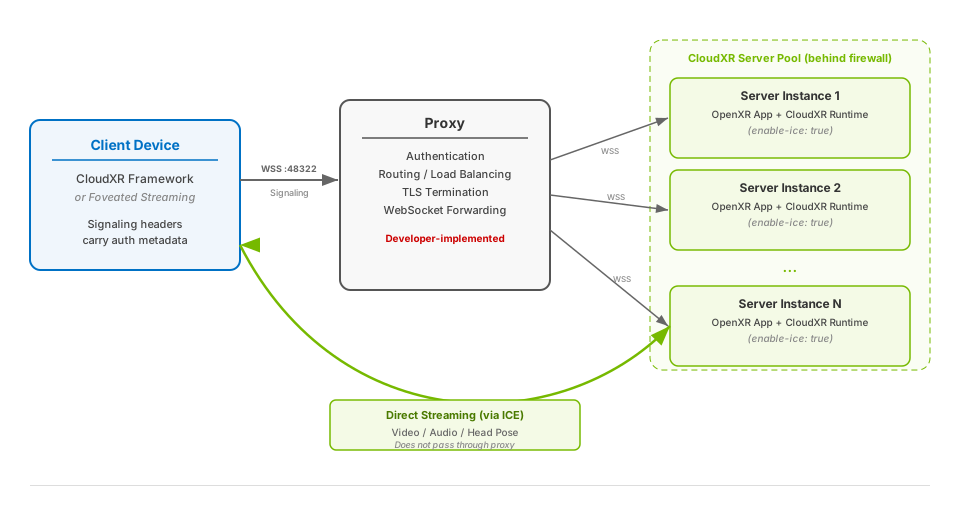
Client device: An Apple Vision Pro, or other supported device running your app built with a CloudXR client framework. The client connects to the proxy using a secure WebSocket connection.
Proxy: A lightweight service that sits between the client and the cloud backend. In this reference architecture, it handles authentication, routes connections to available CloudXR server instances, and manages load balancing. You may combine this with an existing API gateway or load balancer in your infrastructure.
CloudXR server instance: GPU-accelerated container or VM running your OpenXR application with CloudXR Runtime. Media streams (video, audio, and input) flow directly between the client and server without passing through the proxy. In cloud deployments, configure ICE, and when NAT traversal is required, a STUN server so the client can negotiate the media path.
Connection Flow#
The client app connects to the proxy with a secure WebSocket and signaling headers.
The proxy authenticates the request using the signaling headers.
The proxy selects an available CloudXR server instance and forwards the WebSocket connection.
CloudXR Runtime on the server instance accepts the connection and begins streaming via ICE. If a STUN server is configured, the runtime uses it during ICE candidate discovery.
The user sees the XR experience on their device.
Proxy#
In this reference architecture, the proxy serves as the single public-facing entry point for all client connections. Depending on your infrastructure, this could be a dedicated proxy service, an existing API gateway, or a load balancer with WebSocket support.
Note
The proxy layer is the developer’s responsibility to design and deploy as part of the cloud infrastructure. Any technology capable of proxying WebSocket connections can be used (e.g., HAProxy, nginx, Envoy, or a custom application using a WebSocket library). The responsibilities listed below are suggestions based on common cloud deployment patterns and can be adapted as needed.
The proxy typically handles:
Listening for incoming WSS connections on a public-facing port with a CA-signed TLS certificate. The client’s
remoteSecureconnection type validates this certificate against the operating system’s root CA trust store.Authenticating the client by inspecting the HTTP headers from the WebSocket upgrade request. The client sends custom headers (via
signalingHeaders) that your proxy can use to validate credentials (e.g., anAuthorizationbearer token).Selecting a backend CloudXR server instance from a static list, a service registry, or an orchestrator API.
Forwarding the WebSocket connection to the selected server instance by opening a new WebSocket connection to it and bidirectionally relaying all messages (text, binary, ping/pong, and close frames) between client and server.
Cleaning up when either side disconnects by closing the other connection.
Important
The proxy must be deployed with a valid HTTPS certificate issued by a trusted Certificate Authority (CA). Self-signed certificates would fail validation and the connection would be rejected.
CloudXR server instances can remain behind a firewall. The proxy can dynamically allowlist incoming traffic as sessions are established.
Authentication and encryption between the proxy and server instances is up to you to design. In a private network (e.g., within a VPC), unencrypted connections between proxy and server may be acceptable. For cross-network deployments, consider TLS between the proxy and servers as well.
CloudXR Server Configuration#
Each CloudXR server instance runs your OpenXR application with CloudXR Runtime, deployed as a container or VM in your cloud environment.
Enable ICE#
For cloud deployments where the server is behind a proxy, ICE (Interactive Connectivity Establishment) must be enabled on the CloudXR Runtime. ICE enables the direct media connection between the server and client while the proxy handles signaling.
Set the enable-ice property to true via the Runtime Management API:
nv_cxr_service_set_boolean_property(
    service, "enable-ice", sizeof("enable-ice") - 1, true);
For the full property reference, see the enable-ice entry in CloudXR Runtime Management API.
Configure STUN for Cloud NAT Traversal#
When the CloudXR server instance is behind cloud NAT or does not have a media address that is directly reachable by the client, configure a STUN server on the runtime. STUN is used with ICE to discover the server’s public-facing media candidate.
nv_cxr_service_set_string_property(
    service,
    "stun-server-ip", sizeof("stun-server-ip") - 1,
    "203.0.113.20", sizeof("203.0.113.20") - 1);
nv_cxr_service_set_int64_property(
    service, "stun-server-port", sizeof("stun-server-port") - 1, 3478);
If your STUN service requires credentials, also set stun-username and
stun-credential before starting the runtime.
Important
STUN configuration is used only when enable-ice is enabled. If
stun-server-ip is set while ICE is disabled, the runtime ignores the STUN
configuration.
Container Packaging#
Each server instance container or VM must include:
The OpenXR server application (the XR experience to be streamed)
The CloudXR Runtime (handles rendering capture, encoding, and streaming)
A health check endpoint for the orchestrator to monitor readiness
The CloudXR server ports open and accessible from the proxy and client (see Ports and Firewalls for the full port list)
Note
Cloud deployments can keep CloudXR server instances behind a firewall or cloud NAT when ICE and STUN provide a reachable media path. Networks that block the negotiated UDP media traffic still require allowlisting, forwarding, or a deployment-specific relay strategy.
Client Setup#
Both CloudXR Framework and Foveated Streaming Framework support connecting to cloud-hosted servers. For Foveated Streaming client API details, refer to the Apple Foveated Streaming documentation.
On the CloudXR Framework client side, the remoteSecure connection type is designed for cloud deployments where the proxy has a CA-signed certificate:
case remoteSecure(
    host: String,
    signalingHeaders: [String : String] = [:],
    certificateValidationHandler: (URLAuthenticationChallenge) async
        -> (URLSession.AuthChallengeDisposition, URLCredential?)
)
Parameters:
host: The hostname of your proxy (e.g.,"proxy.example.com").signalingHeaders: A dictionary of HTTP headers sent to the proxy during the initial connection handshake. The proxy can use these headers for authentication, session routing, or passing other metadata along the request.certificateValidationHandler: A callback for TLS certificate validation. For cloud deployments with CA-signed certificates, use the system trust store.
Example#
import CloudXRKit

var config = CloudXRKit.Config()
config.connectionType = .remoteSecure(
    host: "proxy.example.com",
    signalingHeaders: [
        "Authorization": "Bearer \(userToken)",
    ],
    certificateValidationHandler: { challenge in
        guard let serverTrust = challenge.protectionSpace.serverTrust else {
            return (.cancelAuthenticationChallenge, nil)
        }
        var error: CFError?
        if SecTrustEvaluateWithError(serverTrust, &error) {
            return (.useCredential, URLCredential(trust: serverTrust))
        } else {
            return (.cancelAuthenticationChallenge, nil)
        }
    }
)

cxrSession.configure(config: config)
try await cxrSession.connect()
When the client calls connect(), CloudXR Framework initiates a secure WebSocket connection (wss://) to the specified host. The signalingHeaders dictionary is included as HTTP headers in the initial WebSocket upgrade request. The proxy receives these headers and can use them for authentication, routing, or other application-specific logic before forwarding the connection to a CloudXR server instance.
Note
The remote connection type (without the Secure suffix) works similarly but does not perform TLS certificate validation. It is not recommended for production deployments.
For additional details on secure connection types, see Secure Connection Mode.
NVIDIA Cloud Functions (NVCF)#
NVIDIA Cloud Functions (NVCF) is one option for hosting CloudXR server instances in the cloud. NVCF provides managed GPU infrastructure with automatic scaling, so you do not need to manage servers or orchestration yourself.
For detailed instructions on setting up a streaming function on NVCF, including a complete proxy Dockerfile example, see the Function Creation section of the NVCF documentation.
See Also#
CloudXR Runtime Management API: CloudXR Runtime configuration properties, including
enable-iceand STUN settingsSecure Connection Mode: Secure connection types in CloudXR Framework
CloudXR Runtime: CloudXR Runtime overview
NVCF User Guide: NVIDIA Cloud Functions documentation