User Guide
Getting Started
Domain Power Service (DPS) is a datacenter power management system that monitors power consumption, enforces power policies, and integrates with BMCs and cluster management systems. It provides the nvidia.dcpower.v1 gRPC API for programmatic access and addresses the growing challenge of optimizing power consumption while maintaining performance and reliability at scale.
Domain Power Service (DPS) provides flexible deployment options to meet your needs, from quick testing to full datacenter power management.
Key Concepts
Before deploying DPS, it’s helpful to understand a few core concepts:
- Topology - A representation of your datacenter’s power distribution network, from utility feeds down to individual compute nodes
- Power Policies - Rules that define power limits and management strategies for different workload scenarios
- Resource Groups - Collections of compute resources (nodes/GPUs) that share power budgets and policies
- dpsctl - The command-line interface for managing DPS
For detailed explanations of these and other concepts, see the Concepts section.
Architecture
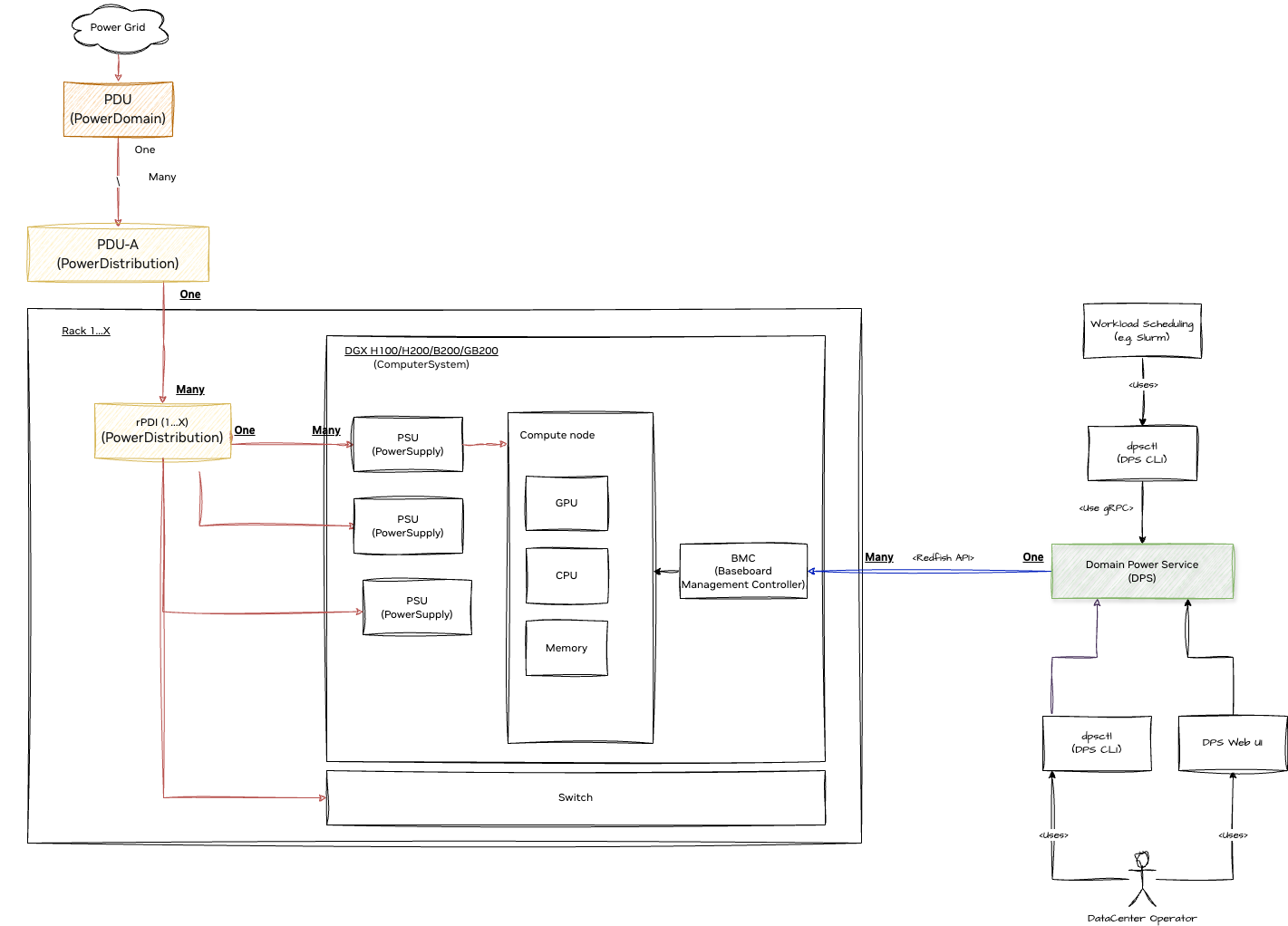
Deployment Options
1. Try It Out - DPS SDK Simulator
The DPS SDK Simulator provides a lightweight, pre-configured environment for testing and development without requiring full datacenter infrastructure. This is ideal for:
- Learning DPS concepts and workflows
- Developing and testing custom integrations via the SDK
- Partner integration development
- Proof-of-concept demonstrations
The simulator includes a mock topology and supports all DPS APIs, allowing you to explore functionality without hardware dependencies. It also provides:
- Grafana dashboards for visualizing power metrics and system behavior
- Simulation scripts for testing resource group scenarios and Grid event responses
- Pre-configured examples for common use cases
Simulator User Guide: SDK Simulator User Guide
2. Full Datacenter Deployment
For production power management, DPS can be deployed as a comprehensive solution for your datacenter. This deployment provides:
- Real-time power monitoring and policy enforcement
- Integration with workload schedulers (e.g., SLURM)
- Multi-level power distribution management
- GPU power optimization capabilities
Prerequisites:
- Kubernetes cluster for DPS services
- Network access to BMCs for all managed nodes
- Understanding of your datacenter’s power distribution architecture
Deployment Steps:
- Deploy DPS - Set up the DPS server infrastructure using Helm charts
- Install dpsctl - Install the command-line client for administration
- Create Topology - Model your datacenter’s power distribution network (see Topologies)
- Import Topology - Load your topology configuration into DPS
- Configure Policies - Define power policies appropriate for your workloads
Note: Administrators will need to create and import a custom topology that accurately represents their datacenter’s power distribution network. See the Managing Topologies guide for detailed instructions.