


Compute-only and Desktop Installation#
Starting in 560, the driver allows a new custom installation method which includes only part of the driver for different use cases. This allows for a more granular installation with fewer dependencies, especially for compute-only systems where the desktop components would pull in a lot of extra libraries that then would go unused.
Depending on the operating system, it is now possible to install the driver in the following configurations:
Desktop: Contains all the X/Wayland drivers and libraries to allow running a GPU with power management enabled on a desktop system (laptop, workstation, and so on) but does not include any CUDA component.
Compute-only, or “headless”: Contains everything required to run CUDA applications on a GPU system where the GPU is not used to drive a display: a computational cluster, a workstation with a dedicated NVIDIA GPU, and so on.
Desktop and Compute: The canonical way of installing the driver, with every possible library and display component. This might be required in cross functional combinations, for CUDA-accelerated video encoding/decoding.
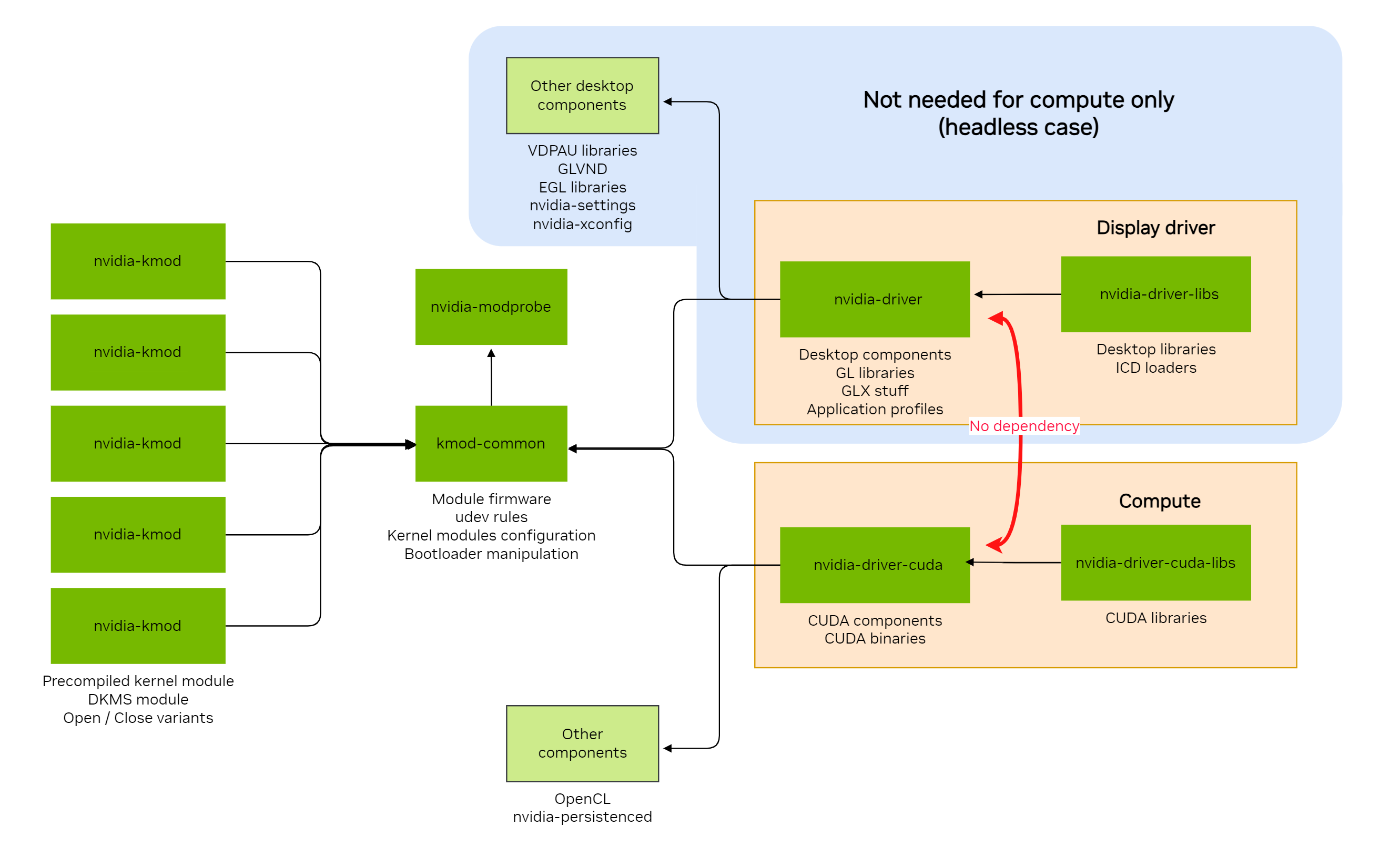
This option is now supported for the following operating systems, with more to follow in future releases:
Amazon Linux 2023
Red Hat Enterprise Linux 8 / AlmaLinux 8 / Rocky Linux 8 / Oracle Linux 8
Red Hat Enterprise Linux 9 / AlmaLinux 9 / Rocky Linux 9 / Oracle Linux 9
Red Hat Enterprise Linux 10 / AlmaLinux 10 / Rocky Linux 10 / Oracle Linux 10
KylinOS 11
Fedora 44
OpenSUSE Leap 15
OpenSUSE Leap 16
SUSE Linux Enterprise Server 15
SUSE Linux Enterprise Server 16
Debian 12
Debian 13
Ubuntu 22.04
Ubuntu 24.04
Ubuntu 26.04
The installation of the driver for the following operating systems is provided exclusively in compute-only/headless mode:
Azure Linux 3
More information is available in the respective sections.