


Architecture Overview#
This section provides an overview of TensorRT-RTX’s architecture, design principles, and ecosystem. It introduces key concepts and complementary tools for deploying optimized inference on NVIDIA RTX GPUs across desktops, laptops, and workstations.
TensorRT for RTX (TensorRT-RTX) is a specialization of NVIDIA TensorRT for the RTX product line. Like TensorRT, it provides a deep learning inference optimizer and runtime. Unlike TensorRT, TensorRT-RTX performs just-in-time (JIT) compilation on the end-user device, which simplifies deployment across a diverse set of RTX GPUs without per-device ahead-of-time builds in your release pipeline.
For runtime object lifetimes, threading, memory contracts, and engine compatibility, refer to How TensorRT-RTX Works.
Two-Phase Compilation#
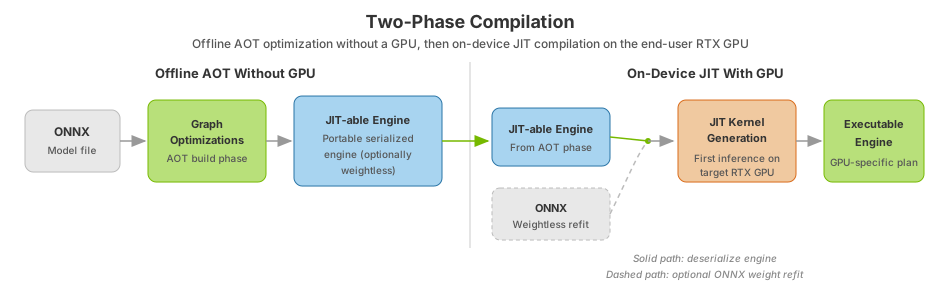
After you train a model in a framework of your choice, TensorRT-RTX compiles it for high-throughput, low-latency inference on the end-user GPU. Compilation proceeds in two phases:
Phase |
When |
Duration |
Output |
Portability |
|---|---|---|---|---|
Phase 1: Ahead-of-Time (AOT) optimization |
During install, first launch, or an offline build step (before inference) |
Typically 20–30 seconds for most models; up to ~60 seconds for complex models |
A portable TensorRT-RTX engine file (JIT-able engine) |
Portable across supported RTX GPU models; AOT build can run on CPU |
Phase 2: Just-in-Time (JIT) compilation |
First inference invocation on the end-user GPU |
Typically under 5 seconds for most models on first run |
An executable inference plan with GPU-specific kernel choices |
Optimized for the user’s specific GPU; runtime caching can persist compiled kernels across runs |
This two-phase approach trades a small amount of first-run startup time for portability: you ship a single engine from the AOT phase, and the JIT phase specializes it for the GPU it actually runs on, so your release pipeline does not have to pre-compile one engine per target device. Benchmark your own model to compare against a device-specific build. Refer to Optimizing Performance.
Complementary Software#
Tool |
Description |
|---|---|
Default execution provider on RTX GPUs for production Windows apps. TensorRT-RTX is the default EP when Windows ML runs on supported RTX hardware. |
|
Run ONNX models through ONNX Runtime with TensorRT-RTX acceleration. Use this path when your application already integrates ONNX Runtime. |
|
LLM workflows on RTX with TensorRT-RTX as an execution provider. Olive recipes such as the Qwen2.5 example show end-to-end optimization paths. |
|
Accelerate |
|
Quantization and compression for models exported to ONNX and deployed with TensorRT-RTX. Datatype support is listed in the Support Matrix. |
|
System-wide profiling integrated with TensorRT-RTX NVTX ranges. Refer to Performance Benchmarking. |
|
Edit and simplify ONNX graphs before parsing. Refer to the ONNX GraphSurgeon API and Polygraphy API pages. |
ONNX#
TensorRT-RTX’s primary means of importing a trained model is the ONNX interchange format. TensorRT-RTX ships with an ONNX parser library and the tensorrt_rtx command-line tool for building engines from .onnx files. You can also construct networks through the native C++ or Python API, or run models through ONNX Runtime and Windows ML execution providers.
Entry path |
When to use |
Next step |
|---|---|---|
ONNX export + ONNX parser |
Most training frameworks (PyTorch, TensorFlow, JAX, and others) |
ONNX Conversion Guide, then Quick Start Guide (CLI verify loop), Build Your First Engine (deployment), or the C++ / Python API walkthroughs |
ONNX Runtime execution provider |
Applications already running models through ONNX Runtime or Windows ML |
TensorRT-RTX Execution Provider documentation |
Native network definition API |
Maximum control over graph construction and weights |
Creating A Network Definition Using The C++ API, Creating A Network Definition Using The Python API, then Using the Native Runtime API |
PyTorch ``torch.compile`` backend |
PyTorch-centric workflows without manual ONNX export |
ONNX conversion is all-or-nothing: every operation in the model must be supported by TensorRT-RTX. Refer to Operators for the ONNX operator catalog.
Relation to NVIDIA TensorRT#
TensorRT-RTX optimizes CNN, diffusion, and speech models expressed in ONNX or native C++ APIs on NVIDIA RTX GPUs. Unlike the NVIDIA TensorRT Inference library, TensorRT-RTX does not target datacenter, edge, or embedded GPU platforms.
TensorRT-RTX exposes a subset of APIs derived from TensorRT and shares the same namespace, so existing TensorRT applications for RTX devices can port by linking to the new library. For when to choose TensorRT versus TensorRT-RTX, the migration checklist, and API differences, refer to the Porting Guide for TensorRT Applications. Start with Choosing an Inference Solution and Migration Checklist.
TensorRT-RTX does not support native LLM deployment out of the box. When used as an execution provider with Windows ML or ONNX Runtime GenAI, TensorRT-RTX optimizes LLM inference on RTX GPUs with compute capability 8.6 or later (Ampere and later). LLMs from Windows AI Foundry Local can use the TensorRT-RTX execution provider. On RTX Turing GPUs (20-series), LLM support through TensorRT-RTX is planned for a future release; use the CUDA Execution Provider as a fallback path on Turing today.
Note
TensorRT-RTX does not yet support framework integrations with NVIDIA TensorRT-LLM, Torch-TensorRT, TensorFlow-TensorRT, and NVIDIA Triton Inference Server.
Code Analysis Tools#
On Linux, use API Capture and Replay to record and replay TensorRT-RTX API sequences during engine building without the original application or model source. For broader diagnostic workflows, refer to the Troubleshooting section.
API Versioning#
TensorRT-RTX version numbers (MAJOR.MINOR.PATCH) follow Semantic Versioning 2.0.0 for public APIs and library ABIs. Serialized engines are tied to the TensorRT-RTX version that built them. Refer to Engine Compatibility and Compatibility Checks before deserializing engines across releases or GPUs.
Deprecation Policy#
Deprecation informs developers that NVIDIA no longer recommends some APIs and tools and plans to remove them. TensorRT-RTX has the following deprecation policy (similar to the TensorRT deprecation policy):
Deprecation notices are communicated in the Release Notes.
When using C++ API:
API functions are marked with the
TRT_DEPRECATED_APImacro.Enums are marked with the
TRT_DEPRECATED_ENUMmacro.All other locations are marked with the
TRT_DEPRECATEDmacro.Classes, functions, and objects will have a statement documenting when they were deprecated.
When using the Python API, deprecated methods and classes will issue deprecation warnings at runtime if they are used.
TensorRT-RTX provides a 12-month migration period after the deprecation.
APIs and tools continue to work during the migration period.
After the migration period ends, NVIDIA removes APIs and tools in a manner consistent with semantic versioning.
Hardware Support Lifetime#
TensorRT-RTX targets NVIDIA RTX GPUs from Turing (compute capability 7.5) through Blackwell (compute capability 12.0 / 12.1). Portable AOT engines target Ampere and later by default; Turing requires an explicit compute-capability setting at build time. Refer to the Support Matrix for supported hardware, operating systems, and dependency versions.
Support#
Support, resources, and information about TensorRT-RTX can be found on the TensorRT-RTX GitHub repository and the NVIDIA Developer TensorRT forum.
Reporting Bugs#
If you encounter problems, gather TensorRT-RTX version, GPU model, driver and CUDA versions, and relevant log output, then open an issue on the TensorRT-RTX GitHub repository or post on the developer forum. Refer to Troubleshooting for diagnostic workflows.