

1. Product Overview#
Run:ai on DGX Cloud is a Kubernetes-based AI workload management platform that empowers teams to efficiently schedule and run AI jobs and optimize GPU resource allocation for their AI initiatives.
Offered as a managed service, this solution is designed for enterprises and institutions to quickly enable and execute their data science and AI projects at any scale, without having to manage the infrastructure themselves. GPU clusters are provisioned, managed, and maintained by NVIDIA.
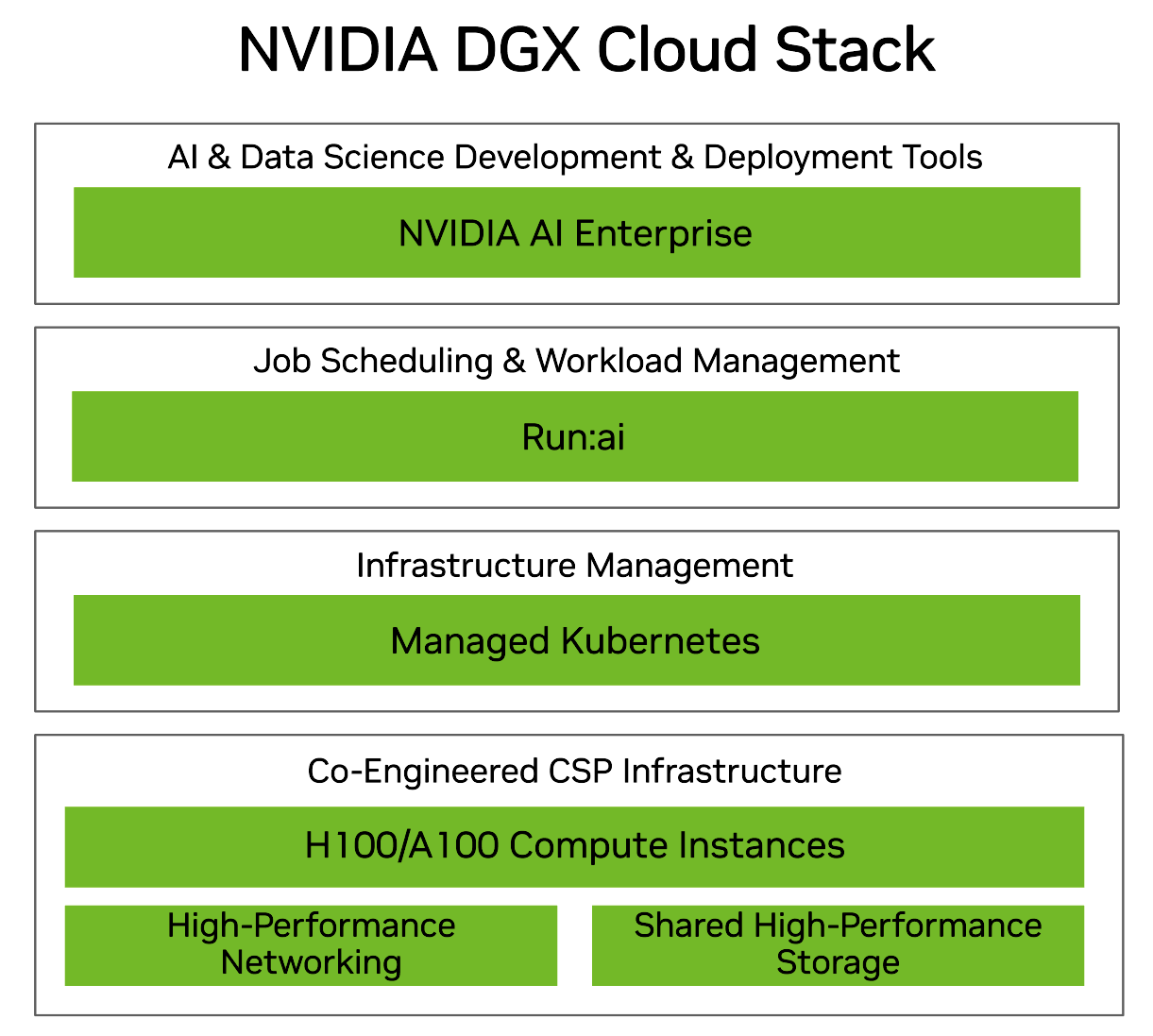
Run:ai on DGX Cloud provides:
A Compute Cluster: Customers get access to a dedicated AI cluster provisioned with state-of-the-art NVIDIA GPU capacity, provided by NVIDIA cloud service provider (CSP) partners, along with storage and networking, as part of their Run:ai on DGX Cloud subscription.
A User Interface: NVIDIA Run:ai provides a UI and CLI for interacting with the cluster.
AI Training Capabilities: Run:ai on DGX Cloud supports distributed AI training workloads for model development, fine-tuning and batch jobs, as well as interactive workloads for experimentation and data science workflows.
Optimized Resource Utilization: Run:ai on DGX Cloud offers automated GPU cluster management, orchestration and job queuing for efficient resource sharing and optimized utilization.
User and Resource Management: The features and functionalities available to the end user are managed with role-based access control (RBAC). NVIDIA Run:ai uses the concept of projects and departments to manage access to resources across the cluster.
Cluster and Workload Observability: The NVIDIA Run:ai GUI provides dashboards for monitoring and managing workloads, users, and resource utilization.
NVIDIA AI Enterprise Subscription: All Run:ai on DGX Cloud subscriptions include access to NVIDIA AI Enterprise, which provides access to NVIDIA’s suite of GPU-optimized software.
Support: Customers have access to 24/7 enterprise-grade support from NVIDIA. NVIDIA will be the primary support for customers. Customers will have access to a Technical Account Manager (TAM).
1.1. Cluster Architecture#
The architecture stack consists of an NVIDIA-optimized Kubernetes cluster on a CSP connected to a NVIDIA Run:ai Software as a Service (SaaS) cloud control plane. The exact configuration and capacity of each of the components available is customized during the onboarding process based on an enterprise’s requirements.
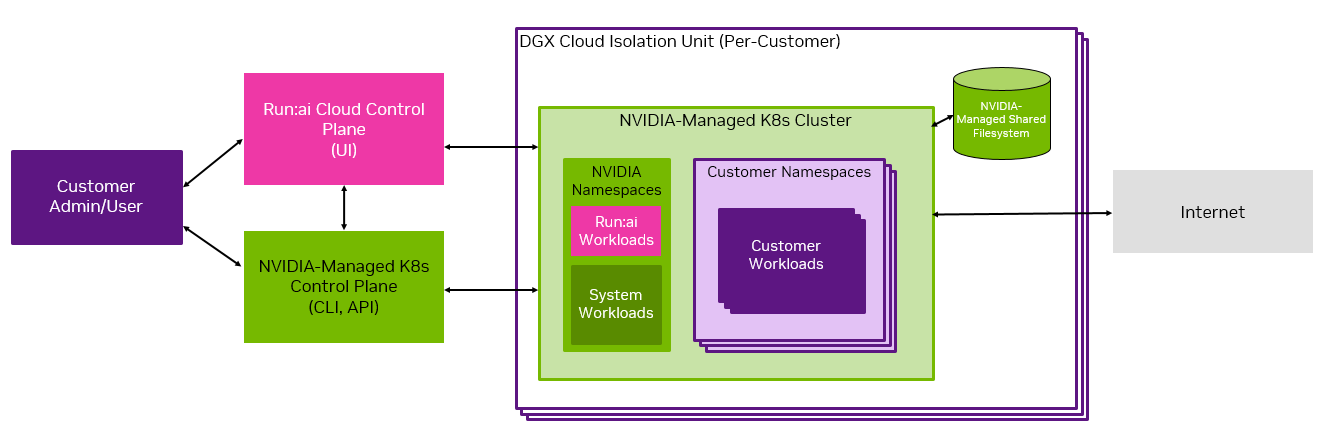
This diagram shows the high level cluster architecture and indicates the shared-management of the system.
The cluster is provisioned with CSP-specific compute, storage, and networking. Each GPU compute node consists of eight NVIDIA H100 GPUs.
Within the Kubernetes cluster, there are NVIDIA namespaces and customer namespaces. Customers are responsible for operating the customer namespaces, while NVIDIA is responsible for the NVIDIA namespaces.
For shared file storage, Run:ai on DGX Cloud leverages high-performance storage available from the CSP in which a given deployment operates. Storage made available as part of the deployment can provision both persistent data sources and temporary volumes. Some data sources are not supported in Run:ai on DGX Cloud. See the Managing Data Storage on the Cluster section of the User Guide for more information.
Local solid-state storage is attached to each node in a workload that uses GPU compute resources.
The compute cluster is connected to the NVIDIA Run:ai SaaS control plane for resource management, workload submission, and cluster monitoring. Every customer is assigned a Realm in the NVIDIA Run:ai control plane, where each Realm is considered a tenant in the multi-tenant control plane.
NVIDIA Run:ai’s GUI and CLI are the primary interfaces users interact with the platform.
1.3. Cluster Ingress and Egress#
As shown in the Overview section, each Run:ai on DGX Cloud cluster can be accessed by either the NVIDIA Run:ai cloud control plane or the NVIDIA-managed Kubernetes control plane.
All ingress to the NVIDIA Run:ai cloud control plane is controlled via Single Sign-On (SSO), which is configured by following instructions provided during the onboarding process as noted in the Admin Guide. Port 443 is externally accessible.
Ingress to the NVIDIA-managed Kubernetes control plane is controlled by an initial customer-specified CIDR range configured during the onboarding process through your TAM. Port 443 is also externally accessible.
The customer cannot modify the ingress and egress restrictions after initial setup and must engage with their NVIDIA TAM for such updates.
1.4. Cluster User Scopes and User Roles#
This section is intended as a high-level overview of user scopes and roles in your Run:ai on DGX Cloud cluster. In subsequent sections, we cover how to create and manage user roles.
1.4.1. User Scopes#
NVIDIA Run:ai uses the concept of scope to define which components of the cluster are accessible to each user, based on their assigned role or roles. Scopes can include the entire cluster, departments and projects. In a NVIDIA Run:ai cluster, each workload runs within a project. Projects are part of departments.
When users are added to the NVIDIA Run:ai cluster, they can be allocated to any combination of departments and/or projects.
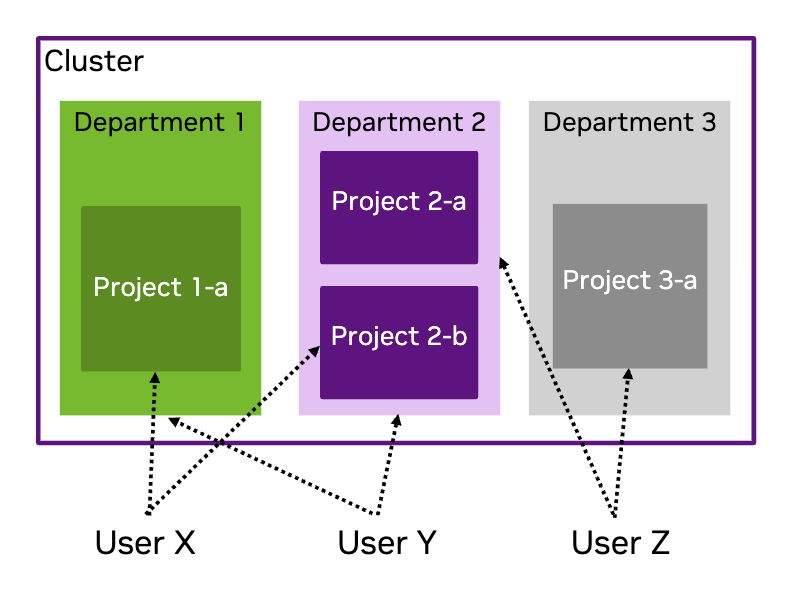
This image provides an example of a cluster which has three departments, Department 1 and Department 3 have one project each, whilst Department 2 contains two projects. User X has access to Project 1-a and Project 2-b. User Y has access to Department 1 and Department 2. User Z has access to Department 2 and Project 3-a.
1.4.1.1. NVIDIA Run:ai Departments#
Each NVIDIA Run:ai project is associated with a department, and multiple projects can be associated with the same department. Departments are assigned a resource quota, and it is recommended that the quota be greater than the sum of all its associated projects’ quotas.
1.4.1.2. NVIDIA Run:ai Projects#
Projects implement resource allocation and define clear boundaries between different research initiatives. Groups of users, or in some cases an individual, are associated with a project and can run workloads within it, utilizing the project’s resource allocation.
1.4.2. Cluster Users#
NVIDIA Run:ai uses role-based access control (RBAC) to determine users’ access and ability to interact with components of the cluster.
Note
More than one role can be assigned to each user.
The NVIDIA Run:ai RBAC documentation details the NVIDIA Run:ai user roles and the permissions for each role.
1.4.2.1. Customer Admin Role#
The customer admin role with the broadest control is the System administrator role. Beyond that there are administrator roles for Departments, Data and Storage, and Projects.
1.4.2.2. Customer User Roles#
The standard user role is AI practitioner which provides the ability to launch and mange their AI workloads. For complete information on NVIDIA Run:ai roles, including the Editor and Viewer (which we do not cover here), refer to NVIDIA Run:ai Roles or visit the Access page in the NVIDIA Run:ai UI. The Roles tab provides a full list of roles and permissions.
1.5. Next Steps#
To get started, try out our Interactive Workload Examples. For more information on accessing your cluster, refer to the Cluster Administrator Guide or Cluster User Guide to get started with your primary responsibilities on the cluster.
Detailed information about using NVIDIA Run:ai is available in the NVIDIA Run:ai Documentation.