

Prioritize Requests
By the end of this guide, requests that you mark as higher priority are served ahead of lower-priority requests when workers are busy. Use it when interactive agent turns (the one a user is waiting on) compete with background subagents for the same workers.
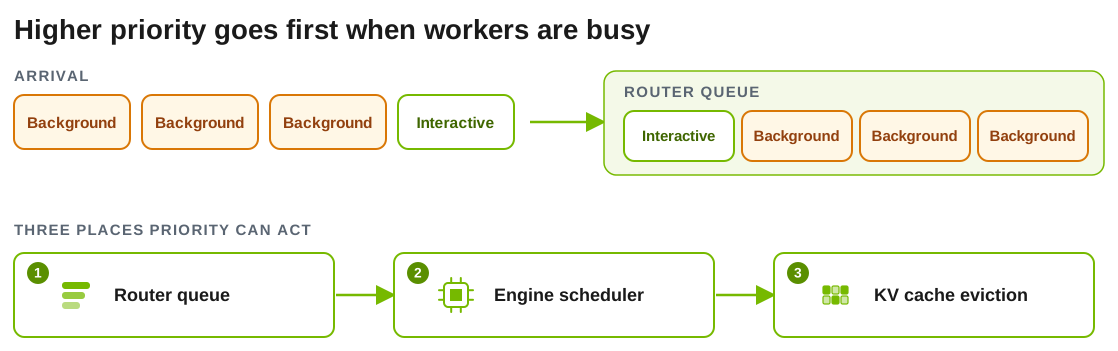
Priority only changes anything under contention. If a request can be routed and scheduled immediately, there is no queue to reorder. Each layer below has its own switch, so turn on the layers you need.
Send a Priority
Add nvext.agent_hints to the request body:
For HTTP requests you can send the same values as x-dynamo-request-priority and x-dynamo-request-strict-priority. Header values override the matching nvext.agent_hints fields. Both methods need the frontend to accept NvExt inputs: they have no effect if you start it with DYN_DISABLE_FRONTEND_NVEXT=true.
Sending a priority changes nothing until you turn on a layer below. The agg_agent.sh launcher enables priority-aware cache eviction only; it does not enable the router queue or engine priority scheduling.
Turn On Priority in Each Layer
Priority can act in three places. They are configured separately and are additive.
1. Router queue
The router holds a request in a queue while every eligible worker is busy, then releases requests in priority order. Queueing is off until you enable it in a router policy file. Save this as policy.yaml:
Start the frontend with KV routing and the policy file:
A request waits while every eligible worker’s active prefill tokens exceed prefill_busy_threshold_frac times its max_num_batched_tokens. Lower the fraction to queue sooner. Keep queue_policy set to fcfs or wspt: the default, edf, ignores priority and strict_priority when it orders the queue. See Policy-Class Queues for the full schema, including wspt ordering and per-worker queue limits.
The older --router-queue-threshold and --router-queue-policy flags are deprecated and are planned for removal in v1.7. Use the policy file instead.
2. Backend engine
Each engine has its own switch. Dynamo converts the priority to the polarity the engine expects.
vLLM
SGLang
TensorRT-LLM
Start vLLM with --scheduling-policy priority. Do not negate priority in client code; Dynamo forwards it with the polarity vLLM expects.
3. KV cache eviction
When GPU cache fills, an engine can evict low-priority entries first. On SGLang, start the worker with --radix-eviction-policy priority. This only matters under memory pressure. See Priority-based KV cache eviction.
Support by backend:
Check That It Works
Use a benchmark that sends different priority values on individual requests. For AIPerf, use a version with per-request extra payload support. Older versions only support global --extra-inputs, which cannot produce mixed-priority tiers in one run.
For router priority:
- Send a fixed number of requests per priority tier, with the same model, input length, output length, and streaming mode.
- Run at enough load for requests to wait. Watch
dynamo_frontend_router_queue_pending_requestsand confirm it is above zero during the measured window. - Configure the backend flag separately if you want to measure engine scheduling and not only the router queue.
Expected result: higher priority values get better TTFT under contention. If lower values win, check whether the client, benchmark harness, or gateway negated the priority before it reached Dynamo.
Troubleshooting
How Priority Works
Router queue ordering
A policy class defaults to the edf queue policy, which dispatches the earliest due time first, then keeps arrival order, and ignores priority and strict_priority. To let these hints reorder the router queue, set the class’s queue_policy to fcfs or wspt. Without a policy file, the synthetic class uses --router-queue-policy, fcfs by default. These policies order queued requests by this key:
The strict tier is compared first. Within a tier, every request with a request classifier’s due_at goes ahead of every request without one, and then the configured policy applies. Sustained deadline-bearing traffic can therefore starve non-deadline requests in the same class.
The fcfs policy treats priority as a positive arrival-time bump: higher values move the request earlier. Negative values are clamped to zero for router queueing, so a request cannot be pushed behind normal first-come ordering. The wspt policy orders by (1 + priority_jump) / scheduling_cost_tokens and optimizes average TTFT.
What priority does not do
Priority is not Kubernetes PriorityClass, GPU preemption, or hard admission control, and it does not reserve capacity. Strict priority applies only to requests already waiting in one scheduler queue. It does not preempt admitted work, order requests across router replicas, or guarantee engine execution order. A new arrival that is eligible can still be admitted directly while others wait.
Other Hints
Two more hints change serving behavior without being about priority:
Hints and session IDs are separate. A session ID is passive identity for traces and optional policies. Hints are active serving intent. Neither enables session affinity; see Maintain session affinity.