

Video Decoding and GPU Requirements
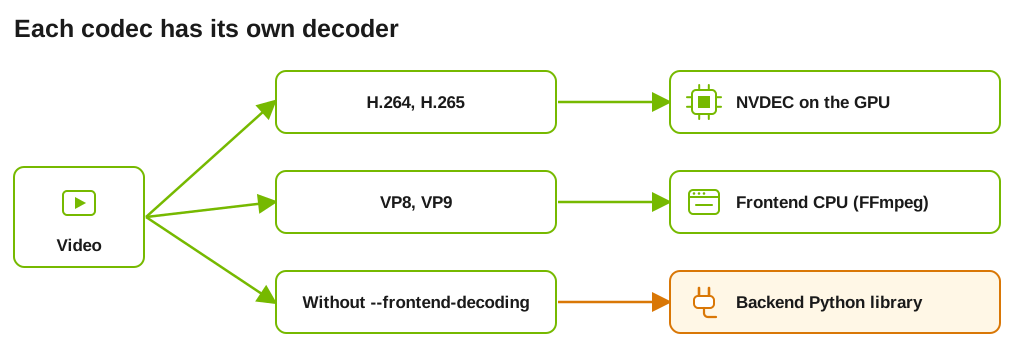
Dynamo provides two video-input decode paths. CUDA runtime images can use both; vLLM CPU and XPU runtimes can use the frontend software path:
- H.264 and H.265 (HEVC) decode on the GPU using NVDEC, NVIDIA’s dedicated hardware video decoder, through PyNvVideoCodec.
- VP8 and VP9 decode on the CPU through Dynamo’s codec-limited, in-tree FFmpeg when frontend decoding is enabled on vLLM, or SGLang on CUDA.
The in-tree FFmpeg does not include H.264, H.265, or AV1 decoders. Without frontend decoding, video input remains owned by the backend and requires its Python decode carrier (OpenCV, PyAV, or decord). The images deliberately omit those wider software-decode carriers by default; vLLM does ship OpenCV, but it is built without a video backend for still-image work only.
This page covers which GPUs provide NVDEC, what the container must expose, and how Dynamo behaves when hardware decode is unavailable.
GPU support
NVDEC is a fixed-function decode engine, separate from the SMs used for inference, so decoding adds negligible load to the GPU beyond a small YUV-to-RGB conversion.
A common misconception is that datacenter GPUs have no video engines. That applies to NVENC, the hardware encoder, which NVIDIA omits from datacenter parts. The decoder is present:
Every GPU above decodes both codecs Dynamo routes to hardware, so H.264 and H.265 video input works across the lineup. Hopper’s NVDEC matches Turing’s feature set and does not decode AV1; Blackwell adds AV1 decode. The Ada parts (L4, L40S, RTX 6000 Ada) decode AV1 as well, and unlike A100, H100, H200, B200, and GB200 they also carry NVENC.
Under Multi-Instance GPU (MIG), NVDEC engines are divided across instances. A given MIG profile may expose fewer decoders than the full GPU, and some profiles expose none. Verify decode works in the exact profile you deploy.
Container requirements
NVDEC links libnvcuvid at runtime, which the NVIDIA container runtime only mounts when
the video driver capability is requested. Without it, import PyNvVideoCodec fails
and Dynamo falls back to software decode.
Dynamo’s runtime images already declare it:
With Docker that is usually enough, because the toolkit reads the capability from the image. To be explicit, or when overriding the variable for other reasons:
Kubernetes
On Kubernetes the image’s ENV is not reliably sufficient. Set the variable on the
container spec as well. Dynamo’s own GPU test runners shipped images carrying the ENV
and still had no hardware decode until the pod spec set it explicitly.
Add it to the container that runs the worker:
If it still does not take effect, the capability is being dropped below the pod. Check
supported-driver-capabilities in /etc/nvidia-container-runtime/config.toml on the
node, and — if the cluster runs in CDI mode — whether the generated device spec includes
the video libraries, since in that mode capabilities come from the spec rather than the
environment variable.
Missing the video capability is the most common cause of hardware decode being
silently unavailable. The GPU itself is fine; the container simply cannot see the
decoder.
Verifying hardware decode
False means Dynamo will not use hardware decode in that container. Check, in order: the
video driver capability, that PyNvVideoCodec is installed, and that
DYN_DISABLE_NVDEC is unset.
To distinguish “capability missing” from every other cause, look for the decode library itself. It is mounted by the container runtime, not installed by the image, so its absence points squarely at the capability:
Expect libnvcuvid.so.1. Nothing means the video capability did not reach this
container. If it is present on the node but not inside, the capability is being dropped
between the two.
Behavior when NVDEC is unavailable
Hardware decode is additive and never blocks a request on its own: routing falls through to a software decode path where one exists. VP8 and VP9 frontend decoding on vLLM, or SGLang on CUDA, does not depend on NVDEC.
The shipped images do not include a software H.264, H.265, or AV1 decoder. Therefore, if NVDEC is unavailable, H.264 and H.265 fail with an unsupported-codec error unless the backend’s wider Python decode carrier is installed. AV1 also requires an additional carrier because Dynamo does not route it through NVDEC and the in-tree FFmpeg excludes it.
Grant the container the video driver capability so NVDEC can serve H.264 and H.265.
For VP8 and VP9, use frontend decoding on vLLM, or SGLang on CUDA. For
other software-decoded cases, install an additional decoder
or transcode the input before sending it.
Install Additional Decoders
Dynamo’s runtime images ship a deliberately small media stack: the in-tree FFmpeg decodes VP8 and VP9, NVDEC covers H.264 and H.265 on supported GPUs, and nothing else installs automatically. For AAC and other compressed audio, or for H.264 and H.265 on hosts without NVDEC, install a backend decoder package with pip install. No image rebuild is needed.
See Additional Media Decoders for the per-backend packages, the bundled installer, Kubernetes and air-gapped setups, and version-pinning notes.
Video Output and NVENC
There is nothing to enable. Dynamo does not use NVENC on any path.
Video output — the generation path — encodes VP9 on the CPU with the in-tree FFmpeg. That is deliberate and works everywhere: A100, H100, H200, B200, and GB200 have no hardware encoder, so a hardware encode path would be unavailable on the GPUs most deployments run. On GPUs that do have NVENC (L4, L40S, RTX 6000 Ada) it stays unused.
The same video driver capability governs both engines, so a container configured for
NVDEC as above needs no additional change. Encode performance does not depend on it.