
Deploy Enterprise RAG on Enterprise RA#
Based on the Enterprise Reference Architecture for 2-8-5 systems, the cluster includes 16 nodes and uses Software ERA Configuration guide [NVOnline 1130533] to install and configure a Kubernetes Cluster on those nodes.
Note
For detailed Software reference design refer to:
NVIDIA Software Reference Stack and automation for Enterprise RA - Run:ai on Vanilla Kubernetes: NVOnline: 1142319
Deployment Guide for NVIDIA Enterprise Reference Architectures (ERA) – Vanilla Kubernetes: NVOnline: 1144086
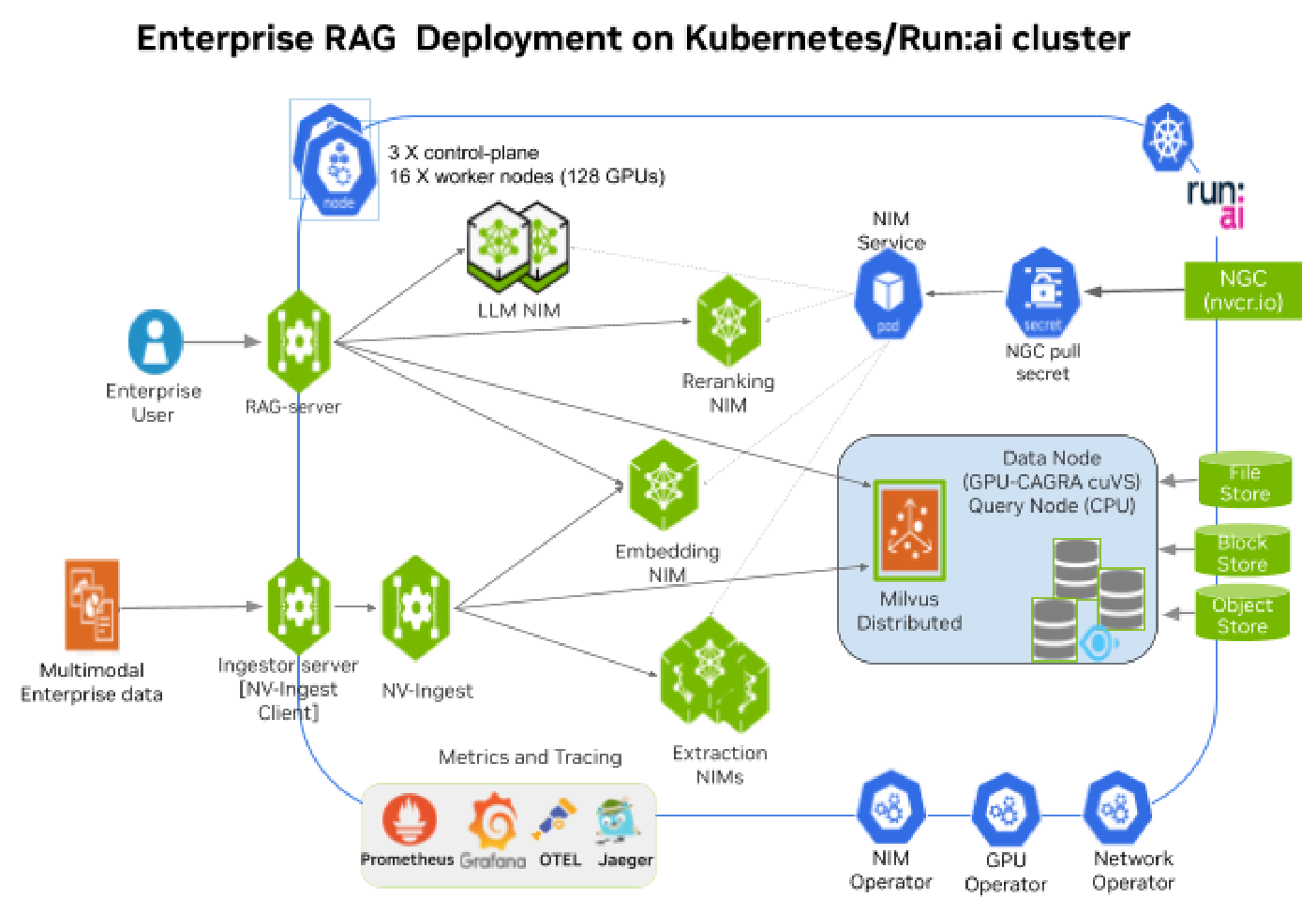
Figure 8 Enterprise RAG Deployment on Kubernetes Run:ai cluster#
Pre-requisites to deploy Enterprise RAG#
Enterprise RA software stack including BCM, Kubernetes, Ingress, Load balancer, Kyverno.
A production ready Kubernetes cluster with supported version installed with NVIDIA AI Enterprise 6.1 deployed including GPU Operator, Network Operator, NIM Operator.
Install Helm in the Kubernetes Cluster and download helm CLI.
Access to Kubernetes Clusters config file and
kubectlCLI installed, this file is in the ERA cluster BCMe head node under/<user>/.kube/config.A default Storage Class is deployed to service Persistent Volume Claims and create Persistent Volumes for workloads, this can be an NFS based storage class, the storage class name is
nfs-client.A fast Block Storage Class is deployed to service Persistent Volume Claims from Enterprise RAG deployment and Milvus Vector Database.
longhorn.ioCSI was used for fast block storage on local NVMe disks, storage class namelonghorn.Observability stack with Prometheus for metrics, Grafana dashboards to view metrics, Open Telemetry for collecting all telemetry, Elastic to store metrics and traces, Jaeger visualization of tracing data.
Create login to access to NGC Enterprise Catalog, generate and download the nvcr.io access token. For more information on how to get the access token, refer to the following guide. For Nvidia enterprise support, it is recommended to have a subscription to NVIDIA AI Enterprise.
Create NGC API secrets on the cluster#
To access NIM images and model weights from NGC create Kubernetes secrets on the cluster, replacing the NGC API token keys in the fields below.
Create a namespace rag and export NGC_API_KEY:
kubectl create namespace rag
export NGC_API_KEY="nvapi-xxxxxxxxxxxxxxxxxxxxxxxxx"
Create Docker Registry credential ngc-secret and generic ngc-api on the cluster:
kubectl create secret -n rag docker-registry ngc-secret \
--docker-server=nvcr.io \
--docker-username='$oauthtoken' \
--docker-password=$NGC_API_KEY

kubectl create secret -n rag generic ngc-api \
--from-literal=NGC_API_KEY=$NGC_API_KEY \
--from-literal=NVIDIA_API_KEY=$NGC_API_KEY
Deploying NIM microservices for Enterprise RAG#
Deploy all the NIM microservices including LLM, Embedding, Reranking and Extraction NIM microservices separately and add endpoints to the RAG blueprint. This provides better control on how the NIM microservices are deployed using:
NIM Operator with NIM Cache / NIM Service for Retrieval NIM microservices (LLM, Reranking) using full GPU
NeMo Retriever (NV-Ingest) Helm charts that use NIM Service to deploy Embedding NIM and Extraction NIM microservices with custom MIG values file
Run:ai GPU functions with Kubernetes manifest files (
kubectl apply -f <manifest.yaml>) to manually create the NIM deployment and services
Note
Run:ai 2.23/2.24 does not currently support deploying RAG blueprint v2.5.0 using Helm with NIM services.