

Enterprise Reference Architecture Overview#
This guide is part of NVIDIA Enterprise Reference Architecture which covers certified hardware, software stack and sizing recommendations to design, build and scale an end-to-end accelerated computing cluster deployment with balanced CPU to GPU to NIC patterns. The Enterprise Reference architecture provides guided and detailed hardware and software architecture recommended by NVIDIA for optimal server, cluster and network configuration needed to build a successful and certified AI factory.
NVIDIA Enterprise Reference Architecture includes hardware design recommendations, software stack configurations and scalability.
Enterprise RA Hardware Stack#
This version of the document uses NVIDIA RTX PRO AI Factory configuration for the hardware stack. The NVLink Optimized 2-8-5-200 (CPU-GPU-NIC-Bandwidth) reference configuration is for 2U NVIDIA-Certified compute node with 2 CPU Sockets, 8 GPUs, 5 NICs, 8 ports @ 200Gbps on East-West GPU network and 1 port X 400Gbps on the North-South primary network. This pattern can scale from 4 to up to 32 nodes in a cluster. The ERA design recommends using NVIDIA Spectrum-X switches Ethernet Platform - Combining Spectrum-4 Ethernet switches and NVIDIA Bluefield-3 SuperNICs for optimized networking.
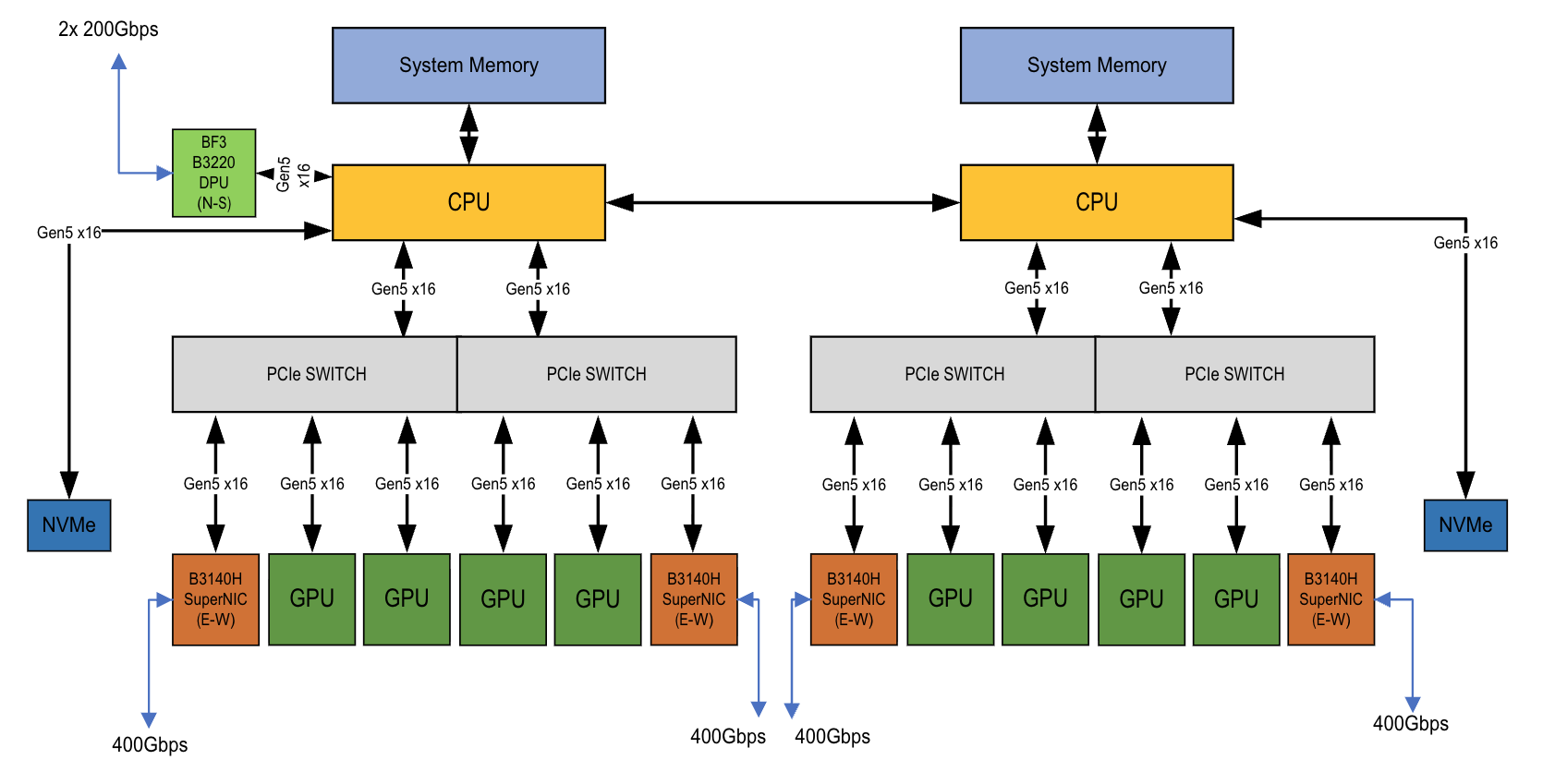
Figure 1 System architecture of a ERA 2-8-5-200 with RTX PRO 6000#
The server used while running test on the Software ERA had the following characteristics:
Component |
Enterprise RA 2-8-5-200 |
|---|---|
CPUs |
2 x AMD EPYC 9354 32-Core Processor, 2 X 32 cores; 128 threads |
GPUs |
8 x NVIDIA RTX PRO 6000, 8 x NVIDIA H200 NVL |
Networking – E/W |
4 x NVIDIA BlueField-3, B3140H (8x200Gbps) |
Networking – N/S |
1 x NVIDIA BlueField-3, B3220 (2x200GB) |
Host Memory |
768 GB DDR5 ECC |
Host Boot Drive |
2 x 480 GB |
Host Storage |
8 x 2 TB NVMe |
Table 2. Specification of Individual Components in the server with NVIDIA H200 NVL GPUs
Enterprise RAG solution was validated on Enterprise RA 2-8-5 cluster pool of 16 servers with 8 X NVIDIA H200 NVL GPUs per node.
The servers are connected with NVIDIA Spectrum-4 SN5600 Leaf-Spine switches and below is the reference architecture for networking. The Enterprise RA 2-8-5-200 is built on building blocks of Scalable Units (SU), each containing 4 servers.
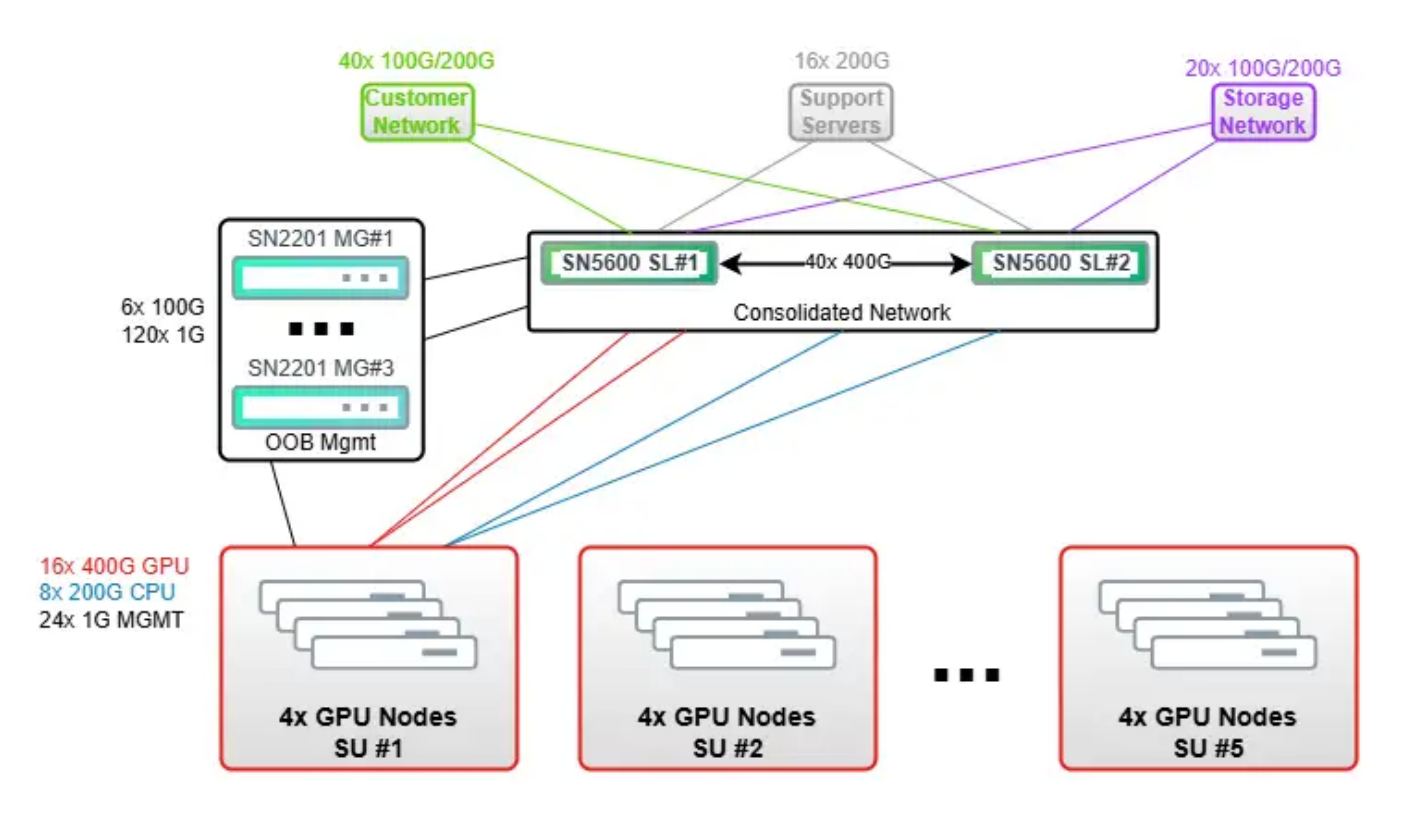
Figure 2 Networking Architecture compliant with Spectrum-X 2.3#
Enterprise RAG scale benchmarking was divided into 4 groups:
1 SU (4 nodes, 32 X RTX PRO 6000 or H200 NVL GPUs),
2 SU (8 nodes, 64 X RTX PRO 6000 or H200 NVL GPUs),
3 SU (3 servers, 96 X RTX PRO 6000 or H200 NVL GPUs),
4 SU (16 servers, 128 X RTX PRO 6000 or H200 NVL GPUs),
Enterprise RA Software Stack#
The software reference stack leverages the bare-metal servers with Kubernetes as the cluster orchestration tool. BCM is part of the NVIDIA AI Enterprise software suite and it provides all the tools to deploy and manage an AI datacenter. It also helps in deploying a Kubernetes cluster on top of the bare-metal servers to create a pool of GPU resources. BCM then is used to deploy all the operators like the GPU Operator, Network operator, NIM Operator to manage the GPUs, Network cards (NICs) and NIM microservices. Next deploy a NIM service picking the model for which Inference service needs to be tested and scaled.
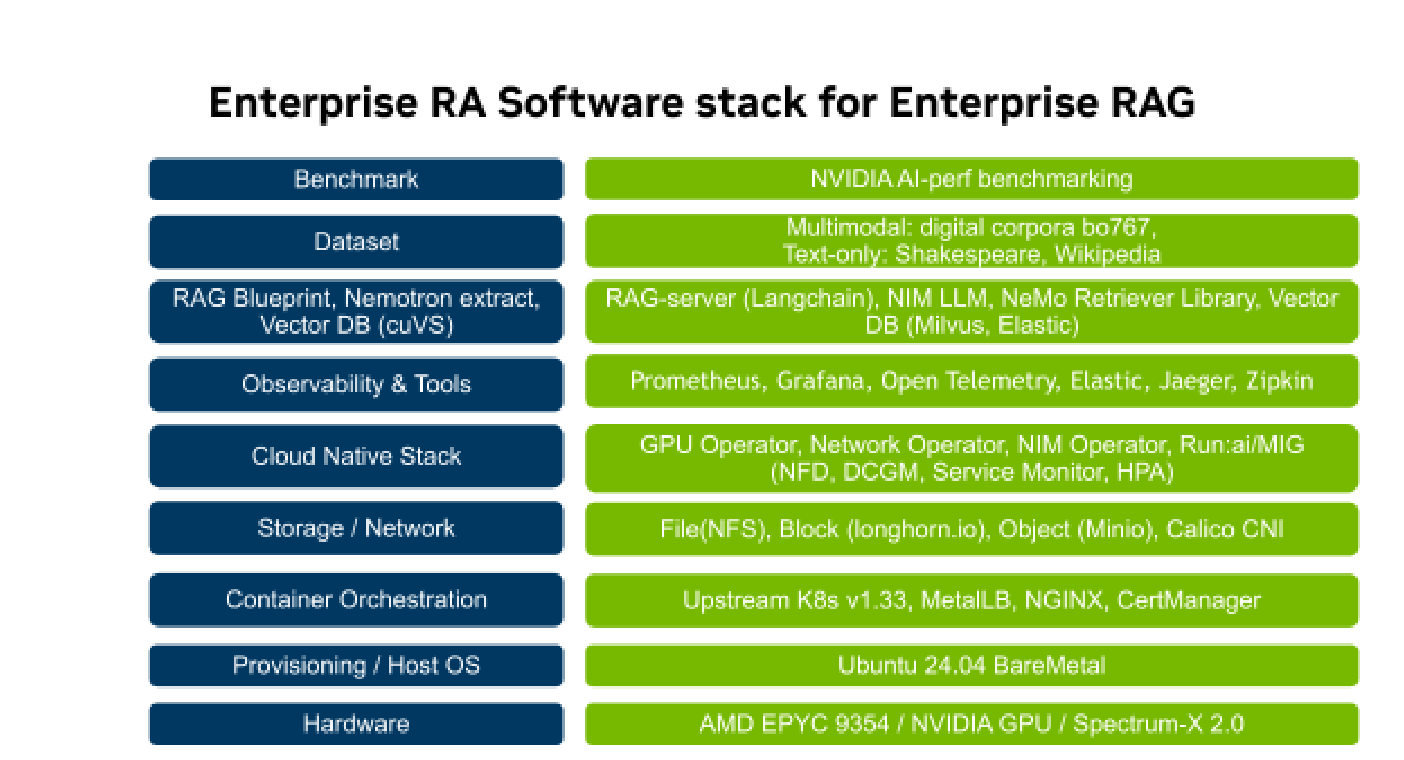
Figure 3 Enterprise RA software stack#
NVIDIA AI Enterprise software is a comprehensive, end-to-end AI platform designed to simplify the deployment, management, and scaling of AI workloads. It provides a robust software stack, including essential tools, drivers, and pre-packaged, pre-trained AI models optimized for NVIDIA hardware.
This Enterprise Reference Architecture leverages NVIDIA AI Enterprise software to install and configure the necessary software and tools required to efficiently deploy and operate an AI factory. Once servers are racked and networked, BCM can be used to image individual servers, deploying Ubuntu 24.04 as the operating system, installing NVIDIA GPU and network drivers, and setting up Kubernetes clusters.
Key Kubernetes services and operators that are deployed to enable seamless hardware resource management, including:
Run:ai – provides dynamic scheduling and orchestration of AI workloads on GPUs based on policies to optimize GPU utilization. Run:ai uses a custom Kubernetes scheduler that uses time slicing to enable running AI workloads on GPU Fractions.
GPU Operator – Facilitates container scheduling with GPU access on server nodes.
Network Operator – Manages container overlay network switching and routing with physical network infrastructure.
NIM Operator – NIM operator manages NIM microservices when deployed using NIMCache and NIM microservice CRDs. It ensures correct GPU profile, tensor parallelism, and quantization settings are applied for optimal model performance. It enables NIM metrics sent to Prometheus with Service Monitors. It enables autoscaling based on KV-Cache percentage using the Horizontal Pod Autoscaler (HPA).
Prometheus Operator – Collects system metrics for monitoring and performance analysis.
Grafana - Frontend for creating dashboards to visualize metrics from resources and workloads in the Kubernetes cluster.
OpenTelemetry Operator – Collects traces, metrics and logs from different sources.
Jaeger with Open Telemetry – Frontend to view tracing data for potential component bottlenecks during scaling.
Beyond these core capabilities, the deployment also aligns the software dependencies for various components required for Kubernetes cluster operations, Calico Container Network Interface (CNI) for managing container networks, NGINX Ingress Controller for handling cluster ingress traffic, and MetalLB for load balancing services within the Kubernetes environment. Also provides firmware to configure and optimize OS like Cumulus Linux for the NVIDIA Spectrum switches, firmware for the Bluefield Super NICs etc.
Note
For the detailed software reference stack, refer to NVIDIA Software Reference Stack - Run:ai on Vanilla Kubernetes.
Deployment of Enterprise RAG requires 2 types of storage:
file storage [default] - 10 TB space (shared), 100 IOPS, Latency p90 <10ms, >1GBps throughput. File storage provided using NFS provisioner CSI deployed on the BCM head node. This is the default storage for creating Persistent Volumes for most workloads; including NIM microservices using NIM Cache.
block storage - 500 GB space (shared), 500 IOPS, Latency p99 <5ms, >10GBps throughput. Block storage was provided using Longhorn.io CSI with local NVMe disks using 3 replicas. Fast block storage is required for Milvus vector DB (etcd, minio), Nemo Retriever (NV-Ingest Redis).
Enterprise customers can use their own storage systems to provide storage volumes needed by Kubernetes and the Inference Services (NIM microservices).
The Enterprise RAG solution was deployed on top of the Enterprise RA Software BoM 26.01 with NVIDIA AI Enterprise 7.2 defined below:
Title |
Description |
|---|---|
Bare Metal OS |
Ubuntu Server 24.04 (AMD64) |
Kubernetes |
Upstream Kubernetes 1.33.5 |
NVIDIA AI Enterprise |
NVIDIA AI Enterprise 7.2 [available since Sept 2025], Container Toolkit v1.18.2 (required for Run:ai GPU fractions) |
Container Runtime |
Containerd 2.1.3 |
GPU Operator |
|
Network CNI |
Calico 3.30.2 |
NIM Operator |
3.0.1 |
Storage CSI |
NFS storage provisioner (storageClass): nfs-ext-provisioner; App version: 4.0.2, Helm chart: nfs-subdir-external-provisioner-4.0.18. Block storage (storageClass): Longhorn.io, Longhorn v1.11.1 |
Ingress and LoadBalancer |
Ingress Gateway - nginx v1.13.1, Nginx 1.24.0 as load balancer, External Load balancer - MetalLB v0.15.2 |
Run:ai |
|
Observability |
Kube Prometheus Stack: v77.12.0 app v0.85.0 |
Table 3. Enterprise RA Software BoM 25.09 with NVIDIA AI Enterprise 7.2