

Enterprise RAG on Enterprise RA 285#
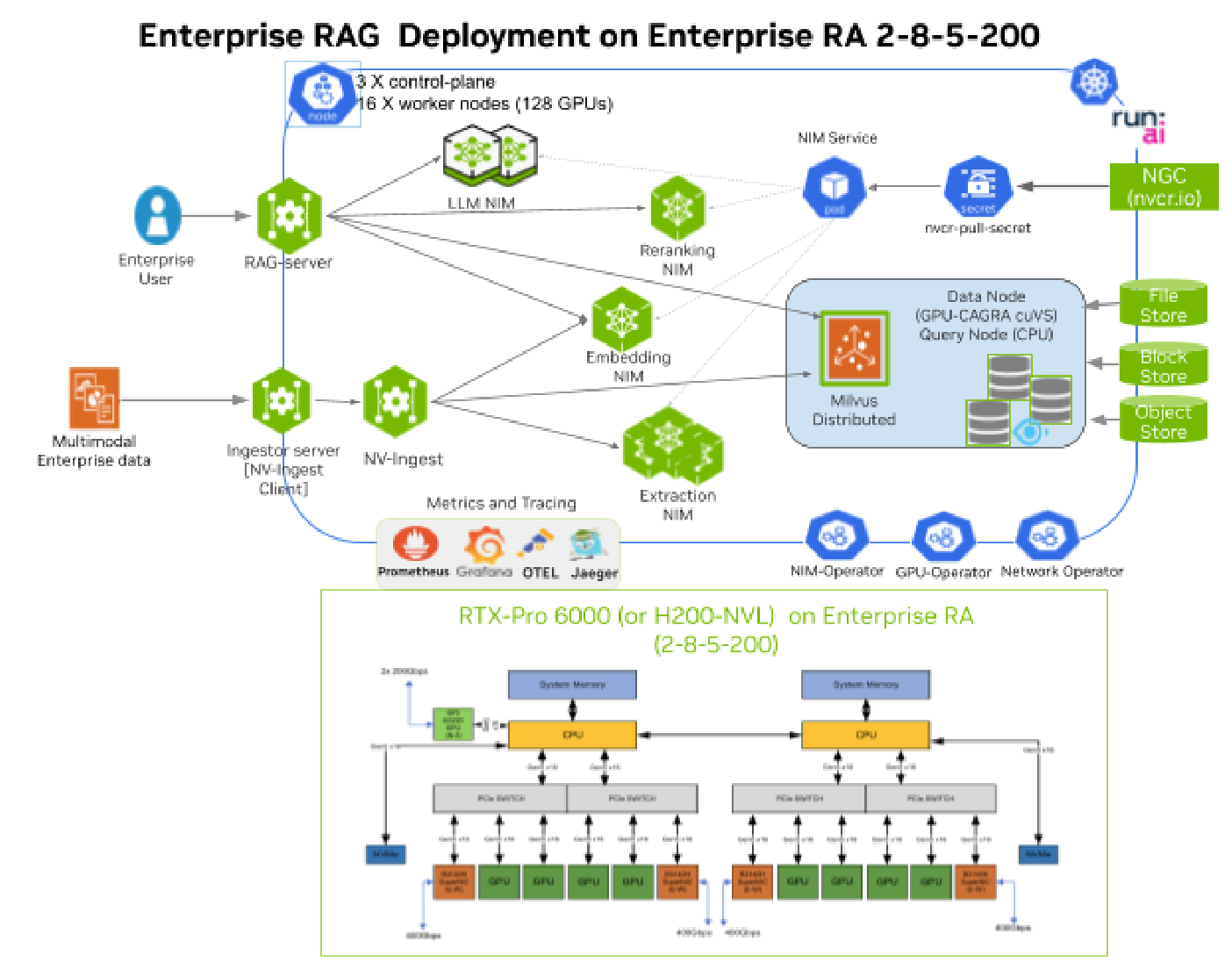
Figure 4 Enterprise RAG Deployment on Enterprise RA 285-200#
RAG Ingestion Pipeline#
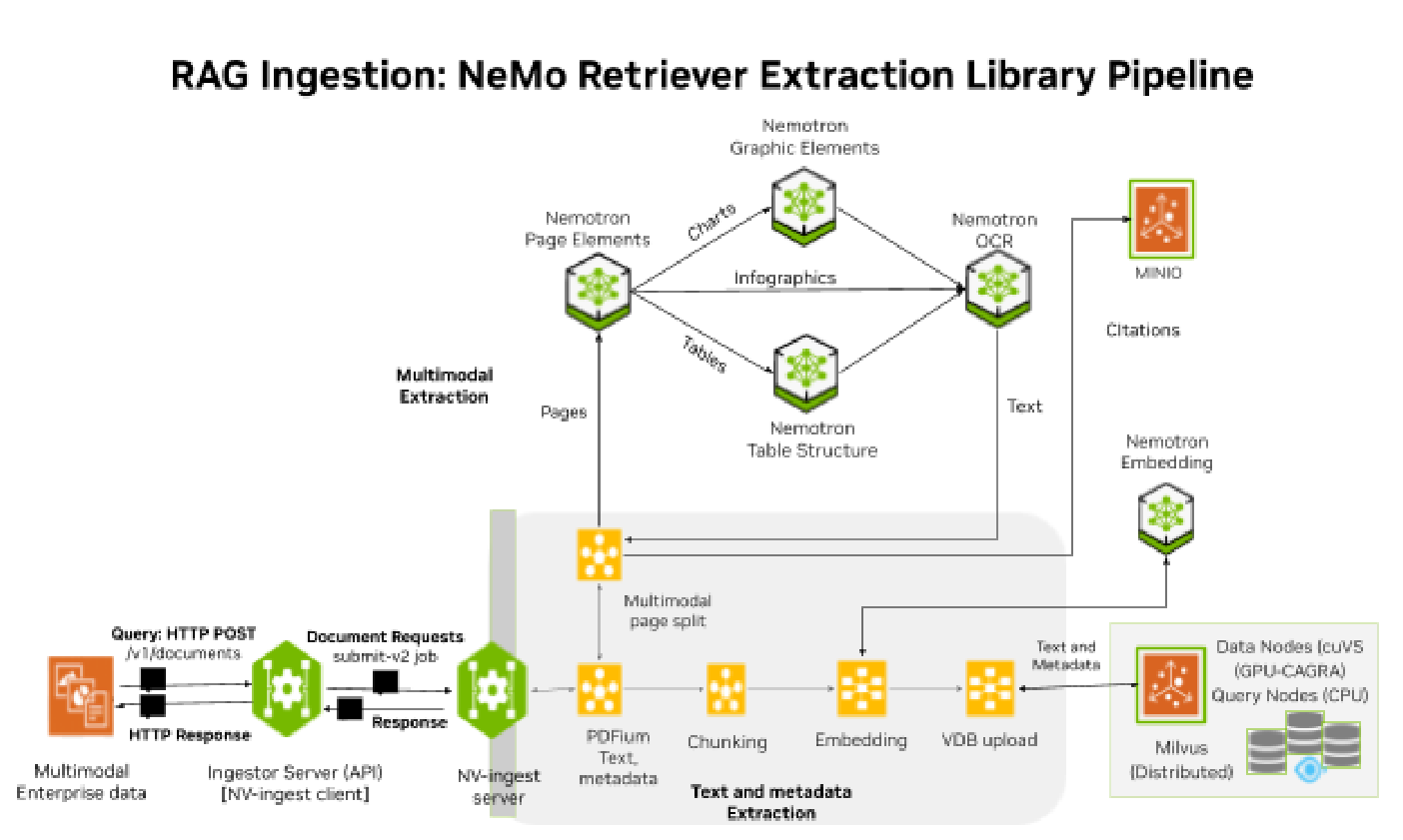
Figure 5 RAG Ingestion - NeMo Retriever Extraction (NV-Ingest) pipeline#
RAG Ingestion Pipeline Services#
Ingestion Server (RAG Blueprint)#
Ingestion Server (ingestor-server v2.5.0) is the frontend API server for the RAG Blueprint Ingestion pipeline that includes NV-Ingest client/server, Redis message broker and extraction microservices. Use the RAG ingestion API to communicate with the Ingestor server to enable multimodal document extraction and bulk or streaming ingestion to the vector DB.
The Ingestor server processes document ingest requests (HTTP GET and POST to endpoint
/v1/documents) and sends responses (HTTP response Code 200/400/500) to the user
when ingestion is completed or failed.
Ingestor server provides API wrapper for the NV-Ingest client, handles collection management, stores multimodal citations in MINIO, sends requests and forwards results on document ingestion.
The typical workflow for ingestion with NeMo Retriever (NV-Ingest) is as shown below:
Parse the document sent by the user; these can be different types (Text, PDF, PPT, Word doc etc.).
For multi-modal PDF data, the document is parsed using PDFium in 32 page-chunks, text and metadata is extracted.
Then page-chunks (32 pages) are rendered into images using 4 pipelines of 8 pages and sent to the NIM microservices to extract page elements; tables, charts, images.
If needed, page text data is further split into smaller chunks based on Chunk Size defined as tokens (128/256/512 tokens).
The extracted text chunks are sent to the Embedding NIM to vectorize and create embeddings.
Embeddings are stored in MinIO object store for later bulk ingestion into Vector DB.
Lastly the embeddings are bulk ingested (or streamed) to the Vector database, where it is indexed and stored for future RAG retrieval.
NeMo Retriever (NV-Ingest) Client#
For ingestion performance benchmarking use the NV-Ingest client from the NeMo Retriever extraction library (v26.3.0) to upload documents to the NV-Ingest server deployed in the Kubernetes cluster.
The NV-Ingest client uses Ingestor python API to create requests (submit-v2) to upload Enterprise data or documents (PDF, text, .docx, .ppt) to the NV-Ingest server deployed in the Kubernetes cluster and then processes responses when jobs are completed or failed.
The NV-Ingest client is installed on the benchmarking server (outside the Kubernetes cluster) from the NeMo Retriever extraction library.
uv pip install nemo-retriever==26.3.0 NV-Ingest-client==26.3.0 NV-Ingest-api==26.3.0
The benchmarking server needs sufficient CPU and Memory capacity to run high document concurrency using client workers= 96,192,128:
Benchmarking server specs: CPU: 128 vCPU/cores, RAM Memory: 256GiB
NeMo Retriever (NV-Ingest) server#
Nemo Retriever (NV-Ingest) server; part of NeMo Retriever extraction (v26.3.0); which is a scalable document content and metadata extraction application with multiple microservices. RAG Blueprint Ingestion pipeline deploys NV-Ingest microservice and Extraction NIM microservices as Kubernetes deployments and services that can be individually scaled out to support high document ingestion rates.
NeMo Retriever Extraction (NV-Ingest) v26.3.0 / v26.1.2 (github)
NeMo Retriever extraction can also be deployed as a standalone product outside the RAG blueprint for data ingestion using Helm.
The NV-Ingest server acts as the data orchestrator for multimodal data ingestion. NV-Ingest workers pull document requests from the Redis message broker queue and process each document one page at a time, extracting text, metadata, tables, charts and images using extraction NIM microservices. The extracted text data is tokenized, chunked (if needed) and sent to embedding NIM to create embeddings stored in MINIO bucket. The vector embeddings are bulk ingested into Milvus vector DB and data is now ready for retrieval.
Multimodal data extraction is CPU intensive and with high concurrency, multiple active document extraction requests, say Concurrent requests = 96,128, 192 or higher; allocate sufficient resources:
Configure NV-Ingest with sufficient workers and CPU and memory
32 workers  (default 16 workers)
CPU: 16vCPU, Memory: 32GiB
In addition configure Redis message broker with sufficient memory
Memory: 12GiB (default 6 GiB)
Nemotron Embedding NIM#
Nemotron Text Embedding NIM - converts ingestion document text data chunks or user query into vectors.
llama-nemotron-embed-1b-v2 (Model card) version: 1.13.0
Image repo and tag: llama-nemotron-embed-1b-v2:1.13.0
Dimensions: 2048 (supported dims 384, 512, 768, 1024, or 2048)
Maximum context length: 8192 tokens
quantization: FP32
Text Embedding NIM is responsible for converting tokenized text data into vector embeddings before sending them to the vector database for indexing and ingestion. The vector embedding size depends on the dimension (2048 dim) and quantization (FP32) selected when embedding the data.
For Embedding NIM with 2048 dim and FP32:
vector embedding size = 2048 dim X 4 Bytes (FP32)
                      =  8 KB or 8192 B
The tokenized data is typically chunked or split into smaller chunks (256 or 512 tokens) before it is sent to Embedding NIM. The Tokenizer used should be compatible with the embedding NIM and the chunk size should not exceed the maximum context length (8192 tokens) supported.
Deploy Embedding NIM with Run:ai (timeslicing) GPU Fractions or Multi-Instance GPU (MIG) to use GPUs efficiently and scale out when required:
Run:ai: 0.5 GPU instead of 1 GPU
MIG: 0.5 GPU instead of 1 GPU
RTX PRO 6K MIG Profile:
mig-2g.48gbH200 MIG Profile:
mig-4g.71gb
Allocate sufficient CPU and Memory; to avoid Kubernetes CPU throttling or OOM-kill:
Embedding NIM: 2vCPU, 8GiB
NIM microservices are deployed using NIM operator which uses NIMCache(Non-LLM) and NIM microservice CRDs. Need to allocate disk capacity to cache models and allow time for NIM to download and start up. Once model is locally cached, the scale out time is significantly reduced (50%- 75%).
Embedding NIM:
Model Cache (NFS PVC): 50GB
initial startup time: 9-12 mins
scale out startup: 2-3 min
When ingesting large amounts of Enterprise data (hundreds of documents at a time) with high document concurrency, concurrency=64,96,128 or higher; scale out the Embedding NIM. Increase replicas: 2, 3, 4 with 0.5 GPU per replica using MIG or Run:ai.
NeMo Retriever Extraction NIM microservices#
These are specialized NIM microservices to extract multimodal data; text, tables, charts and images from PDFs, Word and PowerPoint documents.
Majority of Enterprise data is text-only data but for multimodal data extraction (tables, charts, images) deploy NeMo Retriever extraction.
Multimodal extraction NIM microservices require GPUs for enhanced processing:
Image OCR NIM version 1.3.0
nemotron-ocr-v1 - Detect and extract text from image
Object Detection NIM microservices version 1.8.0
nemotron-page-elements-v3 - Detects and classifies images on a page as a table, chart or infographic.
nemotron-table-structure-v1 - Detects rows, columns, and cells within a table to preserve table structure and convert to Markdown format.
nemotron-graphic-elements-v1 - Detects graphic elements within chart images such as titles, legends, axes, and numerical values.
Deploy Embedding NIM with Run:ai (timeslicing) GPU Fractions or Multi-Instance GPU (MIG) to use GPUs efficiently and scale out when required:
Run:ai: 1 GPU instead of 4 GPUs — Run:ai enables deploying Helm charts onto a Run:ai project in a Run:ai enabled namespace. Run:ai offers the best GPU efficiency and flexibility to customize the GPU allocation for extraction NIM microservices. Distribute the GPU fractions based on the amount and type of elements being ingested; customize for documents with more tables or more images. For typical enterprise data with tends to be more table heavy with some charts and very few images, the GPU fractions below provides a great example to fit all 4 NIM microservices on a single GPU:
Extraction NIM |
Run:ai GPU Fraction |
|---|---|
nemotron-ocr-v1 |
0.4 GPU (40%) |
nemotron-page-elements-v3 |
0.3 GPU (30%) |
nemotron-table-structure-v1 |
0.2 GPU (20%) |
nemotron-graphic-elements-v1 |
0.1 GPU (10%) |
MIG: 1.25 GPU instead of 4 GPUs — If security is a priority with strict isolation then use MIG with profile recommendations shown in the table below:
Extraction NIM |
||
|---|---|---|
nemotron-ocr-v1 |
mig-2g.48gb |
mig-3g.71gb |
nemotron-page-elements-v3 |
mig-2g.35gb |
|
nemotron-table-structure-v1 |
mig-1g.24gb |
|
nemotron-graphic-elements-v1 |
mig-1g.24gb |
mig-1g.18gb |
Allocate sufficient CPU and Memory; to avoid Kubernetes CPU throttling or OOM-kill:
Extraction NIM |
CPU and Memory |
|---|---|
nemotron-ocr-v1 |
3 vCPU, 4 GiB |
nemotron-page-elements-v3 |
1 vCPU, 2 GiB |
nemotron-table-structure-v1 |
1 vCPU, 3.5 GiB |
nemotron-graphic-elements-v1 |
0.5 vCPU, 3 GiB |
NIM microservices are deployed using NIM operator using NIMCache(Non-LLM) and NIM microservice CRDs. Need to allocate disk capacity to cache models and allow time for NIM to download and start up. Once model is locally cached, the scale out time is significantly reduced (30-50%).
Extraction NIM microservices NIM Cache model allocation:
Model Cache (NFS PVC): 10-20GB  (OCR needs 20GB)
initial startup time: 3-5 mins
scale out startup: <1 min
When ingesting large amounts of Enterprise data (hundreds of documents at a time) with high document concurrency concurrency=64,96,128 or higher; scale out the Extraction NIM microservices, especially OCR to 2-4 replicas and others when needed using MIG or Run:ai.
Vector Database (VDB) - Milvus#
Vector DB is required to index and store the vector embeddings. Indexing organizes high-dimensional vector data for efficient retrieval and query processing.
Milvus version 2.6.10
image repo and tag with cuVS (GPU CAGRA for indexing)
milvusdb/milvus:v2.6.5-gpu
RAG Blueprint v2.5.0 offers vector DB options:
Milvus standalone (cuVS) [default]
Milvus GPU index CPU search (cuVS) [recommended]
RAG blueprint deploys Milvus Vector DB in standalone mode (single GPU).
For Enterprise RAG where scaling to millions of vectors is required, it is recommended to deploy Milvus for the Vector DB in Distributed mode, so that individual services; Data/Index nodes, Query/Search nodes, can be scaled independently based on ingestion or retrieval load. Milvus Distributed requires 3X etcd nodes with fast local NVME disks (>500 IOPS with fsync latency 99th percentile (p99th) < 10ms). For etcd nodes, enable fast block storage (longhorn.io) with local NVME disks to avoid sync timeouts.
Data/Index nodes are responsible for data ingestion, while the Query nodes are responsible for Search and Retrieval of data. Data nodes preprocess data and build the indexing. Once indexing is complete vector data is ingested/loaded and ready for retrieval. Vector data is also backed up in an Object store (MinIO) or written to disk.
RAG Blueprint enables Milvus in 3 modes of operation listed below:
GPU indexing and search [default] - Recommended with non-production deployments with Milvus in standalone mode. RAG blueprint enables Milvus VDB in standalone mode with GPU CAGRA using NVIDIA cuVS for index and search.
CPU indexing and search - It will take 4 to 5 times longer to ingest data with CPU indexing. Recommended when ingesting < 1 GB (or < 2 M vectors) of enterprise data at a time.
GPU for Index and CPU for Search [Recommended]: GPU CAGRA (cuVS) for Index (Ingest) and then convert to CPU (HNSW) at load time for Search (Retrieval). This hybrid GPU-CPU Milvus provides the benefits of GPU indexing with high performance data ingestion and CPU search that is reasonably efficient at lower query rates.
Vector DB Index building typically accounts for the majority (50%-70%) of the ingestion time. Using GPU accelerated indexing can speed up index build time by 8X-10X and reduce end-to-end (e2e) ingestion time by 2X-4X compared to CPU based ingestion.
When ingesting large amounts of Enterprise data; thousands of documents or more than 100K vectors at a time; it is recommended to use bulk ingest into vector DB instead of HTTP based streaming at 1000 vectors at a time.
Bulk ingestion using 1GB segment improves vector DB upload time by 10X-12X compared to HTTP streaming.
Use NV-Ingest VDB Bulk upload with Milvus Remote Bulk writer; that requires writing embeddings to remote object storage bucket in MINIO and then bulk writing multiple files in batches to vector DB based using segment size of 1GB. Segment Size of 1GB equates to ~100K embeddings or ~1K multimodal PDF documents (70K pages).
Formula: Segment Size 1GB => ~100K embeddings or ~1K PDFs
1GiB Segment Size = 100K embeddings X 2048dim X 4B(FP32)
                     + 20% overhead (indexing + metadata)
With RAG it is recommended to use CPU for search instead of GPU accelerated (cuVS) search:
Using GPU CAGRA (cuVS) for search can reduce query latency by 50% at high query rates >200 QPS. Typically for RAG query rates are <200 QPS and vector DB search accounts for <3% of LLM TTFT latency, hence will not have a significant impact on the overall RAG retrieval latency.
GPU search increases the overall cost of the Vector DB by 2X-4X. To enable search for large enterprise vector DB sizes of 10M-50M vectors; you need to load vectors in GPU memory (100GB-500GB); this requires scaling Query nodes to 2-4 GPUs (vs 1 GPU).
CPU search is more cost efficient, adds a small overhead to overall RAG latency. For search on large enterprise vector DB sizes of 10M-50M vectors, you need to load vectors in CPU memory (RAM) instead, this requires scaling Query nodes to support 100GB - 500GB RAM.
Example: For GPU search the vector DB collection needs to be loaded in GPU memory and for large collections of 10M vectors, this accounts for ~100 GB:
10M vector size = 10M X 2048 dim X 4 Bytes (FP32)
                = 10M X 8192B
                = 81.92 GB + 20%(indexing + metadata)
                = ~100 GB
This requires scaling Query nodes to multiple GPUs, increases the overall cost for the RAG solution and reduces performance per $ (GPU).
With CPU based search, the vector DB collection needs to be loaded in CPU memory (RAM) and large collections of ~10M vectors will require ~100GB RAM.
For Enterprise RAG, deploy Milvus for the Vector DB in Distributed (cluster enabled) mode with hybrid GPU-CPU mode (GPU for index and CPU for search) using GPU CAGRA (cuVS).
In hybrid GPU-CPU mode, Milvus collections are created with GPU_CAGRA for indexing then at load time, it is converted to CPU search (HNSW like). This requires setting the EF parameter for the Vector DB search query. EF Parameter controls query time/accuracy trade-off. Higher EF leads to more accurate but slower search. EF needs to be >= Vector DB topK (VDB_TOPK) search value.
To enable hybrid GPU-CPU mode with Milvus Vector DB set adapt_for_cpu index
parameter when creating Vector DB collection and send ef (= VDB_topK) search parameter
with Milvus query.
Deploy Milvus Data node with Run:ai (timeslicing) GPU Fractions or Multi-Instance GPU (MIG) to use GPUs efficiently; scale out when required:
Run:ai (timeslicing) GPU Fractions: Allocates 0.25 GPU instead 1 GPU
Multi-Instance GPU (MIG): Allocates 0.25 GPU instead 1 GPU
RTX PRO 6K MIG Profile:
mig-1g.24gbH200 MIG Profile:
mig-2g.18gb
Allocate sufficient CPU and Memory; to avoid Kubernetes CPU throttling or OOM-kill and scale out when required:
Baseline Enterprise Data:  1M vectors  (100K documents, 500MB raw text data) => vector DB size: ~10 GB
1 Data node: 0.25 GPU, 8 vCPU, 8 GiB RAM
1 Query node: 8vCPU, 10 GiB RAM

Large Enterprise Data:  10M-100M vectors (1M-10M documents, 5-50 GB raw text) => vector DB size of 100GB - 1TB
2-4 Data node: 2 X [ 0.25 GPU, 16 vCPU, 32 GiB RAM]
5-10 Query nodes:  5 X [ 16 vCPU, 40 GiB RAM]
The vectors will be split across multiple collections. All collections don’t have to be loaded in memory simultaneously. You can choose to scale up and scale out the data nodes during ingestion and the query nodes to handle the simultaneous search across multiple collections. There is a 10X penalty Vector DB search latency to load the collection into memory from disk for the first time.
Example: 100M Vector DB size (~1 TB, ~10M documents) => 10 collections with 10M vectors or 100 collections with 1M vectors.
100M vector size = 100M X 2048dim X 4B + 20% overhead
                 = ~1 TB
Enterprise Dataset#
Text-only: Wikipedia dataset (parquet files) => 5.9 M documents, 38M vector embeddings (chunk size 256/50, 2048dim X FP32)
PDF text-only: Shakespeare Complete Works dataset => 44 documents, 9K embeddings
PDF Multimodal dataset with text, table, charts, images: digital corpora (download bo767 ids) => 767 PDFs; 77K embeddings (pages: 54,730, tables: 23,323, total_charts: 7,835, elements: 85,888, vectors: 76,868)
RAG Retrieval Pipeline#
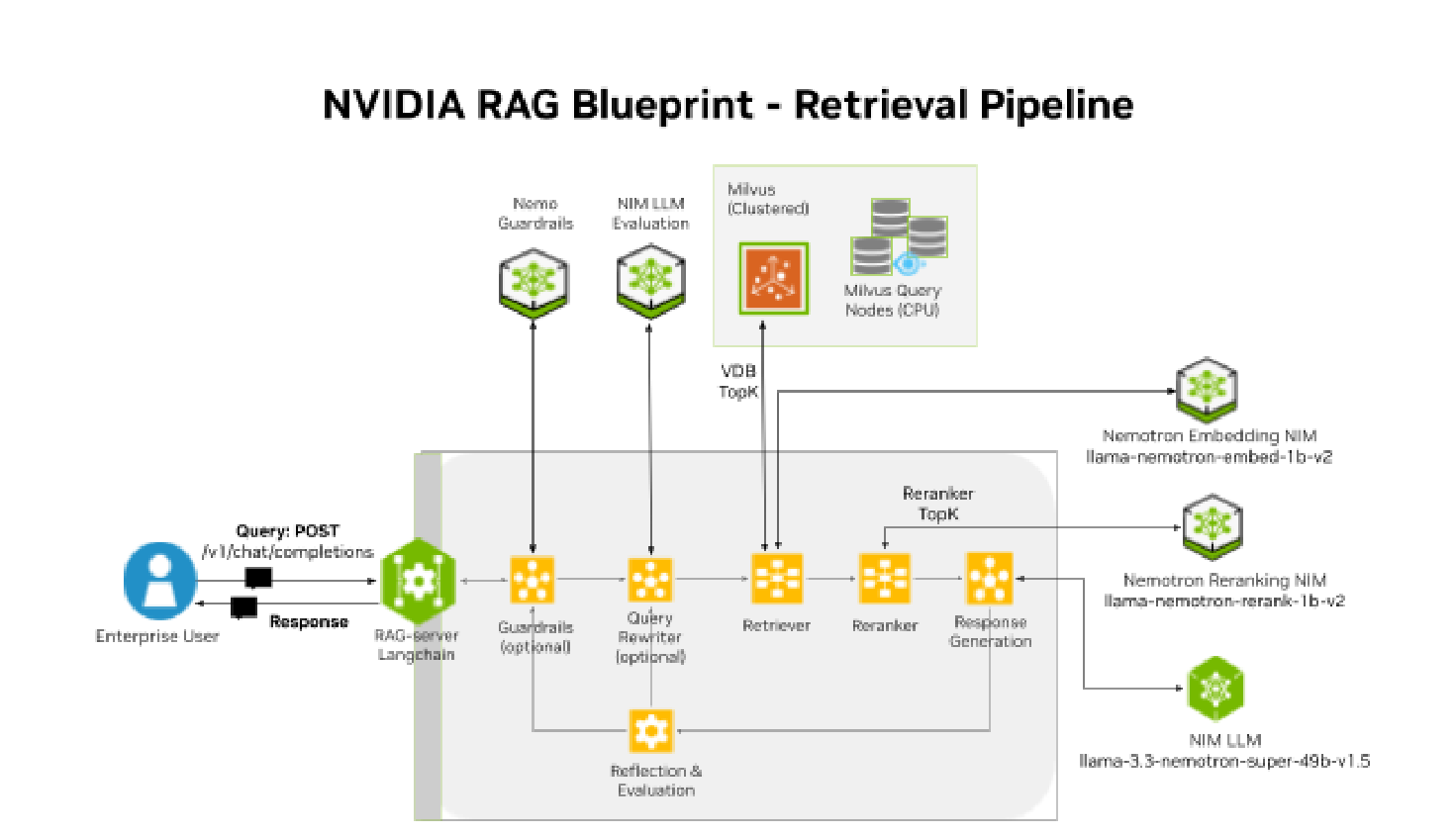
Figure 6 RAG Retrieval Pipeline - rag-server, LLM NIM, Embedding NIM, Reranking NIM and Milvus Vector DB services#
RAG Retrieval Pipeline services#
RAG server#
The RAG Server (rag-server v2.5.0) is the frontend API server for the RAG Blueprint Retrieval pipeline that includes NIM LLM, Embedding NIM, Reranking NIM, vector DB and other services Guardrails, Query rewriter, Evaluator (Ragas AI agent). The RAG server is a Langchain server application deployed as a Kubernetes deployment and service. It acts as the data orchestrator performing requests and processing responses (HTTP requests/response) to and from other services in the retrieval pipeline.
It is responsible for receiving user queries and then initiating calls to Nemotron NIM microservices, Vector database (VDB), NIM LLM, Evaluator (AI Agent) or other third party microservices in the Retrieval pipeline. Finally, the RAG server is responsible for sending the final response to the user query.
Use the RAG retriever API to communicate with the rag-server and initiate retrieval query requests and receive responses using relevant context from the vector DB.
Typical RAG retrieval workflow with NIM LLM:
User sends the request Query (ISL) to rag-server Kubernetes service.
The RAG server tokenizes the Query and sends it to Embedding NIM to create an embedding vector.
The RAG server sends the Query embedding vector to Milvus VDB to perform an Approximate Nearest Neighbor (ANN) search on the collection and return the VDB TopK (say 10) data chunks that are the nearest neighbors to the Query embedding vector.
Then the RAG server sends the 10 data chunks to Reranking NIM which selects the Reranker TopK (say 4) data chunks that are most relevant to the Query embedding. This forms the context for the Query.
The RAG server then sends the original User Query + Context (4 data chunks received from the Reranker) + System Prompt (instructions to answer using context provided) to the LLM.
Finally the RAG server forwards the LLM Response (OSL) to the user.
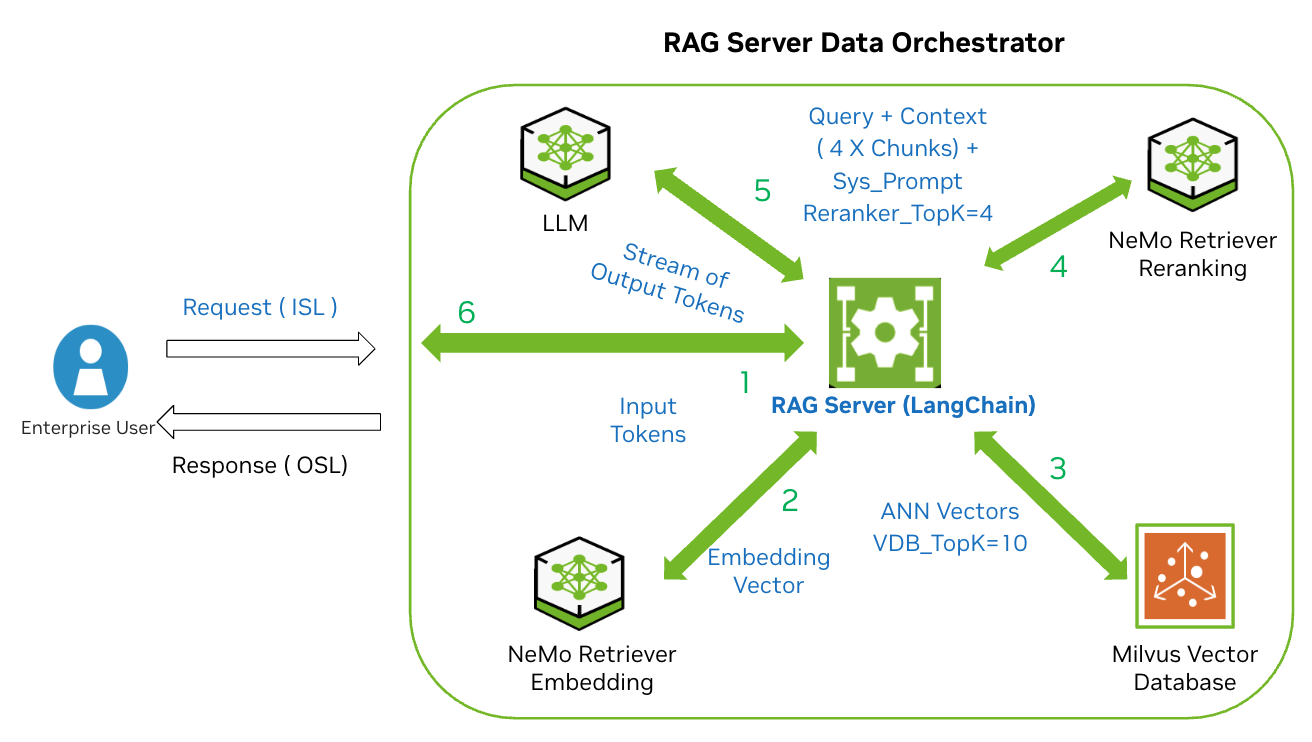
Figure 7 RAG Server Data Orchestrator - 6-step retrieval workflow: (1) User sends Query to RAG Server, (2) RAG Server gets Embedding Vector from Embedding NIM, (3) ANN vector search returns VDB TopK=10 chunks from Milvus, (4) Reranking NIM selects Reranker TopK=4 context chunks, (5) RAG Server sends Query + Context + System Prompt to LLM, (6) LLM streams response back to user.#
When scaling out the RAG retrieval pipeline services: LLM and other NIM microservices; to support high concurrent requests of 1000 or higher, scale out rag-server and ensure that it has sufficient workers and CPU and memory resources to handle the high concurrency and long requests especially for longer Generation requests with higher output throughput requirements.
For RAG retrieval benchmarking scale out rag-server microservice along with LLM scale, to spread the load across multiple servers and to prevent Kubernetes CPU throttling and OOM-kill.
Configure rag-server with sufficient workers and CPU and memory
32 workers  (default 8 workers)
CPU: 8 vCPU, Memory: 32GiB
For RAG scale 8X or higher (LLM scale 8X or higher), scale up resources on rag-server deployment:
High scale RAG scale up rag-server with workers and CPU and memory
64 workers  (default 8 workers)
CPU: 16 vCPU, Memory: 64GiB
LLM NIM#
LLM NIM - Large Language Model (LLM) NIM responds to user queries based on the context provided by the RAG pipeline.
llama-3.3-nemotron-super-49b-v1.5 version 1.15.5
Image repo and tag: nvidia/llama-3.3-nemotron-super-49b-v1.5:1.15.5
Maximum context length: 128K (131,072) tokens
RAG v2.5.0 LLM NIM model configuration:
LLM_MAX_TOKENS: "32768"
LLM_TEMPERATURE: "0"
LLM_TOP_P: "1.0"
FILTER_THINK_TOKENS: "true"
Thinking is disabled: System prompt has /no_think
NIM LLM: llama-3.3-nemotron-super-49b-v1.5 (Model card) profiles for RTX PRO 6000 and H200 NVL. Quantization NVFP4, available with Blackwell GPUs, offers efficient low-precision inference with equivalent accuracy.
GPUs |
RTX PRO 6000 |
H200 NVL |
|---|---|---|
1 |
vLLM, NVFP4, TP1, throughput |
vLLM, FP8, TP1, throughput |
2 |
vLLM, FP8, TP2, latency |
vLLM, FP16, TP2, latency |
Deploy NIM LLM using a single GPU with vLLM engine, Tensor parallelism TP=1 and throughput profile:
RTX PRO 6000 with vLLM, TP1, NVFP4, throughput
H200 NVL with vLLM, TP1, FP8, throughput
NIM LLM (Nemotron Super 49B) with NVFP4 can fit on a single RTX PRO 6000 and provides 10%-25% improved output throughput with equivalent accuracy.
Allocate sufficient CPU and Memory; to avoid Kubernetes CPU throttling or OOM-kill:
LLM NIM: 2 vCPU, 8GiB
NIM microservices are deployed with the NIM Operator using NIMCache(LLM) and NIM microservice CRDs. Need to allocate disk capacity to cache models and allow time for NIM to download and start up. Once model is locally cached, the scale out time is significantly reduced (50%- 80%).
LLM NIM Cache:
Model Cache (NFS PVC): 80GB
initial startup time: 25 mins
scale out startup: 8-9 min
NIM Cache needs to specify model profile or set the gpus.product to match the GPU:
spec.source.ngc.model.gpus.product: RTX6000_BLACKWELL_SVorH200_NVL
Note
NIM LLM (v1.14.0 or higher) enables NIM_ENABLE_KV_CACHE_REUSE: 1 by default,
hence System Prompt will be cached by LLM and TTFT will reduce.
Other LLM NIM options:
Nemotron-3-Super-120B-A12B model requires FP8 TP2 and special instructions to deploy on
RTX PRO 6K (not used in this guide): nvidia/nemotron-3-super-120b-a12b:1.8.0
Embedding NIM#
Nemotron Text Embedding NIM - converts User Query into vector embedding before sending to vector database to retrieve relevant context for the RAG retrieval.
llama-nemotron-embed-1b-v2 (Model card) version: 1.13.0
llama-nemotron-embed-1b-v2  version: 1.13.0
llama-nemotron-embed-1b-v2:1.13.0
Deploy Embedding NIM with Run:ai or MIG: 0.5 GPU.
Embedding NIM: 2vCPU, 8GiB
Note
See RAG ingestion pipeline for more details.
Reranking NIM#
Text Reranking NIM - filters the vector DB retrieved context to provide only most relevant chunks as context to NIM LLM.
llama-nemotron-nv-rerank-1b-v2 (Model card) version: 1.11.0
llama-nemotron-nv-rerank-1b-v2 version: 1.11.0
Image repo and tag: nvidia/llama-nemotron-rerank-1b-v2:1.11.0
Maximum sequence length: 8192 tokens
Reranker maybe scaled down to zero when not in use and during ingestion.
Reranking NIM is responsible for matching the user query to the context received from the Milvus vector database and sending only a subset, (Reranking TopK) of most relevant chunks to the NIM LLM. If reranking topk=10, then only the 10 most relevant chunks are sent to LLM.
Deploy Nemotron Reranking NIM using a single GPU: 1 GPU:
RTX PRO 6000: 1 GPU
H200 NVL: 1 GPU
Allocate sufficient CPU and Memory; to avoid Kubernetes CPU throttling or OOM-kill:
LLM NIM: 1 vCPU, 64GiB
NIM microservices are deployed using NIM operator using NIMCache(LLM) and NIM microservice CRDs. Need to allocate disk capacity to cache models and allow time for NIM to download and start up. Once model is locally cached, the scale out time is significantly reduced (50%- 80%).
LLM NIM Cache: llama-3.3-nemotron-super-49b-v1.5
Model Cache (NFS PVC): 50GB
initial startup time: 9-12 mins
scale out startup: 2-3 min
With high concurrent requests CR>100, long input queries (Summarization ISL=1024 tokens) and reranking topK >20, scale out the Reranking NIM:
Increase replicas: 2, 4 etc. with 1 GPU per replica
Vector DB - Milvus#
Vector DB is required to index and store the vector embeddings for efficient retrieval and query processing.
Milvus version 2.6.10
image repo and tag with cuVS (GPU CAGRA for indexing)
milvusdb/milvus:v2.6.5-gpu
Deploy Milvus in Clustered mode with GPU index CPU search (cuVS):
Milvus - GPU for index and CPU for search
Data: 1M embeddings (2048 dims X FP32)
~500 MB raw text data
1 Data/Index node (0.25 GPU)
1 Query node (4 vCPU + 8 GiB)
Note
See RAG ingestion pipeline for more details.
Query Rewriter#
Query-rewriter can improve accuracy to ensure that the user query is well defined and decontextualizes the incoming query for a multi turn conversation but it adds overhead of an additional call to the LLM:
nvidia/llama-3.3-nemotron-super-49b-v1.5:1.15.0
NeMo Guardrails#
NeMo guardrails serve an important task to ensure content safety, topic control, PII detection, RAG enforcement (avoid hallucinations), and jailbreak prevention and enforce any policies. Guardrails are a must have for Enterprise-grade RAG applications.
Reflection/Evaluator Agent#
Enabled for Accuracy benchmarking:
nvidia/llama-3.3-nemotron-super-49b-v1.5:1.15.0
Reflection uses Evaluator Agent to evaluate the response from LLM using prompt similar to RAGAs with metrics for Accuracy, Groundedness and Relevance to the context provided.
Inference Benchmarking tool#
NVIDIA AIPerf benchmarking (github) for OpenAI API based LLMs. Query with synthetic data or set user defined input prompts. For RAG retrieval performance benchmarking use the AIPerf benchmarking tool to communicate with the rag-server and send high concurrent requests to the RAG retrieval pipeline.
Observability - Metrics, Tracing, Logs#
Enable metrics and service monitor for NIM microservices to enable scaling using KV-Cache metrics. Enable tracing for the RAG server, Ingestor server, NV-Ingest, Milvus to be able to collect traces on individual calls to components. View spans (time taken) for each HTTP request/response call to each component to find component latency bottlenecks. Enable Open Telemetry collector and Jaeger to view traces and download tracing data.
Agentic RAG#
To enable agents to send requests directly with the RAG server, deploy an RAG MCP server that can use MCP transports (SSE, streamable-http, and stdio) instead of REST APIs. Use NeMo Agent Toolkit (NAT) to build RAG workflows with intelligent agents communicating through the MCP server to create collections, ingest data and send queries.
Skills#
Skills to deploy RAG blueprint with different configuration options.
Table 6. RAG Retrieval Pipeline services
Summary: RAG workload deployment#
The Retrieval NIM microservices; NIM LLM and Nemotron Reranking NIM are deployed as full GPUs and scaled out as part of the benchmarking methodology. The NIM LLM is deployed with a throughput optimized profile for the vLLM engine using single full GPU (TP1).
Milvus data (index) node and Nemotron Text Embedding and Nemotron Extraction are deployed with Run:ai GPU Fractions (time slicing) or Multi Instance GPU (MIG) profiles. In addition the Nemotron Reranking NIM is deployed using a single full GPU.
Enterprise RAG |
Service Version |
Minimum Compute |
|---|---|---|
Enterprise RAG |
RAG Retrieval: 2.75 GPUs: LLM NIM: 1 GPU, Reranking NIM: 1 GPU, Embedding NIM: 0.5 GPU (Run:ai or MIG), Milvus Vector DB data node: 0.25 GPU (Run:ai or MIG). RAG ingestion NeMo Retriever (NV-Ingest): 1 - 1.25 GPUs: Extraction NIM microservices Run:ai: 1 GPU or MIG: 1.25 GPU |
Baseline Total: 4 X RTX PRO 6000, 4 X H200 NVL, 40 vCPU, 200 GiB |
RAG Blueprint |
RAG Blueprint v2.5.0, Helm Chart v3.18+. Baseline rag-server - 32 workers; 8 vCPU, 32 GiB. High Performance for Scale and Benchmarking RAG server - 64 workers; 16 vCPU, 64 GiB |
RAG server performance: 64 workers; 16 vCPU, 64 GiB |
NIM LLM |
Nvidia Llama 3.3 Nemotron Super 49b v1.5, llama-3.3-nemotron-super-49b-v1.5 v1.15.0, nvidia/llama-3.3-nemotron-super-49b-v1.5:1.15.0. NIM LLM profile: RTX PRO 6000: vLLM, NVFP4, TP1, throughput; H200 NVL: vLLM, FP8, TP1, throughput |
RTX PRO 6K: 1 GPU, NVFP4. H200 NVL: 1 GPU, FP8. 1 vCPU, 64 GiB |
Nemotron Reranking NIM |
llama-nemotron-rerank-1b-v2 version: 1.11.0, nvidia/llama-nemotron-rerank-1b-v2:1.11.0 |
1 GPU, 4 vCPU, 8 GiB |
Nemotron Embedding NIM |
llama-nemotron-embed-1b-v2 version: 1.13.0, nvidia/llama-nemotron-embed-1b-v2:1.13.0. RTX PRO 6K MIG Profile: mig-2g.48gb. H200 MIG Profile: mig-4g.71gb |
MIG: 0.5 GPU, Run:ai: 0.5 GPU, 4 vCPU, 8 GiB |
NeMo Retriever Extraction (NV-Ingest) |
NeMo Retriever Extraction (NV-Ingest) v26.3.0. NV-Ingest server (16 vCPU, 32 GiB, 32 workers), Redis (4 vCPU, 12 GiB) |
RAG ingestion only, 20 vCPU, 44 GiB |
nemotron-ocr-v1: nim/nvidia/nemotron-ocr-v1:1.3.0; nemotron-page-elements-v3: nim/nvidia/nemotron-page-elements-v3:1.8.0; nemotron-table-structure-v1: nim/nvidia/nemotron-table-structure-v1:1.8.0; nemotron-graphic-elements-v1: nim/nvidia/nemotron-graphic-elements-v3:1.8.0 |
RAG ingestion only: Run:ai: 1 GPU, MIG: 1.25 GPU. 4.75 CPU, 12.5 GiB |
|
Vector DB Milvus |
Milvus version 2.6.10, milvusdb/milvus:v2.6.5-gpu. Milvus (Distributed) with hybrid GPU-CPU mode; enable GPU for index (cuVS) and CPU for search. Baseline Data: 4M vectors. RTX PRO 6K Milvus Data node: 0.25 GPU, mig-1g.24gb. H200 NVL Milvus Data node: 0.25 GPU, mig-1g.18gb |
1 Data node: Run:ai: 0.25 GPU or MIG: 0.25 GPU, 16 vCPU, 32 GiB RAM. 1 Query Node: 16 vCPU, 40 GiB |
Table 7. RAG workload deployment summary
Extraction NIM deployment details:
Extraction NIM |
Run:ai GPU |
MIG RTX PRO 6K |
MIG H200NVL |
CPU/Mem |
|---|---|---|---|---|
ocr |
0.4 GPU |
mig-2g.48gb |
mig-3g.71gb |
3 vCPU, 4 GiB |
page-elements |
0.3 GPU |
mig-1g.24gb |
mig-2g.35gb |
1 vCPU, 2 GiB |
table-structure |
0.2 GPU |
mig-1g.24gb |
mig-1g.18gb |
1 vCPU, 3.5 GiB |
graphic-elements |
0.1 GPU |
mig-1g.24gb |
mig-1g.18gb |
0.5 vCPU, 3 GiB |