

Performance and Scale Methodology#
Run:ai works with Kubernetes to add a custom scheduler that manages the allocation of GPU resources to the AI workloads. This scheduler can also allocate fractional GPUs to the Workloads. In order to benchmark this solution, we first established the Inference workload benchmarks using the Gen-AI perf tool without Run:ai scheduler. Once that was established, we ran the same benchmarking process on the Inference workload deployed with Run:ai, using both fractional and full GPUs. We ran this for two models, Meta Llama 3.1 8B and DeepSeek R1 Distill Llama 8B. Once the Performance benchmarks were established, we then scaled the GPUs, the NIM Pod instances and the workload on the NIM LLM using Gen-AI Perf.
Benchmarking NIM LLM#
To benchmark the NIM service, we used NVIDIA’s GenAI-Perf, a client-side tool, from within the Triton inference server running outside the cluster to generate load on the NIM service API. Gen-AI Perf is a tool developed by NVIDIA to measure the throughput and latency of generative AI models. It provides some key metrics to measure performance and benchmark.
Typically, in an LLM application, a user provides a query (prompt), the inference service queues the request, then processes it, and a response is generated. The model takes the user input prompt and breaks it down into tokens for efficient processing. As such, there are some common terms used to define the process.
Tokens: The unit that LLM use to break a prompt into for processing
Input Sequence Length (ISL): The number of tokens entered by the user
Output Sequence Length (OSL): The number of tokens produced by the inference request at the generation phase.
Based on this, GenAI Perf can load an inference server with various ISL and OSL sequences to mimic Summarization, translation prompts, mimicking the scenarios a user might use the Inference server for, and provide various metrics. Here are some of the key metrics to monitor for an LLM Inference request:
Time to First Token (TTFT): This metric calculates how long a user has to wait after entering a prompt and before the first token is received as a response from the inference service.
Output Tokens Per Second Throughput: This metric shows all the tokens generated by the Inference Service per second for every request.
Inter Token Latency (ITL): Average time taken between consecutive tokens generated
Concurrent Users (CCU): Total number of active users concurrently being served by the inference service
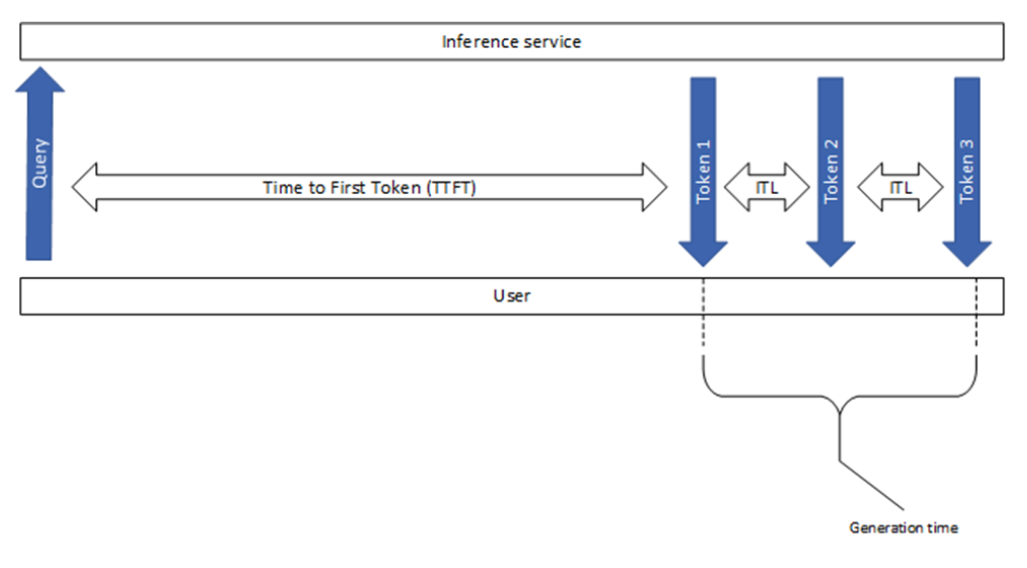
Figure 16 Performance Metrics to monitor for an LLM Inference#
Scale Methodology for NIM LLM with Run:ai#
Determining the appropriate scaling strategy for an LLM service depends on several key factors, including the expected number of concurrent users, acceptable peak-time performance, and organizational constraints such as budget and system tolerances. Two primary metrics drive this assessment: user latency and throughput.
User Latency refers to the time a user waits for a request to be processed, typically measured as Time to First Token (TTFT) in LLM services.
Throughput represents the total number of requests the system can handle within a given timeframe, regardless of the number of concurrent users.
To establish an optimal scaling approach, we evaluate how many concurrent users can issue queries simultaneously without a significant increase in latency or degradation in throughput. For this study, we set a performance threshold ensuring that user latency remains close to 1000ms for all prompt requests. We then determine the maximum number of users a specific model can support, given the minimum number of GPUs needed to run for a particular characteristic, like chat, summary, translation, etc. For Meta Llama 8B, a single Pod needs at least one H100 NVL GPU. Scaling is achieved by increasing the number of pods running the NIM LLM within the Kubernetes cluster and analyzing the impact on user capacity as additional GPUs are consumed and as more LLM pods are scaled. With Run:ai, we are just increasing the number of replicas needed to run a LLM service, starting one replica per LLM service. A single replica is consuming 1-2 GPUs based on the model’s profile and Memory requirement.
This methodology enables precise scalability planning, ensuring that AI infrastructure can dynamically adjust to varying workload demands while maintaining an optimal balance between performance and resource utilization. With Run:ai, this can be automated. Run:ai lets the user determine at what point to scale up or scale down resources based on Throughput, Latency, or Concurrent users. This can be defined while creating the Inference Workload.
GenAI-Perf was used to load the NIM Service with multiple users, using a summarization characteristic, where ISL/OSL is set to 2000:200. Once GenAI-Perf runs a workload against the NIM service it provides metrics to check the throughput, Latency and the Time it took the model to output the first token (TTFT) etc.
Table 4: Models, Scale, and Use Cases tested
LLM |
With Run:ai |
GPU |
GPU Scale Tested |
Use case |
Quantization tested |
|---|---|---|---|---|---|
Meta Llama 3.1 8B Instruct |
No |
H100 NVL |
From 1 Pod X 1 GPU to 64 Pods X 1 GPU |
Summarization (2000:200) |
fp8 |
DeepSeek R1 Distill Llama 8B |
No |
H100 NVL |
From 1 Pod X 1 GPU to 64 Pods X 1 GPU |
Summarization (2000:200) |
fp8 |
Meta Llama 3.1 8B Instruct |
Yes |
H100 NVL |
From 1 Pod X 1 GPU to 64 Pods X 1 GPU |
Summarization (2000:200) |
fp8 |
DeepSeek R1 Distill Llama 8B |
Yes |
H100 NVL |
From 1 Pod X 1 GPU to 64 Pods X 1 GPU |
Summarization (2000:200) |
fp8 |
Meta Llama 3.1 8B Instruct |
Yes |
H100 NVL |
From 1 Pod X 0.5 GPU to 128 Pods X 0.5 GPU |
Summarization (2000:200) |
fp8 |
DeepSeek R1 Distill Llama 8B |
Yes |
H100 NVL |
From 1 Pod X 0.5 GPU to 128 Pods X 0.5 GPU |
Summarization (2000:200) |
fp8 |
Mixed Workloads Meta Llama 3.1 8B & Deepseek R1 Distill Llama 8B |
Yes |
H100 NVL |
From 1 Pod X 1 GPU to 128 Pods X 0.5 GPU (each LLM) |
Summarization (2000:200) |
fp8 |
Installing and Configuring Gen-AI Perf#
Triton Inference Server can be installed as a Docker container or a Pod in a Kubernetes Cluster. You can get the server from NGC here. Triton Inference Server has the GenAI Perf tool in it.
To run on Docker:
docker pull nvcr.io/nvidia/tritonserver:24.12-trtllm-python-py3
To run on Kubernetes, you can deploy it using this YAML file, make sure the secret to NGC is also created in the cluster, as described in the NIM Service creation steps above.
kubectl apply -f triton-server.yaml
apiVersion: v1
kind: Pod
metadata:
  name: triton
  labels:
    app: triton
spec:
  containers:
  - name: triton
    image: nvcr.io/nvidia/tritonserver:24.10-py3-sdk
    command: ["sleep", "infinity"]
    volumeMounts:
    - mountPath: "/mnt"
      name: config-volume
  volumes:
    - name: config-volume
      hostPath:
        path: /tmp
        type: Directory
Once you have the docker container or the Kubernetes pod, shell into it to run the genai-perf command.
The model name to run the GenAI Perf tool can be found by this command. Run this against the NIM LB Service, the IP in the command below is the IP of the NIM load balancer.
curl http://{ip}:{port}/v1/models

mrawat@pdxera-bcm01:~$ curl http://10.184.178.83:8000/v1/models

{"object":"list","data":[{"id":"mistralai/mixtral-8x7b-instruct-v0.1","object":"model","created":1737586179,"owned_by":"system","root":"mistralai/mixtral-8x7b-instruct-v0.1","parent":null,"max_model_len":32768,"permission":[{"id":"modelperm-8d273b12ab3541c6807170b0752429f0","object":"model_permission","created":1737586179,"allow_create_engine":false,"allow_sampling":true,"allow_logprobs":true,"allow_search_indices":false,"allow_view":true,"allow_fine_tuning":false,"organization":"*","group":null,"is_blocking":false}]}]}
More on GenAI-Perf can be found here, below is the command used to run load using GenAI Perf:
genai-perf profile \
    -m $MODEL \ #make sure put model name with quote ' '
    --endpoint v1/chat/completions \
    --endpoint-type chat \
    --service-kind openai \
    --streaming \
    -u http://<IP of Nim-Service>:8000 \
    --num-prompts 100 \
    --synthetic-input-tokens-mean $inputLength \
    --synthetic-input-tokens-stddev 50 \
    --concurrency $CONCURRENCY \
    --extra-inputs max_tokens:$OUTPUT_SEQUENCE_LENGTH \
    --extra-input ignore_eos:true \
    --profile-export-file test_chat_concurrency${concurrency}_input${input_tokens}_output${output_tokens}.json