

Systems Overview#
For this guide, we are leveraging Enterprise Reference Architecture (RA) in the 2-4-3-200 configuration using the Software Reference Stack with Run:ai and deploying NIMs on top of the stack.
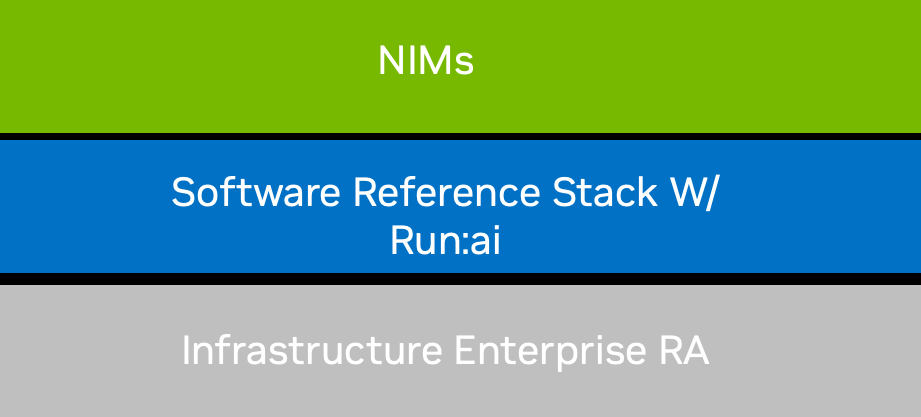
Figure 1 System Overview#
Note
For the detailed hardware design, refer to NVIDIA H100 NVL NVIDIA Spectrum Platforms Enterprise Reference Architecture: NVOnline | NVOnline: 1119885
Run:ai Overview#
Run:ai is NVIDIA’s Kubernetes-native AI workload and GPU orchestration platform, purpose-built to help enterprises manage and scale AI workloads across heterogeneous infrastructure - on-prem, in the cloud and hybrid.
It enables centralized orchestration of AI compute for multiple departments and teams, supporting advanced scheduling, quota enforcement, and GPU resource sharing to maximize infrastructure efficiency and AI workload performance.
Run:ai replaces the default Kubernetes scheduler with a purpose-built AI scheduler, enabling fine-grained control over GPU allocation, including GPU fractioning and advanced scheduling policies tailored to the unique needs of AI and deep learning workloads.
Run.ai has two major components.
The Run:ai Control Plane: The centralized management layer that orchestrates individual GPU clusters. It enforces policies, manages workloads, and provides the UI and API for interacting with Run:ai environments.
Run.ai Cluster: A local instance that receives instructions from the Control Plane. It handles resource management and submits workloads at the cluster level. Multiple Run:ai Clusters can be connected to a single Control Plane instance for unified management.
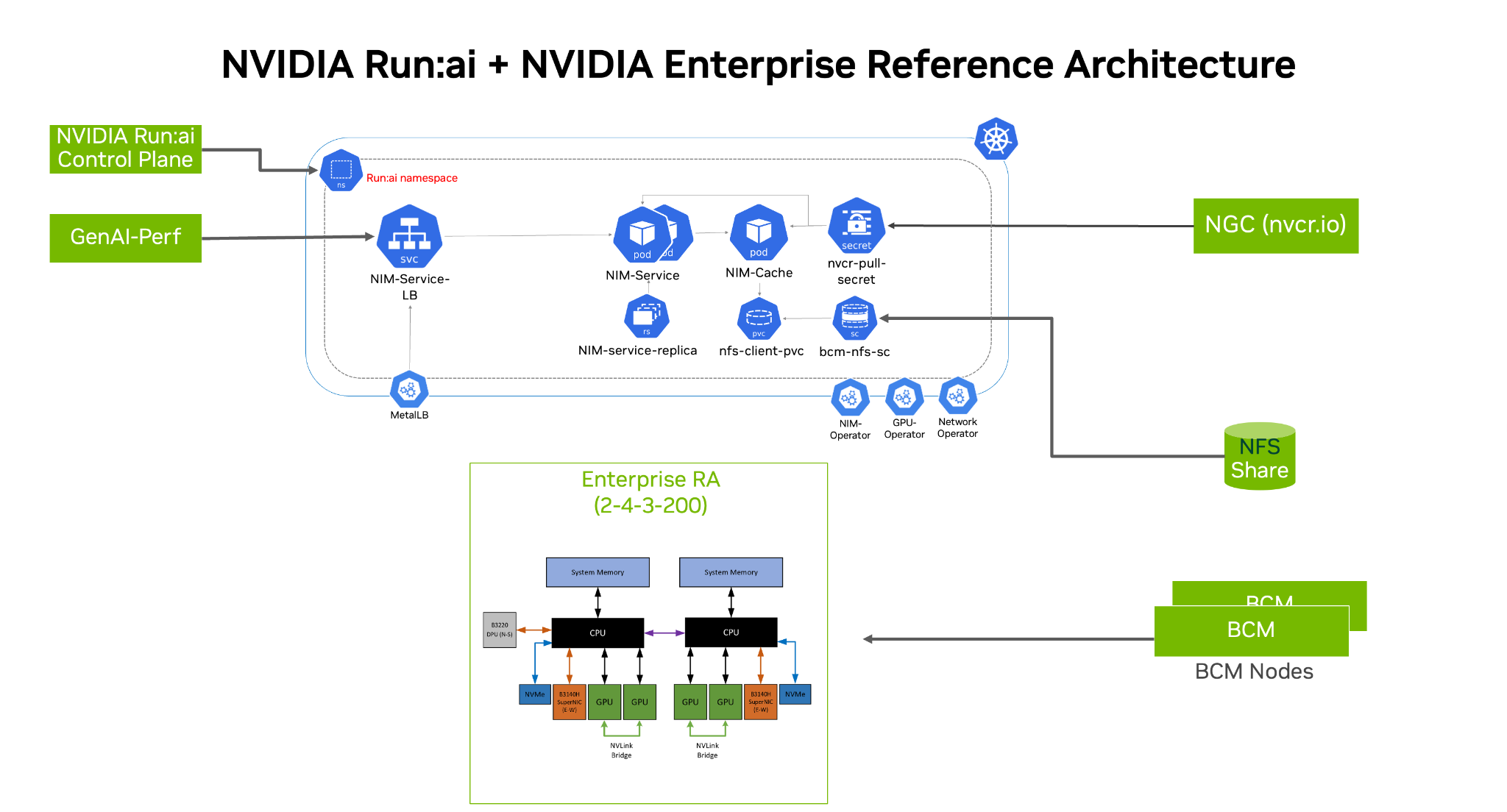
Figure 2 Run:ai Architecture#
Run:ai has three modes of operation:
SaaS/Classic: In this architecture, the Run:ai control plane is in the cloud, and the cluster can be in any data center/Cloud
Self-Hosted: In this mode, both the Run:ai control plane and cluster are installed within the enterprise’s datacenter/cloud, but requires connection to the internet to download bits
Air-Gapped: This mode is Self-Hosted but requires no Internet connection
Note
The scope of this Guide is limited to the SaaS/Classic Installation method.
Enterprise Reference Architecture Overview#
This guide is part of NVIDIA Enterprise Reference Architecture, which covers certified hardware, software stack, and sizing recommendations to design, build, and scale an end-to-end accelerated computing cluster deployment with balanced CPU to GPU to NIC patterns. The Enterprise Reference architecture provides guided and detailed hardware and software architecture recommended by NVIDIA for optimal server, cluster, and network configuration needed to build and scale AI factories.
NVIDIA Enterprise Reference Architecture includes hardware design recommendations, software stack configurations, and scalability.
Hardware Enterprise Reference Architecture#
For this version of the document, we used NVIDIA’s 2-4-3-200 Enterprise RA reference configuration for the overall stack. The PCIe-Optimized 2-4-3 (CPU-GPU-NIC-Bandwidth) reference configuration is for 2U NVIDIA-Certified compute nodes using PCIe, allowing you to deploy up to 4 GPUs with up to 3 NICs balanced with 2 CPUs. This pattern can scale from 4 to up to 32 nodes in a cluster. The Enterprise RA design recommends using NVIDIA Spectrum-X switches, Ethernet Platform - Combining Spectrum-4 Ethernet switches and NVIDIA Bluefield-3 SuperNICs for optimized networking.
Note
For the detailed hardware design, refer to NVIDIA L40S and H100 NVL NVIDIA Spectrum Platforms Enterprise Reference Architecture: NVOnline : 1119410 | NVOnline : 1119885
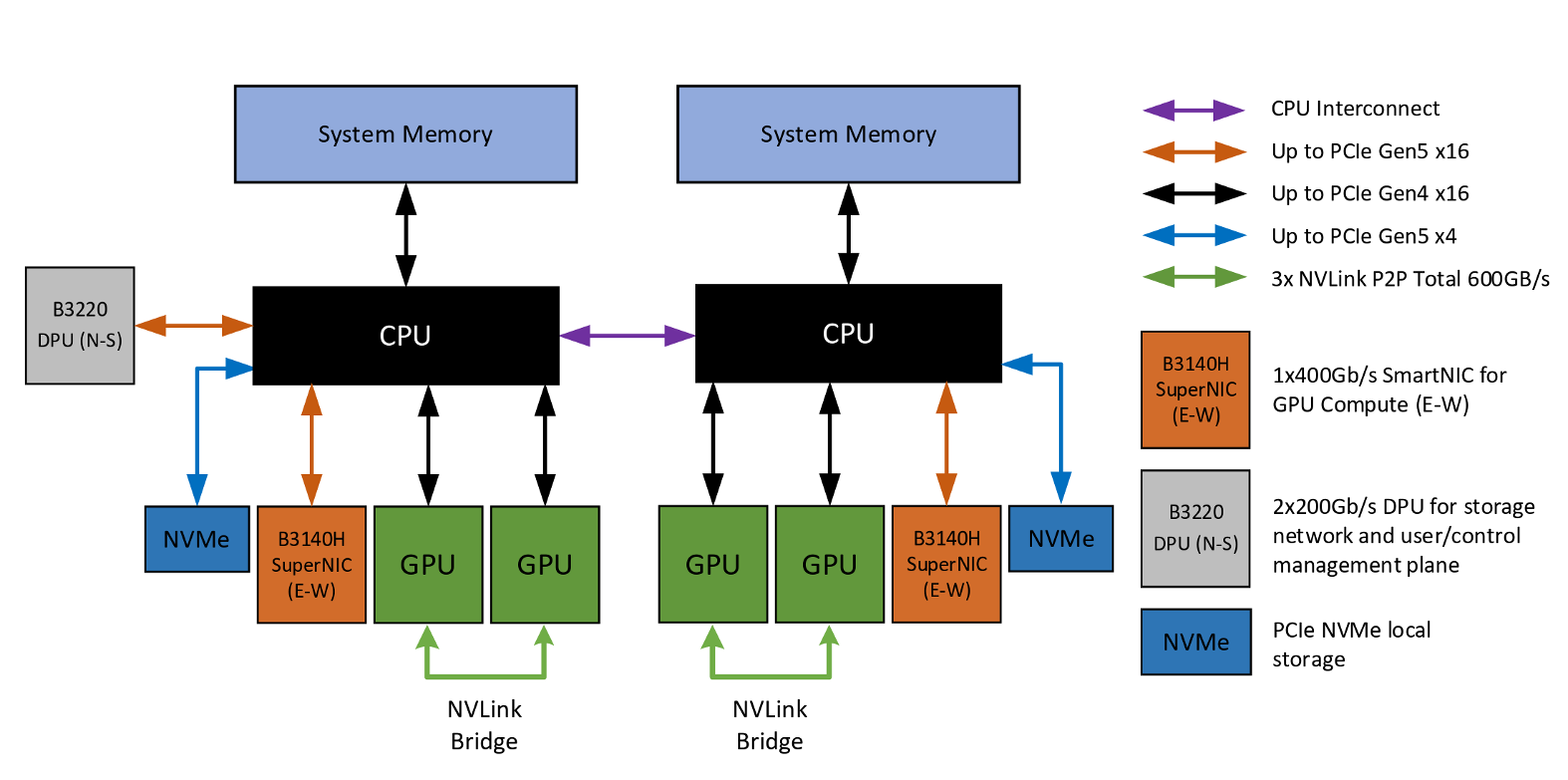
Figure 3 System architecture of Enterprise RA 2-4-3-200 reference configuration#
The server used while running the test on the Software Enterprise RA had the following characteristics.
Table 2: Specification of Individual Components in the server with NVIDIA H100 GPUs
Component |
Specification |
|---|---|
CPUs |
2x INTEL(R) XEON(R) GOLD 6548Y+ 232 cores; 64 threads |
GPUs |
4 x NVIDIA H100 NVL |
Networking – E/W |
2 x NVIDIA BlueField-3, B3140H |
Networking – N/S |
1 x NVIDIA BlueField-3, B3220 |
Host Memory |
32x 64 GB DRAM (2048) |
Host Boot Drive |
2x 896 GB (~1.8 TB) |
Host Storage |
8x 1787.88 GB (~14TB) |
The Systems are connected with NVIDIA SN5600 switches, and below is the reference architecture for Networking. The Scalable Units are a pool of servers with the 2-4-3-200 architecture.
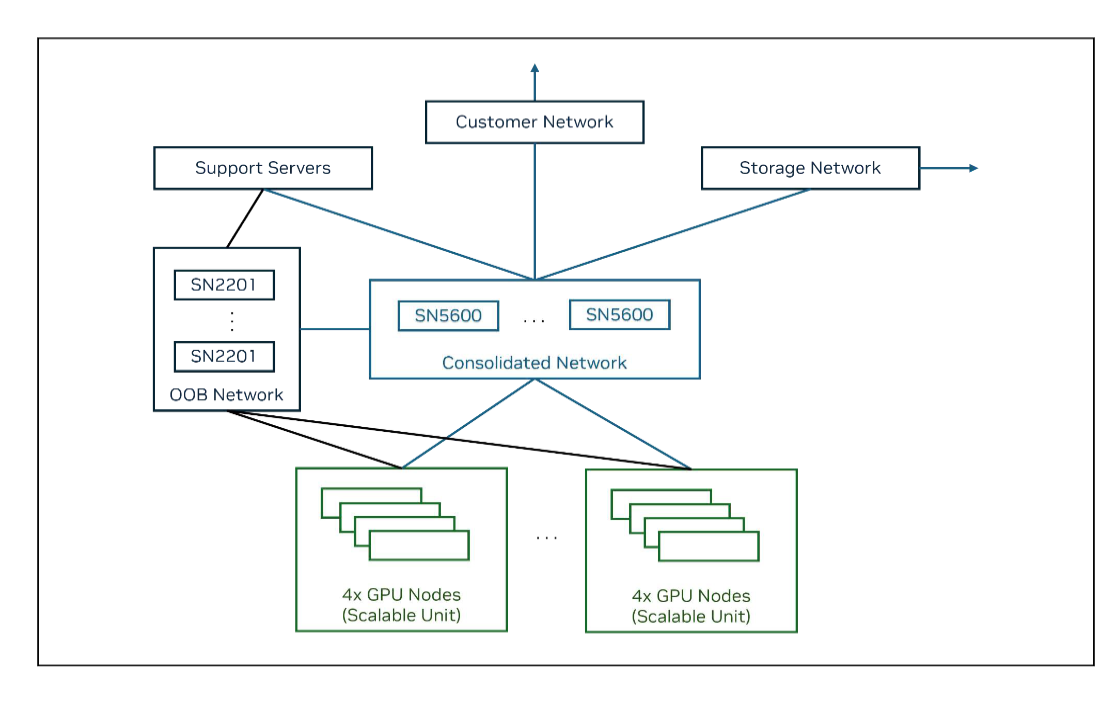
Figure 4 Networking Reference for Enterprise RA#
For this particular guide, we are using NFS Storage that has been deployed on the BCMe head node to provide Persistent Volumes to NIM workloads. Enterprise customers can use their storage systems to provide storage volumes needed by Kubernetes and the Inference Services (NIMs).
Our current Enterprise RA data center deployment consists of a pool of 16 servers with 4 NVIDIA H100 NVL GPUs per node. The complete cluster has 64 GPUs in total.
Software Reference Stack#
The software reference stack leverages the bare-metal servers with Kubernetes as the cluster orchestration tool. BCMe is part of the NVIDIA AI Enterprise software suite, and it provides all the tools you need to deploy and manage an AI datacenter. It also helps in deploying a Kubernetes cluster on top of the bare-metal servers to create a pool of GPU resources. BCM is then used to deploy all the operators like the GPU Operator, Network Operator, NIM Operator, etc. to run the GPUs and Network cards effectively. We then deploy a NIM service, picking the model for which the Inference service needs to be tested and scaled. We installed Run:ai version 2.2 using the SaaS format.
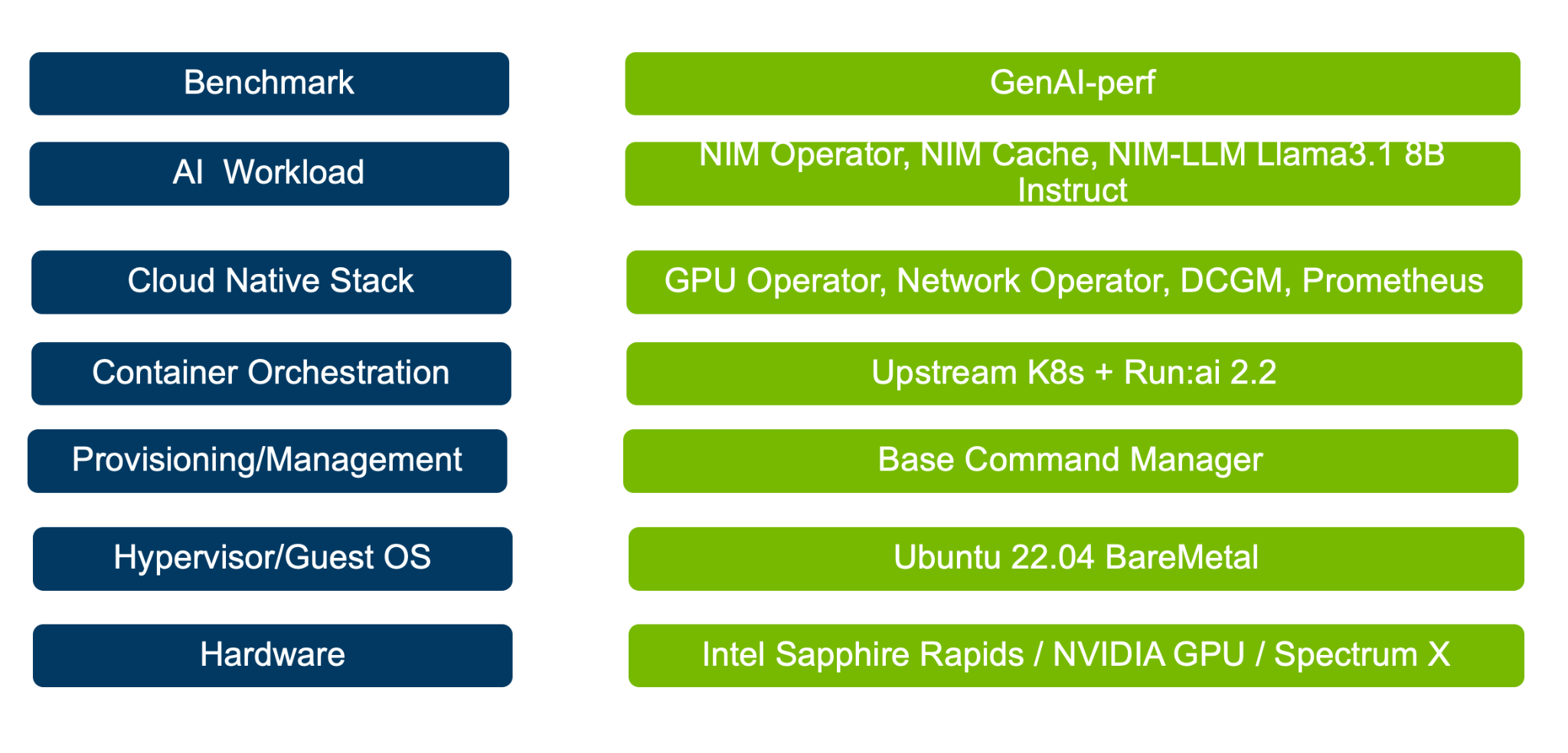
Figure 5 Overview of the overall deployment stack#
This Enterprise Reference Architecture leverages NVIDIA AI Enterprise software to install and configure the necessary software and tools required to efficiently deploy and operate an AI factory. Once servers are racked and networked, BCMe can be used to image individual servers, deploying Ubuntu 22.04 as the operating system, installing NVIDIA GPU and network drivers, and setting up Kubernetes clusters.
Beyond these core capabilities, the deployment also aligns the software dependencies for various components required for Kubernetes cluster operations, such as a Container Network Interface (CNI) for managing container networks, NGINX Ingress Controller for handling cluster ingress traffic, and MetalLB for load balancing services within the Kubernetes environment also provides firmware to configure and optimize OS like Cumulus Linux for the NVIDIA Spectrum switches, firmware for the Bluefield Super NICs etc.
Note
For detailed Software reference design, refer to NVIDIA Software Reference Stack and automation for Enterprise RA - vanilla Kubernetes: NVOnline : 1130533
In this document, we will leverage NVIDIA NIM and install it on top of the Enterprise RA stack, test the performance of the inference server and show how the inference service scales as workloads change.
NVIDIA Inference Microservice (NIM)#
NVIDIA Inference Microservice (NIM) is a pre-trained, customized AI model packaged in the form factor of a Container optimized to run on NVIDIA Systems like Data Centers, RTX AI PCs and workstations. NVIDIA NGC Catalog hosts many NIMs for various AI model domains like Large Language Models (LLMs), Vision Language Models (VLMs), models for speech, medical imaging, 3D, Videos etc.
For this guide, we are scaling and testing the following Large Language (LLMs) Model packed in NVIDIA NIMs, NVAIE also includes Support for these NIMs.
Table 3: NVIDIA NIM - Models & versions
Model |
NIM Version |
|---|---|
Llama 3.1 8B Instruct |
1.8.4 |
DeepSeek R1 Distill Llama 8B |
1.5.2 |