Infiniband Runbook
Motivation
Infiniband This runbook describes the steps on infrastructure setup and configuration of enabling Infiniband.
Unified Fabric Manager (UFM)
Installation
UFM 6.19.0 and up is recommended for configuring UFM in more security mode.
- Follow the prerequisites guidance to install all required packages, including the HA part.
- Follow the HA installation guidance to install the UFM in HA mode.
Configuration
After UFM is deployed, the following security features must be enabled on UFM and OpenSM to enable secure Infiniband support in a multi-tenant site.
The management key (M_Key) is used across the subnet, and the administration key (SA_key) is for services.
Perform the following steps on the host that provides the NVIDIA Unified Fabric Manager (UFM) server.
Static configurations
Update the following parameters in $UFM_HOME/ufm/files/conf/gv.cfg.
Update the following parameters in $UFM_HOME/ufm/files/conf/opensm/opensm.conf.
Static Topology configuration
Static network configuration can be applied to enhance security of Infiniband cluster.
It should be described in specific config file, named topoconfig.conf. The file is located at
The file format is
with fields description as
Starting UFM v6.19.0 to enable ability of UFM to work with static topology configuration $UFM_HOME/ufm/files/conf/gv.cfg file should include following parameter
while on previous UFM versions this ability is enabled in file $UFM_HOME/ufm/files/conf/opensm/opensm.conf as
File topoconfig.conf can be created and modified manually or using UFM REST API starting v6.19.0.
For example initial topoconfig.conf file can be created as
Request job by its ID to check job completion.
Once Job will be completed, path on UFM server to generated topoconfig file will be part of job completion message (Summary). Default generated topoconfig file location: /tmp/ibdiagnet_out/generated_topoconfig.conf
Configurations per UFM
And the following configuration should be configured per UFM:
sm_key
A random 64bit integer is required for the sm_key, RANDOM environment value is a simple way to generate it as follows.
Update the sm_key in $UFM_HOME/ufm/files/conf/opensm/opensm.conf with the generated 64bit integer as follows.
allowed_sm_list
Get the GUID of openSM from $UFM_HOME/ufm/files/conf/opensm/opensm.conf of each UFM in the fabric.
Update allowed_sm_guids in $UFM_HOME/ufm/files/conf/opensm/opensm.conf as follows.
User management
Update the password of the admin as follows. The default password of the admin is 123456; and the new password must be:
- Minimum length is 4
- Maximum length is 30, composed of alphanumeric and ”_” characters
Generate a token for admin as follows:
After the configuration, restart the UFM HA cluster as follows:
And then check UFM HA cluster status:
NICo
Installation
No additional steps are required to enable Infiniband in NCX Infra Controller (NICo).
Configuration
UFM Credential
One of two options can be selected for UFM authentication: token authentication or client authentication.
Follow the instructions in the section that applies to the selected option.
Token Authentication
Get the token of the admin user in UFM in above step, or get it again by following the rest api (the password of the admin user is required to get the token):
Create the credential for UFM client in NICo by carbide-admin-cli as follows:
Client Authentication (mTLS)
Mutual TLS, or mTLS for short, is a method for mutual authentication. mTLS ensures that the parties at each end of a network connection are who they claim to be by verifying that they both have the correct private key. The information within their respective TLS certificates provides additional verification. mTLS is often used in a Zero Trust security framework to verify users, devices, and servers within an organization. Zero Trust means that no user, device, or network traffic is trusted by default, an approach that helps eliminate many security vulnerabilities.
Configure UFM to enable mTLS according the instruction
UFM Server Certificates should include UFM Host Name <ufm host name> into The Subject Alternative Name (SAN) extension to the X.509 specification.
Note:
<ufm host name>should be asdefault.ufm.forge,default.ufm.<site domain name>. Where<site domain name>is taken frominitial_domain_nameNICo configuration parameter.
- direct IP address is not supported.
- for UFM version less than 6.18.0-5 following patch should be applied as
Select Client Authentication mode.
Existing NICo certificates such as /run/secrets/spiffe.io/{tls.crt,tls.key,ca.crt} are used for client side.
Generate UFM server certificate using Vault.
Enter this command to create server UFM certificates using the vault:
carbide-admin-cli credential generate-ufm-cert —fabric=default
UFM Server Certificates have predefined names as default-ufm-ca-intermediate.crt, default-ufm-server.crt, default-ufm-server.key and stored under /var/run/secrets location on carbide-api pod.
Enter Docker UFM container.
Store server certificates at specific location.
Create UFM Server certificates using certificates generated on previous step in the UFM specific location and with predefined file names.
Assign UFM Client Host Name with UFM admin role.
It should be value from client certificate SAN record for example: carbide-api.forge.
Set UFM Server Host Name for certificate verification.
It should be value from server certificate SAN record for example: default.ufm.forge.
Enable mTLS in UFM configuration file /opt/ufm/files/conf/gv.cfg.
Restart UFM.
Check functionality.
Existing carbide certificates such as /run/secrets/spiffe.io/{tls.crt,tls.key,ca.crt} are used for verification.
carbide-api-site-config
Update the configmap carbide-api-site-config-files to configure
the UFM address/endpoint and the pkey range that is used per fabric as follows.
Infiniband typically expresses Pkeys in hex; the available range is “0x0 ~ 0x7FFF”.
Note that currently NICo supports only a single IB fabric. Therefore only
the fabric ID default will be accepted here.
NOTE: A pkey will be generated for all partitions that are managed by NICo; ensure the range does not conflict with the existing pkey in UFM (if any).
Update the configmap carbide-api-site-config-files to enable Infiniband features as follows:
To enable the monitor of IB, update the configmap carbide-api-site-config-files as follows:
Restart carbide-api
Restart carbide-api to enable Infiniband in site-controller.
Rollback
Update the configmap forge-system/carbide-api-site-config-files to disable Infiniband features as follows:
Restart carbide-api to disable Infiniband in site-controller.
FAQ
Where’s the UFM home directory?
The default home directory is /opt/ufm.
How to check UFM connection?
There is a debug tools for QA/SRE to check the address/token of UFM:
The default partition (management/0x7fff) will include all available ports in the fabric; use the view sub-command to list all available ports as follows.
How to check the auth token and UFM IP in NICo?
After configuring UFM credentials in NICo, using the following commands to check whether the token was updated in Vault accordingly.
This returns something like
The username here encodes the UFM address, while the password identifies the auth token.
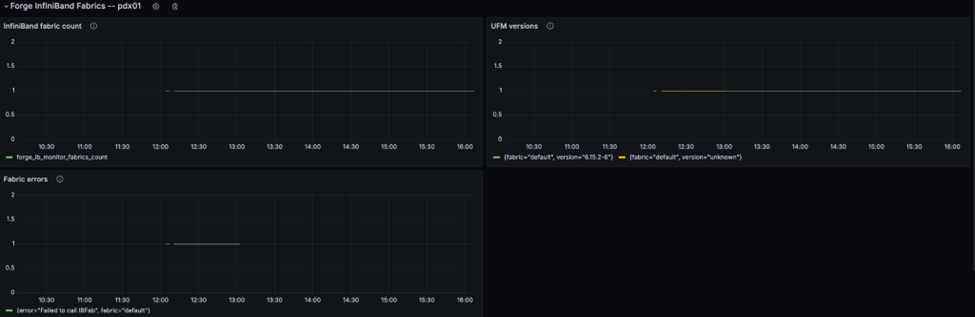
SRE can also check the InfiniBand fabric monitor metrics emitted by NICo to determine whether it can reach UFM. E.g. the following graph shows a scenario where
- First NICo could not connect to UFM due to invalid credentials
- Fixing the credentials provided access and lead UFM metrics (version number) to be emitted
How to check the log of UFM?
Check the log of rest api:
Check the log of UFM:
How to update pool.pkey?
Did not support updating pool.pkey after configuration.

