
Robot Learning Fundamentals#
In this module, you’ll explore the concepts you’ll use throughout the learning path: how to specify a robot learning task, learn and evaluate a policy, and prepare for transfer from simulation to a real robot. You’ll then apply these ideas in Isaac Lab Basics. Throughout these lessons, you’ll see different diagrams describing the same concepts but at different levels of abstraction—try to connect the ideas across the diagrams and lessons.
If you’re ready to start running code, start with Isaac Lab Basics or Train a Robot Arm and refer back to this module as needed.
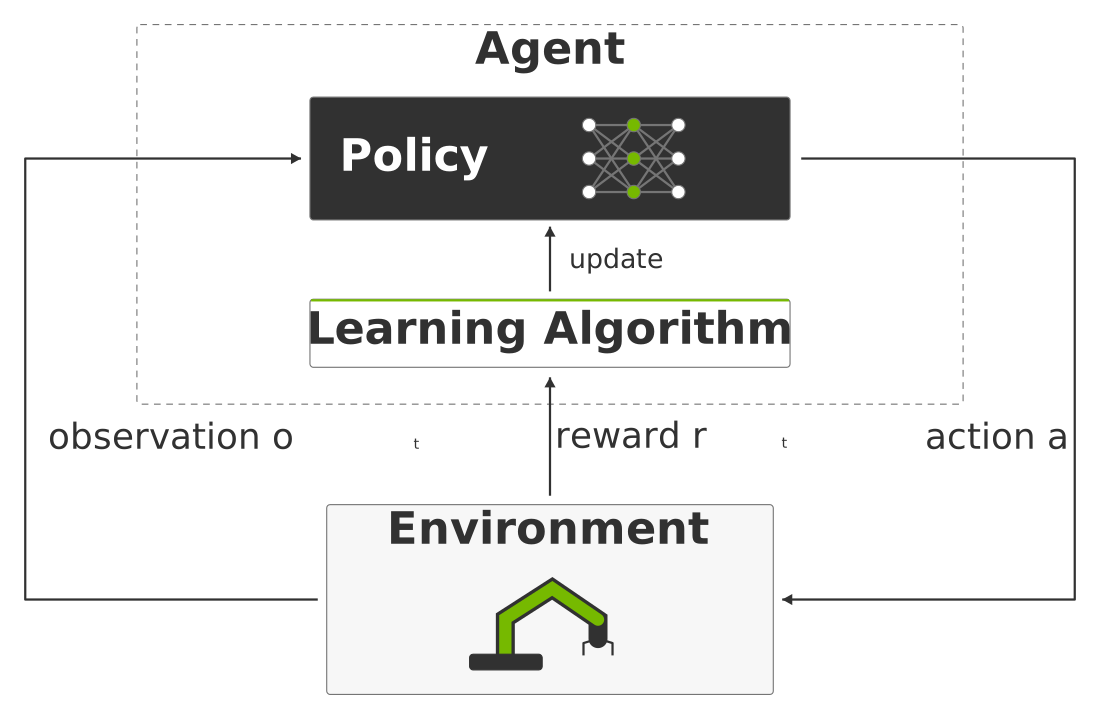
The policy acts in the environment while the learning algorithm uses observations and rewards to update it.#
By the end of this module, you’ll understand the concepts shown in the figure.
Learning Objectives
Define a robot learning task’s observations, actions, rewards, resets, episode endings, and success criteria.
Compare supervised, imitation, unsupervised, and reinforcement learning by how they learn from data.
Describe how Proximal Policy Optimization (PPO) collects experience and updates an actor and critic, and how parallel simulation supports training.
Plan a repeatable policy evaluation that checks task success as well as reward.
Explain how a state-based teacher trains a camera-based student and why imitation alone does not prove task success.
Identify simulation-to-reality mismatches and ways to address them, including checks on the real robot.
How to Use Code Blocks#
Read the instructions above each block. They tell you where to run a command or paste code and which values you need to change first. The labels below show how to use each type of block; these examples illustrate the conventions used in each lesson.
Paste: Copy the code into the file named in the instructions. For example, an instruction to replace
episode_length_sinenv_cfg.pymight show:episode_length_s = 20.0
Run: Copy the command and run it in the specified terminal or directory. For example, this command lists task IDs and presets from a generated project:
uv run python scripts/list_envs.py --show_presets
Reference: Read the example to understand the code or command syntax. Reference blocks have a gray background and no copy button. You do not need to run or paste them. For example, angle-bracket values below are placeholders:
uv run isaaclab <command> --task <task-id>
Output: Compare the block with what your command produces. Output blocks have a gray background and no copy button. This expected output is illustrative; paths, timings, and checkpoint names may differ in your run:
Training complete.
Checkpoint saved: logs/example-run/model_100.pt
Optional: Run or Optional: Paste: A dashed border marks a step you can skip and continue the lesson. The copy button remains available. For example, you can optionally explore the CLI from your project directory:
uv run isaaclab --help
You can still select text in reference examples and output blocks.
Use the activities to check your understanding as you go. Here are some tips for completing them:
Make a prediction about the outcome of a command before running it.
After running a command, change one thing and describe what you observe.
Answer the understanding question before opening its answer or hint.
Use an agent to quiz yourself on the learning objectives.