

NVIDIA Personal AI Router Overview
NVIDIA Personal AI Router (PAIR) turns several machines on your local network into one place to send inference requests. You point an application at a local address on the machine you are working at, and PAIR decides which machine actually serves each request.
Applications do not need to know PAIR exists. The address it presents looks like the inference engine those applications already speak to, so existing tools work unchanged while gaining the ability to use another machine’s GPU.
You install PAIR on each machine you want to contribute compute and pair those machines together. On every one of them, PAIR runs two things:
- An application you interact with: a desktop window or a terminal interface for machines with no desktop
- A set of background services that do the real work
The services find the other machines on your network, keep track of which engine and which models each one has, and decide where a request should go.
This document establishes the vocabulary the rest of the documentation uses. To install PAIR and send a first request, go to Getting Started.
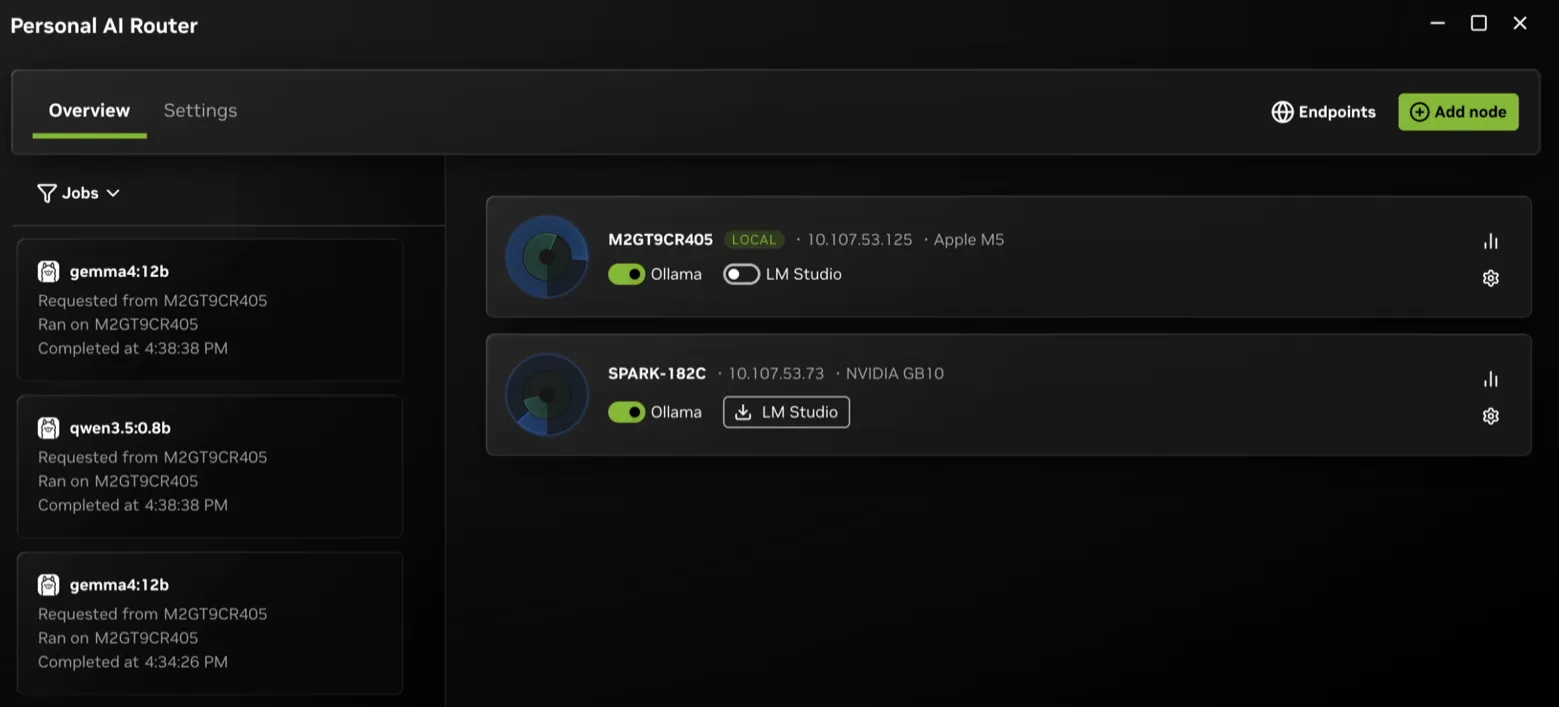
Concepts
These terms have specific meanings in PAIR:
- Node — one machine running PAIR. Every node runs the same software. There is no server, controller, or primary node.
- Cluster — the set of nodes you have paired together. A node belongs to at most one cluster, and it must leave before it can join another.
- Engine — the local inference server that runs models: Ollama, LM Studio, or llama.cpp. PAIR can install, start, stop, and update these engines; it can also adopt supported existing Ollama and LM Studio installations.
- Model — what you prepare on each node. Nodes do not share models, so a node can serve a request only for a model it already holds. Preparing the same model on several nodes is what makes those nodes interchangeable.
- Endpoint — the local URL your applications use. PAIR presents one for each engine on the machine you are working at, and it stays the same no matter which node serves the request.
- Proxy — what sits behind an endpoint. It accepts a request, picks a node, forwards the request, and streams the response back.
- Job — one routed request, which the Jobs view shows. The services call the same thing a workload, which is why both words appear in logs and component names.
- Broker — the parent service on each node. It supervises the other services and exposes the JSON-RPC API that both the desktop application and the terminal interface use.
What Happens when You Run PAIR
Running PAIR follows five steps:
- Start. The application starts the broker, which starts the other services.
- Discover. Nodes announce themselves and browse for peers on the local network. Discovery only finds candidates. Seeing a machine grants it nothing.
- Pair. You invite a node, and someone enters the six-digit PIN on the other machine. Pairing is what establishes trust between two nodes.
- Prepare. On each node, you enable an engine and download the models that node should be able to serve.
- Serve. Applications send requests to the local endpoint and PAIR routes each one.
Discovery, pairing, and preparation are one-time work for each machine. After you form a cluster, only the last step repeats.
Request Model
An application sends an ordinary Ollama-compatible or OpenAI-compatible request, or an Anthropic Messages API request, to a local proxy. The proxy selects one eligible node and forwards the whole request. That node’s engine performs the inference, and the response streams back through the proxy.
Between machines, PAIR encrypts both the request out and the reply in, so the whole round trip stays protected rather than the outbound half alone. Your application sees an ordinary reply and never learns which machine served it, though you can see that yourself.
A node is eligible when all three of these hold:
- It is reachable.
- It is running an engine that can serve the request.
- That engine’s current inventory advertises the requested model.
The proxy excludes unknown and non-matching inventories. If no owner is
available, it returns a local 502.
Among eligible owners, the proxy applies this precedence:
- Manual selection.
- The scheduler’s priority order.
- A deterministic default.
The scheduler ranks nodes by total pending work across all engines, and each proxy also counts requests it has recently dispatched, so a burst of concurrent requests spreads out instead of waiting for workload reports to catch up.
Because routing is a decision rather than a guarantee, use the Jobs view to confirm where work ran.
Trust Between Nodes
Discovery is deliberately not a trust decision. Every machine on the network is visible. Pairing is the trust decision, and it is explicit and mutual. It requires an invitation and a PIN that a person enters. After pairing, node-to-node traffic runs over mutual TLS restricted to nodes in the cluster, and the cluster refuses a machine that is not a member.
The PIN is a short convenience code for bootstrapping that exchange, not a strong authenticator, so pair only over networks and with machines you trust. Local applications reach the proxy over loopback.
For the trust boundaries in detail, refer to Architecture and the security policy.
What PAIR Provides
PAIR provides these capabilities:
- A local endpoint for compatible AI applications and development tools.
- LAN discovery plus manually configured nodes.
- Routing proxies for Ollama-compatible, OpenAI-compatible, and Anthropic Messages API requests.
- Pairing and cluster membership managed by the background services.
- Model-aware, workload-informed routing of independent requests.
- Encrypted routing between machines: a request sent to another node travels over mutual TLS restricted to the nodes you have paired, and the cluster refuses a machine that is not a member. Local applications reach the proxy over loopback.
- A desktop application, plus a terminal interface for headless machines, driving the same services.
- Visibility into nodes, engines, models, workloads, and service errors.
What PAIR Does Not Do
PAIR has these limits:
- It does not pool GPU memory or make several GPUs act as one larger GPU.
- It does not split one model across machines or split one in-flight request. Each request runs whole on a single node.
- It does not move a request that is already running to a different node.
- It does not store or serve models itself. Engines fetch and hold their own.
- It does not make every client, model, engine, GPU, or network compatible. Behavior and performance depend on all of them.
Adding machines therefore increases how many requests you can run at once. It does not make an individual request faster.
How the Code Is Organized
desktop/
The Electron application provides:
- A React renderer for nodes, engines, models, workloads, and settings
- A typed preload bridge
- Electron main-process lifecycle, update, and local CLI support
- A supervisor that starts
nvpair-ui-brokerand translates broker JSON-RPC into stable renderer contracts
The desktop build compiles its bundled Go executables from sibling ../services.
It stages the generated binaries in desktop/cli-bin/.
services/
The Go tree contains 12 build outputs:
nvpair-ui-broker: service entry point, worker supervisor, and JSON-RPC APInvpair-proxy: the compatible inference proxy — one process hosting a facade for each enabled enginenvpair-node-scannerandnvpair-node-info: discovery and host telemetrynvpair-manual-nodes: user-specified nodesnvpair-engine-manager: local engine and model lifecyclenvpair-cluster-manager: identity, pairing, trust, and membershipnvpair-node-settings: persisted settingsnvpair-workload-manager: workload event replicationnvpair-errors: service error registry and peer synchronizationnvpair-job-scheduler: node-wide pending-work priority snapshotsnvpair-tui: standalone terminal interface for headless systems
The broker supervises the worker processes. nvpair-tui is different. It is a
client that starts its own broker, which then starts the workers.
Next Steps
Continue with one of these guides: