
NVIDIA Mission Control is an integrated AI factory management platform designed to simplify operations, reduce downtime, and accelerate model development for enterprise AI infrastructure. It combines NVIDIA’s operational best practices and AI cluster automation into a single control plane.

Learn more at Cloud & Data Center -> Mission Control.
NVIDIA Mission Control Release Announcements (Latest)
What's Included with NVIDIA Mission Control
Your purchase of NVIDIA Mission Control includes the following:
NVIDIA Mission Control
- Recommended software for DGX B200/B300, Rubin NVL8, NVIDIA GB200/GB300 NVL72, and Vera Rubin NVL72 systems.
As a part of integrated software delivery licensing, the following is included with NVIDIA Mission Control:
- NVIDIA Base Command Manager (BCM) for cluster management and provisioning
- NVIDIA Run:ai for AI workload management and GPU orchestration
- NVIDIA Unified Fabric Manager (UFM) for managing InfiniBand scale-out computing environments. May require additional hardware appliances
- NVIDIA NetQ for unified observability across NVLink and Ethernet, providing real-time visibility, monitoring, and troubleshooting for datacenter network fabrics and NVLink Switch telemetry.
- NVIDIA Mission Control delivers additional capabilities not included with these other NVIDIA products. These additional capabilities are delivered through NVIDIA Base Command only to customers who purchased NVIDIA Mission Control. To stay up to date on current functionalities and what’s supported on your DGX system, see NVIDIA Mission Control documentation.
Getting Started — Software Download, Installation, and Activation
        Resource
        Description


          What's Included with NVIDIA Mission Control

        Depending on your purchase, one or more of the following NVIDIA Mission Control components may be included


          DGX Resources Download Center

        Installation and setup Instructions, resources, and the latest product updates for all DGX Blackwell and Rubin systems.


          NVIDIA Mission Control Software Download, Install & Activation

        End-to-end software download, installation, and activation guide for – DGX B200/GB200/B300/GB300 and VR NVL72 Systems.


          NMC OEM Partner Install Guide - GB200/GB300/VR NVL72

        Software download and installation guide for OEM partners.


          BCM Download Site

        Download the Base Command Manager ISO. Requires product key, Linux version, and BCM version.


          BCM Installation Manual

        Detailed BCM license activation via the request-license command.


          NVIDIA Licensing Portal (NLP)

        Generate and download license files for BCM, UFM, and NetQ.


          Generate NGC Service Keys

        Generate NGC Service Keys


          Generate NGC Personal API Keys

        Generate NGC Personal API Keys
NGC Software Artifacts
Artifact
Description
Mission Control - Grafana Visualizations
Pre-built Grafana dashboards for NMC cluster monitoring and observability.
Mission Control - Autonomous Recovery Engine
Autonomous job/hardware recovery, config files, runbooks, and NVRx.
Mission Control - Kubernetes Security Policies
Security policy files for Kubernetes cluster hardening.
Mission Control - Launchpad
Launchpad artifacts for NMC workflow initialization.
Mission Control - Air-Gap Tool
Air-gap tool for DGX B200/B300 and GB200/GB300 NVL72 systems.
Network Calculation Widget
This widget helps customers determine the appropriate Classless Inter-Domain Routing (CIDR) size required for their project.
This tool supports DGX B300/B200, NVIDIA GB300/GB200 NVL72 and Vera Rubin NVL72 systems and provides subnet breakdowns based on the recommended prefix size for Out-of-Band (OOB), In-Band, and Storage networks.
Tool
Description
Network Calculation Widget
Interactive CIDR calculator for OOB, In-Band, and Storage networks.
Deploy and Run AI Factories With Ecosystem Partners
Extend infrastructure capabilities with trusted ecosystem partners for software ready to plug into NVIDIA Mission Control’s flexible architecture. These solutions have been tested in existing deployments and POCs. Offers from partners are not included with NVIDIA Mission Control and all software and support is provided directly from the software partner.
Extend NVIDIA Mission Control capabilities with trusted ecosystem partners for software ready to plug into NVIDIA Mission Control’s flexible architecture. Select any partner logo to learn more about its solution.
Netris
NVIDIA Mission Control™ provides the industry's most comprehensive AI factory management platform — combining Base Command Manager, Run:ai, UFM, and NetQ into a single, unified control plane for compute, workload, and network orchestration. Netris® NAAM (Network Automation, Abstraction, and Multi-Tenancy) extends this powerful foundation with automated Ethernet fabric management, VPC-based multi-tenancy, and hard isolation enforced at the networking hardware level - integrating with UFM for InfiniBand PKey management, NMX-C for automated NVLink partition orchestration on GB200/GB300 NVL72 systems, and NVIDIA DOCA for BlueField DPU provisioning. Together, NVIDIA Mission Control and Netris NAAM deliver a complete, cohesive AI factory stack - from bare metal provisioning to tenant-level network isolation - enabling GPU cloud operators to achieve cloud-provider-grade infrastructure and get revenue-generating operations running in weeks instead of years.
Resources
Proxmox
NVIDIA Mission Control™ is the foundation for deploying and operating the world's most advanced AI factory infrastructure — and Proxmox VE extends that foundation with a powerful virtualization layer for dedicated per-tenant control plane management. By leveraging Proxmox VMs on dedicated control plane nodes placed within each tenant's isolated network - with in-band VLAN, out-of-band VLAN, and InfiniBand PKey isolation enforced at the switch level - operators can flexibly deploy NVIDIA Mission Control services including virtualized Kubernetes, BCM, Slurm, and Run:ai on a per-tenant basis. This dedicated control plane design gives each tenant full autonomy over their NVIDIA Mission Control environment, delivering enterprise-grade security and isolation that shared Kubernetes namespace approaches simply cannot match.
Contact
vCluster
NVIDIA Mission Control™ delivers the operational best practices, automation, and resilience that AI factory operators need to maximize GPU utilization and accelerate time to revenue - and vCluster extends that capability with a shared control plane multi-tenancy model that eliminates the underutilization and capacity constraints of dedicated per-tenant clusters. By enabling multiple tenants to share pooled GPU compute resources through fully automated node and cluster operations, the NVIDIA Mission Control + vCluster + Netris reference architecture delivers secure tenant isolation, strong network automation across NVIDIA Spectrum Ethernet, Quantum InfiniBand, and NVLink fabrics, and resilient day-2 operations - all directly integrated into the NVIDIA stack. The result is a flexible, scalable, and secure AI cloud platform that gives operators the freedom to dynamically reallocate GPU capacity across tenants while maintaining the enterprise-grade control that NVIDIA Mission Control is built to deliver.
Resources
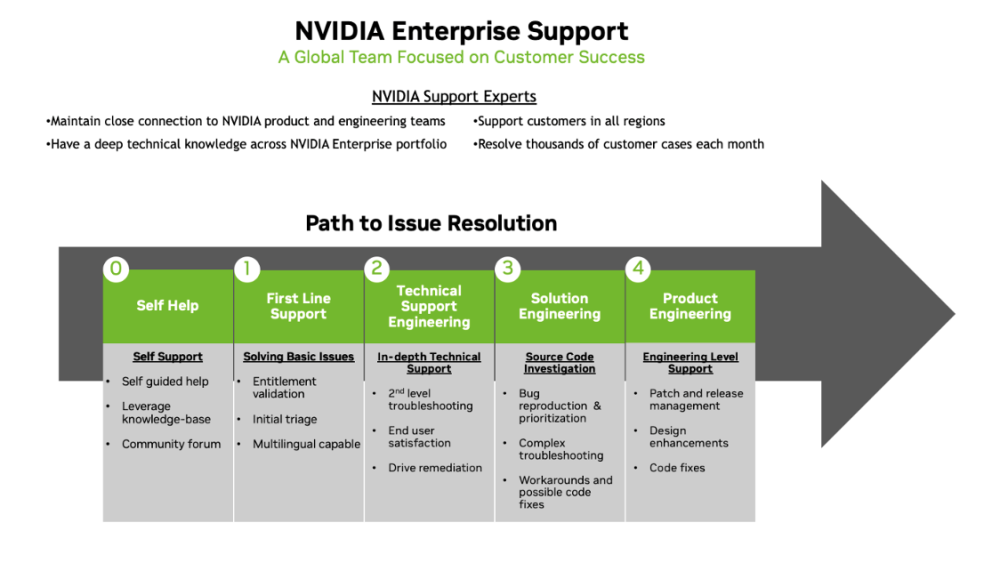
This document is intended for both prospective and existing NVIDIA enterprise customers, including IT administrators, technical decision‑makers, and support teams who rely on NVIDIA enterprise products and solutions. It outlines key support workflows, service entitlements, and guidance to help customers maximize value from NVIDIA Enterprise‑branded support services.
Please note that this User Guide is a non‑binding informational document. It is provided solely for reference and informational purposes and does not create or modify any contractual obligations between NVIDIA and its customers. Customers should refer to their official agreements for specific terms and conditions related to support and services.
The goal of this guide is to ensure clarity, consistency, and ease of use when engaging with NVIDIA Enterprise Support, enabling customers to resolve issues efficiently, understand service capabilities, and maintain optimal system performance.
Section
Content / Link
Open a Support Ticket
 NVIDIA Enterprise Support Portal
NGC Access & Entitlement
 Sign in to NGC and verify entitlement
NMC Documentation Portal
 Access NMC Documentation Portal