

Model Training on Databricks#
Databricks is a widely used platform for managing data, models, applications, and compute on the cloud. This guide shows how to use AutoModel for scalable, performant model training on Databricks.
The specific example here fine-tunes a Llama-3.2-1B model using the SQuAD dataset from Hugging Face, but any AutoModel functionality (for example, model pre-training, VLMs, other supported models) can also be run on Databricks.
Provision Compute#
Let’s start by provisioning a Databricks classic compute cluster with the following setup:
Databricks runtime: 18.0 LTS (Machine Learning version)
Worker instance type:
g6e.12xlargeon AWS (4x L40S GPUs per node)Number of workers: 2
Global environment variable:
GLOO_SOCKET_IFNAME=eth0(see this for details)Cluster-scoped init script:
#!/bin/bash

# Install AutoModel on all nodes
/databricks/python3/bin/pip install git+https://github.com/NVIDIA-NeMo/Automodel
This will provision three compute nodes – one driver node we’ll attach a notebook to, and two worker nodes we’ll use for multi-node training.
Note that we’ve selected a small number of instances for demo purposes, but you can adjust the specific instance type and number of workers for your actual use case.
Train the Model#
With the above compute resources provisioned, we’re ready to fine-tune a model using AutoModel.
AutoModel uses YAML file recipes to configure various settings for the training process (for example, model, dataset, loss function, optimizer, etc.). Here we’ll use this preconfigured recipe for fine-tuning a Llama-3.2-1B model using the SQuAD dataset from Hugging Face. In a notebook connected to our compute resource, download the configuration file:
# Download configuration file
!curl -O https://raw.githubusercontent.com/NVIDIA-NeMo/Automodel/refs/heads/main/examples/llm_finetune/llama3_2/llama3_2_1b_squad.yaml
Here’s what the model, dataset, and optimizer portions of the config file look like:
model:
  _target_: nemo_automodel.NeMoAutoModelForCausalLM.from_pretrained
  pretrained_model_name_or_path: meta-llama/Llama-3.2-1B

dataset:
  _target_: nemo_automodel.components.datasets.llm.squad.make_squad_dataset
  dataset_name: rajpurkar/squad
  split: train

optimizer:
  _target_: torch.optim.Adam
  betas: [0.9, 0.999]
  eps: 1e-8
  lr: 1.0e-5
  weight_decay: 0
See the full file for complete details (!cat llama3_2_1b_squad.yaml).
Finally, we’ll authenticate the VM running the notebook with Hugging Face so we can download the model and dataset:
from getpass import getpass

hf_token = getpass("HF token: ")
!hf auth login --token {hf_token}
Single-Node#
Since AutoModel is installed via the init script, the automodel CLI is available on all nodes.
To run training on a single GPU, use this command:
!automodel llama3_2_1b_squad.yaml \
    --step_scheduler.max_steps 20 \
    --checkpoint.checkpoint_dir /Volumes/<catalog_name>/<schema_name>/<volume_name>/checkpoints_single/ \
    --checkpoint.staging_dir /local_disk0/checkpoints_single/ \
    --checkpoint.is_async True
In addition to specifying the configuration file, we also use these options:
--step_scheduler.max_steps: Limits the number of training steps taken. Again, this is for example purposes – adapt for your actual use case as needed.--checkpoint.checkpoint_dir: Tells AutoModel where to save model checkpoints from training. We recommend saving model checkpoints in a Databricks Unity Catalog volume.--checkpoint.staging_dir: Specifies a temporary staging location for model checkpoints. Files will be temporarily saved to this location before being moved to the finalcheckpoint_dirlocation. This is needed when saving checkpoints in Unity Catalog.--checkpoint.is_async: Uses asynchronous checkpointing.
Looking at GPU metrics in Databricks, we see our single GPU is being well utilized (~95% utilization).
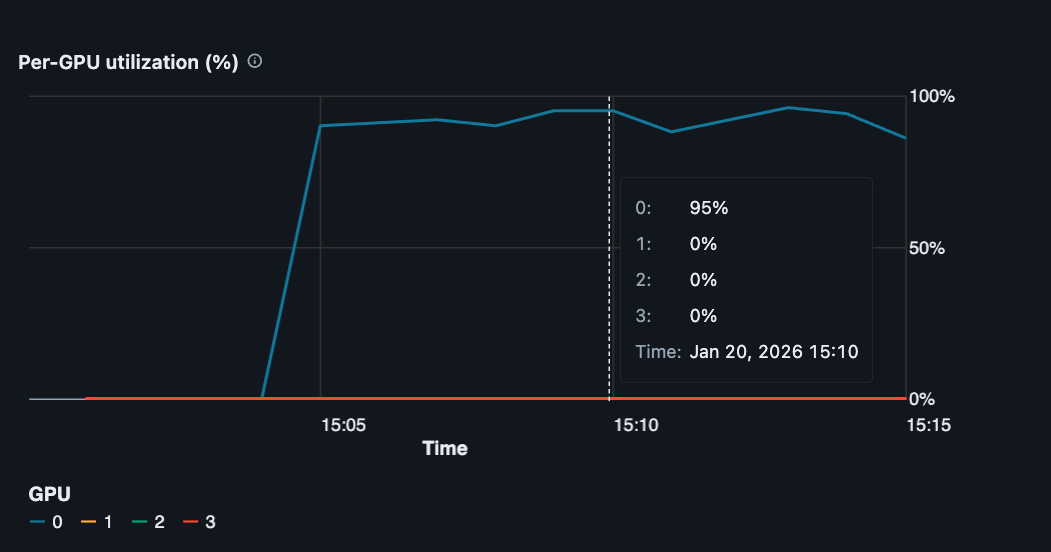
Single GPU utilization of ~95% during model training.#
To utilize all four GPUs available on this g6e.12xlarge instance, add --nproc-per-node=4 to the same command:
!automodel --nproc-per-node=4 llama3_2_1b_squad.yaml \
    --step_scheduler.max_steps 20 \
    --checkpoint.checkpoint_dir /Volumes/<catalog_name>/<schema_name>/<volume_name>/checkpoints_multi/ \
    --checkpoint.staging_dir /local_disk0/checkpoints_multi/ \
    --checkpoint.is_async True
The automodel CLI uses PyTorch’s Elastic Launch internally to spawn and coordinate multiple training processes on the VM. Each training process runs on a separate GPU, and we can now see all four GPUs are being used (~95% utilization for each GPU).
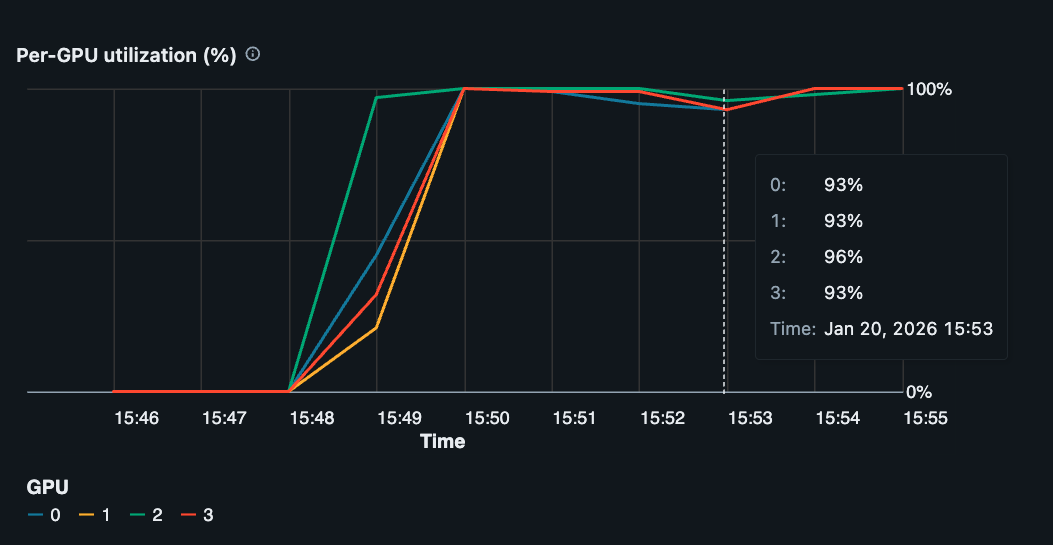
Multi-GPU, single-node utilization of ~95% during model training.#
Multi-Node#
To scale further to multi-node training, we need to submit training jobs to all instances in our Databricks cluster.
First, each instance needs to be authenticated with Hugging Face to download the model and dataset:
# Ensure workers are authenticated with Hugging Face

import subprocess
import shlex

def run_command(cmd):
    p = subprocess.run(shlex.split(cmd), capture_output=True)
    return p.stdout.decode()

rdd = sc.parallelize(range(sc.defaultParallelism))
rdd.mapPartitions(lambda _: [run_command("hf auth login --token " + hf_token)]).collect();
Next, we use PySpark’s TorchDistributor to run the same training job across multiple instances like this:
from pyspark.ml.torch.distributor import TorchDistributor
import nemo_automodel.recipes.llm.train_ft as recipe_mod

num_executor = 2            # Number of workers in cluster
num_gpus_per_executor = 4   # Number of GPUs per worker
distributor = TorchDistributor(
    num_processes=num_executor * num_gpus_per_executor,
    local_mode=False,
    use_gpu=True,
)

train_file = recipe_mod.__file__
args = [
    "--config", "llama3_2_1b_squad.yaml",
    "--step_scheduler.max_steps", "20",
    "--checkpoint.checkpoint_dir", "/Volumes/<catalog_name>/<schema_name>/<volume_name>/checkpoints_dist/",
    "--checkpoint.staging_dir", "/local_disk0/checkpoints_dist/",
    "--checkpoint.is_async", "True",
]
distributor.run(train_file, *args)
TorchDistributor uses torchrun internally, so we point it at the recipe module directly (rather than the automodel CLI, which also wraps torchrun).
We now see GPU utilization is ~95% for all GPUs on all worker nodes during training (8 GPUs in this particular case).
Track Experiments with MLflow#
Databricks includes built-in MLflow integration for tracking experiments, logging metrics, and storing artifacts. To use MLflow with AutoModel on Databricks, add the MLflow configuration to your YAML file.
Configure MLflow#
Edit your configuration file (e.g., llama3_2_1b_squad.yaml) to include the mlflow section:
mlflow:
  experiment_name: "automodel-databricks-llama3-squad"
  run_name: ""
  tracking_uri: "databricks"
  artifact_location: null
  tags:
    platform: "databricks"
    task: "squad-finetune"
    model_family: "llama3.2"
For Databricks, the key configuration parameters are:
tracking_uri: Set to"databricks"to use Databricks’ managed MLflow tracking serverexperiment_name: Name of your experiment (will appear in the Databricks workspace)artifact_location: Leave asnullto use default Databricks artifact storage, or specify a Unity Catalog volume path like/Volumes/<catalog>/<schema>/<volume>/mlflow-artifactstags: Add custom tags to organize and filter your runs
Note
Databricks automatically handles authentication when tracking_uri is set to "databricks". No additional credentials are needed.
Run Training with MLflow#
Run training with MLflow tracking enabled using the same commands as before. The MLflow configuration will be read from your YAML file:
Single-node:
!automodel llama3_2_1b_squad.yaml \
    --step_scheduler.max_steps 20 \
    --checkpoint.checkpoint_dir /Volumes/<catalog_name>/<schema_name>/<volume_name>/checkpoints/
Multi-GPU:
!automodel --nproc-per-node=4 llama3_2_1b_squad.yaml \
    --step_scheduler.max_steps 20 \
    --checkpoint.checkpoint_dir /Volumes/<catalog_name>/<schema_name>/<volume_name>/checkpoints/
Multi-node with TorchDistributor:
import nemo_automodel.recipes.llm.train_ft as recipe_mod

distributor = TorchDistributor(
    num_processes=num_executor * num_gpus_per_executor,
    local_mode=False,
    use_gpu=True,
)

args = [
    "--config", "llama3_2_1b_squad.yaml",
    "--step_scheduler.max_steps", "20",
    "--checkpoint.checkpoint_dir", "/Volumes/<catalog_name>/<schema_name>/<volume_name>/checkpoints/",
]
distributor.run(recipe_mod.__file__, *args)
View Results#
During training, you’ll see MLflow logging messages in your output:
MLflow run started: abc123def456
View run at: databricks/#/mlflow/experiments/123/runs/abc123def456
To view your experiments and metrics:
Navigate to the Experiments page in your Databricks workspace
Find your experiment by name (e.g.,
automodel-databricks-llama3-squad)Click on a run to view metrics, parameters, and artifacts
The Databricks MLflow UI displays:
Training and validation metrics over time
Model parameters and hyperparameters
Custom tags for filtering and comparison
Artifacts and model checkpoints
System metrics (GPU utilization, memory usage)
Store Artifacts in Unity Catalog#
To store MLflow artifacts in Unity Catalog volumes, specify the artifact_location:
mlflow:
  experiment_name: "automodel-databricks-llama3-squad"
  tracking_uri: "databricks"
  artifact_location: "/Volumes/<catalog_name>/<schema_name>/<volume_name>/mlflow-artifacts"
  tags:
    platform: "databricks"
This ensures your artifacts are stored in a governed, versioned location within Unity Catalog.
Additional Configuration#
You can override MLflow settings from the command line:
!automodel llama3_2_1b_squad.yaml \
    --mlflow.experiment_name "custom-experiment-name" \
    --mlflow.run_name "baseline-run-1" \
    --mlflow.tags.learning_rate "1e-5"
For more details on MLflow configuration options and best practices, see the MLflow logging guide.
Conclusion#
This guide showed how to use AutoModel for model training on Databricks-managed compute. It’s relatively straightforward to scale from a single-GPU to multi-GPU to multi-node training to best suit your needs.
While the example here fine-tunes a Llama-3.2-1B model using the SQuAD dataset, any supported AutoModel functionality (like model pre-training, VLMs, etc.) can also run, and scale, on Databricks. Check out additional recipes and end-to-end examples to learn more.