

Fine-Tune Gemma 3 and Gemma 3n
This document explains how to fine-tune Gemma 3 and Gemma 3n using NeMo AutoModel. It outlines key operations, including initiating SFT and PEFT-LoRA runs and managing experiment configurations using YAML.
To set up your environment to run NeMo AutoModel, follow the Installation Guide.
Data
MedPix-VQA Dataset
The MedPix-VQA dataset is a comprehensive medical Visual Question-Answering dataset designed for training and evaluating VQA models in the medical domain. It contains medical images from MedPix, a well-known medical image database, paired with questions and answers that focus on medical image interpretation.
The dataset consists of 20,500 examples with the following structure:
- Training Set: 17,420 examples (85%)
- Validation Set: 3,080 examples (15%)
- Columns:
image_id,mode,case_id,question,answer
Preprocess the Dataset
NeMo AutoModel provides built-in preprocessing for the MedPix-VQA dataset through the make_medpix_dataset function. Here’s how the preprocessing works:
The preprocessing pipeline performs the following steps:
- Loads the dataset using the Hugging Face
datasetslibrary. - Extracts question-answer pairs by processing the
questionandanswerfields from the dataset. - Converts to the Hugging Face message list format to restructure the data into a chat-style format compatible with the Autoprocessor’s
apply_chat_templatefunction.
Use the Collate Functions
NeMo AutoModel provides specialized collate functions for different VLM processors. The collate function is responsible for batching examples and preparing them for model input.
Both Gemma 3 and Gemma 3n models work seamlessly with the Hugging Face AutoProcessor and use the default collate function:
The default collate function:
- Applies the processor’s chat template to convert message lists into model-ready inputs.
- Builds labels from the template’s assistant-turn markers and shifts inputs and labels for next-token prediction.
- Masks non-assistant regions with
-100while retaining assistant content and its closing stop token as training targets.
Preprocess Custom Datasets
When using a custom dataset with a model whose Hugging Face AutoProcessor supports the apply_chat_template method, you’ll need to convert your data into the Hugging Face message list format expected by the apply_chat_template.
We provide examples demonstrating how to perform this conversion.
Some models, such as Qwen2.5 VL, have specific preprocessing requirements and require custom collate functions. For instance, Qwen2.5-VL uses the qwen_vl_utils.process_vision_info function to process images:
If your dataset requires custom preprocessing logic, you can define a custom collate function. To use it, specify the function in your YAML configuration:
We provide example custom collate functions that you can use as references for your implementation.
Run the Fine-Tune Script
Use the automodel CLI to launch fine-tuning with a YAML configuration file.
Apply YAML-Based Configuration
NeMo AutoModel uses a flexible configuration system that combines YAML configuration files with command-line overrides. This allows you to maintain base configurations while easily experimenting with different parameters.
The simplest way to run fine-tuning is with a YAML configuration file. We provide configs for both Gemma 3 and Gemma 3n.
These VLM recipes require the optional vlm dependency set, plus vlm-media for Qwen vision preprocessing (qwen_vl_utils). If you see ImportError: qwen_vl_utils is not installed, install both first:
(If you’re using pip: pip3 install "nemo-automodel[vlm,vlm-media]".)
Run Gemma 3 Fine-Tuning
- Single-GPU
- Multi-GPU
Run Gemma 3n Fine-Tuning
- Single-GPU
- Multi-GPU
Override Configuration Parameters
You can override any configuration parameter using dot-notation without modifying the YAML file:
Configure Model Freezing
NeMo AutoModel supports parameter freezing, allowing you to control which parts of a model remain trainable during fine-tuning. This is especially useful for VLMs, where you may want to preserve the pre-trained visual and audio encoders while adapting only the language model components.
With the freezing configuration, you can selectively freeze specific parts of the model to suit your training objectives:
Run Parameter-Efficient Fine-Tuning
For memory-efficient training, you can use Low-Rank Adaptation (LoRA) instead of full fine-tuning. NeMo AutoModel provides a dedicated PEFT recipe for Gemma 3:
To run PEFT with Gemma 3:
The LoRA configuration excludes vision components and the language-model head from adaptation to preserve pre-trained visual representations:
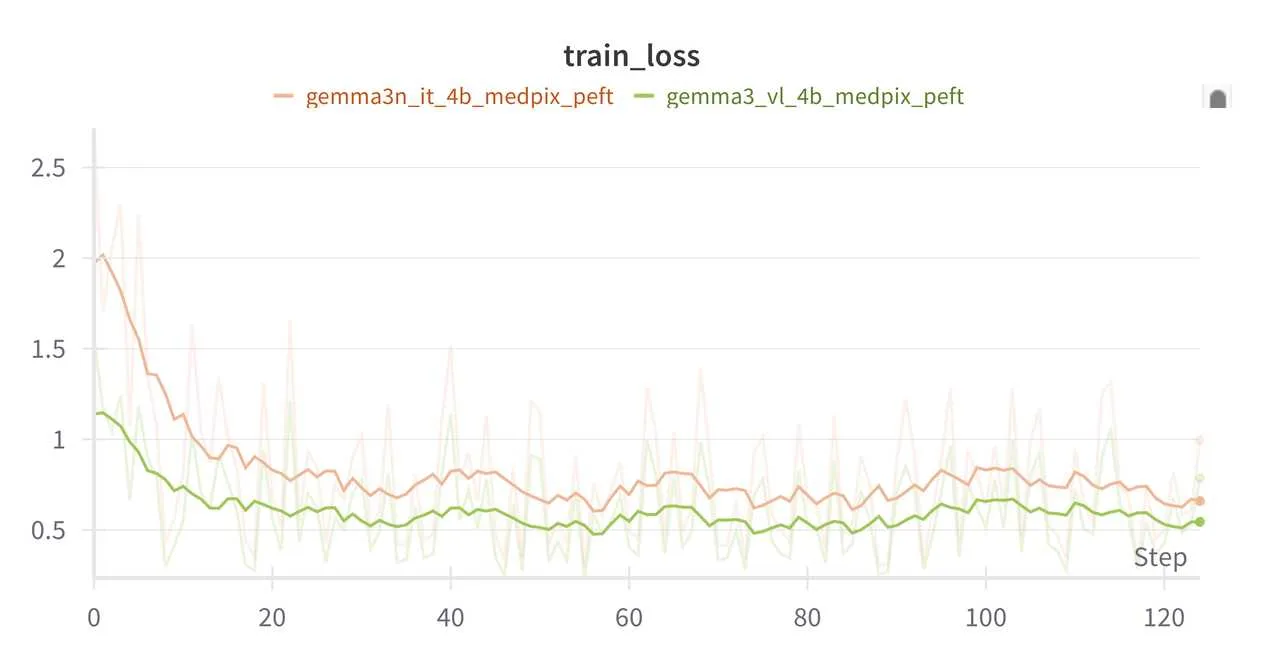
The training loss should look similar to the example below:
Checkpointing
We support training state checkpointing in either Safetensors or PyTorch DCP format.
Integrate Weights & Biases
You can enable W&B logging by setting your API key and configuring the logger:
Then, add the W&B configuration to your YAML file:
Run Inference
After fine-tuning your Gemma 3 or Gemma 3n model, you can use it for inference on new image-text tasks.
Generation Script
The inference functionality is provided through examples/vlm_generate/generate.py, which supports loading fine-tuned checkpoints and performing image-text generation.
Basic Usage
The output can be either text (default) or json, with an optional write file.
For models trained on MedPix-VQA, load the trained checkpoint and generate outputs using the following command. Be sure to specify the same base model used during training:
For a PEFT checkpoint, the script detects model/adapter_model.safetensors, restores the LoRA configuration from model/adapter_config.json and model/automodel_peft_config.json, applies LoRA to the base model, and loads the adapter weights automatically. Supply the original base model with --base-model-path; no separate PEFT flags are required.
Run the following command to load and generate from adapters trained on MedPix-VQA:
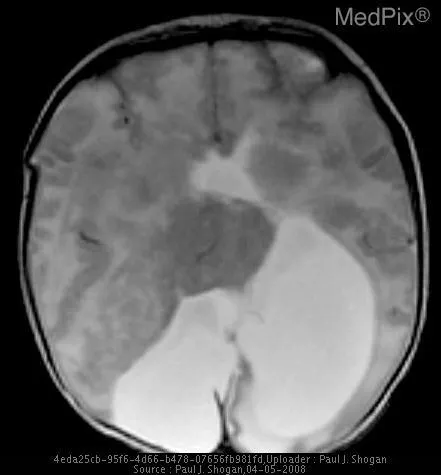
Given the following image:
And the prompt:
Example Gemma 3 response:
Example Gemma 3n response: