


Nemotron Transcribe#
Nemotron Transcribe processes recorded audio through a speech encoder and a language-model decoder. You can request a transcript, speaker tags, word-level timestamps, and subtitles through HTTP APIs. Use natural-language instructions to control transcript formatting.
Note
Nemotron Transcribe supports offline, whole-file inference, not realtime audio streaming.
Use /v1/chat/completions, /v1/audio/transcriptions, or /v1/audio/translations on port 9000.
With stream: true, the generated text is streamed after the complete recording is uploaded.
The Riva gRPC API and realtime WebSocket API do not apply to this NIM.
Prerequisites#
Complete NGC access setup and install Docker and the NVIDIA Container Toolkit. Use a GPU and precision combination described in the Nemotron Transcribe support matrix. The container includes Linux AMD64 and ARM64 images under one multi-architecture image reference. Docker selects the image for your host architecture. The x86_64-only CPU requirement in the general prerequisites does not apply to Nemotron Transcribe. The image is built on CUDA 13.4.1. For the NVIDIA driver requirement, refer to the Nemotron Transcribe support matrix.
The image is nvcr.io/nim/nvidia/nemotron-transcribe; refer to the NGC catalog entry for the available tags.
The examples use the 1.0.0 release: set NIM_IMAGE once and use that same reference in all examples below.
Deploy the NIM Container#
The NIM has three checkpoint profiles: nvfp4, fp8, and bf16.
The concurrency selector is a runtime preset, not an additional checkpoint profile.
Start with concurrency=low and choose a precision supported by your GPU.
export NIM_IMAGE="nvcr.io/nim/nvidia/nemotron-transcribe:1.0.0"
export NIM_TAGS_SELECTOR="concurrency=low"
export LOCAL_NIM_CACHE=~/.cache/nim/nemotron-transcribe
mkdir -p "$LOCAL_NIM_CACHE"
sudo chown 1000:1000 "$LOCAL_NIM_CACHE"

docker run -d --rm --name=nemotron-transcribe \
  --runtime=nvidia --gpus '"device=0"' \
  --ipc=host \
  --ulimit nofile=65536:65536 \
  -e NGC_API_KEY \
  -e NIM_TAGS_SELECTOR \
  -e NIM_HTTP_API_PORT=9000 \
  -v "$LOCAL_NIM_CACHE":/opt/nim/.cache \
  -p 9000:9000 \
  "$NIM_IMAGE"
The deployment examples on this page use --rm, so stopping a container also removes it.
If you started a container without --rm, run docker rm nemotron-transcribe after stopping it and before starting another example.
The cache keeps the downloaded checkpoint, about 26 GB for NVFP4 and up to 70 GB for BF16, so a restarted container does not download it again.
The container runs as user and group 1000:1000, so that user must own the cache directory; refer to Model Caching.
At full concurrency the container holds about 1,600 open sockets.
--ulimit nofile=65536:65536 keeps the open-file limit above that when the Docker daemon’s default limit is low; at startup the NIM warns if the limit is below 4,096.
Without precision, the NIM loads the first checkpoint your GPU supports, in the order NVFP4, FP8, BF16: NVFP4 on Blackwell GPUs, FP8 on Hopper GPUs and Ada, and BF16 on Ampere.
To pin a checkpoint, add precision=nvfp4, precision=fp8, or precision=bf16 to the selector; a precision your GPU does not support stops the NIM at startup.
Selecting a precision loads its checkpoint; it does not convert another checkpoint at startup.
Memory feasibility is checked during startup; selecting a compatible precision does not guarantee that it fits.
Wait for readiness before sending audio.
docker logs -f nemotron-transcribe
# Run these checks in another terminal.
curl -fsS http://localhost:9000/v1/health/ready
curl -fsS http://localhost:9000/v1/models
You can use the model ID returned by /v1/models in inference requests but it is optional.
Select Decoder Precision and Runtime Preset#
Use NIM_TAGS_SELECTOR to select a checkpoint precision and a concurrency preset.
Decoder Checkpoint Format |
Selector |
Equivalent CLI Flag |
Hardware Requirement |
|---|---|---|---|
Bfloat16 (BF16) |
|
|
A supported compute capability and enough memory for the topology. |
FP8-quantized |
|
|
A supported FP8 runtime path. |
NVFP4-quantized |
|
|
A supported Blackwell runtime path. |
These values describe the decoder checkpoint format, not the dtype of every operation in the NIM. They do not change the encoder, diarizer, or timestamp head. The key-value (KV) cache follows the precision: FP8 and NVFP4 checkpoints use an FP8 KV cache, and BF16 checkpoints use a BF16 KV cache, so BF16 needs about twice the KV-cache memory per request. Selecting another precision can download a different checkpoint unless that profile is already cached.
Omitting concurrency selects low.
Omitting precision uses the compatible-profile preference described above.
You can omit the selector entirely and pass --precision and --concurrency after the image reference instead.
If you use both forms, their precision and concurrency values must agree.
Resource flags override preset defaults, but do not override an incompatible checkpoint or GPU architecture.
Do not use the other ASR NIMs’ mode=str, mode=ofl, diarizer=sortformer, or model_type=rmir selectors for Transcribe.
For details on concurrency presets and memory requirements, refer to Concurrency and Memory Tuning.
Run Inference#
Use a mono, 16 kHz PCM WAV file for the best results.
The NIM also accepts WAV files at other sample rates and bit depths, FLAC files, and Ogg Opus files, and converts them to mono 16 kHz before inference.
Other audio and video formats are not supported and return 422; convert them to WAV or FLAC before sending them.
One request accepts one complete recording of up to 3,600 seconds, within a 256 MiB request body (refer to Limits).
Long recordings need host RAM for the upload and the decoded audio, as well as GPU memory; refer to GPU and Host Memory for measured values, and benchmark host memory with your longest recordings, concurrency, and timestamp settings before production.
Recordings or segments without speech, such as noise, music, or near-silence, can be transcribed as invented text.
Note
Reasoning (reasoning_effort) is off by default.
Keep it off: with reasoning on, the model tends to answer requests spoken in the audio instead of transcribing them, and latency rises about 15 times.
Refer to Reasoning.
Transcribe or Translate a File#
To try the API without your own recording, copy the 10.9-second English sample that ships in the image to audio.wav:
docker run --rm --entrypoint cat "$NIM_IMAGE" \
  /usr/local/lib/python3.12/dist-packages/nemotron_transcribe/data/warmup_speech.wav > audio.wav
Upload the audio file as a multipart form.
curl -sS http://localhost:9000/v1/audio/transcriptions \
  -F file=@audio.wav -F language=en
The response is {"text": "...", "usage": {"type": "duration", "seconds": ...}}.
For the sample, it is similar to the following; punctuation can differ slightly by GPU and precision:
{"text":"Because you were sleeping instead of conquering, the lovely rose princess has become a fiddle without a bow, while poor Shaggy sits there a cooing dove.","usage":{"seconds":10.885,"type":"duration"}}
For word timestamps on /v1/audio/transcriptions, add -F response_format=verbose_json -F 'timestamp_granularities[]=word'; the words are in the response’s words field.
To translate speech in another language into English, send the file to /v1/audio/translations:
curl -sS http://localhost:9000/v1/audio/translations \
  -F file=@audio.wav
If you know the spoken language, add its code as language, for example -F language=fr.
To translate English speech into another language, add target_language with a code from the translate list returned by /v1/models:
curl -sS http://localhost:9000/v1/audio/translations \
  -F file=@audio.wav -F language=en -F target_language=de
Only translation into and out of English is supported. Translations do not support word timestamps, subtitles, or speaker diarization.
Transcribe with an Instruction#
To control the transcript with a natural-language instruction, use Chat Completions.
This route takes the audio inline, base64-encoded in the request body, not as a file path.
The following command builds the request with jq, streams it to the NIM, and prints the transcript:
MODEL_ID=$(curl -s http://localhost:9000/v1/models | jq -r '.data[0].id')
jq -n --arg model "$MODEL_ID" --rawfile audio <(base64 -w0 audio.wav) '{
  model: $model,
  messages: [{role: "user", content: [
    {type: "text", text: "Produce a verbatim transcript of the audio. Preserve named entities, abbreviations, numbers, dates, measurements, acronyms, and technical terms as clearly as possible. Keep the same language as spoken and do not translate."},
    {type: "input_audio", input_audio: {data: $audio, format: "wav"}}
  ]}]
}' | curl -sS http://localhost:9000/v1/chat/completions \
  -H 'Content-Type: application/json' --data-binary @- \
  | jq -r '.choices[0].message.content'
The request goes through a pipe, so long recordings do not hit the shell’s argument-length limit.
On macOS, replace base64 -w0 audio.wav with base64 -i audio.wav.
Set format to flac or ogg for those files.
model is optional when the NIM serves one ASR model. If you send it, use the ID returned by GET /v1/models (the first command above reads it): an unknown ID returns 404 and an empty string returns 400.
ASR options such as language and word_timestamps are top-level request fields, next to model, and the structured result, including timestamps when requested, is in the response’s top-level transcription field.
For the OpenAI Python and JavaScript SDKs, refer to OpenAI SDK Examples.
Tip
For plain transcription, you can omit the text part; the NIM then uses its default prompt, which writes numbers as words.
Any text part replaces the default prompt and is followed as an instruction; the NIM does not enforce transcription.
To get a transcript, send no text part or Transcribe the audio.
Keep one task per instruction, and use the prompts in Example Prompts.
Refer to the API reference for details.
Stream the Transcript#
To receive the text while it is generated, add stream: true to the Chat Completions request, and use curl -N so that curl prints each event as it arrives:
jq -n --rawfile audio <(base64 -w0 audio.wav) '{
  stream: true,
  messages: [{role: "user", content: [
    {type: "input_audio", input_audio: {data: $audio, format: "wav"}}
  ]}]
}' | curl -N http://localhost:9000/v1/chat/completions \
  -H 'Content-Type: application/json' --data-binary @-
The response is a stream of server-sent events.
The text arrives in chat.completion.chunk events, in choices[0].delta.content.
An event: transcription.transcript.replace event carries the corrected full text, which replaces the text received so far.
The last chunk carries finish_reason and the full transcription result, and data: [DONE] ends the stream.
Generation starts only after the whole recording is uploaded.
Refer to Streaming Output for the multipart event format and errors.
Transcribe Non-English Audio#
For non-English audio, omit the instruction and set language to the spoken language, for example "language": "fr".
The NIM then adds the language to its default transcription prompt. Use a language code from the supported_languages list returned by /v1/models; any other code returns 400.
language has no effect on the prompt when you send your own instruction; in that case, name the language in the instruction, for example Transcribe this French recording verbatim. Do not translate.
Without a language, the model identifies the language from the audio. Short recordings and low-resource languages can be transcribed in the wrong language or translated. Provide source language for better accuracy.
Example Prompts#
Choose a transcription instruction for your use case and replace the text content part in the Chat Completions example under Transcribe with an Instruction.
Do not send a system message, and keep one task per instruction.
Formatting instructions are model prompts, not the Riva RecognitionConfig flags.
Review the output on representative recordings; a prompt does not guarantee exact formatting or transcription accuracy.
Plain Transcription#
Use this instruction for plain, long-form, or multilingual transcription.
Produce a verbatim transcript of the audio. Preserve named entities, abbreviations, numbers, dates, measurements, acronyms, and technical terms as clearly as possible. Keep the same language as spoken and do not translate.
The default prompt, used when you omit the text part, asks for numbers as words; the example prompts on this page do not.
Writing numbers as words is best effort.
To request it with your own instruction, use the following instruction:
Transcribe the audio. Use only words: write every number in words (for example 'forty two', not '42'; 'twenty twenty', not '2020'). Do not output any digits.
Readable Transcription#
Use this instruction for a readable transcript of an interview, presentation, or conversation without summarizing its content.
Create a readable English transcript of this recording with punctuation and capitalization. Omit verbal fillers and accidental repetitions, but retain the remaining wording and meaning. Return only the transcript.
Contextual Transcription#
Provide relevant vocabulary when transcribing a technical discussion or a recording that contains product names. Replace the example terms with terms relevant to your recording.
Transcribe this English technical discussion with punctuation and capitalization. Vocabulary hints: CUDA, TensorRT, and NVLink. Use these spellings only when supported by the speech; do not add a term merely because it appears in this list. Return only the transcript.
Vocabulary hints are part of the text instruction, not a separate word-boosting API field or a guarantee that a term appears in the output.
Speaker-Attributed Transcription#
Use speaker tags to distinguish turns in an interview or meeting.
Transcribe this audio with punctuation and capitalization. Include all spoken words and verbal fillers. Write numbers in their standard written form. Put speaker tags <spk:0> <spk:1> <spk:2> <spk:3> on the transcription.
For recordings with more than four speakers, extend the tag list through <spk:7>; the model supports up to eight distinct speakers.
The multipart diarization=true option uses a different, server-side speaker prompt (refer to Multipart Requests); its max_speaker_count field is accepted for compatibility and currently has no effect.
For speaker labels without writing an instruction, use that option:
curl -sS http://localhost:9000/v1/audio/transcriptions \
  -F file=@audio.wav -F response_format=verbose_json -F diarization=true
The words in the response’s words field carry one-based speaker numbers.
This output is lowercase, without punctuation, and with numbers as spoken words.
Speaker tags identify speakers within the recording, not real-world speaker identities.
Use a complete instruction for speaker tagging; a bare <spk:0> token is not a transcription instruction.
Word Timestamps and Subtitles#
Request timing and subtitle output through API options, not by adding a timestamp instruction to the prompt. Use these options with a transcription prompt so the generated words can be aligned to the recording.
Requirement |
API Option |
|---|---|
Word-level timestamps |
Set |
SRT or WebVTT subtitles |
Also set |
Word timestamps and subtitles can be requested for every transcription language and for recordings with several speakers.
Timing accuracy varies by language.
A word followed by punctuation, especially the last word of an utterance, can extend into the pause that follows it.
Send the language hint with timestamp requests, and check timing on representative recordings in your languages.
Word timestamps and subtitles are not supported with translation.
/v1/audio/translations returns 400 for word_timestamps, timestamp_granularities[], and srt or vtt output.
On /v1/chat/completions, translation is an instruction, so the server cannot refuse it: a translation request with word_timestamps returns timestamps that do not align the translated text, so do not combine them.
Each aligned word carries a speaker label: with speaker tags in the transcript, the tag of its speaker turn; without them, the speaker the diarizer hears most strongly during the word, or unknown when no speaker is clearly active.
transcription.speaker_word_timestamps groups the words by speaker.
For timestamps, inspect transcription.word_timestamp_alignment.status before using transcription.words.
Do not assume every successful transcript has an available alignment.
Timestamps are not available on a deployment with Multi-turn Mode enabled.
Refer to the API reference for response fields and errors.
Concurrency and Memory Tuning#
concurrency selects a serving tier: low (the default) is tuned for low latency, and high for best throughput.
On a GPU with tuned presets, each tier serves an engine configuration measured on that GPU and decoder precision.
On other compatible GPUs, the NIM plans the tier from total device memory.
The presets do not use current free memory to change their defaults; other processes on the GPU can still cause allocation failure.
Tuned Presets#
The following GPUs have tuned presets.
Each preset sets the decoder lane count (--max-num-seqs), a fixed KV-cache size, the CUDA graph capture size, and speculative decoding.
The presets use multi-token prediction (MTP) where supported.
Both tiers, including the default low tier, use these tuned values on the listed GPUs; the planned tiers in the next section apply only to other GPUs.
A high preset keeps the peak memory of the whole NIM under about 96 GB.
GPU |
Decoder Precision |
|
|
|---|---|---|---|
B200, GB200, GB300 |
NVFP4 |
128 lanes, MTP with 4 draft tokens, 8 GiB KV cache |
896 lanes, MTP with 3 draft tokens, 39.25 GiB KV cache |
B200, GB200, GB300 |
FP8 |
128 lanes, MTP with 4 draft tokens, 8 GiB KV cache |
768 lanes, MTP with 2 draft tokens, 33 GiB KV cache |
B200, GB200, GB300 |
BF16 |
128 lanes, MTP with 4 draft tokens, 8 GiB KV cache |
224 lanes, MTP with 3 draft tokens, 10 GiB KV cache |
H100, H200 |
FP8 |
128 lanes, MTP with 4 draft tokens, 20 GiB KV cache |
768 lanes, MTP with 3 draft tokens, 20 GiB KV cache |
H100, H200 |
BF16 |
64 lanes, no speculative decoding, KV cache sized by vLLM |
Not supported |
GH200 |
FP8 |
128 lanes, MTP with 4 draft tokens, 20 GiB KV cache |
768 lanes, MTP with 3 draft tokens, 20 GiB KV cache |
GH200 |
BF16 |
64 lanes, MTP with 4 draft tokens, 4 GiB KV cache |
128 lanes, MTP with 3 draft tokens, 6 GiB KV cache |
RTX PRO 6000 Blackwell (Workstation and Server Edition) |
NVFP4 |
128 lanes, MTP with 4 draft tokens, 32 GiB KV cache |
768 lanes, MTP with 3 draft tokens, 32 GiB KV cache |
RTX PRO 6000 Blackwell (Workstation and Server Edition) |
FP8 |
128 lanes, MTP with 4 draft tokens, 16 GiB KV cache |
768 lanes, MTP with 3 draft tokens, 24 GiB KV cache |
RTX PRO 6000 Blackwell (Workstation and Server Edition) |
BF16 |
64 lanes, MTP with 4 draft tokens, 4 GiB KV cache |
Not supported |
A100 80 GB |
BF16 |
64 lanes, no speculative decoding, KV cache sized by vLLM |
Not supported |
GeForce RTX 5090 |
NVFP4 |
64 lanes, no speculative decoding, 4 GiB KV cache |
Not supported |
The startup log reports the effective lane count, CUDA graph capture size, KV-cache size, and speculative mode on its CONCURRENCY_PRESET line.
A tier marked Not supported is reported as incompatible by list-model-profiles and refused at startup.
A preset uses MTP speculative decoding only when the checkpoint includes the MTP draft; otherwise it serves the same configuration without speculative decoding and says so in the startup log.
Refer to Speculative Decoding to change or turn off the draft method.
Planned Tiers on Other GPUs#
On a compatible GPU without a tuned preset, such as L40S or DGX Spark, the NIM plans the tier from precision, total device memory, and tensor parallelism (TP) and pipeline parallelism (PP) settings.
DGX Spark supports only concurrency=low.
These values do not apply to the GPUs listed under Tuned Presets.
With concurrency=low, the NIM serves one decoder lane, so one request decodes at a time and other requests wait.
Setting |
|
|
|---|---|---|
Decoder lanes ( |
|
A planning tier from |
Internal API workers |
|
|
GPU memory utilization |
Conservative precision/topology-based allowance, capped at |
|
Maximum CUDA graph capture size |
|
The smaller of the selected lane count and |
Explicit KV-cache bytes |
Unset; vLLM sizes the cache. |
Unset; vLLM sizes the cache. |
Speculative decoding |
Off unless you set |
Off unless you set |
The planner uses the smallest total memory among the GPUs in the selected topology and a conservative estimate of decoder sharding. A smaller GPU can therefore receive a lower tier or fail the planning check; the planner never silently changes precision.
Warning
A planned high tier is resource planning, not a measured throughput guarantee.
If the conservative planning budget cannot accommodate it, startup fails rather than silently switching to low.
Benchmark your precision, topology, audio duration, timestamps, and host-memory usage before relying on it.
GPU and Host Memory#
The NIM reserves most of its GPU memory at startup: the model weights, the preset’s fixed KV cache, and CUDA graphs.
Concurrent requests use the reserved KV cache, so the peak GPU memory of a preset changes little with load, while host memory grows with the number and length of uploads.
On RTX PRO 6000 with NVFP4 and concurrency=low, the weights take about 20 GiB, the KV cache 32 GiB, and the encoder, diarizer, and timestamp graphs about 14 GiB.
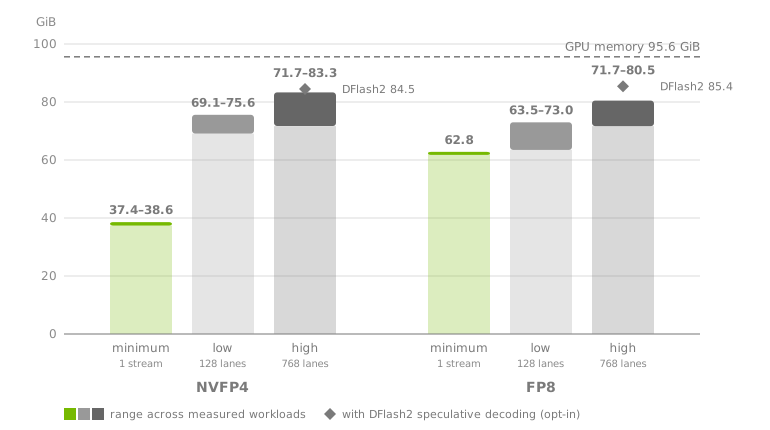
The chart compares one stream with the minimum settings to the low and high presets on RTX PRO 6000 Blackwell Workstation Edition.
Each solid segment spans the measured workloads, and the diamond marks the opt-in DFlash2 speculative decoding.
The following table lists the measured peak GPU memory for one-hour recordings.
One-Hour Recordings in Flight |
Settings |
Transcription With Word Timestamps and Speaker Labels, NVFP4 / FP8 |
Multi-Turn Mode, NVFP4 / FP8 |
|---|---|---|---|
1 |
Minimum settings (below) |
38.6 / 62.8 GiB |
37.7 / 62.8 GiB |
32 |
|
75.6 / 70.0 GiB |
69.6 / 63.5 GiB |
32, plus 96 30-second clips |
|
75.5 / 73.0 GiB |
69.1 / 63.7 GiB |
32 |
|
77.8 / 80.5 GiB |
71.7 / 71.7 GiB |
32, plus 736 30-second clips |
|
83.3 / 79.6 GiB |
72.0 / 71.8 GiB |
Values are the highest whole-GPU memory, sampled every 100 ms from container start to the end of the load, on one RTX PRO 6000 Blackwell Workstation Edition (95.6 GiB), with English meeting recordings and the default speculative mode (MTP; Multi-turn Mode turns it off).
The recordings in flight were all sent at once; how many decode at the same time follows the long-audio limit described in the next section.
In the concurrency=low and concurrency=high rows, with the default limit, four of the 32 decoded at a time, one per API worker, and the others waited.
The one-stream row is the highest of three runs; the other rows are single runs.
The table covers the Workstation Edition with NVFP4 and FP8.
The minimum settings serve one stream with one decoder lane, speculative decoding off, the smallest graph capture, and a KV cache that holds one full 73,728-token request:
Stop the running example container before starting this configuration:
docker stop nemotron-transcribe
docker run -d --rm --name=nemotron-transcribe \
  --runtime=nvidia --gpus '"device=0"' --ipc=host \
  -e NGC_API_KEY -p 9000:9000 \
  -e ASR_LONG_AUDIO_MAX_ACTIVE=1 -e ASR_SALM_SPECULATIVE=off \
  "$NIM_IMAGE" \
  --precision nvfp4 --max-num-seqs 1 --max-cudagraph-capture-size 1 \
  --max-num-batched-tokens 2048 --api-server-count 1 \
  --kv-cache-memory-bytes 335544320
With Multi-turn Mode, set --kv-cache-memory-bytes 671088640 (640 MiB) so that follow-up turns reuse the cached conversation; 320 MiB also works, but some follow-up turns then process the whole conversation again and take longer.
Loading the weights briefly takes about 37 GiB with NVFP4 and 63 GiB with FP8, more than either needs once it is ready (about 35 GiB and 44 GiB), so no setting lowers the peak below these values.
Use NVFP4 for the smallest footprint.
Factor |
Effect on Peak GPU Memory |
|---|---|
Word timestamps and speaker labels |
Up to about 2 GiB more than plain transcription. |
More concurrent requests |
When all lanes are busy with short clips as well as one-hour recordings, up to about 3 GiB more with |
Speculative decoding |
With |
Multi-turn Mode |
About 6 to 9 GiB less than a transcription server with word timestamps on the same preset, because speculative decoding is off and word timestamps are not available. Conversation history uses the KV cache and is capped by the 73,728-token context, so more turns do not add memory. |
|
No measurable change with 32 open conversations. |
Host memory of the container, excluding file cache, was about 7 GiB for one stream with --api-server-count 1, about 13 GiB for one request on a preset, 20 to 25 GiB with 32 one-hour uploads in flight, and up to about 32 GiB with all 768 lanes busy.
The model cache takes about 24.4 GiB on disk for NVFP4 and 35.9 GiB for FP8, and the image about 38 GiB.
Memory and Long Audio#
Two admission limits apply to long recordings, each per internal API worker.
Most tuned presets run four workers; the RTX PRO 6000 BF16, H100 BF16, and A100 presets and the planned low tier run one, and the planned high tier runs four.
--api-server-count overrides the count.
Recordings of 600 seconds or longer count as long audio. By default, each worker decodes one long recording at a time: four at once on a four-worker preset, and one on a one-worker preset. Other long recordings wait in arrival order; they are not refused. To decode more at once, set
ASR_LONG_AUDIO_MAX_ACTIVEto a per-worker value, for example-e ASR_LONG_AUDIO_MAX_ACTIVE=8for up to 32 with four workers. The value cannot exceed the decoder lane count; benchmark GPU and host memory with your longest recordings before you raise it.Word-timestamp alignment runs on at most 3,600 seconds of audio at a time. A single request longer than that runs alone.
The long-audio limit leaves decoder lanes for shorter requests, but it does not guarantee them a lane.
A waiting long recording still holds one of the NIM’s request slots, so a burst of long recordings can delay shorter requests.
The limit applies per worker, so a long recording can wait while another worker decodes none.
Each worker’s startup log line N3NT admission quotas reports the limit as long_audio_max_active.
A preset’s lane count is therefore not the number of hour-long recordings it can serve concurrently.
Where a preset does not fix the KV-cache size, vLLM sizes it from its memory utilization setting and startup profiling.
An explicit --kv-cache-memory-bytes overrides either.
GPU utilization is not a memory cap for the entire NIM, which also runs the encoder, diarizer, and timestamp pipeline.
Pass tuning flags after the image reference to override preset defaults.
Stop the running example container before starting this configuration:
docker stop nemotron-transcribe
docker run -d --rm --name=nemotron-transcribe \
  --runtime=nvidia --gpus '"device=0"' --ipc=host \
  -e NGC_API_KEY -p 9000:9000 \
  "$NIM_IMAGE" \
  --precision nvfp4 --concurrency high \
  --max-num-seqs 32 --gpu-memory-utilization 0.80 \
  --api-server-count 2 --max-cudagraph-capture-size 8
Other tuning flags include --max-num-batched-tokens and --kv-cache-memory-bytes.
--max-num-seqs controls decoder lanes, not client requests or end-to-end memory admission.
ASR_LONG_AUDIO_MAX_ACTIVE cannot exceed --max-num-seqs; if you raise it, keep --max-num-seqs at least as high, or the NIM does not start.
--api-server-count controls internal backend workers; the public NIM management server has one worker.
Conflicting selector and CLI precision or concurrency values are rejected.
Explicit resource values are not silently reduced to fit your device.
Each decoder lane holds one Mamba state block in the KV cache, so an explicit --kv-cache-memory-bytes smaller than the preset’s must come with a lower --max-num-seqs.
On RTX PRO 6000 GPUs, startup checks this before loading the model and names the lane count that fits; for example, 4 GiB holds about 474 lanes with MTP and FP8 or NVFP4 checkpoints, fewer than the 768 of concurrency=high.
Deployment Flag Reference#
These are container startup flags, not fields in individual inference requests.
Place them after "$NIM_IMAGE" in docker run.
Flag |
Values or Default |
Purpose |
|---|---|---|
|
|
Select the decoder checkpoint format. |
|
|
Select the serving tier. |
|
Positive integer; preset default. |
Override the decoder lane count. |
|
Positive integer; preset-dependent. The base budget is |
Set the decoder scheduler’s batched-token budget. |
|
Greater than |
Set vLLM’s memory utilization fraction, not a whole-service memory cap. |
|
Positive integer bytes; preset-dependent. Most tuned presets reserve a fixed size, for example 4 GiB on GeForce RTX 5090 (refer to Tuned Presets); the H100 BF16 and A100 presets and the planned tiers leave it unset, and vLLM sizes the cache. |
Reserve an explicit KV-cache size instead of utilization-based cache sizing. |
|
Positive integer; the preset’s value ( |
Set internal backend API workers. |
|
Positive integer; the preset’s value. It counts decoder tokens per step, up to lanes × (1 + draft tokens) with speculative decoding; a larger value with an explicit |
Bound decoder CUDA graph capture. |
|
Positive integer; |
Set the decoder data-parallel size. |
|
Positive integer; |
Set the decoder tensor-parallel size. |
|
Positive integer; |
Set the decoder pipeline-parallel size. |
|
Mutually exclusive; disabled by default. |
Enable or disable mixture of experts (MoE) sharding within the topology. |
|
Switch; not enabled by default. |
Disable decoder CUDA graph execution for troubleshooting or qualification. |
|
Mutually exclusive; otherwise the artifact’s runtime setting. |
Control decoder prefill scheduling; this does not enable audio streaming. |
|
Positive integer; otherwise the artifact’s runtime setting. |
Override the decoder context limit, subject to model/backend constraints. It must hold the recording’s audio tokens (12.5 per second) plus its output budget. |
|
Positive integer; otherwise the artifact’s runtime setting. |
Override the decoder output-token limit at deployment, not through Chat Completions token-limit fields. It must cover the output budget of the longest recording you serve. |
|
Positive integer; otherwise the runtime default. |
Adjust the native backend readiness timeout. |
Preset-dependent defaults change with the GPU, precision, tier, and speculative mode.
The startup log (docker logs nemotron-transcribe) shows the values in effect.
On a GPU with a tuned preset, the CONCURRENCY_PRESET line reports the lane count, CUDA graph capture size, KV-cache bytes, and speculative mode; kv_bytes=0 means that vLLM sizes the cache.
On every GPU, vLLM’s non-default args line reports max_num_batched_tokens after any increase for speculative decoding.
The NIM itself waits up to 1,800 seconds for the backend to become ready; set ASR_STARTUP_TIMEOUT (seconds) to change it.
When you raise --startup-timeout-seconds, raise ASR_STARTUP_TIMEOUT to at least the same value.
If the backend fails, does not become ready in time, or the start is refused (for example, an unsupported tier or a GPU-count mismatch), the container exits with a nonzero status; check docker logs for the cause.
Each request reserves an output budget from its audio duration: 1,024 tokens up to 20 seconds, 2,048 up to 90 seconds, 4,096 up to 180 seconds, and 16,384 or 6 tokens per second plus 24, whichever is larger, beyond that.
A request whose budget exceeds --max-output-tokens, or does not fit in --max-model-len together with its audio, returns 400.
For example, --max-output-tokens 4096 serves recordings up to 180 seconds only; the artifact’s default serves the full 3,600 seconds.
The NIM wrapper owns model paths, served model names, and internal listeners.
Do not pass --model-dir, --served-model-name, --host, --port, or --internal-port to override them.
Use NIM_HTTP_API_PORT and Docker port mapping for the public listener.
Changing a preset or startup flag requires redeploying the container.
Speculative Decoding#
Speculative decoding increases transcription throughput by drafting several tokens per decoder step and verifying them in one pass.
The tuned presets use MTP speculative decoding by default where the GPU supports it (refer to Tuned Presets); on other GPUs it is off by default.
Select or change the draft method with ASR_SALM_SPECULATIVE at deployment.
|
Draft |
Draft Tokens per Step |
|---|---|---|
|
None. |
Not applicable. |
|
The model’s own multi-token prediction (MTP) head, in BF16 for every decoder precision. |
The preset’s value ( |
|
A separate DFlash2 draft model, in BF16 for every decoder precision. |
|
A100, H100 and H200 with BF16, and GeForce RTX 5090 serve without speculative decoding; selecting mtp or dflash2 there is refused at startup.
B200, GB200, and GB300 support mtp but not dflash2; selecting dflash2 there is refused at startup.
Stop the running example container before starting this configuration:
docker stop nemotron-transcribe
docker run -d --rm --name=nemotron-transcribe \
  --runtime=nvidia --gpus '"device=0"' --ipc=host \
  -e NGC_API_KEY \
  -e NIM_TAGS_SELECTOR="precision=nvfp4" \
  -e ASR_SALM_SPECULATIVE=mtp \
  -p 9000:9000 \
  "$NIM_IMAGE"
The draft is part of the model checkpoint and is checked against the checkpoint manifest at startup.
Startup fails if the selected draft is missing or modified.
ASR_SALM_MTP_DRAFT_PATH and ASR_SALM_DFLASH2_DRAFT_PATH select a draft mounted at another path in the container.
A draft-token value outside its range fails at startup.
Throughput is measured at the defaults (the presets’ MTP values 2 to 4, and DFlash2 4); other values in range are accepted but not performance-qualified, and later draft positions are accepted less often.
Speculative decoding does not change the request or response format.
Transcripts, speaker tags, and word timestamps are supported in both modes.
The NIM raises the decoder’s batched-token budget to make room for the draft tokens; an explicit --max-num-batched-tokens overrides it.
Startup takes longer because the NIM compiles and warms up the draft before reporting ready.
The gain depends on GPU, precision, concurrency, and audio duration; benchmark your workload with and without speculative decoding before enabling it.
Note
Speculative decoding cannot be combined with Multi-turn Mode or with pipeline parallelism in this release.
With ASR_MULTI_TURN=on or --pipeline-parallel-size above 1, a preset serves without speculative decoding and says so in the startup log, and an explicit ASR_SALM_SPECULATIVE=mtp or dflash2 fails at startup.
Use tensor or data parallelism to keep speculative decoding on multiple GPUs.
Multi-Turn Conversations#
Multi-turn Mode lets a client ask follow-up questions about one recording, such as a summary or a question about the content, after the first transcript or answer. The NIM caches the encoded audio and the conversation so far, so later turns do not reprocess the recording. Multi-turn Mode is off by default. Enable it only for deployments that serve conversations: it enables prefix caching in the decoder, which lowers throughput for single transcription requests.
Stop the running example container before starting this configuration:
docker stop nemotron-transcribe
docker run -d --rm --name=nemotron-transcribe \
  --runtime=nvidia --gpus '"device=0"' --ipc=host \
  -e NGC_API_KEY \
  -e NIM_TAGS_SELECTOR="precision=nvfp4" \
  -e ASR_MULTI_TURN=on \
  -p 9000:9000 \
  "$NIM_IMAGE"
Multi-turn Mode has the following restrictions:
It runs on one GPU. Startup fails with a data, tensor, or pipeline parallel size above
1.It cannot be combined with speculative decoding. Startup fails when
ASR_SALM_SPECULATIVEselects a draft.Word timestamps and subtitles return
400on every request. Use a separate deployment without Multi-turn Mode for timestamps.
Without Multi-turn Mode, requests that carry conversation fields, history, or a system message return 400.
Run a Conversation#
A conversation is about one recording.
Open it with the audio and follow_up: true; the response returns transcription.conversation.audio_id.
On each later turn, resend the whole conversation with the same audio bytes in the first user message, each answer as returned with any chat-template markers removed, the new question, and the audio_id.
Audio goes only in the first user message; a later user message carrying input_audio returns 400.
Send close: true with the last turn so the NIM releases the cached conversation.
import base64
import json
import urllib.request

server = "http://localhost:9000"
with urllib.request.urlopen(server + "/v1/models", timeout=30) as response:
    model = json.load(response)["data"][0]["id"]
with open("audio.wav", "rb") as audio_file:
    audio = base64.b64encode(audio_file.read()).decode("ascii")


def chat(body):
    request = urllib.request.Request(
        server + "/v1/chat/completions",
        json.dumps({"model": model, **body}).encode(),
        {"Content-Type": "application/json"},
    )
    with urllib.request.urlopen(request, timeout=600) as response:
        return json.load(response)


# Turn 1: the audio with no text returns a transcript and opens the conversation.
messages = [{"role": "user", "content": [
    {"type": "input_audio", "input_audio": {"data": audio, "format": "wav"}}
]}]
reply = chat({"messages": messages, "follow_up": True})
audio_id = reply["transcription"]["conversation"]["audio_id"]
answer = reply["choices"][0]["message"]["content"]
for marker in ("<|im_start|>assistant", "<|im_start|>", "<|im_end|>", "<think>", "</think>"):
    answer = answer.replace(marker, "")  # the server refuses these in history
messages.append({"role": "assistant", "content": answer.strip()})

# Turn 2: a text follow-up. Resend the history and the audio_id; close: true ends it.
messages.append({"role": "user", "content": [
    {"type": "text", "text": "Summarize the recording in two sentences."}
]})
reply = chat({"messages": messages, "audio_id": audio_id, "close": True})
print(reply["choices"][0]["message"]["content"])
The NIM keeps no conversation state that a client depends on.
The audio_id lets the NIM reuse its cache.
A later turn that resends the audio without a valid audio_id, or one that arrives after the cache was released, is still answered correctly, but the NIM might encode the audio again.
usage.prompt_tokens_details.cached_tokens shows how much of a turn’s prompt was reused.
A first turn with text is answered as an instruction over the audio, for example What are the action items in this meeting?, unless the text is a standard transcription prompt or a speaker-tag prompt; those return a transcript.
You can send one system message, as the first message, only when the turn is answered as an instruction: a first turn with instruction text or task: "respond", or a later text turn.
A system message with a transcription turn (no text, task: "transcribe", a speaker-tag prompt, or a standard transcription prompt) returns 400.
To use a system message for the whole conversation, open it with an instruction turn and resend the same system message unchanged as the first message on every turn.
Refer to the API reference for the full request rules.
Multi-Turn Settings#
Environment Variable |
Default |
Purpose |
|---|---|---|
|
|
Set to |
|
|
Maximum history messages per request, counting user and assistant messages. Applies only with Multi-turn Mode on; with it off, a request carries no history. |
|
|
Maximum characters of history, |
|
|
Release a conversation’s cache after this many seconds without a turn; |
|
|
Set to |
|
Generated at each start |
Key that signs |
Requests over a conversation limit return 400; trim the conversation in the client.
Route all turns of one conversation to the same replica, because each replica has its own cache.
With the default generated key, a container restart invalidates earlier audio_id values; the next turn is still answered, encodes the audio again, and returns a new audio_id.
With a fixed ASR_CONVERSATION_KEY, earlier audio_id values stay valid after a restart, but the caches are empty, so the next turn also encodes the audio again.
Use Multiple GPUs#
Use GPUs with the same supported compute capability and enough memory for the selected topology.
The required CUDA-visible GPU count is DP × TP × PP, where DP means data parallelism.
Expert parallelism (EP) shards experts within the topology; it is not another GPU-count multiplier.
Only use parallel sizes supported by the model and backend; arbitrary positive integers are not guaranteed to work.
Mechanism |
What It Controls |
What It Does Not Imply |
|---|---|---|
Data parallelism (DP) |
Decoder data-parallel ranks and request distribution. |
Independent replicas of the entire ASR pipeline. |
Tensor parallelism (TP) |
Sharding decoder tensor computations across GPUs. |
Sharding every encoder or auxiliary allocation. |
Pipeline parallelism (PP) |
Partitioning decoder layers into pipeline stages. |
Acceptance of every integer stage count by the model/backend. |
Expert parallelism (EP) |
Sharding MoE experts across ranks within the configured topology. |
A separate size flag or additional GPU-count multiplier. |
DP/TP/PP default to 1; EP is disabled unless explicitly enabled.
Pipeline parallelism serves without speculative decoding: with PP above 1, a preset’s MTP is turned off, and an explicit ASR_SALM_SPECULATIVE=mtp or dflash2 fails at startup (refer to Speculative Decoding).
With data parallelism, each DP rank serves the tier’s decoder lanes, so DP=4 serves four times the lanes of one GPU.
Topology does not create additional checkpoint profiles.
The examples below are alternative deployments, not two containers to run simultaneously on the same four GPUs.
Stop the previous example before starting another one with the same container name or port.
Four GPUs with DP and EP#
The following example uses DP=4, TP=1, PP=1, and EP.
docker run -d --rm --name=nemotron-transcribe \
  --runtime=nvidia --gpus '"device=0,1,2,3"' --ipc=host \
  -e NGC_API_KEY \
  -e NIM_TAGS_SELECTOR="precision=nvfp4,concurrency=low" \
  -p 9000:9000 \
  "$NIM_IMAGE" \
  --data-parallel-size 4 --tensor-parallel-size 1 \
  --pipeline-parallel-size 1 --enable-expert-parallel
Four GPUs with TP#
The following example uses DP=1, TP=4, PP=1, with EP disabled.
docker run -d --rm --name=nemotron-transcribe \
  --runtime=nvidia --gpus '"device=0,1,2,3"' --ipc=host \
  -e NGC_API_KEY \
  -e NIM_TAGS_SELECTOR="precision=nvfp4,concurrency=low" \
  -p 9000:9000 \
  "$NIM_IMAGE" \
  --data-parallel-size 1 --tensor-parallel-size 4 \
  --pipeline-parallel-size 1 --disable-expert-parallel
Qualify either topology on your hardware before relying on it in production.
MoE data parallelism is not equivalent to independent full-model replicas.
For independent replicas, run separate single-GPU containers behind a load balancer.
Set topology through CLI flags, not NIM_TAGS_SELECTOR tags.
Reuse Local Models Without Downloads#
Mount a complete materialized workspace containing checkpoint/ and all files for the selected precision, including checkpoint/checksums.blake3.
Populate it using the same NIM version and profile, and preserve any symlinks and their targets.
Inside a running NIM, /opt/nim/workspace contains symlinks into the model cache, so docker cp of that directory copies links that point nowhere.
To create a self-contained workspace, copy it from a NIM that is running the same version and profile, following the symlinks (about 24.4 GiB for NVFP4):
mkdir -p /path/to/materialized-workspace
docker exec nemotron-transcribe tar -chf - -C /opt/nim/workspace . \
  | tar -xf - -C /path/to/materialized-workspace
Stop the running NIM before you start the offline container, because both use the same name and port:
docker stop nemotron-transcribe
The examples on this page start the NIM with --rm, so stopping it also removes it; if you started it without --rm, also run docker rm nemotron-transcribe.
Then start the NIM from the materialized workspace:
docker run -d --rm --name=nemotron-transcribe \
  --runtime=nvidia --gpus '"device=0"' --ipc=host \
  -p 9000:9000 \
  -v /path/to/materialized-workspace:/opt/nim/workspace:ro \
  -e NIM_DISABLE_MODEL_DOWNLOAD=true \
  -e NIM_TAGS_SELECTOR="precision=nvfp4,concurrency=low" \
  "$NIM_IMAGE"
The NIM validates the local checkpoint and leaves its contents unchanged.
A complete checkpoint tree in NIM_WORKSPACE or NIM_CACHE_PATH is reused automatically; the workspace takes precedence.
An empty cache directory or a blob cache alone does not satisfy download-disabled startup.
Missing, corrupt, partial, or wrong-precision checkpoints fail without a download fallback.
If a materialized workspace is nested inside your mounted cache, set NIM_WORKSPACE to that directory explicitly.
Model download disabling does not disable telemetry or all network activity.
The NIM still needs writable runtime locations for metadata overlays and compiler caches.