

Low Latency Streaming (LLS/WebRTC) Functions
Low Latency Streaming (LLS/WebRTC) Functions
Cloud Functions supports the ability to stream video, audio, and other data using WebRTC.
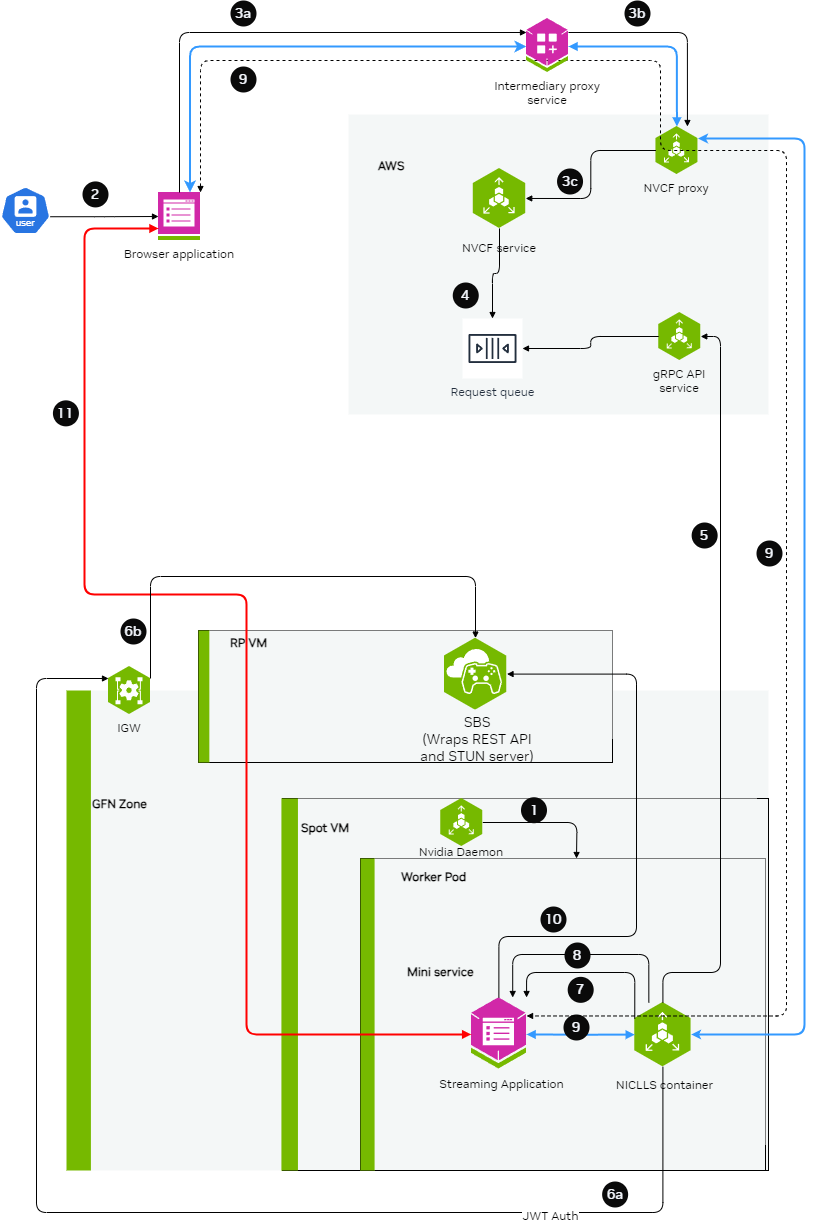
For complete examples of LLS streaming functions, contact your NVIDIA representative for access to sample function containers.
Building the Streaming Server Application
The streaming application needs to be packaged inside a container and should be leveraging the StreamSDK. The streaming application needs to follow the below guidelines:
-
Expose an HTTP server at port
CONTROL_SERVER_PORTwith following 2 endpoints:-
Health endpoint: This endpoint should return 200 HTTP status code only when the streaming application container is ready to start streaming a session. If the streaming application container doesn’t want to serve any more streaming sessions of current container deployment this endpoint should return HTTP status code 500.
-
STUN creds endpoint: This endpoint should accept the access details and credentials for STUN server and keep it cached in the memory of the streaming application. When the streaming requests comes, the streaming application can use these access details and credentials to communicate with STUN server and request for opening of ports for streaming.
-
-
Expose a server at port
STREAMING_SERVER_PORTto accepting WebSocket connection- An endpoint
STREAMING_START_ENDPOINTshould be exposed by this server
- An endpoint
-
Post websocket connection establishment guidelines:
- When the browser client requests for opening port for specific protocols (e.g. WebRTC), the streaming application needs to request STUN server to open port. This port should be in the range of 47998 and 48020 which would be referred as
STREAMING_PORT_BINDING_RANGEin this doc.
- When the browser client requests for opening port for specific protocols (e.g. WebRTC), the streaming application needs to request STUN server to open port. This port should be in the range of 47998 and 48020 which would be referred as
-
Containerization guidelines:
- The container should make sure that the
CONTROL_SERVER_PORT,STREAMING_SERVER_PORTandSTREAMING_PORT_BINDING_RANGEare exposed by the container and accessible from outside the container. - If multiple sessions one after another needs to be supported with a fresh start of container, then exit the container after a streaming session ends.
- The container should make sure that the
Creating the LLS Streaming Function
When creating the function, ensure functionType is set to STREAMING:
Connecting to a streaming function with a client
Intermediary Proxy
An intermediary proxy service needs to be deployed in order to facilitate the connection to the streaming function.
The intermediate proxy serves to handle authentication and the headers that are required for NVCF, and also to align the connection behavior with NVCF that the browser can’t handle on its own, or the browser behavior is unpredictable.
Proxy Responsibilities
The intermediary proxy performs the following functionalities:
- Authenticate the user token coming from the browser to the intermediary proxy
- Authorize the user to have access to specific streaming function
- Once the user is authenticated and authorized, modify the websocket connection coming in to append the required NVCF headers (
NVCF_API_KEYandSTREAMING_FUNCTION_ID) - Forward the websocket connection request to NVCF
Technical Implementation Guidance
nvcf-function-id Header
NVCF requires this header to be present to identify the function that needs to be reached. Browser does not have the mechanism to set any kind of headers in case of WebSocket connections other than Sec-Websocket-Protocol, so the intermediate proxy can serve to either add the nvcf-function-id header on its own, or to parse Sec-Websocket-Protocol if the browser added it there and get the function id from there.
See http-request add-header documentation in HAProxy.
Authentication
The role of intermediate proxy is to add the required server authentication (e.g. http-request set-header Authorization "Bearer NVCF_BEARER_TOKEN").
Connection Keepalive
NVCF controls the session lifetime based on the TCP connection lifetime to the function and the type of disconnection that happens. The intermediate proxy helps to keep the connection with the browser alive.
Resume Support
NVCF returns the cookie with nvcf-request-id, but given the browser may reject the cookie since it is not from the same domain, the intermediate proxy helps to align this.
CORS Headers
For browsers to allow traffic with NVCF, the intermediate proxy needs to add the relevant CORS headers to responses from NVCF:
access-control-expose-headers: *access-control-allow-headers: *access-control-allow-origin: *
For guidance on implementing this in HAProxy, see http-response set-header documentation.
Example HAProxy Dockerfile
Below is an all-in-one Dockerfile sample for setting up an HAProxy intermediary proxy with optional TLS/SSL support:
This example focuses on NVCF integration. In production, you should also implement user authentication and authorization to control access to your streaming function.
For certain applications, TLS/SSL support is required. The proxy can be configured to use self-signed certificates for development and testing purposes by setting PROXY_SSL_INSECURE=true.
Update NVCF_SERVER to point to your gateway address. See gateway-routing for details.
Environment Variables
The following environment variables control proxy behavior:
Usage Examples
1. HTTP Mode (Default)
Standard configuration without SSL:
2. HTTPS Mode with Self-Signed Certificate
Configuration with SSL enabled using a self-signed certificate:
Since this configuration uses self-signed certificates for development and testing, you will need to configure your client to accept untrusted certificates. In production environments, you should use proper CA-signed certificates.
Web Browser Client
Using the proxy, a browser client can be used to connect to the stream.
The browser client needs to be developed by the customer leveraging the raganrok dev branch 0.0.1503 version. Please ensure that the flags are set: