Skip to navigation

Kumo Anomaly

View as Markdown
Runs in Kumo-TS

Kumo Anomaly is part of the Kumo-TS library, not SDM. Install the Kumo-Anomaly package (Python 3.12 or later) before running the example.

Kumo Anomaly scores every time step of a multivariate series by how well a diffusion model can reconstruct it from its surroundings, and flags anomalous steps. It needs no labels.

At a Glance

PropertyValue
Entry pointperform_anomaly_analysis_with_diffusion(df, threshold_strategy="scs")
PackageKumo-TS Kumo-Anomaly 1.0.0, Python 3.12 or later
InputA pandas DataFrame of numeric columns, one row per time step
OutputThe input columns plus Anomaly (0 or 1) and MAE (anomaly score)
LabelsNot needed
DevicesCPU or GPU; uses several GPUs automatically when available
Weightsnvidia/Kumo-Anomaly, Apache-2.0
ReferenceNV-Tesseract-AD

How It Works

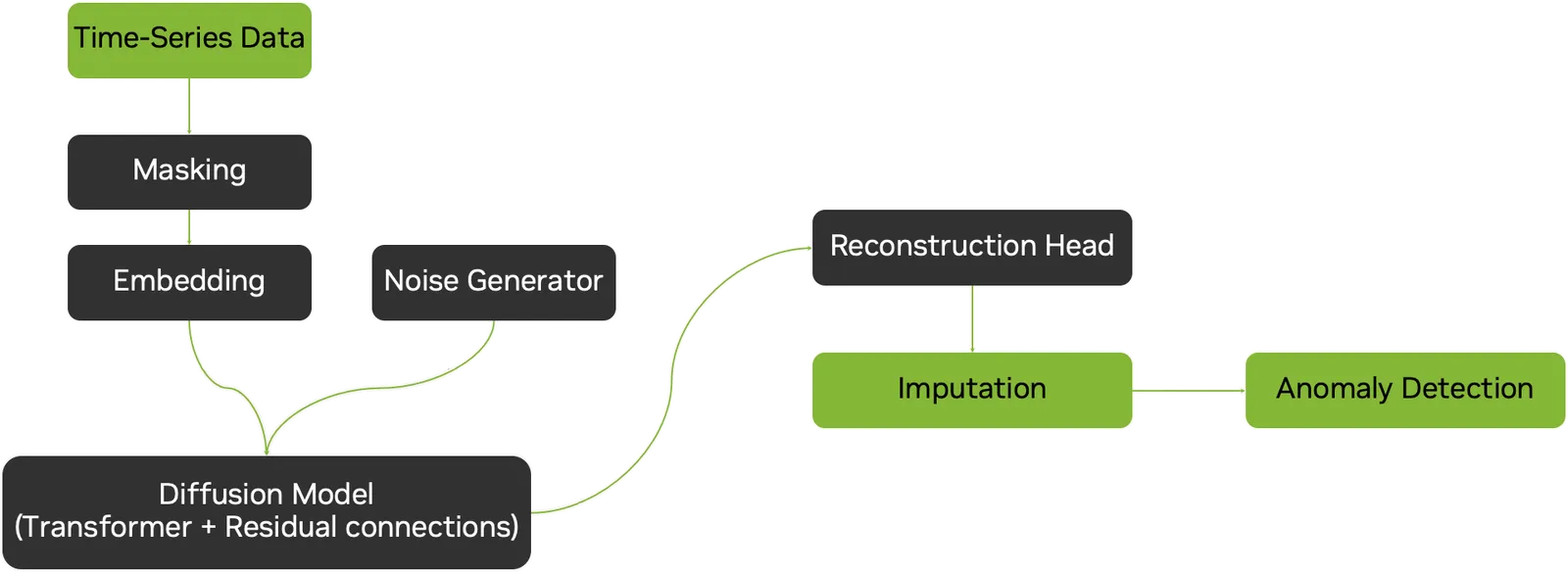
Kumo Anomaly pipeline: time series data is masked and embedded, a diffusion model with transformer and residual connections takes noise and reconstructs the masked parts, and imputation error drives anomaly detection.

  • Features are reduced with PCA and scaled, then split into windows.
  • Masks hide blocks of time steps. A conditional diffusion model reconstructs each hidden block from the visible context, sampling several times.
  • The mean absolute reconstruction error gives the MAE score per time step.
  • An adaptive threshold turns scores into the Anomaly flag.

Example

Run this script with uv run from the Kumo-TS/Kumo-Anomaly directory. The first run downloads the weights into the working directory.

import numpy as np
import pandas as pd
from sdk.anomaly_analysis import perform_anomaly_analysis_with_diffusion
from sdk.inference_ad import set_seed
steps = 500
t = np.arange(steps)
rng = np.random.default_rng(0)
df = pd.DataFrame({ # numeric columns only
"temperature": 20 + 2 * np.sin(2 * np.pi * t / 50) + rng.normal(scale=0.2, size=steps),
"pressure": 5 + 0.5 * np.sin(2 * np.pi * t / 50 + 0.5) + rng.normal(scale=0.05, size=steps),
})
df.loc[300:309, "pressure"] += 3.0 # inject an anomaly at steps 300 to 309
if __name__ == "__main__": # safe with multi-GPU worker processes
set_seed(0)
result = perform_anomaly_analysis_with_diffusion(df=df, threshold_strategy="scs")
print(result.columns.tolist())
print("Flagged steps:", result.index[result["Anomaly"] == 1].tolist())
print("Highest MAE steps:", sorted(result["MAE"].nlargest(10).index.tolist()))
Expected output
['temperature', 'pressure', 'Anomaly', 'MAE']
Flagged steps: [62, 112, 211, 214, 300, 301, 302, 303, 304, 305, 306, 307, 308, 309, 311]
Highest MAE steps: [300, 302, 303, 304, 305, 306, 307, 308, 309, 311]

All ten injected steps (300 to 309) are flagged, plus five false alarms; nine of the ten highest scores fall on the injected steps. The run took about 100 seconds on an Apple laptop GPU and repeats exactly with set_seed.

Read the Output

ColumnMeaning
MAEReconstruction error. Higher means more likely anomalous. Rank by it when you want a fixed alert budget.
Anomaly1 for flagged steps, 0 otherwise, from the chosen threshold strategy.
threshold_strategyMethod
"scs"Segmented Confidence Sequences: thresholds scores within adaptive segments of the series.
"macs"Multi-Scale Adaptive Confidence Segments: variance-weighted score bounds.

Generate a Report

Pass sdk_config=ADDiffusionConfig(report_path="report.pdf", timestamp_column="timestamp", ground_truth_column="GT") to write a PDF of signals, flags, and scores. Timestamp and label columns named there are kept in the output but excluded from the model’s features.

Tune Compute and Reproducibility

  • nsample (default 15) sets the diffusion samples per window. Lower runs faster with noisier scores.
  • Call sdk.inference_ad.set_seed(...) before each call for reproducible results.

Inputs and Limits

  • Numeric columns only. Other columns raise The following columns contain non-numeric values: [...]; drop them or declare them in ADDiffusionConfig.
  • At least as many rows as the model’s PCA dimension.
  • Weight files go to model_path and model_config_path, which default to the working directory.

For model size and training details, see the Hugging Face model card.

Fine-Tuning

Fine-tune on normal windows from your own CSV with examples/finetune_example.py.

Learn More