

Topograph in Kubernetes
Topograph is a tool designed to enhance scheduling decisions in Kubernetes clusters by leveraging network topology information.
Overview
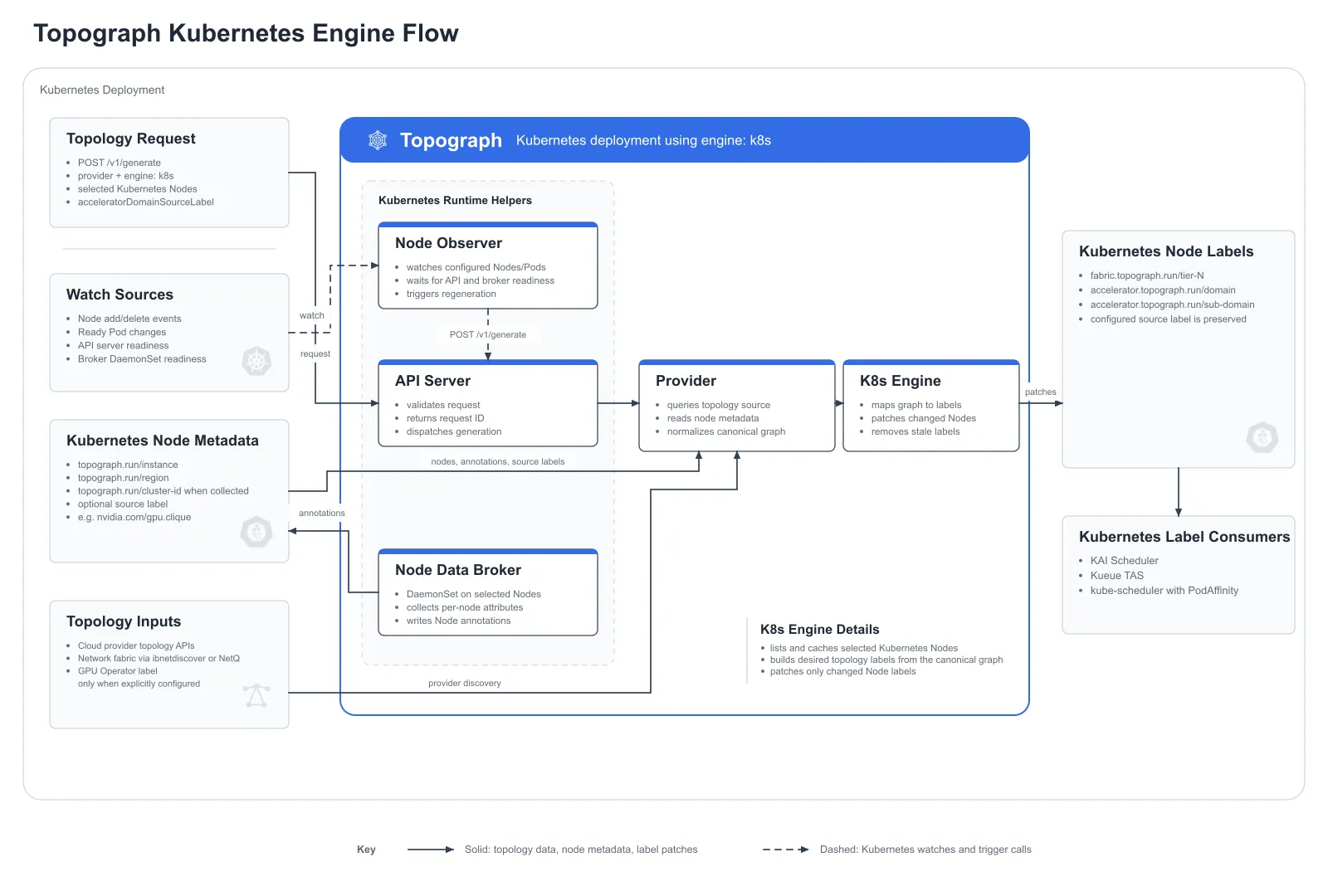
Topograph maps network-fabric locality as a variable-depth label family and accelerator-network locality as a two-level label hierarchy:
fabric.topograph.run/tier-Nidentifies fabric switch tiers.accelerator.topograph.run/domainidentifies the accelerator domain.accelerator.topograph.run/sub-domainidentifies an optional accelerator sub-domain within that domain.
Fabric tier 0 is closest to the compute node, and tier numbers increase
outwards. Topograph writes only the fabric tiers enabled by the label
configuration. When acceleratorDomainSourceLabel is configured and a node
has a non-empty value for that label, the existing label is authoritative and
is not overwritten. The managed accelerator domain and sub-domain labels are
omitted for that node. When the parameter is omitted, provider-supplied
accelerator domains are used and no Kubernetes label receives special
treatment.
The fabric and accelerator-domain label names are configurable via the Helm chart. The accelerator sub-domain key is fixed.
For example, if a node belongs to NVLink domain nvl1, sub-domain
nvl1.rack01, and connects to switch s1, which connects to switch s2, and
then to switch s3, Topograph will apply the following labels to the node:
Relationship to the kubelet Topology Manager
Kubernetes includes a Topology Manager (GA since Kubernetes 1.27) that aligns CPU, GPU, and NIC allocations to the same NUMA domain within a single node, reducing memory access latency for a Pod’s containers. These two features are complementary and address different scopes:
Both can be active simultaneously. Topology Manager optimizes resource allocation within a node; Topograph labels tell the scheduler which nodes belong together on the network.
Using an existing accelerator-domain label
Set engine.params.acceleratorDomainSourceLabel when another component already
publishes the accelerator domain as a Kubernetes Node label:
For each node with a non-empty value, the k8s engine preserves that label,
removes its managed accelerator domain and sub-domain labels, and continues to
publish all configured fabric tiers. Nodes without the source label use the
provider-supplied accelerator domain and sub-domain. acceleratorLabel cannot
be customized when acceleratorDomainSourceLabel is set.
There is no default source label. For example, operators who want the NVIDIA
GPU Operator’s nvidia.com/gpu.clique label to be authoritative must select it
explicitly. Its presence alone has no effect on engine output.
In addition to NVLink domain membership, Topograph provides the full IB switch hierarchy as numbered fabric tiers, giving schedulers both dimensions simultaneously.
For infiniband-k8s, operators can set provider.params.accelerator.source: kubernetes-label with kubernetesLabel.key: nvidia.com/gpu.clique so the provider reads the existing label instead of collecting the same value through a nvidia-smi exec in the GPU Operator device-plugin DaemonSet.
Use of Topograph
While there is currently no fully network-aware scheduler capable of optimally placing groups of pods based on network considerations, Topograph serves as a stepping stone toward developing such a scheduler.
Topograph can be used in conjunction with Kubernetes’ existing PodAffinity feature. This combination enhances pod distribution based on network topology information.
The following excerpt describes a Kubernetes object specification for a cluster with a three-tier network switch hierarchy. The goal is to improve inter-pod communication by assigning pods to nodes within closer network proximity.
Pods are prioritized to be placed on nodes sharing the label fabric.topograph.run/tier-0.
These nodes are connected to the same network switch, ensuring the lowest latency for communication.
Nodes with the label fabric.topograph.run/tier-1 are next in priority.
Pods on these nodes will still be relatively close, but with slightly higher latency.
In the three-tier network, all nodes will share the same fabric.topograph.run/tier-2 label,
so it doesn’t need to be included in pod affinity settings.
Since the default Kubernetes scheduler places one pod at a time, the placement may vary depending on where the first pod is placed. As a result, each scheduling decision might not be globally optimal. However, by aligning pod placement with network-aware labels, we can significantly improve inter-pod communication efficiency within the limitations of the scheduler.
Mixed Workload Considerations
Topology labels are most valuable when nodes in a topology domain are available for topology-sensitive workloads together. Mixed clusters running both distributed training and topology-insensitive workloads (single-GPU inference, CPU services) present a scheduling challenge: topology-insensitive Pods will consume nodes that could otherwise form complete leaf-switch groups or NVLink domains, forcing training jobs to communicate across additional hops. Schedulers that honor topology labels — such as KAI Scheduler and Kueue with Topology-Aware Scheduling — can minimize this fragmentation, but only when topology information is available. Topograph’s labels are a prerequisite for making these decisions.
Configuration
Topograph is deployed as a standard Kubernetes application using a Helm chart.
The main chart directly renders the API server, node-observer, and node-data-broker; the component-specific settings remain under nodeObserver.* and nodeDataBroker.*. When the broker is enabled, the chart passes its name and namespace to the node-observer through NODE_DATA_BROKER_NAME and NODE_DATA_BROKER_NAMESPACE. The observer waits until the broker DaemonSet’s ready replica count matches its desired count before requesting topology generation. When nodeDataBroker.enabled=false, those variables are omitted and there is no broker readiness gate.
Topograph is configured using a configuration file stored in a ConfigMap and mounted to the Topograph container at /etc/topograph/topograph-config.yaml.
In addition, when sending a topology request, the request payload includes additional parameters.
The provider and engine are defined as top-level Helm values, as shown below:
Kubernetes API reconciliation and rate limiting
The Kubernetes engine lists the selected Nodes once, reuses that result while generating output, and compares each Node’s existing topology labels with the desired labels. It skips Nodes that are already current and patches only changed labels, including removing stale Topograph-managed tier labels. This avoids a separate Node GET followed by a full Node update for every reconciliation.
Client-go uses default limits of 5 QPS and burst 10. For Helm deployments,
configure the chart-wide kubeClient.qps and kubeClient.burst values. The
chart exposes them to Topograph as KUBE_QPS and KUBE_BURST, and the DRA
provider and Kubernetes, NFD, and Slinky engines use the resulting shared
deployment settings. Outside Helm, set the environment variables directly.
A large first reconciliation may still patch many Nodes, so increase the shared
values only when client-side throttling is slowing the update. Higher values
increase Kubernetes API-server load; monitor request latency and HTTP 429
responses and narrow nodeSelector where appropriate.
When the chart manages RBAC, the Topograph API server receives get, list,
and patch access to Nodes for the Kubernetes engine; it no longer requires
Node update. Deployments using rbac.create: false must grant the same
permissions to the configured ServiceAccount.
Reusing existing node identity metadata
Use config.nodeMetadata to read instance ID and region from existing node labels
or annotations. For example:
Disable the broker only when your environment also supplies any other metadata
or discovery it provides for the selected provider. With the broker disabled,
the observer does not wait for its DaemonSet. Omit config.nodeMetadata or set it
to null to retain both default Topograph annotations. Otherwise, both instanceID
and region must specify a non-empty type and key. Configured sources are
authoritative: missing or empty values do not fall back to those annotations. See the
configuration reference for
validation and update behavior. Restart Topograph after changing the configuration.
The infiniband-k8s provider requires broker pods to run ibnetdiscover, so keep
nodeDataBroker.enabled: true for that provider even with custom identity sources.
Exposing the Topograph API
The API ConfigMap also carries config.nodeMetadata, used by provider and engine
node reads regardless of whether the API is exposed through a Service, Ingress,
or Gateway API route. Source selection is described above.
The Topograph API server listens on port 49021 by default. The Helm chart always creates a Kubernetes Service; how that Service is exposed depends on your deployment topology and access requirements.
The API server does not implement built-in authentication. Access controls are always applied at a network layer (NetworkPolicy, service mesh, ingress auth, etc.). Deployments that expose the API outside the cluster must add an authentication layer in front of it.
Access pattern matrix
Default: ClusterIP
By default, service.type: ClusterIP and ingress.enabled: false. This means:
- The API is not exposed outside the cluster
- In-cluster components (Node Observer, Node Data Broker) reach the API via the Service DNS name
<release>-topograph.<namespace>.svc.cluster.local:49021by default - Cluster operators can reach the API via port-forward for debugging:
The Service name is <release>-topograph by default (rendered from the chart’s fullname template); substitute your Helm release name and the namespace you deployed it into.
This is the recommended pattern for production deployments where Topograph is consumed only by in-cluster callers.
Exposing via Ingress
Enable the bundled Ingress template:
Authentication must be added at the Ingress or mesh layer. Common patterns:
- nginx-ingress
nginx.ingress.kubernetes.io/auth-url+ oauth2-proxy - Istio
RequestAuthentication+AuthorizationPolicy - mTLS termination at the ingress with client certificate validation
Exposing via Gateway API (HTTPRoute)
The chart ships an optional HTTPRoute template (charts/topograph/templates/httproute.yaml) that attaches to an existing platform-owned Gateway. Enable with:
Mutually exclusive with ingress.enabled. The chart refuses to render if both are enabled — deploying both routing resources against the same Service is almost always a misconfiguration.
A complete example values file is provided at charts/topograph/values.k8s.gateway-api-example.yaml.
Prerequisites (operator responsibility, outside this chart):
- Gateway API CRDs installed in the cluster — standard channel
gateway.networking.k8s.io/v1. The chart fails cleanly with a clear error if they are absent. - A Gateway API implementation running — kgateway, Cilium, Istio, Envoy Gateway, Nginx Gateway Fabric, or any other conformant implementation. The chart’s
HTTPRouteuses only standardgateway.networking.k8s.io/v1fields with no implementation-specific annotations, so it is portable across any of them. - A
Gatewayresource provisioned with a listener thisHTTPRoutecan attach to. The chart does not authorGatewayorGatewayClassresources — both are platform-owned. - A
ReferenceGrantin the Gateway’s namespace if it lives in a different namespace from the release, per Gateway API cross-namespace attachment rules.
Default routing. If gatewayAPI.rules is empty, the chart emits a single catch-all rule routing all requests to the Topograph Service (which serves /v1/generate, /v1/topology, /v1/lookup, /healthz, and /metrics on a single port). Override gatewayAPI.rules to provide path-specific matching — for example, to expose only /v1/:
Authentication. Topograph’s binary has no built-in authentication on any endpoint, including /v1/generate and /v1/lookup. When exposing the API externally, enforce authentication at the Gateway layer via the implementation’s policy mechanism (kgateway TrafficPolicy + ExtAuth, Istio RequestAuthentication, Envoy Gateway SecurityPolicy, Nginx Gateway Fabric ClientSettingsPolicy, Cilium L7). These attach to the rendered HTTPRoute via targetRefs (or equivalent) as separate resources — no chart changes required. See values.k8s.gateway-api-example.yaml for a concrete kgateway example.
GRPCRoute, TLSRoute, BackendTLSPolicy are not supported in this chart. Topograph’s API is HTTP-only; TLS termination (when needed) happens at the Gateway listener.
Metrics endpoint
The /metrics endpoint exposes Prometheus metrics on the same port. Enable the bundled ServiceMonitor for Prometheus Operator scraping:
This creates a monitoring.coreos.com/v1 ServiceMonitor selecting the Topograph Service.
Pod security context
The chart applies a hardened security context to all three components (API server, node-observer, node-data-broker) by default, satisfying the Kubernetes restricted Pod Security Standard: non-root execution (runAsNonRoot, UID/GID 65532), seccompProfile: RuntimeDefault, allowPrivilegeEscalation: false, a read-only root filesystem, and all Linux capabilities dropped. The Kubernetes, NFD, and Slinky engines write Kubernetes resources through the API server and never write to the container filesystem, so these defaults require no additional configuration.
Override individual keys to relax the defaults where a workload needs it; a per-key override wins over the shipped default. Two cases need it:
- InfiniBand discovery. The
infiniband-k8sbroker reads/sys/classand must runprivilegedas root.values.k8s.ib-example.yamlis the built-in example. Supply a complete override, not a partial one: because Helm deep-merges values, setting onlysecurityContext.privileged: trueleaves the defaultallowPrivilegeEscalation: false, and the API server rejectsprivileged: true+allowPrivilegeEscalation: falseat admission. The example therefore also setsallowPrivilegeEscalation: true,readOnlyRootFilesystem: false, andrunAsNonRoot: falseon the broker. Override only that component — keep the API server and node-observer hardened. (infiniband-k8sneeds no exception for Topograph’s own container: it execs into GPU Operator pods, and Topograph’s container stays hardened.) slurm/graphengines in-cluster. These engines write atopology.conffile to their configured output path, so they needsecurityContext.readOnlyRootFilesystem: falseplus a writable volume mounted at that path. The defaultk8sandslinkyengines are API-only and need no such change.
When you additionally enforce the standard on the release namespace (pod-security.kubernetes.io/enforce: restricted), the hardened default workloads pass admission, but two shapes are rejected and need attention:
- The
infiniband-k8sbroker. Its requiredprivileged: trueoverride (above) is incompatible with therestrictedstandard, so the brokerDaemonSetis rejected in a namespace that enforces it. Run the broker in a namespace that does not enforcerestricted(for examplepod-security.kubernetes.io/enforce: baselineorprivileged), or leave the Topograph namespace unenforced when using InfiniBand discovery. - User-supplied
initContainers. Init containers added through theinitContainersvalue render with no container-level security context. The pod-level defaults (runAsNonRoot,seccompProfile) are inherited, but the container-level controls (allowPrivilegeEscalation: false, dropped capabilities) are not — so an unconstrained init container is rejected underrestricted. Give any init container you add its ownrestricted-compliantsecurityContext.
NetworkPolicy
The chart ships an opt-in NetworkPolicy covering all three components (API server, node-observer, node-data-broker), off by default:
The policy selects every pod in the release by the app.kubernetes.io/instance label. When enabled, ingress is denied except:
- intra-release traffic — so the node-observer can reach the API server to trigger regeneration, and
- the metrics scraper namespace (
networkPolicy.metricsScraperNamespace) when set.
serviceMonitor.namespace is where the ServiceMonitor CR lives — it is not necessarily where Prometheus runs. Set networkPolicy.metricsScraperNamespace to the namespace that the Prometheus pod (or other scraper) actually runs in:
Ingress and Gateway API controllers. If you enable ingress.enabled or gatewayAPI.enabled alongside the NetworkPolicy, the ingress or gateway controller pod (which runs in its own namespace) will be blocked. Add an extraIngress rule for the controller namespace:
Egress stays unconstrained until you set extraEgress. Adding an egress rule to a pod turns on default-deny egress for it, so enabling the policy does not add an Egress policyType by itself — that would break egress on clusters without a default-deny. When you set extraEgress (i.e. you do run default-deny egress), the chart adds an Egress policyType with a DNS allow, an intra-release allow (observer→API), and then your rules.
Because a portable chart cannot know your cluster’s API-server address or your provider’s topology-source endpoint, those egress targets are operator-supplied — and on a default-deny-egress cluster they are required (all three components call the Kubernetes API server; the API server calls the provider):
extraIngress similarly appends custom ingress rules. Give every extraIngress/extraEgress entry explicit to/from/ports — an empty rule object ({}) matches all traffic in that direction, which defeats the default-deny. Note that a NetworkPolicy has no effect unless your CNI enforces it (Calico, Cilium, etc.).
The DNS allow rule is scoped to the standard k8s-app: kube-dns pod label. If your cluster’s CoreDNS carries a different label, override networkPolicy.dnsPodSelector so DNS resolution isn’t blocked:
Per-provider egress. Kubernetes NetworkPolicy egress cannot target hostnames — only ipBlock, selectors, and ports — so a provider’s endpoint must be supplied as an ipBlock (resolve the hostname to its IP/CIDR). Typical extraEgress targets by provider:
On NMC / Calico clusters the tenant baseline is a cluster-wide Calico
GlobalNetworkPolicydefault-deny that already allows kube-apiserver and DNS egress and governs intra-tenant traffic by namespace-list membership. There, prefer adding the Topograph namespace to the NMC network-policyuser.namespaceList(and the BCM CIDR tobcmHeadNodeCidrs) rather than this chart policy; thisnetworkPolicyis aimed at clusters that expect each workload to ship its own default-deny allow-rules.
Node Observer RBAC
The node-observer ClusterRole grants pods [list, watch] unconditionally, apps/daemonsets [list, watch] when nodeDataBroker.enabled=true, and nodes [list, watch] only when nodeObserver.topograph.trigger.nodeSelector is set. Set nodeObserver.rbac.create: false to suppress the ClusterRole/ClusterRoleBinding when managing RBAC externally.
When reusing an existing ServiceAccount for Topograph, node-observer, or
node-data-broker, set the component’s serviceAccount.create value to false
and provide serviceAccount.name. The chart rejects an empty name rather than
silently binding cluster-scoped permissions to the namespace’s default
ServiceAccount. To use that account intentionally, set name: default.
Node Data Broker write-scoping via ValidatingAdmissionPolicy
The node-data-broker’s RBAC grants update permission on nodes cluster-wide. To enforce least-privilege scoping, the chart supports deploying an opt-in ValidatingAdmissionPolicy and its binding:
When enabled, the policy matches node UPDATE operations performed by the broker’s ServiceAccount and validates that the name of the node being modified matches the node name claim bound to the requester’s ServiceAccount token (authentication.kubernetes.io/node-name).
Prerequisites:
- A Kubernetes cluster running Kubernetes 1.30+ with the
ValidatingAdmissionPolicyAPI enabled (admissionregistration.k8s.io/v1). - ServiceAccount tokens carrying the node-binding identity claim (e.g., via
ServiceAccountTokenPodNodeInfo). The policy denies updates from the broker ServiceAccount if this required node-name claim is missing from the request context.
Validation and Testing
The Helm chart ships two layers of validation for operators.
Schema-backed values validation at install time
charts/topograph/values.schema.json is a JSON Schema that Helm enforces during helm template and helm install. Out-of-range replica counts, bad pull policies, invalid service port numbers, and malformed serviceMonitor / tests / ingress shapes are rejected with a clear at '/field/path': <explanation> error before any template rendering happens. provider.name and engine.name must be strings, but accepted names are validated by Topograph’s runtime registries rather than chart allowlists.
The schema is deliberately narrow: per-provider credential requirements are documented in prose in docs/providers/<name>.md rather than enforced in the schema, because credential field sets evolve with upstream provider changes.
helm test hooks
The chart ships two helm test hook pods (charts/topograph/templates/tests/) that probe the running Topograph API via its in-cluster Service after install:
test-healthz—GET /healthz; expects HTTP 200 (liveness check).test-metrics—GET /metrics; expects HTTP 200 and thetopograph_versionPrometheus metric present in the response body (topograph-specific identity check; distinguishes topograph from any other service that might return 200).
Run the suite after installation:
Expected output:
Both pods clean themselves up on success (helm.sh/hook-delete-policy: before-hook-creation,hook-succeeded). On failure the pods persist so operators can inspect logs via kubectl logs -n <ns> <pod-name>; the next helm test invocation replaces the prior pods.
The test pods do not mount a service account token (automountServiceAccountToken: false) and set small CPU and memory requests and limits (requests 10m / 16Mi, limits 100m / 128Mi), so the pods are admitted in namespaces whose ResourceQuota requires requests and limits. If a namespace LimitRange sets a minimum or a maxLimitRequestRatio, adjust the values to fit it. Override the defaults with tests.resources.
Air-gapped environments. The test pods reuse the main topograph image by default — they invoke busybox wget from the Alpine-based nvcr.io/nvidia/topograph/topograph image already pulled by the Deployment. No additional image pull is required by helm test, so the suite works in environments where only mirrored images are reachable. If your mirrored image lacks busybox wget, override the test image:
or disable the test hooks entirely:
Chart README
For installation, prerequisites, values reference, and configuration examples, see charts/topograph/README.md — also surfaced via helm show readme topograph/topograph.