

Topograph Slinky Engine
Overview
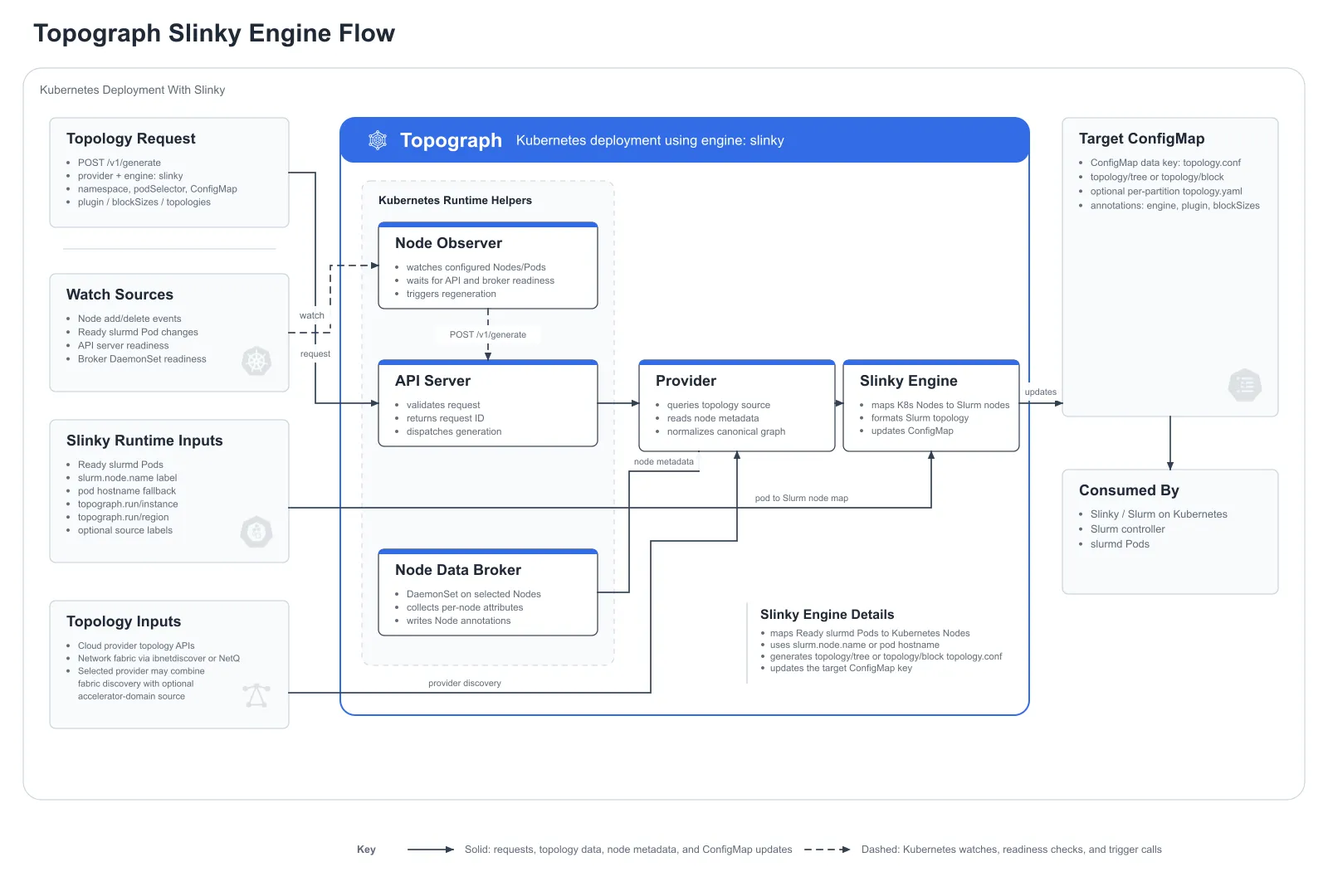
The slinky engine is Topograph’s engine for SLURM clusters running on Kubernetes. It is designed to work with the Slinky project - an open-source set of integration tools by SchedMD that brings SLURM capabilities into Kubernetes environments.
While the Slinky project provides comprehensive SLURM-on-Kubernetes orchestration (operators, schedulers, exporters, etc.), Topograph’s slinky engine complements this ecosystem by providing topology discovery and configuration management for SLURM clusters running in Kubernetes.
The Slinky engine bridges the gap between Kubernetes infrastructure and SLURM workload management by updating SLURM topology configurations stored in Kubernetes ConfigMaps.
How It Works
- Node Discovery: Queries Kubernetes nodes and SLURM pods to build a topology map
- Topology Generation: Creates SLURM topology configuration (tree or block format)
- ConfigMap Management: Updates the specified ConfigMap with new topology data including metadata annotations for tracking and debugging
Configuration
Topograph is deployed as a standard Kubernetes application using a Helm chart.
Topograph is configured using a configuration file stored in a ConfigMap and mounted to the Topograph container at /etc/topograph/topograph-config.yaml.
In addition, when sending a topology request, the request payload includes additional parameters.
The provider and engine are defined as top-level Helm values, as shown below:
Shared with the Kubernetes engine: because the Topograph API server runs as a Kubernetes workload regardless of the engine, anything about the chart’s deployment surface — values-schema validation,
helm testhooks, access patterns (ClusterIP port-forward, Ingress, Gateway APIHTTPRoute), PrometheusServiceMonitor,NetworkPolicyguidance, and the chart’sREADME.md— is shared with the Kubernetes engine and documented authoritatively inengines/k8s.mdandengines/k8s.md#exposing-the-topograph-api. Those sections apply equally to Slinky deployments.
When blockSizes is omitted for topology/block, the Slinky engine uses the
same automatic block-size inference
as the SLURM engine.
Per-partition topologies
When per-partition topologies are configured, each entry may declare how its node membership is resolved:
nodes and podSelector are mutually exclusive on the same entry; configuring both returns a validation error at engine load time.
blockName.nodeNameRegexp uses Go regular-expression syntax and may match anywhere in the node name; use anchors when needed. blockName.format uses Go regexp expansion syntax, including numeric captures such as ${1} and named captures such as ${domain}. Every node in a non-empty block must match and produce the same non-empty name, and names must be unique across blocks. Invalid expressions are rejected at config-parse time. At generation time, unmatched nodes and inconsistent names within a block are not fatal: that block is skipped and logged as a warning, and the rest of the topology is generated normally. Duplicate names across different blocks are still rejected, since it’s ambiguous which block is misconfigured. Empty complemented blocks retain their generated names.
Config update mode
configUpdateMode controls how much the generated ConfigMap changes between
topology requests, which in turn controls how often SLURM reconfigures:
For topology/block, skeleton-only output keeps every BlockName entry but
drops the Nodes= list, since block topology has no hierarchy below a block.
For topology/tree, skeleton-only output keeps only the top-level (root)
switches, each declared by name alone — omitting intermediate and leaf
switches entirely, not just their node lists, and omitting the top-level
switch’s own child-switch list too. This relies on Slurm’s dynamic topology
support to populate everything below the root without a reconfigure, so a
change anywhere below the top level (for example dynamic leaf/spine
reassignment, or adding/removing an intermediate switch) no longer touches the
ConfigMap. When the provider also configures trimTiers, “top-level” means
the highest surviving tier after trim-tiers has already clipped the fabric
path — not necessarily the physical root of the discovered fabric.
Using an existing Node label for block topology
Set acceleratorDomainSourceLabel when another component already publishes the
desired accelerator domain as a Kubernetes Node label. For topology/block,
the Slinky engine uses that label instead of accelerator domains returned by
the provider. There is no default source label, and existing labels receive no
special treatment when the parameter is omitted.
The option only affects block topology. Tree topology still comes from the selected provider, and the engine still maps Kubernetes nodes to Slurm nodes through the configured slurmd pod selector.
Nodes without the configured label retain the existing label-backed behavior:
they are skipped rather than falling back individually to provider domains. If
no usable domains can be built from the configured label and instance ID source,
topology generation fails with an actionable 502 error
that reports the configured key and why nodes were skipped. Replacing provider
domains also suppresses provider accelerator sub-domains.
The instance ID source defaults to the topograph.run/instance annotation.
Configure both instance ID and region sources through
nodeMetadata to reuse existing
node labels or annotations.
For example, an operator may explicitly select
nvidia.com/gpu.clique, but the Slinky engine no longer assumes that key.
Kubernetes API rate limiting
The Slinky engine uses client-go’s default Kubernetes client limits of 5 QPS and a burst of 10 unless deployment-level limits are configured. Dynamic-node reconciliation compares each desired topology annotation with the Node objects returned by the cluster-wide list, skips nodes that are already current, and patches only changed annotations. This avoids a separate Node GET for every node during steady-state reconciliation.
Large reconciliations that legitimately change many nodes can still exceed the default client-side limit. Increase the limits conservatively and monitor API server latency and throttling:
The chart exposes these values as KUBE_QPS and KUBE_BURST to the DRA
provider and the Kubernetes, NFD, and Slinky engines. Outside Helm, set those
environment variables on the Topograph process. Kubernetes client limits are
deployment settings and cannot be overridden by a topology request. Increasing
the limits reduces client-side waiting but does not reduce API-server load;
narrow nodeSelector and podSelector values remain the preferred first
mitigation.
ConfigMap Annotations
Slinky automatically adds metadata annotations to managed ConfigMaps for improved observability:
Annotation Reference
Usage Examples
Topograph runs autonomously in Kubernetes environments, including Slinky. When the Node Observer detects a selected node or pod change, or sees the Topograph API server become ready after startup or a container restart, it sends topology requests to the API server. The API server then triggers an update to the network topology information within the cluster. However, if you want to manually trigger network topology discovery, you can send HTTP requests to the API server, as shown below.