Validating ISL/OSL distributions with the mock server

View as Markdown

The in-repo mock server records the token length of every request it receives. Use this to verify that aiperf is generating prompts at the ISL and OSL you configured — and to compare distributions against other benchmarking tools such as vllm bench serve or sglang bench_serving.

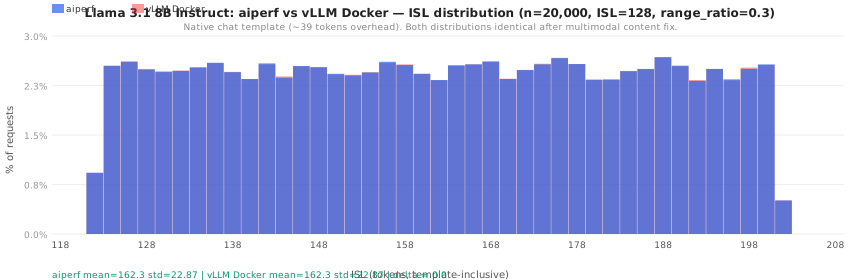
The histograms below show what a correctly-matched comparison looks like — aiperf and vLLM Docker producing identical ISL distributions for the same seed and parameters. Blue = aiperf, red = vLLM Docker; overlapping bars appear purple.
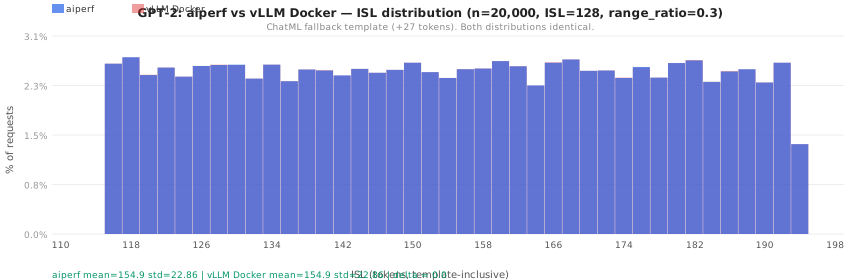
GPT-2 ISL distribution — aiperf vs vLLM Docker

Llama 3.1 8B Instruct ISL distribution — aiperf vs vLLM Docker

An interactive version with additional tokenizer comparisons is available in isl-distribution-examples.html.

Quick start

$# 1. Start the mock server with a tokenizer and a recording file
$aiperf-mock-server \
> --port 18000 \
> --tokenizer gpt2 \
> --default-model my-model \
> --record-requests /tmp/recording.jsonl
$
$# 2. Run your benchmark against it
$aiperf profile \
> --url http://localhost:18000 \
> --model-names my-model \
> --tokenizer gpt2 \
> --prompt-corpus random \
> --random-range-ratio 0.3 \
> --random-corpus-style vllm \
> --prompt-input-tokens-mean 128 \
> --prompt-output-tokens-mean 128 \
> --concurrency 10 \
> --conversation-num 5000 \
> --random-seed 0

When the benchmark finishes the mock server writes two files:

FileContents
recording.jsonlOne JSON line per request: isl, requested_osl, tokenization_mode, and OSL-shaping fields
recording.jsonl.summary.jsonPer-endpoint statistics: ISL/OSL histograms, vocab distribution, unique-value counts

Recording JSONL schema

Each line is a self-contained record:

1{
2 "ts": 1785526379.59,
3 "request_id": "chatcmpl-6348ad24-…",
4 "endpoint": "/v1/chat/completions",
5 "model": "my-model",
6 "isl": 148,
7 "requested_osl": 133,
8 "max_tokens": null,
9 "max_completion_tokens": 133,
10 "min_tokens": null,
11 "ignore_eos": true,
12 "stream": true,
13 "tokenization_mode": "chat_template"
14}

isl is the template-inclusive input token count — the full tokenized representation the server receives, including any chat template markup. For PromptCorpus.RANDOM without --apply-chat-template the isl value matches the configured --prompt-input-tokens-mean target directly.

tokenization_mode indicates how ISL was measured:

ModeMeaning
chat_templateapply_chat_template called; full template overhead included
chat_template_fallbackNo native template; ChatML fallback applied (+27 tokens for GPT-2)
prompt_token_idsRequest carried pre-tokenized prompt_token_ids; used directly
tokenizer_callCompletion endpoint; raw text encoded directly

Inspecting the distribution

1import json, statistics, collections
2
3isls = [json.loads(l)["isl"] for l in open("/tmp/recording.jsonl")]
4s = sorted(isls)
5n = len(s)
6
7print(f"n={n}")
8print(f"min={s[0]}, p5={s[n//20]}, mean={statistics.mean(isls):.1f}, "
9 f"p95={s[int(n*0.95)]}, max={s[-1]}, std={statistics.stdev(isls):.2f}")

Comparing two recordings

The tools/compare_recordings.py utility produces a self-contained HTML report from any two JSONL recording files:

$python tools/compare_recordings.py \
> --a /tmp/aiperf_recording.jsonl --label-a "aiperf" \
> --b /tmp/vllm_recording.jsonl --label-b "vllm bench serve" \
> --out comparison.html
$open comparison.html

What the report contains

  • Stat cards for ISL and OSL — mean, std, p5/p95, min/max, and delta between the two runs
  • Overlapping histograms for ISL and OSL (2-token bins, blue/red transparent bars so overlapping regions are visually distinct)
  • Tokenization-mode breakdown table — count and percentage for each tokenization_mode value per run
  • Vocabulary top-N diff table — the token IDs with the largest count difference between runs (loaded automatically from the companion .summary.json files if present)

CLI reference

usage: compare_recordings.py --a FILE --b FILE [--label-a LABEL]
[--label-b LABEL] [--out FILE]
--a FILE First recording JSONL (A)
--b FILE Second recording JSONL (B)
--label-a LABEL Display label for file A (default: A)
--label-b LABEL Display label for file B (default: B)
--out FILE Output HTML file (default: comparison.html)

The .summary.json companion file is detected automatically at <recording>.summary.json — no extra flag needed.

Validating against vLLM Docker

Run both tools against separate mock server instances in parallel, then compare the recordings:

$# Mock server for aiperf (port 18000)
$aiperf-mock-server --port 18000 --tokenizer meta-llama/Llama-3.1-8B-Instruct \
> --default-model mock-model \
> --record-requests /tmp/aiperf.jsonl &
$
$# Mock server for vLLM (port 18001)
$aiperf-mock-server --port 18001 --tokenizer meta-llama/Llama-3.1-8B-Instruct \
> --default-model mock-model \
> --record-requests /tmp/vllm.jsonl &
$
$# aiperf run
$aiperf profile --url http://localhost:18000 --model-names mock-model \
> --tokenizer meta-llama/Llama-3.1-8B-Instruct \
> --prompt-corpus random --random-range-ratio 0.3 --random-corpus-style vllm \
> --prompt-input-tokens-mean 128 --prompt-output-tokens-mean 128 \
> --concurrency 10 --conversation-num 20000 --random-seed 0 &
$
$# vLLM Docker run
$docker run --rm --platform linux/arm64 \
> -v ~/.cache/huggingface:/root/.cache/huggingface:ro \
> --entrypoint vllm vllm/vllm-openai-cpu:latest-arm64 \
> bench serve --backend openai-chat \
> --base-url http://host.docker.internal:18001 \
> --endpoint /v1/chat/completions --model mock-model \
> --tokenizer meta-llama/Llama-3.1-8B-Instruct \
> --dataset-name random --random-input-len 128 --random-output-len 128 \
> --random-range-ratio 0.3 --num-prompts 20000 \
> --request-rate inf --max-concurrency 30 \
> --ready-check-timeout-sec 0 --seed 0
$
$# Compare
$python tools/compare_recordings.py \
> --a /tmp/aiperf.jsonl --label-a "aiperf" \
> --b /tmp/vllm.jsonl --label-b "vLLM Docker" \
> --out comparison.html
$open comparison.html

Capturing raw prompts

To capture the exact prompt text sent by a benchmark client — useful for diagnosing content differences between tools — use tools/capture_server.py. It records every request’s messages array byte-for-byte without tokenizing and returns a minimal synthetic streaming response so the client does not error out.

$python tools/capture_server.py \
> --out /tmp/captured.jsonl \
> --port 18000 \
> --host 127.0.0.1 # optional, default

Then point your benchmark client at http://localhost:18000. Each line in the output JSONL contains:

1{
2 "i": 0,
3 "messages": [{"role": "user", "content": "..."}],
4 "model": "mock-model",
5 "max_completion_tokens": 128,
6 "stream": true,
7 "ignore_eos": true
8}

CLI reference

usage: capture_server.py --out FILE [--port PORT] [--host HOST]
--out FILE Output JSONL file — one captured request per line
--port PORT Listen port (default: 18000)
--host HOST Listen host (default: 127.0.0.1)

Diffing captured prompts

After capturing from two tools with the same seed, compare content at the Python level:

1import json
2
3a = [json.loads(l)["messages"][0]["content"]
4 for l in open("/tmp/captured_aiperf.jsonl")]
5b = [json.loads(l)["messages"][0]["content"]
6 for l in open("/tmp/captured_vllm.jsonl")]
7
8# Sort both by content since concurrent sends may arrive out of order
9a.sort(); b.sort()
10
11diffs = [(i, ai, bi) for i, (ai, bi) in enumerate(zip(a, b)) if ai != bi]
12print(f"{len(diffs)} / {min(len(a), len(b))} prompts differ")
13for i, ai, bi in diffs[:3]:
14 pos = next((j for j in range(min(len(ai),len(bi))) if ai[j]!=bi[j]), None)
15 print(f" [{i}] first diff at char {pos}")

Note that with --max-concurrency > 1 requests arrive at the capture server out of order. Sort by content (not by the sequential "i" field) before comparing, or use --max-concurrency 1 to force serial delivery.

Notes on template-inclusive ISL

The mock server applies the tokenizer’s chat template before measuring ISL when a native template is available. This means the recorded ISL includes template overhead (role markers, system prompt, generation prompt suffix) on top of the prompt content. For a model like Llama 3.1 8B Instruct the template adds approximately 35 tokens per request.

Clients that send message content as a multimodal list [{"type":"text","text":"..."}] rather than a plain string — including vllm bench serve --backend openai-chat — are handled transparently: the mock server normalises list content via _content_to_text before passing to apply_chat_template, so ISL measurement is consistent regardless of how the client formats the content field.