

CMDaemon REST API
Some data from CMDaemon can be accessed via its REST API.
The REST API typically allows data only to be retrieved for most calls. Exceptions are:
-
the
Statuscall, which can generate status notifications (section 4.2.1), and -
the
Eventcall, which can generate events (section 4.2.9),
and which can take POST input to specify their calls.
4.1 Authentication, And Definition Of curlauth
Two forms of authentication are supported:
-
Basic: HTTP authentication (
--basicoption ofcurl) -
Certificate: Certificate-based authentication (
--certoption ofcurl). Certificate-based authentication is covered in section 6.4.2 of the Administrator Manual.
The following two commands give identical results:
For security, it is best to use the certificate key-based version.
For convenience, the command and authority parts of the preceding two commands —that is the string in the line that includes the text from curl to 8081 in the two curl commands—is designated by <curlauth> in this chapter. Thus, each of the commands can be represented by:
Example
This allows the reader to focus on the path segment and variables part of the API.
4.2 Browsing The API
A summary diagram of the REST API is shown in figure 4.1:
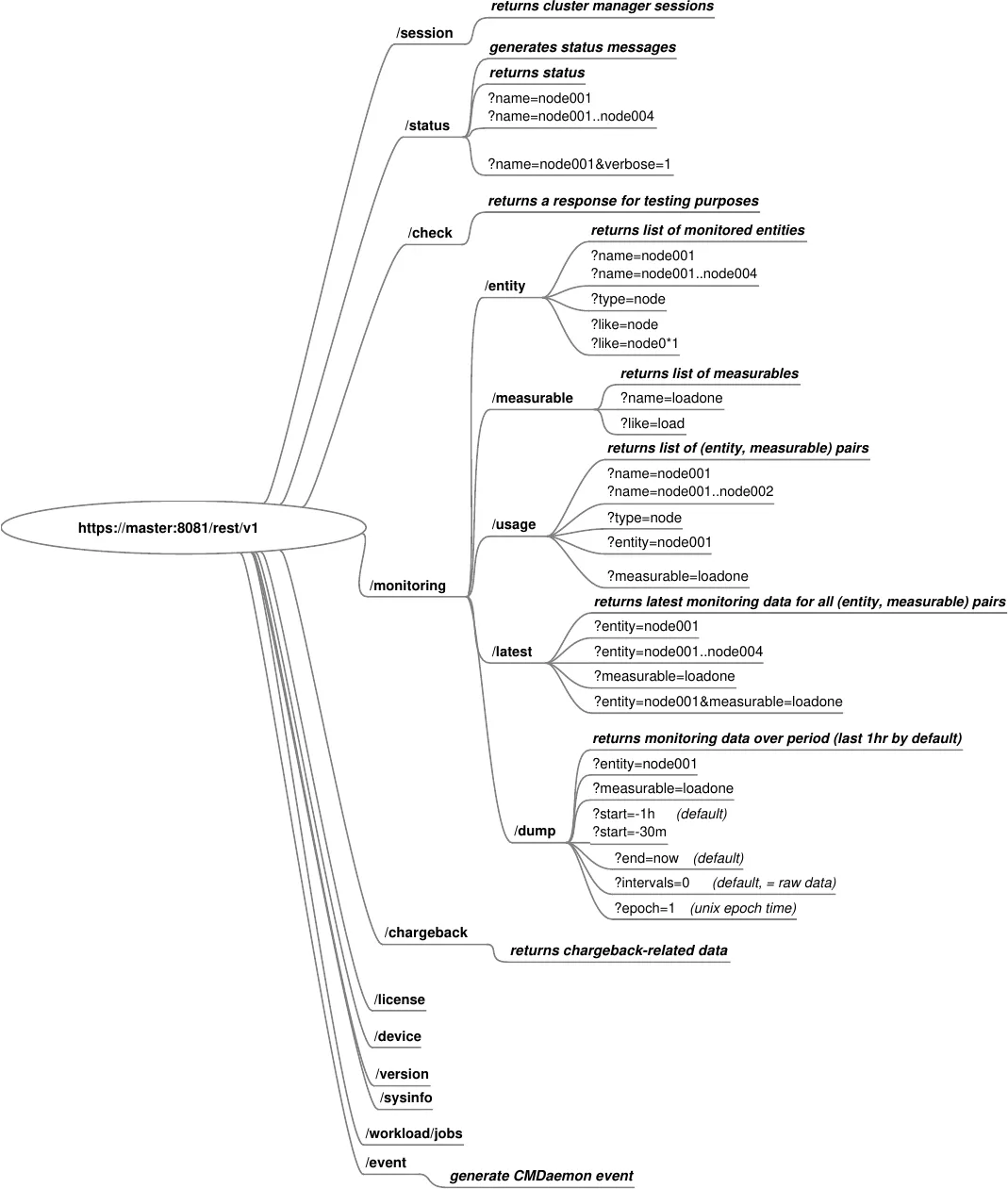
Figure 4.1: REST API summary tree
The remainder of this section elaborates upon the diagram.
The API directory structure is documented within the directory itself.
A GET operation on the main /rest entry point can list all subdirectories:
Example
New lines are not part of the output by default. Setting a parameter of 1, 2, or more, for the indent variable uses newlines and an indentation of one, two, or more spaces. This makes the API output more readable for all API resource paths:
Example
Appending /v1 to the URL gives the functionality available in the first version of the REST API.
Example
Appending /monitoring to the URL lists the subdirectory functionality available for monitoring.
Example
4.2.1 Returning A Status, Or Generating A Status Message, Using /v1/status
4.2.1.1 Returning A Status Using /v1/status
The status resource path returns the UP/DOWN status for all devices:
Example
The status can also be requested for a single device:
Example
The “two dots” list specification format (section 2.5.5.10 of the Administrator Manual) used in Base View and cmsh can also be used in the API:
Example
For more detailed information, the verbose parameter can be added (output truncated):
Example
4.2.1.2 Generating A Status Message Using /v1/status
A message can be associated with the status. An input can be as in the following rest.in file:
Example
The usual curl authentication string used so far, <curlauth> (section 4.1) is slightly modified from its value of:
to
This modified version allows POST data to be entered. The modified version can be called <curlauthpost>, and can be used as follows, returning a vector with the components having an integer value of 0, up to 3:
Example
The dimension of the vector is in the current example is 2, and corresponds to the number of hostnames. Thus, the first component is associated with the hostname node001, and the second component is associated with hostname node002.
The value of each component returns the number of fields in the POST file that were modified by the API call. The fields that are evaluated are the optional fields user, info, and tool.
The event is logged in the event logger, by default at /var/spool/cmd/events.log, as:
Example
An entry is also made in /var/log/cmdaemon:
Example
With the default settings of cmsh, a window running cmsh shows:
Example
Messaging via the REST API is somewhat similar to the event bucket InfoMessages feature (section 12.10.4 of the Administrator Manual) but developers should find the REST API version cleaner.
4.2.2 Monitoring Using /v1/monitoring
4.2.2.1 Entities Via /v1/monitoring/entity
The entity resource returns information about the entities that are known to the monitoring system. It is possible for an entity known to the monitoring system to have no data.
Example
A regex matcher can be used to find entities based on a name match:
Example
Regexes are based on the ECMAScript specification (https://en.cppreference.com/w/cpp/regex/ecmascript).
4.2.2.2 Measurables Via /v1/monitoring/measurable
This entry returns information about the defined measurables.
Example
4.2.2.3 Data Usage Via /v1/monitoring/usage
The usage resource is intended to show which (entity, measurable) pairs have data. For example, nodes with only 1 disk do not have data, if their associated measurables have the string sdb in their name.
To get the complete usage:
Example
It is also possible to get all the measurables for which a specific entity, such as node001, has data.
Example
Or all entities which have data for a specific measurable such as loadone:
Example
4.2.2.4 The Latest Monitoring Data Via /v1/monitoring/latest
The latest resource can be used to retrieve the last known sampled data points.
It is possible to get the latest monitoring data for all (entity, measurable) pairs.
This may result in a lot of information: about 125 bytes per (entity, measurable) pair.
Example
The latest data can be requested for a selection of entities and measurables.
Example
4.2.2.5 Historic Data Dump Via /v1/monitoring/dump
Dumping historic data can be done using the entry point:
Example
The dump resource has several options:
-
entity: name or range of entities -
measurable: name of the measurable -
start: time to be plotted (default:-1h) -
end: end to be plotted (default:now) -
intervals: number of interpolation intervals (default:0, raw data) -
epoch: display timestamps as unix epoch (default:0)
The time specification format is the same one used for the dumpmonitoringdata command (section 12.6.4.1 of the Administrator Manual).
To prevent gigabytes of data being retrieved when no options are specified, entity and measurable must be specified.
If there is a need to dump all the monitoring data, then it can be done by specifying empty strings for both entity and measurable. For example, the following command dumps all raw data for the default last hour:
Example
4.2.3 Session Using /v1/session
The response to the sessions endpoint is similar to the output from listing in session mode of cmsh (cmsh -c "session list")
The endpoint lists the sessions that the cluster manager is involved with.
Example
4.2.4 Version Using /v1/version
The version endpoint returns version parameters.
4.2.5 License Using /v1/license
The license endpoint returns license parameters.
Example
4.2.6 Sysinfo Using /v1/sysinfo
The sysinfo endpoint is similar to the sysinfo command in the device mode of cmsh. It returns information about some basic system hardware parameters.
Example
4.2.7 Device Information Using /v1/device
Example
4.2.8 WLM Information Using /v1/workload
The workkoad path has the following endpoints:
-
jobs -
drain
These return information related to the endpoints.
The workload jobs path returns running jobs:
Example
The workload drain path returns node drain status information:
Example
4.2.9 Event Generation Using /v1/event
An event (section 12.10 of the Administrator Manual) can be generated in CMDaemon from a JSON format input used with the event endpoint.
An input can be as in the following rest.in file:
Example
The usual curl authentication string used so far, <curlauth> (section 4.1) is slightly modified from its value of:
to
This modified version allows POST data to be entered. The modified version can be called <curlauthpost>, and can be used as follows, returning true:
Example
The event is logged in the event logger, by default at /var/spool/cmd/events.log, as:
Example
With the default settings of cmsh, a window running cmsh shows:
Example
and, if as suggested, events details 1 is typed, the value of details from the input is seen: