Skip to navigation

CMDaemon REST API

View as Markdown

Some data from CMDaemon can be accessed via its REST API.

The REST API typically allows data only to be retrieved for most /rest/v1 calls. Exceptions include:

  • the Status call, which can generate status notifications (section 4.2.1),

  • the Event call, which can generate events (section 4.2.9),

  • the workload/topology endpoint, which can accept POST to update the topology

  • the mlxconfig endpoint, which can accept PATCH to update

  • power actions under /rest/v1/power, and

  • the /rest/v2/entities API, which provides create, read, update, and delete for CMDaemon entities (section 4.3).

4.1 Authentication, And Definition Of curlauth

Two forms of authentication are supported:

  • Basic: HTTP authentication (--basic option of curl)

  • Certificate: Certificate-based authentication (--cert option of curl). Certificate-based authentication is covered in section 6.5.2 of the Administrator Manual.

The following two commands give identical results:

[alice@basecm11 ~]$ curl -k --basic --user "alice:password" "https://master:8081/rest"
[alice@basecm11 ~]$ curl --cert ~/.cm/cert.pem --key ~/.cm/cert.key -k "https://master:8081/rest"

For security, it is best to use the certificate key-based version.

For convenience, the command and authority parts of the preceding two commands —that is the string in the line that includes the text from curl to 8081 in the two curl commands—is designated by <curlauth> in this chapter. Thus, each of the commands can be represented by:

Example

[alice@basecm11 ~]$ <curlauth>/rest"

This allows the reader to focus on the path segment and variables part of the API.

4.2 REST v1 API (/rest/v1)

An interactive API explorer using Swagger (https://swagger.io/product/) is available at https://master:8081/api/rest/swagger/ and covers both v1 and v2 endpoints (figure 4.1):
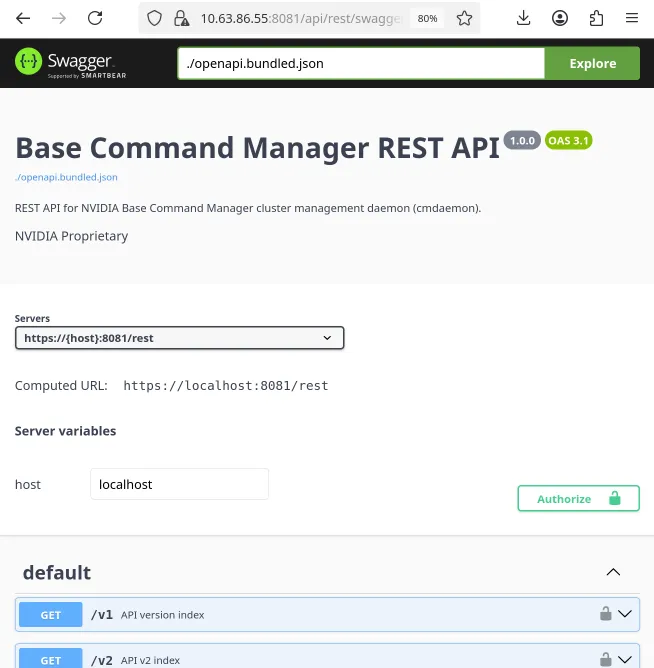
The Swagger OpenAPI explorer at https://master:8081/api/rest/swagger/

Figure 4.1: The Swagger OpenAPI explorer at https://master:8081/api/rest/swagger/

The remainder of this section documents the v1 endpoints (/rest/v1). The v2 entity API (/rest/v2/entities), which supports full create, read, update, and delete, is described in section 4.3.

The following is a tree diagram of the v1 API endpoints, along with some key=value examples:

https://master:8081/rest/v1 ---------- returns endpoints
|
|-- /session (section 4.2.3) --------- returns cluster manager sessions
|
|-- /status (section 4.2.1) ---------- returns status
| |-- ?name=node001
| |-- ?name=node001..node004
| |-- ?name=node001&verbose=1
| `-- /wait (Waiting For A Status Using…) -- waits for a status
|
|--/check ---------------------------- returns a response for testing purposes
|
|--/power ---------------------------- returns endpoints
| |
| |--/status (Status Using /v1/power/status) ----------- returns the status of the devices
| | |-- ?name=node001
| | |-- ?name=node001..node004
| | |-- ?type=node
| | |-- ?like=node
| | `-- ?like=node0*1
| |
| |--/status/<device> (Power Action Using…) ---- returns the status of the device
| |
| |--/on/<device> (Power Action Using…) -------- POSTs the power on action for the device
| |
| |--/off/<device> (Power Action Using…) ------- POSTs the power off action for the device
| |
| |--/reset/<device> (Power Action Using…) ----- POSTs the power reset action for the device
| |
| `--/auxcycle/<device> (Power Action Using…) -- POSTs the power auxcycle action for the device
|
|--/monitoring ----------------------- returns endpoints
| |
| |--/entity (Entities Via /v1/monitoring/entity) ----------- returns a list of monitored entities
| | |-- ?name=node001
| | |-- ?name=node001..node004
| | |-- ?type=node
| | |-- ?like=node
| | `-- ?like=node0*1
| |
| |-- /measurable (Measurables Via…) ------ returns a list of measurables
| | |---?name=loadone
| | `---?like=load
| |
| |-- /usage (Data Usage Via /v1/monitoring/usage) ----------- returns a list of (entity, measurable) pairs
| | |-- ?name=node001
| | |-- ?name=node001..node002
| | |-- ?type=node
| | |-- ?entity=node001
| | `-- ?measurable=node001
| |
| |-- /latest (The Latest Monitoring Data Via…) ---------- returns a dump of the latest monitoring data
| | |-- ?entity=node001
| | |-- ?entity=node001..node004
| | |-- ?measurable=loadone
| | `-- ?entity=node001&measurable=loadone
| |
| |-- /dump (Historic Data Dump Via…) ------------ returns monitoring data over period (last 1 hour by default)
| | |-- ?entity=node001
| | |-- ?measurable=loadone
| | |-- ?start=-1h (default)
| | |-- ?start=-30m
| | |-- ?end=now
| | |-- ?intervals=0
| | `-- ?epoch=1 (unix epoch time)
| |
| `-- /enum-values (Enumeration Values Via…) - returns enum value mappings
|
|--/chargeback (section 4.2.10) ------ returns chargeback-related data
| |-- ?group_by=user,account
| `-- ?users=joe,fred
|
|--/license (section 4.2.5) ---------- returns license parameters
|
|--/device (section 4.2.7)------------ returns device parameters
| |-- ?type=HeadNode
| `-- ?type=PhysicalNode
|
|--/version (section 4.2.4) ---------- returns version information parameters
|
|--/sysinfo (section 4.2.6) ---------- returns sysinfo parameters
|
|--/workload (section 4.2.8) --------- returns endpoints
| |-- /job ----------- returns running jobs
| | |-- ?user=alice
| | |-- ?user=student
| | |-- ?name=hpl
| | |-- ?account=math
| | |-- ?id=1|2|3|4
| | |-- ?array_id=5
| | |-- ?epoch=yes
| | |-- ?wlm=yes
| | |-- ?queue=no
| | |-- ?node=node001
| | `-- ?nodes=node001..node100
| |
| |-- /drain --------- returns drain status
| |-- /job-status ---- returns status of jobs
| |-- /node-status --- returns status of nodes
| |-- /queue-status -- returns status of queues
| `-- /topology ------ returns topology config (GET),
| updates topology (POST)
|
|--/firmware (section 4.2.17) -------- returns firmware information
| |-- ?name=node001
| |-- ?name=node001..node004
| |-- ?type=node
| |-- ?like=node
| `-- ?like=node0*1
|
|--/event (section 4.2.9) ------------ generates a CMDaemon event
|
|--/category (section 4.2.11) -------- returns categories and images
|
|--/network (section 4.2.12) --------- returns endpoints
| |-- /topology -------- returns topology attributes
| |-- /vxlan-topology -- returns VXLAN topology (12.0+)
| |-- /nvdomain -------- returns NVLink domain attributes
| |-- /nvplatform ------ returns GPU platform info
| |-- /ips ------------- returns interface IPs
| `-- /ipam ------------ returns IP pool usage
|
|--/rack (section 4.2.13) ---------------------------------- returns rack-related information
|
|--/freeport (section 4.2.14) ------------------------------ returns free ports
|
|--/lldp (section 4.2.15) ----------------------------------- returns LLDP status information
|
|--/ndp (section 4.2.31) ------------------------------------ returns NDP status information (12.0+)
|
|--/superpod (section 4.2.18) ------------------------------- returns SuperPod information (12.0+)
|
|--/gpu-info (section 4.2.19) ------------------------------- returns GPU inventory
|
|--/bmc-info (section 4.2.20) ------------------------------- returns BMC settings
|
|--/lspci (section 4.2.21) ---------------------------------- returns PCI devices
|
|--/lshw (section 4.2.22) ----------------------------------- returns the hardware tree
|
|--/dmidecode (section 4.2.23) ------------------------------ returns SMBIOS/DMI data
|
|--/vpd (section 4.2.24) ------------------------------------ returns PCI vital product data
|
|--/nvidia-smi (section 4.2.25) ----------------------------- returns GPU state
|
|--/diskpartitioninfo (section 4.2.26) ---------------------- returns disk partitions
|
|--/interface_eeprom (section 4.2.27) ----------------------- returns transceiver EEPROM
|
|--/ipaddress (section 4.2.28) ------------------------------ returns interface IP configuration
|
|--/route (section 4.2.29) ---------------------------------- returns the routing table
|
|--/networkconnection (section 4.2.30) ---------------------- returns active connections
|
|--/ibinfo (section 4.2.32) --------------------------------- returns InfiniBand diagnostics
|
|--/infinibandguid (section 4.2.33) ------------------------- returns InfiniBand GUIDs
|
|--/mlxconfig (section 4.2.34) ------------------------------ returns Mellanox mlxconfig settings (GET)
| configures a particular field on a node (PATCH)
|
|--/systemctl (section 4.2.35) ------------------------------ returns systemd units
|
|--/journalctl (section 4.2.36) ----------------------------- returns systemd journal entries
|
|--/imexctl (section 4.2.37) -------------------------------- returns NVIDIA IMEX status
|
|--/package (section 4.2.38) -------------------------------- returns installed packages
|
`--/releases (section 4.2.39) ------------------------------- returns available BCM releases

Subsections 4.2.1 and onward elaborate upon the endpoints.

Some notes about the API tree:

The API directory structure is documented within the directory itself.

A GET operation on the main /rest/v1 entry point can list all subdirectories:

Example

[alice@basecm11 ~]$ <curlauth>/rest/v1" 2>/dev/null | python -mjson.tool
[
"monitoring",
"chargeback",
"firmware",
"status",
"session",
"check",
"version",
"license",
"sysinfo",
"category",
"network",
"device",
"rack",
"superpod",
"newdevice",
"workload",
"freeport",
"power",
"event",
"lldp",
"ndp",
"gpu-info",
"journalctl",
"nvidia-smi",
"dmidecode",
"ibinfo",
"lshw",
"vpd",
"infinibandguid",
"mlxconfig"
]

The list returned by /rest/v1 highlights the most common endpoints, but it is not exhaustive: several endpoints described in this chapter (for example bmc-info, lspci, route, networkconnection, ipaddress, systemctl, package, interface_eeprom, diskpartitioninfo, imexctl, mlxconfig, and releases) are valid even though they are not advertised in this listing.

Some pipes are used in the output to the preceding to make it prettier, especially because new lines are not part of the output by default. Setting a parameter of 1, 2, or more, for the indent variable uses newlines and an indentation of one, two, or more spaces. This makes the v1 API output more readable for all API resource paths:

Example

[alice@basecm11 ~]$ <curlauth>/rest/v1?indent=1"
[
"monitoring",
"chargeback",
...

Appending /monitoring to the URL lists the subdirectory functionality available for monitoring.

Example

[alice@basecm11 ~]$ <curlauth>/rest/v1/monitoring?indent=1"
[
"entity",
"measurable",
"latest",
"dump",
"usage",
"enum-values"
]

4.2.1 Returning A Status, Or Generating A Status Message, Using /v1/status

4.2.1.1 Returning A Status Using /v1/status

The status resource path returns the UP/DOWN status for all devices:

Example

[alice@basecm11 ~]$ <curlauth>/rest/v1/status?indent=2"
[
{
"hostname": "basecm11",
"status": "UP"
},
{
"hostname": "node001",
"status": "UP"
},
{
"hostname": "node002",
"status": "DOWN"
}
]

The status can also be requested for a single device:

Example

[alice@basecm11 ~]$ <curlauth>/rest/v1/status?name=node001&indent=2"
[
{
"hostname": "node001",
"status": "UP"
}
]

The “two dots” list specification format (section 2.5.5.10 of the Administrator Manual) used in Base View and cmsh can also be used in the API:

Example

[alice@basecm11 ~]$ <curlauth>/rest/v1/status?name=node001..node002&indent=2"
[
{
"hostname": "node001",
"status": "UP"
},
{
"hostname": "node002",
"status": "DOWN"
}
]

For more detailed information, the verbose parameter can be added (output truncated):

Example

[alice@basecm11 ~]$ <curlauth>/rest/v1/status?verbose=1&indent=2"
[
{
"health_check_failed": true,
"health_check_unknown": false,
"hostname": "basecm11",
"provisioning_failed": false,
"restart_required": false,
"status": "UP"
},
{
"health_check_failed": true,
"health_check_unknown": false,
"hostname": "node001",
"provisioning_failed": false,
...

4.2.1.2 Generating A Status Message Using /v1/status

A message can be associated with the status. An input can be as in the following rest.in file:

Example

[alice@basecm11 ~]$ cat /tmp/rest.in
[
{
"hostname": "node001",
"user": "user message1",
"info": "info message1",
"tool": "tool message1"
},
{
"hostname": "node002",
"user": "user message2",
"info": "info message2",
"tool": "tool message2"
}
]

The usual curl authentication string used so far, <curlauth> (section 4.1) is slightly modified from its value of:

curl --cert ~/.cm/cert.pem --key ~/.cm/cert.key -k "https://master:8081

to

curl --cert ~/.cm/cert.pem --key ~/.cm/cert.key -k --data "@/tmp/rest.in" "https://master:8081

This modified version allows POST data to be entered. The modified version can be called <curlauthpost>, and can be used as follows, returning a vector with the components having an integer value of 0, up to 3:

Example

[alice@basecm11 ~]$ <curlauthpost>/rest/v1/status"
[
0,
3
]

The dimension of the vector here is 2, and corresponds to the number of hostnames. Thus, the first component is associated with the hostname node001, and the second component is associated with hostname node002.

The value of each component returns the number of fields in the POST file that were modified by the API call. The fields that are evaluated are the optional fields user, info, and tool.

The event is logged in the event logger, by default at /var/spool/cmd/events.log. Each line contains the timestamp, the CMDaemon PID in brackets, the severity in brackets, and the event body:

Example

Mon Jun 17 18:15:50 2024 [1234] [notice] basecm11: node001, status: UP, reported: UP, time: 1718113341752,
info message: info node1, user message: user node1, tool message: tool node1 (index: 27, display: 1)
Mon Jun 17 18:20:30 2024 [1234] [notice] basecm11: node002, status: UP, reported: UP, time: 1718113666566,
info message: info node2, user message: user node2, tool message: tool node2 (index: 28, display: 1)

An entry is also made in /var/log/cmdaemon:

Example

Jun 17 18:51:57 basecm11 cmd[2586]: [ CMD ] Info: [Service::post_v1_status], update node001, changes: 1
Jun 17 18:51:57 basecm11 cmd[2586]: [ CMD ] Info: [Service::post_v1_status], update node002, changes: 1

With the default settings of cmsh, a window running cmsh shows:

Example

[root@basecm11 ~]# cmsh
[basecm11]%
Mon Jun 17 18:51:58 2024 [notice] basecm11: node001 [ UP ] (info node1) (user node1) (tool node1)
Mon Jun 17 18:51:58 2024 [notice] basecm11: node002 [ UP ] (info node2) (user node2) (tool node2)

Messaging via the REST API is somewhat similar to the event bucket InfoMessages feature (section 10.10.4 of the Administrator Manual) but developers should find the REST API version cleaner.

4.2.1.3 Waiting For A Status Using /v1/status/wait

The status/wait endpoint blocks until the selected devices reach a target status, or until a timeout expires. It is intended for automation workflows that must wait for a cluster state change, such as waiting for nodes to come back UP after a reboot.

Settings are:

  • state: The target status is set with the state parameter (default UP)

  • timeout: The maximum wait is set with timeout (seconds, default 3600, capped at 24 hours)

  • delay: The polling interval is set with delay (seconds, default 5).

Devices are selected with the usual name, like, and type parameters.

Example

[alice@basecm11 ~]$ <curlauth>/rest/v1/status/wait?state=UP&name=node001&indent=1"
{
"status": [
{
"after": 0,
"hostname": "node001",
"status": "UP"
}
],
"success": true
}

The after field is the number of seconds that elapsed before the device reached the target status. The success field is true only if all selected devices reached the target status before the timeout.

4.2.2 Monitoring Using /v1/monitoring

4.2.2.1 Entities Via /v1/monitoring/entity

The entity resource returns information about the entities that are known to the monitoring system. It is possible for an entity known to the monitoring system to have no data.

Example

[alice@basecm11 ~]$ <curlauth>/rest/v1/monitoring/entity?indent=1"
{
"entities": [
{
"key": 12884901889,
"name": "default",
"type": "Category"
},
{
"key": 17179869185,
"name": "globalnet",
"type": "Network"
},
{
"key": 17179869186,
"name": "internalnet",
"type": "Network"
},
...
[alice@basecm11 ~]$ <curlauth>/rest/v1/monitoring/entity?name=node001&indent=1"
{
"entities": [
{
"key": 38654705666,
"name": "node001",
"type": "PhysicalNode"
}
]
}
[alice@basecm11 ~]$ <curlauth>/rest/v1/monitoring/entity?type=node&indent=1"
{
"entities": [
{
"key": 38654705665,
"name": "basecm11",
"type": "HeadNode"
},
{
"key": 38654705666,
"name": "node001",
"type": "PhysicalNode"
},
{
"key": 38654705667,
"name": "node002",
"type": "PhysicalNode"
}
]
}
[alice@basecm11 ~]$ <curlauth>/rest/v1/monitoring/entity?name=node001..node002&indent=1"
{
"entities": [
{
"key": 38654705666,
"name": "node001",
"type": "PhysicalNode"
},
{
"key": 38654705667,
"name": "node002",
"type": "PhysicalNode"
}
]
}

A regex matcher can be used to find entities based on a name match:

Example

[alice@basecm11 ~]$ <curlauth>/rest/v1/monitoring/entity?like=lobal&indent=1"
{
"entities": [
{
"key": 17179869185,
"name": "globalnet",
"type": "Network"
}
]
}
[alice@basecm11 ~]$ <curlauth>/rest/v1/monitoring/entity?like=nod.0*1&indent=1"
{
"entities": [
{
"key": 38654705666,
"name": "node001",
"type": "PhysicalNode"
}
]
}

Regexes are based on the ECMAScript specification (https://en.cppreference.com/w/cpp/regex/ecmascript).

4.2.2.2 Measurables Via /v1/monitoring/measurable

This entry returns information about the defined measurables.

Example

[alice@basecm11 ~]$ <curlauth>/rest/v1/monitoring/measurable?indent=1"
{
"measurables": [
{
"key": 261993005057,
"name": "IpForwDatagrams",
"type": "metric"
},
{
"key": 261993005058,
"name": "IpFragCreates",
"type": "metric"
},
{
"key": 261993005059,
"name": "IpFragFails",
"type": "metric"
},
...typically hundreds more lines...
[alice@basecm11 ~]$ <curlauth>/rest/v1/monitoring/measurable?name=loadone&indent=1"
{
"measurables": [
{
"key": 261993005138,
"name": "LoadOne",
"type": "metric"
}
]
}
[alice@basecm11 ~]$ <curlauth>/rest/v1/monitoring/measurable?like=load&indent=1"
{
"measurables": [
{
"key": 261993005136,
"name": "LoadFifteen",
"type": "metric"
},
{
"key": 261993005137,
"name": "LoadFive",
"type": "metric"
},
{
"key": 261993005138,
"name": "LoadOne",
"type": "metric"
}
]
}

4.2.2.3 Data Usage Via /v1/monitoring/usage

The usage resource is intended to show which (entity, measurable) pairs have data. For example, nodes with only 1 disk do not have data, if their associated measurables have the string sdb in their name.

To get the complete usage:

Example

[alice@basecm11 ~]$ <curlauth>/rest/v1/monitoring/usage?indent=1"
{
"data": [
{
"entity": "default",
"measurable": "CoresTotal"
},
{
"entity": "default",
"measurable": "CoresUp"
},
...typically hundreds more lines...

It is also possible to get all the measurables for which a specific entity, such as node001, has data.

Example

[alice@basecm11 ~]$ <curlauth>/rest/v1/monitoring/usage?entity=node001&indent=1"
{
"data": [
{
"entity": "node001",
"measurable": "IpForwDatagrams"
},
{
"entity": "node001",
"measurable": "IpFragCreates"
},
{
"entity": "node001",
"measurable": "IpFragFails"
},
...typically hundreds more lines...

Or all entities which have data for a specific measurable such as loadone:

Example

[alice@basecm11 ~]$ <curlauth>/rest/v1/monitoring/usage?measurable=loadone&indent=1"
{
"data": [
{
"entity": "basecm11",
"measurable": "LoadOne"
},
{
"entity": "node001",
"measurable": "LoadOne"
}
]
}

4.2.2.4 The Latest Monitoring Data Via /v1/monitoring/latest

The latest resource can be used to retrieve the last known sampled data points.

It is possible to get the latest monitoring data for all (entity, measurable) pairs.

This may result in a lot of information: about 125 bytes per (entity, measurable) pair.

Example

[alice@basecm11 ~]$ <curlauth>/rest/v1/monitoring/latest?indent=1"
{
"data": [
{
"age": 47.868,
"entity": "default",
"measurable": "CoresTotal",
"raw": 1.0,
"time": 1540476088861,
"value": "1"
},
{
"age": 47.868,
"entity": "default",
"measurable": "CoresUp",
"raw": 1.0,
"time": 1540476088861,
"value": "1"
},
{
"age": 47.868,
"entity": "default",
"measurable": "NodesClosed",
"raw": 0.0,
"time": 1540476088861,
"value": "0"
},
{
"age": 47.868,
"entity": "default",
"measurable": "NodesDown",
"raw": 0.0,
"time": 1540476088861,
"value": "0"
},
...typically thousands more lines...

The latest data can be requested for a selection of entities and measurables.

Example

[alice@basecm11 ~]$ <curlauth>/rest/v1/monitoring/latest?entity=node001&indent=1"
{
"data": [
{
"age": 138.625,
"entity": "node001",
"measurable": "IpForwDatagrams",
"raw": 0.0,
"time": 1540476100389,
"value": "0/s"
},
{
"age": 138.625,
"entity": "node001",
"measurable": "IpFragCreates",
"raw": 0.0,
"time": 1540476100389,
"value": "0/s"
},
{
"age": 138.625,
"entity": "node001",
"measurable": "IpFragFails",
"raw": 0.0,
"time": 1540476100389,
"value": "0/s"
},
...typically hundreds more lines...
[alice@basecm11 ~]$ <curlauth>/rest/v1/monitoring/latest?entity=node001..node004&indent=1"
...as for previous output but for the range of nodes001..node004...
[alice@basecm11 ~]$ <curlauth>/rest/v1/monitoring/latest?measurable=LoadOne&indent=1"
{
"data": [
{
"age": 114.099,
"entity": "basecm11",
"measurable": "LoadOne",
"raw": 0.03,
"time": 1540476351361,
"value": "0.03"
},
{
"age": 155.07,
"entity": "node001",
"measurable": "LoadOne",
"raw": 0.0,
"time": 1540476310390,
"value": "0"
}
]
}
[alice@basecm11 ~]$ <curlauth>/rest/v1/monitoring/latest?entity=node001&measurable=LoadOne&indent=1"
{
"data": [
{
"age": 106.706,
"entity": "node001",
"measurable": "LoadOne",
"raw": 0.0,
"time": 1540476790390,
"value": "0"
}
]
}

4.2.2.5 Historic Data Dump Via /v1/monitoring/dump

Dumping historic data can be done using the entry point:

Example

[alice@basecm11 ~]$ <curlauth>/rest/v1/monitoring/dump?<options>"

The dump resource has several options:

  • entity: name or range of entities

  • measurable: name of the measurable

  • start: time to be plotted (default: -1h)

  • end: end to be plotted (default: now)

  • intervals: number of interpolation intervals (default: 0, raw data)

  • epoch: display timestamps as unix epoch (default: 0)

The time specification format is the same one used for the dumpmonitoringdata command (section 10.6.4.1 of the Administrator Manual).

To prevent gigabytes of data being retrieved when no options are specified, entity and measurable must be specified.

If there is a need to dump all the monitoring data, then it can be done by specifying empty strings for both entity and measurable. For example, the following command dumps all raw data for the default last hour:

Example

[alice@basecm11 ~]$ <curlauth>/rest/v1/monitoring/dump?entity=&measurable=&indent=1"
{
"data": [
{
"entity": "default",
"measurable": "CoresTotal",
"raw": 1.0,
"time": "2018/10/25 13:15:28",
"value": "1"
},
{
"entity": "default",
"measurable": "CoresTotal",
"raw": 1.0,
"time": "2018/10/25 16:35:28",
"value": "1"
},
{
"entity": "default",
"measurable": "CoresUp",
"raw": 1.0,
"time": "2018/10/25 13:49:28",
"value": "1"
},
...typically thousands more lines...

4.2.2.6 Enumeration Values Via /v1/monitoring/enum-values

Some monitoring measurables are enumerations: they sample an integer that stands for a categorical state. The enum-values resource returns the mapping from those integers to their human-readable labels, so that raw samples can be interpreted.

Example

[alice@basecm11 ~]$ <curlauth>/rest/v1/monitoring/enum-values?indent=1"
[
{
"enum": {
"0": "up",
"1": "down",
"2": "pending",
"3": "installing",
...
"10": "undefined"
},
"name": "DeviceStatus",
"parameter": "",
"prometheus": "devicestatus"
},
...
]

For each enumeration, name is the measurable name, enum maps each integer value to its label, and prometheus is the corresponding Prometheus metric name.

4.2.3 Session Using /v1/session

The response to the sessions endpoint is similar to the output from listing in session mode of cmsh (cmsh -c "session list")

The endpoint lists the sessions that the cluster manager is involved with.

Example

[alice@basecm11 ~]$ <curlauth>/rest/v1/session?indent=1"
[
{
"address": "127.0.0.1",
"group": "admin",
"node": "basecm11",
"type": "node",
"username": ""
},
{
"address": "10.141.255.254",
"group": "admin",
"type": "node",
"username": ""
},
{
"address": "10.141.0.1",
"group": "node",
"node": "node001",
"type": "node",
"username": ""
},
{
"address": "10.141.0.2",
"group": "node",
"node": "node002",
"type": "node",
"username": ""
}

4.2.4 Version Using /v1/version

The version endpoint returns version parameters.

[alice@basecm11 ~]$ <curlauth>/rest/v1/version?indent=1"
{
"build_hash": "82719b47af",
"build_index": 163129,
"cm_version": "11.0",
"cmd_version": "3.1",
"database_version": 36372
}

4.2.5 License Using /v1/license

The license endpoint returns license parameters.

Example

[alice@basecm11 ~]$ <curlauth>/rest/v1/license?indent=1"
{
"acceleratorNodeCount": 0,
"accountingAndReporting": true,
"baseType": "LicenseInfo",
"burstNodeCount": 0,
"childType": "",
"edgeSites": true,
"edition": "Advanced",
"endTime": 2177449140,
"licenseType": "Commercial",
"licensedAcceleratorNodes": 80,
"licensedBurstNodes": 1000,
"licensedNodes": 100,
"licensee": "/C=US/ST=None/L=None/O=None/OU=None/CN=basecm11",
"macAddress": "FA:16:3E:3B:94:98",
"message": "",
"modified": false,
"nodeCount": 3,
"oldLocalUniqueKey": 0,
"refPartitionUniqueKey": 21474836481,
"revision": "",
"serial": 1017214,
"startTime": 1508108400,
"toBeRemoved": false,
"uniqueKey": 281474976710653,
"version": "7.0 and above"
}

4.2.6 Sysinfo Using /v1/sysinfo

The sysinfo endpoint is similar to the sysinfo command in the device mode of cmsh. It returns information about some basic system hardware parameters.

Example

[alice@basecm11 ~]$ <curlauth>/rest/v1/sysinfo?indent=1"
{
"node001": {
"baseType": "SysInfoCollector",
"biosDate": "04/01/2014",
"biosVendor": "SeaBIOS",
"biosVersion": "1.13.0-1ubuntu1.1",
"bootIf": "ens3",
"childType": "",
"clusterRandomNumber": 6332472641088672013,
"diskCount": 2,
"diskTotalSpace": 10745806848,
"disks": [
{
"baseType": "DiskInfo",
"childType": "",
"ioScheduler": "[mq-deadline] kyber bfq none",
"model": "virtio",
"modified": false,
"name": "vda",
"oldLocalUniqueKey": 0,
"rev": "",
"revision": "",
"size": 8388608,
"toBeRemoved": false,
"uniqueKey": 281474976710948,
"vendor": ""
},
{
"baseType": "DiskInfo",
"childType": "",
"ioScheduler": "[mq-deadline] kyber bfq none",
"model": "virtio",
"modified": false,
"name": "vdb",
"oldLocalUniqueKey": 0,
"rev": "",
"revision": "",
"size": 10737418240,
"toBeRemoved": false,
"uniqueKey": 281474976710949,
"vendor": ""
}
],
"extra": null,
"fabric": false,
"fips": false,
"fpgas": [],
"gpus": [],
"ibGUIDs": [],
"interconnects": [],
"memory": [
{
"IDs": [
"0/0"
],
"baseType": "MemoryInfo",
"childType": "",
"description": "DIMM RAM",
"locations": [
"DIMM 0"
],
"modified": false,
"oldLocalUniqueKey": 0,
"revision": "",
"size": 1073741824,
"speed": 0,
"toBeRemoved": false,
"uniqueKey": 281474976710950
}
],
"memorySwap": 0,
"memoryTotal": 1016152064,
"modified": false,
"motherboardManufacturer": "",
"motherboardName": "",
"nics": [
"ens3"
],
"oldLocalUniqueKey": 0,
"osFlavor": "Rocky8u5",
"osName": "Linux",
"osVersion": "4.18.0-348.el8.0.2.x86_64",
"parentUniqueKey": 85899345921,
"processors": [
{
"IDs": [
0
],
"baseType": "Processor",
"bogomips": 4190.15,
"cacheSize": 16777216,
"childType": "",
"coreIDs": [
0
],
"cores": 1,
"model": "Intel(R) Xeon(R) Silver 4116 CPU @ 2.10GHz",
"modified": false,
"oldLocalUniqueKey": 0,
"physicalIDs": [
0
],
"revision": "",
"speed": 2095078000.0,
"toBeRemoved": false,
"uniqueKey": 281474976710947,
"vendor": "GenuineIntel"
}
],
"raidControllers": [],
"refDeviceUniqueKey": 38654705666,
"revision": "",
"seLinux": false,
"systemManufacturer": "OpenStack Foundation",
"systemName": "OpenStack Nova",
"timestamp": 1651158566,
"toBeRemoved": false,
"uniqueKey": 85899345921,
"updateCount": 5,
"vendorTag": "5bf2a543-542d-4391-946c-abb648a09158",
"virtualCluster": true
},
"node002": {
"baseType": "SysInfoCollector",
"biosDate": "04/01/2014",
...
}

4.2.7 Device Information Using /v1/device

Example

[alice@basecm11 ~]$ <curlauth>/rest/v1/device?indent=1"
[
{
"cluster": "basecm11",
"hostname": "basecm11",
"ip": "10.141.255.254",
"mac": "FA:16:3E:EF:71:05",
"network": "internalnet",
"roles": [
"backup",
"storage",
"firewall",
"headnode",
"monitoring",
"provisioning",
"boot"
],
"type": "HeadNode"
},
{
"category": "default",
"cluster": "basecm11",
"hostname": "node001",
"ip": "10.141.0.1",
"mac": "FA:16:3E:2B:A4:31",
"network": "internalnet",
"type": "PhysicalNode"
},
{
"category": "default",
"cluster": "basecm11",
"hostname": "node002",
"ip": "10.141.0.2",
"mac": "FA:16:3E:D4:C8:5A",
"network": "internalnet",
"type": "PhysicalNode"
}
]

4.2.8 WLM Information Using /v1/workload

The workload path has the following endpoints:

  • jobs

  • drain

  • job-status

  • node-status

  • topology

  • queue-status

These return information related to the endpoints.

4.2.8.1 The jobs Endpoint

The workload jobs path returns running jobs:

Example

[alice@basecm11 ~]$ <curlauth>/rest/v1/workload/jobs?indent=1"
[
{
"account": "projecty",
"group": "alice",
"job_id": "2301",
"job_name": "iozone",
"nodes": [
"node001"
],
"queue": "defq",
"run_time": "4m 39s",
"start_time": "2023/06/08 14:24:53",
"state": "RUNNING",
"submit_time": "2023/06/08 14:24:53",
"user": "alice"
},
{
"account": "projectx",
"group": "charlie",
"job_id": "2306",
"job_name": "sleep",
"nodes": [
"node001"
],
"queue": "defq",
"run_time": "3m 34s",
"start_time": "2023/06/08 14:25:58",
"state": "RUNNING",
"submit_time": "2023/06/08 14:25:57",
"user": "charlie"
},
{
"account": "projecty",
"group": "alice",
"job_id": "2307",
"job_name": "iozone",
...

4.2.8.2 The drain Endpoint

The workload/drain endpoint returns node drain status information:

Example

[alice@basecm11 ~]$ <curlauth>/rest/v1/workload/drain?indent=1"
[
{
"hostname": "node001",
"queue": "defq",
"reason": "",
"status": "UNDRAINED"
},
{
"hostname": "node002",
"queue": "defq",
"reason": "",
"status": "UNDRAINED"
},
...

4.2.8.3 The node-status Endpoint

The workload/node-status endpoint returns node status information:

Example

[alice@basecm11 ~]$ <curlauth>/rest/v1/workload/node-status?indent=1"
{
"slurm": {
"status": {
"allocated": 3,
"idle": 0,
"node001": {
"ready": true,
"state": [
"ALLOCATED"
]
},
"node002": {
"ready": true,
"state": [
"ALLOCATED"
]
},
"node003": {
"ready": true,
"state": [
"ALLOCATED"
]
},
"other": 0,
"total": 3
},
"success": true
}
}

4.2.8.4 The job-status Endpoint

The workload/job-status endpoint returns job status information from the WLM:

Example

[alice@basecm11 ~]$ <curlauth>/rest/v1/workload/job-status"
...

4.2.8.5 The topology Endpoint

The workload/topology endpoint returns WLM topology configuration with the GET HTTP method, or initiates a topology update with the POST HTTP method.

The topology defines how nodes and GPUs are organized for job scheduling (for example: Slurm topology).

GET returns a configuration for all WLM clusters:

Example

[alice@basecm11 ~]$ <curlauth>/rest/v1/workload/topology?indent=1"
{
"slurm": {
"success": true,
"config": "SwitchName=s0 Nodes=node[001-032]...",
"error": ""
}
}

POST accepts an empty body to update all WLM instances, or an optional JSON array of WLM names or UUIDs to update specific instances.

  • To update topology for all WLMs:

    [alice@basecm11 ~]$ <curlauthpost>/rest/v1/workload/topology"

    All WLMs can be updated by omitting the body, or sending an empty array [].

  • To update topology for specific WLM instances, a JSON array is sent in the POST body. For example: ["slurm1"] or ["slurm1", "550e8400-e29b-41d4-a716-446655440000"].

4.2.8.6 The queue-status Endpoint

The workload/queue-status endpoint returns queue status information from the WLM:

Example

[alice@basecm11 ~]$ <curlauth>/rest/v1/workload/queue-status"
{
"partitions": [
{
"nodes": {
"allowed_allocation": "",
"configured": "node[001-003]",
"total": 3
},
"accounts": {
"allowed": "",
"deny": ""
},
"groups": {
"allowed": ""
},
"qos": {
"allowed": "",
"deny": "",
"assigned": ""
},
"alternate": "",
"tres": {
"billing_weights": "",
"configured": "cpu=6,mem=10572M,node=3,billing=6"
},
"cluster": "",
"select_type": [],
"cpus": {
"task_binding": 0,
"total": 6
...

4.2.9 Event Generation Using /v1/event

An event (section 10.10 of the Administrator Manual) can be generated in CMDaemon from a JSON format input used with the event endpoint.

An input can be as in the following rest.in file:

Example

[alice@basecm11 ~]$ cat /tmp/rest.in
{
"message": "hello world",
"details": "send via rest",
"severity": "notice"
}

The usual curl authentication string used so far, <curlauth> (section 4.1) is slightly modified from its value of:

curl --cert ~/.cm/cert.pem --key ~/.cm/cert.key -k "https://master:8081

to

curl --cert ~/.cm/cert.pem --key ~/.cm/cert.key -k --data "@/tmp/rest.in" "https://master:8081

This modified version allows POST data to be entered. The modified version can be called <curlauthpost>, and can be used as follows, returning true:

Example

[alice@basecm11 ~]$ <curlauthpost>/rest/v1/event"
true

The event is logged in the event logger, by default at /var/spool/cmd/events.log. Each line contains the timestamp, the CMDaemon PID in brackets, the severity in brackets, and the event body:

Example

Tues Jun 4 11:09:21 2024 [1234] [notice] basecm11: hello world
send via rest

With the default settings of cmsh, a window running cmsh shows:

Example

[root@basecm11 ~]# cmsh
[basecm11]%
Tue Jun 4 11:09:21 2024 [notice] basecm11: hello world
For details type: events details 1

and, if as suggested, events details 1 is typed, the value of details from the input is seen:

[basecm11]% events details 1
send via rest

4.2.10 Chargeback Values With /v1/chargeback

Values related to chargeback (Chapter 13 of the Administrator Manual) are returned with the chargeback endpoint.

Example

alice@basecm11:~$ <curlauth>/rest/v1/chargeback?indent=1"
{
"items": [
{
"account": "",
...
}
],
"message": "",
"timestamp": 1750944794
}

The preceding lists the chargeback information for all the jobs. The information can be sorted and filtered.

4.2.10.1 Chargeback Keys, Using /v1/chargeback? <key=value(s)>

The group_by key is about sorting the output according to the values set:

  • group_by:

    • user

    • group

    • account

    • name

    • job_id

    If more than one of the preceding values is to be set, then the values can be set as a comma-separated list.

The following keys are filters:

  • users: If more than one user is to be set, then the users can be set as a comma-separated list

  • groups If more than one group is to be set, then the groups can be set as a comma-separated list

  • accounts If more than one account is to be set, then the accounts can be set as a comma-separated list

  • names If more than one of the job names is to be set, then the job names can be set as a comma-separated list

  • job-ids If more than one of the job IDs is to be set, then the values can be set as a comma-separated list

Example

alice@basecm11:~$ cmsh -c "user list"
alice 1001 alice scientists
bob 1002 bob scientists
carol 1003 carol scientists
... and some other users...
alice@basecm11:~$ <curlauth>/rest/v1/chargeback?indent=1" #no keys set
{
"items": [
{
"account": "",
"accounting_info": null,
"cpu_core_seconds": 0,
"cpu_seconds": 3298,
"gpu_seconds": 0,
"group": "",
"job_count": 20,
"job_id": "",
"job_name": "",
"job_runtime_seconds": 1265,
"memory_byte_seconds": 4457859999978.0,
"price": 0.0,
"price_cpu_cores": 0.0,
"price_cpus": 0.0,
"price_gpus": 0.0,
"price_memory_bytes": 0.0,
"price_slots": 0.0,
"price_total_power_usage": 0.0,
"price_total_power_usage_cpu": 0.0,
"price_total_power_usage_gpu": 0.0,
"slot_seconds": 0,
"total_power_usage_cpu_watt_seconds": 0.0,
"total_power_usage_gpu_watt_seconds": 0.0,
"total_power_usage_watt_seconds": 0.0,
"user": ""
}
],
"message": "",
"timestamp": 1751027501
}
alice@basecm11:~$ <curlauth>/rest/v1/chargeback?users=alice,bob&indent=1" #users key set
The output that is returned is for Alice and Bob only. Only the output for Alice is shown.
This is because Bob has run no jobs.
{
"items": [
{
"account": "",
"accounting_info": null,
"cpu_core_seconds": 0,
"cpu_seconds": 122,
"gpu_seconds": 0,
"group": "",
"job_count": 1,
"job_id": "",
"job_name": "",
"job_runtime_seconds": 61,
"memory_byte_seconds": 214964000000.0,
"price": 0.0,
"price_cpu_cores": 0.0,
"price_cpus": 0.0,
"price_gpus": 0.0,
"price_memory_bytes": 0.0,
"price_slots": 0.0,
"price_total_power_usage": 0.0,
"price_total_power_usage_cpu": 0.0,
"price_total_power_usage_gpu": 0.0,
"slot_seconds": 0,
"total_power_usage_cpu_watt_seconds": 0.0,
"total_power_usage_gpu_watt_seconds": 0.0,
"total_power_usage_watt_seconds": 0.0,
"user": ""
}
],
"message": "",
"timestamp": 1751027568
}
alice@basecm11:~$ <curlauth>/rest/v1/chargeback?group_by=job_id,user,account,group,name&indent=1"
Sorting is done by groupings defined by group_by. Using all the groupings is probably overkill.
The API query returns output sorted by all the settings, including sorting by user.
Alice's job is a part of the sorted output and is shown here:
...
{
"account": "",
"accounting_info": null,
"cpu_core_seconds": 0,
"cpu_seconds": 122,
"gpu_seconds": 0,
"group": "",
"job_count": 1,
"job_id": "",
"job_name": "",
"job_runtime_seconds": 61,
"memory_byte_seconds": 214964000000.0,
"price": 0.0,
"price_cpu_cores": 0.0,
"price_cpus": 0.0,
"price_gpus": 0.0,
"price_memory_bytes": 0.0,
"price_slots": 0.0,
"price_total_power_usage": 0.0,
"price_total_power_usage_cpu": 0.0,
"price_total_power_usage_gpu": 0.0,
"slot_seconds": 0,
"total_power_usage_cpu_watt_seconds": 0.0,
"total_power_usage_gpu_watt_seconds": 0.0,
"total_power_usage_watt_seconds": 0.0,
"user": "alice"
},
...

4.2.11 Categories With /v1/category

The images and categories (sections 2.1.2 and 2.1.3 of the Administrator Manual) associated with nodes can be displayed:

alice@basecm11:~$ <curlauth>/rest/v1/category?indent=1"
[
{
"image": "default-image",
"name": "default",
"nodes": [
"node001",
"node002",
"node003"
]
}

4.2.12 Network Values With /v1/network

Objects that can be viewed under the network endpoint can be listed with:

alice@basecm11:~$ <curlauth>/rest/v1/network?indent=1"
[
"topology",
"nvdomain",
"nvplatform",
"ips",
"ipam"
]

In addition to the endpoints listed in the preceding, the vxlan-topology endpoint (section 4.2.12.1) is also available under network.

The nvdomain attributes can be viewed with:

Example

alice@basecm11:~$ <curlauth>/rest/v1/network/nvdomain?indent=1"
[
{
"clique_id": 32766,
"cluster_uuid": "a8d6d7d9-215c-4c57-9daf-722e1ae2d5ee",
"gpu": 0,
"hostname": "dgx-gb200-m06-c2",
"status": 3,
"uuid": "2de7e671-bc1d-4af5-93ac-f2999d680e10"
},
{
"clique_id": 32766,
"cluster_uuid": "a8d6d7d9-215c-4c57-9daf-722e1ae2d5ee",
"gpu": 1,
"hostname": "dgx-gb200-m06-c2",
"status": 3,
"uuid": "2de7e671-bc1d-4af5-93ac-f2999d680e10"
},
{
"clique_id": 32766,
"cluster_uuid": "a8d6d7d9-215c-4c57-9daf-722e1ae2d5ee",
"gpu": 2,
"hostname": "dgx-gb200-m06-c2",
"status": 3,
"uuid": "2de7e671-bc1d-4af5-93ac-f2999d680e10"
},
{
...

The topology endpoint shows source and target pairings for the network. For a DGX NVL72 topology it might show something similar to:

Example

alice@basecm11:~$ <curlauth>/rest/v1/network/topology?indent=1"
[
{
"source": {
"hostname": "nvl04-node04",
"port": "",
"type": "node"
},
"target": {
"hostname": "nvl04-tor1",
"port": 4,
"type": "ethernet"
}
},
{
"source": {
"hostname": "nvl04-node04",
"port": "",
"type": "node"
},
"target": {
"hostname": "nvl04-tor2",
"port": 4,
"type": "ethernet"
}
},
{
"source": {
"hostname": "nvl04-node05",
"port": "",
"type": "node"
},
"target": {
"hostname": "nvl04-tor1",
"port": 5,
"type": "ethernet"
}
},
...

4.2.12.1 The vxlan-topology Endpoint

This endpoint is available in Base Command Manager 12.0 and later. It is not available in 11.0.

The network/vxlan-topology endpoint returns the VXLAN overlay topology of the cluster: the VNIs (VXLAN Network Identifiers), the switches and tenants that participate, the member nodes, and any detected conflicts or warnings:

Example

alice@basecm11:~$ <curlauth>/rest/v1/network/vxlan-topology?indent=1"
{
"conflicts": [],
"nodes": [],
"switches": {},
"tenants": {},
"timestamp": 1782557313,
"vnis": {},
"warnings": []
}

4.2.12.2 The nvplatform Endpoint

The network/nvplatform endpoint returns NVIDIA GPU platform information. For each GPU it returns its InfiniBand GUID, serial number, and physical placement (slot number, tray index, host and module IDs, and peer type). It returns an empty list on clusters with no NVIDIA platform data:

Example

alice@basecm11:~$ <curlauth>/rest/v1/network/nvplatform?indent=1"
[
{
"uuid": "12345678-1234-1234-1234-123456789012",
"hostname": "node001",
"gpu": 0,
"ib_guid": "0x506b4b0300a1b2c3",
"serial": "1234567890ABC",
"slot_number": 1,
"tray_index": 0,
"host_id": 0,
"peer_type": 2,
"module_id": 0
},
...
]

4.2.12.3 The ips Endpoint

The network/ips endpoint returns a flat list of every device interface IP address on the cluster, with one entry per IP address. A dual-stack interface displays two entries. Each entry names the network that the IP address belongs to, and a state field that reports whether the IP address is ok, a duplicate, inside dynamic range, or outside network range. It is the JSON analogue of the cmsh network ips command, flat across all networks.

Example

alice@basecm11:~$ <curlauth>/rest/v1/network/ips?indent=1"
[
{
"device_uuid": "12345678-1234-1234-1234-123456789012",
"family": "ipv4",
"hostname": "basecm11",
"interface": "eth1",
"ip": "10.141.255.254",
"network": "internalnet",
"network_uuid": "a116f9ad-1d65-46b8-9926-2ee41d9faf48",
"state": "ok"
},
...
]

4.2.12.4 The ipam Endpoint

The network/ipam endpoint returns IP-pool usage statistics for every network, with one entry per address family. A dual-stack network displays two entries. For each network it reports the CIDR, the dynamic range, and the total, allocated, and available address counts. It is the JSON analogue of the cmsh network ipam command.

Example

alice@basecm11:~$ <curlauth>/rest/v1/network/ipam?indent=1"
[
{
"allocated": 1,
"available": 63485,
"cidr": "10.141.0.0/16",
"dynamic_range_end": "10.141.167.255",
"dynamic_range_start": "10.141.160.0",
"family": "ipv4",
"name": "internalnet",
"total": 65534,
"type": "INTERNAL",
"uuid": "a116f9ad-1d65-46b8-9926-2ee41d9faf48"
},
...
]

4.2.13 Rack Values With /v1/rack

Some rack attributes and rack-associated node attributes can be viewed with the rack endpoint. In the following example, node001 and node002 are members of rack 1. In the example, the rack has a part number of 123, a serial number of 456, and is associated with a building tower1:

Example

alice@basecm11:~$ <curlauth>/rest/v1/rack?indent=1"
[
{
"building": "tower1",
"devices": [
{
"height": 1,
"hostname": "node002",
"pn": "123",
"position": 2,
"sn": "456",
"type": "node"
},
{
"height": 1,
"hostname": "node001",
"pn": "123",
"position": 1,
"sn": "456",
"type": "node"
}
],
"location": "underground",
"name": "1",
"pn": "123",
"room": "blueroom",
"row": "3",
"sn": "456",
"uuid": "10844016-8e2f-4fce-81fa-83e411a35e27"
}
]

4.2.14 Freeport Values With /v1/freeport

The usual curl authentication string used so far, <curlauth> (section 4.1) can be slightly modified from its value of:

curl --cert ~/.cm/cert.pem --key ~/.cm/cert.key -k "https://master:8081

to

curl --cert ~/.cm/cert.pem --key ~/.cm/cert.key -k "https://localhost:8081

This modified version allows free ports to be found if running on the local host. For security reasons this is blocked on the externally-facing IP addresss. The modified curl authentication string can be called <curlauthlocalhost>. Using it might display:

Example

alice@basecm11:~$ <curlauthlocalhost>/rest/v1/freeport?indent=1"
{
"ports": [
0,
1,
2,
3,
...
65532,
65533,
65534,
65535
],
"success": true
}

Ports that are not free include ports 22, 25, 53.

4.2.15 LLDP Status /v1/lldp

The LLDP (Link Layer Discovery Protocol) endpoint detects nodes seen in layer 2 networking. In the following example, there are 9 nodes that are detected:

Example

alice@basecm11:~$ <curlauth>/rest/v1/lldp?indent=1"
{
"data": [],
"good": 9,
"success": true,
"total": 9
}

4.2.16 Power Operations Using /v1/power

4.2.16.1 Status Using /v1/power/status

The status end point for power returns a power status:

Example

[alice@basecm11 ~]$ <curlauth>/rest/v1/power/status?indent=1&like=node.*"
[
{
"hostname": "node001",
"state": "OFF"
},
{
"hostname": "node002",
"state": "ON"
},
{
"hostname": "node003",
"state": "ON"
}
]

4.2.16.2 Power Action Using /v1/power/{on|off|reset|auxcycle}/<hostname>

Power actions can be carried out for a specified host with the following endpoints:

  • on: Turns the power on

  • off: Turns the power off

  • reset: Resets

  • auxcycle: Carries out an auxiliary power cycle

A success message is returned on success.

Example

[alice@basecm11 ~]$ <curlauthpost>/rest/v1/power/on/node001"
{
"success": true
}

4.2.17 Firmware Information /v1/firmware

The firmware endpoint lists firmware version information reported for each device, for components such as BIOS, BMC, NIC, and GPU. Each entry gives the device hostname, the component name, the firmware version, and the firmware state (Current, Outdated, Unknown, and so on). Devices can be selected with the name, like, and type parameters.

Example

alice@basecm11:~$ <curlauth>/rest/v1/firmware?indent=1"
[
{
"hostname": "node001",
"filename": "BIOS",
"component": "System BIOS",
"version": "2.15.1",
"state": "Current"
},
{
"hostname": "node001",
"filename": "BMC",
"component": "BMC Firmware",
"version": "4.11.11.11",
"state": "Current"
},
...
]

On a cluster where no firmware information has been collected, an empty list ([]) is returned.

4.2.18 SuperPod Values With /v1/superpod

This endpoint is available in BCM 12.0 and later.

A SuperPod is a logical grouping of racks. The superpod endpoint returns each SuperPod with its location information (room, building, location) and the list of racks that belong to it. Rack room, building, and location values are inherited from the SuperPod when they are not set on the rack itself.

Example

alice@basecm11:~$ <curlauth>/rest/v1/superpod?indent=1"
[
{
"name": "SuperPod-01",
"uuid": "12345678-1234-1234-1234-123456789012",
"room": "DC-101",
"building": "A",
"location": "Building A",
"racks": [
"Rack-01",
"Rack-02",
"Rack-03",
"Rack-04"
]
}
]

On a cluster with no SuperPods defined, an empty list ([]) is returned.

4.2.19 GPU Information With /v1/gpu-info

The gpu-info endpoint returns an inventory of the GPUs across the cluster, with one entry per GPU. It combines GPU discovery data with NVLink platform information, so each entry carries the GPU index and UUID and, where available, the InfiniBand GUID and physical placement (slot number, tray index, host and module IDs). Devices can be selected with the name, like, and type parameters.

Example

alice@basecm11:~$ <curlauth>/rest/v1/gpu-info?indent=1"
[
{
"hostname": "node001",
"node_uuid": "12345678-1234-1234-1234-123456789012",
"gpu_index": 0,
"gpu_uuid": "87654321-4321-4321-4321-210987654321",
"gpu_ib_guid": "0x0002c903005a1234",
"slot_number": 1,
"tray_index": 0,
"host_id": 0,
"module_id": 0
},
...
]

On a cluster with no GPUs, an empty list ([]) is returned.

4.2.20 BMC Information With /v1/bmc-info

The bmc-info endpoint returns the Baseboard Management Controller (BMC) settings for the selected devices: the BMC IP address, username, and password used for out-of-band (IPMI) management.

Because the response includes cleartext BMC passwords, this endpoint requires an elevated profile token, and should only ever be used over the secured (HTTPS) transport.

Example

alice@basecm11:~$ <curlauth>/rest/v1/bmc-info?indent=1"
[
{
"hostname": "node001",
"ip": "10.148.0.1",
"password": "...",
"type": "PhysicalNode",
"username": "admin",
"uuid": "12345678-1234-1234-1234-123456789012"
}
]

The ip, username, and password fields are present only for devices that have BMC settings configured.

4.2.21 PCI Devices With /v1/lspci

The lspci endpoint enumerates the PCI devices on the selected nodes, returning the PCI class, the vendor and device IDs and names, and the bus location for each device. It is useful for inventorizing the GPUs and NICs within the general hardware.

Example

alice@basecm11:~$ <curlauth>/rest/v1/lspci?indent=1"
{
"data": [
{
"bus": 0,
"class_id": "0300",
"class_name": "VGA compatible controller",
"device": 2,
"device_id": "1050",
"function": 0,
"hostname": "node001",
"name": "Virtio 1.0 GPU",
"vendor_id": "1af4",
"vendor_name": "Red Hat, Inc."
},
...
]
}

4.2.22 Hardware Listing With /v1/lshw

The lshw endpoint runs lshw on each selected node and returns the full hardware tree as JSON (CPUs, memory, PCI devices, disks, network interfaces, and so on). The optional args parameter forwards a restricted, read-only set of lshw flags (for example -class network); only inspection flags are permitted.

Example

alice@basecm11:~$ <curlauth>/rest/v1/lshw?indent=1"
{
"data": [
{
"exitcode": 0,
"hostname": "node001",
"result": {
"data": {
"class": "system",
"description": "Computer",
...
}
}
}
]
}

4.2.23 DMI/SMBIOS Data With /v1/dmidecode

The dmidecode endpoint runs dmidecode on each selected node and returns the parsed SMBIOS/DMI structures (BIOS, system, baseboard, chassis, processor, and memory information) as JSON. The optional args parameter forwards a restricted, read-only set of flags (for example -t memory).

Example

alice@basecm11:~$ <curlauth>/rest/v1/dmidecode?indent=1"
{
"data": [
{
"exitcode": 0,
"hostname": "node001",
"result": {
"structures": [
{
"type_name": "BIOS Information",
"fields": {
"Vendor": "SeaBIOS",
"Version": "1.15.0-1",
"Release Date": "04/01/2014"
}
},
...
]
}
}
]
}

4.2.24 PCI Vital Product Data With /v1/vpd

The vpd endpoint reads PCI Vital Product Data (VPD) from the PCI devices on the selected nodes. For each device that exposes a VPD blob it returns the well-known keywords (part number, serial number, engineering change, and so on) together with the raw read-only and read-write keyword maps, so vendor-specific fields are also visible.

Example

alice@basecm11:~$ <curlauth>/rest/v1/vpd?indent=1"
{
"data": [
{
"hostname": "node001",
"pci_bus_id": "0000:03:00.0",
"identifier": "BlueField-3 ...",
"part_number": "900-9D3B6-00CV-AA0",
"serial_number": "MT2543602082",
"checksum_valid": true
}
],
"success": true,
"total": 1
}

On a node with no VPD-capable PCI devices, the data array is empty.

4.2.25 GPU State With /v1/nvidia-smi

The nvidia-smi endpoint runs nvidia-smi on each selected node and returns its output in structured (JSON) form. By default it returns a short per-GPU summary (index, name, UUID, driver version, power and memory usage, utilization, and so on). Using args=-q returns a verbose dump. Only read-only nvidia-smi arguments are accepted.

Example

alice@basecm11:~$ <curlauth>/rest/v1/nvidia-smi?indent=1"
{
"data": [
{
"exitcode": 0,
"hostname": "node001",
"result": [
{
"index": "0",
"name": "NVIDIA H100",
"uuid": "GPU-...",
"utilization.gpu": "0 %"
}
]
}
],
"success": true,
"total": 1
}

On a node without the nvidia-smi tool, the per-node entry reports a non-zero exitcode and an error in its result.

4.2.26 Disk Partitions With /v1/diskpartitioninfo

The diskpartitioninfo endpoint returns the disk and partition layout of the selected nodes, as reported by the kernel. Each entry carries the device name, its major and minor numbers, and its size in blocks. The optional find parameter restricts the result to partitions with a matching pattern:

Example

alice@basecm11:~$ <curlauth>/rest/v1/diskpartitioninfo?indent=1"
{
"data": [
{
"blocks": 125829120,
"hostname": "node001",
"major_id": 253,
"minor_id": 0,
"name": "vda",
"node_uuid": "12345678-1234-1234-1234-123456789012"
},
...
],
"success": true,
"total": 5
}

4.2.27 Transceiver EEPROM With /v1/interface_eeprom

The interface_eeprom endpoint reads the EEPROM of the pluggable transceivers (SFP/QSFP modules and cables) on the network interfaces of the selected nodes, using ethtool -m. It returns the module type, the connector, and vendor details (name, part number, serial number), which is useful for cable and optics inventory and validation.

Example

alice@basecm11:~$ <curlauth>/rest/v1/interface_eeprom?indent=1"
{
"data": [
{
"hostname": "node001",
"interface": "ib0",
"identifier": "QSFP28",
"vendor_name": "Mellanox",
"vendor_pn": "MFA1A00-C003",
"vendor_sn": "..."
}
],
"good": 1,
"success": true,
"total": 1
}

On nodes with no pluggable transceivers, the data array is empty.

4.2.28 IP Addresses With /v1/ipaddress

The ipaddress endpoint returns the network interface configuration of the selected nodes. For each interface its IP address, MAC address, netmask, MTU, link speed and duplex, and link state are returned.

Example

alice@basecm11:~$ <curlauth>/rest/v1/ipaddress?indent=1"
{
"data": [
{
"hostname": "node001",
"interface": "eth0",
"ip": "10.141.0.1",
"mac": "FA:16:3E:F2:B6:DD",
"mtu": 1500,
"netmask": "255.255.0.0",
"state": "UP"
},
...
]
}

4.2.29 Routing Table With /v1/route

The route endpoint returns the routing table of the selected nodes. Each entry gives the destination network, netmask, gateway, outgoing interface, metric, and route flags. IPv4 and IPv6 routes are included by default.

Example

alice@basecm11:~$ <curlauth>/rest/v1/route?indent=1"
{
"data": [
{
"destination": "10.141.0.0",
"flags": "U (0001)",
"gateway": "0.0.0.0",
"hostname": "node001",
"interface": "eth1",
"metric": 0,
"netmask": "255.255.0.0"
},
...
]
}

4.2.30 Network Connections With /v1/networkconnection

The networkconnection endpoint returns the active network connections (sockets) on the selected nodes. Each entry gives the connection type (TCP, UDP, TCP6, UDP6), the source and destination addresses and ports, and the connection state. TCP and UDP over both IPv4 and IPv6 are included by default.

Example

alice@basecm11:~$ <curlauth>/rest/v1/networkconnection?indent=1"
{
"data": [
{
"hostname": "node001",
"type": "TCP",
"source": "10.141.255.254",
"source_port": 636,
"destination": "10.141.255.254",
"destination_port": 41074,
"state": "TCP_ESTABLISHED"
},
...
]
}

4.2.31 NDP Status With /v1/ndp

This endpoint is available in Base Command Manager 12.0 and later. It is not available in 11.0.

The ndp (Neighbor Discovery Protocol) endpoint reports IPv6 neighbors discovered on layer-2 networks, analogous to how the lldp endpoint does for LLDP. The good and total fields summarise how many nodes responded.

Example

alice@basecm11:~$ <curlauth>/rest/v1/ndp?indent=1"
{
"data": [],
"good": 1,
"success": true,
"total": 1
}

4.2.32 InfiniBand Diagnostics With /v1/ibinfo

The ibinfo endpoint runs InfiniBand diagnostic tools (ibstat, ibv_devinfo, and mlxlink) on each selected node and returns a unified, per-HCA and per-port JSON view that fuses the output of all three. It is intended for ad-hoc troubleshooting of InfiniBand/RoCE fabric state (link rate, MTU, GIDs, and so on).

Example

alice@basecm11:~$ <curlauth>/rest/v1/ibinfo?indent=1"
{
"data": [
{
"exitcode": 0,
"hostname": "node001",
"result": {
"format": "ibinfo",
"hcas": [],
"warnings": [
"no IB devices found"
]
}
}
],
"success": true,
"total": 1
}

On a node with InfiniBand HCAs, the hcas array holds one record per HCA and port.

4.2.33 InfiniBand GUIDs With /v1/infinibandguid

The infinibandguid endpoint returns a lightweight, sysfs-based inventory of the InfiniBand GUIDs on the selected nodes. For each HCA and port it returns the network interface, the HCA name, the node and port GUIDs, the link layer, and the SR-IOV capability. For richer diagnostics the ibinfo endpoint can be used instead.

Example

alice@basecm11:~$ <curlauth>/rest/v1/infinibandguid?indent=1"
{
"data": [
{
"hostname": "node001",
"interface": "enp3s0f0",
"hca": "mlx5_0",
"node_guid": "5000:e603:00ed:6fc4",
"port_number": 1,
"link_layer": "InfiniBand",
"sriov_capable": true
}
],
"success": true,
"total": 1
}

On a node with no InfiniBand devices, the data array is empty.

4.2.34 Mellanox mlxconfig Settings With /v1/mlxconfig

The mlxconfig endpoint queries and sets Mellanox adapter configuration on selected nodes.

  • A GET request returns adapter inventory and curated configuration fields with current and pending values.

  • A PATCH request sets a single field on one node.

Adapter discovery uses InfiniBand inventory and pure-Ethernet Mellanox NICs; the node runs /usr/bin/mlxconfig locally via CMDevice parallel RPC.

GET requests require GET_MLXCONFIG_TOKEN profile access. PATCH requests require SET_MLXCONFIG_TOKEN profile access. Tokens and profiles are introduced in section 6.5 of the Administrator Manual.

Device selection uses the usual name, like, and type parameters. Additional GET query parameters are adapters_only (adapter inventory only, no field rows), detail_level (0–3), interface, pci_address, port_number (1 or 2), and field. Pagination uses first and limit.

Example

alice@basecm11:~$ <curlauth>/rest/v1/mlxconfig?like=node001&adapters_only=true&indent=1"
{
"data": [
{
"hostname": "node001",
"interface": "ib0",
"pci_bus_id": "0000:03:00.0",
"hca": "mlx5_0",
"card_name": "MCX653105A-HDA_Ax_Bx",
"port_number": 1,
"mlx_port": "P1"
}
],
"success": true,
"total": 1
}

With field expansion enabled, each row also includes the BCM field name, native mlxconfig field name, current value, pending value, and whether a reboot is required for pending changes to take effect.

A PATCH request targets one node and sets one field. The JSON body must identify the node by hostname or uuid, select the adapter by interface or pci_address, and supply field and value. When using pci_address with a per-port field, port_number may also be required.

Example

alice@basecm11:~$ cat /tmp/mlxconfig-patch.json
{
"hostname": "node001",
"interface": "ib0",
"field": "link_type",
"value": "ETH"
}
alice@basecm11:~$ curl --cert ~/.cm/cert.pem --key ~/.cm/cert.key -k -X PATCH \
--data @/tmp/mlxconfig-patch.json "https://master:8081/rest/v1/mlxconfig?indent=1"

The response reports whether the set succeeded, the updated current and pending values, and whether the node needs a reboot before the change takes effect. For lightweight adapter inventory without mlxconfig field details, the infinibandguid endpoint can be used instead.

4.2.35 Systemd Units With /v1/systemctl

The systemctl endpoint returns the systemd units of the selected nodes, with each unit’s load state, active state, sub-state, and description. It is useful for checking service status across the cluster.

Example

alice@basecm11:~$ <curlauth>/rest/v1/systemctl?indent=1"
{
"data": [
{
"hostname": "node001",
"unit": "sshd.service",
"load": "loaded",
"active": "active",
"sub": "running",
"description": "OpenBSD Secure Shell server"
},
...
]
}

4.2.36 System Journal With /v1/journalctl

The journalctl endpoint returns entries from the systemd journal of the selected nodes. Each entry is returned as its set of journal fields (MESSAGE, PRIORITY, SYSLOG_IDENTIFIER, the trusted _-prefixed fields, and so on).

Example

alice@basecm11:~$ <curlauth>/rest/v1/journalctl?indent=1"
{
"data": [
{
"MESSAGE": "Started OpenBSD Secure Shell server.",
"PRIORITY": "6",
"SYSLOG_IDENTIFIER": "systemd",
"_HOSTNAME": "node001",
"_PID": "1"
},
...
]
}

4.2.37 NVIDIA IMEX Status With /v1/imexctl

The imexctl endpoint returns NVIDIA IMEX (Internode Memory Exchange) status for the selected nodes: the IMEX domain index, the bound IP, the service status, and the current connections. IMEX enables direct GPU-to-GPU memory access across nodes.

Example

alice@basecm11:~$ <curlauth>/rest/v1/imexctl?indent=1"
{
"data": [
{
"hostname": "node001",
"index": 0,
"ip": "0.0.0.0",
"connections": [],
"service": "",
"status": "NONE",
"version": ""
}
],
"success": true,
"total": 1
}

4.2.38 Installed Packages With /v1/package

The package endpoint returns the installed software packages of the selected nodes (RPM or DEB), with each package’s name, version, release, architecture, install date, and size. It is useful for software inventory and compliance auditing.

Example

alice@basecm11:~$ <curlauth>/rest/v1/package?indent=1"
{
"data": [
{
"hostname": "node001",
"name": "adduser",
"version": "3.137ubuntu1",
"arch": "all",
"type": "DEB",
"installed": true,
"size": 462848
},
...
]
}

4.2.39 Available Releases With /v1/releases

The releases endpoint lists the available BCM release versions by querying the public support site, returning the package filenames (cmdaemon, cm-lite-daemon, base-view, cluster-tools) for each release. By default the result is filtered to the architecture and OS of the local system; all=yes lists every OS and architecture combination, and bcm=<major> selects a different major version.

Example

alice@basecm11:~$ <curlauth>/rest/v1/releases?indent=1"
[
{
"version": "11.31.0",
"arch": "x86_64",
"os": "ubuntu2404",
"date": "2025-12-19",
"cmdaemon": "cmdaemon_11.31.0-96_amd64.deb",
"cm-lite-daemon": "cm-lite-daemon_11.31.0-96_amd64.deb",
"base-view": "base-view_11.31.0-96_amd64.deb",
"cluster-tools": "cluster-tools_11.31.0-96_amd64.deb"
},
...
]

4.3 REST v2 Entity API (/rest/v2/entities)

Section 4.2 discussed REST API v1 endpoints.

This section (section 4.3) discusses REST API v2 endpoints, which expose CMDaemon entities for create, read, update, and delete actions. REST API v2 is disabled by default; it can be enabled with RestV2Enabled=1 and restarting cmd:

Example

[root@basecm11 ~]$ cm-manipulate-advanced-config.py "RestV2Enabled=1"
[root@basecm11 ~]$ systemctl restart cmd

Machine-readable endpoint and schema files are installed under /cm/local/docs/cmd/rest/:

  • rest_v2_entities_endpoint.md

  • rest_v2_entities_schema.json

  • openapi.json

Authentication uses the same profile tokens as GraphQL:

  • GET_*_TOKEN for read

  • ADD_*_TOKEN for create

  • UPDATE_*_TOKEN for replace, patch, and delete.

4.3.1 Index And Supported Types

Example

[alice@basecm11 ~]$ <curlauth>/rest/v2?indent=1"
[
"entities"
]

Example

[alice@basecm11 ~]$ <curlauth>/rest/v2/entities?indent=1"
{
"success": true,
"data": [
"Device",
"Category",
"Rack",
"Network",
"NodeGroup",
"..."
],
"total": 27
}

The data array lists entity type names that the running daemon can manage. GET /rest/v2/entities is authoritative for a given cluster.

4.3.2 Entity CRUD

MethodPathDescription
GET/rest/v2/entities/{type}List all entities of that type
GET/rest/v2/entities/{type}/{id}Get one entity
POST/rest/v2/entities/{type}Create (HTTP 201; server assigns UUID)
PUT/rest/v2/entities/{type}/{id}Replace top-level fields
PATCH/rest/v2/entities/{type}/{id}Partial update (extended merge)
DELETE/rest/v2/entities/{type}/{id}Remove entity

The {id} path segment accepts a UUID or a manager-specific natural key (for example hostname for Device, name for NodeGroup). Query parameter force=1 overrides validation warnings, the same as cmsh --force.

Successful responses use a JSON envelope with success: true and a data field. List responses also include total. Entity delete returns "data": true.

Example

[alice@basecm11 ~]$ <curlauth>/rest/v2/entities/Device/node001?indent=1"
{
"success": true,
"data": {
"baseType": "Device",
"hostname": "node001",
"uuid": "29650a88-282c-4cf0-9de1-78f12e33fbe7",
"interfaces": [
{
"name": "BOOTIF",
"ip": "10.141.0.1",
"uuid": "b33c0b21-6cf1-4f20-aeb7-5973b0d028cd"
}
]
}
}

Write methods use the same certificate (or basic) authentication as <curlauth> (section 4.1), with an explicit HTTP method, Content-Type: application/json, and a JSON body file when needed. Examples below spell out the full curl line.

4.3.3 Nested Sub-Resources

Child objects in registered list fields can be addressed under the parent entity. The only nested field registered at the time of writing is interfaces, keyed by interface name (case-insensitive) or child uuid:

MethodPathDescription
GET.../{id}/{field}/{childKey}Get one child
PATCH.../{id}/{field}/{childKey}Update child fields
PUT.../{id}/{field}/{childKey}Replace child object
POST.../{id}/{field}Append a new child
DELETE.../{id}/{field}/{childKey}Remove child

Example

[alice@basecm11 ~]$ <curlauth>/rest/v2/entities/Device/node001/interfaces/BOOTIF?indent=1"
{
"success": true,
"data": {
"name": "BOOTIF",
"ip": "10.141.0.1",
"uuid": "b33c0b21-6cf1-4f20-aeb7-5973b0d028cd"
}
}

To change an interface IP with a nested PATCH:

Example

[alice@basecm11 ~]$ cat > /tmp/rest.in <<'EOF'
{ "ip": "10.141.0.1" }
EOF
[alice@basecm11 ~]$ curl --cert ~/.cm/cert.pem --key ~/.cm/cert.key -k \\
-X PATCH -H "Content-Type: application/json" -d @/tmp/rest.in \\
"https://master:8081/rest/v2/entities/Device/node001/interfaces/BOOTIF"

The same change as a parent-level merge:

Example

[alice@basecm11 ~]$ cat > /tmp/rest.in <<'EOF'
{ "interfaces": [ { "name": "BOOTIF", "ip": "10.141.0.1" } ] }
EOF
[alice@basecm11 ~]$ curl --cert ~/.cm/cert.pem --key ~/.cm/cert.key -k \\
-X PATCH -H "Content-Type: application/json" -d @/tmp/rest.in \\
"https://master:8081/rest/v2/entities/Device/node001"

4.3.4 PATCH Merge Semantics

PATCH applies an extended merge-patch:

  • Scalar fields and ordinary objects follow RFC 7396: omitted keys are unchanged; JSON null removes a key.

  • Child-list fields such as interfaces deep-merge by child uuid or key field (name). Each patch item must match an existing child; unmatched items are rejected. New children are added with POST .../{field}, not with PATCH on the parent list.

  • Nested paths such as .../interfaces/BOOTIF are syntactic sugar for the same child-list merge.

PUT on an entity replaces only the top-level keys present in the body. PUT on a child replaces that child object entirely (identity is taken from the existing child and URL).

4.3.5 NodeGroup CRUD Example

Create (HTTP 201; server assigns uuid):

Example

[alice@basecm11 ~]$ cat > /tmp/rest.in <<'EOF'
{ "name": "docs-demo", "nodes": ["29650a88-282c-4cf0-9de1-78f12e33fbe7"] }
EOF
[alice@basecm11 ~]$ curl --cert ~/.cm/cert.pem --key ~/.cm/cert.key -k \\
-X POST -H "Content-Type: application/json" -d @/tmp/rest.in \\
"https://master:8081/rest/v2/entities/NodeGroup"

Read, rename, and delete by natural key:

Example

[alice@basecm11 ~]$ <curlauth>/rest/v2/entities/NodeGroup/docs-demo?indent=1"
[alice@basecm11 ~]$ cat > /tmp/rest.in <<'EOF'
{ "name": "docs-demo-renamed" }
EOF
[alice@basecm11 ~]$ curl --cert ~/.cm/cert.pem --key ~/.cm/cert.key -k \\
-X PATCH -H "Content-Type: application/json" -d @/tmp/rest.in \\
"https://master:8081/rest/v2/entities/NodeGroup/docs-demo"
[alice@basecm11 ~]$ curl --cert ~/.cm/cert.pem --key ~/.cm/cert.key -k \\
-X DELETE -H "Content-Type: application/json" \\
"https://master:8081/rest/v2/entities/NodeGroup/docs-demo-renamed"

A successful delete returns {"success": true, "data": true}.

4.3.6 Validation And Delete-Blocked Errors

A validation failure returns HTTP 400 with a validation array:

{
"success": false,
"error": "Update Device failed: The ip is not valid",
"validation": [
{
"field": "interfaces.0.ip",
"message": "The ip is not valid",
"severity": "ERROR",
"error_code": "BAD_VALUE",
"ref_entity_uuid": "b33c0b21-6cf1-4f20-aeb7-5973b0d028cd"
}
]
}

Deleting an entity that is still referenced returns HTTP 409 with a changes array of dependent objects (for example a Category that is still the default category of a partition, or assigned to a device).

If RestV2Enabled is 0, requests return HTTP 503 with "error": "REST v2 is disabled".