Skip to navigation

BCM JSON API

View as Markdown

This chapter documents the JSON API services and entities available for NVIDIA Base Command Manager.

The BCM head node landing page (section 2.4.1 of the Administrator Manual) links via the CM API Docs tile (the second tile in figure 5.1) to the API reference documentation for all available services and entities:
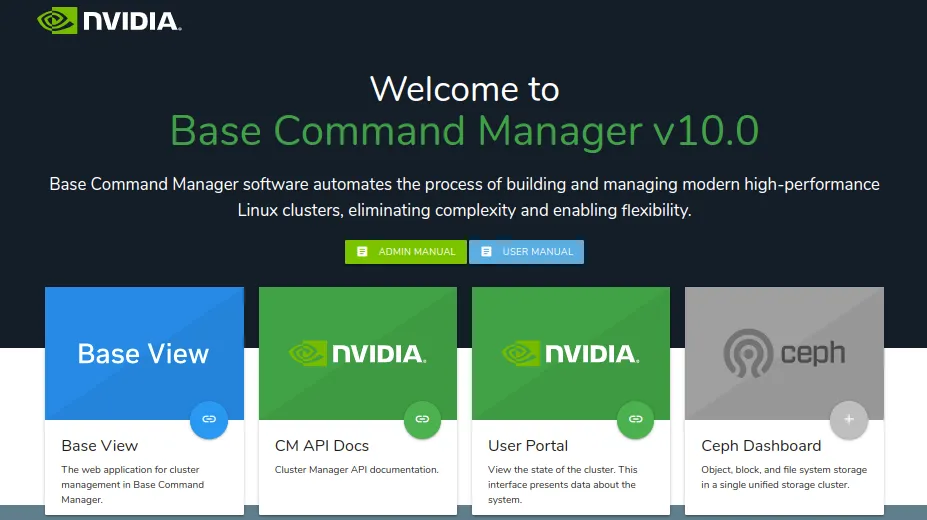
Head node hostname or IP address landing page at https://<host name or IP address>

Figure 5.1: Head node hostname or IP address landing page at https://<host name or IP address>

It can also be accessed via the user portal of the cluster by clicking on the JSON API documentation link in the documentation section of the home page (Section 10.8.4 of the Administrator Manual).

By default, the direct API URL takes the form:

https://<head node address name or IP address>:8081/api

At that URL:

  • the Search page can be used to list services, entities, events, and RPCs

  • the Inheritance page can be used to display the entities hierarchy

Within the search page (figure 5.2),
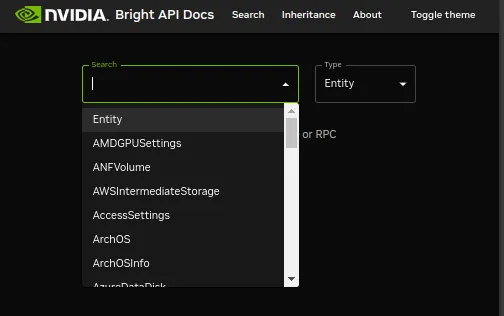
Search page for API documentation

Figure 5.2: Search page for API documentation

  • if the Type option is set to Service, then the drop-down list for Search presents the list of services

  • if the Type option is set to Entity, then the drop-down list for Search presents the list of entities

5.1 API Services

If a service is selected from the drop-down list for Search, then its RPCs are displayed. Each RPC shows the tokens required for its use. Each RPC in turn can be expanded to display its request format (call and arguments) and response format (figure 5.3):
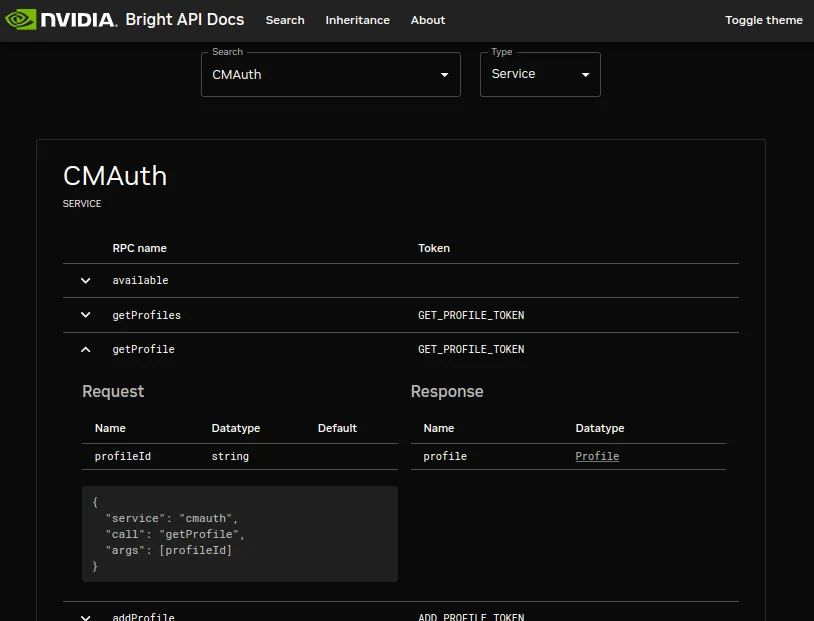
Example of an API documentation search page display result for the expanded view of the getProfile RPC of the CMAuth service

Figure 5.3: Example of an API documentation search page display result for the expanded view of the getProfile RPC of the CMAuth service

5.1.1 API Services List

The list of services are:

CMAuth
CMCert
CMCloud
CMDevice
CMEtcd
CMGui
CMJob
CMKube
CMMain
CMMon
CMNet
CMPart
CMProc
CMProv
CMServ
CMSession
CMStatus
CMTest
CMUser

5.2 API Entities

If an entity is selected from the drop-down list for Search, then its properties are displayed. (figure 5.4):
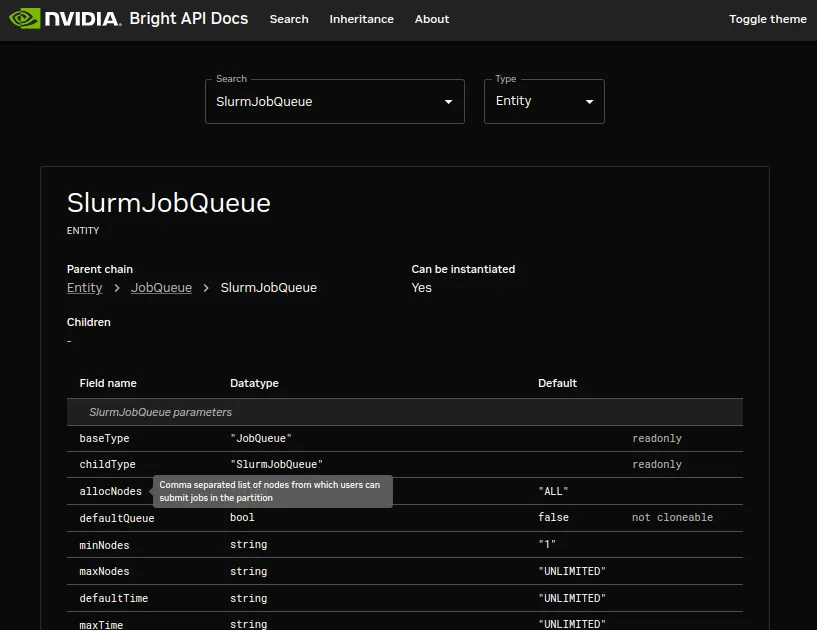
Example of an API documentation search page display result for the SlurmJobQueue entity

Figure 5.4: Example of an API documentation search page display result for the SlurmJobQueue entity

Each entity parameter typically has hovertext that describes it. For example, in figure 5.4 the terse allocNodes parameter of the SlurmJobQueue entity has a helpful associated hovertext description of Comma-separated list of nodes from which users can submit jobs into the system.

5.2.1 API Entities List

The list of API entities can be viewed in the search page display (figure 5.2).

By default the Inheritance page for API entities is located at

https://<head node address name or IP address>:8081/api/inheritance

The list of API entities can also conveniently be viewed there in a hierarchy:

Entity
|-- ANFVolume
|-- AccessSettings
|-- ArchOSInfo
| '-- ArchOS
|-- AzureDisk
| |-- AzureDataDisk
| '-- AzureOSDisk
...

5.3 JSON Examples

5.3.0.1 complete.sh

#!/bin/bash
URL=https://localhost:8081/json/
user=root
pass=secretrootpassword
echo "========== login ==========="
curl -c curl.cookiest.txt -i -k -X POST -d \
'{"service":"login", "username":"root", "password":"'"$pass"'"}' "$URL"; echo
echo "========= master =========="
curl --cookie curl.cookiest.txt -i -k -X POST -d \
'{"service":"cmdevice","call":"getNode", "arg":"master"}' $URL; echo
echo "========== logout =========="
curl --cookie curl.cookiest.txt -i -k -X POST -d \
'{"service":"logout"}' $URL; echo
echo "========== denied =========="
curl --cookie curl.cookiest.txt -i -k -X POST -d \
'{"service":"cmdevice","call":"getNode", "arg":"master"}' $URL; echo
rm -f curl.cookiest.txt
echo "=========== cert =========="
curl --cert $HOME/.cm/admin.pem --key $HOME/.cm/admin.key -i -k -X POST -d \
'{"service":"cmdevice","call":"getNode","arg":"master"}' $URL; echo

5.3.0.2 curl.sh

#!/bin/bash
URL=https://localhost:8081/json/
if [ -z "$1" ]; then
read -p "pass: " -s pass
else
pass=$1
fi
curl -c curl.cookiest.txt -i -k -X POST -d \
'{"service":"login", "username":"root", "password":"'"$pass"'"}' "$URL"
# curl --cookie curl.cookiest.txt -i -k -X POST -d \
# '{"service":"cmsession","call":"getLastEvents","args":[0,256]}' $URL
curl --cookie curl.cookiest.txt -i -k -X POST -d \
'{"service":"cmmain","call":"getProfile"}' $URL
curl --cookie curl.cookiest.txt -i -k -X POST -d \
'{"service":"cmmain","call":"getSubjectName"}' $URL

5.3.0.3 devices.sh

#!/bin/bash
URL=https://localhost:8081/json/
if [ "$1" == "gzip" ]; then
wget --certificate=$HOME/.cm/admin.pem --private-key=$HOME/.cm/admin.key \
--header='Accept-Encoding: gzip' \
--no-check-certificate --server-response -qO- $URL \
--post-data='{"service":"cmdevice","call":"getDevices"}'
else
wget --certificate=$HOME/.cm/admin.pem --private-key=$HOME/.cm/admin.key --no-check-certificate \
--server-response -qO- $URL --post-data='{"service":"cmdevice","call":"getDevices"}'
fi

Tip: run as ./devices.sh | python -mjson.tool.

5.3.0.4 loadone.sh

#!/bin/bash
URL=https://localhost:8081/json/
# not perfect but gets the job done
function jsonval {
temp=$(echo $json | sed 's/\\\\\//\//g' | sed 's/[{}]//g' |
awk -v k="text" '{n=split($0,a,","); for (i=1; i<=n; i++) print a[i]}' |
sed 's/\"\:\"/\|/g' | sed 's/[\,]/ /g' | sed 's/\"//g' | grep -w $prop)
r=$(echo ${temp##*|} | tr ']' ' ' | tr ' ' '\n' | cut -d: -f2 | sort -n)
echo $(echo $r | cut -d' ' -f 1)
}
prop='uuid'
node=master
json=$(2>/dev/null wget --certificate=$HOME/.cm/admin.pem \
--private-key=$HOME/.cm/admin.key \
--no-check-certificate \
--server-response \
-qO- $URL \
--post-data='{"service":"cmdevice","call":"getDevice","arg":"'$node'"}')
nkey=$(jsonval)
if [ -z "$nkey" ]; then
echo "$json"
exit 1
fi
echo "$node.uuid = $nkey"
json=$(2>/dev/null wget --certificate=$HOME/.cm/admin.pem \
--private-key=$HOME/.cm/admin.key \
--no-check-certificate \
--server-response \
-qO- $URL \
--post-data='{"service":"cmmon","call":"getMonitoringMeasurable","name":"LoadOne"}')
mkey=$(jsonval)
echo "loadone.uuid = $mkey"
now=$(date +%s)
day=$((now-86400))
echo "now is $now"
echo "day is $day"
cat <<EOF > /tmp/plot.json
{ "service" : "cmmon",
"call" : "plot",
"request" : { "entities" : ["$nkey"],
"measurables" : ["$mkey"],
"intervals" : 25,
"rangeStart" : $((day*1000)),
"rangeEnd" : $((now*1000))
}
}
EOF
2>/dev/null wget --certificate=$HOME/.cm/admin.pem \
--private-key=$HOME/.cm/admin.key \
--no-check-certificate \
-qO- $URL \
--post-file=/tmp/plot.json | \
python -mjson.tool

5.3.0.5 login.sh

#!/bin/bash
URL=https://localhost:8081/json/
user=$USER
pass=secretpassword
wget --keep-session-cookies --save-cookies cookie.txt --no-check-certificate \
--server-response -qO- $URL --post-data='{"service":"login","username":"'"$user"'","password":"'"$pass"'"}'
echo

5.3.0.6 logout.sh

#!/bin/bash
URL=https://localhost:8081/json/
wget --load-cookies cookie.txt --no-check-certificate --server-response -qO- $URL \
--post-data='{"service":"logout"}'
rm cookie.txt
echo

5.3.0.7 node001.sh

#!/bin/bash
URL=https://localhost:8081/json/
if [ -z "$1" ]; then
node=node001
else
node=$1
fi
wget --certificate=$HOME/.cm/admin.pem --private-key=$HOME/.cm/admin.key \
--no-check-certificate --server-response -qO- $URL \
--post-data='{"service":"cmdevice","call":"getDevice","arg":"'$node'"}' | python -mjson.tool

5.3.0.8 basic_information.sh

#!/bin/bash
URL=https://localhost:8081/json/
wget --certificate=$HOME/.cm/admin.pem --private-key=$HOME/.cm/admin.key \
--no-check-certificate --server-response -qO- $URL \
--post-data='{"service":"cmpart","call":"getBasicEntityInformation"}'

5.3.0.9 push_to_CMDaemon.sh

In the following example, the health check ManagedServicesOK, is pushed to CMDaemon with a FAIL value.

Example

[root@basecm11 ~]# cat push_to_CMDaemon.sh
#!/bin/bash
URL='https://master:8081/monitoring/push/ManagedServicesOk?info=brol&class=Push/Single&healthcheck=yes'
value='FAIL'
curl --cert $HOME/.cm/admin.pem --key $HOME/.cm/admin.key -i -k -X POST -d "$value" $URL; echo

Its behavior can be verified by checking the latest value for ManagedServicesOK before and after the push_to_CMDaemon.sh script is run:

Example

[root@basecm11 ~]# curl --cert ~/.cm/admin.pem --key ~/.cm/admin.key -k
"https://master:8081/rest/v1/monitoring/latest?measurable=ManagedServicesOK&entity=basecm11&indent=1"
{
"data": [
{
"age": 89.735,
"entity": "basecm11",
"measurable": "ManagedServicesOk",
"raw": 0.0,
"time": 1586450030968,
"value": "PASS"
}
]
}
[root@basecm11 ~]#./push_to_CMDaemon.sh
HTTP/1.1 200 OK
Content-Length: 55
Content-Type: application/json
{
"values": {
"added": 1,
"provided": 1
}
}
[root@basecm11 ~]# curl --cert ~/.cm/admin.pem --key ~/.cm/admin.key -k
"https://master:8081/rest/v1/monitoring/latest?measurable=ManagedServicesOK&entity=basecm11&indent=1"
{
"data": [
{
"age": 3.357,
"entity": "basecm11",
"info": "brol",
"measurable": "ManagedServicesOk",
"raw": 2.0,
"time": 1586450124437,
"value": "FAIL"
}
]
}

A metric version of the push, using the measurable push-test-02 might look like:

#!/bin/bash
URL='https://localhost:8081/monitoring/push/push-test-02?info=brol&class=Push/Single&unit=s'
value=$(date +%s)
curl --cert $HOME/.cm/admin.pem --key $HOME/.cm/admin.key -i -k -X POST -d "$value" $URL; echo

A collection can be pushed as follows: To initialize (once):

#!/bin/bash
URL='https://localhost:8081/monitoring/initialize'
curl --cert $HOME/.cm/admin.pem --key $HOME/.cm/admin.key -i -k -X POST -d \
'[
{"metric":"push-collection-01","class":"Push/Collection"},
{"metric":"push-collection-02","class":"Push/Collection"}
]' $URL; echo

After initializing, sampling can be done with:

#!/bin/bash
URL='https://localhost:8081/monitoring/push'
curl --cert $HOME/.cm/admin.pem --key $HOME/.cm/admin.key -i -k -X POST -d \
'[
{"metric":"push-collection-01","value":31},
{"metric":"push-collection-02","value":32,"info":"Some message"}
]' $URL; echo