

Introduction
This manual is intended for cluster users who need a quick introduction to the NVIDIA Base Command Manager, which manages a Beowulf cluster configuration. It explains how to use the MPI and batch environments, how to submit jobs to the queuing system, and how to check job progress. The specific combination of hardware and software installed may differ depending on the specification of the cluster, which means that parts of this manual may not be relevant to the user’s particular cluster.
1.1 What Is A Beowulf Cluster?
1.1.1 Background And History
In the history of the English language, Beowulf is the earliest surviving epic poem written in English. It is a story about a hero with the strength of many men who defeated a fearsome monster called Grendel.
In computing, a Beowulf class cluster computer is a multiprocessor architecture used for parallel computations, i.e., it uses many processors together so that it has the brute force to defeat certain “fearsome” number-crunching problems.
The architecture was first popularized in the Linux community when the source code used for the original Beowulf cluster built at NASA was made widely available. The Beowulf class cluster computer design usually consists of one head node and one or more regular nodes connected together via Ethernet or some other type of network. While the original Beowulf software and hardware has long been superseded, the name given to this basic design remains “Beowulf class cluster computer”, or less formally “Beowulf cluster”.
1.1.2 Brief Hardware And Software Description
On the hardware side, commodity hardware is generally used in Beowulf clusters to keep costs down. These components are usually x86-compatible processors produced at the Intel and AMD chip foundries, standard Ethernet adapters, InfiniBand interconnects, and switches. From around 2019 the ARMv8 processor architecture is also gaining attention.
On the software side, free and open-source software is generally used in Beowulf clusters to keep costs down. For example: the Linux operating system, the GNU C compiler collection and open-source implementations of the Message Passing Interface (MPI) standard.
The head node controls the whole cluster and serves files and information to the nodes. It is also the cluster’s console and gateway to the outside world. Large Beowulf clusters might have more than one head node, and possibly other nodes dedicated to particular tasks, for example consoles or monitoring stations. In most cases compute nodes in a Beowulf system are dumb—in general, the dumber the better—with the focus on the processing capability of the node within the cluster, rather than other abilities a computer might generally have. A node may therefore have
-
one or more processing elements. The processors may be standard CPUs, as well as GPUs, FPGAs, MICs, and so on.
-
enough local memory—memory contained in a single node—to deal with the processes passed on to the node
-
a connection to the rest of the cluster
Nodes are configured and controlled by the head node, and do only what they are told to do. One of the main differences between Beowulf and a Cluster of Workstations (COW) is the fact that Beowulf behaves more like a single machine rather than many workstations. In most cases, the nodes do not have keyboards or monitors, and are accessed only via remote login or possibly serial terminal. Beowulf nodes can be thought of as a CPU + memory package which can be plugged into the cluster, just like a CPU or memory module can be plugged into a motherboard to form a larger and more powerful machine. A significant difference is that the nodes of a cluster have a relatively slower interconnect.
1.2 Brief Network Description
A Beowulf Cluster consists of a login, compile and job submission node, called the head, and one or more compute nodes, often referred to as worker nodes. A second (fail-over) head node may be present in order to take control of the cluster in case the main head node fails. Furthermore, a second fast network may also have been installed for high-performance low-latency communication between the (head and the) nodes (see figure 1.1).
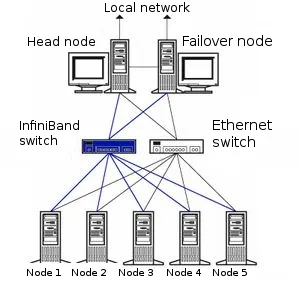
Figure 1.1: Cluster layout
The login node is used to compile software, to submit a parallel or batch program to a job queuing system and to gather/analyze results. Therefore, it should rarely be necessary for a user to log on to one of the nodes and in some cases node logins are disabled altogether. The head, login and compute nodes usually communicate with each other through a gigabit Ethernet network, capable of transmitting information at a maximum rate of 1000 Mbps. In some clusters 10 gigabit Ethernet (10GE, 10GBE, or 10GigE) is used, capable of up to 10 Gbps rates, while higher rates than that are also available.
Sometimes an additional network is used by the cluster for even faster communication between the compute nodes. This particular network is mainly used for programs dedicated to solving large scale computational problems, which may require multiple machines and could involve the exchange of vast amounts of information. One such network topology is InfiniBand, commonly capable of transmitting information at a maximum effective data rate of about 124Gbps and about 1.2μs end-to-end latency on small packets, for clusters in 2013. The commonly available maximum transmission rates will increase over the years as the technology advances.
Applications relying on message passing benefit greatly from lower latency. The fast network is usually complementary to a slower Ethernet-based network.