

Core Services#
The DCGM host engine keeps one model of the hardware and management state on a host. Core services provide the model’s common vocabulary: entities, fields, groups, watches, cached samples, topology, and workload statistics. Most higher-level DCGM features select objects and consume data through this layer.
Core is compiled into the DCGM library as module ID 0. It is loaded when the host engine starts and cannot be denylisted. Loadable modules add behavior such as health assessment, configuration, diagnostics, or profiling, but they do not replace the core model.
The Host Engine’s Domain Model#
An operator can understand most DCGM commands by identifying four things: the object, the value or operation, the time boundary, and the owner of the state.
Concept |
Meaning |
Example |
|---|---|---|
Entity |
One typed object known to the host engine. Its identity is the pair of an entity family and an ID. |
Physical GPU |
Entity group |
A reusable set of entities. It is a logical selection, not a hardware allocation or security boundary. |
The two GPUs assigned to scheduler job 4815. |
Field |
A typed definition for one inventory value, gauge, counter, event, or time series. |
GPU temperature, power usage, an XID event, or transmitted bytes. |
Field group |
A reusable set of field IDs. It selects data definitions but does not start collection. |
Temperature and power fields used by a site monitor. |
Watch |
A request to collect fields for entities with a sampling interval and retention limits. |
Sample power for GPUs 0 and 1 every second and keep ten minutes. |
Sample |
A field value associated with an entity, collection timestamp, and status. |
GPU 0 used 271.4 W at a particular time. |
Relationship state |
Topology and link information attached to entities. |
GPU 0 is CPU-local to cores 0-31 and has six direct NVLinks to GPU 1. |
Workload window |
A process ID or caller-defined job interval used to summarize retained GPU data. |
Energy, utilization, errors, and health during one batch job. |
The word group appears in two different ways in the API. An entity family
(DCGM_FE_GPU, DCGM_FE_SWITCH, and so on) supplies the type portion of an
entity ID. A DCGM group is a user-visible collection of entity IDs. This
guide uses entity family for the first meaning and entity group for the
second.
How the concepts depend on one another#
The existing core subject matter forms one pipeline rather than a set of independent commands:
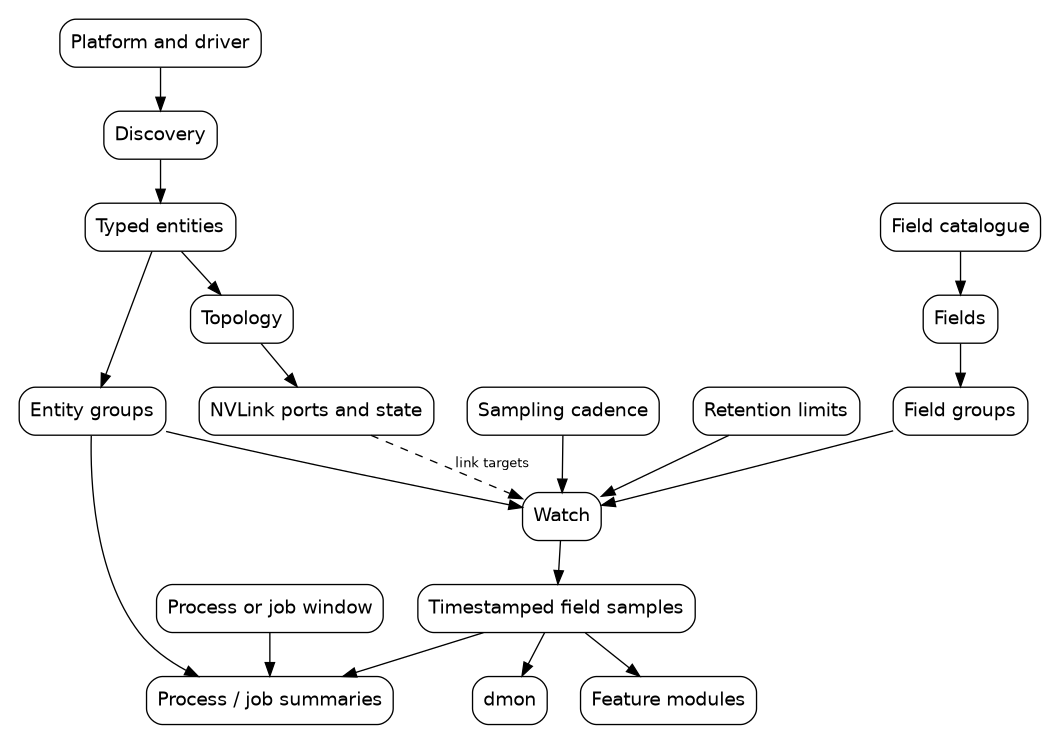
Dependencies among core host-engine concepts#
The dependencies explain the learning order:
Discover entities before putting them in a group or applying an operation.
Choose fields before requesting a watch.
Combine an entity selection and a field selection with cadence and retention to create samples.
Interpret samples in context: their timestamps, entity support, topology, link state, and workload interval all matter.
Let feature modules consume the same inventory and field layer when a health judgment or active operation is needed.
Where Runtime State Lives#
The host engine is not merely a stateless command dispatcher. One running
nv-hostengine process, or one embedded engine, owns:
the current entity inventory and its DCGM IDs;
user-created entity groups and field groups;
each client’s watch requests and the effective collection schedule;
retained field samples;
module load state and module-owned watches; and
process watches and job records.
This scope has practical consequences:
Clients connected to the same standalone host engine share compatible field collection and can refer to the same persistent groups.
A client connected to another host engine has a different namespace and cache, even when it runs on the same physical host.
Numeric IDs should be discovered at runtime. Use a GPU UUID or PCI bus ID when correlating DCGM inventory with a durable asset record.
A host-engine restart clears in-memory groups, samples, watches, and job records. A service or scheduler integration must recreate the state it owns.
Deleting a group removes the reusable selection. It does not reverse configuration already applied to the selected devices.
The scheduler or operating system still owns admission, placement, and isolation. A DCGM group can describe an allocation, but it does not reserve the GPUs or prevent another process from using them. Likewise, DCGM’s retained samples are an operational cache, not a durable monitoring database. Export data to the site’s observability or accounting system when it must survive a restart.
The Administrator’s Loop#
A system administrator normally uses core services in this order.
- Discover
Ask the target host engine which entities it knows about and correlate transient DCGM IDs with hardware identity.
- Select
Reuse a built-in group, create a node-wide group, or create a short-lived group that mirrors a scheduler allocation.
- Observe
Choose fields and request a sampling cadence and retention window. Read the latest values or history without assuming that a read caused a fresh hardware query.
- Interpret
Check timestamps, support and status, topology, link state, and counter deltas. Use a feature module when the task requires a health decision, policy action, configuration change, profile, or active diagnostic.
- Clean up
Delete transient groups and job records. Long-running integrations should also recreate their intended state after the host engine restarts.
Example: inspect a scheduler allocation#
Discover the current IDs before using the scheduler’s assignment:
$ dcgmi discovery --list
Suppose the scheduler assigned GPUs 0 and 1. Create a DCGM group that mirrors the allocation:
$ dcgmi group --create job-4815 --add gpu:0,gpu:1
The command prints a group ID assigned by this host engine. Use that ID to sample temperature and power five times and inspect the group’s placement:
$ dcgmi dmon --group-id <group-id> --field-id 150,155 --count 5
$ dcgmi topo --group <group-id>
Delete the selection during scheduler cleanup:
$ dcgmi group --delete <group-id>
The group did not allocate or release either GPU. It gave DCGM commands a common target whose lifetime matched the scheduler job.
Core Service Guides#
Read these guides in order when learning the model; jump directly to one when the prerequisite concepts are already familiar.
Guide |
What it teaches |
Prerequisite |
|---|---|---|
Entity types, runtime inventory, durable identity, inactive GPUs, and reusable selections. |
This overview. |
|
Field metadata, samples, watches, shared collection, retention, field
groups, and |
Entities and groups. |
|
CPU and PCIe locality, NVLink endpoints, current port state, error counters, and repeated link telemetry. |
Entities; fields for repeated telemetry. |
|
Process-watch setup and scheduler job windows over retained GPU data. |
Entity groups, watches, and retention. |
For exact accepted options, output, and limits, use Command Line. For programmatic interfaces, use C/C++ API. Continue to Modules for the features that interpret or act on core state.