

Multi-Node Diagnostics#
Distributed GPU applications depend on more than the health of each host in isolation. They also depend on services that coordinate the run, software that launches processes across hosts, and data paths that let GPUs communicate between hosts. A problem in one of those shared layers may appear only when a workload crosses a host boundary, even if every host passes its individual checks.
DCGM Multi-Node Diagnostics run controlled distributed workloads to investigate that gap. They can reproduce a cross-host symptom outside the original application, exercise different kinds of GPU communication, and distinguish a failure to launch the test from a failure reported after GPU work begins. Their results are evidence for narrowing an investigation; they do not, by themselves, identify a defective GPU, switch, or link.
This page develops those ideas through a representative example. As the example progresses, it explains what a multi-node diagnostic exercises, how to choose a workload, and what its result establishes. The example is illustrative; it is not a procedure that the reader is presumed to be performing. For exact command syntax and system configuration, use the references in Further reading.
A representative problem#
Two nodes pass the relevant single-node checks, but an application fails when it distributes compute and GPU communication across both nodes. The failure is not yet associated with one GPU or one connection.
What crosses the node boundary#
Suppose node01 coordinates the example and both node01 and node02
participate in the workload. Three different paths are involved:
The control path connects the
dcgmiclient to the coordinating DCGM host engine and connects that engine to the participating host engines. A host engine,nv-hostengine, is the long-lived DCGM service that manages the GPUs visible on its host.The launch path starts the workload processes on the participating hosts. DCGM uses
mpirunfrom Open MPI for this distributed launch and uses noninteractive SSH when reaching remote hosts.The GPU data path carries the peer-memory traffic generated by the workload.
The control and launch paths both use the system’s management and IP networking:
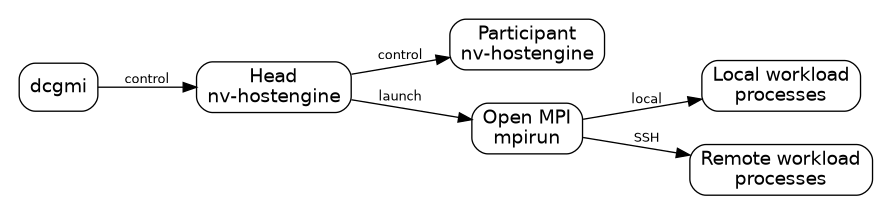
Control and launch paths in a multi-node diagnostic#
Note
About Open MPI
The Message Passing Interface (MPI) is a widely adopted standard for
message passing in distributed-memory computing. Open MPI is a
vendor-neutral, open-source implementation of that standard. mndiag
uses Open MPI’s mpirun to launch diagnostic processes across hosts, so
administrators must provide a working Open MPI remote-launch environment.
See the MPI Forum for the standard and the
Open MPI process-launch documentation for the
implementation.
A fabric is a collection of links and switches that connects many devices as one communication system. In a Multi-Node NVLink system, the fabric comprises the participating GPUs, their high-speed NVLink connections, and the NVSwitches that connect GPUs across compute trays. These components form an NVLink domain in which a GPU can access another GPU’s memory, including across host operating-system boundaries. This fabric is not the management or IP network used for host-engine connections, SSH, and process launch. For platform architecture and administration, see the NVIDIA Multi-Node NVLink Systems documentation.
Note
About IMEX
The NVIDIA IMEX service enables CUDA processes running on different hosts to share GPU memory across an NVLink domain. Multi-node diagnostics do not configure IMEX; they assume that the service and the required IMEX channel access are already configured on every participating host. For architecture and administration details, see the NVIDIA IMEX documentation.
A successful host-engine connection or MPI launch proves that the corresponding control or launch path works; it does not prove that the GPU data path works.
What the example assumes#
For the remainder of the example, suppose both nodes are part of a supported, uniform Multi-Node NVLink system. They have compatible DCGM, driver, Open MPI, and workload packages; their control and launch paths work; IMEX is configured for the NVLink domain; and the relevant single-node checks have already passed.
Also suppose that every active GPU on both nodes is assigned exclusively to this diagnostic. That is a property of the example’s scheduled allocation, not an instruction to interrupt work on an arbitrary system. Installation, host-engine listeners, Open MPI paths and interfaces, SSH configuration, and IMEX channel configuration are operational prerequisites, but they are not taught as setup steps here. Their exact requirements are in the command and platform references linked below.
Why this symptom points to mnubergemm#
The example fails only when compute and communication are active together. That observation matters more than the diagnostic names.
mnubergemm combines three kinds of activity in one distributed job:
pulsed single-precision matrix multiplication, which loads the GPU compute hardware;
copy-engine work, which uses hardware that moves data separately from the compute cores; and
communication through the NVIDIA Collective Communications Library (NCCL), which coordinates data movement among GPU processes.
Note
About NCCL
The NVIDIA Collective Communications Library (NCCL) provides topology-aware communication operations among GPUs, both within a host and across hosts. These include collective operations, in which a group of GPU processes participates in a coordinated data exchange.
Administrators supporting NCCL-based distributed workloads should understand the platform and communication configuration on which NCCL depends, as well as its basic troubleshooting model. For further information, see the NCCL documentation.
That combination resembles the conditions under which the example
application fails, so mnubergemm is a reasonable way to try to reproduce
the symptom. It is also the default multi-node diagnostic. A passing run
would not qualify every GPU pair or establish a minimum communication rate;
it would show only that this combined workload completed without reporting an
error.
How different evidence changes the choice#
If the original symptom instead identified a transfer direction or a pair of
GPUs, mnnvbandwidth would ask a more focused question. Its normal mode
measures copy-engine peer-memory writes and reads one direction at a time and
records a bandwidth matrix. A transfer from process A to process B is separate
from the transfer in the opposite direction. If N is the number of MPI
processes and N is no more than 16, the default run requests all
\(N(N-1)\) source-to-destination pairs. Above that size, it samples
\(N\) pairs while maximizing GPU coverage.
mnnvbandwidth.gpuPairs=all asks a different question. DCGM runs
NVBandwidth’s GPU-issued peer-memory read test with a 1 MiB buffer for every
unordered GPU pair, one pair after another. This can associate an
unsuccessful transfer with two endpoints, but the quadratic, sequential sweep
is a connectivity check rather than a peak-bandwidth qualification. Marking
both endpoints of a failed pair does not establish which endpoint caused the
failure.
Another symptom might appear only when many GPUs communicate in a particular
shape. nvloom is the packaged benchmark that generates such traffic. For
example, it can concentrate transfers on one destination, cross rack
boundaries in both directions, send the same data to many GPUs, measure
latency, or sustain concurrent transfers. NVLoom calls these predefined
groups of tests suites. Its default gpu-to-rack suite uses a
configurable sample of GPUs per rack for its transfer measurements; another
suite is useful only when its traffic pattern resembles the condition being
investigated.
DCGM does not apply a bandwidth threshold to either NVLoom or MNNVBandwidth. Their captured workload logs retain the measurements, which must be compared with a known-good system or a site requirement. Completion without a reported workload error is not, by itself, a performance qualification.
Workload selection at a glance#
The following table summarizes the distinctions developed above:
Situation being investigated |
Run |
What it actually does |
Evidence it provides |
|---|---|---|---|
A distributed application fails only when GPU computation and GPU communication run together, and its logs do not identify a peer or direction. |
|
Runs FP32 matrix work, copy-engine activity, and NCCL communication concurrently across all active GPUs. |
Shows whether that combined load reproduces the failure and preserves workload errors associated with reported hosts and GPUs; it does not isolate a transfer path. |
The application or prior testing identifies slow or failing traffic from one GPU process toward another, or shows different behavior by direction. |
|
Measures copy-engine reads and writes separately by direction. It covers every directed pair with at most 16 processes and samples pairs on larger runs. |
Produces a directional bandwidth matrix for comparing A-to-B with B-to-A and with known-good measurements. |
A new or changed system has a peer-access failure, but nothing identifies which pair is unreachable. |
|
Runs a 1 MiB peer-memory read for every unordered active-GPU pair, one pair at a time. |
Identifies the two endpoints of an unsuccessful pair; it does not identify the faulty endpoint or qualify peak bandwidth. |
An application fails only with a recognizable many-GPU pattern, such as many senders targeting one GPU, rack-crossing transfers, the same data sent to many GPUs, or sustained concurrent traffic. |
|
Recreates the selected traffic shape across the participating GPUs. |
Preserves workload errors and bandwidth or latency summaries for that pattern; coverage and interpretation depend on the selected suite. |
Whose identity launches the workload#
This distinction matters when mndiag can contact the host engines but
cannot start or initialize its workload. For account lookup, noninteractive
SSH, remote permissions, executable access, and IMEX channel access, inspect
the caller-derived launch account. For inherited environment settings,
including the mpirun path and root-launch control, inspect the head host
engine’s environment. The configured service account does not select either
one.
When an operator invokes dcgmi in the example, three identities must not
be conflated:
The dcgmi caller is the operating-system user running the command. DCGM sends that process’s numeric effective user ID (UID) to the head host engine. Running the command through
sudochanges this UID.The head host-engine user is the operating-system user running
nv-hostengineonnode01. This process coordinates the run and supplies the environment inherited by its launch children.The configured service account is the separate account named by
nv-hostengine --service-account. The mndiag path does not use that setting to choose its SSH or MPI execution user.
The head host engine resolves the caller’s numeric UID in node01’s
account database. When that UID differs from the host engine’s own effective
UID, the head requests that its SSH-tunnel and MPI-launch children run as the
resolved account. When the UIDs are equal, those children retain the host
engine’s process identity. Participant host engines continue to run under
their own daemon identities.
Only the numeric UID travels in the request. The caller’s login name, shell environment, and SSH agent do not. The resolved launch account must therefore have a suitable identity and noninteractive authentication on the remote participants independently of the caller’s interactive shell.
When the caller-derived launch account has UID 0 and the operator
intentionally permits the MPI workload to run as root, set
DCGM_MPIRUN_ALLOW_RUN_AS_ROOT in the head host engine’s environment. Its
presence causes DCGM to add Open MPI’s root-launch option; its value is not
parsed, so remove the variable to disable the behavior. It has no effect on a
non-root caller-derived launch account. A head host engine running as root
does not activate this behavior for a non-root dcgmi caller, and the
configured service account does not affect the decision.
Reading one representative request#
With those assumptions, the example can be expressed by one request:
$ dcgmi mndiag --hostList 'node01;node02' --run mnubergemm \
    --parameters mnubergemm.time_to_run=600
In this example, dcgmi uses its default local connection to the host
engine on node01. Listing node01 also makes the coordinating node a
workload participant; node02 is the remote participant. The quotes
preserve the semicolon as part of the host-list argument. The host list
selects participating hosts and transports, not GPU subsets. On a supported,
uniform system, mndiag launches the workload on every active GPU and uses
the active-GPU count seen on the head node as the common processes-per-node
count. In this example, those GPUs are already assigned exclusively to the
diagnostic.
The --run value selects the mixed workload that matches the observed
symptom. The parameter requests 600 seconds of workload time; DCGM derives
its monitoring deadline from that value and adds startup allowance. Ten
minutes is useful only as a concrete value in this example; an appropriate
qualification duration depends on the system and the condition being
investigated.
The caller’s effective UID travels with this request. The head host engine then coordinates both listed host engines, inventories and reserves their active GPUs, resolves the packaged workload, constructs one MPI job, monitors its processes, and converts recognized workload output into overall and per-host/per-GPU results.
What a multi-node diagnostic does not decide#
Multi-node diagnostics do not repair faults, certify the complete NVLink domain, identify a failed physical component by themselves, or determine RMA eligibility. An unsuccessful run can originate in the control or launch environment, while a completed diagnostic failure can originate in the workload, software stack, IMEX configuration, GPU data path, or hardware.
A passing result applies only to the reported participants, selected workload or mode, configuration, and duration. It does not qualify paths the workload did not exercise or establish a site-specific performance requirement.
Command completion and diagnostic result are different#
The example can end in two fundamentally different ways.
An orchestration failure means DCGM did not return a usable diagnostic result. A connection, authorization, reservation, inventory, executable, SSH, MPI launch, timeout, signal, cleanup, or rendering problem can take this path. The command returns a nonzero status, but that status is not a verdict about the GPUs or NVLink fabric.
A completed command returns process status zero and carries a diagnostic
result. For mnubergemm, DCGM reports Pass or Fail:
Passmeans the workload completed for the participating hosts and GPUs without reporting an error. It applies only to this workload, configuration, and duration.Failmeans the workload reported an error, did not provide a usable result for the requested participants, or exited unsuccessfully. The workload message and its host/GPU association are evidence, not an automatic diagnosis of defective hardware.
Other multi-node diagnostics can also produce Skip when all work is
waived or unavailable. Skip is not a passing qualification. In every
case, automation must inspect the diagnostic result: a completed diagnostic
can report Fail while the dcgmi process returns zero.
How the evidence refines the question#
The paths introduced at the beginning determine what can be learned next. A host-engine connection or SSH/MPI launch error leaves the example in the control or launch path and produces no fabric verdict. A workload initialization, permission, or memory-import error can indicate that the IMEX prerequisite was not satisfied. In that case, the workload might have stopped before generating the intended GPU traffic, so the result does not establish that a GPU or NVLink fabric component failed.
A GPU-scoped error that appears only under the combined mnubergemm load is evidence about that interaction. If later evidence isolates a direction or a pair, MNNVBandwidth can replace the broad load with a focused transfer question. If it instead isolates a many-GPU traffic shape, the corresponding NVLoom suite can attempt to reproduce that pattern. The diagnostic workflow is therefore an evidence loop: choose a workload from the observed failure, interpret only what that workload establishes, and use the result to make the next question more specific.
Further reading#
Diagnostics introduces active single-node qualification and explains how it differs from passive health monitoring.
dcgmi mndiag defines the complete command grammar, host forms, execution inventory, Open MPI controls, environment, output, and exit behavior.
mnubergemm defines the mnubergemm parameters, runtime, results, and logs.
nvloom defines the NVLoom suites and parameters, duration accounting, results, and logs.
mnnvbandwidth defines the normal and all-pairs modes, pair coverage, parameters, results, and logs.
Multi-Node Diagnostics provides the concise multi-node diagnostic catalogue and availability boundaries.