
Running KVBM in TensorRT-LLM#
This guide explains how to leverage KVBM (KV Block Manager) to manage KV cache and do KV offloading in TensorRT-LLM (trtllm).
To learn what KVBM is, please check here
Note
Ensure that
etcdandnatsare running before starting.KVBM only supports TensorRT-LLM’s PyTorch backend.
Disable partial reuse
enable_partial_reuse: falsein the LLM API config’skv_connector_configto increase offloading cache hits.KVBM requires TensorRT-LLM v1.2.0rc2 or newer.
Enabling KVBM metrics with TensorRT-LLM is still a work in progress.
Quick Start#
To use KVBM in TensorRT-LLM, you can follow the steps below:
# Start up etcd for KVBM leader/worker registration and discovery
docker compose -f deploy/docker-compose.yml up -d

# Build a dynamo TRTLLM container (KVBM is built in by default)
./container/build.sh --framework trtllm

# Launch the container
./container/run.sh --framework trtllm -it --mount-workspace --use-nixl-gds

# Configure KVBM cache tiers (choose one of the following options):

# Option 1: CPU cache only (GPU -> CPU offloading)
# 4 means 4GB of pinned CPU memory would be used
export DYN_KVBM_CPU_CACHE_GB=4

# Option 2: Both CPU and Disk cache (GPU -> CPU -> Disk tiered offloading)
export DYN_KVBM_CPU_CACHE_GB=4
# 8 means 8GB of disk would be used
export DYN_KVBM_DISK_CACHE_GB=8

# [Experimental] Option 3: Disk cache only (GPU -> Disk direct offloading, bypassing CPU)
# NOTE: this option is only experimental and it might not give out the best performance.
# NOTE: disk offload filtering is not supported when using this option.
export DYN_KVBM_DISK_CACHE_GB=8

# Note: You can also use DYN_KVBM_CPU_CACHE_OVERRIDE_NUM_BLOCKS or
# DYN_KVBM_DISK_CACHE_OVERRIDE_NUM_BLOCKS to specify exact block counts instead of GB
Note
When disk offloading is enabled, to extend SSD lifespan, disk offload filtering would be enabled by default. The current policy is only offloading KV blocks from CPU to disk if the blocks have frequency equal or more than 2. Frequency is determined via doubling on cache hit (init with 1) and decrement by 1 on each time decay step.
To disable disk offload filtering, set DYN_KVBM_DISABLE_DISK_OFFLOAD_FILTER to true or 1.
# write an example LLM API config
# Note: Disable partial reuse "enable_partial_reuse: false" in the LLM API config’s "kv_connector_config" to increase offloading cache hits.
cat > "/tmp/kvbm_llm_api_config.yaml" <<EOF
backend: pytorch
cuda_graph_config: null
kv_cache_config:
  enable_partial_reuse: false
  free_gpu_memory_fraction: 0.80
kv_connector_config:
  connector_module: kvbm.trtllm_integration.connector
  connector_scheduler_class: DynamoKVBMConnectorLeader
  connector_worker_class: DynamoKVBMConnectorWorker
EOF

# [DYNAMO] start dynamo frontend
python3 -m dynamo.frontend --http-port 8000 &

# [DYNAMO] To serve an LLM model with dynamo
python3 -m dynamo.trtllm \
  --model-path Qwen/Qwen3-0.6B \
  --served-model-name Qwen/Qwen3-0.6B \
  --extra-engine-args /tmp/kvbm_llm_api_config.yaml &

# Make a call to LLM
curl localhost:8000/v1/chat/completions   -H "Content-Type: application/json"   -d '{
    "model": "Qwen/Qwen3-0.6B",
    "messages": [
    {
        "role": "user",
        "content": "In the heart of Eldoria, an ancient land of boundless magic and mysterious creatures, lies the long-forgotten city of Aeloria. Once a beacon of knowledge and power, Aeloria was buried beneath the shifting sands of time, lost to the world for centuries. You are an intrepid explorer, known for your unparalleled curiosity and courage, who has stumbled upon an ancient map hinting at ests that Aeloria holds a secret so profound that it has the potential to reshape the very fabric of reality. Your journey will take you through treacherous deserts, enchanted forests, and across perilous mountain ranges. Your Task: Character Background: Develop a detailed background for your character. Describe their motivations for seeking out Aeloria, their skills and weaknesses, and any personal connections to the ancient city or its legends. Are they driven by a quest for knowledge, a search for lost familt clue is hidden."
    }
    ],
    "stream":false,
    "max_tokens": 30
  }'
KVBM is also supported on the prefill worker of disaggregated serving. To launch the prefill worker, run:
# [DYNAMO] To serve an LLM model with dynamo
python3 -m dynamo.trtllm \
  --model-path Qwen/Qwen3-0.6B \
  --served-model-name Qwen/Qwen3-0.6B \
  --extra-engine-args /tmp/kvbm_llm_api_config.yaml
  --disaggregation-mode prefill &
Alternatively, can use “trtllm-serve” with KVBM by replacing the above two [DYNAMO] cmds with below:
trtllm-serve Qwen/Qwen3-0.6B --host localhost --port 8000 --backend pytorch --extra_llm_api_options /tmp/kvbm_llm_api_config.yaml
Enable and View KVBM Metrics#
Follow below steps to enable metrics collection and view via Grafana dashboard:
# Start the basic services (etcd & natsd), along with Prometheus and Grafana
docker compose -f deploy/docker-observability.yml up -d

# Set env var DYN_KVBM_METRICS to true, when launch via dynamo
# Optionally set DYN_KVBM_METRICS_PORT to choose the /metrics port (default: 6880).
DYN_KVBM_METRICS=true \
DYN_KVBM_CPU_CACHE_GB=20 \
python3 -m dynamo.trtllm \
  --model-path Qwen/Qwen3-0.6B \
  --served-model-name Qwen/Qwen3-0.6B \
  --extra-engine-args /tmp/kvbm_llm_api_config.yaml &

# Optional if firewall blocks KVBM metrics ports to send prometheus metrics
sudo ufw allow 6880/tcp
View grafana metrics via http://localhost:3000 (default login: dynamo/dynamo) and look for KVBM Dashboard
KVBM currently provides following types of metrics out of the box:
kvbm_matched_tokens: The number of matched tokenskvbm_offload_blocks_d2h: The number of offload blocks from device to hostkvbm_offload_blocks_h2d: The number of offload blocks from host to diskkvbm_offload_blocks_d2d: The number of offload blocks from device to disk (bypassing host memory)kvbm_onboard_blocks_d2d: The number of onboard blocks from disk to devicekvbm_onboard_blocks_h2d: The number of onboard blocks from host to devicekvbm_host_cache_hit_rate: Host cache hit rate (0.0-1.0) from sliding windowkvbm_disk_cache_hit_rate: Disk cache hit rate (0.0-1.0) from sliding window
Troubleshooting#
If enabling KVBM does not show any TTFT perf gain or even perf degradation, one potential reason is not enough prefix cache hit on KVBM to reuse offloaded KV blocks. To confirm, please enable KVBM metrics as mentioned above and check the grafana dashboard
Onboard Blocks - Host to DeviceandOnboard Blocks - Disk to Device. If observed large number of onboarded KV blocks as the example below, we can rule out this cause: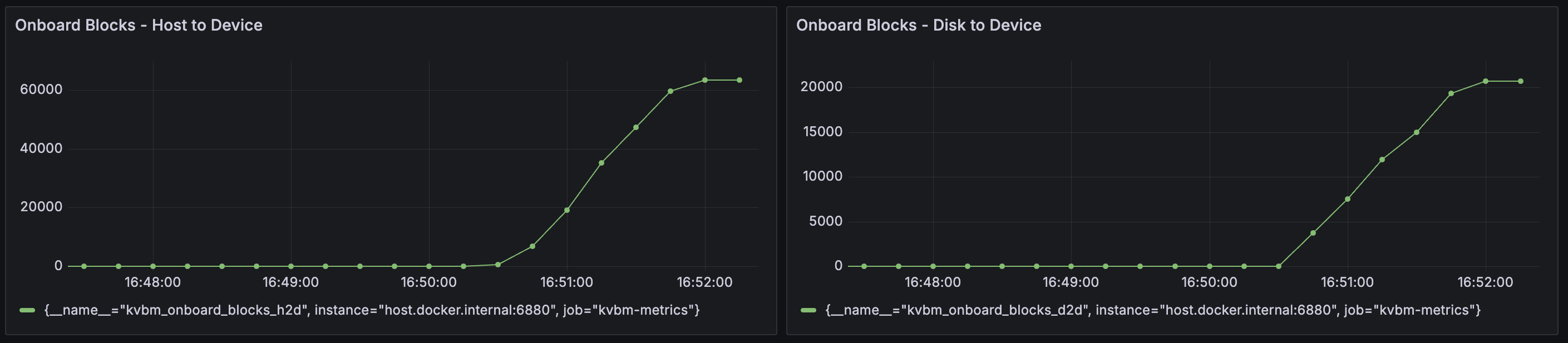
Allocating large memory and disk storage can take some time and lead to KVBM worker initialization timeout. To avoid it, please set a longer timeout (default 1800 seconds) for leader–worker initialization.
# 3600 means 3600 seconds timeout
export DYN_KVBM_LEADER_WORKER_INIT_TIMEOUT_SECS=3600
When offloading to disk is enabled, KVBM could fail to start up if fallocate is not supported to create the files. To bypass the issue, please use disk zerofill fallback.
# Set to true to enable fallback behavior when disk operations fail (e.g. fallocate not available)
export DYN_KVBM_DISK_ZEROFILL_FALLBACK=true
Benchmark KVBM#
Once the model is loaded ready, follow below steps to use LMBenchmark to benchmark KVBM performance:
git clone https://github.com/LMCache/LMBenchmark.git

# Show case of running the synthetic multi-turn chat dataset.
# We are passing model, endpoint, output file prefix and qps to the sh script.
cd LMBenchmark/synthetic-multi-round-qa
./long_input_short_output_run.sh \
    "Qwen/Qwen3-0.6B" \
    "http://localhost:8000" \
    "benchmark_kvbm" \
    1

# Average TTFT and other perf numbers would be in the output from above cmd
More details about how to use LMBenchmark could be found here.
NOTE: if metrics are enabled as mentioned in the above section, you can observe KV offloading, and KV onboarding in the grafana dashboard.
To compare, you can remove the kv_connector_config section from the LLM API config and run trtllm-serve with the updated config as the baseline.
cat > "/tmp/llm_api_config.yaml" <<EOF
backend: pytorch
cuda_graph_config: null
kv_cache_config:
  enable_partial_reuse: false
  free_gpu_memory_fraction: 0.80
EOF

# Run trtllm-serve for the baseline for comparison
trtllm-serve Qwen/Qwen3-0.6B --host localhost --port 8000 --backend pytorch --extra_llm_api_options /tmp/llm_api_config.yaml &
Developing Locally#
Inside the Dynamo container, after changing KVBM related code (Rust and/or Python), to test or use it:
cd /workspace/lib/bindings/kvbm
uv pip install maturin[patchelf]
maturin build --release --out /workspace/dist
uv pip install --upgrade --force-reinstall --no-deps /workspace/dist/kvbm*.whl