

Solution Overview#
Application Layer#
Application Layer Software#
RUN.AI#
Supports Vanilla K8s 1.30 – 1.33
Also installed:
OSMO#
OSMO is the workflow orchestration platform used to run multi-stage Physical AI pipelines.
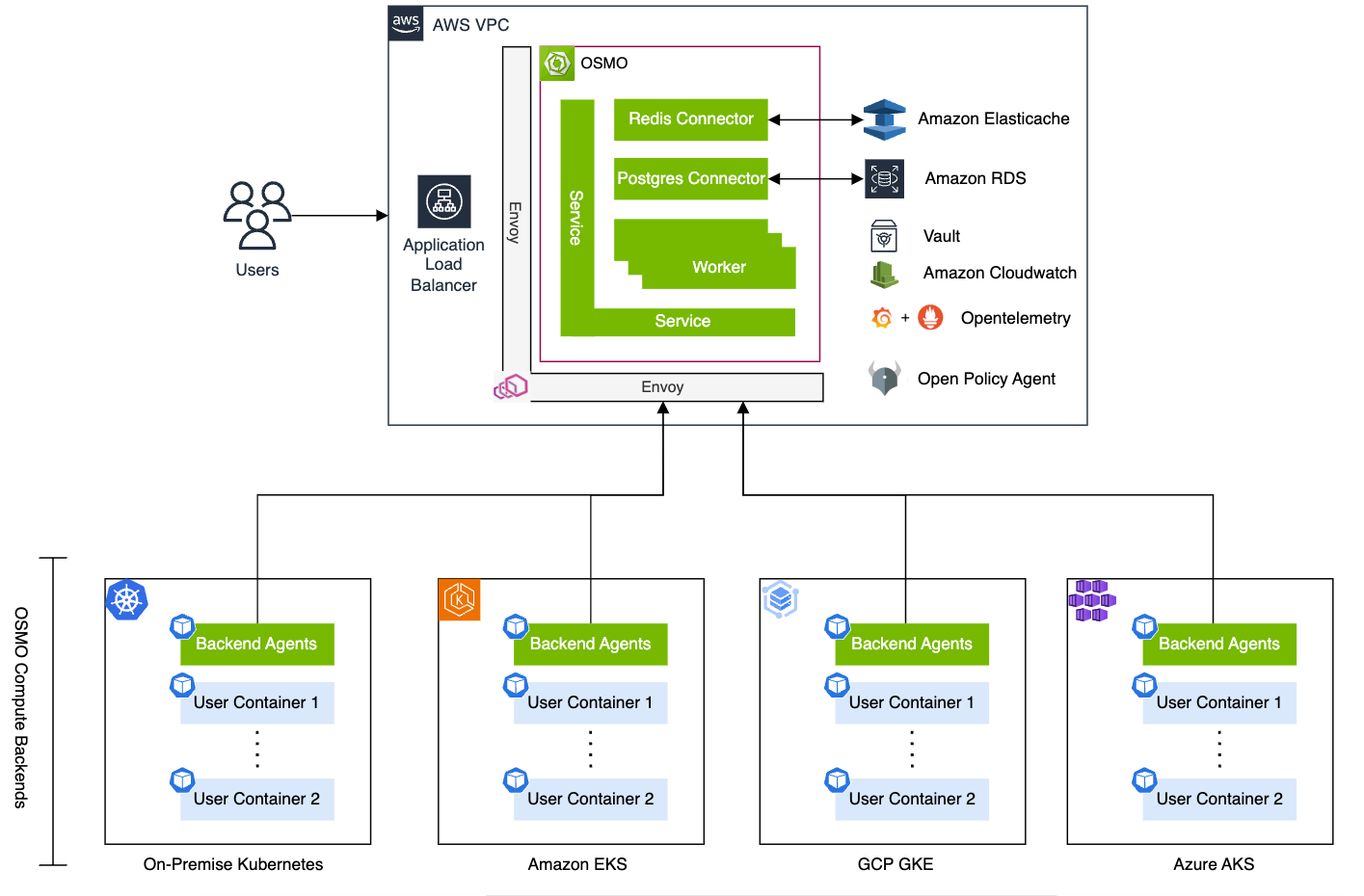
Figure 1 OSMO architecture showing the control plane and compute backends across cloud and on-premise Kubernetes clusters#
Prometheus#
Prometheus (via kube-prometheus-stack) provides metrics collection and monitoring across the cluster. See Table 1 for version details.
Infrastructure Layer#
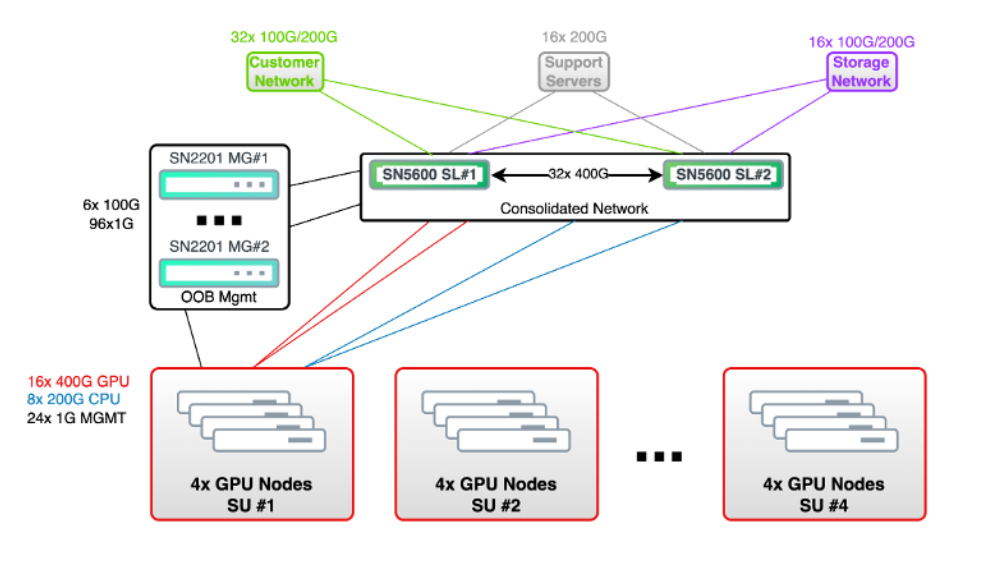
Figure 2 Infrastructure layer network topology showing consolidated switching, GPU node scaling units, and management network#
Storage#
OSMO: Uses persistent volumes backed by Longhorn for workflow state and dataset storage.
Kubernetes (Longhorn v1.7.2): Longhorn provides distributed block storage for the cluster.
Deployed on control plane nodes
Default storage class for persistent volumes
Features:
Replicated storage across 3 control plane nodes
Snapshot and backup support
Volume expansion support
Infrastructure Layer Software#
Table 1: Infrastructure Software Support Matrix
Component |
Version |
Notes |
|---|---|---|
Host Operating System |
Ubuntu 24.04 LTS Server |
|
Linux Kernel (Control Planes) |
6.8.0-84-generic |
|
Linux Kernel (HGX B200) |
6.8.0-85-generic |
|
Linux Kernel (RTX PRO Servers) |
6.8.0-85-generic |
|
Kubespray |
v2.28.0 |
Used for Kubernetes deployment |
Container Runtime |
Containerd 2.0.5 |
|
Kubernetes |
v1.32.5 |
Deployed using Kubespray |
NVIDIA Driver |
580.82.07 |
|
CUDA Toolkit |
13.0 |
Included with driver 580.82.07 |
NVIDIA GPU Operator |
v25.3.4 |
Deployed via Helm chart from NGC |
NVIDIA Network Operator |
v25.7.0 |
|
Longhorn |
v1.7.2 |
Distributed block storage, not used for perf critical operations |
Prometheus (kube-prometheus-stack) |
82.4.3 |
Installed via Helm |
LoadBalancer (MetalLB) |
0.15.3 |
Used for LoadBalancer service type support |
Firmware |
nvfwupd-v2.0.8, FW 25.09.1 |
|
VBIOS |
97.00.6E.00.07 |
Production support release |
Host Operating System#
Ubuntu 24.04 LTS Server
Deployed on all nodes (control planes and workers)
Minimal installation with SSH server enabled
Container Runtime#
Containerd 2.0.5
Configured with NVIDIA runtime support
Runtime configuration:
/etc/containerd/config.tomlNVIDIA Container Toolkit integration for GPU workloads
Kubernetes#
Version: v1.32.5 Deployed using Kubespray v2.28.0
High Availability (HA) configuration:
3 Control Plane nodes (
k8s-1-cp1,k8s-1-cp2,k8s-1-cp3)Stacked etcd topology (etcd running on control plane nodes)
Kube-VIP for control plane load balancing
Worker nodes:
NVIDIA 2-8-5-200 (2 CPUs for system management, 8 PCIe GPUs for acceleration, 5 network adapters/DPUs for high-speed connectivity, 200 Gbps dedicated network bandwidth per GPU for distributed workloads). In the test bed: 2x RTX PRO Servers (
rtxprosrv1,rtxprosrv2) each equipped with 8x RTX PRO 6000 Blackwell Server Edition GPUs.NVIDIA 2-8-9-400 (2 CPUs for system management, 8 NVLink-connected HGX GPUs, 9 network adapters/DPUs for high-speed connectivity, 400 Gbps network bandwidth per GPU for distributed workloads). In the test bed: 1x HGX B200 (
b200-1) with 8x B200 GPUs.
NVIDIA Driver#
Driver Version: 580.82.07
CUDA Version: 13.0
Deployed via NVIDIA GPU Operator
Special configuration for RTX PRO 6000 Blackwell Server Edition GPUs:
Kernel module parameter:
uvm_disable_hmm=1Applied via
ConfigMapto work around a CUDA validation issue on RTX PRO 6000 Blackwell Server Edition GPUs
CUDA Toolkit#
CUDA 13.0 (included with driver 580.82.07)
NVIDIA GPU Operator#
Version: v25.3.4 Deployed via Helm chart from NGC
Components deployed:
nvidia-driver-daemonset— manages driver installationnvidia-device-plugin-daemonset— GPU discovery and allocationnvidia-dcgm-exporter— GPU metrics collectiongpu-feature-discovery— GPU capabilities detectionnvidia-container-toolkit-daemonset— container runtime configurationnvidia-mig-manager— MIG configuration supportnvidia-operator-validator— validates GPU stack
NVIDIA Network Operator#
Version: v25.7.0
Configuration approach:
Simplified setup (no accelerated OVS)
No OFED/MOFED installation (using inbox kernel drivers)
Multus CNI for secondary network interfaces
nv-ipam(NVIDIA IPAM plugin) for IP address management
Network architecture:
North-South: Standard network architecture
East-West: Simplified setup — all rails from RTX 6K servers face the same switch
Skipped advanced SpectrumX features due to lab topology
HGX B200 Configuration#
Firmware updated: nvfwupd-v2.0.8, FW 25.09.1
VBIOS: 97.00.6E.00.07 (production support release)
Additional Components#
Prometheus (
kube-prometheus-stack)MetalLBfor LoadBalancer service type support