


Integration Guide#
Note
This documentation uses updated terminology. Legacy code may reference PSF, PSS, PSD for backward compatibility.
1. Document Structure#
This integration guide is organized into the following sections:
Overview - Architectural details and system components
Component Details - Detailed descriptions of HOISA sub-elements
Application Development - Implementation guidelines and APIs
2. Overview#
This section documents the architectural details of the Halos Outside-In Safety (HOISA). It includes definitions and descriptions of the building blocks, interactions with other components of the host software stack (L4T for Tegra-based environments and standard Linux distributions for x86-64-based environments), interactions and data flow between the elements within HOISA, and extensibility interfaces to support a variety of end-user specific applications.
The following figures depict the positioning of HOISA in respective platform’s host software stack.
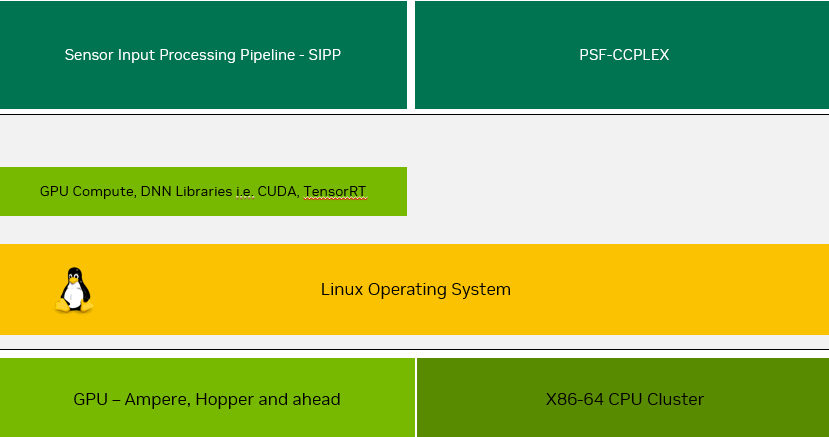
Figure 1 - Overview of x86-64 based Software Stack with HOISA
Figure 1 depicts the positioning of HOISA within the x86-64-based software stack. HOISA makes use of Linux features and APIs exposed by standard desktop Linux distributions, specifically Ubuntu.
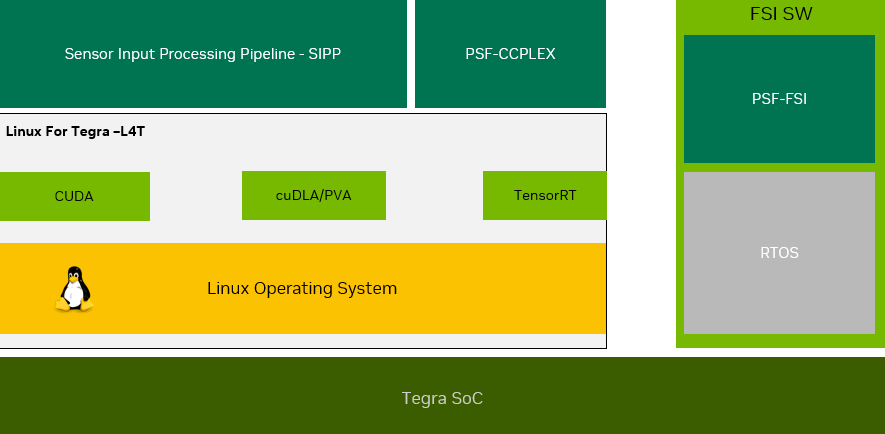
Figure 2 - Overview of Tegra based IGX Software Stack with HOISA
Tegra/IGX: Components run on CCPLEX (L4T user space) and FSI (RTOS). Interacts with L4T and standard Linux APIs.
For both HOISA variants, the framework includes one or more sensor input processing pipelines which may be specific to the use case under consideration. These typically include deep neural networks and computer vision algorithms operating on image streams captured by camera devices, or processing elements operating over data streams captured by various sensors deployed to monitor the physical parameters within the surroundings. NVIDIA Metropolis is an example of a sensor pipeline.
The Halos Outside-In Safety blueprint consists of the following sub-elements:
Sensor Input Processing Pipeline (SIPP) - Also referred as AI Perception pipeline
Safety AI Monitor (SAIM)
Safety Event Integrator (SEI) - previously known as Proactive Safety Supervisor (PSS)
Safety Decision Maker (SDM) - previously known as Proactive Safety Decision (PSD)
Safety Black Box (SBB) - previously known as Proactive Safety Black Box (PSB)
Safety User Interface (SUI) - previously known as Proactive Safety User Interface (PSU)
Variable by use case: SIPP, SDM. Use-case agnostic: SEI, SBB. Data flow:
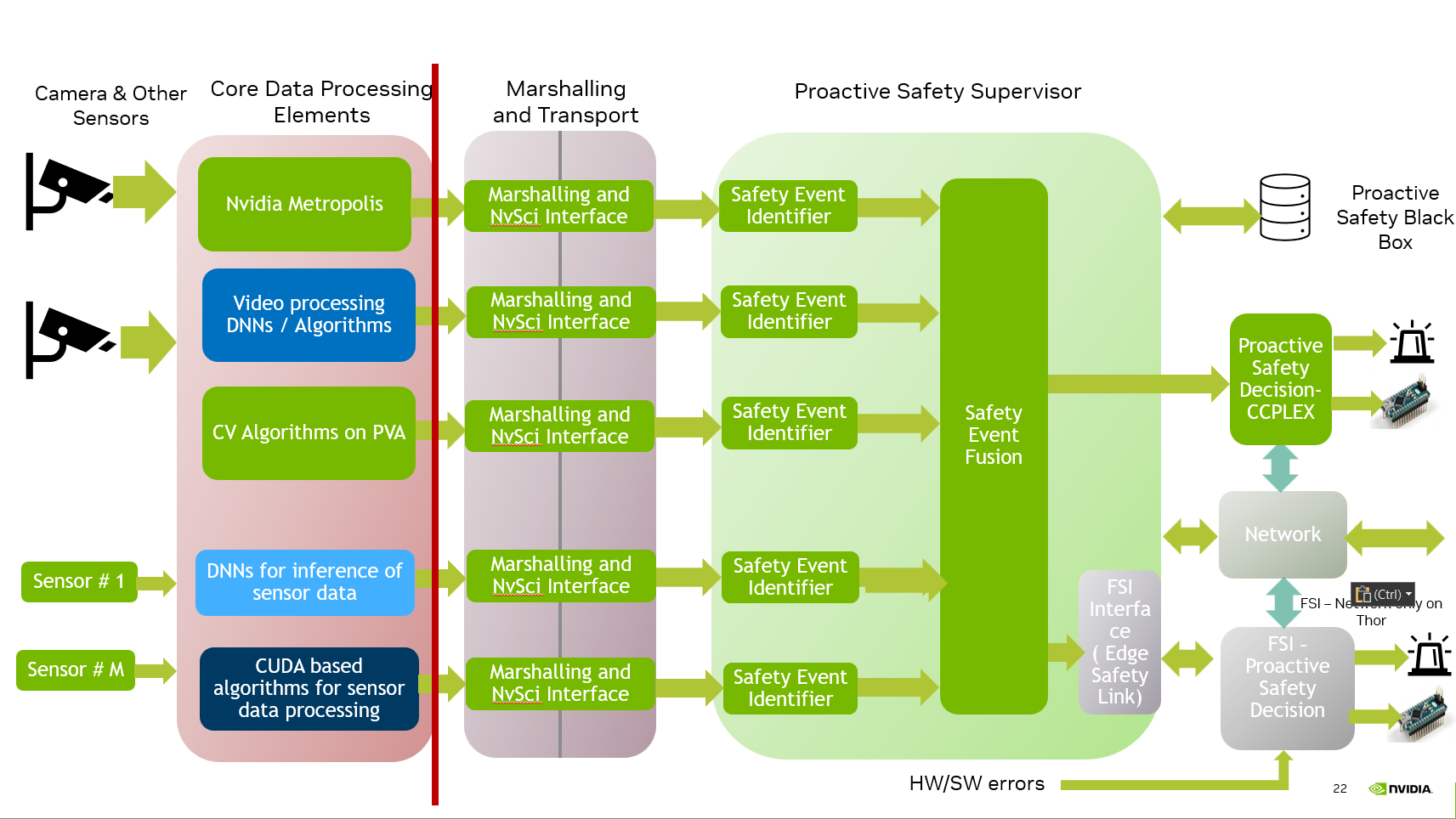
Figure 3 - HOISA Data Path
Data transformation sequence:
Table 1 - Summary of Data Transformations in Sub-Elements
ID |
Stage |
Form of Input Data |
Operation |
Form of Output Data |
|---|---|---|---|---|
1 |
Sensor Input Processing Pipeline (AI Perception) |
Data captured by sensors and appropriately conditioned |
Transformation through DNN or an algorithm to identify/detect required safety condition |
A data structure representing the identified/detected safety condition |
2 |
Marshalling and Transport |
A data structure representing the identified/detected safety condition |
Extraction of relevant data and pass to the different process context |
Same data structure received across different process context |
3 |
Safety Event Integrator - Safety Event Identifier (PSSCore) |
Data structure representing the identified/detected safety condition |
Analysis of contents of the data structure based on certain rules to proactively detect potential safety event |
A message or a signal identifying the potential safety event |
4 |
Safety Event Integrator - Safety Event Fusion |
Message or signal identifying the safety event as received from Safety Event Identifier |
Fusion of the messages/signals |
A message or a signal confirming the occurrence of safety event |
5 |
Safety Decision Maker (FSI or CCPLEX) |
A message or signal confirming the occurrence of safety event |
Ascertain the appropriate action based on the nature of identified safety event |
A message or signal back to PSS-CCPLEX identifying the next required action to address the safety event |
The Safety Black Box (SBB) can be considered as a master record for the operations associated with HOISA. Any HOISA component can access SBB with appropriate access profile to include respective operational milestones. The entries in SBB can also be utilized by SUI for presenting to the user after appropriate conditions or post-processing.
The Safety User Interface (SUI) is not described in Figure 2 and Table 1 above as it is not part of the mainstream data path. Details of this sub-element are discussed in further sections.
3. Component Details#
This section provides detailed documentation for each HOISA component, including responsibilities, interfaces, and configuration guidelines. Review the relevant component page before making design or integration changes.
3.1 Sensor Input Processing Pipeline (AI Perception)#
3.2 Safety AI Monitor (SAIM)#
3.3 Safety Event Integrator (SEI)#
3.4 Safety Decision Maker (SDM)#
3.5 Safety Black Box (SBB)#
3.6 Safety User Interface (SUI)#
4. Application Development#
The perception and behavior analytics features of the Video Storage and Streaming (VSS) stack can be leveraged to define various safety events within a warehouse blueprint. This allows for the creation of independent, customized safety use-cases. Through HOISA, these custom safety events can be mapped, and a Safety Decision Maker (SDM) can be defined to handle them appropriately.
In this section, the process of building a custom application on top of HOISA is explained, using Control of Forklift Safety Function and Proximity Monitoring as examples.
4.1 Control of Forklift Safety Function Use-Case#
In the Control of Forklift Safety Function use-case, a forklift operating in a warehouse is monitored while loading and unloading pallets to and from a trailer. The system evaluates forklift and personnel movement around the trailer gate and issues commands to control the forklift safety function.
The application maps perception signals into discrete HOISA safety events, then processes them in the Safety Decision Maker to generate control commands for the forklift:
Safe to Enter/Operate in Trailer: Forklift is in trailer, no personnel inside trailer, and no person in restricted ROI. Mapped through forklift/person movement events and ROI events. A Mute Safety Function command (
CMD_MUTE) is issued by the SDM.Standard Operation Mode: Forklift exits trailer, personnel detected, restricted ROI violation, or software/gateway safety fault. Mapped to corresponding safety events. An Unmute Safety Function command (
CMD_UNMUTE) is issued by the SDM, withCMD_SW_ERRORin software-fault conditions.
See also
Instructions for executing the Control of Forklift Safety Function application can be found in Safety Core Guide, Section 2.2.
The implementation of this use-case using HOISA components is broken down in the following sections.
4.1.1 SDM Execution on CCPLEX#
This approach applies to both x86-64 and aarch64 (IGX-Thor) platforms, where the Safety Decision Maker runs natively on the main CPU (CCPLEX) alongside the rest of the HOISA components.
Prerequisites: Debian Package Installation
Before proceeding with application development, the HOISA development Debian packages must be installed or extracted on the development system.
x86-64: The Debian packages are installed directly on the development host:
sudo dpkg -i psf-desktop.deb
sudo dpkg -i psf-desktop-dev.deb
aarch64 (IGX-Thor): Since cross-compilation for aarch64 targets is performed on an x86-64 development host, the Tegra Debian packages are extracted rather than installed:
dpkg -x psf-tegra.deb <extraction_path>
dpkg -x psf-tegra.deb ${EXTRACTION_PATH}
dpkg -x psf-tegra-dev.deb ${EXTRACTION_PATH}
After installation or extraction, the development headers and reference source code are available at the following paths (relative to the installation root or <extraction_path>):
Component |
Path |
|---|---|
Headers |
/opt/nvidia/psf/include |
Reference application source |
/opt/nvidia/psf/examples/apps/metropolis |
1. Define Event Mapping
The first step is to configure how VSS perception events are mapped into discrete HOISA safety events. This is done using a Protobuf text configuration file passed to the Event Ingestion module (mdx_client).
For the Forklift Safety Function use-case, the event mapping subscribes to both mdx-events and mdx-frames streams. Tripwire alerts capture forklift/person movement across the trailer boundary, while ROI alerts capture restricted-area violations near the trailer gate. These are translated into HOISA output events used by the SDM.
Below is a snapshot of the event mapping configuration:
rules {
  name: "Forklift tripwire OUT"
  message_source: "mdx-events"
  alert_type: "tripwire"
  event_type: "OUT"
  object_type: "forklift"
  rule_id: "tripwire-id-1"
  output_event: "EVENT_0"
  severity: "HIGH"
}
rules {
  name: "Forklift tripwire IN"
  message_source: "mdx-events"
  alert_type: "tripwire"
  event_type: "IN"
  object_type: "forklift"
  rule_id: "tripwire-id-1"
  output_event: "EVENT_1"
  severity: "HIGH"
}
rules {
  name: "Person tripwire OUT"
  message_source: "mdx-events"
  alert_type: "tripwire"
  event_type: "OUT"
  object_type: "person"
  rule_id: "tripwire-id-1"
  output_event: "EVENT_2"
  severity: "HIGH"
}
rules {
  name: "Person tripwire IN"
  message_source: "mdx-events"
  alert_type: "tripwire"
  event_type: "IN"
  object_type: "person"
  rule_id: "tripwire-id-1"
  output_event: "EVENT_3"
  severity: "HIGH"
}
rules {
  name: "Person restricted area ROI violation"
  message_source: "mdx-frames"
  alert_type: "roi"
  object_type: "person"
  rule_id: "roi-id-1"
  restricted_area_violation: "true"
  output_event: "EVENT_4"
  severity: "HIGH"
}
rules {
  name: "Person restricted area ROI violation cleared"
  message_source: "mdx-frames"
  alert_type: "restrictedAreaViolationCleared"
  object_type: "person"
  rule_id: "roi-id-1"
  output_event: "EVENT_5"
  severity: "HIGH"
}
The object types and rule identifiers used in these rules are configurable and should match the labels and IDs emitted by the deployed VSS pipeline.
Note
The rule and object-type strings in the event mapping file must match the identifiers produced by the active VSS deployment.
2. Event Ingestion with mdx_client
The mdx_client application serves as the event ingestion layer between the VSS perception pipeline and HOISA. It subscribes to Kafka topics (mdx-events and mdx-frames), parses incoming telemetry, and evaluates messages against the configured event mapping rules. When a rule matches, the corresponding HOISA safety event is generated and reported to the SEI daemon.
The application is configuration-driven — different use-cases are supported by supplying a different event mapping file, without requiring any code changes.
The mdx_client is launched as follows:
./mdx_client --config <path_to_event_mapping_config> --sensor-config <path_to_sensor_config> --broker <broker_address>
Parameter |
Description |
|---|---|
|
Path to the event mapping configuration file (required). Accepts Protobuf text or binary format. |
|
Path to sensor-to-pipeline mapping config file used by HOISA. |
|
Kafka broker address. Defaults to |
|
Enables debug mode. Matched events are printed to stdout instead of being reported to the SEI daemon. |
For the Forklift Safety Function use-case, the application is launched with:
./mdx_client --config /opt/nvidia/psf/apps/atl/event_mapping_atl.pb.txt \
    --sensor-config /opt/nvidia/psf/bin/sensor_config.conf
3. Implement the Safety Decision Maker (SDM)
The SDM is the core decision-making component of a HOISA application. It receives fused safety events from the SEI daemon via the NvPSD Gateway and translates them into actionable commands (e.g. Mute/Unmute Safety Function) that are transmitted to the downstream forklift command receiver.
A custom SDM is implemented as a standalone application that communicates with the NvPSD Gateway using a lightweight UDP-based protocol. The following headers, available in the development Debian packages (psf-desktop-dev.deb or psf-tegra-dev.deb) under the include/ directory, are required:
Header |
Purpose |
|---|---|
|
Defines the |
|
Defines the registration and heartbeat protocol constants
( |
|
Defines the ATL 64-byte command/ack packet format and command
opcodes such as |
The system libraries required for linking are stdc++, pthread, and rt.
Note
To ensure the integrity of received messages, integrity checks such as CRC validation or similar mechanisms can be implemented as a security best practice.
3.1 Connect to the NvPSD Gateway
The SDM communicates with the NvPSD Gateway over a UDP socket. At initialization, a non-blocking UDP socket is created and bound to an ephemeral port. The gateway address (IP and port) is typically provided via command-line arguments; the default is 127.0.0.1:50000.
int gwSock = socket(AF_INET, SOCK_DGRAM, 0);
fcntl(gwSock, F_SETFL, fcntl(gwSock, F_GETFL, 0) | O_NONBLOCK);

struct sockaddr_in bindAddr = {};
bindAddr.sin_family      = AF_INET;
bindAddr.sin_addr.s_addr = INADDR_ANY;
bindAddr.sin_port        = htons(0);  // ephemeral port
bind(gwSock, (struct sockaddr*)&bindAddr, sizeof(bindAddr));

struct sockaddr_in gatewayAddr = {};
gatewayAddr.sin_family = AF_INET;
gatewayAddr.sin_port   = htons(gatewayPort);
inet_pton(AF_INET, gatewayIP.c_str(), &gatewayAddr.sin_addr);
This same socket is used for all subsequent communication with the gateway — registration, event reception, and heartbeat exchange.
3.2 Register for Safety Events
Before the SDM can receive events, it must register with the NvPSD Gateway by sending a binary registration packet. The packet has the following structure:
Field |
Description |
|---|---|
Bytes 0-3 |
Magic: |
Byte 4 |
Count of subscribed event types ( |
Byte 5+ |
Array of |
For this use-case, the SDM subscribes to EVENT_0 through EVENT_5 and SW_FAIL.
#include "NvPSDGatewayProtocol.h"
#include "pss_protocol.h"

static const EventType subscribedEvents[] = {
    EVENT_0, EVENT_1, EVENT_2, EVENT_3, EVENT_4, EVENT_5, SW_FAIL
};
static const uint8_t eventCount = 7;
Registration should be sent once at startup and re-sent periodically (e.g. every 30 seconds) to recover from potential gateway restarts where in-memory subscription state may be lost.
3.3 Receive and Process DecisionRequest Events
Once registered, the NvPSD Gateway forwards DecisionRequest messages to the SDM as raw UDP datagrams. The SDM event loop uses poll() on the gateway socket and distinguishes between two types of incoming messages based on their size:
Heartbeat (8 bytes, magic
HBPG) — Handled as described in the next section.DecisionRequest (
sizeof(DecisionRequest)bytes) — A fused event batch from the SEI daemon.
The DecisionRequest structure contains the following key fields:
Field |
Description |
|---|---|
|
Unique identifier for the decision request. |
|
Number of valid entries in the |
|
Array of |
|
System status including |
|
Message integrity trailer for validation. |
The ATL SDM updates internal state from the subscribed events and then evaluates whether the forklift safety function should be muted or unmuted:
EVENT_0: Forklift entered trailer (tripwire OUT) ->forkliftInTrailer = trueEVENT_1: Forklift exited trailer (tripwire IN) ->forkliftInTrailer = falseEVENT_2: Person entered trailer -> increment person countEVENT_3: Person exited trailer -> decrement person countEVENT_4: Restricted ROI violation set ->restrictedAreaViolation = trueEVENT_5: Restricted ROI violation cleared ->restrictedAreaViolation = falseSW_FAILorpssStatus.mode == ERROR-> fail-safe (CMD_UNMUTE+CMD_SW_ERROR)
The following snippet illustrates the core decision logic:
if (forkliftInTrailer && personsInTrailerCount == 0 && !restrictedAreaViolationByPerson)
    sendDecisionCommand(CMD_MUTE, true, nullptr);     // allow operation
else
    sendDecisionCommand(CMD_UNMUTE, true, nullptr);   // prevent operation
3.4 Gateway Heartbeat Protocol
The NvPSD Gateway maintains a heartbeat mechanism to monitor the liveness of connected SDM clients. This protocol operates on the same UDP socket used for event reception and consists of two message types:
Direction |
Format |
|---|---|
Gateway -> SDM |
8 bytes: |
SDM -> Gateway |
8 bytes: |
Upon receiving a heartbeat from the gateway, the SDM must echo the sequence number back in an acknowledgement packet:
if (n == NVPSD_GATEWAY_HB_MSG_SIZE &&
    memcmp(rawBuf, NVPSD_GATEWAY_HB_MAGIC_GATEWAY, 4) == 0)
{
    char ack[NVPSD_GATEWAY_HB_MSG_SIZE];
    memcpy(ack, NVPSD_GATEWAY_HB_MAGIC_CLIENT, 4);
    memcpy(ack + 4, rawBuf + 4, 4);  // echo sequence number
    send(gwSock, ack, NVPSD_GATEWAY_HB_MSG_SIZE, 0);
}
It is recommended that a heartbeat watchdog be implemented to detect gateway communication failures. If heartbeats are not received within the configured threshold (max_hb_failures), the SDM should transition to a fail-safe state and initiate a graceful shutdown.
4. Building the Forklift SDM Reference
A complete reference implementation of the Forklift Safety Function SDM is included in the development Debian packages. After installation (x86-64) or extraction (aarch64), the source files are located at:
/opt/nvidia/psf/examples/apps/metropolis/atl/sdm/ccplex/
├── ATL.cpp                    # Entry point (CLI argument parsing, launch)
├── ATLControl.cpp             # Gateway integration, event handling, heartbeat
├── ATLControl.h               # SDM interface declarations
└── pss_message_validate.c     # Message integrity validation

/opt/nvidia/psf/examples/apps/metropolis/atl/include/
└── atl_cmd_pkt.h              # Application-specific command packet definition
The required HOISA headers (pss_protocol.h, NvPSDGatewayProtocol.h) are located under /opt/nvidia/psf/include/.
The reference SDM can be compiled using a standard GCC toolchain as follows:
x86-64:
g++ -std=c++11 -o atl_sdm \
    /opt/nvidia/psf/examples/apps/metropolis/atl/sdm/ccplex/ATL.cpp \
    /opt/nvidia/psf/examples/apps/metropolis/atl/sdm/ccplex/ATLControl.cpp \
    /opt/nvidia/psf/examples/apps/metropolis/atl/sdm/ccplex/pss_message_validate.c \
    -I /opt/nvidia/psf/include \
    -I /opt/nvidia/psf/examples/apps/metropolis/atl/include \
    -I /opt/nvidia/psf/examples/apps/metropolis/atl/sdm/ccplex \
    -lpthread -lrt
aarch64 (cross-compilation on x86-64 host):
aarch64-linux-gnu-g++ -std=c++11 -o atl_sdm \
    <extraction_path>/opt/nvidia/psf/examples/apps/metropolis/atl/sdm/ccplex/ATL.cpp \
    <extraction_path>/opt/nvidia/psf/examples/apps/metropolis/atl/sdm/ccplex/ATLControl.cpp \
    <extraction_path>/opt/nvidia/psf/examples/apps/metropolis/atl/sdm/ccplex/pss_message_validate.c \
    -I <extraction_path>/opt/nvidia/psf/include \
    -I <extraction_path>/opt/nvidia/psf/examples/apps/metropolis/atl/include \
    -I <extraction_path>/opt/nvidia/psf/examples/apps/metropolis/atl/sdm/ccplex \
    -lpthread -lrt
The resulting atl_sdm binary can then be deployed and launched as described in Safety Core Guide, Section 2.2.
5. Building the Command Receiver Reference
The development packages also include the source for the Forklift UDP Command Receiver — a reference application that simulates the actuator side. It listens for UDP command packets from the SDM and sends back acknowledgement packets using the same 64-byte packet format.
The source is located at:
/opt/nvidia/psf/examples/apps/metropolis/atl/udp_cmd_receiver/
└── cmd_rx.cpp

/opt/nvidia/psf/examples/apps/metropolis/atl/include/
└── atl_cmd_pkt.h              # Shared packet definition (used by both SDM and receiver)
The command receiver can be compiled as follows:
x86-64:
g++ -std=c++11 -o atl_sdm_cmd_receiver \
    /opt/nvidia/psf/examples/apps/metropolis/atl/udp_cmd_receiver/cmd_rx.cpp \
    -I /opt/nvidia/psf/examples/apps/metropolis/atl/include \
    -lpthread
aarch64 (cross-compilation on x86-64 host):
aarch64-linux-gnu-g++ -std=c++11 -o atl_sdm_cmd_receiver \
    <extraction_path>/opt/nvidia/psf/examples/apps/metropolis/atl/udp_cmd_receiver/cmd_rx.cpp \
    -I <extraction_path>/opt/nvidia/psf/examples/apps/metropolis/atl/include \
    -lpthread
4.2 Proximity Monitoring Use-Case#
In the Proximity Monitoring use-case, the distance between a human (Person) and a robot (Agility_Digit_Humanoid) is monitored, and commands are issued based on safety thresholds.
The application computes the spatial distances between the specified objects, and maps them into discrete HOISA safety events based on the thresholds. These events are then processed by the Safety Decision Maker to generate control commands for the robot:
Safe Zone (> 2m): No violation. Mapped to
EVENT_0. A Normal Operation command is issued by the SDM.Warning Zone (1m to 2m): Proximity warning. Mapped to
EVENT_1. A Slow Down command is issued by the SDM.Critical Zone (< 1m): Proximity violation. Mapped to
EVENT_2. An Emergency Stop command is issued by the SDM.
See also
Instructions for executing the Proximity Monitoring application can be found in Safety Core Guide, Section 2.3.
The implementation of this use-case using HOISA components is broken down in the following sections.
4.2.1 SDM Execution on CCPLEX#
This approach applies to both x86-64 and aarch64 (IGX-Thor) platforms, where the Safety Decision Maker runs natively on the main CPU (CCPLEX) alongside the rest of the HOISA components.
Prerequisites: Debian Package Installation
Before proceeding with application development, the HOISA development Debian packages must be installed or extracted on the development system.
x86-64: The Debian packages are installed directly on the development host:
sudo dpkg -i psf-desktop.deb
sudo dpkg -i psf-desktop-dev.deb
aarch64 (IGX-Thor): Since cross-compilation for aarch64 targets is performed on an x86-64 development host, the Tegra Debian packages are extracted rather than installed:
dpkg -x psf-tegra.deb <extraction_path>
dpkg -x psf-tegra.deb ${EXTRACTION_PATH}
dpkg -x psf-tegra-dev.deb ${EXTRACTION_PATH}
After installation or extraction, the development headers and reference source code are available at the following paths (relative to the installation root or <extraction_path>):
Component |
Path |
|---|---|
Headers |
/opt/nvidia/psf/include |
Reference application source |
/opt/nvidia/psf/examples/apps/metropolis |
1. Define Event Mapping
The first step is to configure how VSS perception events are mapped into discrete HOISA safety events. This is done using a Protobuf text configuration file passed to the Event Ingestion module (mdx_client).
For the Proximity Monitoring use-case, the event mapping configuration defines a set of rules that subscribe to telemetry data from the VSS perception pipeline. The rules are specifically configured to monitor social_distancing and no_violation alerts originating from the mdx-frames message source. Each rule filters incoming alerts by strictly matching the primary and secondary object types to Agility_Digit_Humanoid and Person respectively. When a matching alert is detected, the rule evaluates the reported physical distance against predefined distance_threshold_meters parameters. Based on this evaluation, the alert is classified and translated into one of three designated HOISA output events (EVENT_0, EVENT_1, or EVENT_2). Finally, a severity level of HIGH is assigned to the output, ensuring the Safety Decision Maker prioritizes the processed events.
Below is a snapshot of the event mapping configuration :
rules {
  name: "Proximity no violation (safe distance, >2m or SD false)"
  message_source: "mdx-frames"
  alert_type: "no_violation"
  rule_id: "proximity_no_violation"
  object_type_primary: "Agility_Digit_Humanoid"
  object_type_secondary: "Person"
  output_event: "EVENT_0"
  severity: "HIGH"
}
rules {
  name: "Proximity 2m > distance > 1m"
  message_source: "mdx-frames"
  alert_type: "social_distancing"
  object_type_primary: "Agility_Digit_Humanoid"
  object_type_secondary: "Person"
  distance_threshold_meters: 2.0
  output_event: "EVENT_1"
  severity: "HIGH"
}
rules {
  name: "Proximity distance < 1m"
  message_source: "mdx-frames"
  alert_type: "social_distancing"
  object_type_primary: "Agility_Digit_Humanoid"
  object_type_secondary: "Person"
  distance_threshold_meters: 1.0
  output_event: "EVENT_2"
  severity: "HIGH"
}
The object types specified in the rules are not fixed and can be adapted to match the entities recognized by the VSS perception pipeline. For example, the same distance-based safety logic can be applied to monitor proximity between two robots, or between a person and a different robot type.
The following example illustrates rules for monitoring the distance between an Agility_Digit_Humanoid and a Fourier_GR1_T2_Humanoid robot:
rules {
  name: "Robot-to-robot warning (2m > distance > 1m)"
  message_source: "mdx-frames"
  alert_type: "social_distancing"
  object_type_primary: "Agility_Digit_Humanoid"
  object_type_secondary: "Fourier_GR1_T2_Humanoid"
  distance_threshold_meters: 2.0
  output_event: "EVENT_1"
  severity: "HIGH"
}
Similarly, to monitor the distance between a Person and a Fourier_GR1_T2_Humanoid:
rules {
  name: "Person-to-Fourier warning (2m > distance > 1m)"
  message_source: "mdx-frames"
  alert_type: "social_distancing"
  object_type_primary: "Fourier_GR1_T2_Humanoid"
  object_type_secondary: "Person"
  distance_threshold_meters: 2.0
  output_event: "EVENT_1"
  severity: "HIGH"
}
Note
The object type strings must match the class labels defined in the VSS perception model configuration. Any object type recognized by the deployed model can be used in the event mapping rules.
2. Event Ingestion with mdx_client
The mdx_client application serves as the event ingestion layer between the VSS perception pipeline and HOISA. It subscribes to Kafka topics (mdx-events and mdx-frames) published by the VSS stack, parses incoming Behavior and FrameMessage protobufs, and evaluates them against the rules defined in the event mapping configuration file. When a match is found, the corresponding HOISA safety event is generated and reported to the SEI daemon.
The application is configuration-driven — different use-cases are supported by supplying a different event mapping file, without requiring any code changes.
The mdx_client is launched as follows:
./mdx_client --config <path_to_event_mapping_config> --broker <broker_address>
Parameter |
Description |
|---|---|
|
Path to the event mapping configuration file (required). Accepts Protobuf text or binary format. |
|
Kafka broker address. Defaults to |
|
Enables debug mode. Matched events are printed to stdout instead of being reported to the SEI daemon. Useful for validating rule matching without a running SEI daemon. |
For the Proximity Monitoring use-case, the application is launched with:
./mdx_client --config /opt/nvidia/psf/apps/proximity/proximity_event_mapping.pb.txt
3. Implement the Safety Decision Maker (SDM)
The SDM is the core decision-making component of a HOISA application. It receives fused safety events from the SEI daemon via the NvPSD Gateway and translates them into actionable commands (e.g. Stop, Slow Down, Normal Operation) that are transmitted to the downstream actuator or controller.
A custom SDM is implemented as a standalone application that communicates with the NvPSD Gateway using a lightweight UDP-based protocol. The following headers, available in the development Debian packages (psf-desktop-dev.deb or psf-tegra-dev.deb) under the include/ directory, are required:
Header |
Purpose |
|---|---|
|
Defines the |
|
Defines the registration and heartbeat protocol constants
( |
The system libraries required for linking are stdc++, pthread, and rt.
Note
To ensure the integrity of received messages, integrity checks such as CRC validation or similar mechanisms can be implemented as a security best practice.
3.1 Connect to the NvPSD Gateway
The SDM communicates with the NvPSD Gateway over a UDP socket. At initialization, a non-blocking UDP socket is created and bound to an ephemeral port. The gateway address (IP and port) is typically provided via command-line arguments; the default is 127.0.0.1:50000.
int gwSock = socket(AF_INET, SOCK_DGRAM, 0);
fcntl(gwSock, F_SETFL, fcntl(gwSock, F_GETFL, 0) | O_NONBLOCK);

struct sockaddr_in bindAddr = {};
bindAddr.sin_family      = AF_INET;
bindAddr.sin_addr.s_addr = INADDR_ANY;
bindAddr.sin_port        = htons(0);  // ephemeral port
bind(gwSock, (struct sockaddr*)&bindAddr, sizeof(bindAddr));

struct sockaddr_in gatewayAddr = {};
gatewayAddr.sin_family = AF_INET;
gatewayAddr.sin_port   = htons(gatewayPort);
inet_pton(AF_INET, gatewayIP.c_str(), &gatewayAddr.sin_addr);
This same socket is used for all subsequent communication with the gateway — registration, event reception, and heartbeat exchange.
3.2 Register for Safety Events
Before the SDM can receive events, it must register with the NvPSD Gateway by sending a binary registration packet. The packet has the following structure:
Field |
Description |
|---|---|
Bytes 0–3 |
Magic: |
Byte 4 |
Count of subscribed event types ( |
Byte 5+ |
Array of |
Each uint32_t value corresponds to an EventType enum value from pss_protocol.h (e.g. EVENT_0, EVENT_1, EVENT_2). Only events matching the subscribed types are forwarded by the gateway to this client.
#include "NvPSDGatewayProtocol.h"
#include "pss_protocol.h"

static const EventType subscribedEvents[] = { EVENT_0, EVENT_1, EVENT_2 };
static const uint8_t   eventCount = 3;

void sendRegistration(int gwSock, struct sockaddr_in* gwAddr)
{
    char buf[4 + 1 + eventCount * sizeof(uint32_t)];
    memcpy(buf, NVPSD_GATEWAY_REG_MAGIC, 4);       // "REGR"
    buf[4] = static_cast<char>(eventCount);

    for (uint8_t i = 0; i < eventCount; ++i) {
        uint32_t val = htonl(static_cast<uint32_t>(subscribedEvents[i]));
        memcpy(buf + 5 + i * sizeof(uint32_t), &val, sizeof(uint32_t));
    }

    sendto(gwSock, buf, sizeof(buf), 0,
           (struct sockaddr*)gwAddr, sizeof(*gwAddr));
}
Registration should be sent once at startup and re-sent periodically (e.g. every 30 seconds) to recover from potential gateway restarts where in-memory subscription state may be lost.
3.3 Receive and Process DecisionRequest Events
Once registered, the NvPSD Gateway forwards DecisionRequest messages to the SDM as raw UDP datagrams. The SDM event loop uses poll() on the gateway socket and distinguishes between two types of incoming messages based on their size:
Heartbeat (8 bytes, magic
HBPG) — Handled as described in the next section.DecisionRequest (
sizeof(DecisionRequest)bytes) — A fused event batch from the SEI daemon.
The DecisionRequest structure contains the following key fields:
Field |
Description |
|---|---|
|
Unique identifier for the decision request. |
|
Number of valid entries in the |
|
Array of |
|
System status including |
|
Message integrity trailer for validation. |
The event handler examines each SensorData entry and maps the event.type to an application-specific action. Events with STALE status should be skipped. If pssStatus.mode is ERROR, the SDM should immediately issue a fail-safe response.
The following snippet illustrates the core event handling logic for the Proximity Monitoring use-case:
void onEventNotificationReceive(const DecisionRequest* request)
{
    // PSS ERROR mode — immediate fail-safe
    if (request->pssStatus.mode == ERROR) {
        issueFailSafeAction();
        return;
    }

    for (uint8_t i = 0; i < request->sensorDataSummarySize; ++i) {
        const SensorData& sd = request->sensorDataSummary[i];

        if (sd.event.status == STALE)
            continue;  // skip stale events

        if (sd.event.type == EVENT_2)        // Critical proximity (< 1 m)
            issueStopAction();
        else if (sd.event.type == EVENT_1)   // Warning zone (1–2 m)
            issueReduceSpeedAction();
        else if (sd.event.type == EVENT_0)   // Safe distance (> 2 m)
            issueNormalAction();
    }
}
The mapping between event types and actions is entirely application-specific. Each use-case defines its own logic for translating the received events into appropriate actuator commands.
3.4 Gateway Heartbeat Protocol
The NvPSD Gateway maintains a heartbeat mechanism to monitor the liveness of connected SDM clients. This protocol operates on the same UDP socket used for event reception and consists of two message types:
Direction |
Format |
|---|---|
Gateway -> SDM |
8 bytes: |
SDM -> Gateway |
8 bytes: |
Upon receiving a heartbeat from the gateway, the SDM must echo the sequence number back in an acknowledgement packet:
if (n == NVPSD_GATEWAY_HB_MSG_SIZE &&
    memcmp(rawBuf, NVPSD_GATEWAY_HB_MAGIC_GATEWAY, 4) == 0)
{
    // Update local watchdog timestamp
    hbLastRecvTime = std::chrono::steady_clock::now();

    // Echo ACK: [HBPC][seq]
    char ack[NVPSD_GATEWAY_HB_MSG_SIZE];
    memcpy(ack, NVPSD_GATEWAY_HB_MAGIC_CLIENT, 4);
    memcpy(ack + 4, rawBuf + 4, 4);  // echo sequence number
    sendto(gwSock, ack, NVPSD_GATEWAY_HB_MSG_SIZE, 0,
           (struct sockaddr*)&sender, senderLen);
}
It is recommended that a heartbeat watchdog be implemented to detect gateway communication failures. The watchdog tracks the elapsed time since the last received heartbeat and derives a miss count. If heartbeats are not received within the configured threshold (max_hb_failures, default: 10), the SDM should transition to a fail-safe state and initiate a graceful shutdown.
4. Building the Proximity SDM Reference
A complete reference implementation of the Proximity Monitoring SDM is included in the development Debian packages. After installation (x86-64) or extraction (aarch64), the source files are located at:
/opt/nvidia/psf/examples/apps/metropolis/proximity/sdm/ccplex/
├── Proximity.cpp              # Entry point (CLI argument parsing, launch)
├── ProximityControl.cpp        # Gateway integration, event handling, heartbeat
├── ProximityControl.h          # SDM interface declarations
└── pss_message_validate.c      # Message integrity validation

/opt/nvidia/psf/examples/apps/metropolis/proximity/include/
└── proximity_cmd_pkt.h         # Application-specific command packet definition
The required HOISA headers (pss_protocol.h, NvPSDGatewayProtocol.h) are located under /opt/nvidia/psf/include/.
The reference SDM can be compiled using a standard GCC toolchain as follows:
x86-64:
g++ -std=c++11 -o proximity_sdm \
    /opt/nvidia/psf/examples/apps/metropolis/proximity/sdm/ccplex/Proximity.cpp \
    /opt/nvidia/psf/examples/apps/metropolis/proximity/sdm/ccplex/ProximityControl.cpp \
    /opt/nvidia/psf/examples/apps/metropolis/proximity/sdm/ccplex/pss_message_validate.c \
    -I /opt/nvidia/psf/include \
    -I /opt/nvidia/psf/examples/apps/metropolis/proximity/include \
    -I /opt/nvidia/psf/examples/apps/metropolis/proximity/sdm/ccplex \
    -lpthread -lrt
aarch64 (cross-compilation on x86-64 host):
aarch64-linux-gnu-g++ -std=c++11 -o proximity_sdm \
    <extraction_path>/opt/nvidia/psf/examples/apps/metropolis/proximity/sdm/ccplex/Proximity.cpp \
    <extraction_path>/opt/nvidia/psf/examples/apps/metropolis/proximity/sdm/ccplex/ProximityControl.cpp \
    <extraction_path>/opt/nvidia/psf/examples/apps/metropolis/proximity/sdm/ccplex/pss_message_validate.c \
    -I <extraction_path>/opt/nvidia/psf/include \
    -I <extraction_path>/opt/nvidia/psf/examples/apps/metropolis/proximity/include \
    -I <extraction_path>/opt/nvidia/psf/examples/apps/metropolis/proximity/sdm/ccplex \
    -lpthread -lrt
The resulting proximity_sdm binary can then be deployed and launched as described in Safety Core Guide, Section 2.3.
5. Building the Command Receiver Reference
The development packages also include the source for the Proximity UDP Command Receiver — a reference application that simulates the actuator side. It listens for UDP command packets from the SDM and evaluates them using a “most conservative wins” policy within a configurable time window (default: 100 ms):
Any Stop, Hardware Error, or Software Error command in the window results in an Emergency Stop.
Any Reduce command (with no Stop) results in a Slow Down.
If all commands are Normal, normal operation continues.
The source is located at:
/opt/nvidia/psf/examples/apps/metropolis/proximity/udp_cmd_receiver/
└── cmd_rx.cpp

/opt/nvidia/psf/examples/apps/metropolis/proximity/include/
└── proximity_cmd_pkt.h        # Shared packet definition (used by both SDM and receiver)
The command receiver can be compiled as follows:
x86-64:
g++ -std=c++11 -o proximity_sdm_cmd_receiver \
    /opt/nvidia/psf/examples/apps/metropolis/proximity/udp_cmd_receiver/cmd_rx.cpp \
    -I /opt/nvidia/psf/examples/apps/metropolis/proximity/include \
    -lpthread
aarch64 (cross-compilation on x86-64 host):
aarch64-linux-gnu-g++ -std=c++11 -o proximity_sdm_cmd_receiver \
    <extraction_path>/opt/nvidia/psf/examples/apps/metropolis/proximity/udp_cmd_receiver/cmd_rx.cpp \
    -I <extraction_path>/opt/nvidia/psf/examples/apps/metropolis/proximity/include \
    -lpthread