


Forklift ROS2 Action Graph#
Action Graph controlling forklift behavior in Isaac Sim.
Graph Overview#
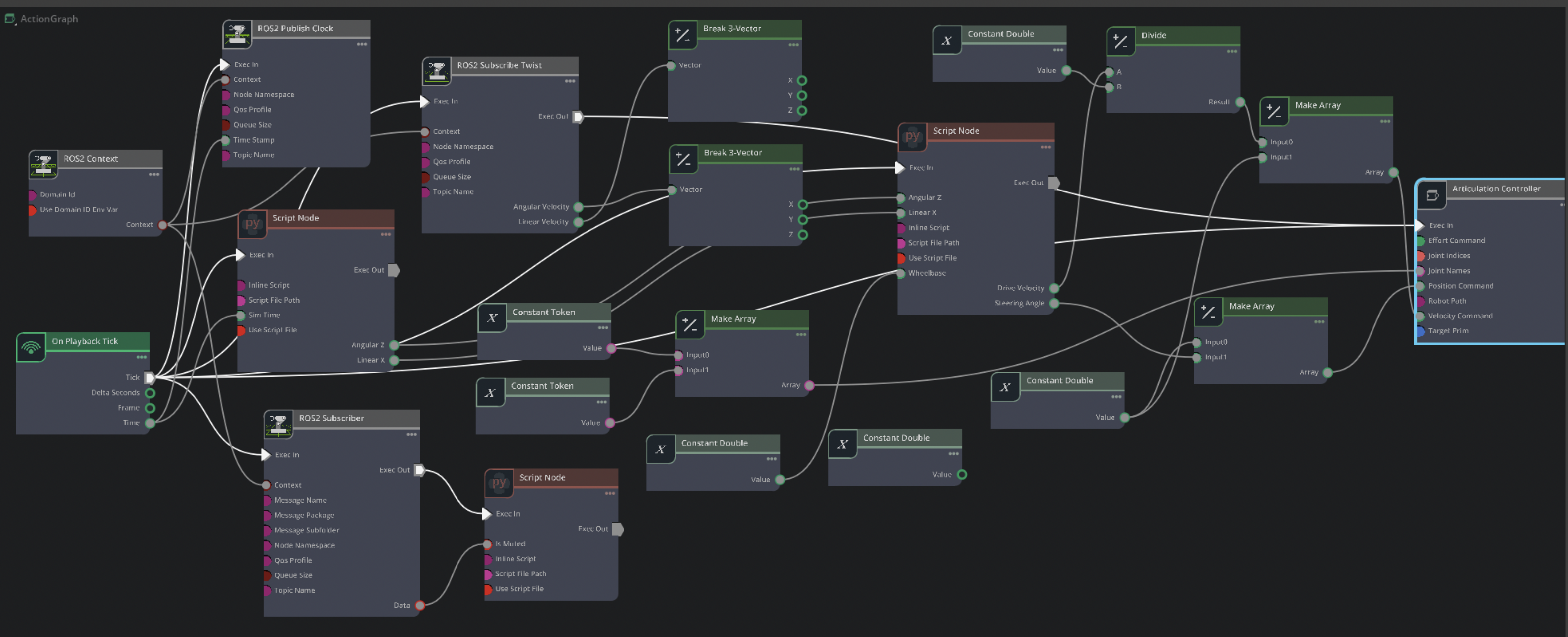
Complete Action Graph in Isaac Sim#
The Action Graph subscribes to ROS2 safety commands and controls forklift articulation. Components:
On Playback Tick: Execution trigger at 30 Hz
ROS2 Context: Domain ID 0, shared context for ROS2 nodes
ROS2 Subscribe Bool (
/safety/is_muted): Receives safety stateROS2 Publish Clock: Publishes simulation time to
/clockScript Node (Playback): Generates forklift motion commands from segments
Script Node (SwivelIK): Converts Twist commands to wheel velocities
Script Node (Indicator): Changes safety light color based on mute state
Isaac Articulation Controller: Applies commands to forklift joints
Execution Flow#
On Playback Tick (30 Hz)
     ├─> ROS2 Publish Clock (publishes /clock)
     ├─> ROS2 Subscribe Bool (reads /safety/is_muted)
     │    └─> Script Node Indicator (changes light color)
     ├─> Script Node Playback (reads segments.json)
     │    ├─> outputs: linear_x, angular_z
     │    └─> Script Node SwivelIK (converts to wheel commands)
     │         ├─> outputs: drive_velocity, steering_angle
     │         ├─> Divide (drive_velocity / wheel_radius = angular velocity)
     │         └─> Make Arrays (joint names, velocities, positions)
     └─> Articulation Controller (applies to /World/forklift_b)
Forklift Parameters#
Constants defined in Action Graph:
Parameter |
Value |
Usage |
|---|---|---|
Wheelbase |
1.49 m |
Steering kinematics calculation |
Wheel Radius |
0.15 m |
Convert m/s → rad/s |
Max Steer |
0.785 rad (45°) |
Steering angle limit |
Drive Joint |
|
Velocity command |
Swivel Joint |
|
Position command (steering) |
Safety Indicator#
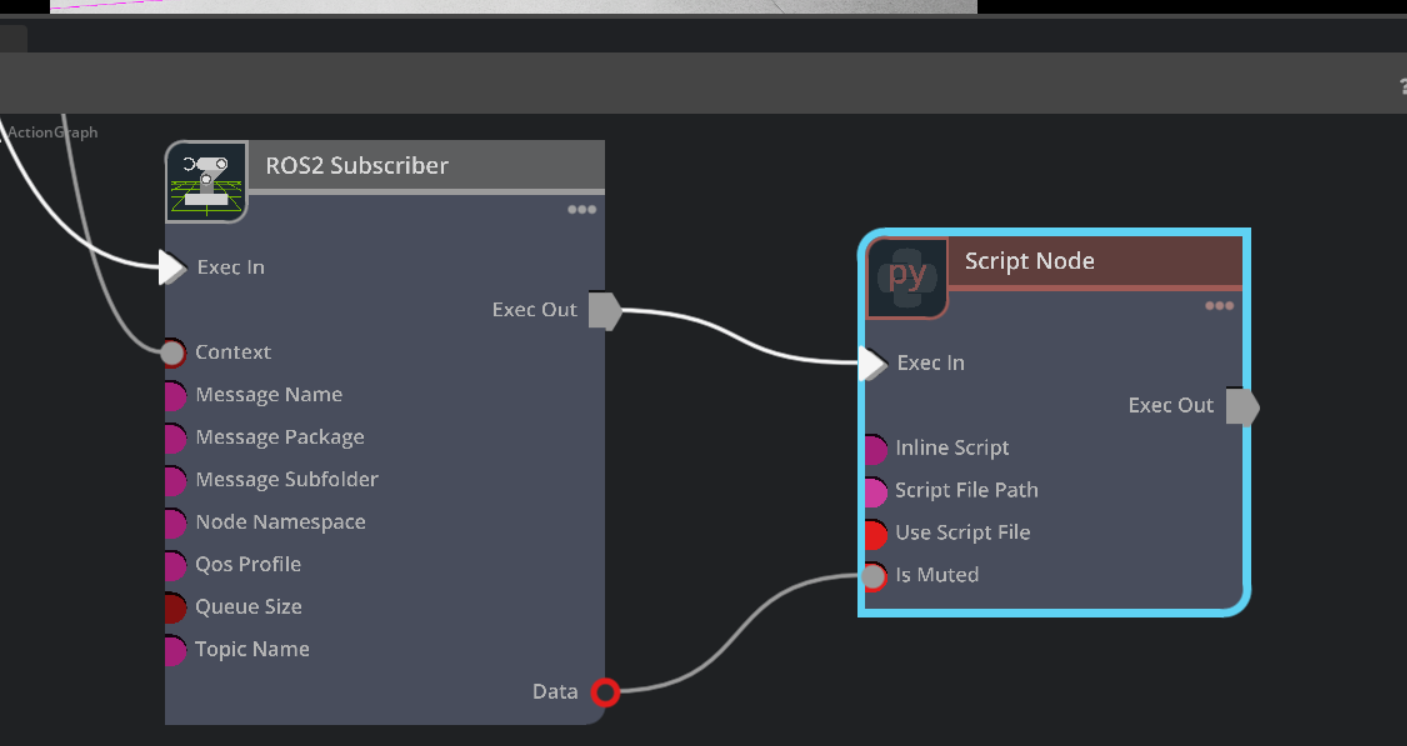
Safety Indicator control in Action Graph#
Script node:
def compute(db):
    stage = omni.usd.get_context().get_stage()
    disk_path = "/World/forklift_b/body/body/safety_indicator"

    disk_prim = stage.GetPrimAtPath(disk_path)
    if disk_prim.IsValid():
        mesh = UsdGeom.Mesh(disk_prim)
        color_attr = mesh.GetDisplayColorAttr()

        if db.inputs.is_muted:
            # GREEN - safety muted (loading allowed)
            color_attr.Set([Gf.Vec3f(0.0, 1.0, 0.0)])
        else:
            # ORANGE - alarm active
            color_attr.Set([Gf.Vec3f(1.0, 0.3, 0.0)])

    return True
Indicator states:
is_muted = true: GREEN (0.0, 1.0, 0.0)is_muted = false: ORANGE (1.0, 0.3, 0.0)
Located at: /World/forklift_b/body/body/safety_indicator mesh prim
Important
Difference from VST Overlay: This Isaac Sim safety indicator is a 3D mesh object in the simulation scene, visible to cameras as part of the 3D environment. It is separate from the VST/VIOS overlay (proximity bubble and Standard Mode/Efficient Mode text) rendered by VIOS on top of the video stream in the VST UI. The VST overlay is configured in VIOS config files and serves a different purpose—providing visual feedback in the monitoring interface—while this indicator represents a simulated physical alarm light on the forklift.
Playback System#
Script node loads movement segments from segments.json.
Configuration#
Environment variable:
PLAYBACK_SEGMENTS_FILE=/isaac-sim/sil/playback/segments.json
Fallback segments (if file not found):
SEGMENTS_FALLBACK = [
    (16.0, 1.0, 0.0, "Forward"),
    (5.0, 0.0, 0.0, "Idle"),
    (16.0, -1.0, 0.0, "Backward"),
    (5.0, 0.0, 0.0, "Idle"),
]
Segment format: (duration_sec, linear_x, angular_z, note)
Script behavior:
Loads segments from JSON file
Outputs
linear_x,angular_zat each tickAdvances to next segment when duration elapsed
Loops if
LOOP = TrueFlips angular if
FLIP_ANGULAR = True
Segment JSON Format#
{
  "segments": [
    {"duration": 16.0, "linear_x": 1.0, "angular_z": 0.0, "note": "Forward"},
    {"duration": 5.0, "linear_x": 0.0, "angular_z": 0.0, "note": "Idle"}
  ]
}
Default segments file: /isaac-sim/sil/playback/segments.json
SwivelIK Script#
Converts Twist commands to swivel-wheel forklift kinematics.
Script node:
MAX_STEER = math.radians(45.0)
MIN_COS = 1e-3
MIN_SPEED = 1e-4

def compute(db):
    linear_x = -db.inputs.linear_x
    angular_z = -db.inputs.angular_z
    wheelbase = db.inputs.wheelbase

    heading_speed = max(abs(linear_x), MIN_SPEED)
    steer = math.atan2(angular_z * wheelbase, heading_speed)
    steer = max(min(steer, MAX_STEER), -MAX_STEER)

    if linear_x < 0.0:
        steer = 0.0 if abs(angular_z) < MIN_SPEED else -steer
        drive = -heading_speed / max(math.cos(steer), MIN_COS)
    else:
        drive = heading_speed / max(math.cos(steer), MIN_COS)

    db.outputs.drive_velocity = drive
    db.outputs.steering_angle = steer
    return True
Inputs:
linear_x: Forward/backward velocity (m/s)angular_z: Turning rate (rad/s)wheelbase: 1.49 m
Outputs:
drive_velocity: Wheel speed (m/s)steering_angle: Swivel angle (radians)
Articulation Controller#
Applies joint commands to forklift at /World/forklift_b.
Joint commands:
Joint |
Command Type |
Source |
|---|---|---|
|
Velocity (rad/s) |
|
|
Position (radians) |
|
Limitations#
Physics Drift#
After ~40 minutes of continuous simulation, forklift may crash into pallets due to accumulated wheel slip errors.
Cause: Segment playback is open-loop (no position feedback). Forklift executes velocity commands without checking if it reached intended position. Small wheel slips accumulate over time.
Workarounds:
Limit test scenarios to <30 minutes
Add idle segments periodically
Increase scene corridor widths
Cannot Slow Down When Person Detected#
Currently, the Action Graph cannot slow down the forklift automatically when a person is detected. Each playback segment only specifies a fixed duration and velocity, without the ability to adjust speed dynamically in response to people appearing in the environment.
For example, if a segment is set to run for 10 seconds at 1.0 m/s (intended to travel 10 meters), and the safety state changes to UNMUTE (person detected) for the first 5 seconds, the forklift speed will be capped (e.g., at 0.5 m/s), and it will only move 2.5 meters. When the safety state returns to MUTE (no person detected), the Action Graph does not compensate for the distance lost—there’s no position feedback or closed-loop speed control. As a result, the forklift cannot automatically slow down or adapt its speed when a person is present.
No Lift Control#
Current Action Graph does not control forklift lift (forks up/down). Forks remain at fixed height.
Customize for New Scene#
Note
Detailed customization instructions will be added in future release.
When adapting Action Graph for different warehouse scenes:
Update
targetPrimpath if forklift prim renamedRecalculate wheelbase and wheel radius if using different forklift model
Adjust
safety_indicatorpath if indicator mesh relocatedModify playback segments for new warehouse layout