

Inverse Kinematics#
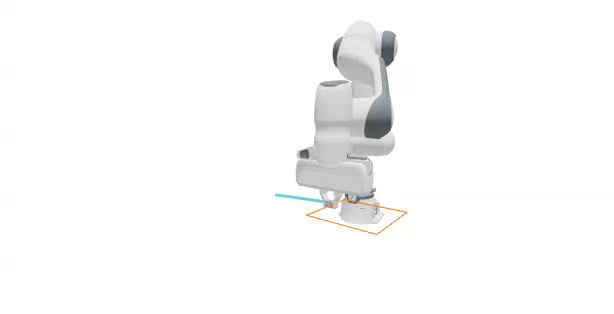
So far we’ve commanded joints directly. But we usually want to think in task space: “put the end effector here, pointing this way.” Inverse kinematics (IK) solves for the joint angles that achieve a desired end-effector pose. In this lesson we’ll use Newton’s GPU-first IK module to move a Franka end effector to a point, then add an orientation constraint, and finally trace a full rectangle in the air.
Tip
Short on time? Jump to the final example for the complete runnable script.
Note
This lesson downloads the Franka asset on first use. The newton[examples] extra in Getting Started installs the required GitPython dependency automatically.
In this lesson, we will:
Explain how Newton composes IK objectives, optimizers, and Jacobian modes.
Solve a position-only IK task on a single target.
Add an orientation objective to constrain the end-effector rotation.
Track a full rectangular path by feeding interpolated targets to the solver.
How Newton IK Works#
Newton’s IK module, newton.ik, is a GPU-first, batched inverse-kinematics system built on Warp. It lets you compose multiple objectives into a single solve, then choose the optimization strategy (LM or LBFGS), the Jacobian backend (ANALYTIC, AUTODIFF, or MIXED), and optional multi-seed sampling. Because it solves many IK problems in parallel and can use CUDA graph execution for low-overhead repeated solves, Newton scales especially well in large batched workloads, with throughput and solve quality competitive with modern GPU IK libraries such as PyRoKi and cuRobo.
An IKSolver is assembled from a list of objectives. In this lesson we use three:
IKObjectivePositionpulls a link to a target position.IKObjectiveRotationaligns a link to a target orientation.IKObjectiveJointLimitkeeps the solution inside the joint limits.
We keep the joint-limit objective active in every solve.
The IK Building Blocks#
Every IK task in this lesson follows the same recipe. First, build a Franka-only world and grab the end-effector link index (11 for this URDF). Then define the objectives and construct the solver.
ee_index = 11
home_pos_np = state_0.body_q.numpy()[ee_index][:3].astype(np.float32)
single_target_np = home_pos_np + np.array([0.0, 0.52, 0.04], dtype=np.float32)

# Position objective
pos_obj = ik.IKObjectivePosition(
    link_index=ee_index,
    link_offset=wp.vec3(0.0, 0.0, 0.0),
    target_positions=wp.array([single_target_np], dtype=wp.vec3),
)

joint_limit_obj = ik.IKObjectiveJointLimit(
    joint_limit_lower=model.joint_limit_lower,
    joint_limit_upper=model.joint_limit_upper,
)

joint_q_ik = wp.clone(model.joint_q.reshape((1, -1)))
ik_solver = ik.IKSolver(
    model=model,
    n_problems=1,
    objectives=[pos_obj, joint_limit_obj],
    lambda_initial=0.1,
    jacobian_mode=ik.IKJacobianType.ANALYTIC,
)
Each frame we solve IK, copy the solved arm coordinates into the joint targets, and step the physics. The gripper fingers are held closed at zero here since we’re only tracking a pose.
for _ in range(120):
    pos_obj.set_target_positions(wp.array([single_target_np], dtype=wp.vec3))
    ik_solver.step(joint_q_ik, joint_q_ik, iterations=24)

    joint_target_q_view = control.joint_target_q.reshape((1, -1))
    wp.copy(dest=joint_target_q_view[:, :7], src=joint_q_ik[:, :7])
    wp.copy(dest=joint_target_q_view[:, 7:9], src=wp.array([[0.0, 0.0]], dtype=wp.float32))

    # ... run_sim_substeps() + viewer logging ...
Step 1: Position-Only IK#
The simplest task is a single fixed end-effector position target. Only the position and joint-limit objectives are active, and the arm drives its tip to the target point. That’s exactly the recipe above.
Position-only IK: the solver drives the end effector to the target position while the orientation is left free.
Step 2: Add an Orientation Objective#
Keeping the same position target, we add an IKObjectiveRotation so the end effector also holds a desired orientation. This isolates the effect of the rotation objective.
fixed_rot = wp.quat_from_axis_angle(wp.vec3(1.0, 0.0, 0.0), wp.pi / 2)

rot_obj = ik.IKObjectiveRotation(
    link_index=ee_index,
    link_offset_rotation=wp.quat_identity(),
    target_rotations=wp.array([fixed_rot[:4]], dtype=wp.vec4),
)

ik_solver = ik.IKSolver(
    model=model,
    n_problems=1,
    objectives=[pos_obj, rot_obj, joint_limit_obj],
    lambda_initial=0.1,
    jacobian_mode=ik.IKJacobianType.ANALYTIC,
)
Inside the loop we now also call rot_obj.set_target_rotations(...) before stepping the solver.
Position plus orientation IK: the end effector holds the target point while also aligning to the commanded orientation.
Step 3: Preview the Path#
Before solving IK on a moving target, it helps to see the geometric target on its own. We build a rectangle of corner points in front of the robot and draw it with viewer.log_lines, without running any IK yet.
rect_center = home_pos_np + np.array([0.0, 0.25, 0.0], dtype=np.float32)
rect_half = 0.08
rect_corners_np = np.array(
    [
        [rect_center[0] - rect_half, rect_center[1] - rect_half, rect_center[2]],
        [rect_center[0] + rect_half, rect_center[1] - rect_half, rect_center[2]],
        [rect_center[0] + rect_half, rect_center[1] + rect_half, rect_center[2]],
        [rect_center[0] - rect_half, rect_center[1] + rect_half, rect_center[2]],
    ],
    dtype=np.float32,
)
rect_starts_np = rect_corners_np
rect_ends_np = np.roll(rect_corners_np, -1, axis=0)

viewer.log_lines("/ik/rectangle_preview", rect_starts_np, rect_ends_np, colors=(1.0, 0.4, 0.0), width=0.012)
The rectangle target path drawn with viewer.log_lines. No IK runs yet; this is the geometry the arm will track next.
Step 4: Track the Full Rectangle#
Now we combine all three objectives and feed the solver a stream of interpolated targets along the rectangle. We sample points along each edge, and for each point we set the position target, solve IK, and step the simulation. Tracing the end-effector path lets us compare the commanded target against the achieved motion.
edge_frames = 45
rect_path_points = []
for i in range(len(rect_corners_np)):
    start = rect_corners_np[i]
    end = rect_corners_np[(i + 1) % len(rect_corners_np)]
    for t in np.linspace(0.0, 1.0, edge_frames, endpoint=False):
        rect_path_points.append(start * (1.0 - t) + end * t)
rect_path_np = np.array(rect_path_points, dtype=np.float32)

for p in rect_path_np:
    target_wp = wp.vec3(p[0], p[1], p[2])
    pos_obj.set_target_positions(wp.array([target_wp], dtype=wp.vec3))
    rot_obj.set_target_rotations(wp.array([fixed_rot[:4]], dtype=wp.vec4))
    ik_solver.step(joint_q_ik, joint_q_ik, iterations=24)
    # ... copy targets, step physics, log trace ...
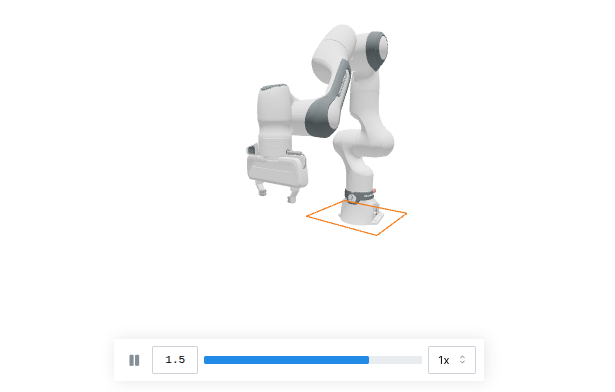
The orange rectangle is the commanded target path fed to the IK solver, one interpolated point per frame.#
Full rectangle tracking: the solver follows the interpolated targets around all four edges while the cyan line traces the achieved end-effector path.
Complete Script#
This script runs the full rectangle-tracking task end to end. Before running it, open http://localhost:8080 in a browser tab and reload the tab when Viser starts. Download lesson3_inverse_kinematics.py, or save the script below as lesson3_inverse_kinematics.py and run it with the pinned Newton 1.5 command from Getting Started.
Show the complete runnable script
  1"""Newton Fundamentals - Lesson 3: Inverse kinematics path following.
  2
  3Tracks a rectangle in front of a Franka arm using position + rotation + joint-limit IK.
  4Before running, open http://localhost:8080 in a browser tab and reload it when
  5the Viser server starts.
  6"""
  7
  8import time
  9
 10import numpy as np
 11import warp as wp
 12
 13import newton
 14import newton.utils
 15import newton.ik as ik
 16
 17wp.config.quiet = True
 18newton.solvers.SolverMuJoCo.import_mujoco()
 19
 20
 21def make_viewer(name: str):
 22    """Open a Viser web viewer; it prints a URL (normally http://localhost:8080)."""
 23    return newton.viewer.ViewerViser(verbose=False)
 24
 25
 26def build_franka_scene(include_table=True, include_cube=True, use_targets=True):
 27    builder = newton.ModelBuilder()
 28    builder.default_shape_cfg.gap = 0.0
 29    newton.solvers.SolverMuJoCo.register_custom_attributes(builder)
 30
 31    table_height = 0.1
 32    table_pos = wp.vec3(0.0, -0.5, 0.5 * table_height)
 33    table_top_center = table_pos + wp.vec3(0.0, 0.0, 0.5 * table_height)
 34    if include_table:
 35        builder.add_shape_box(body=-1, hx=0.4, hy=0.4, hz=0.5 * table_height, xform=wp.transform(table_pos))
 36
 37    robot_base_pos = table_top_center + wp.vec3(-0.5, 0.0, 0.0)
 38    builder.add_urdf(
 39        str(newton.utils.download_asset("franka_emika_panda") / "urdf/fr3_franka_hand.urdf"),
 40        xform=wp.transform(robot_base_pos, wp.quat_identity()),
 41        floating=False,
 42        enable_self_collisions=False,
 43        parse_visuals_as_colliders=False,
 44    )
 45
 46    builder.joint_q[:9] = [
 47        -3.6802115e-03, 2.3901723e-02, 3.6804110e-03, -2.3683236e00,
 48        -1.2918962e-04, 2.3922248e00, 7.8549200e-01, 0.05, 0.05,
 49    ]
 50    builder.joint_target_q[:9] = [
 51        -3.6802115e-03, 2.3901723e-02, 3.6804110e-03, -2.3683236e00,
 52        -1.2918962e-04, 2.3922248e00, 7.8549200e-01, 1.0, 1.0,
 53    ]
 54    builder.joint_target_ke[:9] = [4500, 4500, 3500, 3500, 2000, 2000, 2000, 100, 100]
 55    builder.joint_target_kd[:9] = [450, 450, 350, 350, 200, 200, 200, 10, 10]
 56    builder.joint_effort_limit[:9] = [87, 87, 87, 87, 12, 12, 12, 100, 100]
 57    builder.joint_armature[:9] = [0.195] * 4 + [0.074] * 3 + [0.1] * 2
 58    return builder, None, None, None
 59
 60
 61# Build a Franka-only world.
 62builder, _, _, _ = build_franka_scene(include_table=False, include_cube=False, use_targets=True)
 63model = builder.finalize()
 64
 65state_0, state_1 = model.state(), model.state()
 66control = model.control()
 67collision_pipeline = newton.CollisionPipeline(model)
 68contacts = collision_pipeline.contacts()
 69
 70solver = newton.solvers.SolverMuJoCo(
 71    model,
 72    solver="newton",
 73    integrator="implicitfast",
 74    iterations=20,
 75    ls_iterations=100,
 76    nconmax=500,
 77    njmax=1000,
 78    cone="elliptic",
 79    impratio=1000.0,
 80)
 81
 82newton.eval_fk(model, model.joint_q, model.joint_qd, state_0)
 83
 84fps = 60
 85frame_dt = 1.0 / fps
 86sim_substeps = 8
 87sim_dt = frame_dt / sim_substeps
 88
 89ee_index = 11
 90fixed_rot = wp.quat_from_axis_angle(wp.vec3(1.0, 0.0, 0.0), wp.pi)
 91home_pos_np = state_0.body_q.numpy()[ee_index][:3].astype(np.float32)
 92rect_center = home_pos_np + np.array([0.0, 0.25, 0.0], dtype=np.float32)
 93rect_half = 0.08
 94edge_frames = 45
 95rect_corners_np = np.array(
 96    [
 97        [rect_center[0] - rect_half, rect_center[1] - rect_half, rect_center[2]],
 98        [rect_center[0] + rect_half, rect_center[1] - rect_half, rect_center[2]],
 99        [rect_center[0] + rect_half, rect_center[1] + rect_half, rect_center[2]],
100        [rect_center[0] - rect_half, rect_center[1] + rect_half, rect_center[2]],
101    ],
102    dtype=np.float32,
103)
104
105# Interpolate target points along the rectangle edges.
106rect_path_points = []
107for i in range(len(rect_corners_np)):
108    start = rect_corners_np[i]
109    end = rect_corners_np[(i + 1) % len(rect_corners_np)]
110    for t in np.linspace(0.0, 1.0, edge_frames, endpoint=False):
111        rect_path_points.append(start * (1.0 - t) + end * t)
112rect_path_np = np.array(rect_path_points, dtype=np.float32)
113
114# Objectives: position + rotation + joint limits.
115home_wp = wp.vec3(home_pos_np[0], home_pos_np[1], home_pos_np[2])
116pos_obj = ik.IKObjectivePosition(
117    link_index=ee_index,
118    link_offset=wp.vec3(0.0, 0.0, 0.0),
119    target_positions=wp.array([home_wp], dtype=wp.vec3),
120)
121rot_obj = ik.IKObjectiveRotation(
122    link_index=ee_index,
123    link_offset_rotation=wp.quat_identity(),
124    target_rotations=wp.array([fixed_rot[:4]], dtype=wp.vec4),
125)
126
127joint_limit_obj = ik.IKObjectiveJointLimit(
128    joint_limit_lower=model.joint_limit_lower,
129    joint_limit_upper=model.joint_limit_upper,
130)
131
132joint_q_ik = wp.clone(model.joint_q.reshape((1, -1)))
133ik_solver = ik.IKSolver(
134    model=model,
135    n_problems=1,
136    objectives=[pos_obj, rot_obj, joint_limit_obj],
137    lambda_initial=0.1,
138    jacobian_mode=ik.IKJacobianType.ANALYTIC,
139)
140
141viewer = make_viewer("08_franka_ik_rectangle_full")
142viewer.set_model(model)
143viewer.set_camera(wp.vec3(0.5, 0.0, 0.5), -15, -140)
144
145target_starts_np = rect_path_np[:-1]
146target_ends_np = rect_path_np[1:]
147
148sim_time = 0.0
149ee_trace = []
150graph = None
151
152
153def run_sim_substeps():
154    global state_0, state_1
155    for _ in range(sim_substeps):
156        state_0.clear_forces()
157        collision_pipeline.collide(state_0, contacts)
158        solver.step(state_in=state_0, state_out=state_1, control=control, contacts=contacts, dt=sim_dt)
159        state_0, state_1 = state_1, state_0
160
161
162print("Tracking the rectangle (the first solve compiles kernels)...")
163for p in rect_path_np:
164    target_wp = wp.vec3(p[0], p[1], p[2])
165    pos_obj.set_target_positions(wp.array([target_wp], dtype=wp.vec3))
166    rot_obj.set_target_rotations(wp.array([fixed_rot[:4]], dtype=wp.vec4))
167    ik_solver.step(joint_q_ik, joint_q_ik, iterations=24)
168
169    joint_target_q_view = control.joint_target_q.reshape((1, -1))
170    wp.copy(dest=joint_target_q_view[:, :7], src=joint_q_ik[:, :7])
171    wp.copy(dest=joint_target_q_view[:, 7:9], src=wp.array([[0.0, 0.0]], dtype=wp.float32))
172
173    if graph is not None:
174        wp.capture_launch(graph)
175    elif wp.get_device().is_cuda:
176        with wp.ScopedCapture() as capture:
177            run_sim_substeps()
178        graph = capture.graph
179    else:
180        run_sim_substeps()
181
182    viewer.begin_frame(sim_time)
183    viewer.log_state(state_0)
184    try:
185        viewer.log_lines("/ik/rectangle_full/target", target_starts_np, target_ends_np, colors=(1.0, 0.4, 0.0), width=0.01)
186    except ValueError:
187        pass
188
189    ee_trace.append(state_0.body_q.numpy()[ee_index][:3].astype(np.float32))
190    if len(ee_trace) > 1:
191        ee_trace_np = np.asarray(ee_trace, dtype=np.float32)
192        try:
193            viewer.log_lines("/ik/rectangle_full/trace", ee_trace_np[:-1], ee_trace_np[1:], colors=(0.1, 0.8, 1.0), width=0.03)
194        except ValueError:
195            pass
196
197    viewer.end_frame()
198    sim_time += frame_dt
199
200print("Simulation finished. Reload the pre-opened viewer tab; press Ctrl+C to exit.")
201try:
202    while viewer.is_running():
203        time.sleep(0.1)
204except KeyboardInterrupt:
205    pass
206viewer.close()  # stops the viser server and frees the port
Challenge: Change the Path#
Try replacing the rectangle with a different trajectory, such as a circle or a figure-eight, by generating a different set of rect_path_points. Observe how closely the traced end-effector path follows your new target when you vary the number of solver iterations.
Key Takeaways#
You used Newton’s batched IK to command the Franka in task space: first a single position, then a position plus orientation, and finally a full path built from interpolated targets. The pattern is always the same: define objectives, build an IKSolver, and each frame set the targets, solve, and push the result into the joint targets. Next we’ll take on a task that a single solver can’t handle well: manipulating a deformable cable.