

Architecture#
After installation, you need a way to supply new workload images, updates, and data throughout the cluster lifecycle. This chapter describes suggested architectures for supplying these artifacts. A fully disconnected environment has no route to upstream services. An environment with restricted egress permits selected outbound connections through an approved proxy. These environments need different refresh paths, even when both serve workloads from local storage.
The companion page, Examples, provides illustrative settings for these designs. The examples do not prescribe a registry product or replace the installation procedures.
From Installation Bundles to Post-Installation Services#
NVIDIA Base Command Manager (BCM) and NVIDIA Mission Control (NMC) installation bundles establish a known starting point. They contain artifacts selected for an installation release. They do not contain every future training image, model, dataset, or package that your users will request.
Use the existing procedures for BCM Kubernetes preparation, NMC artifact downloads, artifact import, and registry mirroring when you install or update the corresponding components.
Keep those release artifacts available for repair. You can then manage approved workload artifacts through separate local services, with their own owners, access policies, and refresh schedules.
Consider three local destinations. Installation storage holds bundles, operating system media, and release manifests. A workload registry holds container images and, when supported, Open Container Initiative (OCI) Helm charts. Shared storage holds models, datasets, source archives, and Slurm container files. Keeping these roles explicit helps you preserve installation artifacts while workload storage grows.
Two Network Designs#
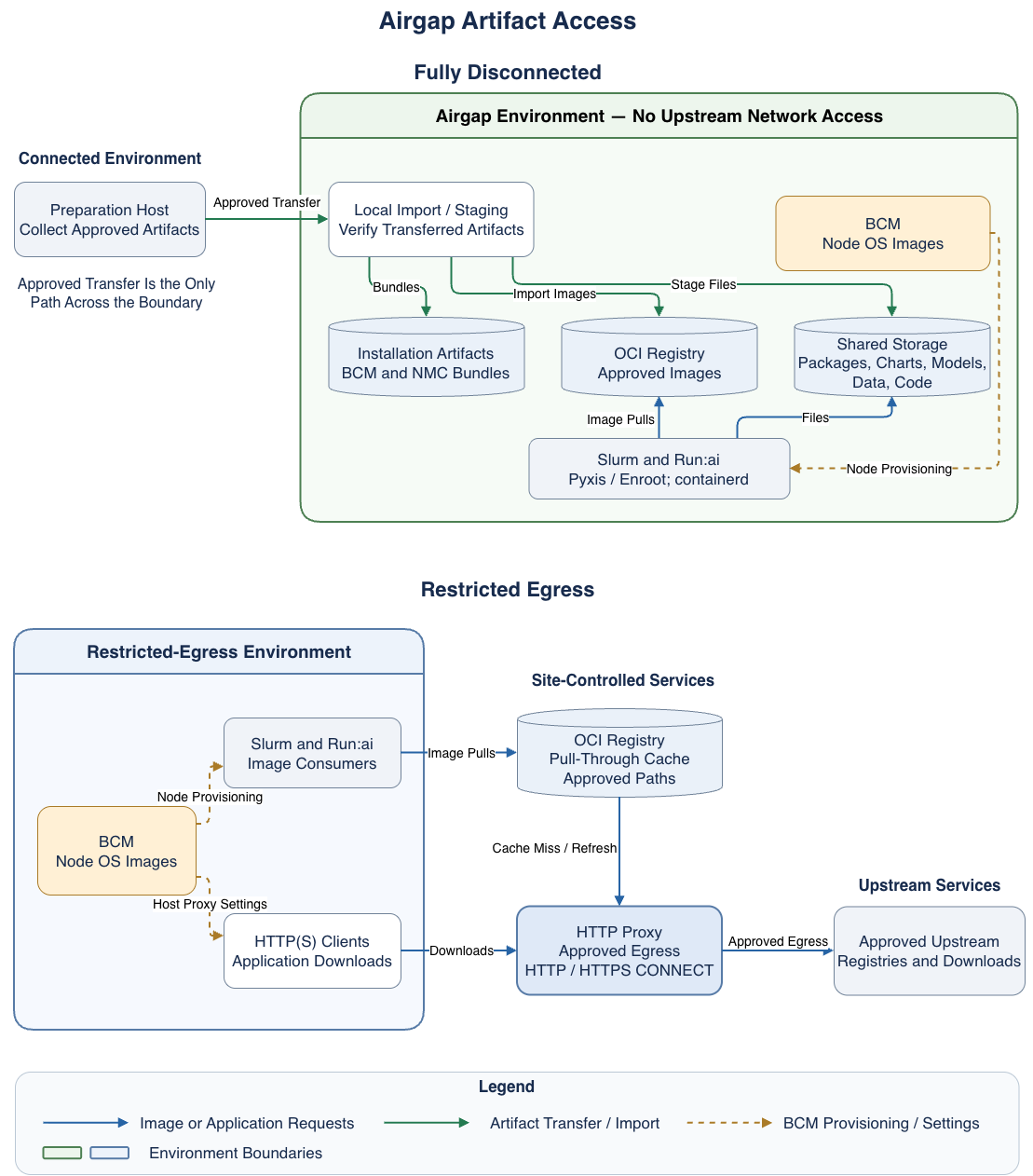
The following diagram shows explicit environment boundaries. In the fully disconnected panel, the preparation host stays outside the Airgap Environment. Approved transfer carries artifacts across that boundary into local storage and the OCI registry. In the restricted-egress panel, BCM, workload image consumers, and HTTP(S) clients stay inside the Restricted-Egress Environment. The OCI registry and HTTP proxy sit outside that workload environment as site-controlled services. Image pulls cross the workload boundary to the registry over the local network. The registry and HTTP(S) clients reach approved upstream services through the HTTP proxy. Placement outside the workload environment does not require public or internet-hosted services. BCM hosts the cluster node operating system (OS) images for provisioning and supplies host proxy settings inside each environment.
Fully Disconnected#
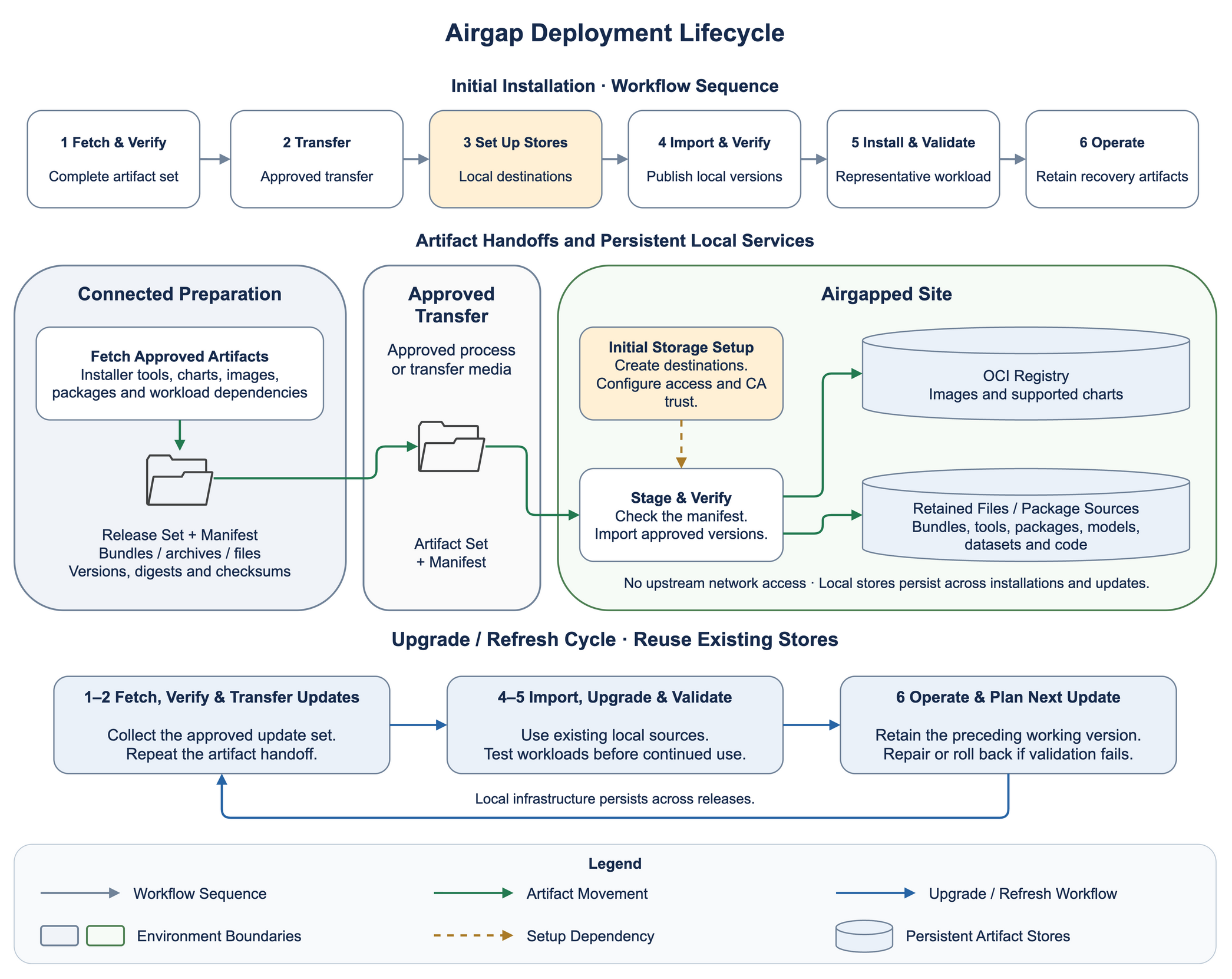
In a fully disconnected design, a connected preparation host collects an approved set of artifacts and their dependencies. Your transfer process moves that set across the network boundary. You can record versions, image digests, file checksums, licenses, and approval evidence in a transfer manifest, then verify the files before publishing them locally.
An ordinary registry repository stores the imported images. Package mirrors or retained installation media supply host packages. Shared storage supplies large models, datasets, source snapshots, and prebuilt SquashFS container files. SquashFS is a compressed, read-only filesystem format that Enroot can use for Slurm containers.
A disconnected registry cannot fetch an absent image from the internet. Successful pulls from a previously used compute node do not prove completeness: its local cache can hide missing registry content. A suggested acceptance check uses a node without the selected image and exercises a representative workload with upstream access unavailable. Include initialization containers, sidecars, jobs, chart dependencies, model files, and application downloads in that check.
The following diagram shows the fully disconnected lifecycle: the initial installation sequence, the artifact handoff from connected preparation through approved transfer into persistent local stores, and the upgrade cycle that reuses those stores.
Restricted Egress Through an Approved Proxy#
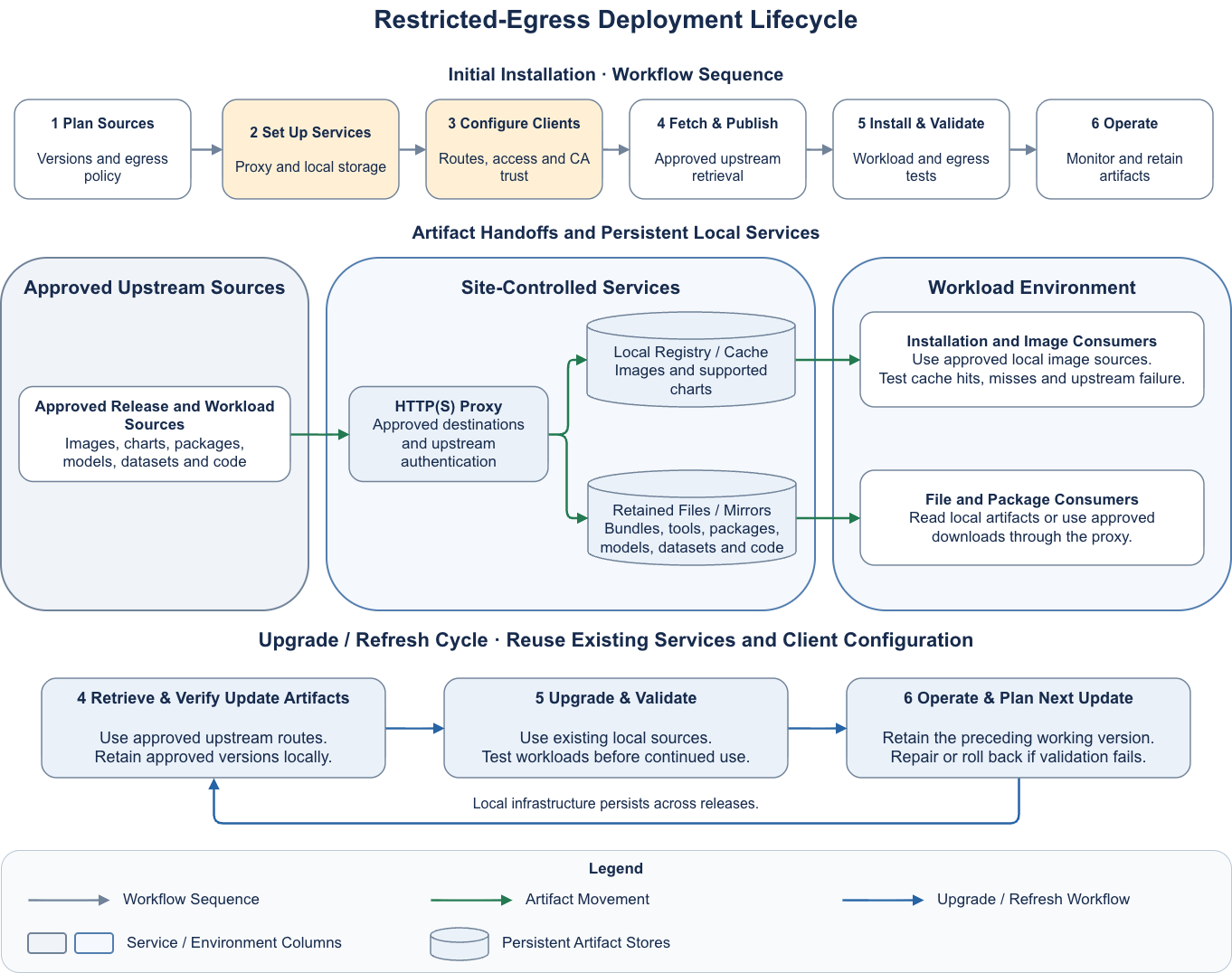
In a restricted-egress design, compute nodes can pull images from a local registry or registry cache. The diagram places the OCI registry and HTTP proxy outside the workload environment, on the site-controlled network. A registry configured for caching reaches approved upstream registries through the proxy. Host tools, package managers, and applications can use the proxy for permitted downloads, or use local mirrors for reproducible access.
Squid can forward HTTP traffic and establish HTTPS tunnels with the CONNECT method. In a normal tunnel, Transport Layer Security (TLS) protects the connection between the client and the upstream service. Squid does not read or cache the encrypted artifact content. A registry cache stores images because it acts as the registry client and understands the image protocol. These roles are separate. Refer to the Squid HTTPS documentation.
You can restrict outbound traffic to the proxy and its approved destinations. Account for registry authentication services and download redirects as well as the original hostname. Local registries, BCM services, Kubernetes application programming interface (API) endpoints, and storage services should have direct internal paths. Proxy bypass settings need to match those paths in each client.
The following diagram shows the restricted-egress lifecycle: the initial installation sequence, the placement of the proxy and local stores as site-controlled services between approved upstream sources and the workload environment, and the upgrade cycle that reuses those services and the existing client configuration.
Container Image Sources and Consumers#
Container images usually need the most detailed dependency inventory. An image name contains a registry, a repository path, and a tag or digest. Tags can change. A digest identifies specific image content. An image index can refer to several processor architectures; the layers for an x86 host do not establish that the Arm image is available.
You can retain approved digests and the architecture variants that your nodes require. Include both NMC component images and user workload images. Where your approval process uses signatures or provenance records, transfer and retain those records with the image, and verify that the local copy preserves the expected digest.
The consumer determines how the image reaches a workload. Slurm with Pyxis uses Enroot to import an image or open a SquashFS file. Kubernetes nodes use containerd to pull images for Run:ai workloads. A configuration change for one consumer does not configure the other. Neither image path supplies files that an application downloads after it starts.
Pull-Through Caches and Offline Repositories#
A pull-through cache fetches missing content from an upstream registry on demand. A cache miss therefore needs upstream reachability and valid upstream credentials. Previously cached content can reduce outbound traffic, but cache retention, tag checks, and upstream failure behavior depend on the product and version. Harbor documents cached-image service when the upstream is unreachable, but an upstream deletion can prevent service. Treat a cache as a service whose failure behavior you need to test, rather than an offline inventory guarantee. Refer to Harbor proxy cache behavior.
For a disconnected cluster, consider importing the approved image set into ordinary repositories and protecting it from cache eviction. A cache warmed before disconnection can still miss an unrequested architecture, layer, tag, or auxiliary image. Keep the transfer manifest as the inventory of what the local registry must serve.
Registry routes also need a path contract. A proxy project can add a path prefix to the upstream repository. Clients need that prefix in image references or a runtime mapping that preserves it. Authentication to the local registry and authentication from the registry to its upstream are separate. Local clients also need to trust the certificate authority (CA) that signed the registry certificate.
You can choose explicit local image names or approved runtime mirror mappings. If the design requires all pulls to stay local, confirm that the runtime has no fallback route to the original upstream. A failed local pull should expose a missing artifact or service fault for repair, rather than trigger an unreviewed direct download.
Other Artifact Sources#
The following table suggests local sources and refresh considerations for artifacts that container images do not cover.
Artifact |
Local Source and Consumers |
Suggested Refresh and Retention |
|---|---|---|
Packages |
|
Retain signed repository metadata, dependency packages, and approved versions for the matching operating system and processor architecture. Test a refresh in a software image before deploying it to nodes. Python wheels and other language packages need their own local source when applications use them. |
Helm charts |
|
Retain exact chart versions, dependencies, and the values used for deployment. Inspect image references separately: copying a chart does not copy its container images. OCI chart storage also needs registry login and CA trust. |
Models |
|
Retain weights, tokenizer files, configuration, and any required custom code. Record upstream revisions, checksums, license terms, and access restrictions. Publish a complete version before workloads select it. |
Datasets |
|
Retain dataset versions, schemas, checksums, and access policies. Budget for extracted copies and intermediate data. Separate reproducibility retention from temporary job output. |
Environment modules and built software |
|
BCM provides an environment modules system for user-facing software. You can build applications and their modulefiles on a compatible preparation or build system, then transfer the complete software tree and modulefiles into the cluster’s shared storage. Build against the same operating system, libraries, and processor architecture as the target nodes, and transfer runtime dependencies with the tree. Version module names so that existing jobs keep their current software while users adopt the new build. |
Source code |
|
Retain commits, submodules, large-file objects, and dependency lock files. A source snapshot needs local build dependencies to support offline rebuilds. |
Time Synchronization#
Certificate validation, token lifetimes, log correlation, and scheduled jobs all depend on accurate clocks, and a disconnected site cannot reach public Network Time Protocol (NTP) servers. Plan an authoritative local time source before relying on the TLS trust described in this chapter: an expired-looking or not-yet-valid certificate caused by clock skew produces the same x509 errors as a genuine trust problem.
Common local sources include a dedicated time appliance disciplined by a Global Navigation Satellite System (GNSS) receiver, or an existing site-approved internal NTP service. Where facility policy prohibits an external antenna, an appliance with a stable holdover oscillator can maintain time between manual corrections; agree on the acceptable drift with your security and operations teams. In a restricted-egress design, an approved internal time service remains preferable to opening NTP egress.
Point the head nodes at the selected source and serve the cluster from them, so that compute nodes, registry hosts, and storage services share one time reference. Include the time source in your validation checks: compare clocks across the head node, a reprovisioned node, and the registry host before investigating certificate failures.
Certificate Ownership and Renewal#
BCM, Kubernetes, and user-facing services use certificates with different renewal procedures. BCM and Kubernetes use separate certificate authorities for their public key infrastructure (PKI). Customer-supplied certificates secure endpoints such as the Run:ai UI, Grafana, and local registries. For each certificate, record its issuing CA, expiration date, renewal contact, replacement procedure, and the services that use it.
The following table summarizes what to check for each group of certificates.
Certificates |
Administration Tasks |
|---|---|
BCM cluster PKI |
Check certificate validity and identify certificates that need replacement. Refer to Certificates, Section 2.3.3 of the BCM Administrator Manual, which documents the BCM certificate check script. |
Kubernetes and etcd PKI |
Identify the certificates used by the Kubernetes control plane and etcd. The Security Model, Section 4.10 of the BCM Containerization Manual, explains the separate Kubernetes CA and BCM certificate layout. Confirm the renewal procedure for your installed BCM and Kubernetes versions with NVIDIA Support before changing these certificates directly. |
Customer-supplied service certificates |
Renew and install certificates for endpoints such as the Run:ai UI and Grafana. Identify the gateway or service that presents each certificate and where its full certificate chain is configured. Check every endpoint that shares the certificate. |
Local registry, proxy, and mirror certificates |
Arrange renewal with the administrator of each service that terminates TLS. Identify the hosts, software images, container runtimes, and workloads that need to trust its issuing CA. |
In a disconnected environment, allow time to request and transfer replacement certificates before the current certificates expire. Transfer certificate requests and issued certificates through your site’s approved process. Protect the associated private keys. For restricted egress, verify that any automated renewal service can reach the endpoints it requires.
When the issuing CA changes, distribute the new CA certificate to clients before replacing the service certificate. Update the relevant software images and application trust stores so that reprovisioned nodes retain that trust. Reload or restart services as required by the component’s replacement procedure. After replacement, check the certificate presented to clients and verify that the affected services and clients connect successfully. Include cluster health, user access, or artifact pulls as appropriate, and repeat client checks from a reprovisioned node.
For the customer-supplied NMC Gateway certificate, refer to Create the TLS secret. That secret does not renew itself; track its expiry and replace it before it expires.
Refresh, Capacity, and Recovery#
You can assign an owner to each source and agree on a refresh interval with its consumers. A useful refresh sequence collects a candidate set, checks its integrity and approval status, tests it against the installed software, and publishes a new local version. Keep the preceding working set until you have completed rollback and recovery checks. In a disconnected site, the approved transfer schedule determines how quickly you can apply a new fix.
Retention should protect active workloads, queued jobs, required rollback versions, and installation recovery artifacts. Coordinate registry garbage collection with those requirements. A node cache can disappear during reprovisioning, and an Enroot cache can be removed independently of shared SquashFS files. Neither replaces the retained local source.
Plan capacity for registry blobs, manifests, and metadata; package mirrors; retained bundles; models and datasets; backups; and temporary import space. Enroot conversion also needs space for downloaded layers, the resulting SquashFS file, and extracted containers. Shared image layers can reduce registry storage, but image conversion and dataset extraction can create additional copies. Measure representative imports and concurrent job starts before setting quotas. Leave space for refreshes and recovery instead of filling the service to its storage limit.
Recovery needs more than artifact files. Consider backing up registry data and its database where applicable, repository configuration, access policies, certificates, protected credentials, transfer manifests, and BCM software images. Test restoration into a separate service, then pull a retained image and open representative model and dataset files. Refer to Backups for the cluster backup context.
A useful post-installation record ties the approved version set to its local locations and consumers. That record helps you distinguish a missing artifact from a proxy, authentication, trust, or storage failure. The validation suggestions in Suggested Validation and Failure Symptoms illustrate those distinctions.