

Data Center Architecture#
The NCP Software Reference Guide is built on the assumption that the NCP data center closely aligns with the NCP Hardware Reference Design, with minimal deviation. This assumption holds true for all versions of the NCP Software Reference Guide.
GPU Compute Node#
The contents of each Compute Tray, built into NVIDIA MGX™ Open Compute Platform (OCP) standard rack, are described below.
| GB200/GB300 Components | ||
|---|---|---|
| Feature | GB200 | GB300 |
| General Purpose Processor | 2 x Grace ARM CPU, 72 ARM Neoverse V2 / socket, Up to 1 TB LPDDR5 | |
| GPU | 4 x B200 Blackwell GPUs w/ aggregate of 720GB HBM3 | 4 x B300 Blackwell Ultra GPUs w/ aggregate 1.152TB HBM3e |
| Local Storage | Up to 8 x NVMe data drives + 1 x NVMe boot drive | |
| TAN Network Connectivity (aka N/S) | 2 x 400GbE BF3, each configured as 2x200GbE | 1 x 400GbE BF3 configured as 2x200GbE |
| CIN Network (aka E/W) | 4 x 400Gb CX7, Configurable to IB or Ethernet | 4 x 800Gb CX8, Configurable to IB or Ethernet |
| SMN Network | 1 x 1GbE | 1 x 1GbE |
Networking#
There are four unique networks within the NVIDIA® NCP Hardware Reference Design data center.
TAN — Tenant Access Network: Also known as North/South or Front End, this is the primary networking to interconnect all parts of the data center, with storage systems being the primary consumer.
SMN — Secure Management Network: This out-of-band management network provides a secure, high-reliability network to configure and manage the entire data center.
CIN — (GPU) Cluster Interconnect Network: Also known as East/West or Scale Out. This is the network used to interconnect all the GPU NVL72 racks for GPU-to-GPU communication.
NVLink: Also known as scale up, this is the high bandwidth domain within a single rack providing local GPU to GPU communication. One domain per GPU rack.
:::{note} The TAN and SMN are always Ethernet; the CIN can be configured as either Ethernet or InfiniBand, and NVLink is a proprietary NVIDIA standard. :::
GPU Compute Rack#
The GB200 and GB300 racks are very similar, consisting of:
18 Compute Trays
9 NVL72 NVLink Switch Trays
Infrastructure components (power shelves, stiffeners, and so on).
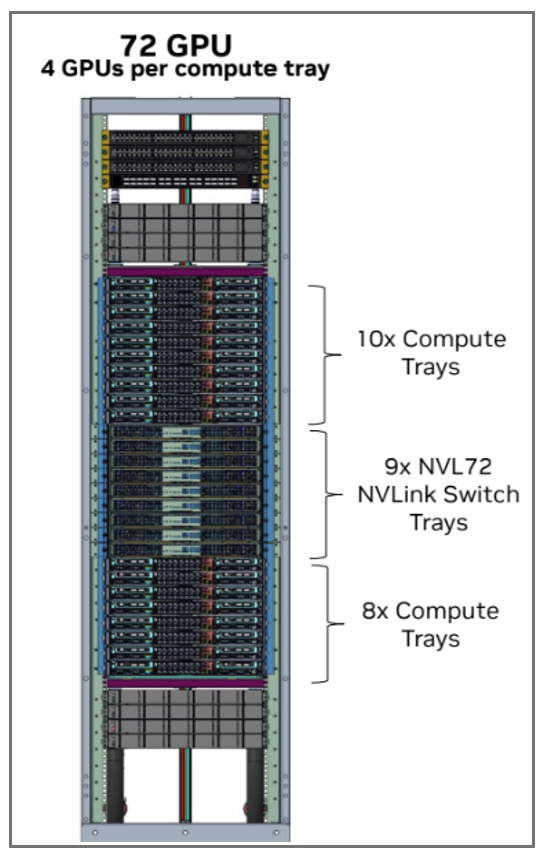
GB200/GB300 Compute Rack#
Storage#
Storage is a critical component in AI, and there are many different ways to implement it. Different applications have varying storage preferences (high-speed file system versus object) and differing bandwidth requirements. Different NCPs may want to deliver storage in different ways (3rd party commercial solutions, open source, proprietary). Likewise, the Storage bandwidth (BW) per GPU is highly variable based on workload, model, and performance requirements.
The NCP Hardware Reference Design assumes the presence of a file storage cluster and an optional object storage cluster. NVIDIA DGX™ Cloud hardware design supplements specify requirements for 24-drive machines capable of supporting a variety of different storage solutions, including AI-targeted offerings from companies such as WEKA, VAST, DDN, and others. These systems can deliver a mix of block storage, high-speed file storage, and object storage.
The NCP Software Reference Guide assumes that most infrastructure providers will provide access to remote block storage, high-speed file systems, and object storage, as each type has well-known uses across a variety of AI workloads. Additionally, key use cases for local NVMe drives include ephemeral logs or k8s image caches. Each NCP should determine its specific offerings based on its individual requirements.
Data Center View#
Pulling it all together, the full data center can be pictured as seen in the Data Center View diagram.
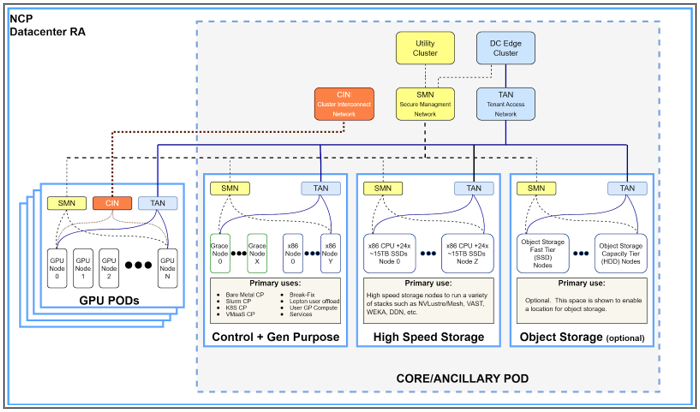
Data Center View#
The NCP Hardware Reference Design supports one to 64 GPU PODs (with up to 1152 GPUs per POD) and a Core POD. The following table lists the various types of compute found in the data center.
Function |
POD |
Comment |
|---|---|---|
GPU Compute |
GPU PODs |
GPUs are organized in dedicated PODs, each POD containing up to 1152 GPUs |
Control Nodes |
CORE POD |
Control nodes are the compute for various control planes and operator services |
Gen Purpose Nodes |
CORE POD |
non-GPU compute available for user workload or other services |
High speed Storage |
CORE POD |
Server-specific SDS nodes or appliances |
Utility Cluster |
CORE POD |
Foundational element to bootstrap the data center |
DC Edge Cluster |
CORE POD |
Networking interface to the outside world including firewalls |
Note
The POD construct should not be confused with a Kubernetes Pod. The POD describes a standardized physical building block of the data center. A Kubernetes pod is a deployable Kubernetes unit.